ECO mode NISSAN VERSA 2007 1.G Owner's Manual
[x] Cancel search | Manufacturer: NISSAN, Model Year: 2007, Model line: VERSA, Model: NISSAN VERSA 2007 1.GPages: 304, PDF Size: 4.72 MB
Page 158 of 304

1. Tuning switch
2. Phone operation switch
3. POWER on and SOURCE select
switch
4. Volume control switch
STEERING WHEEL SWITCH FOR
AUDIO CONTROL (if so equipped)
The audio system can be operated using the
controls on the steering wheel.
POWER on switch
With the ignition key turned to the ACC or ON
position, push the POWER switch to turn the
audio system on.
SOURCE select switch:
Push the SOURCE select switch to change the
mode in the following sequence: PRESET A!
PRESET B!PRESET C!PRESET A.
With a CD inserted and an auxiliary device
plugged in, push the SOURCE select switch to
change the mode in the following sequence: CD
!AUX!PRESET A!PRESET B!PRESET
C!CD.
While in one of the preset radio station banks (A,
B or C) , use the tuning switch
orto
select one of the preset radio stations (1–6) .
Volume control switch
Push the volume control switch to increase or
decrease the volume.
Tuning
Memory change (radio):
While in one of the preset radio station banks (A,
B or C) , push the tuning switch
orfor less than 1.5 seconds to change to the next
preset station in memory.
Seek tuning (radio):
Push the tuning switch
orfor more
than 1.5 seconds to seek the next or previous
radio station.
Next/Previous track (CD):
Push the tuning switch
orfor less
than 1.5 seconds to return to the beginning of the
present track or skip to the next track. Push
several times to skip back or skip through tracks.
Change disc (CD) (if so equipped):
Push the tuning switch
orfor more
than 1.5 seconds to change the playing disc up
or down.
WHA0785
4-26Heater, air conditioner, audio and phone systems
ZREVIEW COPYÐ2007 Versa(vrs)
Owners ManualÐUSA_English(nna)
10/05/06Ðdebbie
X
Page 159 of 304
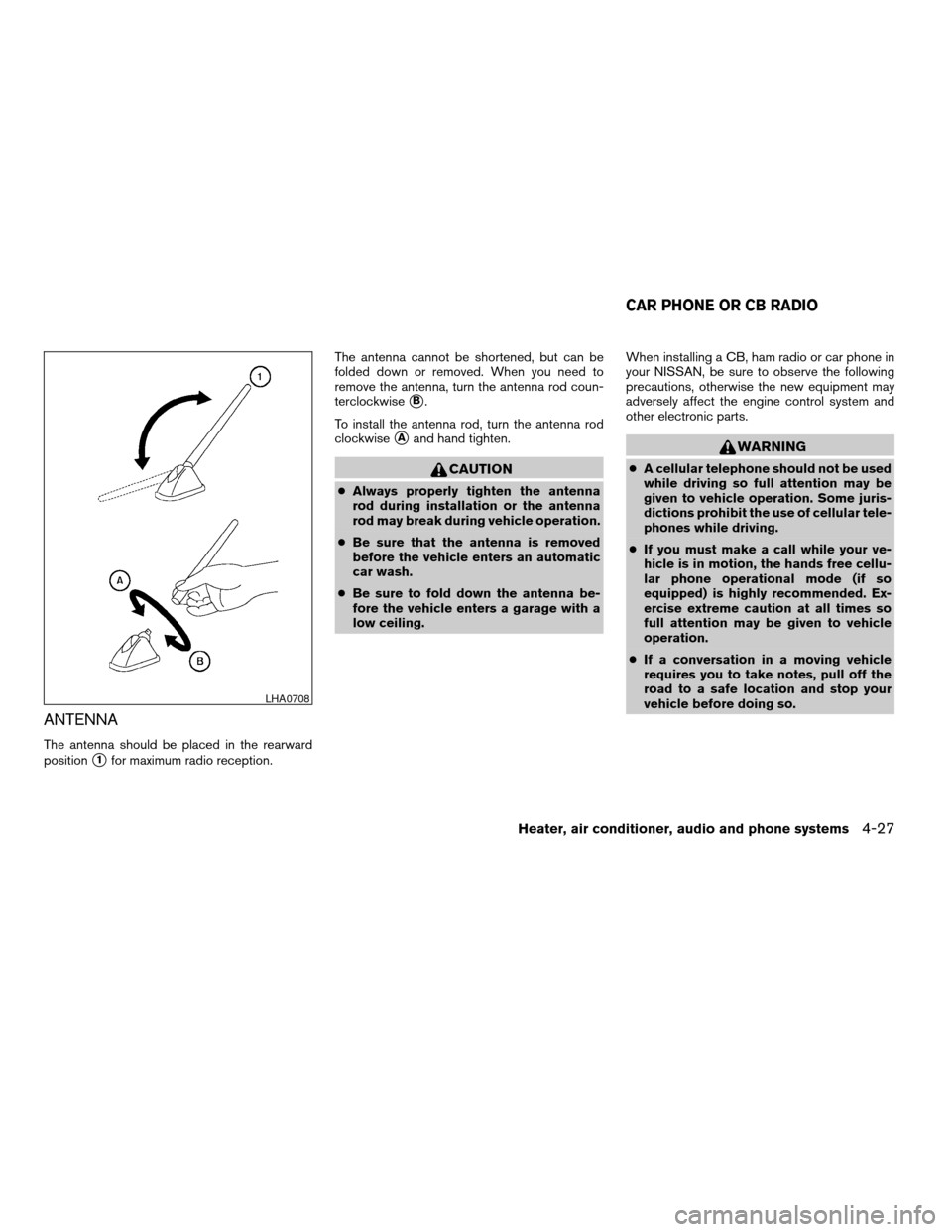
ANTENNA
The antenna should be placed in the rearward
position
s1for maximum radio reception.The antenna cannot be shortened, but can be
folded down or removed. When you need to
remove the antenna, turn the antenna rod coun-
terclockwise
sB.
To install the antenna rod, turn the antenna rod
clockwise
sAand hand tighten.
CAUTION
cAlways properly tighten the antenna
rod during installation or the antenna
rod may break during vehicle operation.
cBe sure that the antenna is removed
before the vehicle enters an automatic
car wash.
cBe sure to fold down the antenna be-
fore the vehicle enters a garage with a
low ceiling.When installing a CB, ham radio or car phone in
your NISSAN, be sure to observe the following
precautions, otherwise the new equipment may
adversely affect the engine control system and
other electronic parts.
WARNING
cA cellular telephone should not be used
while driving so full attention may be
given to vehicle operation. Some juris-
dictions prohibit the use of cellular tele-
phones while driving.
cIf you must make a call while your ve-
hicle is in motion, the hands free cellu-
lar phone operational mode (if so
equipped) is highly recommended. Ex-
ercise extreme caution at all times so
full attention may be given to vehicle
operation.
cIf a conversation in a moving vehicle
requires you to take notes, pull off the
road to a safe location and stop your
vehicle before doing so.
LHA0708
CAR PHONE OR CB RADIO
Heater, air conditioner, audio and phone systems4-27
ZREVIEW COPYÐ2007 Versa(vrs)
Owners ManualÐUSA_English(nna)
10/05/06Ðdebbie
X
Page 164 of 304

CONTROL BUTTONS
The control buttons for the BluetoothTHands-
Free Phone System are located on the steering
wheel.
PHONE/SEND
Press the
button to initiate a VR
session or answer an incoming call.
You can also use the
button to
skip through system feedback and to
enter commands during a call. See “List
of voice commands” and “During a call”
later in this section for more information.
PHONE/END
Press the
button to cancel a VR
session or end a call.
GETTING STARTED
The following procedures will help you get
started using the BluetoothTHands-Free Phone
System with NISSAN Voice Recognition. For ad-
ditional command options, refer to “List of voice
commands” later in this section.
Choosing a language
You can interact with the BluetoothTHands-Free
Phone System using English, Spanish or French.
To change the language, perform the following.
1. Press and hold the
button for more
than 5 seconds.
2. The system announces: “Press the
PHONE/SEND (
) button for the
hands-free phone system to enter the
speaker adaptation mode or press the
PHONE/END (
) button to select a dif-
ferent language.”
3. Press the
button.
For information on speaker adaptation, see
“Speaker adaptation (SA) mode” later in this
section.4. The system announces the current language
and gives you the option to change the lan-
guage to Spanish (in Spanish) or French (in
French) . Use the following chart to select
the language.
NOTE:
Note: You must press the
button or
thebutton within 5 seconds to
change the language.
Current
languagePress(PHONE/SEND)
to selectPress(PHONE/END)
to select
English Spanish French
Spanish English French
French English Spanish
5. If you decide not to change the language, do
not press either button. After 5 seconds, the
VR session will end, and the language will
not be changed.
Pairing procedure
NOTE:
The pairing procedure must be performed
when the vehicle is stationary. If the vehicle
starts moving during the procedure, the
procedure will be cancelled.
WHA0787
4-32Heater, air conditioner, audio and phone systems
ZREVIEW COPYÐ2007 Versa(vrs)
Owners ManualÐUSA_English(nna)
10/05/06Ðdebbie
X
Page 165 of 304

Main Menu
“Setup”sA“Pair Phone”sB“New Phone”sCInitiate from handsetsDName phonesEAssign prioritysFChoose ringtonesG
1. Press thebutton on the steering
wheel. The system announces the available
commands.
2. Say: “Setup”
sA. The system acknowledges
the command and announces the next set of
available commands.
3. Say: “Pair phone”
sB. The system acknowl-
edges the command and announces the
next set of available commands.
4. Say: “New phone”
sC. The system acknowl-
edges the command and asks you to initiate
pairing from the phone handset
sD.
The pairing procedure of the cellular phone
varies according to each cellular phone
model. See the cellular phone Owner’s
Manual for details. You can also visit
www.nissanusa.com/bluetooth for instruc-
tions on pairing NISSAN recommended cel-
lular phones.When prompted for a PIN code, enter
“1234” from the handset. The PIN code
“1234” has been assigned by NISSAN and
cannot be changed.
5. The system asks you to say a name for the
phone
sE.
If the name is too long or too short, the
system tells you, then prompts you for a
name again.
Also, if more than one phone is paired and
the name sounds too much like a name
already used, the system tells you, then
prompts you for a name again.
6. The system asks you to assign a priority level
sF. The priority level determines which
phone is active when more than one paired
BluetoothTphone is in the vehicle. Follow
the instructions provided by the system or
refer to “Setup” later in this section for more
information on changing priorities.
7. The system will ask if you would like to select
a custom ring tone
sG. Follow the instruc-
tions provided by the system or refer to
“Setup” later in this section for more infor-
mation on selecting ringtones.
Making a call by entering a phone
number
Main Menu
“Call”sANumber (speak digits)sB“Dial”sC
1. Press thebutton on steering wheel. A
tone will sound.
2. Say: “Call”
sA. The system acknowledges
the command and announces the next set of
available commands.
3. Say the number you wish to call
sB. For
example, 555-1212 can be said as “five five
five one two one two.” See “How to say
numbers” earlier in this section for more
information.
4. When you have finished speaking the phone
number, the system repeats it back and an-
nounces the available commands.
5. Say: “Dial”
sC. The system acknowledges
the command and makes the call.
For additional command options, see “List of
voice commands” later in this section.
Heater, air conditioner, audio and phone systems4-33
ZREVIEW COPYÐ2007 Versa(vrs)
Owners ManualÐUSA_English(nna)
10/05/06Ðdebbie
X
Page 171 of 304

and you change the priority level of Phone C to
Level 1, then:
Priority Level 1 = Phone C
Priority Level 2 = Phone B
Priority Level 3 = Phone A
“Delete phone”
sE
Use the Delete Phone command to delete a
specific phone or all phones from the BluetoothT
Hands-Free Phone System.
The system announces the names of the phones
already paired with the system and their priority
level. The system then gives you the option to
delete a specific phone, all phones or listen to the
list again.
Once you chose to delete a phone or all phones,
the system asks you to confirm this action.
NOTE:
When you delete a phone, the associated
phone book for that phone will also be
deleted.
“Select ringtone”
sF
Use the Select Ringtone command to select the
tone heard in the vehicle when an incoming call is
received.The system announces the name of the active
phone and asks you to choose from the following
commands:
c
“Ringtone” — The system plays a ringtone
and asks if you would like to select that tone.
If you say no, the system plays the next ring-
tone available and continues to cycle through
the ringtones until you select one or quit.
c“Silent” — The system asks you to confirm
your wish to disable the ringtone.
“Bluetooth off”
sG
Use the Bluetooth Off command to turn off the
BluetoothTHands-Free Phone System.
When the BluetoothTHands-Free Phone Sys-
tem is off, you will not be able to make or receive
calls using NISSAN Voice Recognition. Also, you
will not have access to the Phone Book.
You can still use the Memo Pad and access
Setup.
SPEAKER ADAPTATION (SA) MODE
Speaker Adaptation allows up to two out-of-
dialect users to train the system to improve rec-
ognition accuracy. By repeating a number of
commands, the users can create a voice model of
their own voice that is stored in the system. The
system is capable of storing a different speaker
adaptation model for memory A and memory B.If memory A is available, the system will use
memory A to store the model. If memory A is in
use and memory B is available, the system will
use memory B to store the model. If both of the
memory locations are in use, the system will ask
the user to select which memory location should
be overwritten.
Training procedure
The procedure for training a voice is as follows.
1. Position the vehicle in a reasonably quiet
outdoor location.
2. Sit in the driver’s seat with the engine run-
ning, the parking brake on, and the transmis-
sion in P (Park) (AT and CVT models) or N
(Neutral) (MT models) .
3. Press and hold the
button for more
than 5 seconds.
4. The system announces: “Press the
PHONE/SEND (
) button for the
hands-free phone system to enter the
speaker adaptation mode or press the
PHONE/END (
) button to select a dif-
ferent language.
5. Press the
button.
For information on selecting a different lan-
guage, see “Choosing a language” earlier in
this section.
Heater, air conditioner, audio and phone systems4-39
ZREVIEW COPYÐ2007 Versa(vrs)
Owners ManualÐUSA_English(nna)
10/05/06Ðdebbie
X
Page 172 of 304

6. Voice memory A or memory B is selected
automatically. If both memory locations are
already in use, the system will prompt you to
overwrite one. Follow the instructions pro-
vided by the system.
7. When preparation is complete and you are
ready to begin, the press the
button.
8. The SA mode will be explained. Follow the
instructions provided by the system.
9. When training is finished, the system will tell
you an adequate number of phrases have
been recorded.
10. The system will ask you to say your name.
Follow the instructions to register your
name.
11. The system will announce that speaker ad-
aptation has been completed and the sys-
tem is ready.
The SA mode will stop if:
cThe
button is pressed for more than 5
seconds in SA mode.
cThe vehicle begins moving during SA mode.
cThe ignition switch is turned to the OFF or
LOCK position.
Training phrases
During the SA mode, the system instructs the
trainer to say the following phrases. (The system
will prompt you for each phrase.)
cphone book new entry
cdial three oh four two nine
cdelete call back number
csetup pair phone
cmemo pad play
ceight pause nine three two pause seven
cdelete all entries
ccall seven two four zero nine
cphone book delete entry
cmemo pad record
cdial star two one seven oh
cYe s
cNo
cselect ring tone
cdial eight five six nine two
cBluetooth on
csetup change priority
ccall three one nine oh twocnine seven pause pause three oh eight
cCancel
ccall back number
ccall star two zero nine five
cdelete phone
cdial eight three zero five one
cHome
cfour three pause two nine pause zero
cdelete redial number
cphone book list names
ccall eight oh five four one
cCorrection
csetup change ring tone
cdial seven four oh one eight
csetup main menu
cDelete
cdial nine seven two six six
cmemo pad delete
ccall seven six three oh one
cgo back
ccall five six two eight zero
cdial six six four three seven
4-40Heater, air conditioner, audio and phone systems
ZREVIEW COPYÐ2007 Versa(vrs)
Owners ManualÐUSA_English(nna)
10/05/06Ðdebbie
X
Page 173 of 304

TROUBLESHOOTING GUIDE
The system should respond correctly to all voice
commands without difficulty. If problems are en-
countered, try the following solutions.Where the solutions are listed by number, try
each solution in turn, starting with number 1, until
the problem is resolved.
Symptom Solution
System fails to interpret the command correctly.1. Ensure that the command is valid. See “List of voice commands” earlier in this section.
2. Ensure that the command is spoken after the tone.
3. Speak clearly without pausing between words and at a level appropriate to the ambient noise level in the vehicle.
4. Ensure that the ambient noise level is not excessive (for example, windows open or defroster on) . NOTE: If it is too
noisy to use the phone, it is likely that the voice commands will not be recognized.
5. If more than one command was said at a time, try saying the commands separately.
6. If the system consistently fails to recognize commands, the voice training procedure should be carried out to im-
prove the recognition response for the speaker. See “Speaker adaptation (SA) mode” earlier in this section.
The system consistently selects the wrong entry from the
phone book.1. Ensure that the phone book entry name requested matches what was originally stored. This can be confirmed by
using the “List Names” command. See “Phone book” earlier in this section.
2. Replace one of the names being confused with a new name.
Heater, air conditioner, audio and phone systems4-41
ZREVIEW COPYÐ2007 Versa(vrs)
Owners ManualÐUSA_English(nna)
10/05/06Ðdebbie
X
Page 176 of 304
WARNING
cDo not leave children or adults who
would normally require the assistance
of others alone in your vehicle. Pets
should also not be left alone. They
could accidentally injure themselves or
others through inadvertent operation of
the vehicle. Also, on hot, sunny days,
temperatures in a closed vehicle could
quickly become high enough to cause
severe or possibly fatal injuries to
people or animals.
cClosely supervise children when they
are around cars to prevent them from
playing and becoming locked in the
trunk where they could be seriously in-
jured. Keep the car locked, with the rear
seatback and trunk lid securely latched
when not in use, and prevent children’s
access to car keys.
cProperly secure all cargo to help pre-
vent it from sliding or shifting. Do not
place cargo higher than the seatbacks.
In a sudden stop or collision, unsecured
cargo could cause personal injury.
EXHAUST GAS (carbon monoxide)
WARNING
cDo not breathe exhaust gases; they
contain colorless and odorless carbon
monoxide. Carbon monoxide is danger-
ous. It can cause unconsciousness or
death.
cIf you suspect that exhaust fumes are
entering the vehicle, drive with all win-
dows fully open, and have the vehicle
inspected immediately.
cDo not run the engine in closed spaces
such as a garage.
cDo not park the vehicle with the engine
running for any extended length of time.
cKeep the trunk or the rear hatch closed
while driving, otherwise exhaust gases
could be drawn into the passenger
compartment. If you must drive with the
trunk or the rear hatch open, follow
these precautions:
1. Open all the windows.
2. Turn the air recirculation mode off
and set the fan speed control to the
highest level to circulate the air.cThe exhaust system and body should be
inspected by a qualified mechanic
whenever:
a. The vehicle is raised for service.
b. You suspect that exhaust fumes are
entering into the passenger
compartment.
c. You notice a change in the sound of
the exhaust system.
d. You have had an accident involving
damage to the exhaust system, un-
derbody, or rear of the vehicle.
THREE-WAY CATALYST
The three-way catalyst is an emission control
device installed in the exhaust system. Exhaust
gases in the three-way catalyst are burned at
high temperatures to help reduce pollutants.
WARNING
cThe exhaust gas and the exhaust sys-
tem are very hot. Keep people, animals
or flammable materials away from the
exhaust system components.
PRECAUTIONS WHEN STARTING
AND DRIVING
5-2Starting and driving
ZREVIEW COPYÐ2007 Versa(vrs)
Owners ManualÐUSA_English(nna)
10/05/06Ðdebbie
X
Page 180 of 304
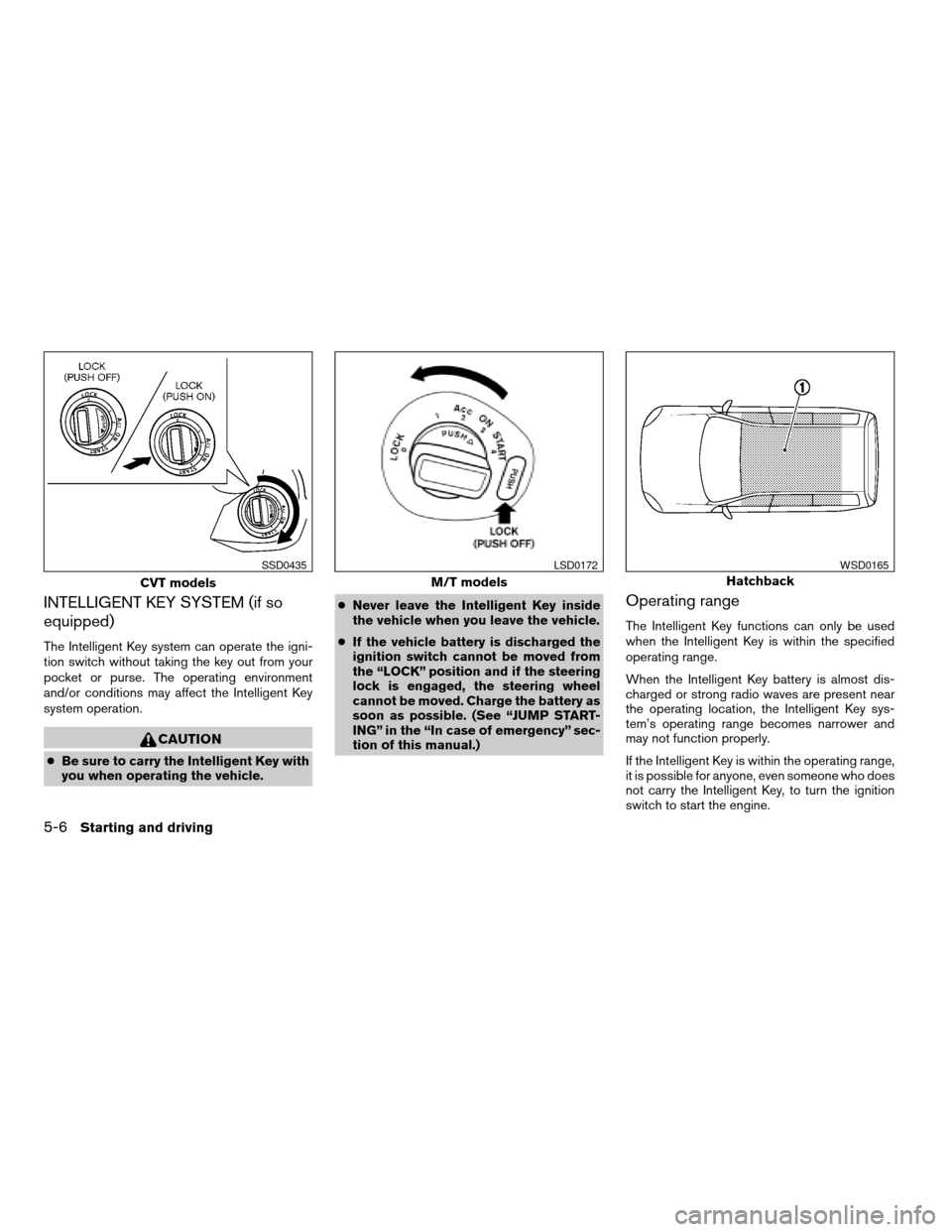
INTELLIGENT KEY SYSTEM (if so
equipped)
The Intelligent Key system can operate the igni-
tion switch without taking the key out from your
pocket or purse. The operating environment
and/or conditions may affect the Intelligent Key
system operation.
CAUTION
cBe sure to carry the Intelligent Key with
you when operating the vehicle.cNever leave the Intelligent Key inside
the vehicle when you leave the vehicle.
cIf the vehicle battery is discharged the
ignition switch cannot be moved from
the “LOCK” position and if the steering
lock is engaged, the steering wheel
cannot be moved. Charge the battery as
soon as possible. (See “JUMP START-
ING” in the “In case of emergency” sec-
tion of this manual.)
Operating range
The Intelligent Key functions can only be used
when the Intelligent Key is within the specified
operating range.
When the Intelligent Key battery is almost dis-
charged or strong radio waves are present near
the operating location, the Intelligent Key sys-
tem’s operating range becomes narrower and
may not function properly.
If the Intelligent Key is within the operating range,
it is possible for anyone, even someone who does
not carry the Intelligent Key, to turn the ignition
switch to start the engine.
CVT models
SSD0435
M/T models
LSD0172
Hatchback
WSD0165
5-6Starting and driving
ZREVIEW COPYÐ2007 Versa(vrs)
Owners ManualÐUSA_English(nna)
10/05/06Ðdebbie
X
Page 184 of 304
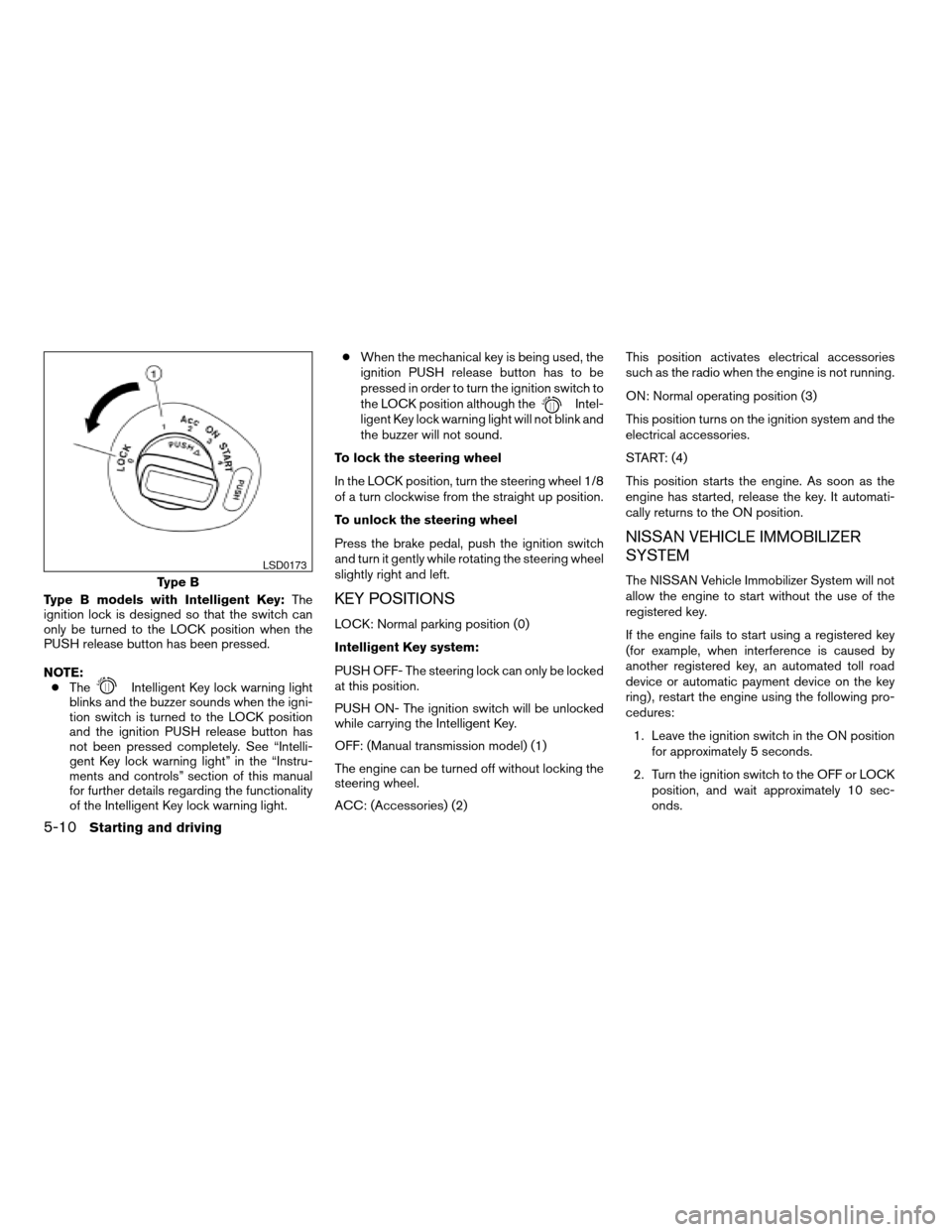
Type B models with Intelligent Key:The
ignition lock is designed so that the switch can
only be turned to the LOCK position when the
PUSH release button has been pressed.
NOTE:
cThe
Intelligent Key lock warning light
blinks and the buzzer sounds when the igni-
tion switch is turned to the LOCK position
and the ignition PUSH release button has
not been pressed completely. See “Intelli-
gent Key lock warning light” in the “Instru-
ments and controls” section of this manual
for further details regarding the functionality
of the Intelligent Key lock warning light.cWhen the mechanical key is being used, the
ignition PUSH release button has to be
pressed in order to turn the ignition switch to
the LOCK position although the
Intel-
ligent Key lock warning light will not blink and
the buzzer will not sound.
To lock the steering wheel
In the LOCK position, turn the steering wheel 1/8
of a turn clockwise from the straight up position.
To unlock the steering wheel
Press the brake pedal, push the ignition switch
and turn it gently while rotating the steering wheel
slightly right and left.
KEY POSITIONS
LOCK: Normal parking position (0)
Intelligent Key system:
PUSH OFF- The steering lock can only be locked
at this position.
PUSH ON- The ignition switch will be unlocked
while carrying the Intelligent Key.
OFF: (Manual transmission model) (1)
The engine can be turned off without locking the
steering wheel.
ACC: (Accessories) (2)This position activates electrical accessories
such as the radio when the engine is not running.
ON: Normal operating position (3)
This position turns on the ignition system and the
electrical accessories.
START: (4)
This position starts the engine. As soon as the
engine has started, release the key. It automati-
cally returns to the ON position.
NISSAN VEHICLE IMMOBILIZER
SYSTEM
The NISSAN Vehicle Immobilizer System will not
allow the engine to start without the use of the
registered key.
If the engine fails to start using a registered key
(for example, when interference is caused by
another registered key, an automated toll road
device or automatic payment device on the key
ring) , restart the engine using the following pro-
cedures:
1. Leave the ignition switch in the ON position
for approximately 5 seconds.
2. Turn the ignition switch to the OFF or LOCK
position, and wait approximately 10 sec-
onds.Type B
LSD0173
5-10Starting and driving
ZREVIEW COPYÐ2007 Versa(vrs)
Owners ManualÐUSA_English(nna)
10/05/06Ðdebbie
X