automatic drive NISSAN VERSA 2007 1.G Owners Manual
[x] Cancel search | Manufacturer: NISSAN, Model Year: 2007, Model line: VERSA, Model: NISSAN VERSA 2007 1.GPages: 304, PDF Size: 4.72 MB
Page 57 of 304

1. Crash zone sensor
2. Supplemental front air bag modules
3. Diagnosis sensor unit
4. SRS side-impact air bag modules
5. SRS curtain side-impact air bag mod-
ules
6. Side satellite sensor
7. Seat belt pre-tensioner retractor
8. Seat belt buckle switches on driver’s
and passenger’s sideNISSAN Advanced Air Bag System
(front seats)
This vehicle is equipped with the NISSAN ad-
vanced air bag system for the driver and front
passenger seats. This system is designed to
meet certification requirements under U.S. regu-
lations. It is also permitted in Canada.However,
all of the information, cautions and warn-
ings in this manual still apply and must be
followed.
The driver supplemental front air bag is located in
the center of the steering wheel. The passenger
supplemental front air bag is mounted in the
dashboard above the glove box. The supplemen-tal front air bags are designed to inflate in higher
severity frontal collisions, although they may in-
flate if the forces in another type of collision are
similar to those of a higher severity frontal impact.
They may not inflate in certain frontal collisions.
Vehicle damage (or lack of it) is not always an
indication of proper supplemental front air bag
system operation.
The NISSAN advanced air bag system has dual
stage inflators. It also monitors information from
the crash zone sensor, the diagnosis sensor unit,
seat belt buckle sensors, occupant classification
sensor (pressure sensor) and passenger seat
belt tension sensor. Inflator operation is based on
the severity of a collision and seat belt usage for
the driver. For the front passenger, it additionally
monitors the weight of an occupant or object on
the seat and seat belt tension. Based on informa-
tion from the sensors, only one front air bag may
inflate in a crash, depending on the crash severity
and whether the front occupants are belted or
unbelted. Additionally, the front passenger air
bag may be automatically turned OFF under
some conditions, depending on the weight de-
tected on the passenger seat and how the seat
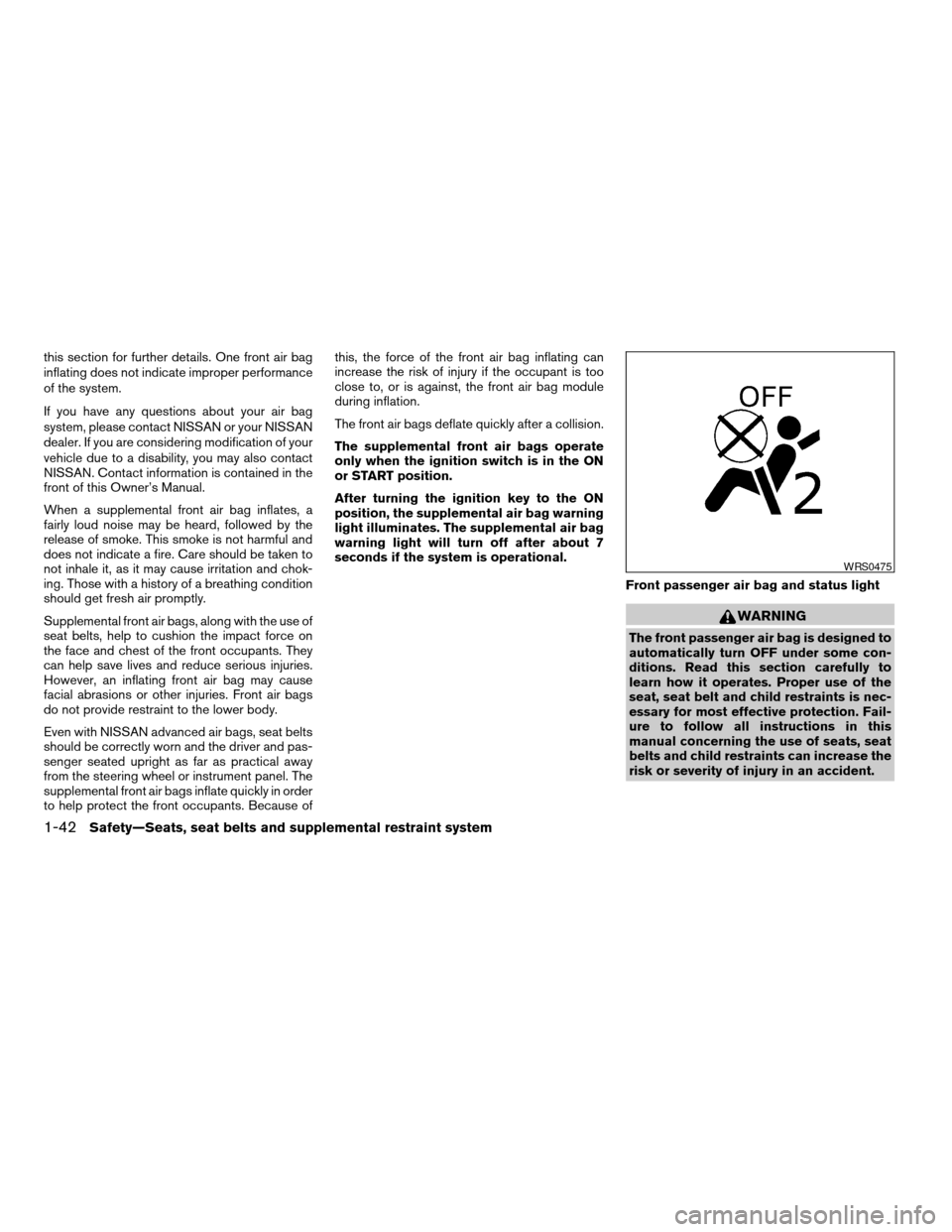
belt is used. If the front passenger air bag is OFF,
the passenger air bag status light will be illumi-
nated (if the seat is unoccupied, the light will not
be illuminated, but the air bag will be off) . See
“Front passenger air bag and status light” later in
WRS0701
Safety—Seats, seat belts and supplemental restraint system1-41
ZREVIEW COPYÐ2007 Versa(vrs)
Owners ManualÐUSA_English(nna)
10/05/06Ðdebbie
X
Page 58 of 304
this section for further details. One front air bag
inflating does not indicate improper performance
of the system.
If you have any questions about your air bag
system, please contact NISSAN or your NISSAN
dealer. If you are considering modification of your
vehicle due to a disability, you may also contact
NISSAN. Contact information is contained in the
front of this Owner’s Manual.
When a supplemental front air bag inflates, a
fairly loud noise may be heard, followed by the
release of smoke. This smoke is not harmful and
does not indicate a fire. Care should be taken to
not inhale it, as it may cause irritation and chok-
ing. Those with a history of a breathing condition
should get fresh air promptly.
Supplemental front air bags, along with the use of
seat belts, help to cushion the impact force on
the face and chest of the front occupants. They
can help save lives and reduce serious injuries.
However, an inflating front air bag may cause
facial abrasions or other injuries. Front air bags
do not provide restraint to the lower body.
Even with NISSAN advanced air bags, seat belts
should be correctly worn and the driver and pas-
senger seated upright as far as practical away
from the steering wheel or instrument panel. The
supplemental front air bags inflate quickly in order
to help protect the front occupants. Because ofthis, the force of the front air bag inflating can
increase the risk of injury if the occupant is too
close to, or is against, the front air bag module
during inflation.
The front air bags deflate quickly after a collision.
The supplemental front air bags operate
only when the ignition switch is in the ON
or START position.
After turning the ignition key to the ON
position, the supplemental air bag warning
light illuminates. The supplemental air bag
warning light will turn off after about 7
seconds if the system is operational.
Front passenger air bag and status light
WARNING
The front passenger air bag is designed to
automatically turn OFF under some con-
ditions. Read this section carefully to
learn how it operates. Proper use of the
seat, seat belt and child restraints is nec-
essary for most effective protection. Fail-
ure to follow all instructions in this
manual concerning the use of seats, seat
belts and child restraints can increase the
risk or severity of injury in an accident.
WRS0475
1-42Safety—Seats, seat belts and supplemental restraint system
ZREVIEW COPYÐ2007 Versa(vrs)
Owners ManualÐUSA_English(nna)
10/05/06Ðdebbie
X
Page 59 of 304

Status light
The front passenger air bag status light
is
located near the climate controls. The light oper-
ates as follows:
cUnoccupied passenger’s seat: The
is
OFF and the front passenger air bag is OFF
and will not inflate in a crash.
cPassenger’s seat occupied by a small adult,
child or child restraint as outlined in this
section: The
illuminates to indicate
that the front passenger air bag is OFF and
will not inflate in a crash.
cOccupied passenger seat and the passen-
ger meet the conditions outlined in this sec-
tion: The light
is OFF to indicate that
the front passenger air bag is operational.
Front passenger air bag
The front passenger air bag is designed to auto-
matically turn OFF when the vehicle is operated
under some conditions as described below in
accordance with U.S. regulations. If the front
passenger air bag is OFF, it will not inflate in a
crash. The driver air bag and other air bags in your
vehicle are not part of this system.
The purpose of the regulation is to help reduce
the risk of injury or death from an inflating air bag
to certain front passenger seat occupants, suchas children, by requiring the air bag to be auto-
matically turned OFF. Certain sensors are used
to meet the requirements.
One sensor used is the occupant classification
sensor (pressure sensor) . It is in the bottom of the
front passenger seat cushion and is designed to
detect an occupant and objects on the seat by
weight. It works together with seat belt sensors
described later. For example, if a child is in the
front passenger seat, the advanced air bag sys-
tem is designed to turn the passenger air bag
OFF in accordance with the regulations. Also, if a
child restraint of the type specified in the regula-
tions is on the seat, its weight and the child’s
weight can be detected and cause the air bag to
turn OFF. Occupant classification sensor opera-
tion can vary depending on the front passenger
seat belt sensors.
The front passenger seat belt sensors are de-
signed to detect if the seat belt is buckled and the
amount of tension on the seat belt, such as when
it is in the automatic locking mode (child restraint
mode) . Based on the weight on the seat detected
by the occupant classification sensor and the belt
tension detected on the seat belt, the advanced
air bag system determines whether the front pas-
senger air bag should be automatically turned
OFF as required by the regulations.Front passenger seat adult occupants who are
properly seated and using the seat belt as out-
lined in this manual should not cause the passen-
ger air bag to be automatically turned OFF. For
small adults it may be turned OFF, however if the
occupant takes his/her weight off the seat cush-
ion (for example, by not sitting upright, by sitting
on an edge of the seat, or by otherwise being out
of position) , this could cause the sensor to turn
the air bag OFF. In addition, if the occupant
improperly uses the seat belt in the automatic
locking mode (child restraint mode) , this could
cause the air bag to be turned OFF. Always be
sure to be seated and wearing the seat belt
properly for the most effective protection by the
seat belt and supplemental air bag.
NISSAN recommends that pre-teens and chil-
dren be properly restrained in a rear seat.
NISSAN also recommends that appropriate child
restraints and booster seats be properly installed
in a rear seat. If this is not possible, the occupant
classification sensor and seat belt sensors are
designed to operate as described above to turn
the front passenger air bag OFF for specified
child restraints as required by the regulations.
Failing to properly secure child restraints and to
use the automatic locking mode (child restraint
mode) may allow the restraint to tip or move in an
accident or sudden stop. This can also result in
the passenger air bag inflating in a crash instead
Safety—Seats, seat belts and supplemental restraint system1-43
ZREVIEW COPYÐ2007 Versa(vrs)
Owners ManualÐUSA_English(nna)
10/05/06Ðdebbie
X
Page 72 of 304

orAnti-lock braking system (ABS)
warning light (if so equipped)Low fuel warning lightCruise SET switch indicator light
(if so equipped)
orBrake warning lightLow tire pressure warning light
(if so equipped)Front passenger air bag status light
Charge warning lightLow windshield washer fluid warning light
(if so equipped)High beam indicator light (Blue)
Door open warning lightP position selecting warning light
(CVT models) (if so equipped)Low temperature indicator light (Blue)
Electric power steering warning lightSeat belt warning light and chimeMalfunction indicator light (MIL)
Engine oil pressure warning lightSupplemental air bag warning lightOverdrive off indicator light
(A/T / CVT models)
High temperature warning light (Red)Automatic Transmission (A/T)/Continuously
Variable Transmission (CVT) position indicator
lightSecurity indicator light
Intelligent Key lock warning light (M/T models)
(if so equipped)CRUISE main switch indicator light
(if so equipped)Turn signal/hazard indicator lights
Intelligent Key system warning light
(if so equipped)
WARNING/INDICATOR LIGHTS AND
AUDIBLE REMINDERS
2-6Instruments and controls
ZREVIEW COPYÐ2007 Versa(vrs)
Owners ManualÐUSA_English(nna)
10/05/06Ðdebbie
X
Page 75 of 304
CAUTION
If the high temperature warning light illu-
minates while the engine is running, it
may indicate the engine temperature is
extremely high. Stop the vehicle safely as
soon as possible. If the vehicle is over-
heated, continuing vehicle operation may
seriously damage the engine. See “If your
vehicle overheats” in the “In case of emer-
gency” section.
Intelligent Key lock warning
light (M/T models) (if so
equipped)
When the ignition switch is left in the OFF posi-
tion instead of completely turning it to the LOCK
position, the Intelligent Key lock warning light
blinks red and the Intelligent Key room buzzer will
sound. The light will keep blinking until the igni-
tion switch is returned to the LOCK or ACC
position.
If the Intelligent Key lock warning light blinks and
the buzzer sounds, press the PUSH release but-
ton next to ignition knob, then turn the ignition
knob to either the LOCK or ACC position.
Intelligent Key system warning
light (if so equipped)
The Intelligent Key system warning light illumi-
nates green when the ignition switch can be
turned. The Intelligent Key system warning light
illuminates red when the ignition switch cannot
be turned.
The Intelligent Key system warning light blinks
red if the Intelligent Key is taken outside of the
vehicle while the ignition switch is in the ACC or
ON position.
cIf the Intelligent Key system warning light
blinks, make sure of the location of the Intel-
ligent Key as soon as possible. The Intelli-
gent Key should be carried by the driver
while operating the vehicle.
cThe Intelligent Key system warning light
turns off about 10 seconds after the Intelli-
gent Key is brought inside the vehicle.
The Intelligent Key system warning light blinks
green indicating that the Intelligent Key battery is
almost discharged.
See “Intelligent Key system” in the “Pre-driving
checks and adjustments” section.
Low fuel warning light
This light comes on when the fuel level in the fuel
tank is getting low. Refuel as soon as it is conve-
nient, preferably before the fuel gauge reaches E
(Empty) .There will be a small reserve of fuel
in the tank when the fuel gauge needle
reaches E (Empty) .
Low tire pressure warning
light (if so equipped)
Your vehicle is equipped with a Tire Pressure
Monitoring System (TPMS) that monitors the tire
pressure of all tires except the spare.
The low tire pressure warning light warns of low
tire pressure or indicates that the TPMS is not
functioning properly.
After the ignition switch is turned ON, this light
illuminates for about 1 second and turns off.
Low tire pressure warning:
If the vehicle is being driven with low tire pres-
sure, the warning light will illuminate.
When the low tire pressure warning light illumi-
nates, you should stop and adjust the tire pres-
sure to the recommended COLD tire pressure
shown on the Tire and Loading Information label.
The low tire pressure warning light does not
automatically turn off when the tire pressure is
Instruments and controls2-9
ZREVIEW COPYÐ2007 Versa(vrs)
Owners ManualÐUSA_English(nna)
10/05/06Ðdebbie
X
Page 77 of 304
When the warning light blinks, turn the ignition
switch to the ON position, move the selector
lever to the P position, then turn the ignition
switch to the LOCK position.
Seat belt warning light and
chime
The light and chime remind you to fasten your
seat belts. The light illuminates whenever the
ignition key is turned to the ON or START position
and remains illuminated until the driver’s seat belt
is fastened. At the same time, the chime sounds
for about 6 seconds unless the driver’s seat belt
is securely fastened.
The seat belt warning light may also illuminate if
the front passenger’s seat belt is not fastened
when the front passenger’s seat is occupied . For
7 seconds after the ignition switch is in the ON
position, the system does not activate the warn-
ing light for the front passenger.
Refer to “Seat belts” in the “Safety—Seats, seat
belts and supplemental restraint system” section
for precautions on seat belt usage.
Supplemental air bag warning
light
When the ignition key is in the ON or START
position, the supplemental air bag warning lightilluminates for about 7 seconds and then turns
off. This means the system is operational.
If any of the following conditions occur, the
supplemental front air bags, supplemental side
air bags, curtain side-impact air bags, and pre-
tensioner seat belt systems need servicing and
your vehicle must be taken to a NISSAN dealer:
cThe supplemental air bag warning light re-
mains on after approximately 7 seconds.
cThe supplemental air bag warning light
flashes intermittently.
cThe supplemental air bag warning light does
not come on at all.
Unless checked and repaired, the supplemental
restraint system (air bag system) and/or the pre-
tensioner seat belts may not function properly.
For additional details see “Supplemental restraint
system” in the “Safety—Seats, seat belts and
supplemental restraint system” section of this
manual.
WARNING
If the supplemental air bag warning light
is on, it could mean that the supplemental
front air bag, supplemental side air bag,
curtain side-impact air bag systems (if so
equipped) and/or pre-tensioner seat belt
systems will not operate in an accident. To
help avoid injury to yourself or others,
have your vehicle checked by a NISSAN
dealer as soon as possible.
INDICATOR LIGHTS
Automatic Transmission
(A/T)/Continuously Variable
Transmission (CVT) position
indicator light (if so equipped)
When the ignition key is turned to the ON posi-
tion, this indicator light shows the transmission
selector lever position. See “Driving the vehicle”
in the “Starting and driving” section of this
manual.
Cruise main switch indicator
light (if so equipped)
The light comes on when the cruise control main
switch is pushed. The light goes out when the
main switch is pushed again. When the cruise
Instruments and controls2-11
ZREVIEW COPYÐ2007 Versa(vrs)
Owners ManualÐUSA_English(nna)
10/05/06Ðdebbie
X
Page 79 of 304
cMalfunction indicator light blinking — An en-
gine misfire has been detected which may
damage the emission control system. To re-
duce or avoid emission control system dam-
age:
– do not drive at speeds above 45 MPH
(72 km/h) .
– avoid hard acceleration or deceleration.
– avoid steep uphill grades.
– if possible, reduce the amount of cargo
being hauled or towed.
The malfunction indicator light may stop blinking
and come on steady. Have the vehicle inspected
by a NISSAN dealer. You do not need to have
your vehicle towed to the dealer.
CAUTION
Continued vehicle operation without hav-
ing the emission control system checked
and repaired as necessary could lead to
poor driveability, reduced fuel economy,
and possible damage to the emission con-
trol system.
Overdrive off indicator light
(A/T / CVT models)
The overdrive off indicator light illuminates when
the overdrive off mode is selected.
For additional information, see “Continuous Vari-
able Transmission (CVT)” or “Automatic Trans-
mission (A/T) in the “Starting and driving” section
of this manual.
Security indicator light
For vehicles without Intelligent Key: This light
blinks whenever the ignition switch is in the
LOCK, OFF or ACC position.
For vehicles with Intelligent Key: This light blinks
when the ignition switch is in the LOCK position
with the key removed from the ignition switch.
The blinking security indicator light indicates that
the security systems equipped on the vehicle are
operational.
For additional information, see “Security sys-
tems” later in this section.
Turn signal/hazard indicator
lights
The appropriate light flashes when the turn signal
switch is activated.Both lights flash when the hazard switch is turned
on.
AUDIBLE REMINDERS
Brake pad wear warning
The disc brake pads have audible wear warnings.
When a disc brake pad requires replacement, it
makes a high pitched scraping sound when the
vehicle is in motion, whether or not the brake
pedal is depressed. Have the brakes checked as
soon as possible if the warning sound is heard.
Key reminder chime
A chime sounds if the driver’s door is opened
while the key is left in the ignition switch. Remove
the key and take it with you when leaving the
vehicle.
Intelligent Key door buzzer (if so
equipped)
The Intelligent Key door buzzer sounds if any one
of the following improper operations is found.
cThe ignition switch is not returned to the
LOCK position when locking the doors.
cThe Intelligent Key is left inside the vehicle
when locking the doors.
cThe Intelligent Key is taken outside the ve-
hicle when operating the vehicle.
Instruments and controls2-13
ZREVIEW COPYÐ2007 Versa(vrs)
Owners ManualÐUSA_English(nna)
10/05/06Ðdebbie
X
Page 81 of 304

cany request switch (Intelligent Key mod-
els) .
cthe keyfob or Intelligent Key.
Keyfob and Intelligent Key operation:
cPush the
button. All doors lock.
The hazard lights flash twice and the horn
beeps once to indicate all doors are
locked.
cWhen the
button is pushed with
all doors locked, the hazard lights flash
twice and the horn beeps once as a re-
minder that the doors are already locked.
The horn may or may not beep. Refer to
“Silencing the horn beep feature” in the
“Pre-driving checks and adjustments” sec-
tion later in this manual.
4. Confirm that the
indicator light comes
on. Thelight stays on for about 30
seconds. The vehicle security system is now
pre-armed. After about 30 seconds the ve-
hicle security system automatically shifts
into the armed phase. The
light begins
to flash once every 3 seconds. If, during the
30-second pre-arm time period, the driver’s
door is unlocked by the key, a request
switch, the keyfob or Intelligent Key, or if the
ignition switch is turned to ACC or ON, the
system will not arm.cIf the key is turned slowly when locking
the driver’s door, the system may not
arm. Furthermore, if the key is turned
beyond the vertical position toward the
unlock position to remove the key, the
system may be disarmed when the key
is removed. If the indicator light fails to
glow for 30 seconds, unlock the door
once and lock it again.
cEven when the driver and/or passen-
gers are in the vehicle, the system will
arm with all doors closed and locked
with the ignition key in the OFF posi-
tion.
Vehicle security system activation
The vehicle security system will give the following
alarm:
cThe headlights blink and the horn sounds
intermittently.
cThe alarm automatically turns off after ap-
proximately 50 seconds. However, the alarm
reactivates if the vehicle is tampered with
again. The alarm can be shut off by unlocking
the driver’s door with the key, a request
switch or by pressing the
button on
the keyfob or Intelligent Key.The alarm is activated by:
copening a door without using the key, a
request switch, keyfob or Intelligent Key
(even if the door is unlocked by using the
inside lock knob or the power door lock
switch) .
How to stop an activated alarm
The alarm stops only by unlocking the driver’s
door with the key, pressing thebutton on
the keyfob or Intelligent Key, or by unlocking all
doors with any request switch (Intelligent Key
models) .
NISSAN VEHICLE IMMOBILIZER
SYSTEM
The NISSAN Vehicle Immobilizer System will not
allow the engine to start without the use of a
registered key.
If the engine fails to start using a registered key (for
example, when interference is caused by another
registered key, an automated toll road device or
automatic payment device on the key ring) , restart
the engine using the following procedures:
1. Leave the ignition switch in the ON position
for approximately 5 seconds.
2.
Turn the ignition switch to the OFF or LOCK
position, and wait approximately 10 seconds.
Instruments and controls2-15
ZREVIEW COPYÐ2007 Versa(vrs)
Owners ManualÐUSA_English(nna)
10/05/06Ðdebbie
X
Page 87 of 304
TURN SIGNAL SWITCH
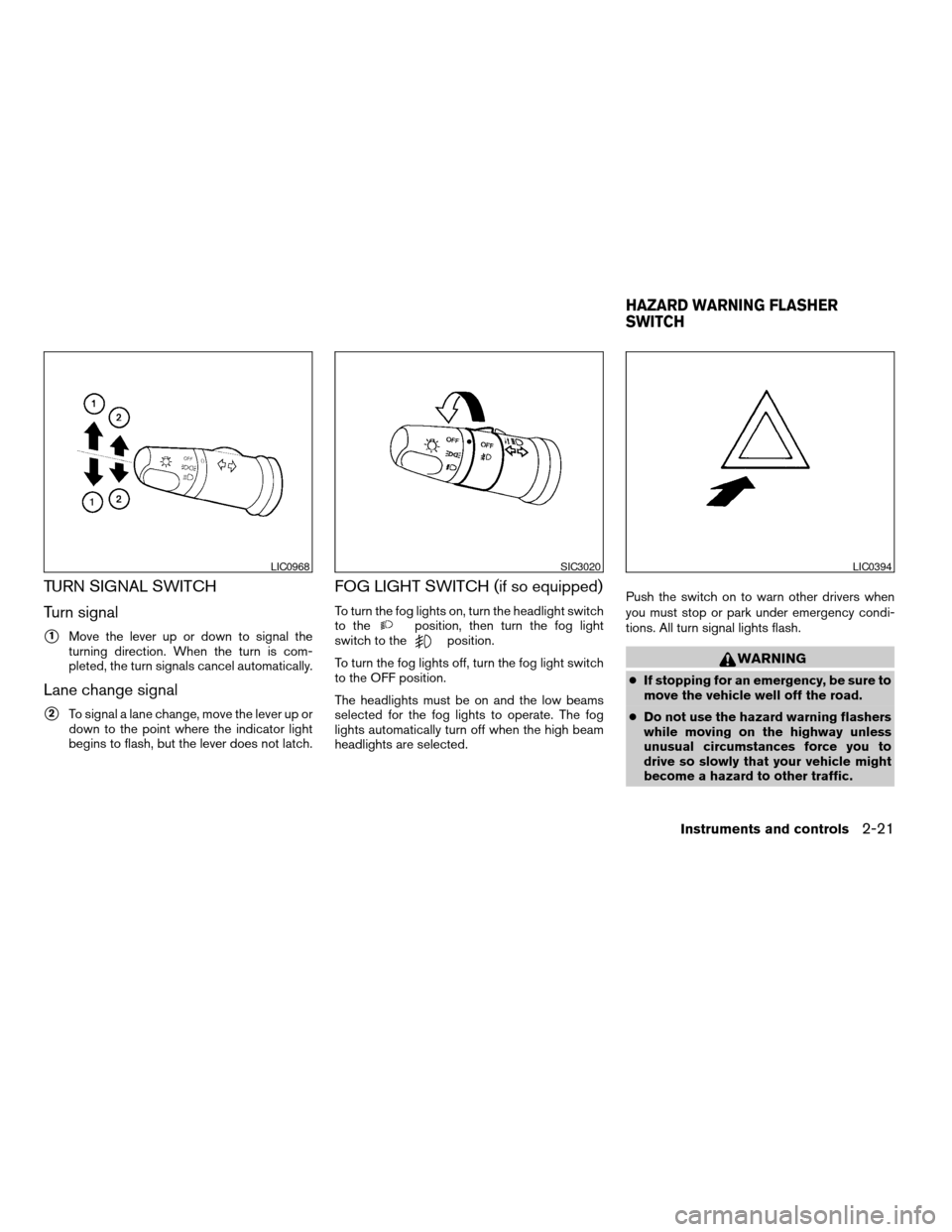
Turn signal
s1Move the lever up or down to signal the
turning direction. When the turn is com-
pleted, the turn signals cancel automatically.
Lane change signal
s2To signal a lane change, move the lever up or
down to the point where the indicator light
begins to flash, but the lever does not latch.
FOG LIGHT SWITCH (if so equipped)
To turn the fog lights on, turn the headlight switch
to theposition, then turn the fog light
switch to theposition.
To turn the fog lights off, turn the fog light switch
to the OFF position.
The headlights must be on and the low beams
selected for the fog lights to operate. The fog
lights automatically turn off when the high beam
headlights are selected.Push the switch on to warn other drivers when
you must stop or park under emergency condi-
tions. All turn signal lights flash.
WARNING
cIf stopping for an emergency, be sure to
move the vehicle well off the road.
cDo not use the hazard warning flashers
while moving on the highway unless
unusual circumstances force you to
drive so slowly that your vehicle might
become a hazard to other traffic.
LIC0968SIC3020LIC0394
HAZARD WARNING FLASHER
SWITCH
Instruments and controls2-21
ZREVIEW COPYÐ2007 Versa(vrs)
Owners ManualÐUSA_English(nna)
10/05/06Ðdebbie
X
Page 94 of 304
POWER WINDOWS (if so equipped)
WARNING
cMake sure that all passengers have
their hands, etc. inside the vehicle while
it is in motion and before closing the
windows. Use the window lock switch
to prevent unexpected use of the power
windows.
cDo not leave children unattended inside
the vehicle. They could unknowingly ac-
tivate switches or controls and become
trapped in a window. Unattended chil-
dren could become involved in serious
accidents.
The power windows operate when the ignition
switch is in the ON position, or for about 45
seconds after the ignition switch is turned to the
OFF position. If the driver’s or passenger’s door
is opened during this period of about 45 sec-
onds, power to the windows is canceled.
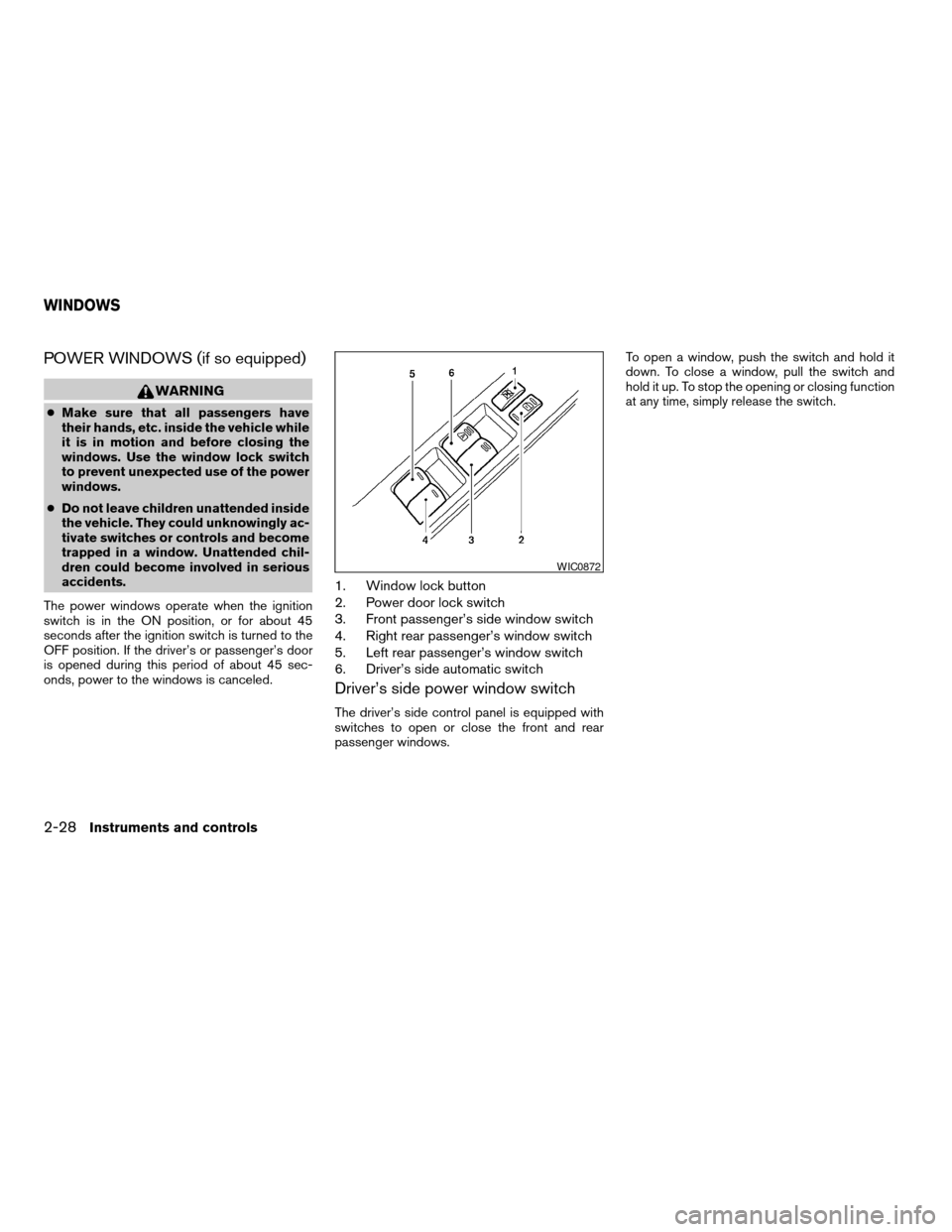
1. Window lock button
2. Power door lock switch
3. Front passenger’s side window switch
4. Right rear passenger’s window switch
5. Left rear passenger’s window switch
6. Driver’s side automatic switch
Driver’s side power window switch
The driver’s side control panel is equipped with
switches to open or close the front and rear
passenger windows.To open a window, push the switch and hold it
down. To close a window, pull the switch and
hold it up. To stop the opening or closing function
at any time, simply release the switch.
WIC0872
WINDOWS
2-28Instruments and controls
ZREVIEW COPYÐ2007 Versa(vrs)
Owners ManualÐUSA_English(nna)
10/05/06Ðdebbie
X