AUX NISSAN VERSA 2018 User Guide
[x] Cancel search | Manufacturer: NISSAN, Model Year: 2018, Model line: VERSA, Model: NISSAN VERSA 2018Pages: 354, PDF Size: 4.84 MB
Page 177 of 354
USB (Universal Serial Bus)
CONNECTION PORT (if so
equipped)
Connecting a device to the USB
connection port
WARNING
Do not connect, disconnect or operate
the USB device while driving. Doing so
can be a distraction. If distracted you
could lose control of your vehicle and
cause an accident or serious injury.
CAUTION
∙ Do not force the USB device into the
USB port. Inserting the USB device
tilted or up-side-down into the port
may damage the port. Make sure that
the USB device is connected correctly
into the USB port.
∙ Do not grab the USB port cover (if so
equipped) when pulling the USB de-
vice out of the port. This could dam-
age the port and the cover.
∙ Do not leave the USB cable in a place
where it can be pulled unintentionally.
Pulling the cable may damage the
port.
For additional information, refer to your de-
vice manufacturer’s owner information re-
garding the proper use and care of the
device.
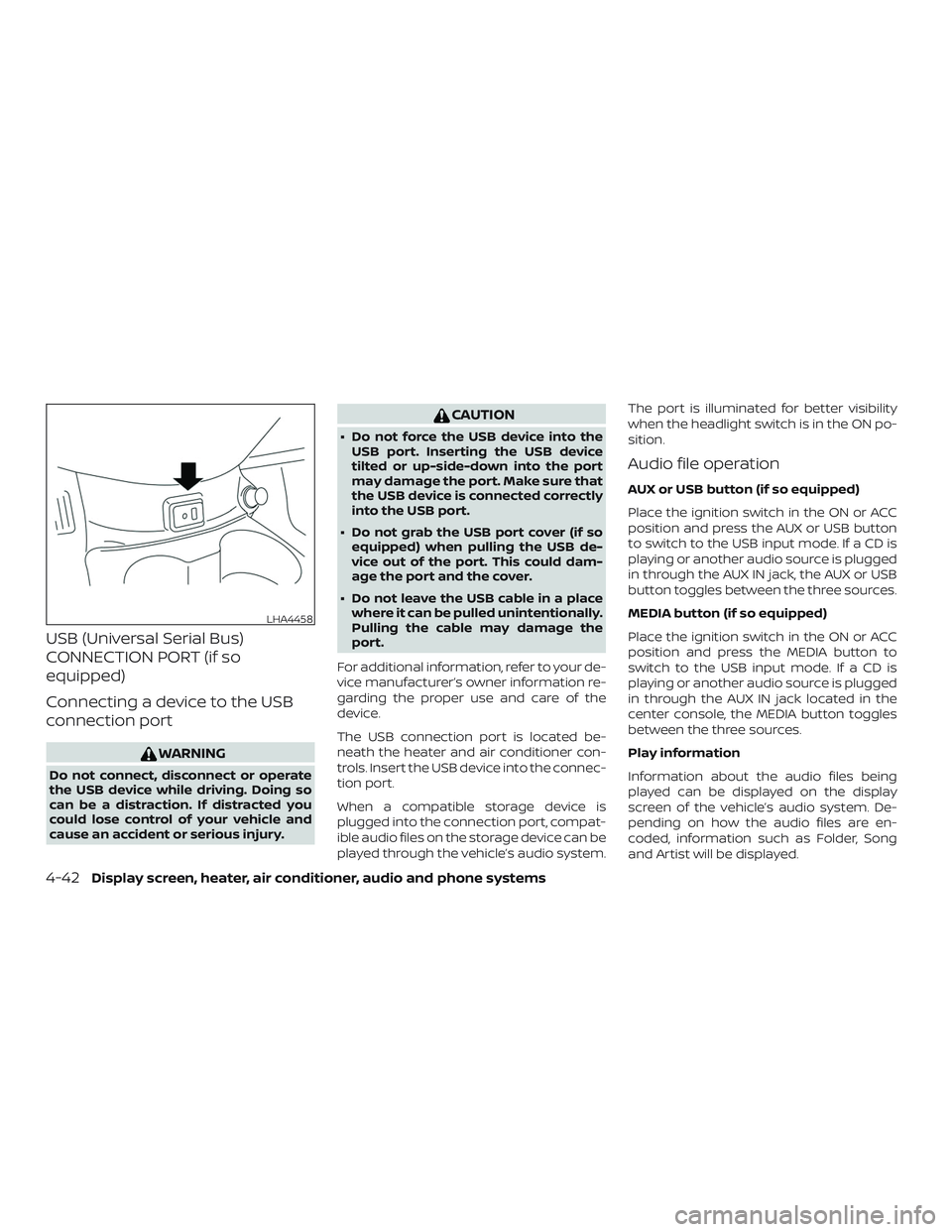
The USB connection port is located be-
neath the heater and air conditioner con-
trols. Insert the USB device into the connec-
tion port.
When a compatible storage device is
plugged into the connection port, compat-
ible audio files on the storage device can be
played through the vehicle’s audio system.The port is illuminated for better visibility
when the headlight switch is in the ON po-
sition.
Audio file operation
AUX or USB button (if so equipped)
Place the ignition switch in the ON or ACC
position and press the AUX or USB button
to switch to the USB input mode. If a CD is
playing or another audio source is plugged
in through the AUX IN jack, the AUX or USB
button toggles between the three sources.
MEDIA button (if so equipped)
Place the ignition switch in the ON or ACC
position and press the MEDIA button to
switch to the USB input mode. If a CD is
playing or another audio source is plugged
in through the AUX IN jack located in the
center console, the MEDIA button toggles
between the three sources.
Play information
Information about the audio files being
played can be displayed on the display
screen of the vehicle’s audio system. De-
pending on how the audio files are en-
coded, information such as Folder, Song
and Artist will be displayed.
LHA4458
4-42Display screen, heater, air conditioner, audio and phone systems
Page 183 of 354
STEERING WHEEL SWITCH FOR
AUDIO CONTROL
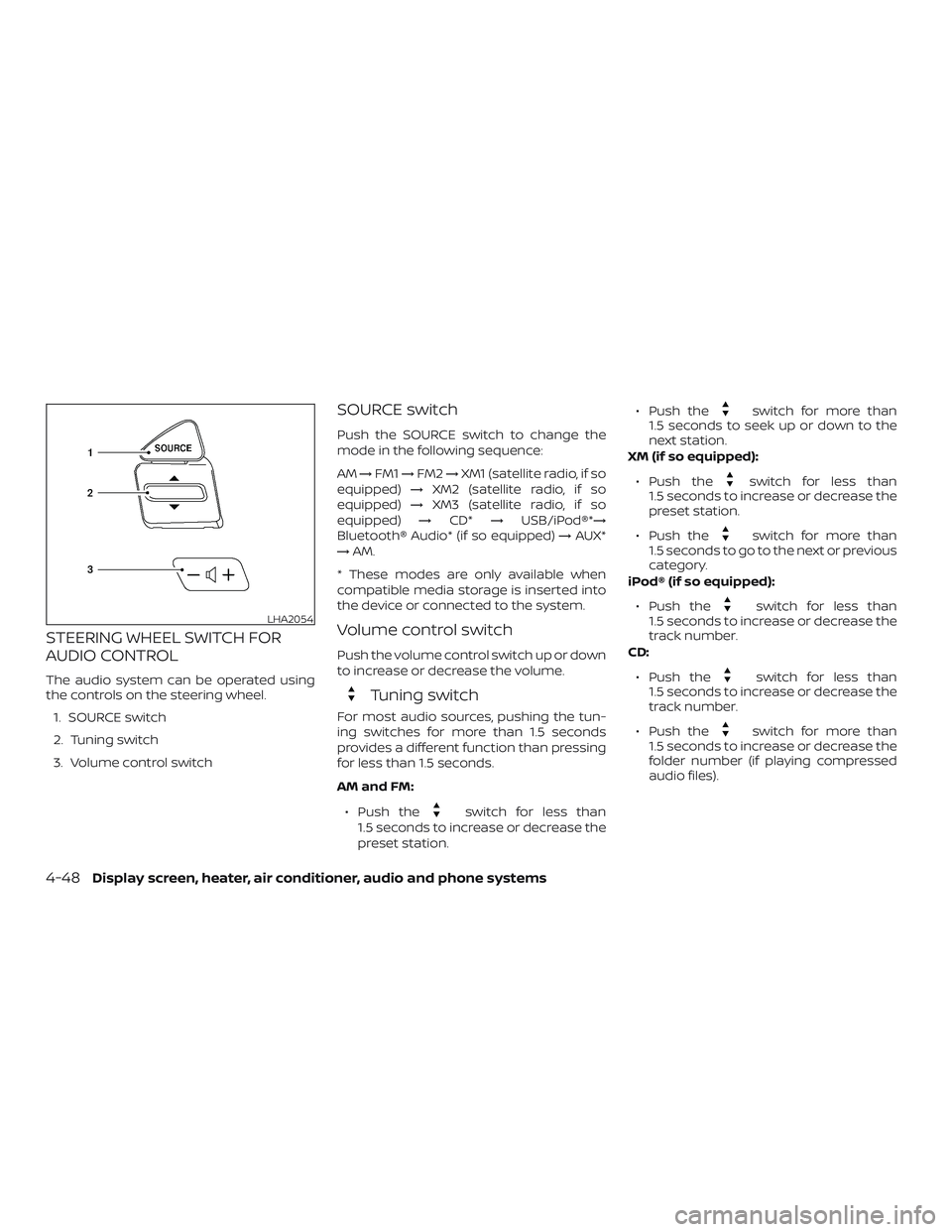
The audio system can be operated using
the controls on the steering wheel.
1. SOURCE switch
2. Tuning switch
3. Volume control switch
SOURCE switch
Push the SOURCE switch to change the
mode in the following sequence:
AM→FM1→FM2→XM1 (satellite radio, if so
equipped)→XM2 (satellite radio, if so
equipped)→XM3 (satellite radio, if so
equipped)→CD*→USB/iPod®*→
Bluetooth® Audio* (if so equipped)→AUX*
→AM.
* These modes are only available when
compatible media storage is inserted into
the device or connected to the system.
Volume control switch
Push the volume control switch up or down
to increase or decrease the volume.
Tuning switch
For most audio sources, pushing the tun-
ing switches for more than 1.5 seconds
provides a different function than pressing
for less than 1.5 seconds.
AM and FM:
∙ Push the
switch for less than
1.5 seconds to increase or decrease the
preset station.∙ Push the
switch for more than
1.5 seconds to seek up or down to the
next station.
XM (if so equipped):
∙ Push the
switch for less than
1.5 seconds to increase or decrease the
preset station.
∙ Push the
switch for more than
1.5 seconds to go to the next or previous
category.
iPod® (if so equipped):
∙ Push the
switch for less than
1.5 seconds to increase or decrease the
track number.
CD:
∙ Push the
switch for less than
1.5 seconds to increase or decrease the
track number.
∙ Push the
switch for more than
1.5 seconds to increase or decrease the
folder number (if playing compressed
audio files).
LHA2054
4-48Display screen, heater, air conditioner, audio and phone systems
Page 346 of 354
11 Index
A
Air bag (See supplemental restraint
system).....................1-42
Air bag system
Front (See supplemental front impact
airbagsystem)..............1-51
Air bag warning labels............1-59
Airbagwarninglight..........1-60, 2-17
Air bag warning light,
supplemental..............1-60, 2-17
Air cleaner housing filter..........8-15
Air conditioner
Air conditioner operation........4-13
Air conditioner service..........4-17
Air conditioner specification label . .10-12
Air conditioner system refrigerant
and oil recommendations.......10-7
Air conditioner system refrigerant
recommendations............10-7
Heater and air conditioner controls . .4-9
Servicing air conditioner.........4-17
Air flow charts.................4-14
Anchor point locations...........1-25
Antenna....................4-49
Antifreeze...................5-29
Anti-lock brake warning light........2-13
Anti-lock Braking System (ABS)......5-25
Audible reminders..............2-20
Audio system.................4-17
AMradioreception............4-18
Bluetooth® audio.............4-46Compact disc (CD)
player.............4-29,4-35,4-40
FM/AM radio with compact disc (CD)
player....................4-31
FM-AM radio with compact disc (CD)
player....................4-27
FM/AM/SAT radio with compact
disc(CD)player..............4-36
FMradioreception............4-17
iPod®Player................4-44
iPod® player operation.........4-44
Radio....................4-17
Steering wheel audio control
switch ...................4-48
USBinterface...............4-42
USB (Universal Serial Bus) Connection
Port.....................4-42
Automatic
Automatic power window switch . . .2-31
Automatic door locks.............3-5
AUXjack.................4-30,4-32
B
Battery..................5-29,8-11
Charge warning light...........2-14
Battery replacement............8-20
Keyfob................8-20,8-21
Before starting the engine.........5-10
Belt(Seedrivebelt)..............8-14
Block heater
Engine....................5-31Bluetooth® audio...............4-46
Bluetooth® hands-free phone
system..................4-50,4-65
Booster seats.................1-38
Brake
Anti-lock Braking System (ABS)....5-25
Brakefluid..................8-9
Brakelight(Seestoplight).......8-24
Brakesystem...............5-25
Brakewarninglight............2-13
Brakewearindicators.......2-20,8-17
Parking brake operation.........5-18
Self-adjustingbrakes ..........8-17
Brakeassist..................5-26
Brakefluid....................8-9
Brakes......................8-17
Brakesystem.................5-25
Break-in schedule..............5-20
Brightness control
Instrument panel.............2-23
Bulb check/instrument panel.......2-12
Bulb replacement..............8-24
C
Capacities and recommended fuel/
lubricants....................10-2
Cargo
(See vehicle loading information).....10-13
Car phone or CB radio...........4-49
CDcareandcleaning............4-47