climate control NISSAN VERSA NOTE 2018 Owner´s Manual
[x] Cancel search | Manufacturer: NISSAN, Model Year: 2018, Model line: VERSA NOTE, Model: NISSAN VERSA NOTE 2018Pages: 878, PDF Size: 9.62 MB
Page 709 of 878
Volume & beeps
There are several methods to customize
the volume settings.
Volume & Beeps
The Volume & Beeps screen can be found
by pressing the
MENU button on the
control panel, touching the “Settings” key
on the screen and selecting “Volume &
Beeps”. To adjust the volume of the follow-
ing options, touch the “–” and “+” keys on the
screen.
The available settings are:
∙ Ringtone Adjust the volume level of the ringtone
of incoming calls.
∙ Outgoing Call Adjust the volume level of the outgoing
calls.
∙ Voice Prompt Vol. Adjust the volume level of the system
voice.
∙ Text-to-speech Vol. Adjust the volume of the replay voice for
text messaging.
∙ Button Beeps Turns on/off the button beep sounds
and alarm for prohibited operations. Volume Settings
The Volume settings screen can be found
by pressing the
button on the control
panel then touching the “Volume” key on
the screen. To adjust the volume of the
following options, touch the “–” and “+” keys
on the screen.
The available settings are:
∙ Ringtone Adjust the volume level of the ringtone
of incoming calls.
∙ Outgoing Call Adjust the volume level of the outgoing
calls.
WARNING
∙ Use a phone af ter stopping your ve-hicle in a safe location. If you have to
use a phone while driving, exercise ex-
treme caution at all times so full at-
tention may be given to vehicle
operation.
∙ If you are unable to devote full atten- tion to vehicle operation while talking
on the phone, pull off the road to a
safe location and stop your vehicle.
CAUTION
To avoid discharging the vehicle bat-
tery, use a phone af ter starting the
engine.
BLUETOOTH® HANDS-FREE PHONE
SYSTEM WITH NAVIGATION SYSTEM
(if so equipped)
Monitor, climate, audio, phone and voice recognition systems4-109
Page 712 of 878
BLUETOOTH® is a
trademark owned
by Bluetooth SIG,
Inc. and licensed
to Bosch.
VOICE COMMANDS
You can use voice commands to operate
various Bluetooth® Hands-Free Phone Sys-
tem features using the NISSAN Voice Rec-
ognition system. For additional informa-
tion, refer to “NISSAN Voice Recognition
System” in this section.
Voice Prompt Interrupt
While using the voice recognition system,
the system voice can be interrupted to al-
low the user to speak commands. While
the system is speaking, press
the
button on the steering wheel. The
system voice will stop and a tone will be
heard. Af ter the tone, speak desired com-
mand (displayed on the touch-screen).
One Shot Call
To use the system faster, you may speak
the second level commands with the main
menu command on the main menu. For
example, press the
button and af ter
the tone say, “Call Redial”.
CONNECTING PROCEDURE
NOTE:
The connecting procedure must be per-
formed when the vehicle is stationary. If
the vehicle starts moving during the pro-
cedure, the procedure will be canceled.
1. Press the [
] button on the control
panel.
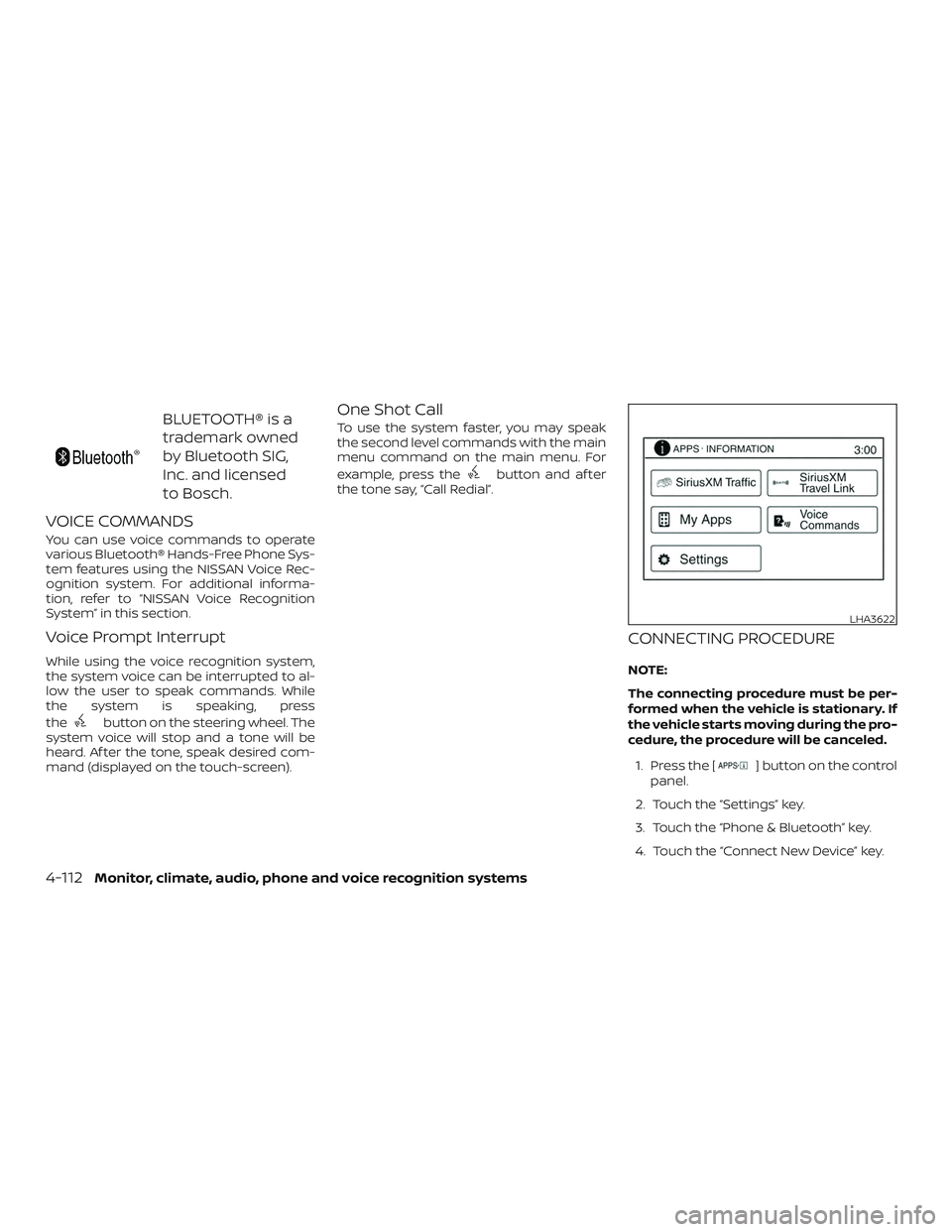
2. Touch the “Settings” key.
3. Touch the “Phone & Bluetooth” key.
4. Touch the “Connect New Device” key.
LHA3622
4-112Monitor, climate, audio, phone and voice recognition systems
Page 713 of 878
5. Initiate the connecting process fromthe handset. The system will display
the message: “Is PIN XXXXXX displayed
on your Bluetooth device?”. If the PIN is
displayed on your Bluetooth® device,
select “Yes” to complete the pairing
process.
For additional information, refer to the
Bluetooth® device’s Owner’s Manual.
VEHICLE PHONEBOOK
To access the vehicle phonebook:
1. Press the
button on the control
panel.
2. Touch the “Phonebook” key.
3. Choose the desired entry from the dis- played list.
4. The number of the entry will be dis- played on the screen. Touch the num-
ber to initiate dialing. NOTE:
To scroll quickly through the list, touch
the “A-Z” key in the upper right corner of
the screen. Turn the TUNE knob to
choose a letter or number and then
press ENTER. The list will move to the
first entry that begins with that number
or letter.
MAKING A CALL
To make a call, follow the procedure below:
1. Press the
button on the control
panel. The “Phone” screen will appear
on the display.
2. Select one of the following options to make a call:
∙ “Phonebook”: Select the name from an entry stored in the vehicle phonebook.
∙ “Call Lists”: Select the name from the incoming, outgoing or missed.
∙ “Redial”: Dial the last outgoing call from the vehicle. ∙“
”: Input the phone number manu-
ally using a keypad displayed on the
screen. For additional information, refer
to “How to use the touch-screen” in this
section.
RECEIVING A CALL
When a call is placed to the connected
phone, the display will change to phone
mode.
To accept the incoming call, either:
∙ Press the
button on the steering
wheel, or
∙ Touch the phone
icon on the
screen.
To reject the incoming call, either:
∙ Press the
button on the steering
wheel, or
∙ Touch the phone
icon on the
screen.
Monitor, climate, audio, phone and voice recognition systems4-113
Page 714 of 878
DURING A CALL
While a call is active, the following options
are available on the screen:∙ “Handset” Select this option to switch control of
the phone call over to the handset.
∙ “Mute Mic.” Select this option to mute the micro-
phone. Select again to unmute the mi-
crophone.
∙ Phone
icon
Select to end the phone call.
ENDING A CALL
To end a phone call, select the
phone
icon on the screen or press
the
button on the steering wheel.
TEXT MESSAGING
WARNING
∙ Laws in some jurisdictions may re- strict the use of “Text-to-Speech.”
Check local regulations before using
the feature.
∙ Laws in some jurisdictions may re- strict the use of some of the applica-
tions and features, such as social net-
working and texting. Check local
regulations for any requirements.
∙ Use the text messaging feature af ter stopping your vehicle in a safe loca-
tion. If you have to use the feature
while driving, exercise extreme cau-
tion at all times so full attention may
be given to vehicle operation.
∙ If you are unable to devote full atten- tion to vehicle operation while using
the text messaging feature, pull off
the road to a safe location and stop
your vehicle. NOTE:
Many phones may require special per-
mission to enable text messaging. Check
the phone’s screen during Bluetooth®
pairing. For some phones, you may need
to enable ‘Notifications’ in the phone’s
Bluetooth® menu for text messages to
appear on the headunit. For additional
information, refer to the phone’s Own-
er’s Manual.
Text message integration requires that
the phone support MAP (Message Ac-
cess Profile) for both receiving and send-
ing text messages. Some phones may
not support all text messaging features.
Please visit
www.nissanusa.com/bluetooth
www.nissan.ca/bluetooth for compat-
ibility information, as well as your de-
vices’ Owner’s manual.
The system allows for the sending and re-
ceiving of text messages through the ve-
hicle interface.
4-114Monitor, climate, audio, phone and voice recognition systems
Page 721 of 878
∙ Press the BACK button on the controlpanel to move back through the menus
displayed on the screen.
∙ If you want to adjust the volume of the voice feedback, use the volume control
switches on the steering wheel or the
volume knob on the control panel.
∙ The voice command screen can also be accessed using the control panel dis-
play:
1. Press the [
] button.
2. Touch the “Voice Commands” key.
Operating tips
To get the best performance out of NISSAN
Voice Recognition, observe the following: ∙ Keep the interior of the vehicle as quiet as possible. Close the windows to elimi-
nate the surrounding noises (traffic
noises, vibration sounds, etc.), which
may prevent the system from recogniz-
ing the voice commands correctly.
∙ Wait until a tone sounds before speak- ing a command. Otherwise, the com-
mand will not be received properly. ∙ Start speaking a command within
3.5 seconds af ter the tone sounds.
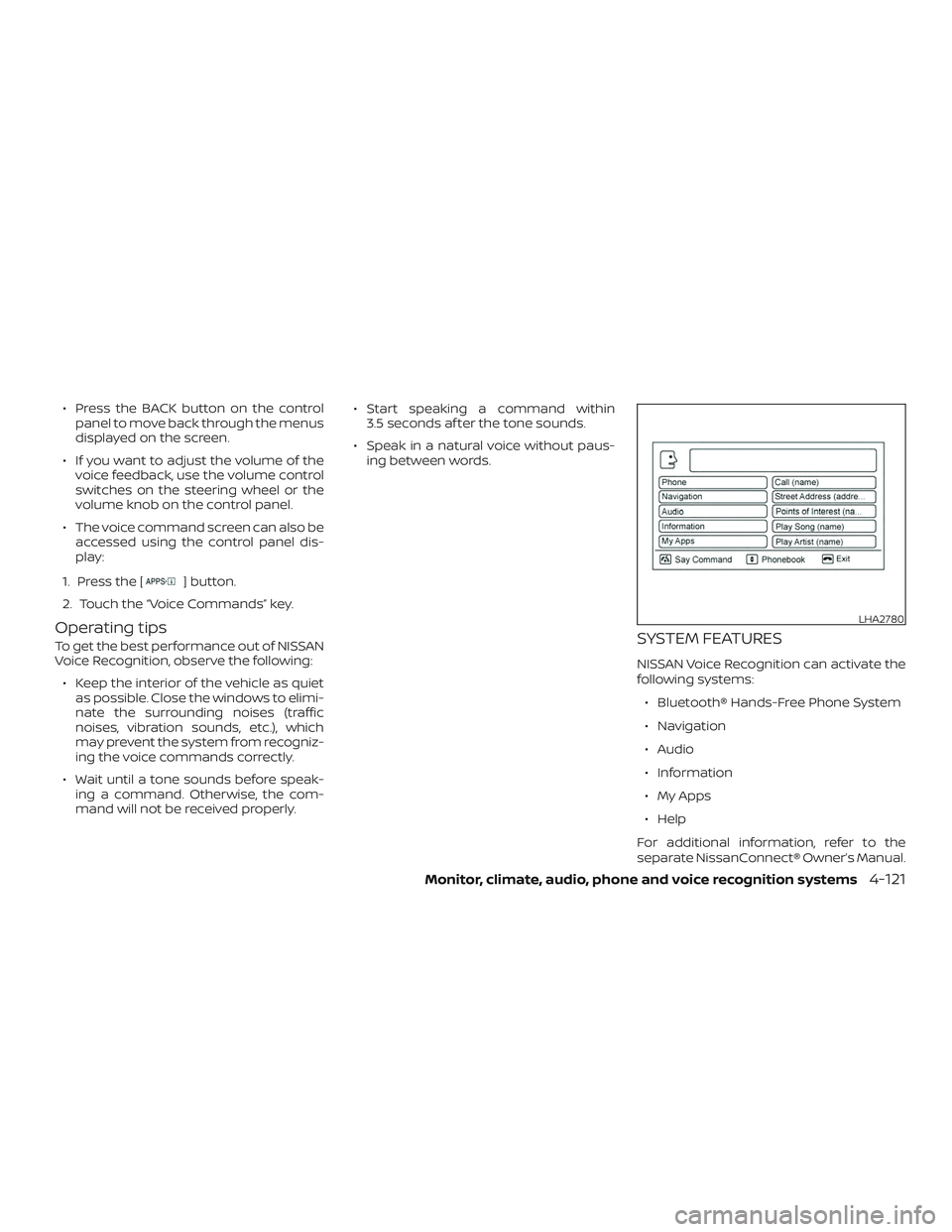
∙ Speak in a natural voice without paus- ing between words.SYSTEM FEATURES
NISSAN Voice Recognition can activate the
following systems:
∙ Bluetooth® Hands-Free Phone System
∙ Navigation
∙ Audio
∙ Information
∙ My Apps
∙ Help
For additional information, refer to the
separate NissanConnect® Owner’s Manual.
LHA2780
Monitor, climate, audio, phone and voice recognition systems4-121
Page 723 of 878
∙ Recent CallsThe system prompts for an additional
command. Say “Missed Calls”, “Incom-
ing Calls” or “Outgoing Calls” to display
a list of such calls on the screen.
Speak the number of the entry dis-
played on the screen to dial that num-
ber or say “Next Page” to view entries
on the next page (if available).
∙ Redial Redials the last called number.
∙ Read Text Reads an incoming text message. For
additional information, refer to
“Bluetooth® Hands-Free Phone Sys-
tem with Navigation System” in this
section.
∙ Send Text Sends a text message. For additional
information, refer to “Bluetooth®
Hands-Free Phone System with Navi-
gation System” in this section. ∙ Select Phone
The system replies “Please use manual
controls to continue”. Use manual con-
trols to change the active phone from
among the listed phones connected
to the vehicle.
∙ Siri® (if so equipped) For additional information about the
Bluetooth® Hands-Free Phone System,
refer to “Bluetooth® Hands-Free Phone
System with Navigation System” in this
section.
For additional information, refer to
“Bluetooth® Hands-Free Phone System
with Navigation System” in this section.NAVIGATION SYSTEM VOICE
COMMANDS
The following voice commands are avail-
able for the navigation system: ∙ Street Address (address)
∙ Points of Interest (name)
∙ POI by Category
∙ Home
∙ Address Book
∙ Previous Destinations
∙ Enter Address in Steps
∙ Cancel Route
For additional information, refer to the
separate NissanConnect® Owner’s Manual.
Monitor, climate, audio, phone and voice recognition systems4-123
Page 863 of 878
DOT (Department of Transportation) Qual-
ity Grades: All passenger car tires must
conform to federal safety requirements in
addition to these grades.
Quality grades can be found where appli-
cable on the tire sidewall between tread
shoulder and maximum section width. For
example:
Treadwear 200 Traction AA Temperature
A
Treadwear
The treadwear grade is a comparative rat-
ing based on the wear rate of the tire when
tested under controlled conditions on a
specified government test course. For ex-
ample, a tire graded 150 would wear one
and one-half (1 1/2) times as well on the
government course as a tire graded 100.
The relative performance of tires depends
upon the actual conditions of their use,
however, and may depart significantly from
the norm due to variations in driving habits,
service practices and differences in road
characteristics and climate.
Traction AA, A, B and C
The traction grades, from highest to low-
est, are AA, A, B, and C. Those grades repre-
sent the tire’s ability to stop on wet pave-ment as measured under controlled
conditions on specified government test
surfaces of asphalt and concrete. A tire
marked C may have poor traction perfor-
mance.
WARNING
The traction grade assigned to this tire
is based on straight-ahead braking
traction tests, and does not include ac-
celeration, cornering, hydroplaning, or
peak traction characteristics.
Temperature A, B and C
The temperature grades are A (the high-
est), B, and C, representing the tire’s resis-
tance to the generation of heat, and its
ability to dissipate heat when tested under
controlled conditions on a specified indoor
laboratory test wheel. Sustained high tem-
perature can cause the material of the tire
to degenerate and reduce tire life, and ex-
cessive temperature can lead to sudden
tire failure. The grade C corresponds to a
level of performance which all passenger
car tires must meet under the Federal Mo-
tor Safety Standard No. 109. Grades B and A
represent higher levels of performance on
the laboratory test wheel than the mini-
mum required by law.
WARNING
The temperature grade for this tire is
established for a tire that is properly in-
flated and not overloaded. Excessive
speed, under-inflation, or excessive
loading, either separately or in combi-
nation, can cause heat build-up and
possible tire failure.
UNIFORM TIRE QUALITY GRADING
Technical and consumer information10-19