AUX NISSAN VERSA NOTE 2018 Owner´s Manual
[x] Cancel search | Manufacturer: NISSAN, Model Year: 2018, Model line: VERSA NOTE, Model: NISSAN VERSA NOTE 2018Pages: 878, PDF Size: 9.62 MB
Page 689 of 878
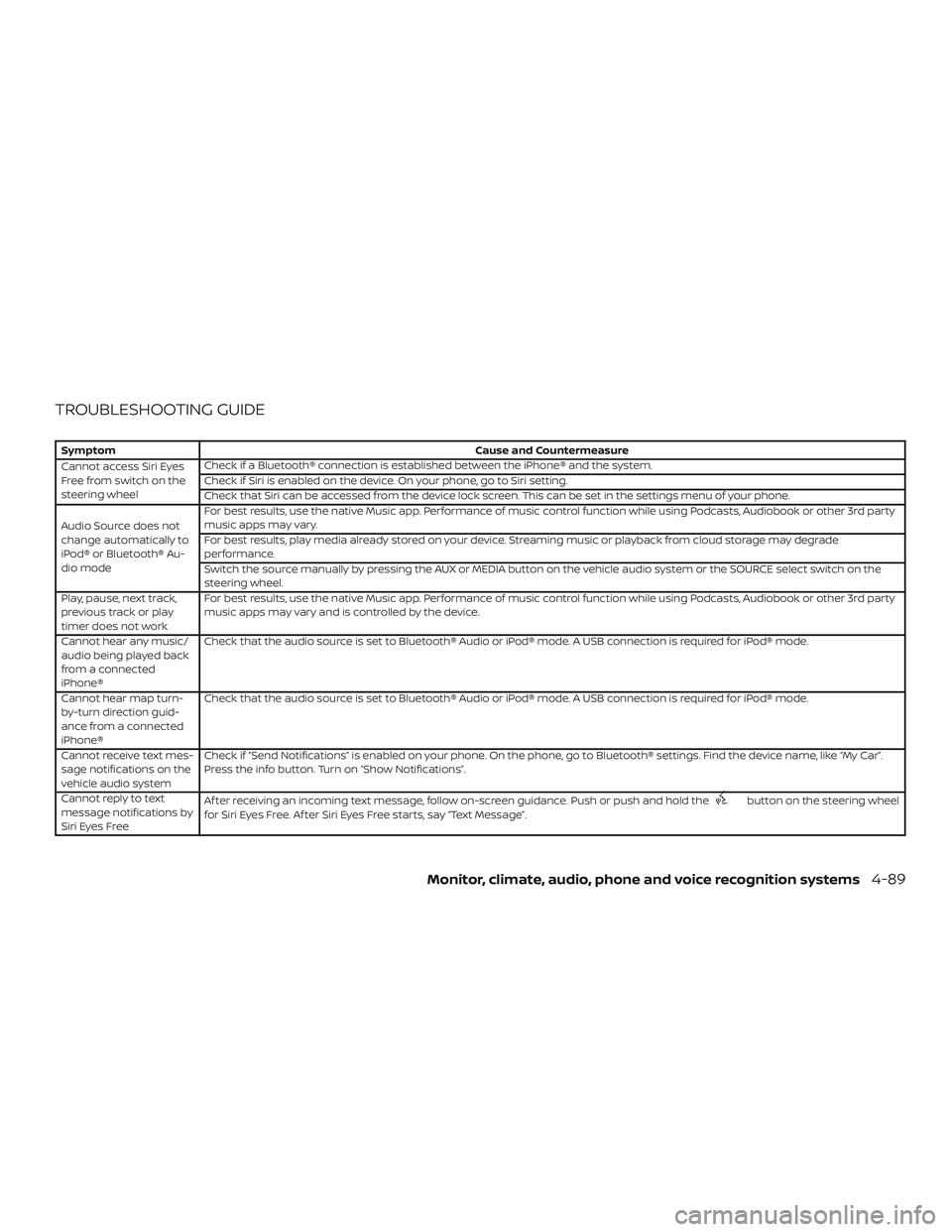
TROUBLESHOOTING GUIDE
SymptomCause and Countermeasure
Cannot access Siri Eyes
Freefromswitchonthe
steering wheel Check if a Bluetooth® connection is established between the iPhone® and the system.
Check if Siri is enabled on the device. On your phone, go to Siri setting.
Check that Siri can be accessed from the device lock screen. This can be set in the settings menu of your phone.
Audio Source does not
change automatically to
iPod® or Bluetooth® Au-
dio mode For best results, use the native Music app. Performance of music control function while using Podcasts, Audiobook or other 3rd party
music apps may vary.
For best results, play media already stored on your device. Streaming music or playback from cloud storage may degrade
performance.
Switch the source manually by pressing the AUX or MEDIA button on the vehicle audio system or the SOURCE select switch on the
steering wheel.
Play, pause, next track,
previous track or play
timer does not work For best results, use the native Music app. Performance of music control function while using Podcasts, Audiobook or other 3rd party
music apps may vary and is controlled by the device.
Cannot hear any music/
audio being played back
from a connected
iPhone® Check that the audio source is set to Bluetooth® Audio or iPod® mode. A USB connection is required for iPod® mode.
Cannot hear map turn-
by-turn direction guid-
ance from a connected
iPhone® Check that the audio source is set to Bluetooth® Audio or iPod® mode. A USB connection is required for iPod® mode.
Cannot receive text mes-
sage notifications on the
vehicle audio system Check if “Send Notifications” is enabled on your phone. On the phone, go to Bluetooth® settings. Find the device name, like “My Car”.
Press the info button. Turn on “Show Notifications”.
Cannot reply to text
message notifications by
Siri Eyes Free Af ter receiving an incoming text message, follow on-screen guidance. Push or push and hold the
button on the steering wheel
for Siri Eyes Free. Af ter Siri Eyes Free starts, say “Text Message”.
Monitor, climate, audio, phone and voice recognition systems4-89
Page 867 of 878
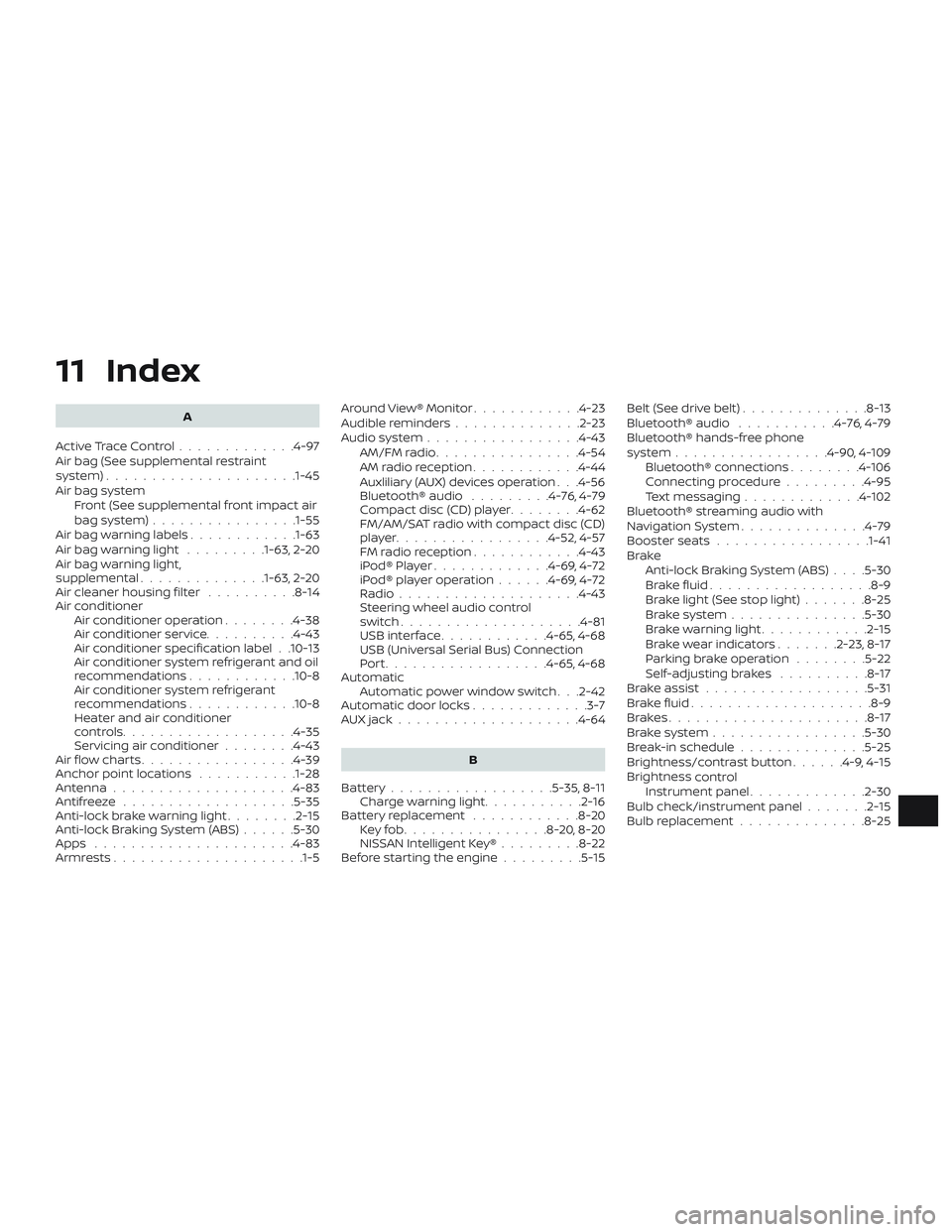
11 Index
A
ActiveTraceControl.............4-97
Air bag (See supplemental restraint
system) .................... .1-45
Air bag system Front (See supplemental front impact air
bagsystem)............... .1-55
Air bag warning labels ............1-63
Airbagwarninglight .........1-63, 2-20
Air bag warning light,
supplemental ..............1-63, 2-20
Air cleaner housing filter ..........8-14
Air conditioner Air conditioner operation ........4-38
Air conditioner service ..........4-43
Air conditioner specification label . .10-13
Air conditioner system refrigerant and oil
recommendations ............10-8
Air conditioner system refrigerant
recommendations ............10-8
Heater and air conditioner
controls...................4-35
Servicing air conditioner ........4-43
Air flow charts .................4-39
Anchor point locations ...........1-28
Antenna ....................4-83
Antifreeze ...................5-35
Anti-lock brake warning light ........2-15
Anti-lock Braking System (ABS) ......5-30
Apps ......................4-83
Armrests.....................1-5 Around View® Monitor
............4-23
Audible reminders ..............2-23
Audiosystem.................4-43 AM/FMradio................4-54
AMradioreception............4-44
Auxliliary (AUX) devices operation . . .4-56
Bluetooth® audio .........4-76,4-79
Compact disc (CD) player ........4-62
FM/AM/SAT radio with compact disc (CD)
player.................4-52,4-57
FMradioreception............4-43
iPod®Player.............4-69,4-72
iPod® player operation ......4-69,4-72
Radio ....................4-43
Steering wheel audio control
switch....................4-81
USBinterface............4-65,4-68
USB (Universal Serial Bus) Connection
Port..................4-65,4-68
Automatic Automatic power window switch . . .2-42
Automatic door locks .............3-7
AUXjack....................4-64
B
Battery..................5-35,8-11 Charge warning light ...........2-16
Battery replacement ............8-20
Keyfob................8-20,8-20
NISSAN Intelligent Key® .........8-22
Before starting the engine .........5-15Belt(Seedrivebelt)..............8-13
Bluetooth® audio
...........4-76,4-79
Bluetooth® hands-free phone
system .................4-90,4-109
Bluetooth® connections ........4-106
Connecting procedure .........4-95
Text messaging .............4-102
Bluetooth® streaming audio with
NavigationSystem..............4-79
Booster seats .................1-41
Brake Anti-lock Braking System (ABS) ....5-30
Brakefluid..................8-9
Brakelight(Seestoplight).......8-25
Brakesystem...............5-30
Brakewarninglight............2-15
Brakewearindicators.......2-23,8-17
Parking brake operation ........5-22
Self-adjustingbrakes ..........8-17
Brakeassist..................5-31
Brakefluid....................8-9
Brakes......................8-17
Brakesystem.................5-30
Break-in schedule ..............5-25
Brightness/contrast button ......4-9,4-15
Brightness
control
Instrument panel .............2-30
Bulb check/instrument panel .......2-15
Bulb replacement ..............8-25