navigation system NISSAN VERSA NOTE 2018 Owner´s Manual
[x] Cancel search | Manufacturer: NISSAN, Model Year: 2018, Model line: VERSA NOTE, Model: NISSAN VERSA NOTE 2018Pages: 878, PDF Size: 9.62 MB
Page 679 of 878
Bluetooth® audio operation
The ability to pause, change tracks, fast
forward, rewind, randomize and repeat
music may be different between devices.
Some or all of these functions may not be
supported on each device.
NOTE:
Depending on the Bluetooth® audio de-
vice that is connected, it may not be pos-
sible to perform audio operations or a
delay may occur before music is played
back.
Activation and playing
A Bluetooth® audio device can be played by
touching the “Bluetooth” key on the Menu
screen or by touching Bluetooth on the
Launch Bar.
To pause playing the Bluetooth® audio,
touch the “
” key. Touch the “”key
to resume playing.
Changing folders
To change folders, touch the “BT Menu” key. Fast-forwarding/rewinding
To fast-forward or rewind the track, push
and hold the
orbuttons on the
control panel or touch the “
”or“”
keys on the screen.
Changing play mode
Repeat mode
Touch the “
” key on the screen to
change the repeat mode.
Random mode
Touch the “
” key on the screen to
change the random mode.
NOTE:
Available repeat/random modes change
depending on the connected device.
BT Menu
Touch the “BT Menu” key on the Bluetooth®
audio screen to display the Bluetooth® au-
dio menu screen.
The following items are available.
“Now Playing” key Touch to display the
Bluetooth® audio screen.
“Current List” key (if so
equipped)* A list of track in the cur-
rently selected folder is
displayed.
“Connections” key Touch to display the connections screen.
“Folder List” key* Touch to display the folder list. Touch an item
on the list to select the
folder.
*: displayed only when available.
NOTE:
Depending on the connected device, the
“BT Menu” key may not be displayed.
BLUETOOTH® STREAMING AUDIO
(models with Navigation System)
(if so equipped)
If you have a compatible Bluetooth® audio
device that is capable of playing audio files,
the device can be connected to the vehi-
cle’s audio system so that the audio files on
the device play through the vehicle’s
speakers.
Monitor, climate, audio, phone and voice recognition systems4-79
Page 683 of 878
∙ Hold theswitch for 1.5 seconds to
fast forward or rewind the track being
played.
ANTENNA
The antenna cannot be shortened, but can
be removed. When you need to remove the
antenna, turn the antenna rod counter-
clockwise.
To install the antenna rod, turn the antenna
rod clockwise and hand tighten.
CAUTION
∙ Always properly tighten the antenna rod during installation or the antenna
rod may break during vehicle
operation.
∙ Be sure that the antenna is removed before the vehicle enters an auto-
matic car wash. This vehicle is equipped with Smartphone
Integration technology. This allows many
compatible Smartphone applications to
be displayed and easily controlled through
the vehicle’s touch-screen.
NOTE:
A compatible smartphone and registra-
tion is required to use mobile applica-
tions or to access connected features of
certain vehicle applications.
REGISTERING WITH
NISSANCONNECT® MOBILE APPS
To use the Smartphone Integration feature,
it is necessary for the user to register. In
order to register, visit the NissanConnect®
Mobile Apps website,
www.nissanusa.com/connect/ or
www.nissan.ca/en/connect or
www.nissan.ca/fr/connect and sign up or
create an account through the prompts on
the NissanConnect® Mobile Apps. Once
registered, download the NissanConnect®
Mobile Apps from your compatible phone’s
application download source and then log
into the application. If you already have an
account created through the App, please
log in.
CONNECT PHONE
To use this feature, a compatible smart-
phone must be connected via Bluetooth®
or USB to the vehicle. For additional infor-
mation on connecting your phone, refer to
“Bluetooth® Hands-Free Phone System
with Navigation System” in this section.
NOTE:
For vehicles with a navigation system,
Apple iPhones® require the phone to be
plugged in via USB for NissanConnect
Mobile Apps to function.
For vehicles without a navigation sys-
tem, Apple iPhones® must be paired via
Bluetooth® for NissanConnect Mobile
Apps to function.
NOTE:
For Android phones, NissanConnect
Mobile Apps requires the phone to be
paired via Bluetooth®.
NISSANCONNECT® MOBILE APPS (if
so equipped)
Monitor, climate, audio, phone and voice recognition systems4-83
Page 684 of 878
APPLICATION DOWNLOAD
Once connected, the NissanConnect® App
will search your phone to determine which
compatible applications are currently in-
stalled. The user will then choose which
apps they want to bring into their vehicle
from the list of apps within the “Manage My
Apps” section of the NissanConnect® App
on their smartphone. The vehicle will then
download the in-vehicle interface for each
of these compatible applications. Once
downloaded, the user can access their se-
lected smartphone applications through
the vehicle touch-screen. For additional in-
formation, refer to
www.nissanusa.com/connect or
www.nissan.ca/en/connect or
www.nissan.ca/fr/connect regarding ap-
plication availability.Apple Siri® Eyes Free personal assistant
can be accessed from the vehicle. Siri Eyes
Free can be accessed in Siri Eyes Free
mode to reduce user distraction. In this
mode, Siri Eyes Free is available for interac-
tion by voice control. Af ter connecting a
compatible Apple device by using
Bluetooth®, Siri Eyes Free can be activated
from the
button on the steering
wheel.
Siri® is a trademark of Apple Inc., registered
in the U.S. and other countries.
∙ Some Siri Eyes Free functions, such as displaying pictures or opening apps,
may not be available while driving.
∙ For getting best results, always update your device to the latest sof tware ver-
sion.
∙ Keep the interior of the vehicle as quiet as possible. Close the windows to elimi-
nate the surrounding noises (traffic
noises, vibration sounds, etc.), which
may prevent the system from recogniz-
ing the voice commands correctly.
∙ For functions that can be used in Siri Eyes Free, please refer to the Apple
website.
REQUIREMENTS
Siri® is only available on the iPhone® 4S or
later. Devices released before iPhone® 4S
are not supported by the Siri® Eyes Free
system. Visit www.apple.com/ios/siri for
details about device compatibility.
Siri must be enabled on the phone. Please
check phone settings.
If the device has a lock screen, Siri must be
accessible from the lock screen. Please
check phone settings.
For best results, always update your device
to the latest sof tware version.
SIRI® EYES FREE (models without
Navigation System) (if so equipped)
4-84Monitor, climate, audio, phone and voice recognition systems
Page 687 of 878
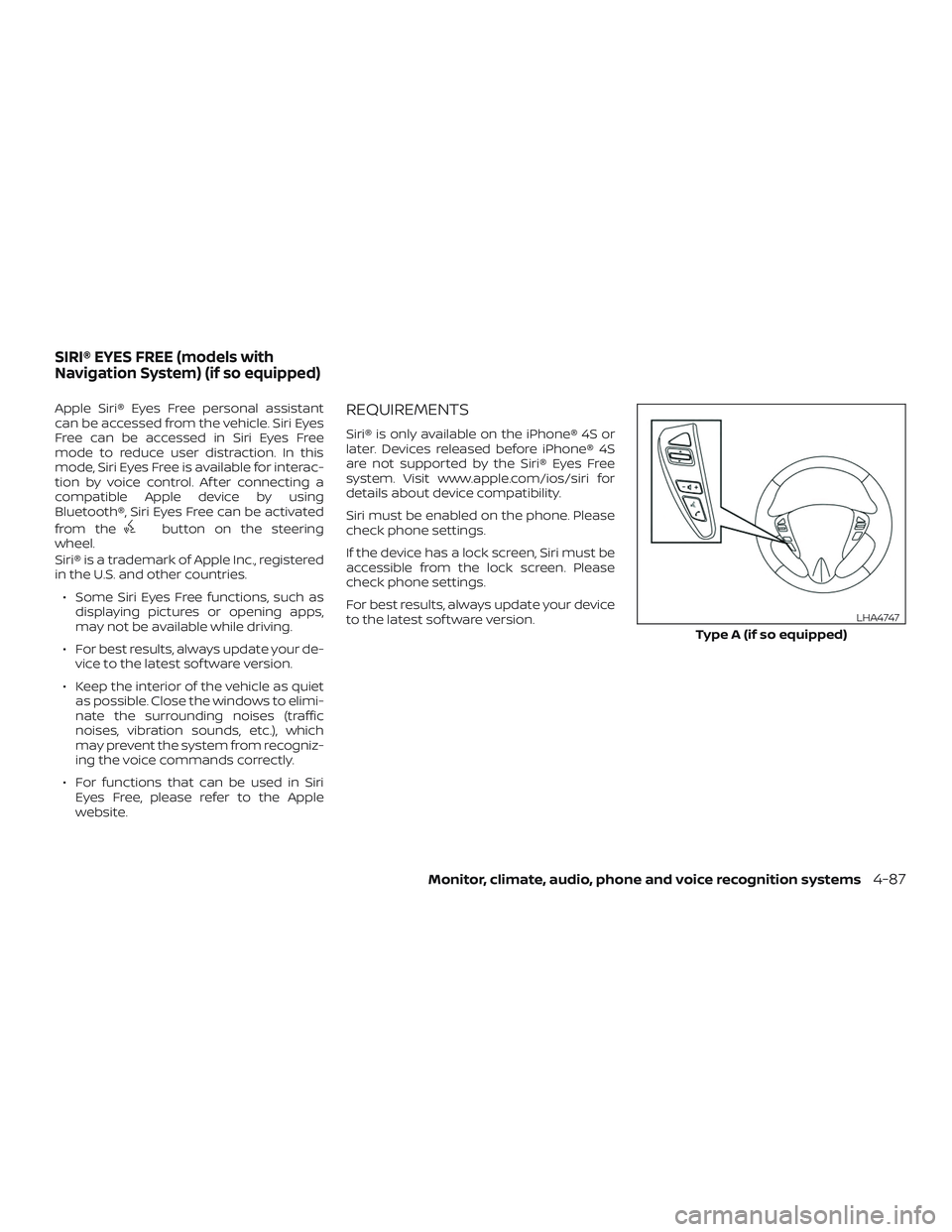
Apple Siri® Eyes Free personal assistant
can be accessed from the vehicle. Siri Eyes
Free can be accessed in Siri Eyes Free
mode to reduce user distraction. In this
mode, Siri Eyes Free is available for interac-
tion by voice control. Af ter connecting a
compatible Apple device by using
Bluetooth®, Siri Eyes Free can be activated
from the
button on the steering
wheel.
Siri® is a trademark of Apple Inc., registered
in the U.S. and other countries.
∙ Some Siri Eyes Free functions, such as displaying pictures or opening apps,
may not be available while driving.
∙ For best results, always update your de- vice to the latest sof tware version.
∙ Keep the interior of the vehicle as quiet as possible. Close the windows to elimi-
nate the surrounding noises (traffic
noises, vibration sounds, etc.), which
may prevent the system from recogniz-
ing the voice commands correctly.
∙ For functions that can be used in Siri Eyes Free, please refer to the Apple
website.
REQUIREMENTS
Siri® is only available on the iPhone® 4S or
later. Devices released before iPhone® 4S
are not supported by the Siri® Eyes Free
system. Visit www.apple.com/ios/siri for
details about device compatibility.
Siri must be enabled on the phone. Please
check phone settings.
If the device has a lock screen, Siri must be
accessible from the lock screen. Please
check phone settings.
For best results, always update your device
to the latest sof tware version.
Type A (if so equipped)
LHA4747
SIRI® EYES FREE (models with
Navigation System) (if so equipped)
Monitor, climate, audio, phone and voice recognition systems4-87
Page 690 of 878
When installing a CB, ham radio or car
phone in your vehicle, be sure to observe
the following precautions; otherwise, the
new equipment may adversely affect the
engine control system and other electronic
parts.
WARNING
∙ A cellular phone should not be usedfor any purpose while driving so full
attention may be given to vehicle op-
eration. Some jurisdictions prohibit
the use of cellular phones while
driving.
∙ If you must make a call while your ve- hicle is in motion, the hands free cellu-
lar phone operational mode is highly
recommended. Exercise extreme cau-
tion at all times so full attention may
be given to vehicle operation.
∙ If you are unable to devote full atten- tion to vehicle operation while talking
on the phone, pull off the road to a
safe location and stop your vehicle.
CAUTION
∙ Keep the antenna as far away as pos-sible from the electronic control
modules.
∙ Keep the antenna wire more than 8 in (20 cm) away from the electronic con-
trol system harnesses. Do not route
the antenna wire next to any harness.
∙ Adjust the antenna standing-wave ratio as recommended by the
manufacturer.
∙ Connect the ground wire from the CB radio chassis to the body.
∙ For additional information, it is rec- ommended that you visit a NISSAN
dealer for servicing.
WARNING
∙ Use a phone af ter stopping your ve-hicle in a safe location. If you have to
use a phone while driving, exercise ex-
treme caution at all times so full at-
tention may be given to vehicle
operation.
∙ If you are unable to devote full atten- tion to vehicle operation while talking
on the phone, pull off the road to a
safe location and stop your vehicle.
CAUTION
To avoid discharging the vehicle bat-
tery, use a phone af ter starting the
engine.
CAR PHONE OR CB RADIO BLUETOOTH® HANDS-FREE PHONE
SYSTEM WITHOUT NAVIGATION
SYSTEM (if so equipped)
4-90Monitor, climate, audio, phone and voice recognition systems
Page 703 of 878
3. The system will provide a list of avail-able commands in order to determine
the recipient of the text message.
Choose from the following:
∙ Phonebook
∙ Quick Dial
∙ Incoming Calls
∙ Outgoing Calls
∙ Missed Calls
∙ Dial
4. Once a recipient is chosen, the system prompts for which message to send.
Nine predefined messages are avail-
able as well as three custom mes-
sages. To choose one of the predefined
messages, speak one of the following
af ter the tone:
∙ “Driving, can’t text”
∙ “Call me”
∙ “On my way ”
∙ “Running late”
∙ “Okay ”
∙ “Yes”
∙ “No” ∙ “Where are you?”
∙ “When?”
To send one of the custom messages,
say “Custom Messages”. If more than
one custom message is stored, the
system will prompt for the number of
the desired custom message. For ad-
ditional information on setting and
managing custom text messages, re-
fer to “Phone and text message set-
tings” in this section.
Reading a received text message
1. Press and hold the
button on the
steering wheel for more than 1.5 sec-
onds.
2. Say “Read Text” af ter the tone.
The display will show a list of 20 messages
with the sender and delivery time. Touch
the “Next” key on the screen to view all mes-
sages. To view a text message press
the
button on the steering wheel and
speak the number item list on the screen.
The following options will be available:
∙ Play Speak this command to have the sys-
tem say the message. ∙ Reply
Speak this command to send a text
message response to the sender of the
text message.
∙ Call Speak this command to call the sender.
∙ Previous Speak this command to move to the
previous text message (if available).
∙Next Speak this command to move to the
next text message (if available).
Siri® Eyes Free (if so equipped)
If a connected phone is equipped with Siri®,
it can also be used to create custom mes-
sages that are sent through the phone. For
additional information, refer to “Siri® Eyes
Free (models with touch-screen without
Navigation System)” in this section.
NOTE:Text messages are only displayed if the
vehicle speed is less than 5 mph (8 km/h).
NOTE:
For Apple iPhones®, text messages can
only be sent through Siri.
Monitor, climate, audio, phone and voice recognition systems4-103
Page 709 of 878
Volume & beeps
There are several methods to customize
the volume settings.
Volume & Beeps
The Volume & Beeps screen can be found
by pressing the
MENU button on the
control panel, touching the “Settings” key
on the screen and selecting “Volume &
Beeps”. To adjust the volume of the follow-
ing options, touch the “–” and “+” keys on the
screen.
The available settings are:
∙ Ringtone Adjust the volume level of the ringtone
of incoming calls.
∙ Outgoing Call Adjust the volume level of the outgoing
calls.
∙ Voice Prompt Vol. Adjust the volume level of the system
voice.
∙ Text-to-speech Vol. Adjust the volume of the replay voice for
text messaging.
∙ Button Beeps Turns on/off the button beep sounds
and alarm for prohibited operations. Volume Settings
The Volume settings screen can be found
by pressing the
button on the control
panel then touching the “Volume” key on
the screen. To adjust the volume of the
following options, touch the “–” and “+” keys
on the screen.
The available settings are:
∙ Ringtone Adjust the volume level of the ringtone
of incoming calls.
∙ Outgoing Call Adjust the volume level of the outgoing
calls.
WARNING
∙ Use a phone af ter stopping your ve-hicle in a safe location. If you have to
use a phone while driving, exercise ex-
treme caution at all times so full at-
tention may be given to vehicle
operation.
∙ If you are unable to devote full atten- tion to vehicle operation while talking
on the phone, pull off the road to a
safe location and stop your vehicle.
CAUTION
To avoid discharging the vehicle bat-
tery, use a phone af ter starting the
engine.
BLUETOOTH® HANDS-FREE PHONE
SYSTEM WITH NAVIGATION SYSTEM
(if so equipped)
Monitor, climate, audio, phone and voice recognition systems4-109
Page 720 of 878
The NISSAN Voice Recognition system al-
lows hands-free operation of the systems
equipped on this vehicle, such as the
phone and navigation systems.
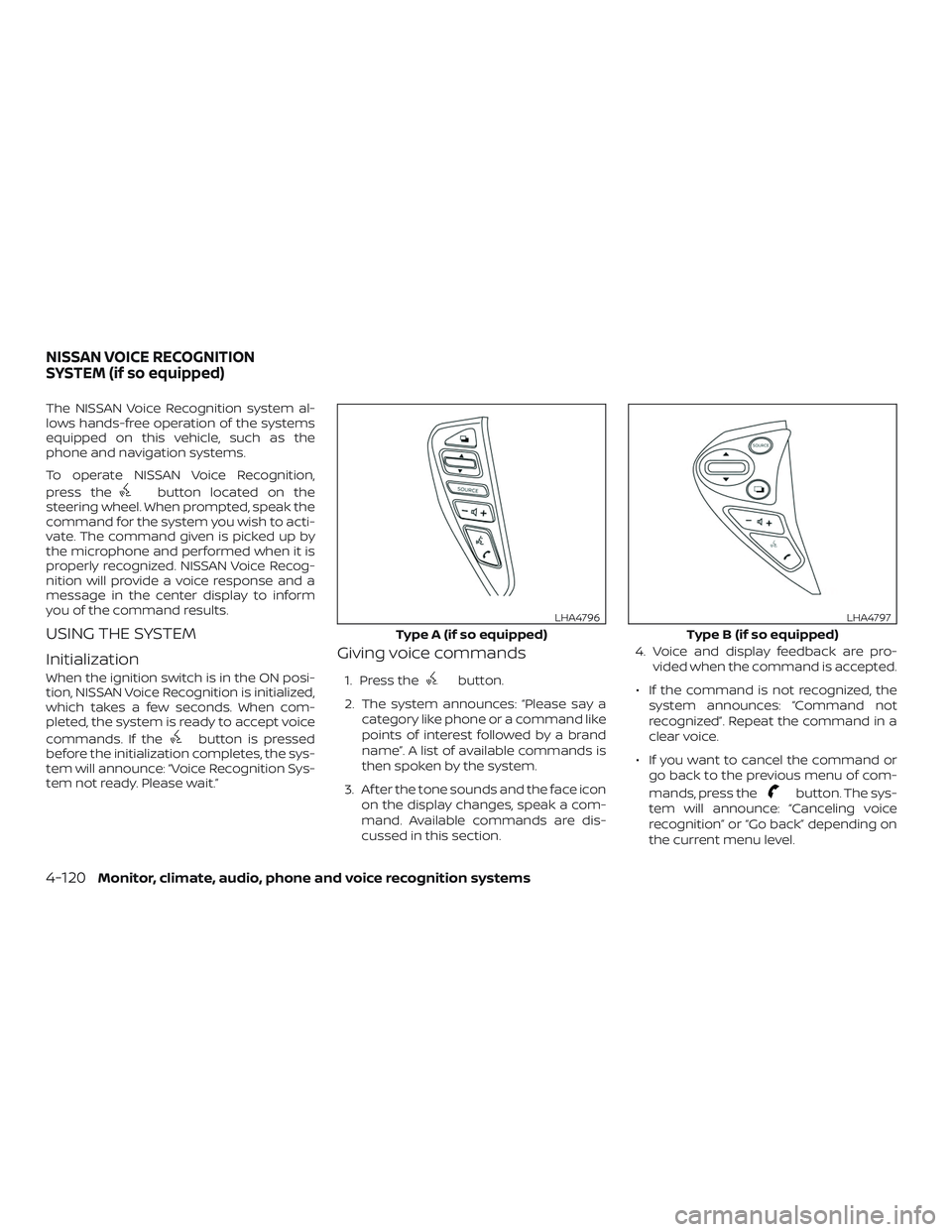
To operate NISSAN Voice Recognition,
press the
button located on the
steering wheel. When prompted, speak the
command for the system you wish to acti-
vate. The command given is picked up by
the microphone and performed when it is
properly recognized. NISSAN Voice Recog-
nition will provide a voice response and a
message in the center display to inform
you of the command results.
USING THE SYSTEM
Initialization
When the ignition switch is in the ON posi-
tion, NISSAN Voice Recognition is initialized,
which takes a few seconds. When com-
pleted, the system is ready to accept voice
commands. If the
button is pressed
before the initialization completes, the sys-
tem will announce: “Voice Recognition Sys-
tem not ready. Please wait.”
Giving voice commands
1. Press thebutton.
2. The system announces: “Please say a category like phone or a command like
points of interest followed by a brand
name”. A list of available commands is
then spoken by the system.
3. Af ter the tone sounds and the face icon on the display changes, speak a com-
mand. Available commands are dis-
cussed in this section. 4. Voice and display feedback are pro-
vided when the command is accepted.
∙ If the command is not recognized, the system announces: “Command not
recognized”. Repeat the command in a
clear voice.
∙ If you want to cancel the command or go back to the previous menu of com-
mands, press the
button. The sys-
tem will announce: “Canceling voice
recognition” or “Go back” depending on
the current menu level.
Type A (if so equipped)
LHA4796
Type B (if so equipped)
LHA4797
NISSAN VOICE RECOGNITION
SYSTEM (if so equipped)
4-120Monitor, climate, audio, phone and voice recognition systems
Page 721 of 878
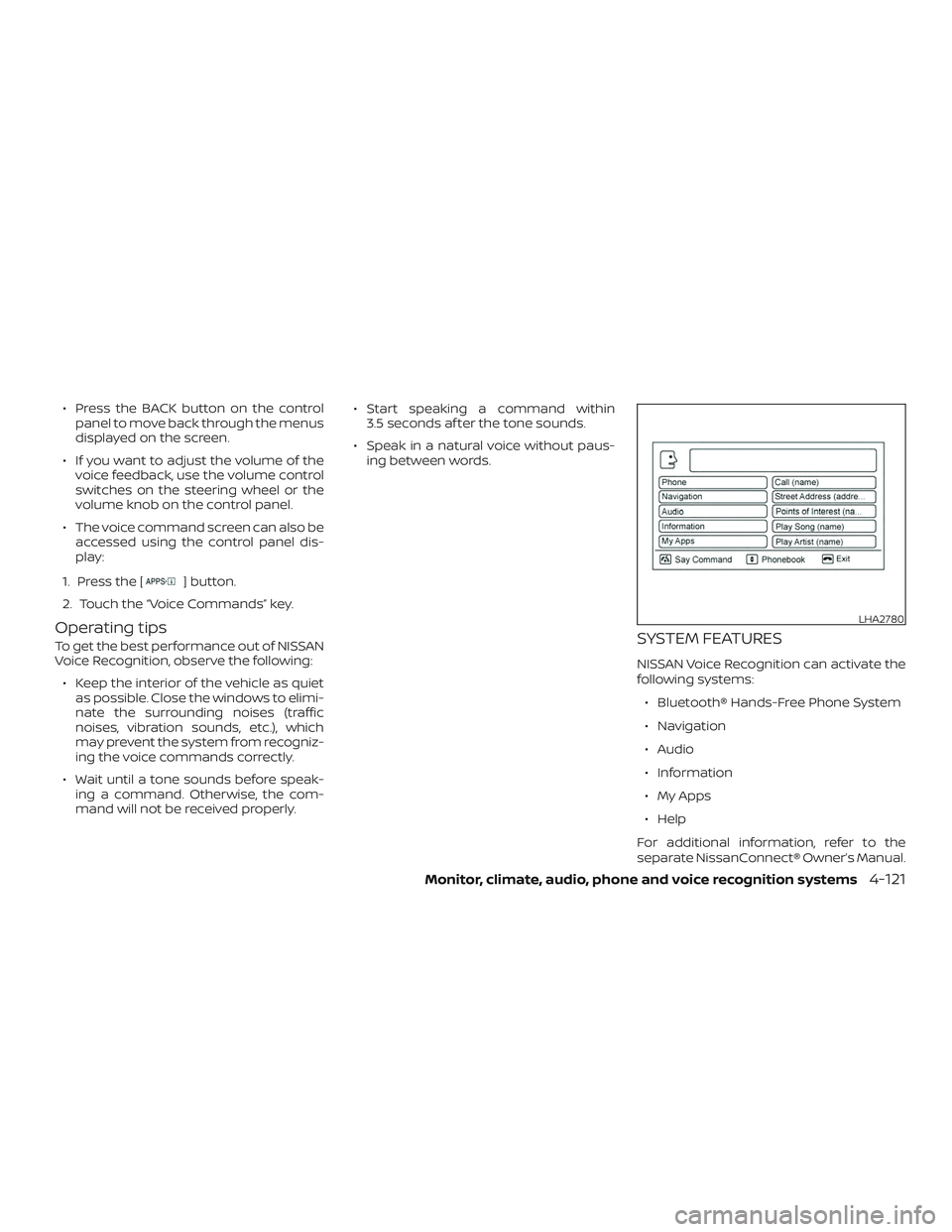
∙ Press the BACK button on the controlpanel to move back through the menus
displayed on the screen.
∙ If you want to adjust the volume of the voice feedback, use the volume control
switches on the steering wheel or the
volume knob on the control panel.
∙ The voice command screen can also be accessed using the control panel dis-
play:
1. Press the [
] button.
2. Touch the “Voice Commands” key.
Operating tips
To get the best performance out of NISSAN
Voice Recognition, observe the following: ∙ Keep the interior of the vehicle as quiet as possible. Close the windows to elimi-
nate the surrounding noises (traffic
noises, vibration sounds, etc.), which
may prevent the system from recogniz-
ing the voice commands correctly.
∙ Wait until a tone sounds before speak- ing a command. Otherwise, the com-
mand will not be received properly. ∙ Start speaking a command within
3.5 seconds af ter the tone sounds.
∙ Speak in a natural voice without paus- ing between words.SYSTEM FEATURES
NISSAN Voice Recognition can activate the
following systems:
∙ Bluetooth® Hands-Free Phone System
∙ Navigation
∙ Audio
∙ Information
∙ My Apps
∙ Help
For additional information, refer to the
separate NissanConnect® Owner’s Manual.
LHA2780
Monitor, climate, audio, phone and voice recognition systems4-121
Page 723 of 878
∙ Recent CallsThe system prompts for an additional
command. Say “Missed Calls”, “Incom-
ing Calls” or “Outgoing Calls” to display
a list of such calls on the screen.
Speak the number of the entry dis-
played on the screen to dial that num-
ber or say “Next Page” to view entries
on the next page (if available).
∙ Redial Redials the last called number.
∙ Read Text Reads an incoming text message. For
additional information, refer to
“Bluetooth® Hands-Free Phone Sys-
tem with Navigation System” in this
section.
∙ Send Text Sends a text message. For additional
information, refer to “Bluetooth®
Hands-Free Phone System with Navi-
gation System” in this section. ∙ Select Phone
The system replies “Please use manual
controls to continue”. Use manual con-
trols to change the active phone from
among the listed phones connected
to the vehicle.
∙ Siri® (if so equipped) For additional information about the
Bluetooth® Hands-Free Phone System,
refer to “Bluetooth® Hands-Free Phone
System with Navigation System” in this
section.
For additional information, refer to
“Bluetooth® Hands-Free Phone System
with Navigation System” in this section.NAVIGATION SYSTEM VOICE
COMMANDS
The following voice commands are avail-
able for the navigation system: ∙ Street Address (address)
∙ Points of Interest (name)
∙ POI by Category
∙ Home
∙ Address Book
∙ Previous Destinations
∙ Enter Address in Steps
∙ Cancel Route
For additional information, refer to the
separate NissanConnect® Owner’s Manual.
Monitor, climate, audio, phone and voice recognition systems4-123