reset NISSAN VERSA NOTE 2019 Owner´s Manual
[x] Cancel search | Manufacturer: NISSAN, Model Year: 2019, Model line: VERSA NOTE, Model: NISSAN VERSA NOTE 2019Pages: 388, PDF Size: 4.46 MB
Page 189 of 388
∙ Some characters used in other lan-guages (Chinese, Japanese, etc.) may
not appear properly in the display. Using
English language characters with a USB
device is recommended.
General notes for USB use: ∙ For additional information, refer to your device manufacturer’s owner informa-
tion regarding the proper use and care
of the device.
Notes for iPod® use:
iPod® is a trademark of Apple Inc., regis-
tered in the U.S. and other countries. ∙ Improperly plugging in the iPod® may cause a checkmark to be displayed on
and off (flickering). Always make sure
that the iPod® is connected properly.
∙ An iPod® nano (1st Generation) may re- main in fast forward or rewind mode if it
is connected during a seek operation. In
this case, please manually reset the
iPod®.
∙ An iPod® nano (2nd Generation) will continue to fast-forward or rewind if it is
disconnected during a seek operation. ∙ An incorrect song title may appear
when the Play Mode is changed while
using an iPod® nano (2nd Generation).
∙ Audiobooks may not play in the same order as they appear on an iPod®.
∙ Large video files cause slow responses in an iPod®. The vehicle center display
may momentarily black out, but will
soon recover.
∙ If an iPod® automatically selects large video files while in the shuffle mode, the
vehicle center display may momen-
tarily black out, but will soon recover.
Bluetooth® streaming audio
∙ Some Bluetooth® audio devices maynot be recognized by the in-vehicle au-
dio system.
∙ It is necessary to set up the wireless connection between a compatible
Bluetooth® audio device and the in-
vehicle Bluetooth® module before using
the Bluetooth® audio.
∙ Operating procedure of the Bluetooth® audio will vary depending on the de-
vices. Make sure how to operate your
audio device before using it with this
system. ∙ The Bluetooth® audio may be stopped
under the following conditions:
∙ Receiving a call on the Bluetooth® Hands-Free Phone System.
∙ Checking the connection to the hands-free phone.
∙ Do not place the Bluetooth® audio de- vice in an area surrounded by metal or
far away from the in-vehicle Bluetooth®
module to prevent tone quality degra-
dation and wireless connection disrup-
tion.
∙ While an audio device is connected through the Bluetooth® wireless con-
nection, the battery power of the device
may discharge quicker than usual.
∙ This system supports the Bluetooth® Audio Distribution Profile (A2DP, AVRCP).
BLUETOOTH® is a
trademark owned
by Bluetooth SIG,
Inc. and licensed
to Panasonic.
Monitor, climate, audio, phone and voice recognition systems4-25
Page 192 of 388

AUDIO button
Push to display the audio screen. When this
button is pushed while the audio screen is
not displayed, the last audio source played
will play.
AM/FM radio screen
1. “AM Menu” / “FM Menu” keyTouch to display the radio menu
screen.
2. Direct Tune Touch to manually enter a station.
3. Audio source indicator Indicates the currently selected audio
source.
4. Reception information display Reception information currently avail-
able such as frequency, station name,
etc. is displayed. 5. Preset list
To listen to a preset station, touch the
corresponding station from the preset
list. If displayed, touch the “ <”or“>”keys
to scroll the preset list.
AM radio operation
Press theMENU button and touch the
“AM” key or press the AUDIO button and
select AM on the bottom of the Launch Bar
to bring up the AM display screen.
If another audio source is playing when the
“AM” key is pressed, the audio source play-
ing will automatically be turned off and the
last radio station played will begin playing.
AM Menu
Touch the “AM Menu” key to display the AM
Menu screen options:
∙ SCAN: To scan tune the stations, touch the “AM Menu” key on the radio screen
and then touch the “SCAN” key. The sta-
tions will be tuned from low to high fre-
quencies and stop at each broadcast-
ing station for several seconds.
Touching the “SCAN” key again during
this period of several seconds will stop
tuning and the radio will remain tuned
to that station.
LHA4708
4-28Monitor, climate, audio, phone and voice recognition systems
Page 193 of 388
∙ Refresh: Touch the “Refresh” key to scanand update the station list displayed on
the right side of the AM Menu screen.
(SEEK/TRACK) buttons
Press the
orbuttons to tune
from low to high or high to low frequencies
and to stop at the next broadcasting sta-
tion.
1 to 6 station memory operations
Up to six stations can be registered in the
preset list.
1. Select the AM radio band.
2. Tune to the station you wish to store.
3. Touch and hold one of the preset num- bers in the preset list.
The information such as frequency will be
displayed on the preset list.
To select and listen to the preset stations,
push
oron the steering wheel
briefly or touch a preferred station on the
preset list on the radio screen.
FM radio operation
Press theMENU button and touch the
“FM” key or press the AUDIO button and
select FM on the bottom of the Launch Bar
to bring up the FM display screen.
If another audio source is playing when the
“FM” key is pressed, the audio source play-
ing will automatically be turned off and the
last radio station played will begin playing.
The FM stereo indicator (STEREO) is shown
on the screen during FM stereo reception.
When the stereo broadcast signal is weak,
the radio automatically changes from ste-
reo to monaural reception.
FM Menu
Touch the “FM Menu” key to display the FM
Menu screen options:
∙ SCAN: To scan tune the stations, touch the “FM Menu” key on the radio screen
and then touch the “SCAN” key. The sta-
tions will be tuned from low to high fre-
quencies and stop at each broadcast-
ing stations for several seconds.
Touching the “SCAN” key again during
this period of several seconds will stop
tuning and the radio will remain tuned
to that station. ∙ Refresh: Touch the “Refresh” key to up-
date the station list displayed on the
right side of the FM Menu screen.
∙ RDS Info: Radio station and song infor- mation can be displayed on the FM dis-
play screen.
(SEEK/TRACK) buttons
Press the
orbuttons to tune
from low to high or high to low frequencies
and to stop at the next broadcasting sta-
tion.
1 to 12 Station memory operations
Up to 12 stations can be registered in the
preset list.
1. Select the FM radio band.
2. Tune to the station you wish to store.
3. Touch and hold one of the preset num- bers in the preset list.
The information such as frequency will be
displayed on the preset list.
To select and listen to the preset stations,
push
oron the steering wheel
briefly or touch a preferred station on the
preset list on the radio screen.
Monitor, climate, audio, phone and voice recognition systems4-29
Page 206 of 388
Tuning switch
For most audio sources, pressing the
switches for more than 1.5 seconds pro-
vides a different function than pressing for
less than 1.5 seconds.
AM and FM:∙ Push the
switch for less than
1.5 seconds to increase or decrease the
preset station.
∙ Push the
switch for more than
1.5 seconds to seek up or down to the
next station.
iPod®:
∙ Push the
switch for less than
1.5 seconds to increase or decrease the
track number.
∙ Hold the
switch for 1.5 seconds to
fast forward or rewind the track being
played.
USB:
∙ Push the
switch for less than
1.5 seconds to increase or decrease the
track number.
∙ Hold the
switch for 1.5 seconds to
fast forward or rewind the track being
played. Bluetooth® Audio:
∙ Push the
switch for less than
1.5 seconds to skip ahead or back to the
next song.
∙ Hold the
switch for 1.5 seconds to
fast forward or rewind the track being
played.
ANTENNA
The antenna cannot be shortened, but can
be removed. When you need to remove the
antenna, turn the antenna rod counter-
clockwise.
To install the antenna rod, turn the antenna
rod clockwise and hand tighten.
CAUTION
∙ Always properly tighten the antenna rod during installation or the antenna
rod may break during vehicle
operation.
∙ Be sure that the antenna is removed before the vehicle enters an auto-
matic car wash. Apple Siri® Eyes Free personal assistant
can be accessed from the vehicle. Siri Eyes
Free can be accessed in Siri Eyes Free
mode to reduce user distraction. In this
mode, Siri Eyes Free is available for interac-
tion by voice control. Af ter connecting a
compatible Apple device by using
Bluetooth®, Siri Eyes Free can be activated
from the
button on the steering
wheel.
Siri® is a trademark of Apple Inc., registered
in the U.S. and other countries.
∙ Some Siri Eyes Free functions, such as displaying pictures or opening apps,
may not be available while driving.
∙ For getting best results, always update your device to the latest sof tware ver-
sion.
∙ Keep the interior of the vehicle as quiet as possible. Close the windows to elimi-
nate the surrounding noises (traffic
noises, vibration sounds, etc.), which
may prevent the system from recogniz-
ing the voice commands correctly.
∙ For functions that can be used in Siri Eyes Free, please refer to the Apple
website.
SIRI® EYES FREE
4-42Monitor, climate, audio, phone and voice recognition systems
Page 235 of 388
∙ When replacing a wheel without theTPMS such as the spare tire, when a
spare tire is mounted or a wheel is
replaced, the TPMS will not function
and the low tire pressure warning
light will flash for approximately
1 minute. The light will remain on af ter
1 minute. Have your tires replaced
and/or TPMS system reset as soon as
possible. It is recommended that you
visit a NISSAN dealer for this service.
∙ Replacing tires with those not origi- nally specified by NISSAN could affect
the proper operation of the TPMS.
∙ Do not inject any tire liquid or aerosol tire sealant into the tires, as this may
cause a malfunction of the tire pres-
sure sensors.
CAUTION
Do not place metalized film or any
metal parts (antenna, etc.) on the win-
dows. This may cause poor reception of
the signals from the tire pressure sen-
sors, and the TPMS will not function
properly. Some devices and transmitters may tem-
porarily interfere with the operation of the
TPMS and cause the low tire pressure
warning light to illuminate.
Some examples are:
∙ Facilities or electric devices using simi- lar radio frequencies are near the ve-
hicle.
∙ If a transmitter set to similar frequen- cies is being used in or near the vehicle.
∙ If a computer (or similar equipment) or a DC/AC converter is being used in or
near the vehicle.
The low tire pressure warning light may
illuminate in the following cases: ∙ If the vehicle is equipped with a wheel and tire without TPMS.
∙ If the TPMS has been replaced and the ID has not been registered.
∙ If the wheel is not originally specified by NISSAN. FCC Notice:
For USA:
This device complies with Part 15 of the
FCC Rules. Operation is subject to the fol-
lowing two conditions: (1) This device
may not cause harmful interference, and
(2) this device must accept any interfer-
ence received, including interference
that may cause undesired operation.
NOTE:
Changes or modifications not expressly
approved by the party responsible for
compliance could void the user’s author-
ity to operate the equipment.
For Canada:
This device complies with Industry
Canada licence-exempt RSS standard(s).
Operation is subject to the following two
conditions: (1) this device may not cause
interference, and (2) this device must ac-
cept any interference, including interfer-
ence that may cause undesired opera-
tion of the device.
Starting and driving5-5
Page 255 of 388
WARNING
Do not use the cruise control when driv-
ing under the following conditions:
∙ When it is not possible to keep thevehicle at a set speed.
∙ In heavy traffic or in traffic that varies in speed.
∙ On winding or hilly roads.
∙ On slippery roads (rain, snow, ice, etc.).
∙ In very windy areas.
Doing so could cause a loss of vehicle
control and result in an accident.
CAUTION
On manual transmission models, do not
shif t into N (Neutral) without depress-
ing the clutch pedal when the cruise
control is set. Should this occur, depress
the clutch pedal and turn the ON/OFF
switch off immediately. Failure to do so
may cause engine damage.
CRUISE CONTROL OPERATIONS
The cruise control allows driving at a speed
between 25 - 89 mph (40 - 144 km/h) with-
out keeping your foot on the accelerator
pedal.
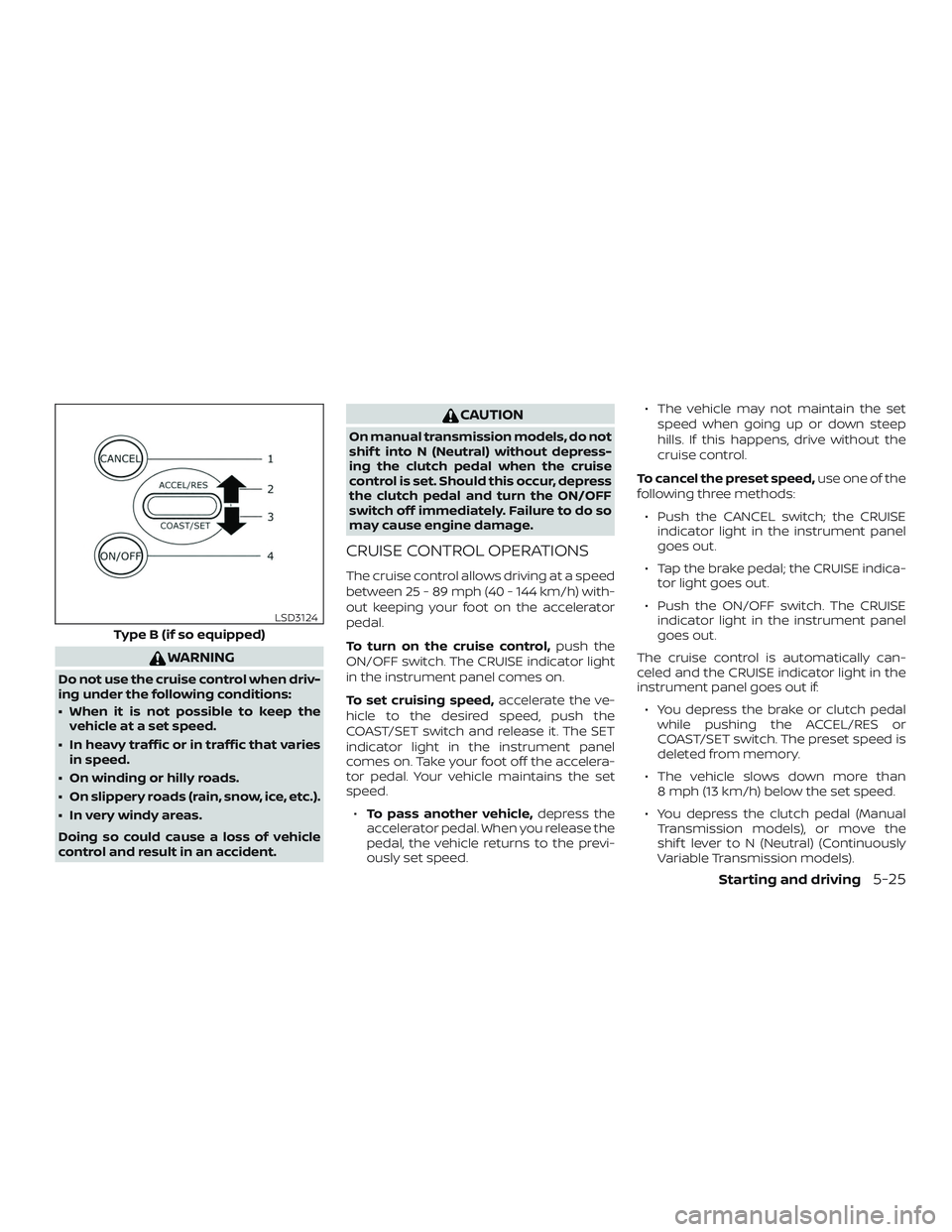
To turn on the cruise control, push the
ON/OFF switch. The CRUISE indicator light
in the instrument panel comes on.
To set cruising speed, accelerate the ve-
hicle to the desired speed, push the
COAST/SET switch and release it. The SET
indicator light in the instrument panel
comes on. Take your foot off the accelera-
tor pedal. Your vehicle maintains the set
speed.
∙ To pass another vehicle, depress the
accelerator pedal. When you release the
pedal, the vehicle returns to the previ-
ously set speed. ∙ The vehicle may not maintain the set
speed when going up or down steep
hills. If this happens, drive without the
cruise control.
To cancel the preset speed, use one of the
following three methods:
∙ Push the CANCEL switch; the CRUISE indicator light in the instrument panel
goes out.
∙ Tap the brake pedal; the CRUISE indica- tor light goes out.
∙ Push the ON/OFF switch. The CRUISE indicator light in the instrument panel
goes out.
The cruise control is automatically can-
celed and the CRUISE indicator light in the
instrument panel goes out if: ∙ You depress the brake or clutch pedal while pushing the ACCEL/RES or
COAST/SET switch. The preset speed is
deleted from memory.
∙ The vehicle slows down more than 8 mph (13 km/h) below the set speed.
∙ You depress the clutch pedal (Manual Transmission models), or move the
shif t lever to N (Neutral) (Continuously
Variable Transmission models).
Type B (if so equipped)
LSD3124
Starting and driving5-25
Page 256 of 388
To reset at a faster cruising speed,use
one of the following three methods:
∙ Depress the accelerator pedal. When the vehicle attains the desired speed,
push and release the COAST/SET
switch.
∙ Push and hold the ACCEL/RES switch. When the vehicle attains the speed you
desire, release the switch.
∙ Push and release the ACCEL/RES switch. Each time you do this, the set
speed increases by about 1 mph
(1.6 km/h).
To reset at a slower cruising speed, use
one of the following three methods:
∙ Lightly tap the brake pedal. When the vehicle attains the desired speed, push
the COAST/SET switch and release it.
∙ Push and hold the COAST/SET switch. Release the switch when the vehicle
slows to the desired speed.
∙ Push and release the COAST/SET switch. Each time you do this, the set
speed decreases by about 1 mph
(1.6 km/h). To resume the preset speed,
push and
release the ACCEL/RES switch. The vehicle
returns to the last set cruising speed when
the vehicle speed is over 25 mph (40 km/h).CAUTION
During the first 1,200 miles (2,000 km),
follow these recommendations to ob-
tain maximum engine performance
and ensure the future reliability and
economy of your new vehicle. Failure to
follow these recommendations may re-
sult in shortened engine life and re-
duced engine performance.
∙ Avoid driving for long periods at con- stant speed, either fast or slow, and do
not run the engine over 4,000 rpm.
∙ Do not accelerate at full throttle in any gear.
∙ Avoid quick starts.
∙ Avoid hard braking as much as pos- sible.
BREAK-IN SCHEDULE
5-26Starting and driving
Page 264 of 388
prevent one drive wheel from slipping by
transferring power to a non-slipping drive
wheel. The
indicator light flashes if
this occurs. All other VDC functions are off
and the
indicator light will not flash.
The VDC system is automatically reset to
on when the ignition switch is placed in the
OFF position then back to the ON position.
The computer has a built-in diagnostic fea-
ture that tests the system each time you
start the engine and move the vehicle for-
ward or in reverse at a slow speed. When
the self-test occurs, you may hear a clunk
noise and/or feel a pulsation in the brake
pedal. This is normal and is not an indica-
tion of a malfunction.
WARNING
∙ The VDC system is designed to help the driver maintain stability but does
not prevent accidents due to abrupt
steering operation at high speeds or
by careless or dangerous driving
techniques. Reduce vehicle speed and
be especially careful when driving and
cornering on slippery surfaces and al-
ways drive carefully. ∙ Do not modif y the vehicle’s suspen-
sion. If suspension parts such as
shock absorbers, struts, springs, sta-
bilizer bars, bushings and wheels are
not NISSAN recommended for your
vehicle or are extremely deteriorated,
the VDC system may not operate
properly. This could adversely affect
vehicle handling performance, and
the
indicator light may flash or
the
indicator light may
illuminate.
∙ If brake related parts such as brake pads, rotors and calipers are not
NISSAN recommended or are ex-
tremely deteriorated, the VDC system
may not operate properly and both
the
and theindicator
lights may illuminate.
∙ If engine control related parts are not NISSAN recommended or are ex-
tremely deteriorated, both the
andindicator lights may
illuminate. ∙ When driving on extremely inclined
surfaces such as higher banked cor-
ners, the VDC system may not operate
properly and the
indicator light
may flash or the
indicator light
may illuminate. Do not drive on these
types of roads.
∙ When driving on an unstable surface such as a turntable, ferry, elevator or
ramp, the
indicator light may
flash or the
indicator light may
illuminate. This is not a malfunction.
Restart the engine af ter driving onto
a stable surface.
∙ If wheels or tires other than the NISSAN recommended ones are used,
the VDC system may not operate
properly and the
indicator light
may flash or the
indicator light
may illuminate.
∙ The VDC system is not a substitute for winter tires or tire chains on a snow
covered road.
5-34Starting and driving
Page 271 of 388
TIRE PRESSURE MONITORING
SYSTEM (TPMS) (if so equipped)
This vehicle is equipped with the Tire Pres-
sure Monitoring System (TPMS). It monitors
tire pressure of all tires except the spare.
When the low tire pressure warning light is
lit, and the CHECK TIRE PRES (pressure)
warning message is displayed in the
odometer, one or more of your tires is sig-
nificantly under-inflated. If the vehicle is be-
ing driven with low tire pressure, the TPMS
will activate and warn you of it by the low
tire pressure warning light. This system will
activate only when the vehicle is driven at
speeds above 16 mph (25 km/h). For addi-
tional information, refer to “Warning lights,
indicator lights and audible reminders” in
the “Instruments and controls” section, and
“Tire Pressure Monitoring System (TPMS)” in
the “Starting and driving” section of this
manual.
WARNING
∙ Radio waves could adversely affectelectric medical equipment. Those
who use a pacemaker should contact
the electric medical equipment
manufacturer for the possible influ-
ences before use. ∙ If the low tire pressure warning light
illuminates while driving, avoid sud-
den steering maneuvers or abrupt
braking, reduce vehicle speed, pull off
the road to a safe location and stop
the vehicle as soon as possible. Driv-
ing with under-inflated tires may per-
manently damage the tires and in-
crease the likelihood of tire failure.
Serious vehicle damage could occur
and may lead to an accident and could
result in serious personal injury.
Check the tire pressure for all four
tires. Adjust the tire pressure to the
recommended COLD tire pressure
shown on the Tire and Loading Infor-
mation label to turn the low tire pres-
sure warning light OFF. If you have a
flat tire, replace it with a spare tire as
soon as possible.
∙ When replacing a wheel without TPMS such as the spare tire, TPMS will not
function and the low tire pressure
warning light will flash for approxi-
mately 1 minute. The light will remain
on af ter 1 minute. Have your tires re-
placed and/or TPMS system reset as
soon as possible. It is recommended
that you visit a NISSAN dealer for
these services. ∙ Do not inject any tire liquid or aerosol
tire sealant into the tires, as this may
cause a malfunction of the tire pres-
sure sensors.
∙ Replacing tires with those not origi- nally specified by NISSAN could affect
the proper operation of the TPMS.
CHANGING A FLAT TIRE
If you have a flat tire, follow the instructions
below:
Stopping the vehicle
1. Safely move the vehicle off the road and
away from traffic.
2. Turn on the hazard warning flashers.
3. Park on a level surface and apply the parking brake. Shif t the manual trans-
mission into R (Reverse) or the Continu-
ously Variable Transmission (CVT) into
P (Park).
4. Turn off the engine.
5. Raise the hood to warn other traffic and to signal professional road assis-
tance personnel that you need assis-
tance.
FLAT TIRE
In case of emergency6-3
Page 334 of 388
∙ When replacing a wheel without theTPMS, such as the spare tire, the TPMS
will not function and the low tire pres-
sure warning light will flash for ap-
proximately 1 minute. The light will re-
main on af ter 1 minute. Have your
tires replaced and/or TPMS system
reset as soon as possible. It is recom-
mended that you visit a NISSAN dealer
for this service.
∙ Replacing tires with those not origi- nally specified by NISSAN could affect
the proper operation of the TPMS (if so
equipped).
∙ The TPMS sensor may be damaged if it is not handled correctly. Be careful
when handling the TPMS sensor.
∙ When replacing the TPMS sensor, the ID registration may be required. Con-
tact a NISSAN dealer for ID
registration.
∙ Do not use a valve stem cap that is not specified by NISSAN. The valve stem
cap may become stuck. ∙ Be sure that the valve stem caps are
correctly fitted. Otherwise the valve
may be clogged up with dirt and
cause a malfunction or loss of
pressure.
∙ Do not install a damaged or deformed wheel or tire even if it has been re-
paired. Such wheels or tires could
have structural damage and could fail
without warning.
∙ The use of retread tires is not recommended.
∙ For additional information regarding tires, refer to “Important Tire Safety
Information” (US) or “Tire Safety Infor-
mation” (Canada) in the Warranty In-
formation Booklet.
Wheel balance
Unbalanced wheels may affect vehicle
handling and tire life. Even with regular use,
wheels can get out of balance. Therefore,
they should be balanced as required. Wheel balance service should be per-
formed with the wheels off the vehicle.
Spin balancing the wheels on the vehicle
could lead to mechanical damage.
∙ For additional information regarding
tires, refer to “Important Tire Safety
Information” (US) or “Tire Safety In-
formation” (Canada) in the Warranty
Information Booklet.
Care of wheels
∙ Wash the wheels when washing the ve- hicle to maintain their appearance.
∙ Clean the inner side of the wheels when the wheel is changed or the underside
of the vehicle is washed.
∙ Do not use abrasive cleaners when washing the wheels.
∙ Inspect wheel rims regularly for dents or corrosion. Such damage may cause
loss of pressure or poor seal at the tire
bead.
∙ NISSAN recommends waxing the road wheels to protect against road salt in
areas where it is used during winter.
8-40Do-it-yourself