tire pressure NISSAN VERSA NOTE 2020 Owner´s Manual
[x] Cancel search | Manufacturer: NISSAN, Model Year: 2020, Model line: VERSA NOTE, Model: NISSAN VERSA NOTE 2020Pages: 492, PDF Size: 6.12 MB
Page 113 of 492
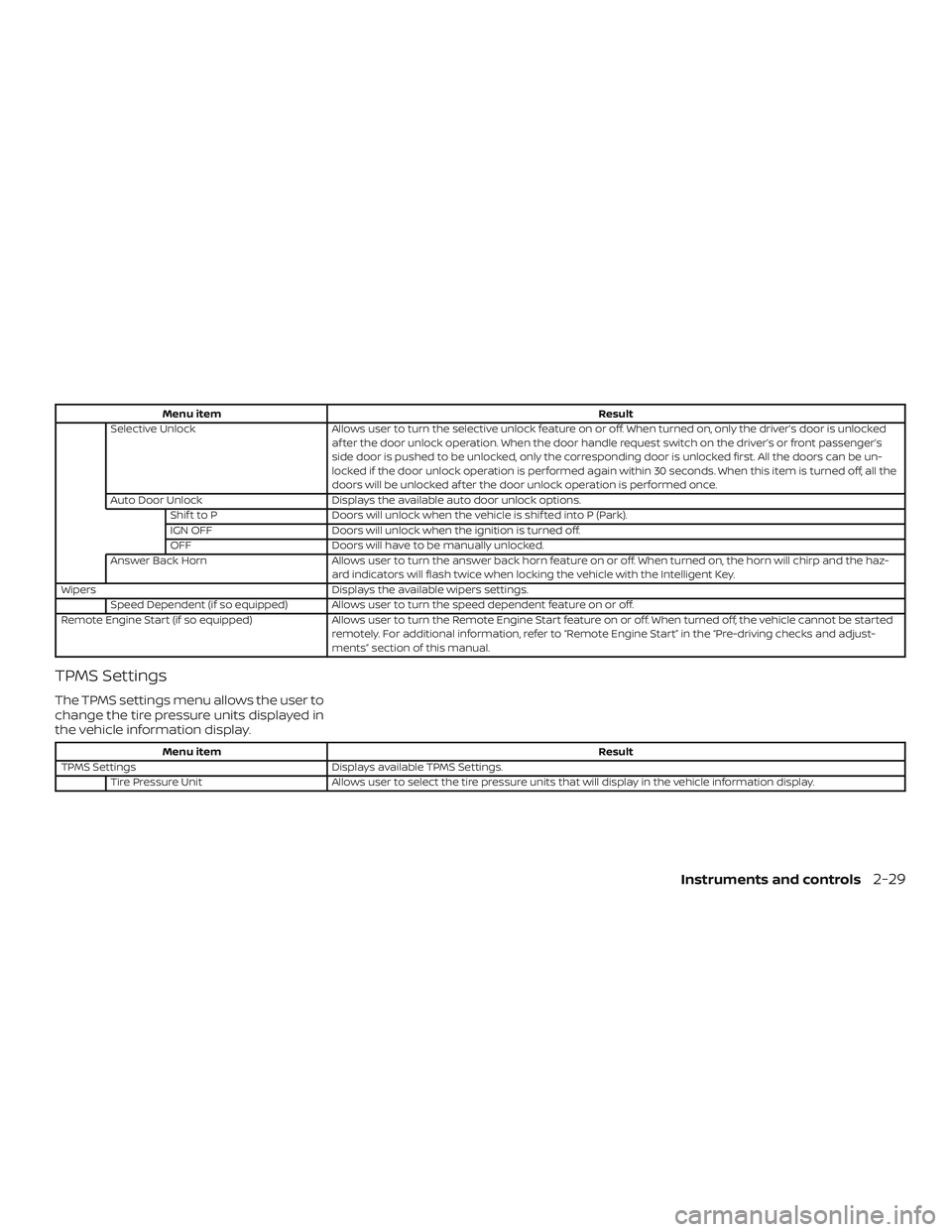
Menu itemResult
Selective Unlock Allows user to turn the selective unlock feature on or off. When turned on, only the driver’s door is unlocked
af ter the door unlock operation. When the door handle request switch on the driver’s or front passenger’s
side door is pushed to be unlocked, only the corresponding door is unlocked first. All the doors can be un-
locked if the door unlock operation is performed again within 30 seconds. When this item is turned off, all the
doors will be unlocked af ter the door unlock operation is performed once.
Auto Door Unlock Displays the available auto door unlock options.
Shif t to P Doors will unlock when the vehicle is shif ted into P (Park).
IGN OFF Doors will unlock when the ignition is turned off.
OFF Doors will have to be manually unlocked.
Answer Back Horn Allows user to turn the answer back horn feature on or off. When turned on, the horn will chirp and the haz-
ard indicators will flash twice when locking the vehicle with the Intelligent Key.
Wipers Displays the available wipers settings.
Speed Dependent (if so equipped) Allows user to turn the speed dependent feature on or off.
Remote Engine Start (if so equipped) Allows user to turn the Remote Engine Start feature on or off. When turned off, the vehicle cannot be started
remotely. For additional information, refer to “Remote Engine Start” in the “Pre-driving checks and adjust-
ments” section of this manual.
TPMS Settings
The TPMS settings menu allows the user to
change the tire pressure units displayed in
the vehicle information display.
Menu item Result
TPMS Settings Displays available TPMS Settings.
Tire Pressure Unit Allows user to select the tire pressure units that will display in the vehicle information display.
Instruments and controls2-29
Page 114 of 492
Maintenance
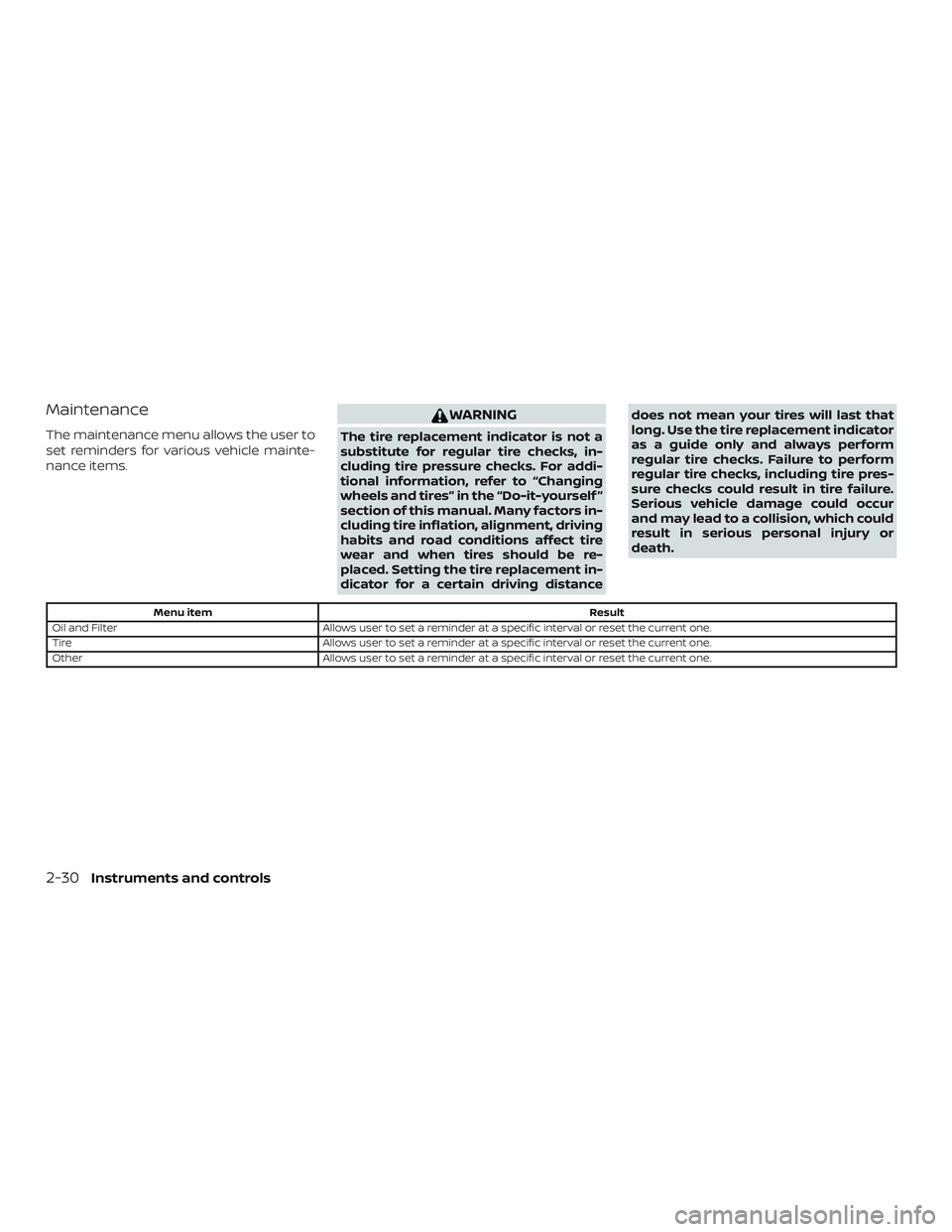
The maintenance menu allows the user to
set reminders for various vehicle mainte-
nance items.
WARNING
The tire replacement indicator is not a
substitute for regular tire checks, in-
cluding tire pressure checks. For addi-
tional information, refer to “Changing
wheels and tires” in the “Do-it-yourself ”
section of this manual. Many factors in-
cluding tire inflation, alignment, driving
habits and road conditions affect tire
wear and when tires should be re-
placed. Setting the tire replacement in-
dicator for a certain driving distancedoes not mean your tires will last that
long. Use the tire replacement indicator
as a guide only and always perform
regular tire checks. Failure to perform
regular tire checks, including tire pres-
sure checks could result in tire failure.
Serious vehicle damage could occur
and may lead to a collision, which could
result in serious personal injury or
death.
Menu item
Result
Oil and Filter Allows user to set a reminder at a specific interval or reset the current one.
Tire Allows user to set a reminder at a specific interval or reset the current one.
Other Allows user to set a reminder at a specific interval or reset the current one.
2-30Instruments and controls
Page 115 of 492
Clock
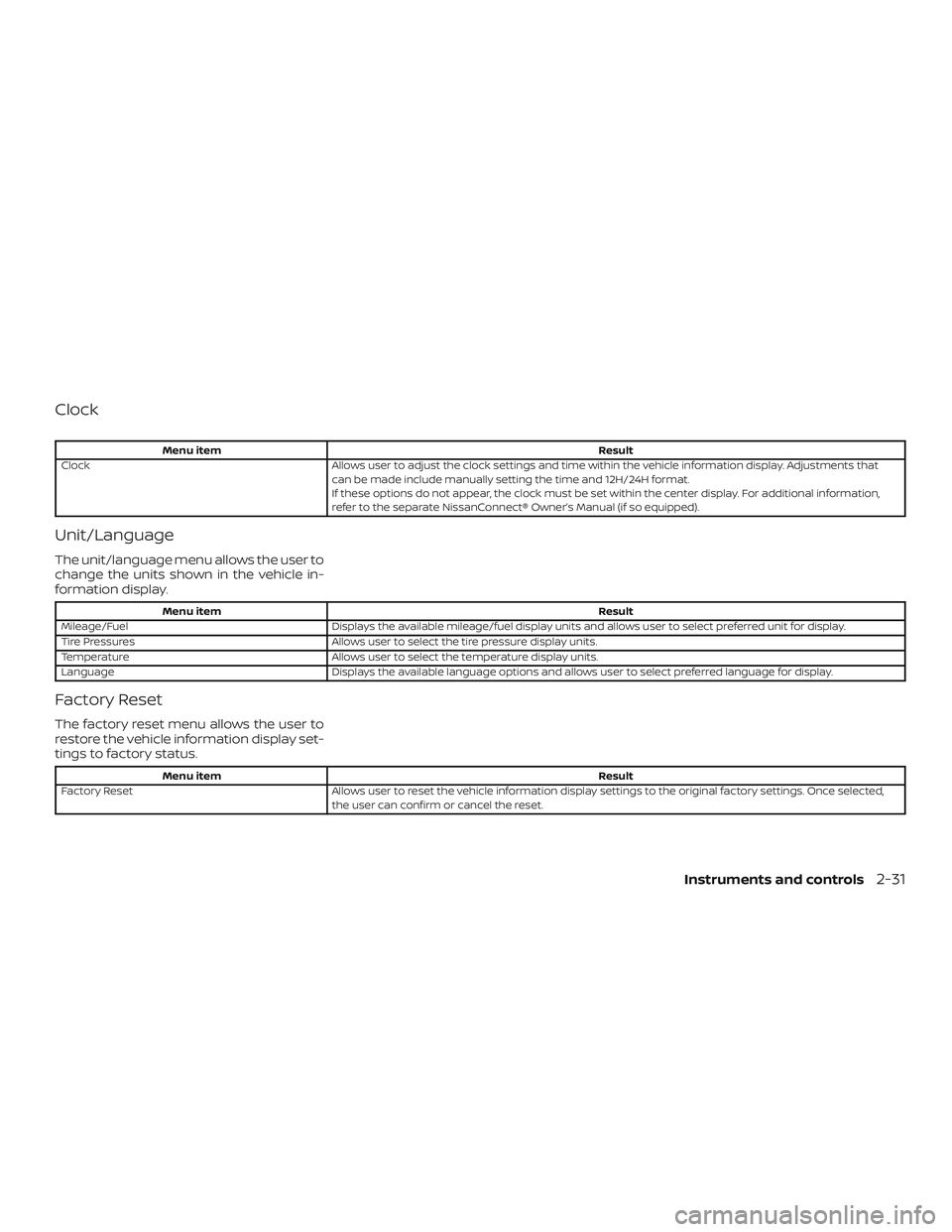
Menu itemResult
Clock Allows user to adjust the clock settings and time within the vehicle information display. Adjustments that
can be made include manually setting the time and 12H/24H format.
If these options do not appear, the clock must be set within the center display. For additional information,
refer to the separate NissanConnect® Owner’s Manual (if so equipped).
Unit/Language
The unit/language menu allows the user to
change the units shown in the vehicle in-
formation display.
Menu item Result
Mileage/Fuel Displays the available mileage/fuel display units and allows user to select preferred unit for display.
Tire Pressures Allows user to select the tire pressure display units.
Temperature Allows user to select the temperature display units.
Language Displays the available language options and allows user to select preferred language for display.
Factory Reset
The factory reset menu allows the user to
restore the vehicle information display set-
tings to factory status.
Menu item Result
Factory Reset Allows user to reset the vehicle information display settings to the original factory settings. Once selected,
the user can confirm or cancel the reset.
Instruments and controls2-31
Page 117 of 492
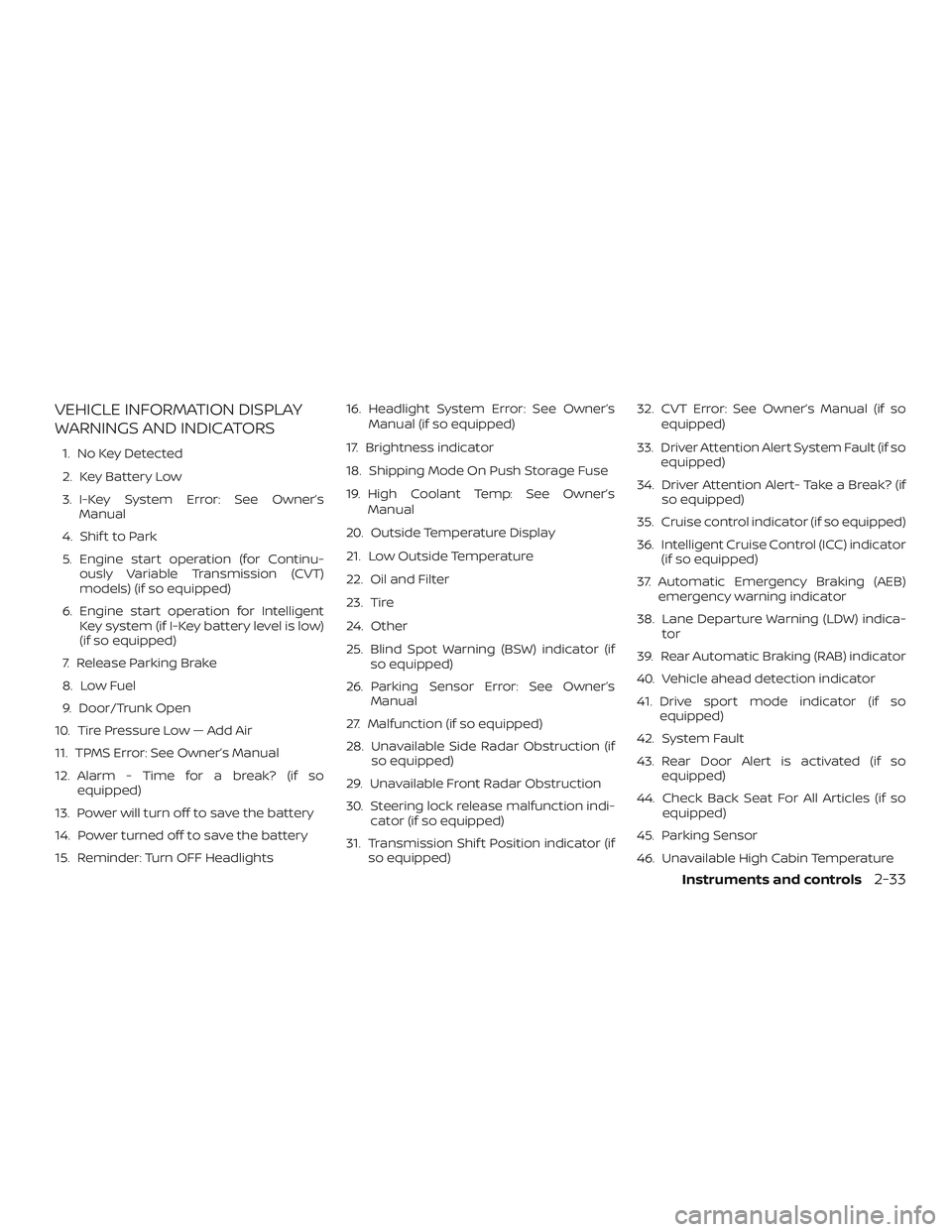
VEHICLE INFORMATION DISPLAY
WARNINGS AND INDICATORS
1. No Key Detected
2. Key Battery Low
3. I-Key System Error: See Owner’sManual
4. Shif t to Park
5. Engine start operation (for Continu- ously Variable Transmission (CVT)
models) (if so equipped)
6. Engine start operation for Intelligent Key system (if I-Key battery level is low)
(if so equipped)
7. Release Parking Brake
8. Low Fuel
9. Door/Trunk Open
10. Tire Pressure Low — Add Air
11. TPMS Error: See Owner’s Manual
12. Alarm - Time for a break? (if so equipped)
13. Power will turn off to save the battery
14. Power turned off to save the battery
15. Reminder: Turn OFF Headlights 16. Headlight System Error: See Owner’s
Manual (if so equipped)
17. Brightness indicator
18. Shipping Mode On Push Storage Fuse
19. High Coolant Temp: See Owner’s Manual
20. Outside Temperature Display
21. Low Outside Temperature
22. Oil and Filter
23. Tire
24. Other
25. Blind Spot Warning (BSW) indicator (if so equipped)
26. Parking Sensor Error: See Owner’s Manual
27. Malfunction (if so equipped)
28. Unavailable Side Radar Obstruction (if so equipped)
29. Unavailable Front Radar Obstruction
30. Steering lock release malfunction indi- cator (if so equipped)
31. Transmission Shif t Position indicator (if so equipped) 32. CVT Error: See Owner’s Manual (if so
equipped)
33. Driver Attention Alert System Fault (if so equipped)
34. Driver Attention Alert- Take a Break? (if so equipped)
35. Cruise control indicator (if so equipped)
36. Intelligent Cruise Control (ICC) indicator (if so equipped)
37. Automatic Emergency Braking (AEB) emergency warning indicator
38. Lane Departure Warning (LDW) indica- tor
39. Rear Automatic Braking (RAB) indicator
40. Vehicle ahead detection indicator
41. Drive sport mode indicator (if so equipped)
42. System Fault
43. Rear Door Alert is activated (if so equipped)
44. Check Back Seat For All Articles (if so equipped)
45. Parking Sensor
46. Unavailable High Cabin Temperature
Instruments and controls2-33
Page 119 of 492
Tire Pressure Low - Add Air
This warning appears when the low tire
pressure warning light in the meter illumi-
nates and low tire pressure is detected. The
warning appears each time the ignition
switch is placed in the ON position as long
as the low tire pressure warning light re-
mains illuminated. If this warning appears,
stop the vehicle and adjust the tire pres-
sures of all four tires to the recommended
COLD tire pressure shown on the Tire and
Loading Information label. For additional
information, refer to “Low tire pressure
warning light” in this section and “Tire Pres-
sure Monitoring System (TPMS)” in the
“Starting and driving” section of this
manual.
TPMS Error: See Owner’s Manual
This warning appears when there is an er-
ror with your TPMS. If this warning comes
on, have the system checked. It is recom-
mended that you visit a NISSAN dealer for
this service.
Alarm - Time for a break? (if so
equipped)
This indicator appears when the driver en-
ables the Timer Alert function within the
Driving Assistance settings and the se-lected set time is expired. The time is based
on ignition on time and can be set up to six
hours.
Power will turn off to save the battery
This message appears in the vehicle infor-
mation display af ter a period of time if the
ignition switch is in the ON position and if
the vehicle is in P (Park). For additional infor-
mation, refer to “Push-button ignition
switch positions” in the “Starting and driv-
ing” section of this manual.
Power turned off to save the battery
This message appears af ter the ignition
switch is automatically turned off. For addi-
tional information, refer to “Push-button ig-
nition switch positions” in the “Starting and
driving” section of this manual.
Reminder: Turn OFF Headlights
This warning appears when the headlights
are lef t in the ON position when exiting the
vehicle. Place the headlight switch in the
OFF or AUTO position. For additional infor-
mation, refer to “Headlight and turn signal
switch” in this section.
Headlight System Error: See Owner’s
Manual (if so equipped)
This warning appears when there is an er-
ror with the system. For additional informa-
tion, refer to “Headlight and turn signal
switch” in this section.
Brightness indicator
This indicator shows the brightness ad-
justment of the instrument panel. For addi-
tional information, refer to “Instrument
brightness control” in this section.
Shipping Mode On Push Storage Fuse
This warning may appear if the extended
storage switch is not pushed in. When this
warning appears, push in the extended
storage switch to turn off the warning. For
additional information, refer to “Extended
storage switch” in this section.
High Coolant Temp: See Owner’s Manual
This warning appears when the tempera-
ture of the engine coolant is too high. Stop
the vehicle in a safe location as soon as
possible. Avoid quick starting or abrupt ac-
celeration. When the warning turns off, the
vehicle can be driven.
Instruments and controls2-35
Page 120 of 492
If the warning appears again soon af ter it
turns off, have the vehicle checked. It is rec-
ommended that you visit a NISSAN dealer
for this service.
Outside Temperature Display
The outside temperature display appears
in the center region of the vehicle informa-
tion display.
Low Outside Temperature
This warning appears if the outside tem-
perature is below 37°F (3°C). The tempera-
ture can be changed to display in Celsius or
Fahrenheit. For additional information, re-
fer to “Settings” in this section.
Oil and Filter
This indicator appears when the customer
set distance comes for changing the en-
gine oil and filter. You can set or reset the
distance for checking or replacing these
items. For scheduled maintenance items
and intervals, refer to the “Maintenance and
schedules” section of this manual.
Tire
This indicator appears when the customer
set distance is reached for replacing tires.
You can set or reset the distance for replac-
ing tires.WARNING
The tire replacement indicator is not a
substitute for regular tire checks, in-
cluding tire pressure checks. For addi-
tional information, refer to “Changing
wheels and tires” in the “Do-it-yourself ”
section of this manual. Many factors in-
cluding tire inflation, alignment, driving
habits and road conditions affect tire
wear and when tires should be re-
placed. Setting the tire replacement in-
dicator for a certain driving distance
does not mean your tires will last that
long. Use the tire replacement indicator
as a guide only and always perform
regular tire checks. Failure to perform
regular tire checks, including tire pres-
sure checks could result in tire failure.
Serious vehicle damage could occur
and may lead to a collision, which could
result in serious personal injury or
death.
Other
This indicator appears when the customer
set distance is reached for checking or re-
placing maintenance items other than the
engine oil, oil filter and tires. Other mainte-
nance items can include such things as air filter or tire rotation. The distance for
checking or replacing the items can be set
or reset.
Blind Spot Warning (BSW) indicator (if
so equipped)
This indicator shows when the BSW system
is engaged.
For additional information, refer to “Blind
Spot Warning (BSW)” in the “Starting and
driving” section of this manual.
Parking Sensor Error: See Owner’s
Manual
This warning illuminates when there is an
error with the system. For additional infor-
mation, refer to “Rear Sonar System (RSS)”
in the “Starting and driving” section of this
manual.
Malfunction (if so equipped)
This warning appears when one or more of
the following systems (if so equipped) is
not functioning properly:
∙ Automatic Emergency Braking (AEB)
∙ Automatic Emergency Braking (AEB) with Pedestrian Detection
∙ Blind Spot Warning (BSW)
2-36Instruments and controls
Page 253 of 492
5 Starting and driving
Precautions when starting and driving..........5-4
Exhaust gas (carbon monoxide) ..............5-4
Three-way catalyst ...........................5-4
Tire Pressure Monitoring System
(TPMS)........................................5-5
Avoiding collision and rollover ................5-9
Off-roadrecovery ............................5-9
Rapid air pressure loss .......................5-9
Drinking alcohol/drugs and driving ..........5-10
Ignition switch (if so equipped) ...................5-11
Continuously Variable Transmission
(if so equipped) ............................... 5-11
Manual transmission (if so equipped) ........5-12
Ignition switch positions .....................5-12
NISSAN Vehicle Immobilizer System .........5-12
Push-button ignition switch (if so equipped) ....5-13
Operating range ............................. 5-14
Push-button ignition switch positions .......5-14
Emergency engine shut off ..................5-15
NISSAN Intelligent Key® battery
discharge ................................... 5-15
NISSAN Vehicle Immobilizer System .........5-16
Before starting the engine ......................5-16Starting the engine (models without NISSAN
Intelligent Key® system)
........................5-16
Starting the engine (models with NISSAN
Intelligent Key® system) ........................5-17
Remote Engine Start (if so equipped) ........5-18
Driving the vehicle .............................. 5-19
Continuously Variable Transmission
(CVT) (if so equipped) ........................ 5-19
Manual transmission (if so equipped) ........5-23
Parking brake .................................. 5-25
Lane Departure Warning (LDW) .................5-26
LDW system operation ......................5-28
How to enable/disable the LDW system .....5-29
LDW system limitations ......................5-30
System temporarily unavailable .............5-31
System malfunction ......................... 5-31
System maintenance ........................ 5-31
Blind Spot Warning (BSW) (if so equipped) .......5-32
BSW system operation ......................5-34
How to
enable/disable the BSW system .....5-36
BSW system limitations ......................5-36
BSW driving situations .......................5-37
System temporarily unavailable .............5-41
Page 257 of 492
WARNING
∙ The exhaust gas and the exhaust sys-tem are very hot. Keep people, ani-
mals or flammable materials away
from the exhaust system
components.
∙ Do not stop or park the vehicle over flammable materials such as dry
grass, waste paper or rags. They may
ignite and cause a fire.
CAUTION
∙ Do not use leaded gasoline. Depositsfrom leaded gasoline will seriously re-
duce the three-way catalyst’s ability
to help reduce exhaust pollutants.
∙ Keep your engine tuned up. Malfunc- tions in the ignition, fuel injection, or
electrical systems can cause overrich
fuel flow into the three-way catalyst,
causing it to overheat. Do not keep
driving if the engine misfires, or if no-
ticeable loss of performance or other
unusual operating conditions are de-
tected. Have the vehicle inspected
promptly. It is recommended that you
visit a NISSAN dealer for this service. ∙ Avoid driving with an extremely low
fuel level. Running out of fuel could
cause the engine to misfire, damag-
ing the three-way catalyst.
∙ Do not race the engine while warming it up.
∙ Do not push or tow your vehicle to start the engine.
TIRE PRESSURE MONITORING
SYSTEM (TPMS)
Each tire, including the spare (if provided),
should be checked monthly when cold and
inflated to the inflation pressure recom-
mended by the vehicle manufacturer on
the vehicle placard or tire inflation pressure
label. (If your vehicle has tires of a different
size than the size indicated on the vehicle
placard or tire inflation pressure label, you
should determine the proper tire inflation
pressure for those tires.)
As an added safety feature, your vehicle
has been equipped with a Tire Pressure
Monitoring System (TPMS) that illuminates
a low tire pressure telltale when one or
more of your tires is significantly under-
inflated. Accordingly, when the low tire
pressure telltale illuminates, you should
stop and check your tires as soon as pos- sible, and inflate them to the proper pres-
sure. Driving on a significantly under-
inflated tire causes the tire to overheat and
can lead to tire failure. Under-inflation also
reduces fuel efficiency and tire tread life,
and may affect the vehicle’s handling and
stopping ability.
Please note that the TPMS is not a substi-
tute for proper tire maintenance, and it is
the driver’s responsibility to maintain cor-
rect tire pressure, even if under-inflation
has not reached the level to trigger illumi-
nation of the TPMS low tire pressure telltale.
Your vehicle has also been equipped with a
TPMS malfunction indicator to indicate
when the system is not operating properly.
The TPMS malfunction indicator is com-
bined with the low tire pressure telltale.
When the system detects a malfunction,
the telltale will flash for approximately one
minute and then remain continuously illu-
minated. This sequence will continue upon
subsequent vehicle start-ups as long as
the malfunction exists. When the malfunc-
tion indicator is illuminated, the system
may not be able to detect or signal low tire
pressure as intended. TPMS malfunctions
may occur for a variety of reasons, includ-
ing the installation of replacement or alter-
nate tires or wheels on the vehicle that
Starting and driving5-5
Page 258 of 492
prevent the TPMS from functioning prop-
erly. Always check the TPMS malfunction
telltale af ter replacing one or more tires or
wheels on your vehicle to ensure that the
replacement or alternate tires and wheels
allow the TPMS to continue to function
properly.
Additional information:∙ When replacing a wheel without the TPMS such as a spare tire, the TPMS
does not monitor the tire pressure of
the spare tire.
∙ The TPMS will activate only when the vehicle is driven at speeds above
16 mph (25 km/h). Also, this system may
not detect a sudden drop in tire pres-
sure (for example, a flat tire while driv-
ing).
∙ The low tire pressure warning light does not automatically turn off when the tire
pressure is adjusted. Af ter the tire is in-
flated to the recommended pressure,
the vehicle must be driven at speeds
above 16 mph (25 km/h) to activate the
TPMS and turn off the low tire pressure
warning light. Use a tire pressure gauge
to check the tire pressure. ∙ The “Tire Pressure Low — Add Air” or
“CHECK TIRE PRES” warning appears
each time the ignition switch is placed
in the ON position as long as the low tire
pressure warning light remains illumi-
nated.
∙ The “Tire Pressure Low — Add Air” warn- ing appears in the vehicle information
display or the “CHECK TIRE PRES” warn-
ing appears in the trip computer when
the low tire pressure warning light is
illuminated and low tire pressure is de-
tected. The “Tire Pressure Low — Add Air”
or “CHECK TIRE PRES” warning turns off
when the low tire pressure warning light
turns off.
∙ The “Tire Pressure Low — Add Air” or “CHECK TIRE PRES” warning does not
appear if the low tire pressure warning
light illuminates to indicate a TPMS mal-
function. ∙ Tire pressure rises and falls depending
on the heat caused by the vehicle’s op-
eration and the outside temperature.
Do not reduce the tire pressure af ter
driving because the tire pressure rises
af ter driving. Low outside temperature
can lower the temperature of the air
inside the tire which can cause a lower
tire inflation pressure. This may cause
the low tire pressure warning light to
illuminate. If the warning light illumi-
nates, check the tire pressure for all four
tires.
∙ The Tire and Loading Information label is located in the driver’s door opening.
∙ You can also check the pressure of all tires (except the spare tire) on the ve-
hicle information display (if so
equipped). The order of the tire pressure
figures displayed on the screen corre-
sponds with the actual order of the tire
position.
For additional information, refer to “Low tire
pressure warning light” in the “Instruments
and controls” section and “Tire Pressure
Monitoring System (TPMS)” in the “In case of
emergency” section of this manual.
5-6Starting and driving
Page 259 of 492

WARNING
∙ Radio waves could adversely affectelectric medical equipment. Those
who use a pacemaker should contact
the electric medical equipment
manufacturer for the possible influ-
ences before use.
∙
If the low tire pressure warning light
illuminates while driving, avoid sudden
steering maneuvers or abrupt braking,
reduce vehicle speed, pull off the road
to a safe location and stop the vehicle
as soon as possible. Driving with under-
inflated tires may permanently dam-
age the tires and increase the likeli-
hood of tire failure. Serious vehicle
damage could occur and may lead to
an accident and could result in serious
personal injury. Check the tire pressure
for all four tires. Adjust the tire pressure
to the recommended COLD tire pres-
sure shown on the Tire and Loading In-
formation label to turn the low tire
pressure warning light off. If you have a
flat tire, replace it with a spare tire as
soon as possible. (For additional infor-
mation, refer to “Flat tire” in the “In case
of emergency ” section for changing a
flat tire.)
∙ When replacing a wheel without the TPMS such as the spare tire, when a
spare tire is mounted or a wheel is
replaced, the TPMS will not function
and the low tire pressure warning
light will flash for approximately
1 minute. The light will remain on af ter
1 minute. Have your tires replaced
and/or TPMS system reset as soon as
possible. It is recommended that you
visit a NISSAN dealer for this service.
∙ Replacing tires with those not origi- nally specified by NISSAN could affect
the proper operation of the TPMS.
∙ Do not inject any tire liquid or aerosol tire sealant into the tires, as this may
cause a malfunction of the tire pres-
sure sensors.
CAUTION
∙ The TPMS may not function properlywhen the wheels are equipped with
tire chains or the wheels are buried in
snow. ∙ Do not place metalized film or any
metal parts (antenna, etc.) on the win-
dows. This may cause poor reception
of the signals from the tire pressure
sensors, and the TPMS will not func-
tion properly.
Some devices and transmitters may tem-
porarily interfere with the operation of the
TPMS and cause the low tire pressure
warning light to illuminate.
Some examples are: ∙ Facilities or electric devices using simi- lar radio frequencies are near the ve-
hicle.
∙ If a transmitter set to similar frequen- cies is being used in or near the vehicle.
∙ If a computer (or similar equipment) or a DC/AC converter is being used in or
near the vehicle.
The low tire pressure warning light may
illuminate in the following cases: ∙ If the vehicle is equipped with a wheel and tire without TPMS.
∙ If the TPMS has been replaced and the ID has not been registered.
Starting and driving5-7