check engine light NISSAN VERSA NOTE 2020 Owner´s Manual
[x] Cancel search | Manufacturer: NISSAN, Model Year: 2020, Model line: VERSA NOTE, Model: NISSAN VERSA NOTE 2020Pages: 492, PDF Size: 6.12 MB
Page 369 of 492
– When installing a spare tire, makesure that it is the proper size and
type as specified on the Tire and
Loading Information label. For ad-
ditional information, refer to “Tire
and Loading Information label” in
the “Technical and consumer infor-
mation” section of this manual.
– For additional information, refer to “Wheels and tires” in the “Do-it-
yourself ” section of this manual.
The ABS controls the brakes so the wheels
do not lock during hard braking or when
braking on slippery surfaces. The system
detects the rotation speed at each wheel
and varies the brake fluid pressure to pre-
vent each wheel from locking and sliding.
By preventing each wheel from locking, the
system helps the driver maintain steering
control and helps to minimize swerving
and spinning on slippery surfaces.
Using the system
Depress the brake pedal and hold it down.
Depress the brake pedal with firm steady
pressure, but do not pump the brakes. The
Anti-lock Braking System will operate to
prevent the wheels from locking up. Steer
the vehicle to avoid obstacles.
WARNING
Do not pump the brake pedal. Doing so
may result in increased stopping
distances.
Self-test feature
The Anti-lock Braking System (ABS) in-
cludes electronic sensors, electric pumps,
hydraulic solenoids and a computer. The
computer has a built-in diagnostic feature
that tests the system each time you start
the engine and move the vehicle at a low
speed in forward or reverse. When the self-
test occurs, you may hear a “clunk” noise
and/or feel a pulsation in the brake pedal.
This is normal and does not indicate a mal-
function. If the computer senses a mal-
function, it switches the ABS off and illumi-
nates the ABS warning light on the
instrument panel. The brake system then
operates normally but without anti-lock
assistance.
If the ABS warning light illuminates during
the self-test or while driving, have the ve-
hicle checked. It is recommended that you
visit a NISSAN dealer for this service.
Normal operation
The Anti-lock Braking System (ABS) oper-
ates at speeds abov e3-6mph(5-
10 km/h). The speed varies according to
road conditions.
When the ABS senses that one or more
wheels are close to locking up, the actuator
rapidly applies and releases hydraulic pres-
sure. This action is similar to pumping the
brakes very quickly. You may feel a pulsa-
tion in the brake pedal and hear a noise
from under the hood or feel a vibration
from the actuator when it is operating. This
is normal and indicates that the ABS is op-
erating properly. However, the pulsation
may indicate that road conditions are haz-
ardous and extra care is required while
driving.
BRAKE ASSIST
When the force applied to the brake pedal
exceeds a certain level, the Brake Assist is
activated generating greater braking force
than a conventional brake booster even
with light pedal force.
Starting and driving5-117
Page 393 of 492
CAUTION
∙ Do not push start this vehicle. Thethree-way catalyst may be damaged.
∙ Continuously Variable Transmission (CVT) and manual transmission mod-
els cannot be push-started or tow-
started. Attempting to do so may
cause transmission damage.
∙ For manual transmission models, never try to start the vehicle by tow-
ing it. When the engine starts, the for-
ward surge could cause the vehicle to
collide with the tow vehicle.
∙ Continuously Variable Transmission (CVT) models cannot be push-started
or tow-started. Attempting to do so
may cause transmission damage. If your vehicle is overheating, indicated by
an extremely high temperature gauge
reading (if so equipped) a red high tem-
perature warning light
(if so
equipped), or if you feel a lack of engine
power, detect abnormal noise, etc. take the
following steps.
WARNING
∙ Do not continue to drive if your vehicle overheats. Doing so could cause en-
gine damage or vehicle fire.
∙ To avoid the danger of being scalded, never remove the coolant reservoir
cap while the engine is still hot. When
the coolant reservoir cap is removed,
pressurized hot water will spurt out,
possibly causing serious injury.
∙ Do not open the hood if steam is com- ing out
1. Move the vehicle safely off the road, ap- ply the parking brake and move the
shif t lever to N (Neutral) (manual trans-
mission) or to P (Park) (Continuously
Variable Transmission).
Do not stop the engine. 2. Turn off the air conditioner. Open all the
windows, move the heater or air condi-
tioner temperature control to maxi-
mum hot and fan control to high
speed.
3. Get out of the vehicle. Look and listen for steam or coolant escaping from the
radiator before opening the hood. (If
steam or coolant is escaping, turn off
the engine). Do not open the hood fur-
ther until no steam or coolant can be
seen.
4. Open the engine hood.
WARNING
If steam or water is coming from the
engine, stand clear to prevent getting
burned.
5. Visually check drive belts for damage or looseness. Also check if the cooling
fan is running. The radiator hoses and
radiator should not leak water. If cool-
ant is leaking, the water pump belt is
missing or loose, or the cooling fan
does not run, stop the engine.
PUSH STARTING IF YOUR VEHICLE OVERHEATS
In case of emergency6-11
Page 407 of 492
8 Do-it-yourself
Maintenance precautions.......................8-2
Engine compartment check locations ...........8-3
Engine cooling system ..........................8-4
Checking engine coolant level ................8-5
Changing engine coolant .....................8-5
Engine oil ........................................8-6
Checking engine oil level .....................8-6
Changing engine oil and oil filter ..............8-6
Continuously Variable Transmission (CVT)
fluid (if so equipped) .............................8-9
Brake and clutch (if so equipped) fluid ...........8-9
Brake fluid ................................... 8-10
Clutch (if so equipped) fluid ..................8-10
Windshield-washer fluid ........................8-10
Windshield-washer fluid reservoir ............8-10
Battery......................................... 8-12
Jump starting ............................... 8-13
Variable voltage control system
(if so equipped) ................................. 8-14
Drive belt ....................................... 8-14
Spark plugs .................................... 8-15
Replacing spark plugs ....................... 8-15Air cleaner
...................................... 8-16
In-cabin microfilter .......................... 8-16
Windshield wiper blades ........................8-17
Cleaning .................................... 8-17
Replacing ................................... 8-17
Brakes.......................................... 8-18
Fuses ........................................... 8-19
Engine compartment ....................... 8-19
Passenger compartment ....................8-21
Battery replacement ........................... 8-22
NISSAN Intelligent Key® (if so equipped) ......8-22
Lights .......................................... 8-24
Headlights ................................... 8-24
Fog lights (if so equipped) ...................8-24
Exterior and interior lights ...................8-25
Wheels and tires ................................ 8-28
Tire pressure ................................ 8-28
Tire labeling ................................. 8-31
T ypes
of tires ................................ 8-34
Tire chains .................................. 8-35
Changing wheels and tires ..................8-36
Page 425 of 492
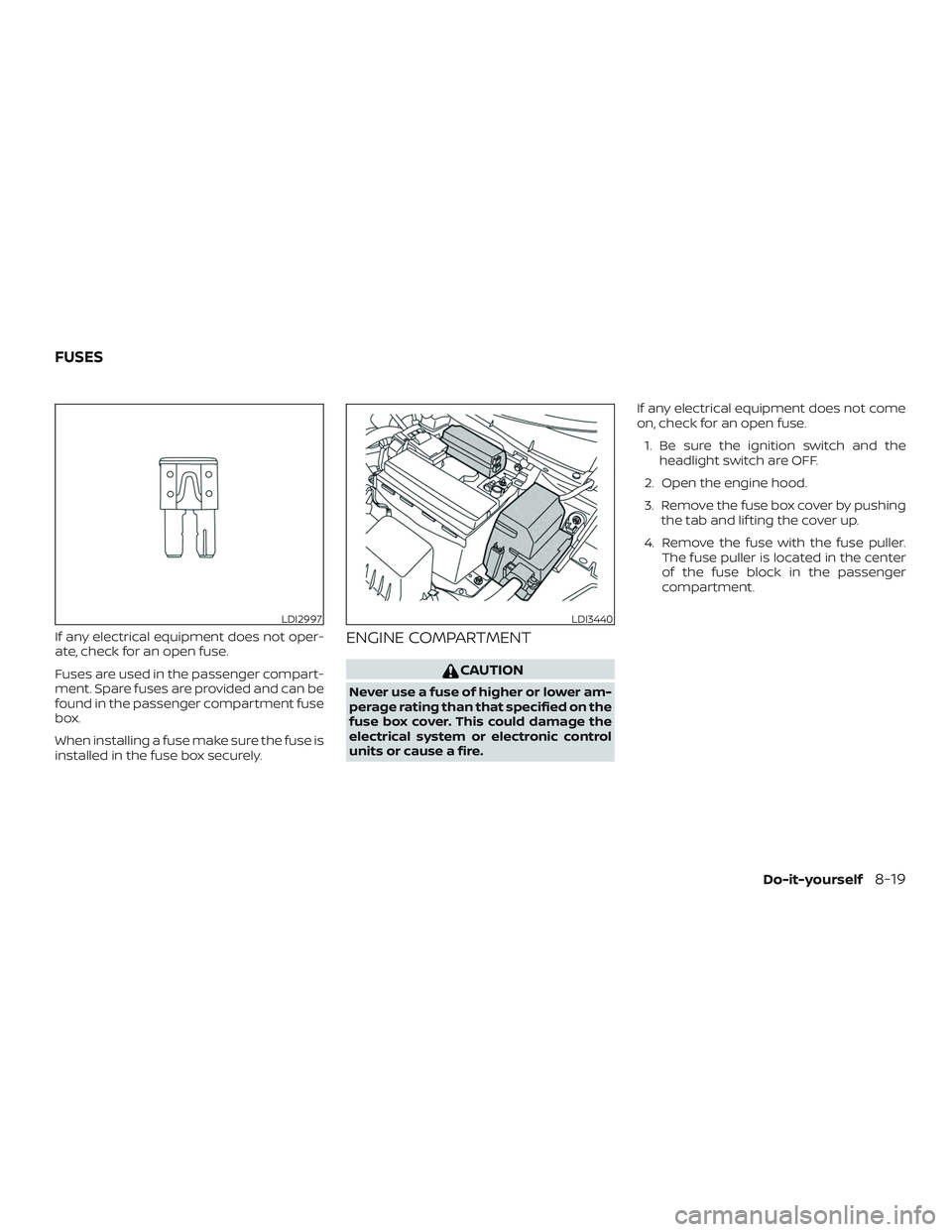
If any electrical equipment does not oper-
ate, check for an open fuse.
Fuses are used in the passenger compart-
ment. Spare fuses are provided and can be
found in the passenger compartment fuse
box.
When installing a fuse make sure the fuse is
installed in the fuse box securely.ENGINE COMPARTMENT
CAUTION
Never use a fuse of higher or lower am-
perage rating than that specified on the
fuse box cover. This could damage the
electrical system or electronic control
units or cause a fire.If any electrical equipment does not come
on, check for an open fuse.
1. Be sure the ignition switch and the headlight switch are OFF.
2. Open the engine hood.
3. Remove the fuse box cover by pushing the tab and lif ting the cover up.
4. Remove the fuse with the fuse puller. The fuse puller is located in the center
of the fuse block in the passenger
compartment.
LDI2997LDI3440
FUSES
Do-it-yourself8-19
Page 450 of 492
Seats:Check seat position controls such
as seat adjusters, seatback recliner, etc., to
ensure they operate smoothly and all
latches lock securely in every position.
Check that the head restraints/headrests
move up and down smoothly and the locks
(if so equipped) hold securely in all latched
positions.
Seat belts: Check that all parts of the seat
belt system (for example, buckles, anchors,
adjusters and retractors) operate properly
and smoothly, and are installed securely.
Check the belt webbing for cuts, fraying,
wear or damage.
Steering wheel: Check for changes in the
steering system, such as excessive free
play, hard steering or strange noises.
Warning lights and chimes: Make sure all
warning lights and chimes are operating
properly.
Windshield defroster: Check that the air
comes out of the defroster outlets properly
and in sufficient quantity when operating
the heater or air conditioner.
Windshield wiper and washer*: Check
that the wipers and washer operate prop-
erly and that the wipers do not streak.Under the hood and vehicle
The maintenance items listed here should
be checked periodically (for example, each
time you check the engine oil or refuel).
Battery*: This vehicle is equipped with a
sealed maintenance free battery. It is rec-
ommended that you visit a NISSAN dealer
for service.
NOTE:
Care should be taken to avoid situations
that can lead to potential battery dis-
charge and potential no-start conditions
such as:
1. Installation or extended use of elec-
tronic accessories that consume bat-
tery power when the engine is not
running (Phone chargers, GPS, DVD
players, etc.).
2. Vehicle is not driven regularly and/or
only driven short distances.
In these cases, the battery may need to
be charged to maintain battery health.
Brake and clutch (if so equipped) fluid
level*: Make sure that the brake and clutch
fluid levels are between the MIN and MAX
lines on the reservoir. Engine coolant level*:
Check the coolant
level when the engine is cold.
Engine drive belts*: Make sure the drive
belts are not frayed, worn, cracked or oily.
Engine oil level*: Check the level af ter
parking the vehicle on a level surface with
the engine off. Wait more than 15 minutes
for the oil to drain back into the oil pan.
Exhaust system: Make sure there are no
loose supports, cracks or holes. If the
sound of the exhaust seems unusual or
there is a smell of exhaust fumes, immedi-
ately have the exhaust system inspected. It
is recommended that you visit a NISSAN
dealer for this service. For additional infor-
mation, refer to “Exhaust gas (carbon mon-
oxide)” in the “Starting and driving” section
of this manual.
Fluid leaks: Check under the vehicle for
fuel, oil, water or other fluid leaks af ter the
vehicle has been parked for a while. Water
dripping from the air conditioner af ter use
is normal. If you should notice any leaks or if
fuel fumes are evident, check for the cause
and have it corrected immediately.
Radiator and hoses: Check the front of the
radiator and clean off any dirt, insects,
leaves, etc., that may have accumulated.
9-4Maintenance and schedules
Page 466 of 492
Octane rating tips
Using unleaded gasoline with an octane
rating lower than recommended can
cause persistent, heavy “spark knock.”
(“Spark knock” is a metallic rapping
noise.) If severe, this can lead to engine
damage. If you detect a persistent heavy
spark knock even when using gasoline
of the stated octane rating, or if you hear
steady spark knock while holding a
steady speed on level roads, it is recom-
mended that you have a NISSAN dealer
correct the condition. Failure to correct
the condition is misuse of the vehicle, for
which NISSAN is not responsible.
Incorrect ignition timing may result in
spark knock, af ter-run and/or overheating,
which may cause excessive fuel consump-
tion or engine damage. If any of the above
symptoms are encountered, have your ve-
hicle checked. It is recommended that you
visit a NISSAN dealer for servicing.
However, now and then you may notice
light spark knock for a short time while
accelerating or driving up hills. This is not
a cause for concern, because you get the
greatest fuel benefit when there is light
spark knock for a short time under heavy
engine load.
ENGINE OIL AND OIL FILTER
RECOMMENDATIONS
Selecting the correct oil
It is essential to choose the correct grade,
quality and viscosity engine oil to ensure
satisfactory engine life and performance.
For additional information, refer to “Recom-
mended fluids/lubricants and capacities”
in this section. NISSAN recommends the
use of an energy conserving oil in order to
improve fuel economy.
Select only engine oils that meet the
American Petroleum Institute (API) certifi-cation or International Lubricant Standard-
ization and Approval Committee (ILSAC)
certification and SAE viscosity standard.
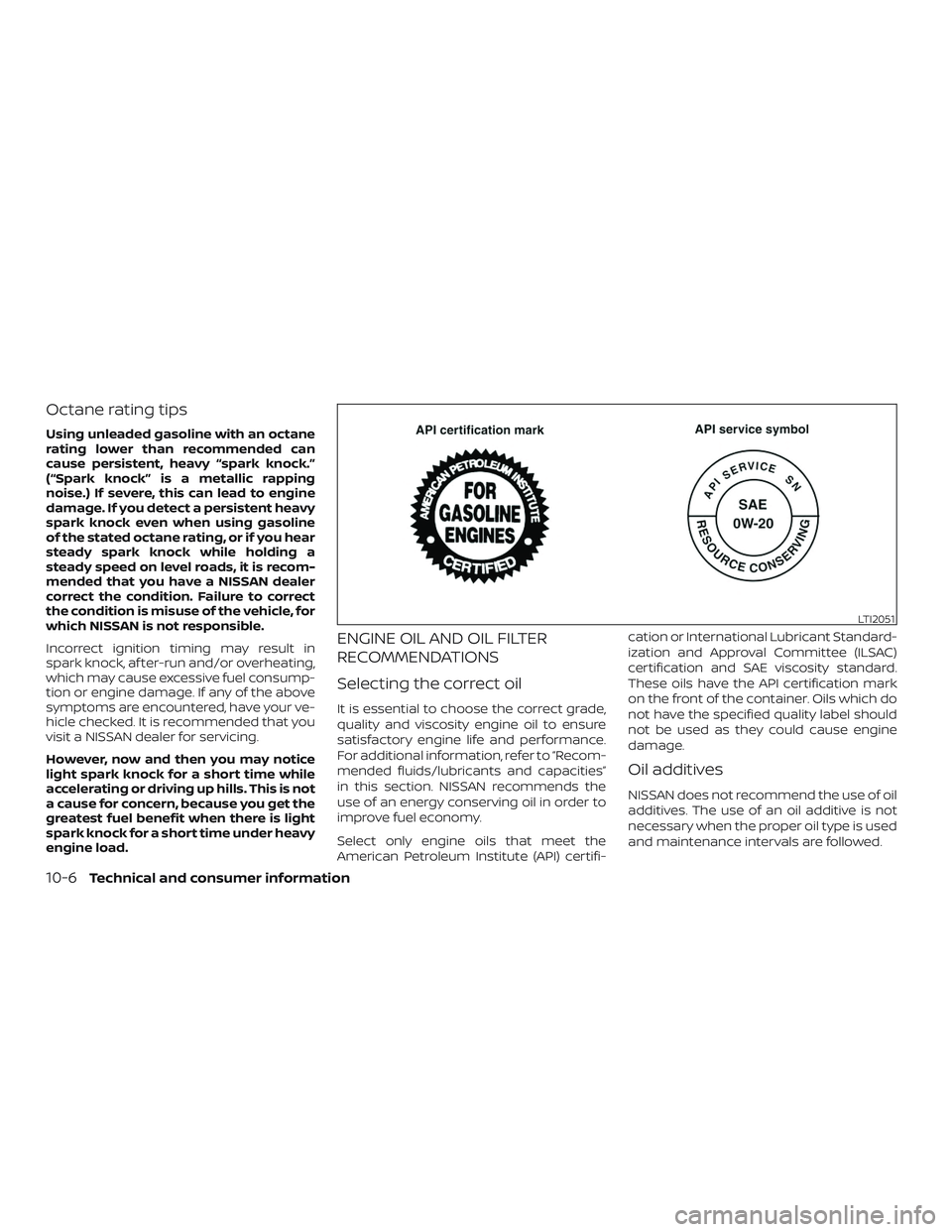
These oils have the API certification mark
on the front of the container. Oils which do
not have the specified quality label should
not be used as they could cause engine
damage.
Oil additives
NISSAN does not recommend the use of oil
additives. The use of an oil additive is not
necessary when the proper oil type is used
and maintenance intervals are followed.
LTI2051
10-6Technical and consumer information
Page 479 of 492
You may notif y NISSAN by contact-
ing our Consumer Affairs Depart-
ment, toll-free, at 1-800-NISSAN-1.
For Canada
If you believe that your vehicle has a
defect which could cause a crash or
could cause injury or death, you
should immediately inform Trans-
port Canada in addition to notif ying
NISSAN.
If Transport Canada receives com-
plaints, it may open an investigation,
and if it finds that a safety defect
exists in a group of vehicles, it may
request that NISSAN conduct a recall
campaign. However, Transport
Canada cannot become involved in
individual problems between you,
your dealer, or NISSAN.
You may contact Transport Canada’s
Defect Investigations and Recalls Divi-
sion toll free at 1-800-333-0510. You
may also report safety defects online
at: https://wwwapps.tc.gc.ca/
Saf-Sec-Sur/7/PCDB-BDPP/fc-cp.aspx?lang=eng (English speak-
ers) or https://wwwapps.tc.gc.ca/
Saf-Sec-Sur/7/PCDB-BDPP/
fc-cp.aspx?lang=fra (French speak-
ers)
Additional information concerning
motor vehicle safety may be ob-
tained from Transport Canada’s
Road Safety Information Centre at
1-800-333-0371 or online at
www.tc.gc.ca/roadsafety (English
speakers) or
www.tc.gc.ca/securiteroutiere
(French speakers).
To notif y NISSAN of any safety con-
cerns please contact our Consumer
Information Centre toll free at
1-800-387-0122.
Due to legal requirements in some states
and Canadian Provinces, your vehicle may
be required to be in what is called the
“ready condition” for an
Inspection/Maintenance (I/M) test of the
emission control system.
The vehicle is set to the “ready condition”
when it is driven through certain driving
patterns. Usually, the ready condition can
be obtained by ordinary usage of the ve-
hicle.
If a powertrain system component is re-
paired or the battery is disconnected, the
vehicle may be reset to a “not ready” condi-
tion. Before taking the I/M test, check the
vehicle’s inspection/maintenance test
readiness condition. Place the ignition
switch in the ON position without starting
the engine. If the Malfunction Indicator
Light (MIL) comes on steady for 20 seconds
and then blinks for 10 seconds , the I/M test
condition is “not ready”. If the MIL does not
blink af ter 20 seconds, the I/M test condi-
tion is “ready”. It is recommended that you
visit a NISSAN dealer to set the “ready con-
dition” or to prepare the vehicle for testing.
READINESS FOR INSPECTION/
MAINTENANCE (I/M) TEST
Technical and consumer information10-19
Page 481 of 492
11 Index
A
ActiveTraceControl.............4-60
Air bag (See supplemental restraint
system) .................... .1-43
Air bag system Front (See supplemental front impact air
bagsystem)............... .1-53
Air bag warning labels ............1-63
Airbagwarninglight..........1-64, 2-19
Air bag warning light,
supplemental ..............1-64, 2-19
Air cleaner housing filter ..........8-16
Air conditioner Air conditioner operation ....4-20,4-26
Air conditioner service .........4-28
Air conditioner specification label . .10-12
Air conditioner system refrigerant
and oil recommendations .......10-7
Air conditioner system refrigerant
recommendations ............10-7
Heater and air conditioner .......4-25
Heater and air conditioner
(manual) ..................4-17
Servicing air conditioner ........4-28
Air flow charts .................4-22
Alarm system
(See vehicle security system) .......2-39
Anchor point locations ...........1-26
Antenna .................4-49,4-50
Antifreeze ...................5-127
Anti-lock brake warning light ........2-13Anti-lock Braking System (ABS)
......5-116
Audible reminders ..............2-22
Audiosystem.................4-29 AM/FMradio............4-34,4-36
AM radio operation ............4-36
AMradioreception............4-29
Auxiliary (AUX) devices operation . . .4-38
Bluetooth® audio .............4-45
FM radio operation ............4-37
FMradioreception............4-29
iPod®Player................4-42
iPod® player operation .........4-42
Radio ....................4-29
Steering wheel audio control
switch ...................4-48
USB Connections .............4-40
USBinterface...............4-39
Autolightswitch ...............2-43
Automatic Automatic power window switch . . .2-61
Automatic door locks .............3-6
Automatic Emergency Braking
(AEB) ....................2-13,2-18
Automatic Emergency Braking (AEB) with
Pedestrian Detection ............5-85
B
Battery..................5-127,8-12 Charge warning light ...........2-14
Battery replacement ............8-22
Keyfob...................8-22 NISSAN Intelligent Key®
.........8-22
Before starting the engine .........5-16
Belt(Seedrivebelt)..............8-14
Blind Spot Warning (BSW) ..........5-32
Bluetooth® audio ...............4-45
Bluetooth® hands-free phone system . .4-53 Bluetooth® connections ........4-68
Connecting procedure .........4-59
Phone indicators .............4-57
Text messaging ..............4-65
Booster seats .................1-39
Br ak
e
Anti-lock Braking System (ABS) ....5-116
Brakefluid..................8-9
Brakelight(Seestoplight).......8-25
Brakesystem...............5-116
Brakewarninglight............2-13
Brakewearindicators.......2-22, 8-18
Parking brake operation ........5-25
Self-adjustingbrakes ..........8-18
Brake Assist ..................5-117
Brakefluid....................8-9
Brakes......................8-18
Brakesystem.................5 -116
Break-in schedule ..............5-111
Brightness/contrast button .........4-8
Brightness control Instrument panel .............2-48
Bulb check/instrument panel .......2-13
Bulb replacement ..............8-25
Page 482 of 492
C
Capacities and recommended fuel/
lubricants....................10-2
Cargo
(See vehicle loading information) .....10-13
Car phone or CB radio ............4-53
Check tire press .................2-7
Check tire pressure ..............2-35
Childrestraints........1-19, 1-20, 1-21, 1-24 LATCH (Lower Anchors and Tethers for
CHildren)System............. .1-24
Precautions on child
restraints.........1-21, 1-28, 1-34, 1-39
Top tether strap anchor point
locations.................. .1-26
Child safety rear door lock ..........3-7
Chimes, audible reminders .........2-22
Cleaningexteriorandinterior......7-2,7-5
Clockset.....................4-6
Clutch Clutchfluid.................8-10
Coldweatherdriving.............5-127
Continuously Variable Transmission
(CVT) ....................5 -11, 5-19
Continuously Variable Transmission
(CVT) fluid ...................8-9
Driving with Continuously Variable
Transmission (CVT) .........5-11, 5-19
Control panel buttons .............4-3
Brightness/contrast button .......4-8
Controls Audio controls (steering wheel) ....4-48
Heater and air conditioner controls
(automatic).................4-25 Heater and air conditioner controls
(manual)
...................4-17
Coolant Capacities and recommended
fuel/lubricants...............10-2
Changing engine coolant .........8-5
Checking engine coolant level ......8-5
Corrosionprotection..............7-8
Cruisecontrol..................5-51
Cupholders ..................2-58
D
Daytime Running Light System .......2-47
Defroster switch Rear window and outside mirror
defrosterswitch...........2-42,4-27
Rear window defroster switch . .2-42, 4-19
Dimensions and weights ...........10-9
Dimmer switch for instrument panel . . .2-48
Display controls
(see control panel buttons) ..........4-3
Door locks ..................3-4,3-5
Door open warning light ...........2-14
Drivebelt ....................8-14
Driving Cold weather driving ...........5-127
Driving with Continuously Variable
Transmission (CVT) .........5-11, 5-19
Driving with manual
transmission .............5-12,5-23
Precautions when starting and
driving.....................5-4
Drivingthevehicle...............5-19 E
Economy - fuel ................5-113
Emergency engine shutoff ..........5-15
Emission control information label . . . .10-11
Emission control system warranty . . . .10-18
Engine Before starting the engine ........5-16
Capacities and recommended
fuel/lubricants...............10-2
Changing engine coolant .........8-5
Changing engine oil ............8-6
Changing engine oil filter .........8-6
Checking engine coolant level ......8-5
Checking engine oil level .........8-6
Engine compartment check
locations...................8-3
Engine cooling system ..........8-4
Engine oil ...................8-6
Engine oil and oil filter
r ec
ommendation .............10-6
Engine oil pressure warning light ....2-14
Engine oil viscosity .............10-7
Engine serial number ...........10-11
Engine specifications ...........10-8
Starting the engine ............5-16
Engine Block Heater .............5-128
EventDatarecorders............10-20
Exhaust gas (Carbon monoxide) .......5-4
Explanation of maintenance items .....9-2
Explanation of scheduled maintenance
items .......................9-5
Extended storage switch ..........2-56
11-2
Page 484 of 492
J
Jumpstarting...............6-9,8-13
K
Key.........................3-2
Key fob battery replacement ........8-22
Keyless entry With Intelligent Key system
(See Intelligent Key system) .......3-14
Keys NISSAN Intelligent Key® ........3-2,3-7
NISSAN Vehicle Immobilizer System
keys......................3-4
L
Labels Air conditioner specification label . . .10-12
Emission control information label . .10-11
Engine serial number ...........10-11
F.M.V.S.S. certification label ........10-11
Tire and Loading Information label . .10-12
Vehicle identification number (VIN) . .10-10
Vehicle identification number (VIN)
plate.....................10-10
Warning labels (for SRS) ..........1-63
Lane Departure Warning (LDW) .......5-26
LATCH (Lower Anchors and Tethers for
CHildren)System............... .1-24
Launch bar menu ................4-8
License plate Installing the license plate .......10-12Light
Airbagwarninglight........1-64, 2-19
Brakelight(Seestoplight)........8-25
Bulb check/instrument panel ......2-13
Bulb replacement .............8-25
Charge warning light ...........2-14
ExteriorandInteriorlights........8-25
Foglights..................8-24
Foglightswitch..............2-49
Headlight and turn signal switch ....2-43
Headlightcontrolswitch.........2-43
Headlights .................8-24
Interiorlight.................2-62
Lightbulbs.................8-24
Low tire pressure warning light .....2-15
Low windshield-washer fluid warning
light......................2-17
Personal lights ...............2-63
Security indicator light ..........2-21
Trunklight..................2-64
Warning/indicator lights and audible
reminders ..................2-19
Lights......................8-24 Maplights..................2-63
Lock Child safety rear door lock ........3-7
Door locks ................3-4,3-5
Fuel-filler door lock opener lever . . . .3-26
Power door locks ..............3-6
Trunk lid lock opener lever ........3-24
Loose fuel cap warning ............2-7
Lowfuelwarninglight......2-15,2-17,2-34
Low tire pressure warning light .......2-15
Low windshield-washer fluid warning
light........................2-17 Luggage
(See vehicle loading information)
.....10-13
M
Maintenance General maintenance ...........9-2
Insidethevehicle..............9-3
Maintenance precautions .........8-2
Outsidethevehicle.............9-2
Seat belt maintenance ..........1-18
Under the hood and vehicle .......9-4
Maintenance log ................9-11
Maintenance requirements ..........9-2
Maintenance schedules ............9-7
Maintenance under severe operation
conditions....................9-10
Malfunctionindicatorlight..........2-20
Manual front seat adjustment ........1-3
Maplights................... .2-63
Menu button ...................4-6
Meters and gauges ...............2-4
Instrument brightness control .....2-48
Mirror Outsidemirrors...............3-31
Rearview ..................3-30
Va
nitymirror................3-30
Mirrors......................3-30
N
NissanConnect® Owner's Manual ......4-2
NISSAN Intelligent Key® ..........3-2,3-7
11-4