mirror NISSAN XTERRA 2009 Owner´s Manual
[x] Cancel search | Manufacturer: NISSAN, Model Year: 2009, Model line: XTERRA, Model: NISSAN XTERRA 2009Pages: 336, PDF Size: 4.52 MB
Page 9 of 336
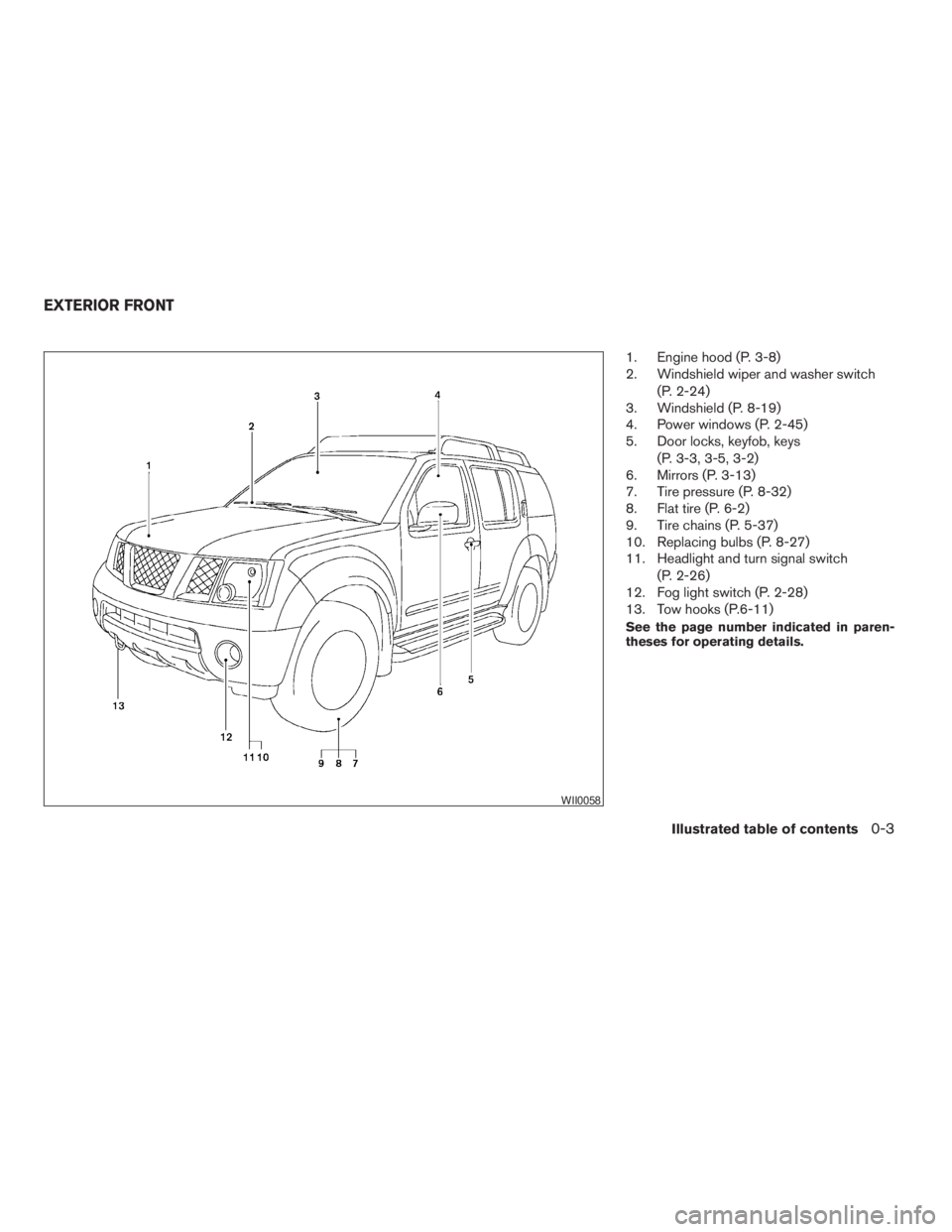
1. Engine hood (P. 3-8)
2. Windshield wiper and washer switch
(P. 2-24)
3. Windshield (P. 8-19)
4. Power windows (P. 2-45)
5. Door locks, keyfob, keys
(P. 3-3, 3-5, 3-2)
6. Mirrors (P. 3-13)
7. Tire pressure (P. 8-32)
8. Flat tire (P. 6-2)
9. Tire chains (P. 5-37)
10. Replacing bulbs (P. 8-27)
11. Headlight and turn signal switch
(P. 2-26)
12. Fog light switch (P. 2-28)
13. Tow hooks (P.6-11)
See the page number indicated in paren-
theses for operating details.
WII0058
EXTERIOR FRONT
Illustrated table of contents0-3
ZREVIEW COPYÐ2009 Xterra(xtr)
Owners ManualÐUSA_English(nna)
05/20/08Ðdebbie
X
Page 11 of 336
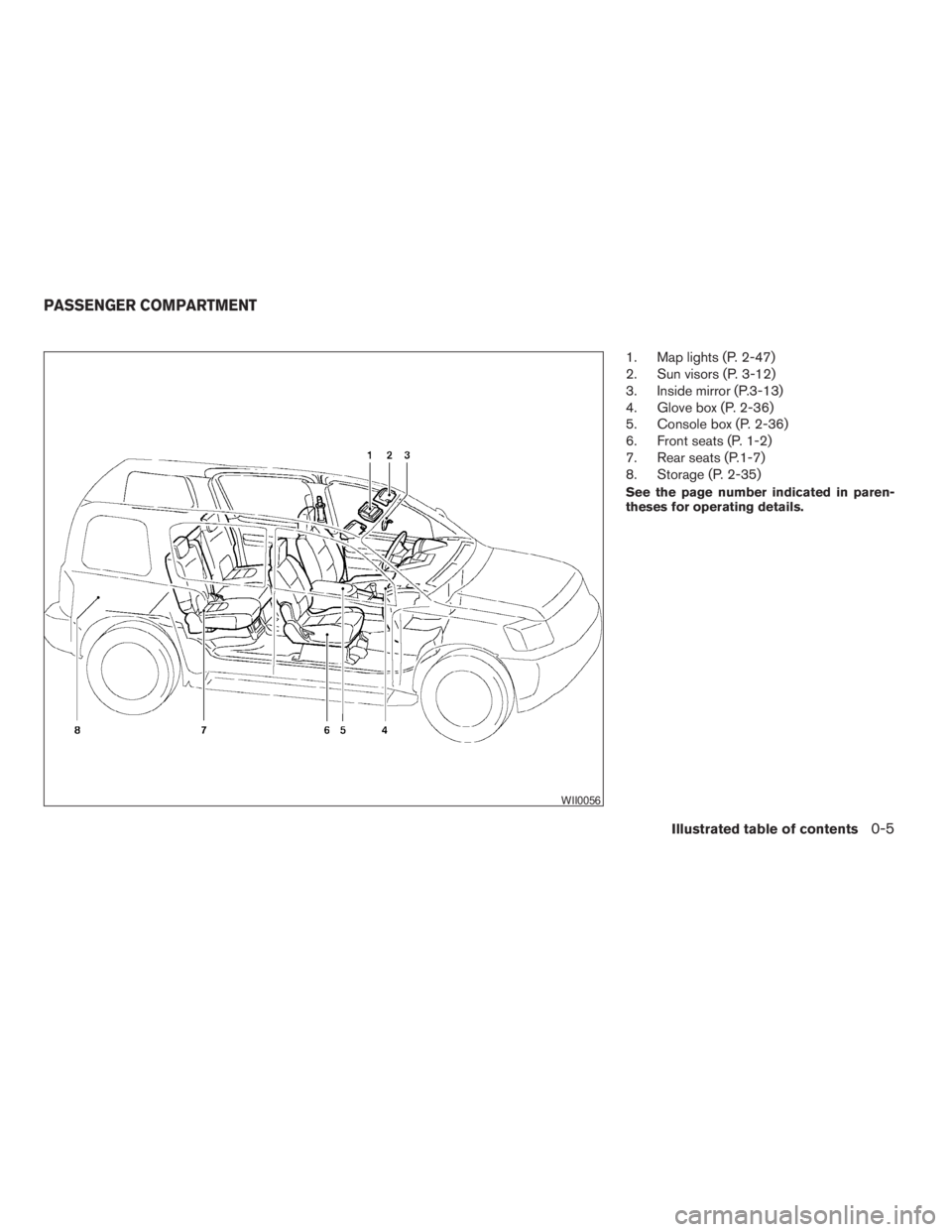
1. Map lights (P. 2-47)
2. Sun visors (P. 3-12)
3. Inside mirror (P.3-13)
4. Glove box (P. 2-36)
5. Console box (P. 2-36)
6. Front seats (P. 1-2)
7. Rear seats (P.1-7)
8. Storage (P. 2-35)
See the page number indicated in paren-
theses for operating details.
WII0056
PASSENGER COMPARTMENT
Illustrated table of contents0-5
ZREVIEW COPYÐ2009 Xterra(xtr)
Owners ManualÐUSA_English(nna)
05/20/08Ðdebbie
X
Page 13 of 336
15. Electronic locking rear differential
(E-Lock) system switch
(if so equipped) (P. 2-32)
Hill descent control switch
(if so equipped) (P. 2-31)
Vehicle Dynamic Control (VDC) OFF
switch (P. 2-30)
16. Shift selector (P. 5-13)
17. 4WD shift switch (if so equipped)
(P. 5-22)
18. Climate controls (P. 4-9)
19. Hazard warning flasher switch (P. 2-29)
20. Ignition switch (P. 5-9)
21. Tilt steering wheel control (P. 3-11)
22. Off road lamps switch (P. 2-29)
23. Clutch interlock (clutch start) switch
(if so equipped) (P. 2-33)
24. Power outside mirror controls (P. 3-14)
See the page number indicated in paren-
theses for operating details.
Illustrated table of contents0-7
ZREVIEW COPYÐ2009 Xterra(xtr)
Owners ManualÐUSA_English(nna)
05/20/08Ðdebbie
X
Page 79 of 336
15. Electronic locking rear differential
(E-Lock) system switch
(if so equipped) (P. 2-32)
Hill descent control switch
(if so equipped) (P. 2-31)
Vehicle Dynamic Control (VDC) OFF
switch (P. 2-30)
16. Shift selector (P. 5-13)
17. 4WD shift switch (if so equipped)
(P. 5-22)
18. Climate controls (P. 4-9)
19. Hazard warning flasher switch (P. 2-29)
20. Ignition switch (P. 5-9)
21. Tilt steering wheel control (P. 3-11)
22. Off road lamps switch (P. 2-29)
23. Clutch interlock (clutch start) switch
(if so equipped) (P. 2-33)
24. Power outside mirror controls (P. 3-14)
See the page number indicated in paren-
theses for operating details.
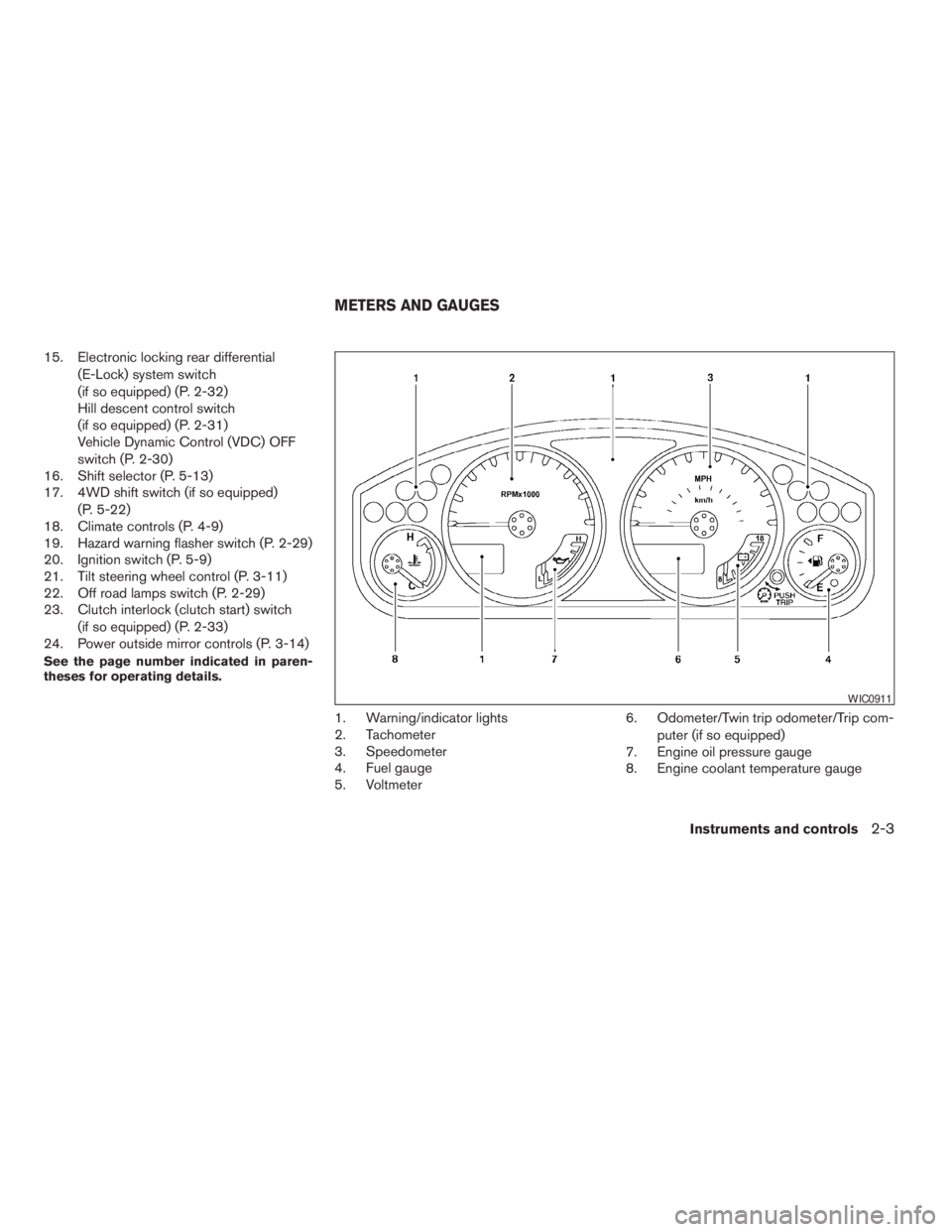
1. Warning/indicator lights
2. Tachometer
3. Speedometer
4. Fuel gauge
5. Voltmeter6. Odometer/Twin trip odometer/Trip com-
puter (if so equipped)
7. Engine oil pressure gauge
8. Engine coolant temperature gauge
WIC0911
METERS AND GAUGES
Instruments and controls2-3
ZREVIEW COPYÐ2009 Xterra(xtr)
Owners ManualÐUSA_English(nna)
05/20/08Ðdebbie
X
Page 85 of 336
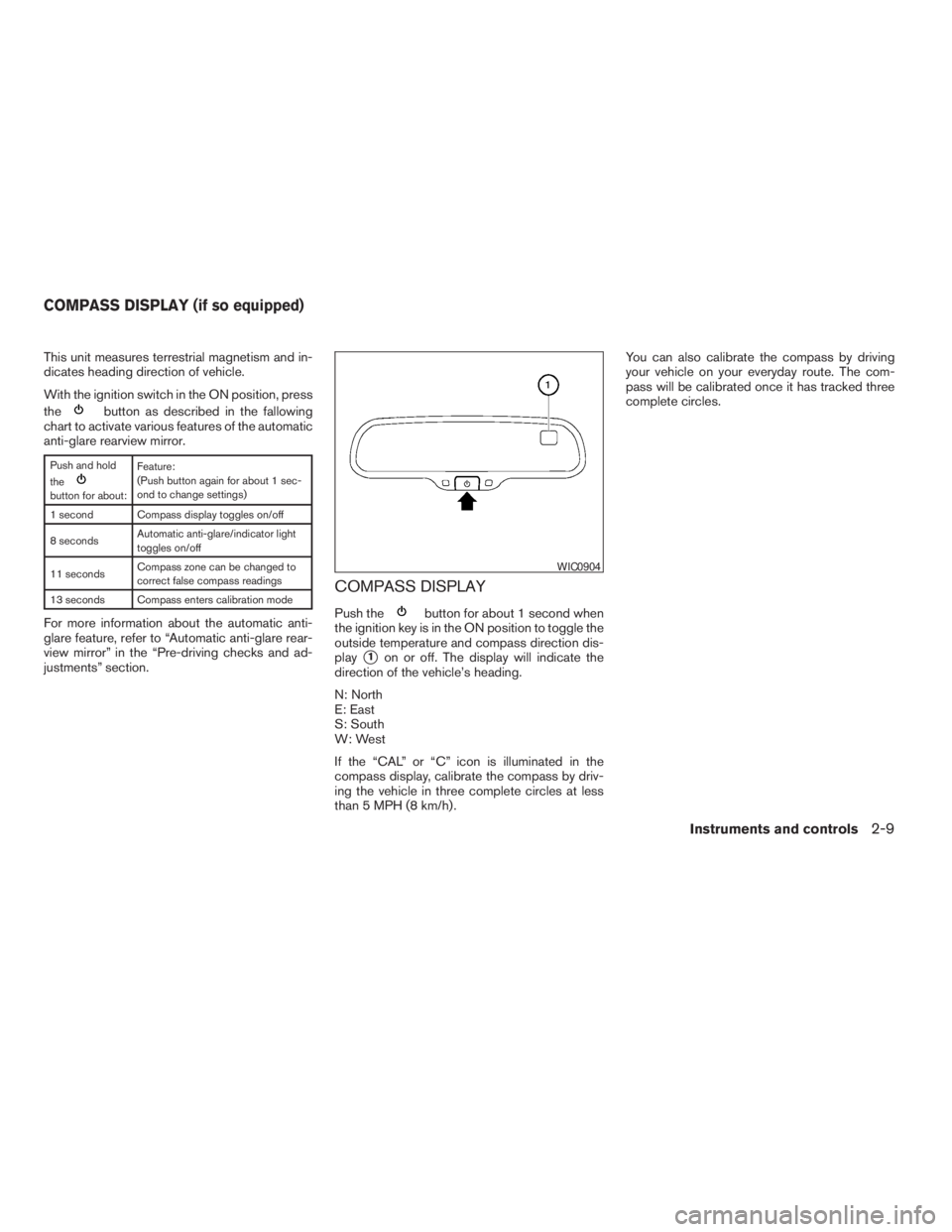
This unit measures terrestrial magnetism and in-
dicates heading direction of vehicle.
With the ignition switch in the ON position, press
the
button as described in the fallowing
chart to activate various features of the automatic
anti-glare rearview mirror.
Push and hold
the
button for about:Feature:
(Push button again for about 1 sec-
ond to change settings)
1 second Compass display toggles on/off
8 secondsAutomatic anti-glare/indicator light
toggles on/off
11 secondsCompass zone can be changed to
correct false compass readings
13 seconds Compass enters calibration mode
For more information about the automatic anti-
glare feature, refer to “Automatic anti-glare rear-
view mirror” in the “Pre-driving checks and ad-
justments” section.
COMPASS DISPLAY
Push thebutton for about 1 second when
the ignition key is in the ON position to toggle the
outside temperature and compass direction dis-
play
s1on or off. The display will indicate the
direction of the vehicle’s heading.
N: North
E: East
S: South
W: West
If the “CAL” or “C” icon is illuminated in the
compass display, calibrate the compass by driv-
ing the vehicle in three complete circles at less
than 5 MPH (8 km/h) .You can also calibrate the compass by driving
your vehicle on your everyday route. The com-
pass will be calibrated once it has tracked three
complete circles.
WIC0904
COMPASS DISPLAY (if so equipped)
Instruments and controls2-9
ZREVIEW COPYÐ2009 Xterra(xtr)
Owners ManualÐUSA_English(nna)
05/20/08Ðdebbie
X
Page 87 of 336
1. With the display turned on, press and hold
the
button for about 13 seconds. The
“CAL” icon in the compass display will illu-
minate.
2. Calibrate the compass by driving the vehicle
in three complete circles at a maximum
speed of 5 MPH (8 km/h) .
3. After completing the circles, the display
should return to normal.
CAUTION
cDo not install a ski rack, antenna, etc.,
which are attached to the vehicle by
means of a magnet. They affect the op-
eration of the compass.
cWhen cleaning the mirror, use a paper
towel or similar material dampened
with glass cleaner. Do not spray glass
cleaner directly on the mirror as it may
cause the liquid cleaner to enter the
mirror housing.
Instruments and controls2-11
ZREVIEW COPYÐ2009 Xterra(xtr)
Owners ManualÐUSA_English(nna)
05/20/08Ðdebbie
X
Page 125 of 336
3 Pre-driving checks and adjustments
Keys .............................................3-2
NISSAN vehicle immobilizer system keys..........3-2
Doors............................................3-3
Locking with key................................3-3
Locking with inside lock knob....................3-4
Locking with power door lock switch.............3-4
Automatic Door Locks..........................3-4
Child safety rear door lock.......................3-5
Remote keyless entry system.......................3-5
How to use remote keyless entry system..........3-6
Hood............................................3-8
Lift gate..........................................3-9Fuel-filler door...................................3-10
Opening the fuel-filler lid.......................3-10
Fuel-filler cap.................................3-10
Steering wheel...................................3-11
Tilt operation..................................3-11
Sun visors.......................................3-12
Vanity mirrors (if so equipped)...................3-12
Mirrors..........................................3-13
Rearview mirror...............................3-13
Automatic anti-glare rearview mirror
(if so equipped)...............................3-13
Outside mirrors...............................3-14
ZREVIEW COPYÐ2009 Xterra(xtr)
Owners ManualÐUSA_English(nna)
05/21/08Ðdebbie
X
Page 136 of 336
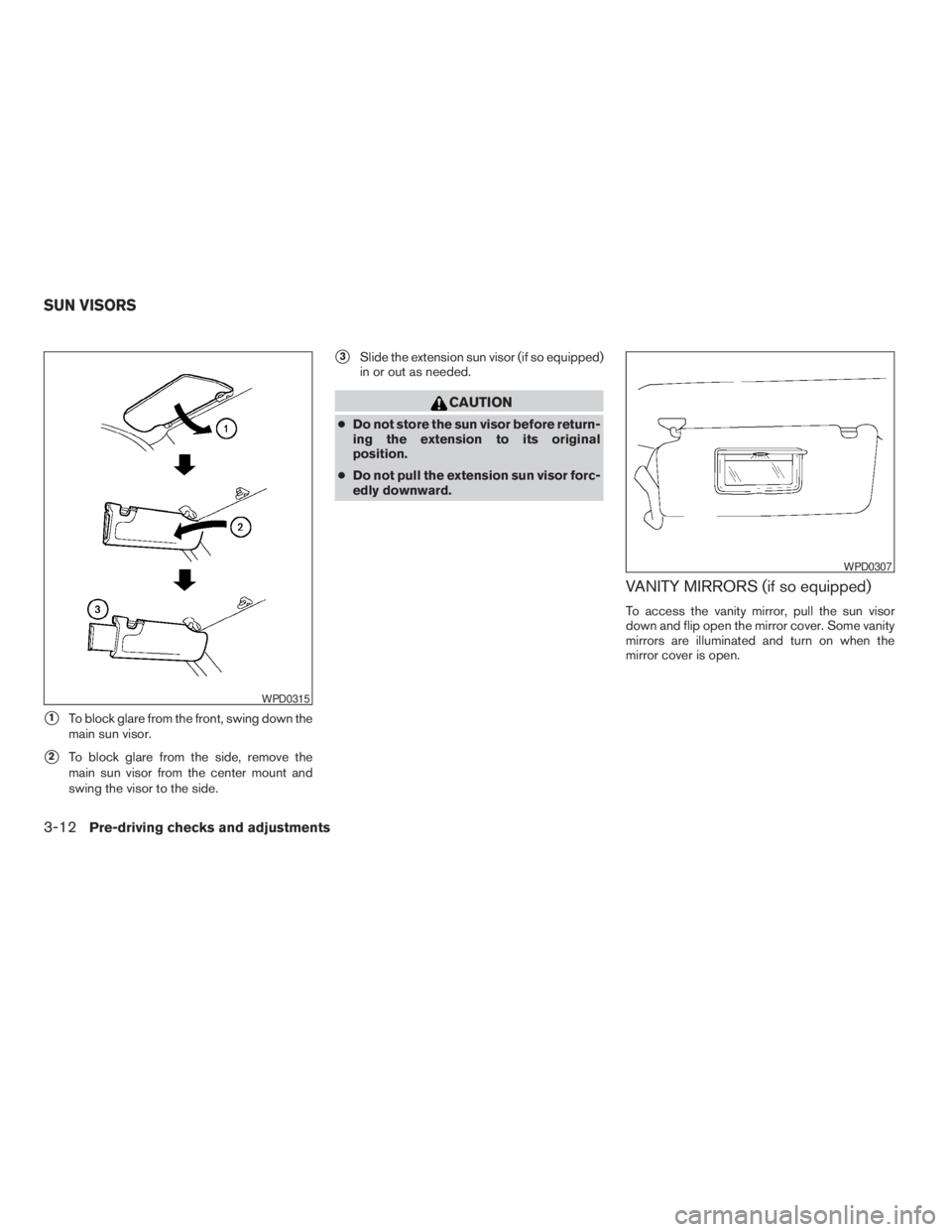
s1To block glare from the front, swing down the
main sun visor.
s2To block glare from the side, remove the
main sun visor from the center mount and
swing the visor to the side.
s3Slide the extension sun visor (if so equipped)
in or out as needed.
CAUTION
cDo not store the sun visor before return-
ing the extension to its original
position.
cDo not pull the extension sun visor forc-
edly downward.
VANITY MIRRORS (if so equipped)
To access the vanity mirror, pull the sun visor
down and flip open the mirror cover. Some vanity
mirrors are illuminated and turn on when the
mirror cover is open.
WPD0315
WPD0307
SUN VISORS
3-12Pre-driving checks and adjustments
ZREVIEW COPYÐ2009 Xterra(xtr)
Owners ManualÐUSA_English(nna)
05/21/08Ðdebbie
X
Page 137 of 336

REARVIEW MIRROR
The night positions1reduces glare from the
headlights of vehicles behind you at night.
Use the day position
s2when driving in daylight
hours.
WARNING
Use the night position only when neces-
sary, because it reduces rear view clarity.
AUTOMATIC ANTI-GLARE
REARVIEW MIRROR (if so equipped)
The inside mirror is designed so that it automati-
cally dims according to the intensity of the head-
lights of the vehicle following you. The automatic
anti-glare feature is activated when the ignition
switch is in the ON position.
NOTE:
Do not hang any objects over the sensors
s1or apply glass cleaner to the sensors.
Doing so will reduce the sensitivity of the
sensors, resulting in improper operation.
The indicator light will illuminate when the auto-
matic anti-glare feature is operating.
WPD0126LPD0446
MIRRORS
Pre-driving checks and adjustments3-13
ZREVIEW COPYÐ2009 Xterra(xtr)
Owners ManualÐUSA_English(nna)
05/21/08Ðdebbie
X
Page 138 of 336
With the ignition switch in the ON position, press
the
button as described:
cTo turn off the anti-glare feature, push
the
button. The indicator light will turn
off.
cTo turn on the anti-glare feature, push
the
button again. The indicator light
will turn on.
For more information about the
s2compass and
compass features (if so equipped) , refer to
“Compass display” in the “Instruments and con-
trols” section.
OUTSIDE MIRRORS
WARNING
cObjects viewed in the outside mirror on
the passenger side are closer than they
appear. Be careful when moving to the
right. Using only this mirror could cause
an accident. Use the inside mirror or
glance over your shoulder to properly
judge distances to other objects.
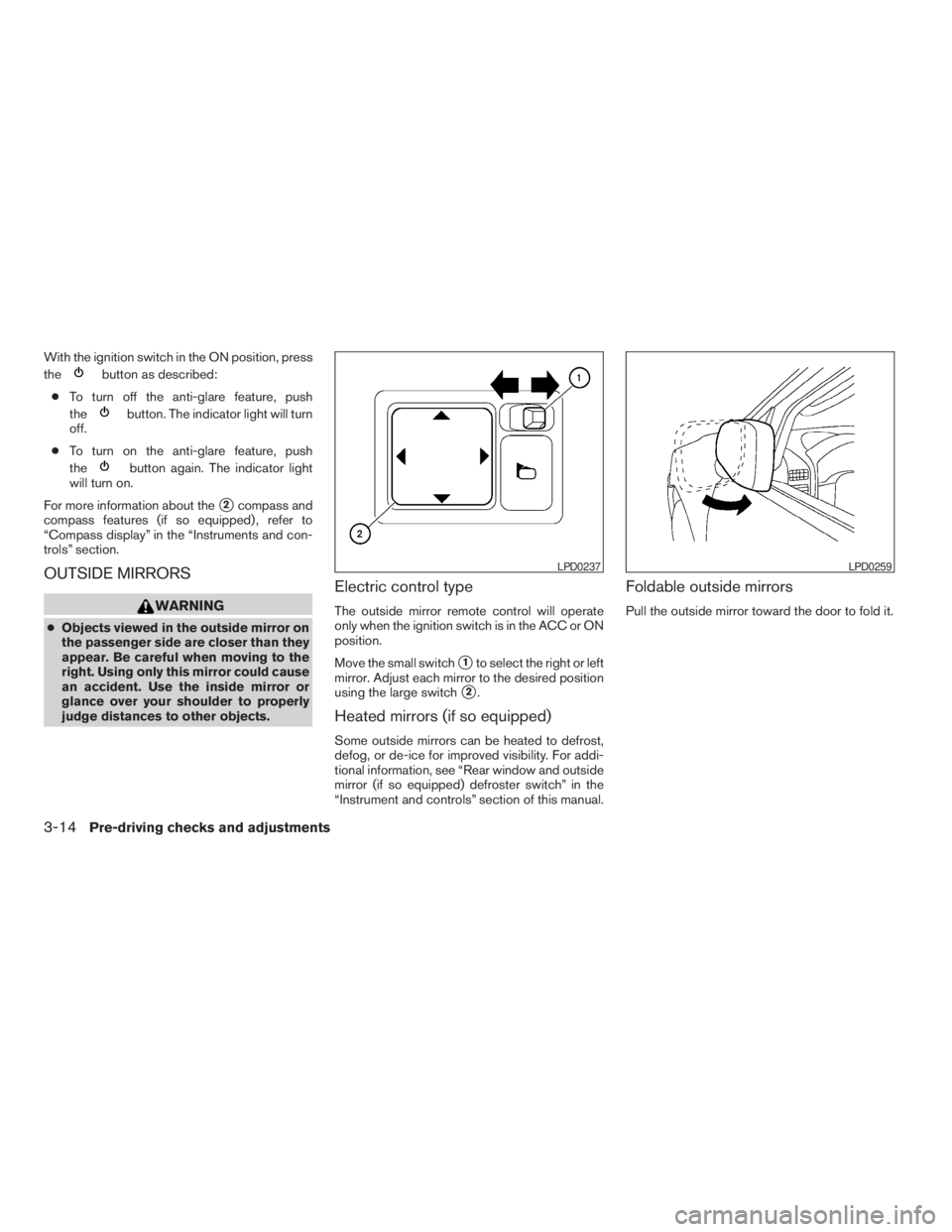
Electric control type
The outside mirror remote control will operate
only when the ignition switch is in the ACC or ON
position.
Move the small switch
s1to select the right or left
mirror. Adjust each mirror to the desired position
using the large switch
s2.
Heated mirrors (if so equipped)
Some outside mirrors can be heated to defrost,
defog, or de-ice for improved visibility. For addi-
tional information, see “Rear window and outside
mirror (if so equipped) defroster switch” in the
“Instrument and controls” section of this manual.
Foldable outside mirrors
Pull the outside mirror toward the door to fold it.
LPD0237LPD0259
3-14Pre-driving checks and adjustments
ZREVIEW COPYÐ2009 Xterra(xtr)
Owners ManualÐUSA_English(nna)
05/21/08Ðdebbie
X