phone NISSAN XTERRA 2009 Owner´s Manual
[x] Cancel search | Manufacturer: NISSAN, Model Year: 2009, Model line: XTERRA, Model: NISSAN XTERRA 2009Pages: 336, PDF Size: 4.52 MB
Page 4 of 336

NISSAN CARES...
Both NISSAN and your NISSAN dealer are dedicated to serving all your automotive needs. Your satisfaction with your vehicle and your NISSAN dealer are
our primary concerns. Your NISSAN dealer is always available to assist you with all your automobile sales and service needs.
However, if there is something that your NISSAN
dealer cannot assist you with or you would like to
provide NISSAN directly with comments or
questions, please contact the NISSAN Con-
sumer Affairs Department using our toll-free
number:
For U.S. customers
1-800-NISSAN-1
(1-800-647-7261)
For Canadian customers
1-800-387-0122The Consumer Affairs Department will ask for the
following information:
– Your name, address, and telephone number
– Vehicle identification number (attached to the
top of the instrument panel on the driver’s
side)
– Date of purchase
– Current odometer reading
– Your NISSAN dealer’s name
– Your comments or questions
ORYou can write to NISSAN with the information at:
For U.S. customers
Nissan North America, Inc.
Consumer Affairs Department
P.O. Box 685003
Franklin, TN 37068-5003
For Canadian customers
Nissan Canada Inc.
5290 Orbitor Drive
Mississauga, Ontario L4W 4Z5
We appreciate your interest in NISSAN and thank you for buying a quality NISSAN vehicle.
NISSAN CUSTOMER CARE PROGRAM
ZREVIEW COPYÐ2009 Xterra(xtr)
Owners ManualÐUSA_English(nna)
05/20/08Ðdebbie
X
Page 5 of 336
Table of
ContentsIllustrated table of contents
Safety—Seats, seat belts and supplemental restraint system
Instruments and controls
Pre-driving checks and adjustments
Heater, air conditioner, audio and phone systems
Starting and driving
In case of emergency
Appearance and care
Maintenance and do-it-yourself
Technical and consumer information
Index
0
1
2
3
4
5
6
7
8
9
10
Page 12 of 336
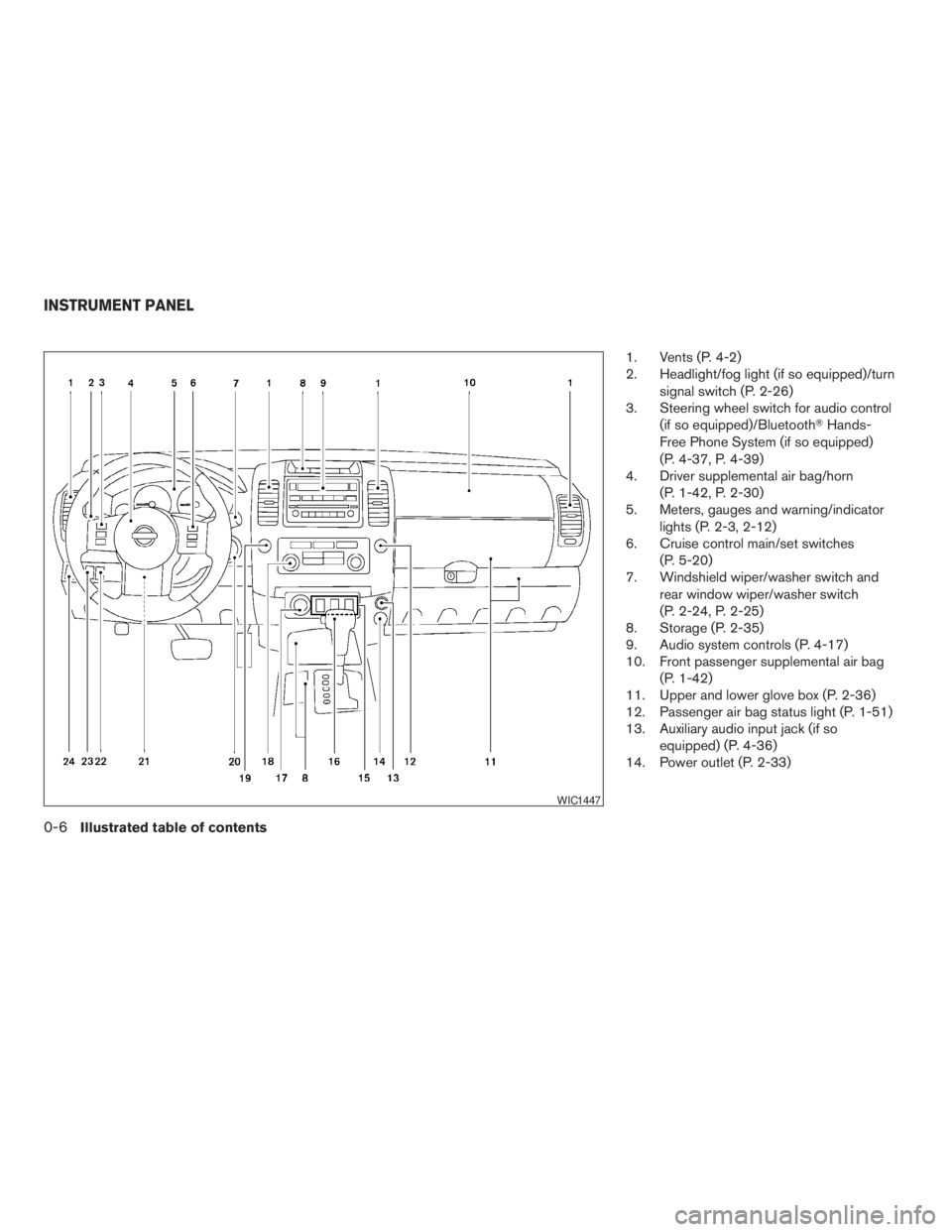
1. Vents (P. 4-2)
2. Headlight/fog light (if so equipped)/turn
signal switch (P. 2-26)
3. Steering wheel switch for audio control
(if so equipped)/BluetoothTHands-
Free Phone System (if so equipped)
(P. 4-37, P. 4-39)
4. Driver supplemental air bag/horn
(P. 1-42, P. 2-30)
5. Meters, gauges and warning/indicator
lights (P. 2-3, 2-12)
6. Cruise control main/set switches
(P. 5-20)
7. Windshield wiper/washer switch and
rear window wiper/washer switch
(P. 2-24, P. 2-25)
8. Storage (P. 2-35)
9. Audio system controls (P. 4-17)
10. Front passenger supplemental air bag
(P. 1-42)
11. Upper and lower glove box (P. 2-36)
12. Passenger air bag status light (P. 1-51)
13. Auxiliary audio input jack (if so
equipped) (P. 4-36)
14. Power outlet (P. 2-33)
WIC1447
INSTRUMENT PANEL
0-6Illustrated table of contents
ZREVIEW COPYÐ2009 Xterra(xtr)
Owners ManualÐUSA_English(nna)
05/20/08Ðdebbie
X
Page 78 of 336
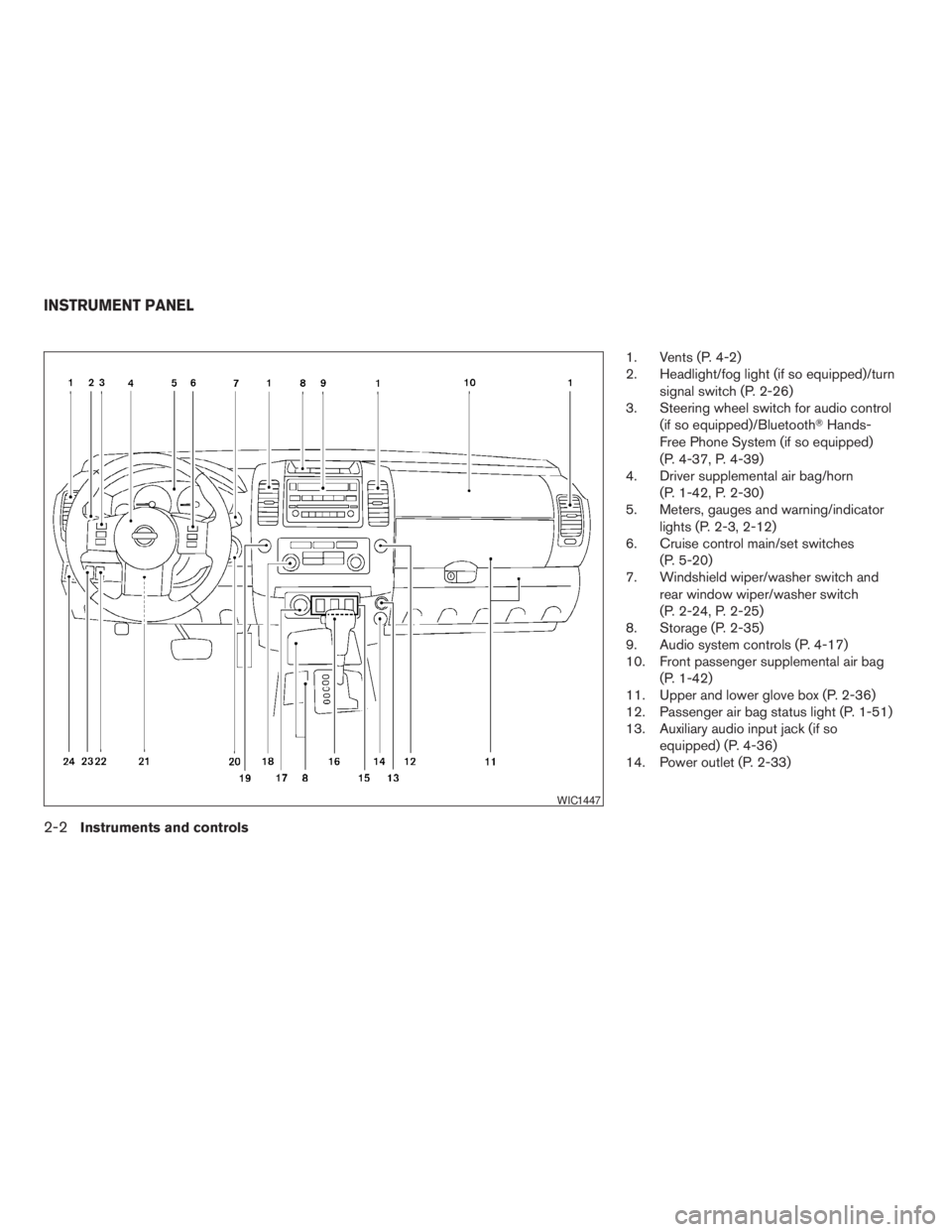
1. Vents (P. 4-2)
2. Headlight/fog light (if so equipped)/turn
signal switch (P. 2-26)
3. Steering wheel switch for audio control
(if so equipped)/BluetoothTHands-
Free Phone System (if so equipped)
(P. 4-37, P. 4-39)
4. Driver supplemental air bag/horn
(P. 1-42, P. 2-30)
5. Meters, gauges and warning/indicator
lights (P. 2-3, 2-12)
6. Cruise control main/set switches
(P. 5-20)
7. Windshield wiper/washer switch and
rear window wiper/washer switch
(P. 2-24, P. 2-25)
8. Storage (P. 2-35)
9. Audio system controls (P. 4-17)
10. Front passenger supplemental air bag
(P. 1-42)
11. Upper and lower glove box (P. 2-36)
12. Passenger air bag status light (P. 1-51)
13. Auxiliary audio input jack (if so
equipped) (P. 4-36)
14. Power outlet (P. 2-33)
WIC1447
INSTRUMENT PANEL
2-2Instruments and controls
ZREVIEW COPYÐ2009 Xterra(xtr)
Owners ManualÐUSA_English(nna)
05/20/08Ðdebbie
X
Page 109 of 336
WARNING
Pay special attention to your surround-
ings when using the clutch interlock
switch. The vehicle will move forward or
backward according to the gear selected.
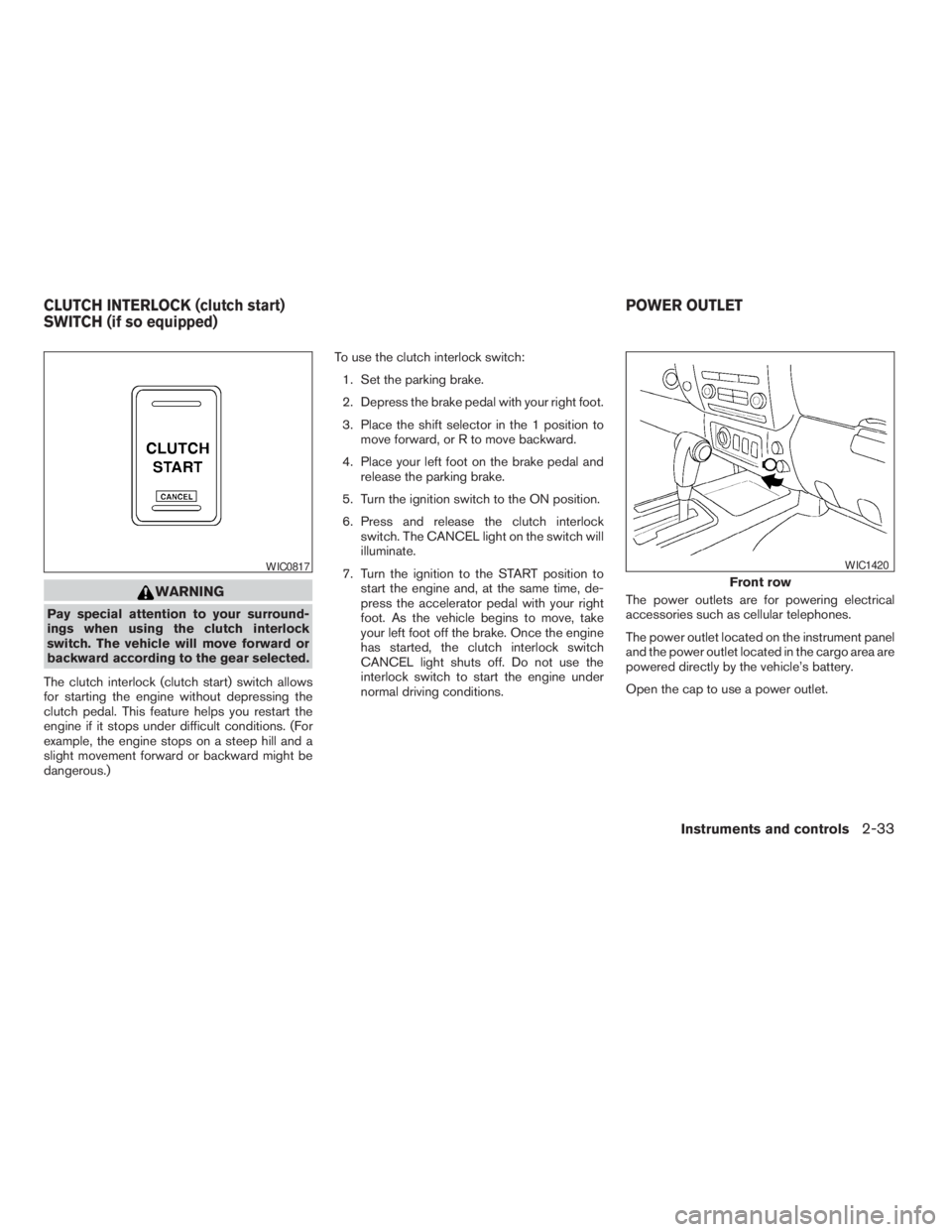
The clutch interlock (clutch start) switch allows
for starting the engine without depressing the
clutch pedal. This feature helps you restart the
engine if it stops under difficult conditions. (For
example, the engine stops on a steep hill and a
slight movement forward or backward might be
dangerous.)To use the clutch interlock switch:
1. Set the parking brake.
2. Depress the brake pedal with your right foot.
3. Place the shift selector in the 1 position to
move forward, or R to move backward.
4. Place your left foot on the brake pedal and
release the parking brake.
5. Turn the ignition switch to the ON position.
6. Press and release the clutch interlock
switch. The CANCEL light on the switch will
illuminate.
7. Turn the ignition to the START position to
start the engine and, at the same time, de-
press the accelerator pedal with your right
foot. As the vehicle begins to move, take
your left foot off the brake. Once the engine
has started, the clutch interlock switch
CANCEL light shuts off. Do not use the
interlock switch to start the engine under
normal driving conditions.The power outlets are for powering electrical
accessories such as cellular telephones.
The power outlet located on the instrument panel
and the power outlet located in the cargo area are
powered directly by the vehicle’s battery.
Open the cap to use a power outlet.
WIC0817
Front row
WIC1420
CLUTCH INTERLOCK (clutch start)
SWITCH (if so equipped)POWER OUTLET
Instruments and controls2-33
ZREVIEW COPYÐ2009 Xterra(xtr)
Owners ManualÐUSA_English(nna)
05/21/08Ðdebbie
X
Page 139 of 336
4 Heater, air conditioner, audio and phone
systems
Vents............................................4-2
Heater and air conditioner (manual)..................4-2
Controls.......................................4-3
Heater operation...............................4-4
Air conditioner operation........................4-5
Air flow charts..................................4-6
Heater and air conditioner (manual)..................4-9
Controls......................................4-10
Heater operation..............................4-11
Air conditioner operation.......................4-12
Air flow charts.................................4-13
Servicing air conditioner...........................4-16
Audio system....................................4-17
Radio........................................4-17
FM radio reception............................4-17
AM radio reception............................4-17
Satellite radio reception (if so equipped).........4-18
Audio operation precautions....................4-18
FM/AM radio with compact disc (CD) player
(if so equipped)...............................4-23FM/AM radio with compact disc (CD) player
(if so equipped)...............................4-27
FM/AM/SAT radio with compact disc (CD)
changer (if so equipped).......................4-31
CD care and cleaning..........................4-36
Steering wheel switch for audio control
(if so equipped)...............................4-37
Antenna......................................4-38
Car phone or CB radio............................4-38
BluetoothTHands-Free Phone System
(if so equipped)..................................4-39
Regulatory Information.........................4-40
Using the system..............................4-41
Control buttons...............................4-43
Getting started................................4-43
List of voice commands........................4-45
Speaker adaptation (SA) mode..................4-50
Troubleshooting guide.........................4-53
ZREVIEW COPYÐ2009 Xterra(xtr)
Owners ManualÐUSA_English(nna)
05/21/08Ðdebbie
X
Page 140 of 336
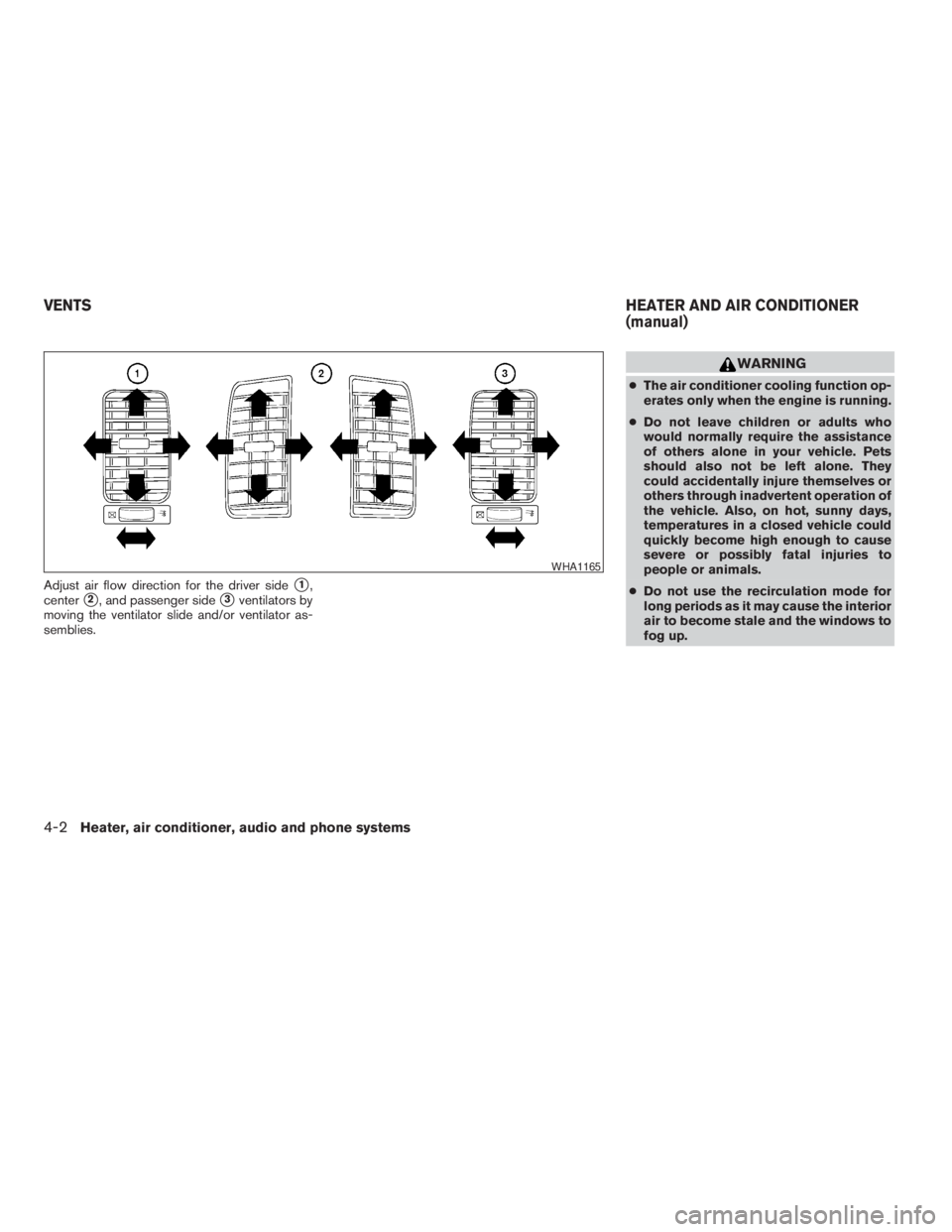
Adjust air flow direction for the driver sides1,
center
s2, and passenger sides3ventilators by
moving the ventilator slide and/or ventilator as-
semblies.
WARNING
cThe air conditioner cooling function op-
erates only when the engine is running.
cDo not leave children or adults who
would normally require the assistance
of others alone in your vehicle. Pets
should also not be left alone. They
could accidentally injure themselves or
others through inadvertent operation of
the vehicle. Also, on hot, sunny days,
temperatures in a closed vehicle could
quickly become high enough to cause
severe or possibly fatal injuries to
people or animals.
cDo not use the recirculation mode for
long periods as it may cause the interior
air to become stale and the windows to
fog up.
WHA1165
VENTSHEATER AND AIR CONDITIONER
(manual)
4-2Heater, air conditioner, audio and phone systems
ZREVIEW COPYÐ2009 Xterra(xtr)
Owners ManualÐUSA_English(nna)
05/21/08Ðdebbie
X
Page 141 of 336
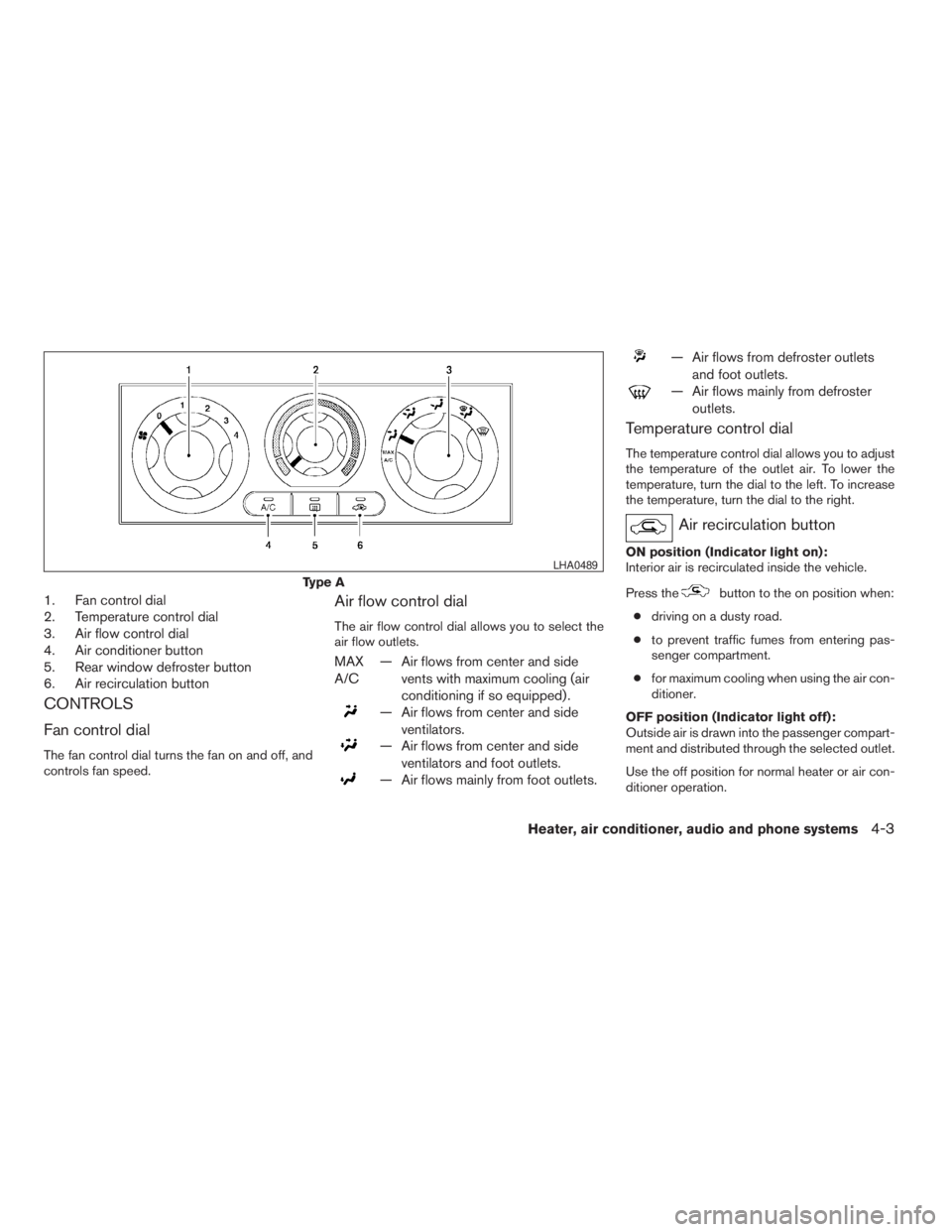
1. Fan control dial
2. Temperature control dial
3. Air flow control dial
4. Air conditioner button
5. Rear window defroster button
6. Air recirculation button
CONTROLS
Fan control dial
The fan control dial turns the fan on and off, and
controls fan speed.
Air flow control dial
The air flow control dial allows you to select the
air flow outlets.
MAX
A/C— Air flows from center and side
vents with maximum cooling (air
conditioning if so equipped) .
— Air flows from center and side
ventilators.
— Air flows from center and side
ventilators and foot outlets.
— Air flows mainly from foot outlets.
— Air flows from defroster outlets
and foot outlets.
— Air flows mainly from defroster
outlets.
Temperature control dial
The temperature control dial allows you to adjust
the temperature of the outlet air. To lower the
temperature, turn the dial to the left. To increase
the temperature, turn the dial to the right.
Air recirculation button
ON position (Indicator light on):
Interior air is recirculated inside the vehicle.
Press the
button to the on position when:
cdriving on a dusty road.
cto prevent traffic fumes from entering pas-
senger compartment.
cfor maximum cooling when using the air con-
ditioner.
OFF position (Indicator light off):
Outside air is drawn into the passenger compart-
ment and distributed through the selected outlet.
Use the off position for normal heater or air con-
ditioner operation.Type A
LHA0489
Heater, air conditioner, audio and phone systems4-3
ZREVIEW COPYÐ2009 Xterra(xtr)
Owners ManualÐUSA_English(nna)
05/21/08Ðdebbie
X
Page 142 of 336
Air conditioner button
Start the engine, turn the fan control dial to the
desired (1 to 4) position and push the
button to turn on the air conditioner. The indicator
light on the
button will come on. Push
the
button again to turn off the air condi-
tioner. The indicator light on the
button will
go off.
The air conditioner cooling function oper-
ates only when the engine is running.
Rear window defroster switch
For more information about the rear window de-
froster switch, see “Rear window defroster
switch” in the “Instruments and controls” section
of this manual.
HEATER OPERATION
Heating
This mode is used to direct heated air to the foot
outlets. Some air also flows from the defrost
outlets.
1. Push the
button to the OFF position
for normal heating. The indicator light on
the
button will go off.2. Turn the air flow control dial to the
position.
3. Turn the fan control dial to the desired posi-
tion.
4. Turn the temperature control dial to the de-
sired position between the middle and the
hot position.
Ventilation
This mode directs outside air to the side and
center vent.
1. Push the
button to the OFF position.
The indicator light on the
button will
go off.
2. Turn the air flow control dial to the
position.
3. Turn the fan control dial to the desired posi-
tion.
4. Turn the temperature control dial to the de-
sired position.
Defrosting or defogging
This mode directs the air to the defrost outlets to
defrost/defog the windows.
1. Turn the air flow control dial to the
position.2. Turn the fan control dial to the desired posi-
tion.
3. Turn the temperature control dial to the de-
sired position between the middle and the
hot position.
cTo quickly remove ice or fog from the win-
dows, turn the fan control dial to 4 and the
temperature control lever to the full HOT
position.
cWhen the
position is selected, the air
conditioner automatically turns on (however,
the indicator light will not illuminate) if the
outside temperature is more than 36°F
(2°C) . The air conditioning system will con-
tinue to operate until the fan control dial is
turned to OFF or the vehicle is shut off, even
if the air flow control dial is turned to a
position other than the
position. This
dehumidifies the air which helps defog the
windshield. The
mode automatically
turns off, allowing outside air to be drawn
into the passenger compartment to further
improve the defogging performance.
Bi-level heating
The bi-level mode directs warmed air to the side
and center vents and to the front and rear floor
outlets.
4-4Heater, air conditioner, audio and phone systems
ZREVIEW COPYÐ2009 Xterra(xtr)
Owners ManualÐUSA_English(nna)
05/21/08Ðdebbie
X
Page 143 of 336
1. Push thebutton to the OFF position.
The indicator light on the
button will
go off.
2. Turn the air flow control dial to the
position.
3. Turn the fan control dial to the desired posi-
tion.
4. Turn the temperature control dial to the de-
sired position.
Heating and defogging
This mode heats the interior and defogs the wind-
shield.
1. Turn the air flow control dial to the
position.
2. Turn the fan control dial to the desired posi-
tion.
3. Turn the temperature control dial to the de-
sired position between the middle and the
hot position.cWhen the
position is selected, the air
conditioner automatically turns on (however,
the indicator light on the
button will
not come on) if the outside temperature is
more than 36°F (2°C) . If in defrost mode for
more than one minute, the air conditioning
system will continue to operate until the fan
control dial is turned to OFF or the vehicle is
shut off, even if the air flow control dial is
turned to a position other than the
position. This dehumidifies the air which
helps defog the windshield. The
mode automatically turns off, allowing out-
side air to be drawn into the passenger
compartment to further improve the defog-
ging performance.
Operating tips
Clear snow and ice from the wiper blades
and air inlet in front of the windshield. This
improves heater operation.
AIR CONDITIONER OPERATION
Start the engine, turn the fan control dial to the
desired position, and push in the
button to
activate the air conditioner. When the air condi-
tioner is on, cooling and dehumidifying functions
are added to the heater operation.The air conditioner cooling function oper-
ates only when the engine is running.
Cooling
This mode is used to cool and dehumidify the air.
1. Push the
button to the off position.
2. Turn the air flow control dial to the
position.
3. Turn the fan control dial to the desired posi-
tion.
4. Push the
button. The indicator light
comes on.
5. Turn the temperature control dial to the de-
sired position.
cFor quick cooling when the outside tem-
perature is high, push the
button to
the on position (indicator light on) . Be sure
to return the
button to the off position
for normal cooling.
Dehumidified defogging
This mode is used to defog the windows and
dehumidify the air.
1. Turn the air flow control dial to the
position.
Heater, air conditioner, audio and phone systems4-5
ZREVIEW COPYÐ2009 Xterra(xtr)
Owners ManualÐUSA_English(nna)
05/21/08Ðdebbie
X