window NISSAN XTERRA 2009 Owner´s Manual
[x] Cancel search | Manufacturer: NISSAN, Model Year: 2009, Model line: XTERRA, Model: NISSAN XTERRA 2009Pages: 336, PDF Size: 4.52 MB
Page 9 of 336
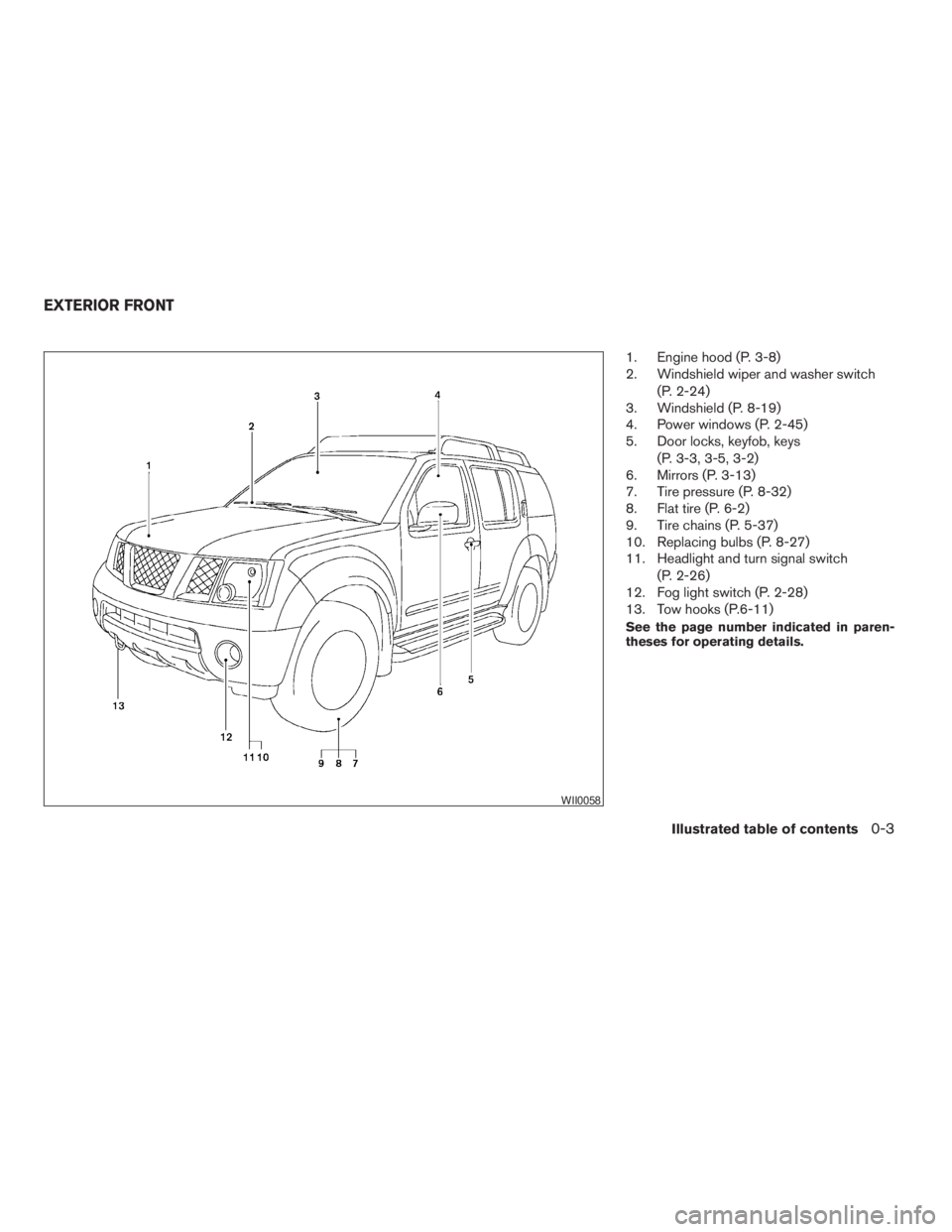
1. Engine hood (P. 3-8)
2. Windshield wiper and washer switch
(P. 2-24)
3. Windshield (P. 8-19)
4. Power windows (P. 2-45)
5. Door locks, keyfob, keys
(P. 3-3, 3-5, 3-2)
6. Mirrors (P. 3-13)
7. Tire pressure (P. 8-32)
8. Flat tire (P. 6-2)
9. Tire chains (P. 5-37)
10. Replacing bulbs (P. 8-27)
11. Headlight and turn signal switch
(P. 2-26)
12. Fog light switch (P. 2-28)
13. Tow hooks (P.6-11)
See the page number indicated in paren-
theses for operating details.
WII0058
EXTERIOR FRONT
Illustrated table of contents0-3
ZREVIEW COPYÐ2009 Xterra(xtr)
Owners ManualÐUSA_English(nna)
05/20/08Ðdebbie
X
Page 10 of 336
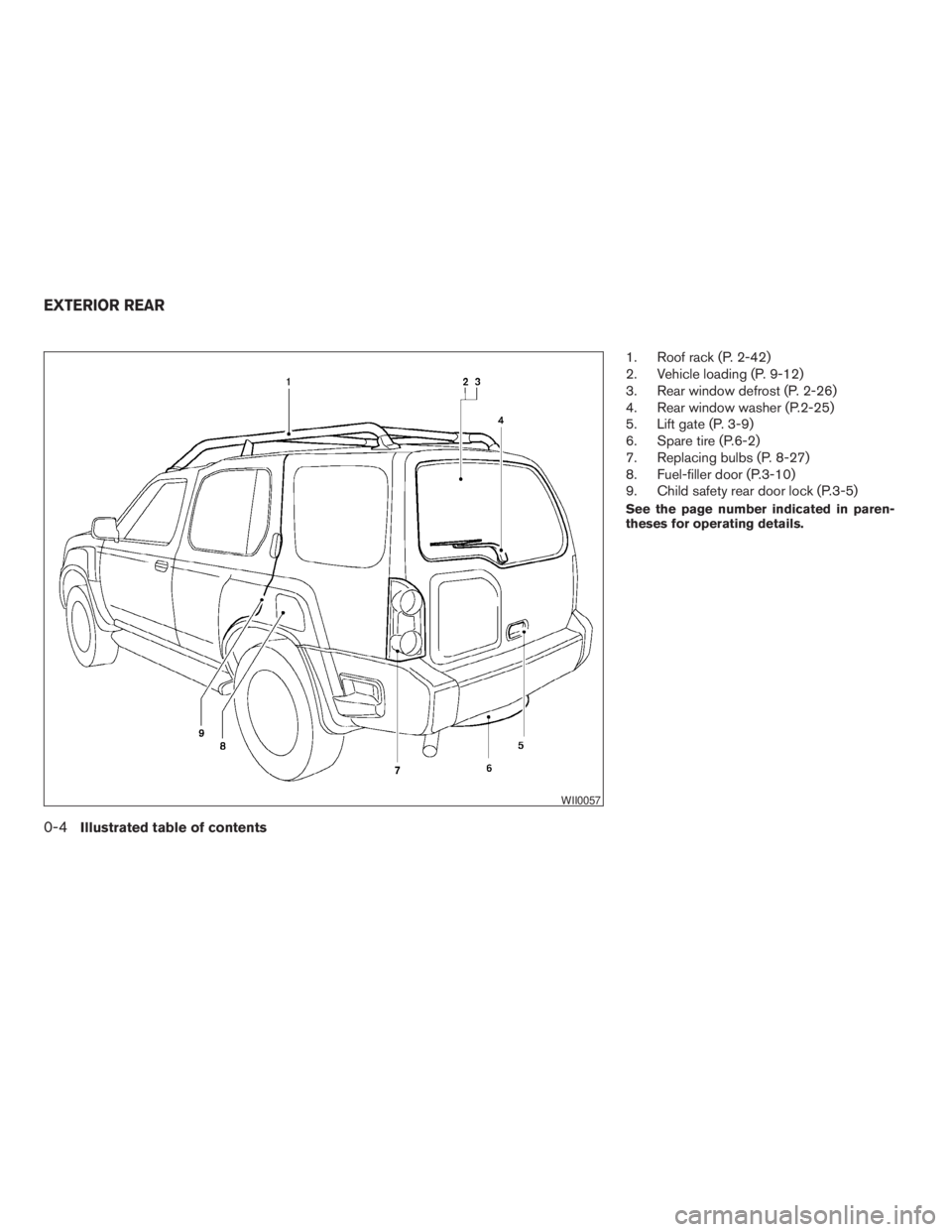
1. Roof rack (P. 2-42)
2. Vehicle loading (P. 9-12)
3. Rear window defrost (P. 2-26)
4. Rear window washer (P.2-25)
5. Lift gate (P. 3-9)
6. Spare tire (P.6-2)
7. Replacing bulbs (P. 8-27)
8. Fuel-filler door (P.3-10)
9. Child safety rear door lock (P.3-5)
See the page number indicated in paren-
theses for operating details.
WII0057
EXTERIOR REAR
0-4Illustrated table of contents
ZREVIEW COPYÐ2009 Xterra(xtr)
Owners ManualÐUSA_English(nna)
05/20/08Ðdebbie
X
Page 12 of 336
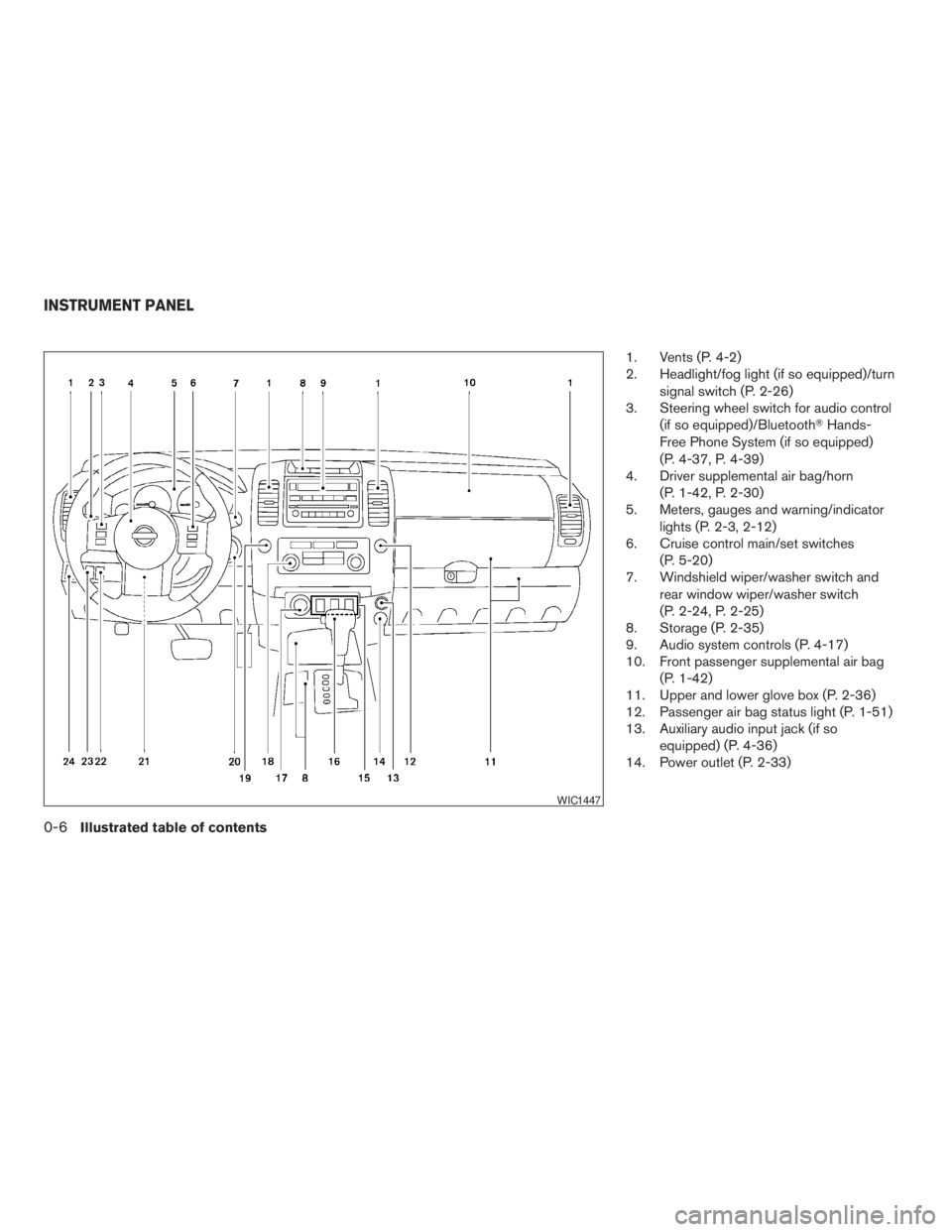
1. Vents (P. 4-2)
2. Headlight/fog light (if so equipped)/turn
signal switch (P. 2-26)
3. Steering wheel switch for audio control
(if so equipped)/BluetoothTHands-
Free Phone System (if so equipped)
(P. 4-37, P. 4-39)
4. Driver supplemental air bag/horn
(P. 1-42, P. 2-30)
5. Meters, gauges and warning/indicator
lights (P. 2-3, 2-12)
6. Cruise control main/set switches
(P. 5-20)
7. Windshield wiper/washer switch and
rear window wiper/washer switch
(P. 2-24, P. 2-25)
8. Storage (P. 2-35)
9. Audio system controls (P. 4-17)
10. Front passenger supplemental air bag
(P. 1-42)
11. Upper and lower glove box (P. 2-36)
12. Passenger air bag status light (P. 1-51)
13. Auxiliary audio input jack (if so
equipped) (P. 4-36)
14. Power outlet (P. 2-33)
WIC1447
INSTRUMENT PANEL
0-6Illustrated table of contents
ZREVIEW COPYÐ2009 Xterra(xtr)
Owners ManualÐUSA_English(nna)
05/20/08Ðdebbie
X
Page 60 of 336
WARNING
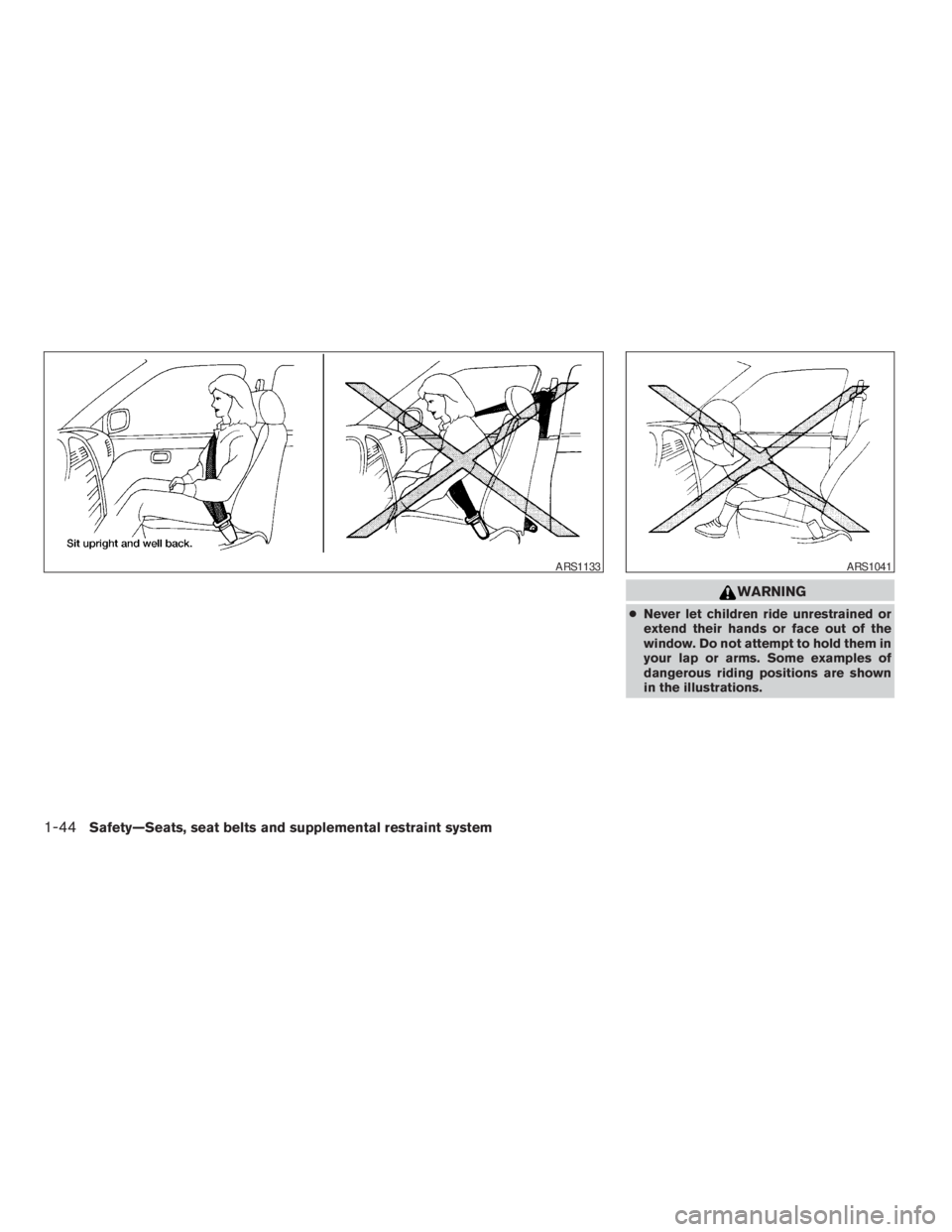
cNever let children ride unrestrained or
extend their hands or face out of the
window. Do not attempt to hold them in
your lap or arms. Some examples of
dangerous riding positions are shown
in the illustrations.
ARS1133ARS1041
1-44Safety—Seats, seat belts and supplemental restraint system
ZREVIEW COPYÐ2009 Xterra(xtr)
Owners ManualÐUSA_English(nna)
05/20/08Ðdebbie
X
Page 63 of 336
WARNING
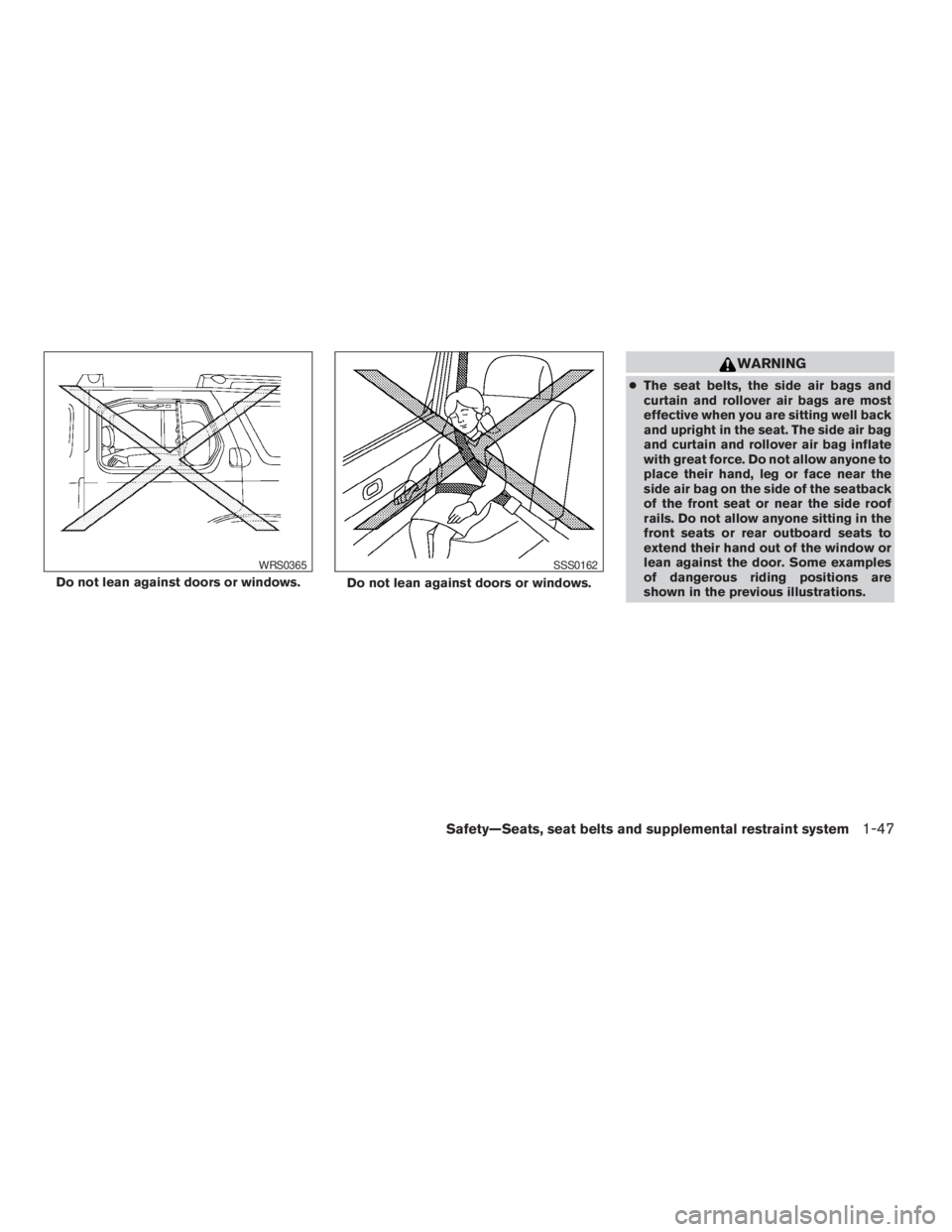
cThe seat belts, the side air bags and
curtain and rollover air bags are most
effective when you are sitting well back
and upright in the seat. The side air bag
and curtain and rollover air bag inflate
with great force. Do not allow anyone to
place their hand, leg or face near the
side air bag on the side of the seatback
of the front seat or near the side roof
rails. Do not allow anyone sitting in the
front seats or rear outboard seats to
extend their hand out of the window or
lean against the door. Some examples
of dangerous riding positions are
shown in the previous illustrations.
Do not lean against doors or windows.
WRS0365
Do not lean against doors or windows.
SSS0162
Safety—Seats, seat belts and supplemental restraint system1-47
ZREVIEW COPYÐ2009 Xterra(xtr)
Owners ManualÐUSA_English(nna)
05/20/08Ðdebbie
X
Page 76 of 336
2 Instruments and controls
Instrument panel...................................2-2
Meters and gauges................................2-3
Speedometer and odometer.....................2-4
Trip computer (if so equipped)...................2-5
Tachometer....................................2-6
Engine coolant temperature gauge...............2-6
Fuel gauge....................................2-7
Engine oil pressure gauge.......................2-8
Voltmeter......................................2-8
Compass display (if so equipped)...................2-9
Compass display...............................2-9
Warning/indicator lights and audible reminders......2-12
Checking bulbs...............................2-13
Warning lights................................2-13
Indicator lights................................2-17
Audible reminders.............................2-21
Security systems.................................2-22
Vehicle security system.........................2-22
NISSAN vehicle immobilizer system.............2-23
Windshield wiper and washer switch...............2-24
Switch operation..............................2-24
Rear window wiper and washer switch..............2-25
Rear window defroster switch......................2-25Headlight and turn signal switch....................2-26
Headlight control switch........................2-26
Daytime running light system (Canada only)......2-27
Instrument brightness control...................2-28
Turn signal switch.............................2-28
Fog light switch (if so equipped)................2-28
Off road lamps switch (if so equipped)...........2-29
Hazard warning flasher switch.....................2-29
Horn............................................2-30
Vehicle Dynamic Control (VDC) OFF switch.........2-30
Hill descent control switch (if so equipped)..........2-31
Electronic locking rear differential (E-Lock) system
switch (if so equipped)............................2-32
Clutch interlock (clutch start) switch
(if so equipped)..................................2-33
Power outlet.....................................2-33
Storage.........................................2-35
Storage trays.................................2-35
Console box..................................2-36
Glove box....................................2-36
Sunglasses holder (if so equipped)..............2-36
Map pockets..................................2-37
Seat pockets (if so equipped)...................2-37
ZREVIEW COPYÐ2009 Xterra(xtr)
Owners ManualÐUSA_English(nna)
06/10/08Ðdebbie
X
Page 77 of 336
Cup holders..................................2-38
Cargo area storage............................2-39
Luggage hooks................................2-39
Cargo nets...................................2-41
Roof rack.....................................2-42Windows........................................2-45
Power windows...............................2-45
Interior lights.....................................2-46
Map lights.......................................2-47
Cargo light......................................2-48
ZREVIEW COPYÐ2009 Xterra(xtr)
Owners ManualÐUSA_English(nna)
05/20/08Ðdebbie
X
Page 78 of 336
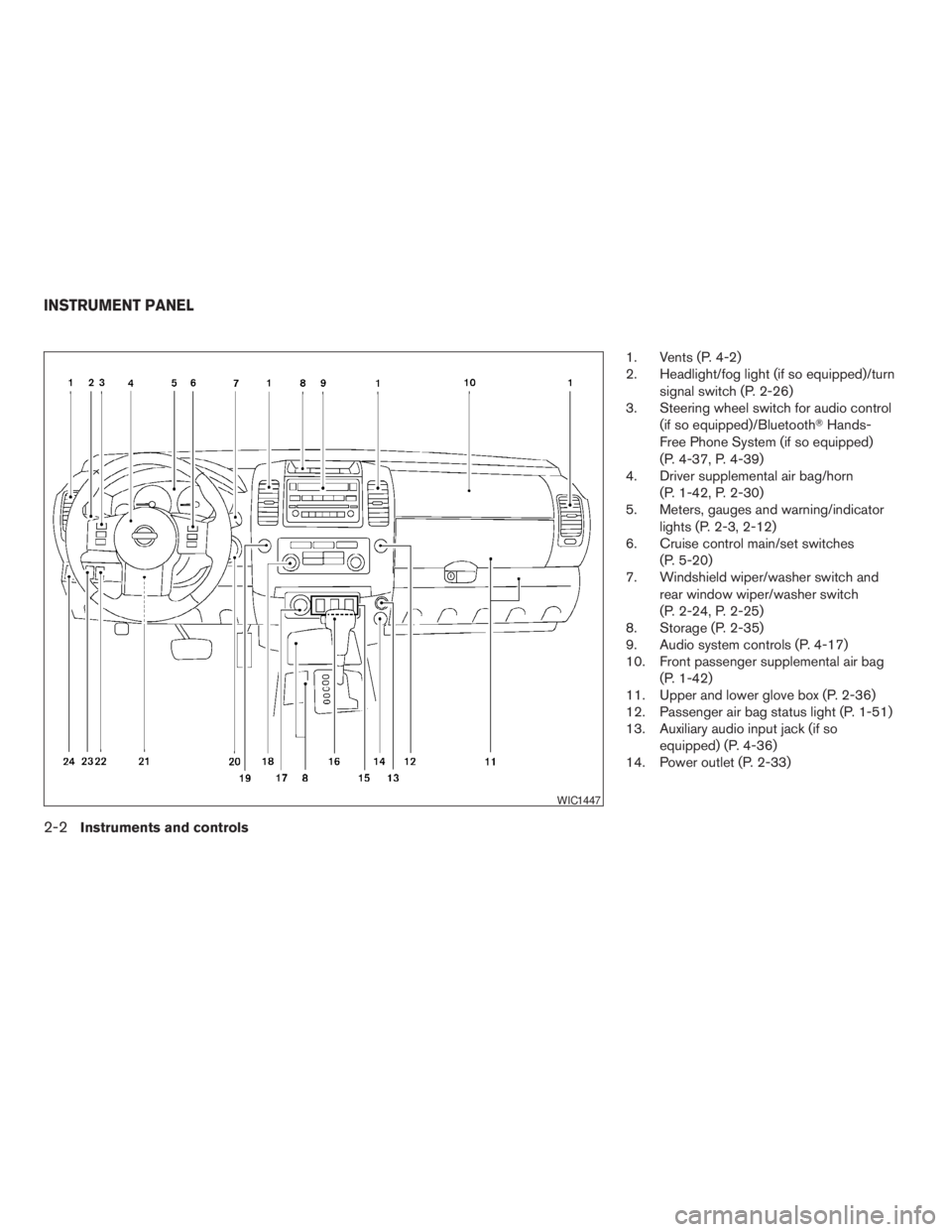
1. Vents (P. 4-2)
2. Headlight/fog light (if so equipped)/turn
signal switch (P. 2-26)
3. Steering wheel switch for audio control
(if so equipped)/BluetoothTHands-
Free Phone System (if so equipped)
(P. 4-37, P. 4-39)
4. Driver supplemental air bag/horn
(P. 1-42, P. 2-30)
5. Meters, gauges and warning/indicator
lights (P. 2-3, 2-12)
6. Cruise control main/set switches
(P. 5-20)
7. Windshield wiper/washer switch and
rear window wiper/washer switch
(P. 2-24, P. 2-25)
8. Storage (P. 2-35)
9. Audio system controls (P. 4-17)
10. Front passenger supplemental air bag
(P. 1-42)
11. Upper and lower glove box (P. 2-36)
12. Passenger air bag status light (P. 1-51)
13. Auxiliary audio input jack (if so
equipped) (P. 4-36)
14. Power outlet (P. 2-33)
WIC1447
INSTRUMENT PANEL
2-2Instruments and controls
ZREVIEW COPYÐ2009 Xterra(xtr)
Owners ManualÐUSA_English(nna)
05/20/08Ðdebbie
X
Page 93 of 336
Low windshield washer fluid
warning light
This light comes on when the windshield washer
fluid is at a low level. Add windshield washer fluid
as necessary. See “Window washer fluid” in the
“Maintenance and do-it-yourself” section of this
manual.
Seat belt warning light and
chime
The light and chime remind you to fasten your
seat belts. The light illuminates whenever the
ignition switch is placed in the ON or START
position and remains illuminated until the driver’s
seat belt is fastened. At the same time, the chime
sounds for about 6 seconds unless the driver’s
seat belt is securely fastened.
The seat belt warning light may also illuminate if
the front passenger’s seat belt is not fastened
when the front passenger’s seat is occupied . For
7 seconds after the ignition switch is placed in
the ON position, the system does not activate the
warning light for the front passenger.
Refer to “Seat belts” in the “Safety—Seats, seat
belts and supplemental restraint system” section
for precautions on seat belt usage.
Supplemental air bag warning
light
When the ignition switch is placed in the ON or
START position, the supplemental air bag warn-
ing light illuminates for about 7 seconds and then
turns off. This means the system is operational.
If any of the following conditions occur, the front
air bag, side air bag, curtain air bag and preten-
sioners need servicing and your vehicle must be
taken to a NISSAN dealer:
cThe supplemental air bag warning light re-
mains on after approximately 7 seconds.
cThe supplemental air bag warning light
flashes intermittently.
cThe supplemental air bag warning light does
not come on at all.
Unless checked and repaired, the supplemental
restraint systems (air bag system) and/or the
pretensioners may not function properly. For ad-
ditional details see “Supplemental restraint sys-
tem” in the “Safety—Seats, seat belts and
supplemental restraint system” section of this
manual.
WARNING
If the supplemental air bag warning light
is on, it could mean that the front air bag,
side air bags, curtain and rollover air bags
and/or pretensioners will not operate in
an accident. To help avoid injury to your-
self or others, have your vehicle checked
by a NISSAN dealer as soon as possible.
INDICATOR LIGHTS
Automatic transmission
position indicator light (A/T
models only)
When the ignition switch is in the ON position,
this indicator light shows the shift selector posi-
tion. See “Driving the vehicle” in the “Starting and
driving” section of this manual.
Cruise main switch indicator
light
The light comes on when the cruise control main
switch is pushed. The light goes out when the
main switch is pushed again. When the cruise
main switch indicator light comes on, the cruise
control system is operational.
Instruments and controls2-17
ZREVIEW COPYÐ2009 Xterra(xtr)
Owners ManualÐUSA_English(nna)
05/21/08Ðdebbie
X
Page 98 of 336
Your vehicle may have two types of security sys-
tems:
cVehicle security system
cNISSAN Vehicle Immobilizer System
VEHICLE SECURITY SYSTEM
The vehicle security system provides visual and
audible alarm signals if someone opens the doors
when the system is armed. It is not, however, a
motion detection type system that activates when
a vehicle is moved or when a vibration occurs.
The system helps deter vehicle theft but cannot
prevent it, nor can it prevent the theft of interior or
exterior vehicle components in all situations. Al-ways secure your vehicle even if parking for a
brief period. Never leave your keys in the ignition,
and always lock the vehicle when unattended. Be
aware of your surroundings, and park in secure,
well-lit areas whenever possible.
Many devices offering additional protection, such
as component locks, identification markers, and
tracking systems, are available at auto supply
stores and specialty shops. Your NISSAN dealer
may also offer such equipment. Check with your
insurance company to see if you may be eligible
for discounts for various theft protection features.
How to arm the vehicle security
system
1. Close all windows.(The system can be
armed even if the windows are open.)
2. Remove the key from the ignition switch.
3. Close all doors. Lock all doors. The doors
can be locked with the key, power door lock
switch (if the door is opened, locked and
then closed) , or with the keyfob.
Keyfob operation:
cPush the
button on the keyfob.
All doors lock. The hazard lights flash
twice and the horn beeps once to indicate
all doors are locked.cWhen the
button is pushed with
all doors locked, the hazard lights flash
twice and the horn beeps once as a re-
minder that the doors are already locked.
The horn may or may not beep. Refer to
“Silencing the horn beep feature” in the
“Pre-driving checks and adjustments” sec-
tion later in this manual.
4. Confirm that the
indicator light comes
on. The
light stays on for about 30
seconds. The vehicle security system is now
pre-armed. After about 30 seconds the ve-
hicle security system automatically shifts
into the armed phase. The
light begins
to flash once every 3 seconds. If, during the
30-second pre-arm time period, the driver’s
door is unlocked by the key or the keyfob, or
the ignition switch is placed in ACC or ON
position, the system will not arm.
cIf the key is turned slowly when locking
the driver’s door, the system may not
arm. Furthermore, if the key is turned
beyond the vertical position toward the
unlock position to remove the key, the
system may be disarmed when the key
is removed. If the indicator light fails to
glow for 30 seconds, unlock the door
once and lock it again.
LIC0372
SECURITY SYSTEMS
2-22Instruments and controls
ZREVIEW COPYÐ2009 Xterra(xtr)
Owners ManualÐUSA_English(nna)
05/21/08Ðdebbie
X