steering Oldsmobile Achieva 1995 Owner's Manuals
[x] Cancel search | Manufacturer: OLDSMOBILE, Model Year: 1995, Model line: Achieva, Model: Oldsmobile Achieva 1995Pages: 340, PDF Size: 16.99 MB
Page 29 of 340
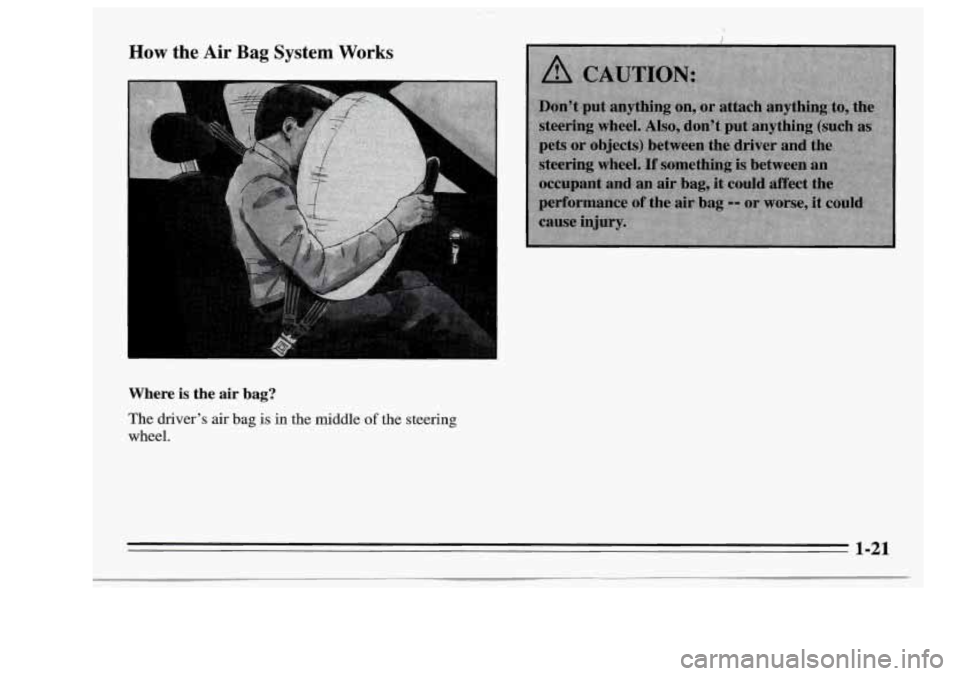
How the Air Bag System Works
Where is the air bag?
The driver’s air bag is in the middle of the steering
wheel.
1-21
Page 30 of 340
When should an air bag inflate?
The air bag is designed to inflate in moderate to severe
frontal or near-frontal crashes. The air bag will inflate
only if the impact speed is above the system’s designed
“threshold level.” If your vehicle goes straight into a
wall that doesn’t move or deform, the threshold level is
about
9 to 16 mph (14 to 26 km/h). The threshold level
can vary, however, with specific vehicle design,
so that
it can be somewhat above or below this range.
If your
vehicle strikes something that will move or deform, such
as a parked car, the threshold level will be higher. The
air bag is not designed to inflate in rollovers, side
impacts, or rear impacts, because inflation would not
help the occupant.
In any particular crash, no one can say whether an air
bag should have inflated simply because of the damage
to
a vehicle or because of what the repair costs were.
Inflation is determined by the angle of the impact and
the vehicle’s deceleration. Vehicle damage is only one
indication of this.
What makes an air bag inflate?
In a frontal or near-frontal impact of sufficient severity,
the air bag sensing system detects that the vehicle is
suddenly stopping as a result of a crash. The sensing
system triggers a chemical reaction of the sodium azide
sealed
in the inflator. The reaction produces nitrogen
gas, which inflates the air bag. The inflator, air bag, and
related hardware are all part of the air bag module
packed inside
the steering wheel.
How does an air bag restrain?
In moderate to severe frontal or near-frontal collisions,
even belted occupants can contact the steering wheel.
The air bag supplements the protection provided by
safety belts. Air bags distribute the force
of the impact
more evenly over the occupant’s upper body, stopping
the occupant more gradually. But air bags would not
help you in many types
of collisions, including rollovers
and rear and side impacts, primarily because an
occupant’s motion is not toward the air bag. Air bags
should never be regarded as anything more than a
supplement
to safety belts, and then only in moderate to
severe frontal or near-frontal collisions.
1-22
Page 31 of 340
What will you see after an air bag inflates?
After the air bag inflates, it quickly deflates. This occurs
so quickly that some people may not even realize the air
bag inflated. Some components of the air bag module in
the steering wheel hub will be hot for a short time, but
the part
of the bag that comes into contact with you will
not be hot to the touch. There will be some smoke and
dust coming from vents in the deflated air bag. Air bag
inflation will not prevent the driver from seeing or from
being able to steer the vehicle, nor will
it stop people
from leaving the vehicle.
0
0
0
The air bag is designed to inflate only once. After it
inflates, you’ll need some new parts for your air bag
system. If you don’t get them, the air bag system
won’t be there to help protect you in another crash.
A new system will include the air bag module and
possibly other parts. The service manual for your
vehicle covers the need to replace other parts.
Your vehicle is equipped with a diagnostic module,
which records information about the air bag system.
The module records information about the readiness
of the system, when the sensors are activated and
driver’s safety belt usage at deployment.
Let only qualified technicians work on your air bag
system. Improper service can mean that your air bag
system won’t work properly. See your retailer for
service.
I NOTICE:
If you damage the cover for the driver’s air bag,
it may
not work properly. You may have to
replace the air bag module.
Do not open or break
the air bag cover.
Page 67 of 340
Theft
Glove Box
Use one of the vehicle’s keys to lock and unlock the
glove box. To open, pull the glove box handle toward
you.
Vehicle theft is big business, especially in some cities.
Although your Oldsmobile has a number
of theft
deterrent features, we know that nothing we put
on it
can make it impossible to steal. However, there are ways
you can help.
Key in the Ignition
If you walk away from your vehicle with the keys
inside,
it’s an easy target fm joy riders or professional
thieves
-- so don’t do it.
When you park your Oldsmobile and open the driver’s
door,
you’ll hear a chime reminding you to remove your
key from
the ignition and take it with you. Always do
this.
Your steering wheel will be locked, and so will
your ignition.
If you have an automatic transaxle, taking
your key out also locks your transaxle. And remember
to lock the doors.
2-11
Page 69 of 340
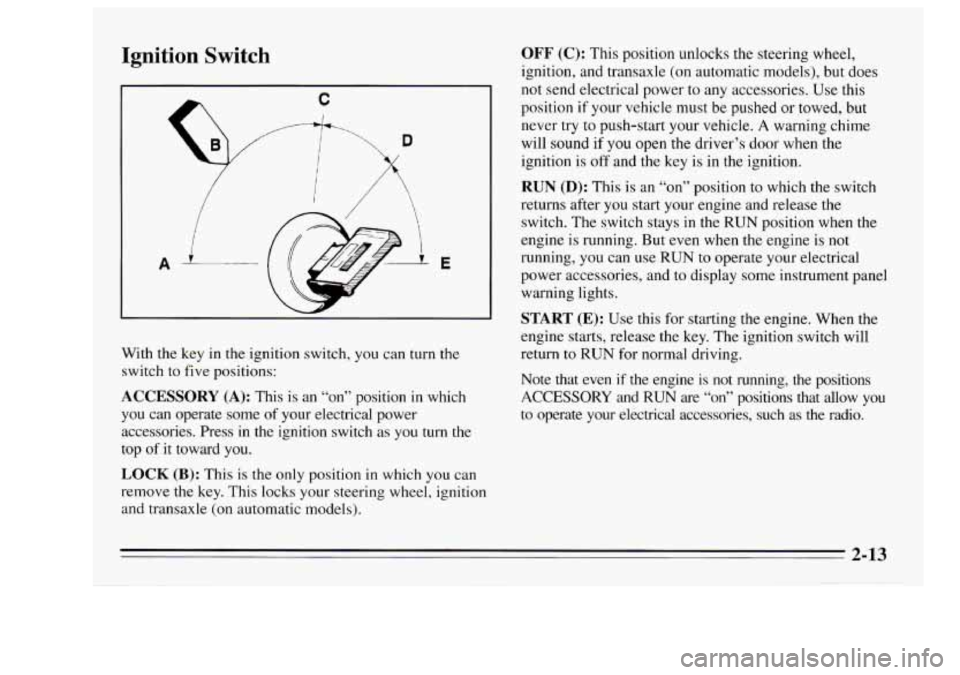
Ignition Switch
A E
With the key in the ignition switch, you can turn the
switch to five positions:
ACCESSORY (A): This is an “on” position in which
you can operate some
of your electrical power
accessories. Press in the ignition switch as you
turn the
top
of it toward you.
LOCK (B): This is the only position in which you can
remove the key. This locks your steering wheel, ignition
and transaxle (on automatic models).
OFF (C): This position unlocks the steering wheel,
ignition, and transaxle (on automatic models), but does
not send electrical power to any accessories. Use this
position
if your vehicle must be pushed or towed, but
never try to push-start your vehicle.
A warning chime
will sound if
you open the driver’s door when the
ignition is
off and the key is in the ignition.
RUN (D): This is an “on” position to which the switch
returns after you start your engine and release the
switch. The switch stays
in the RUN position when the
engine is running. But even when the engine
is not
running, you can use
RUN to operate your electrical
power accessories, and to display some instrument panel
warning lights.
START (E): Use this for starting the engine. When the
engine starts, release the key.
The ignition switch will
return to
RUN for normal driving.
Note that even
if the engine is not running, the positions
ACCESSORY and RUN are “on” positions that allow you
to operate your electrical accessories, such as the radio.
2-13
Page 70 of 340
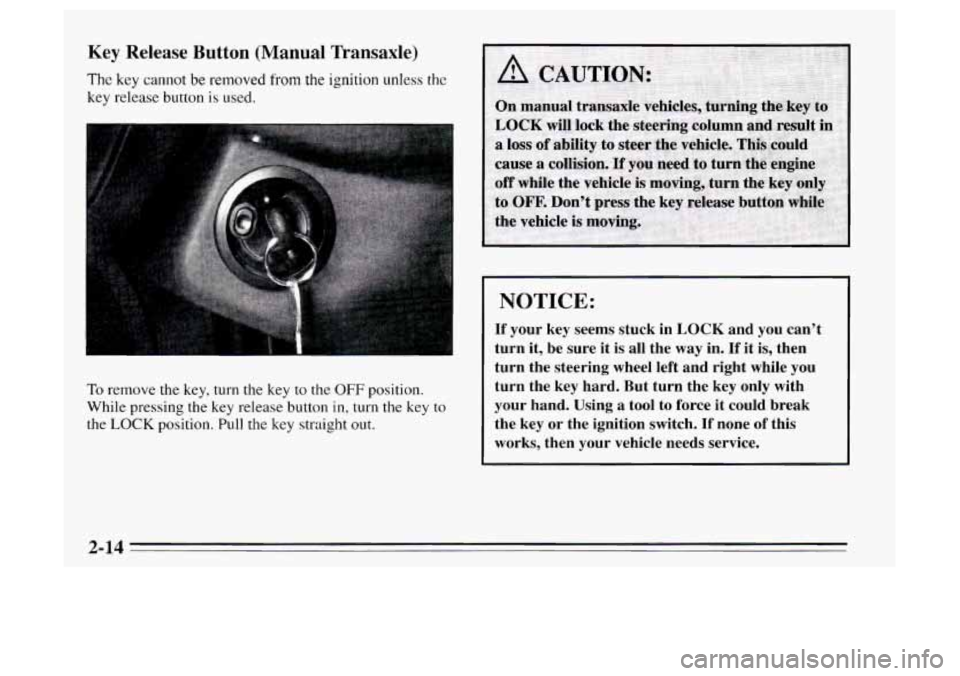
Key Release Button (Manual Transaxle)
The key cannot be removed from the ignition unless the
key release button is used.
To remove the key, turn the key to the OFF position.
While pressing the
key release button in, turn the key to
the
LOCK position. Pull the key straight out.
NOTICE:
If your key seems stuck in LOCK and you can’t
turn it, be sure it is all the
way in. If it is, then
turn the steering wheel left and right while you
turn the key hard. But turn the key only with
your hand. Using a tool to force it could break
the key or the ignition switch.
If none of this
works, then your vehicle needs service.
2-14
Page 89 of 340
Horn
You can sound the horn by pressing the horn symbol on
your steering wheel.
Tilt Steering Wheel
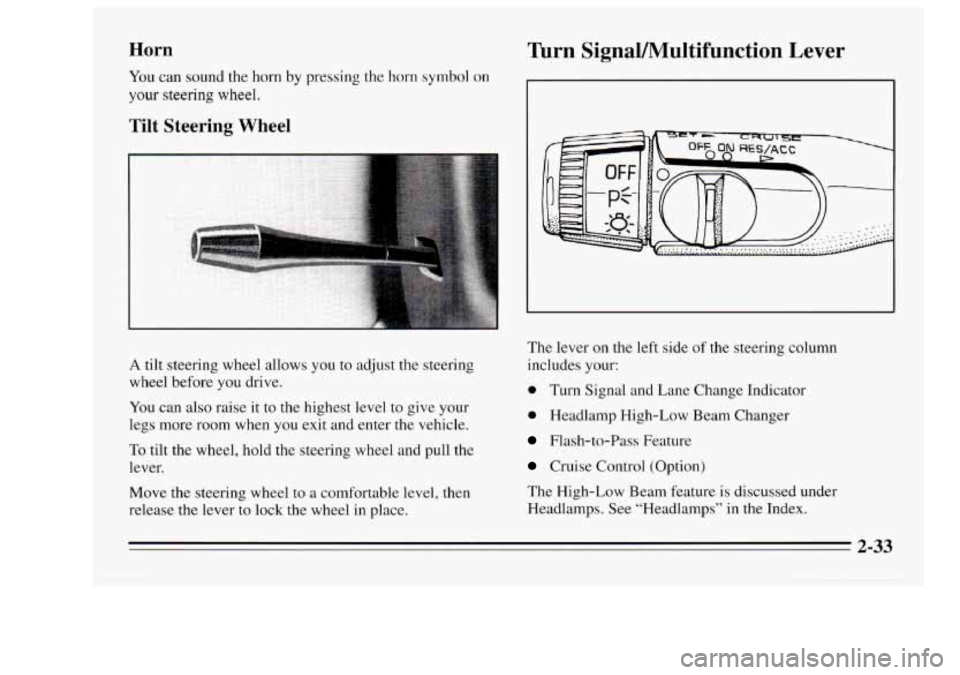
A tilt steering wheel allows you to adjust the steering
wheel before
you drive.
You can also raise it
to the highest level to give your
legs more room when you exit and enter the vehicle.
To tilt the wheel, hold the steering wheel and pull the
lever.
Move the steering wheel
to a comfortable level, then
release the lever to lock the wheel in place.
Turn SignaVMultifunction Lever
The lever on the left side of the steering column
includes your:
0 Turn Signal and Lane Change Indicator
0 Headlamp High-Low Beam Changer
Flash-to-Pass Feature
Cruise Control (Option)
The High-Low Beam feature
is discussed under
Headlamps. See “Headlamps” in the Index.
2-33
Page 111 of 340
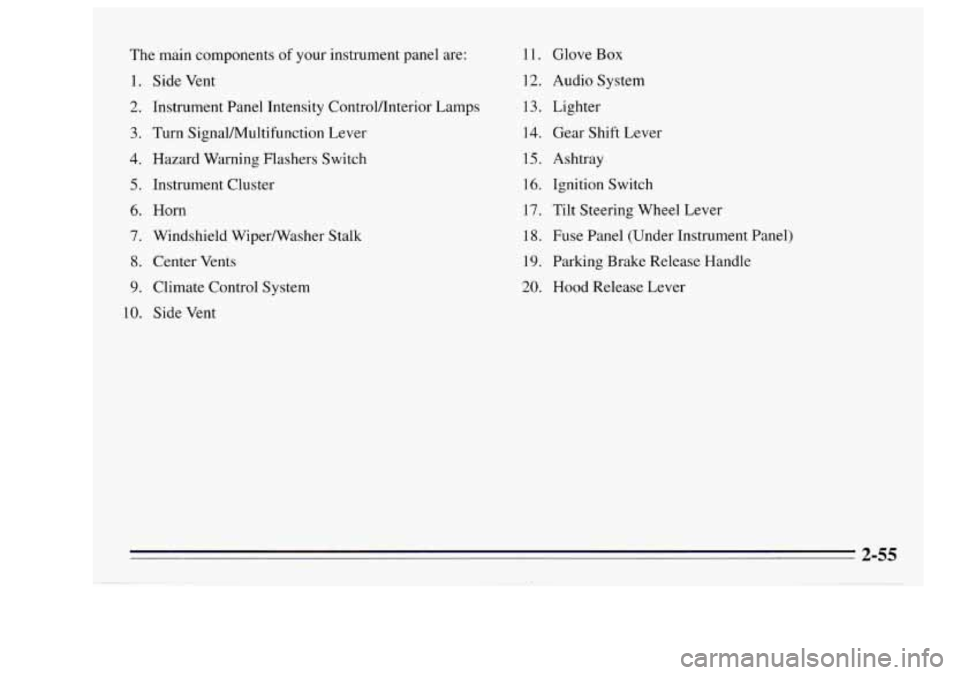
The main components of your instrument panel are:
1.
2.
3.
4.
5.
6.
7.
8.
9.
10.
Side Vent
Instrument Panel Intensity Controlflnterior Lamps
Turn SignaVMultifunction Lever
Hazard Warning Flashers Switch
Instrument Cluster
Horn
Windshield WiperNasher Stalk
Center Vents
Climate Control System
Side Vent 11.
Glove
Box
12. Audio System
13. Lighter
14. Gear Shift Lever
15. Ashtray
16. Ignition Switch
17. Tilt Steering Wheel Lever
18. Fuse Panel (Under Instrument Panel)
19. Parking Brake Release Handle
20. Hood Release Lever
2-55
Page 149 of 340
Control of a Vehicle
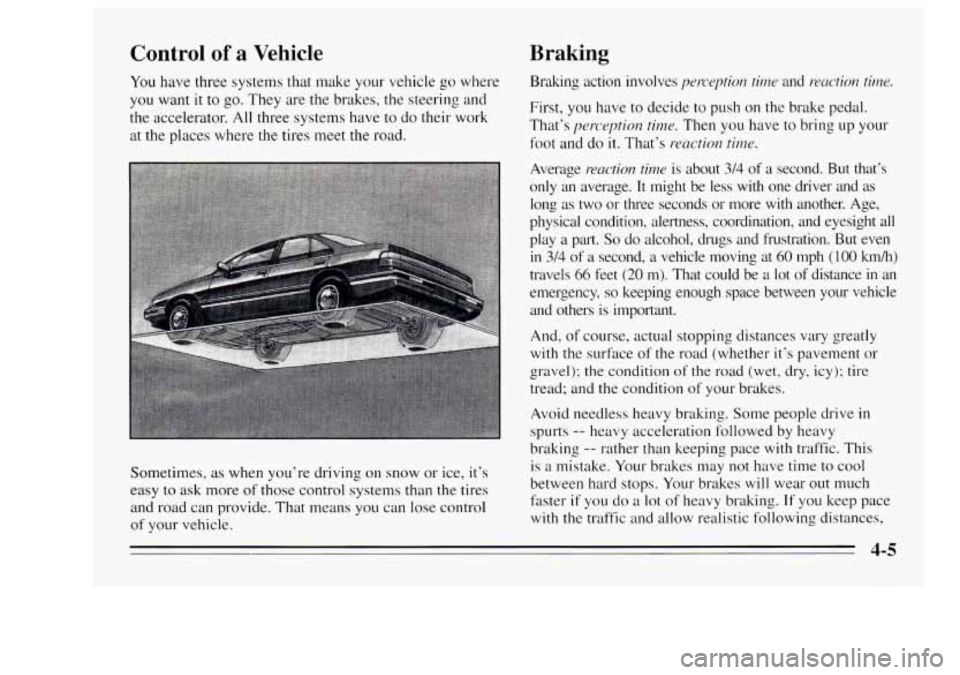
You have three systems that make your vehicle go where
you want
it to go. They are the brakes, the steering and
the accelerator.
All three systems have to do their work
at the places where the tires meet the road.
Sometimes,
as when you’re driving on snow or ice, it’s
easy to ask more
of those control systems than the tires
and road can provide. That means you can lose control
of your vehicle.
Braking
Braking action involves perception tir7z.e and rzaction time.
First, you have to decide to push on the brake pedal.
That’s
perception time. Then you have to bring up your
foot and do
it. That’s reaction time.
Average reaction time is about 34 of a second. But that’s
only an average. It might be less with one driver and as
long as two or three seconds or more with another. Age,
physical condition, alertness, coordination, and eyesight all
play a
part. So do alcohol, drugs and frustration. But even
in 3/4 of a second, a vehicle moving at 60 mph ( 100 kmh)
travels
66 feet (20 m). That could be a lot of distance in an
emergency,
so keeping enough space between your vehicle
and others is important.
And, of course, actual stopping distances vary greatly
with the surface
of the road (whether it’s pavement or
gravel); the condition of the road (wet, dry, icy); tire
tread; and the condition of your brakes.
Avoid needless heavy braking. Some people drive in
spurts
-- heavy acceleration followed by heavy
braking
-- rather than keeping pace with traffic. This
is
a mistake. Your brakes may not have time to cool
between hard stops. Your brakes will wear out much
faster
if you do a lot of heavy braking. If you keep pace
with the traffic and allow realistic following distances,
4-5
Page 152 of 340
To Use Anti-Lock
Don’t pump the brakes. Just hold the brake pedal down
and
let anti-lock work for you. You may feel the system
working, or you may notice some noise, but this is
normal.
Braking in Emergencies
Use your anti-lock braking system when you need to.
With anti-lock, you can steer and brake at the same
time.
In many emergencies, steering can help you more
than even the very best braking.
Steering
Power Steering
If you lose power steering assist because the engine
stops or
the system is not functioning, you can steer but
it will take much more effort.
Steering Tips
Driving on Curves
It’s important to take curves at a reasonable speed.
A lot of the “driver lost control” accidents mentioned on
the news happen on curves. Here’s why: Experienced driver or beginner, each
of us is subject to
the same laws
of physics when driving on curves. The
traction
of the tires against the road surface makes it
possible for the vehicle to change its path when YOLI turn
the front wheels. If there’s no traction, inertia will keep
the vehicle going in the same direction.
If you’ve ever
tried to steer
a vehicle on wet ice, you’ll understand this.
The traction you can get
in a curve depends on the
condition of your tires and the road surface, the angle at
which the curve is banked, and your speed. While
you’re
in a curve, speed is the one factor you can
control.
Suppose you’re steering through
a sharp curve. Then
you suddenly accelerate. Both control systems
--
steering and acceleration -- have to do their work where
the tires meet the road. Adding the sudden acceleration
can demand too much of those places. You can lose
control.
What should you do
if this ever happens? Ease up on the
accelerator pedal, steer the vehicle the way you want
it
to go, and slow down.
Speed limit signs near curves warn
that you should
adjust your speed. Of course, the posted speeds are
based on
good weather and road conditions. Under less
favorable conditions you’ll want to
go slower.
4-8