lock Oldsmobile Alero 2001 s Manual PDF
[x] Cancel search | Manufacturer: OLDSMOBILE, Model Year: 2001, Model line: Alero, Model: Oldsmobile Alero 2001Pages: 340, PDF Size: 2.53 MB
Page 257 of 340
6-19
How to Reset the Change Oil Light
After changing the engine oil, you must reset the
system. To reset the system, you must do the following:
1. With the ignition key to ON, push the RESET button
located in the driver's side instrument panel fuse block.
2. When the CHANGE OIL light starts to flash, press
and hold the RESET button again.
The reset is complete when you hear the chimes
sound and the CHANGE OIL light goes out.
What to Do with Used Oil
Did you know that used engine oil contains certain elements
that may be unhealthy for your skin and could even cause
cancer? Don't let used oil stay on your skin for very long.
Clean your skin and nails with soap and water, or a good hand
cleaner. Wash or properly throw away clothing or rags
containing used engine oil. See the manufacturer's warnings
about the use and disposal of oil products.
Used oil can be a real threat to the environment. If you
change your own oil, be sure to drain all free
-flowing oil
from the filter before disposal. Don't ever dispose of oil by
putting it in the trash, pouring it on the ground, into
sewers, or into streams or bodies of water. Instead, recycle
it by taking it to a place that collects used oil. If you have
a problem properly disposing of your used oil, ask your
dealer, a service station or a local recycling center for help.
Engine Air Cleaner/Filter
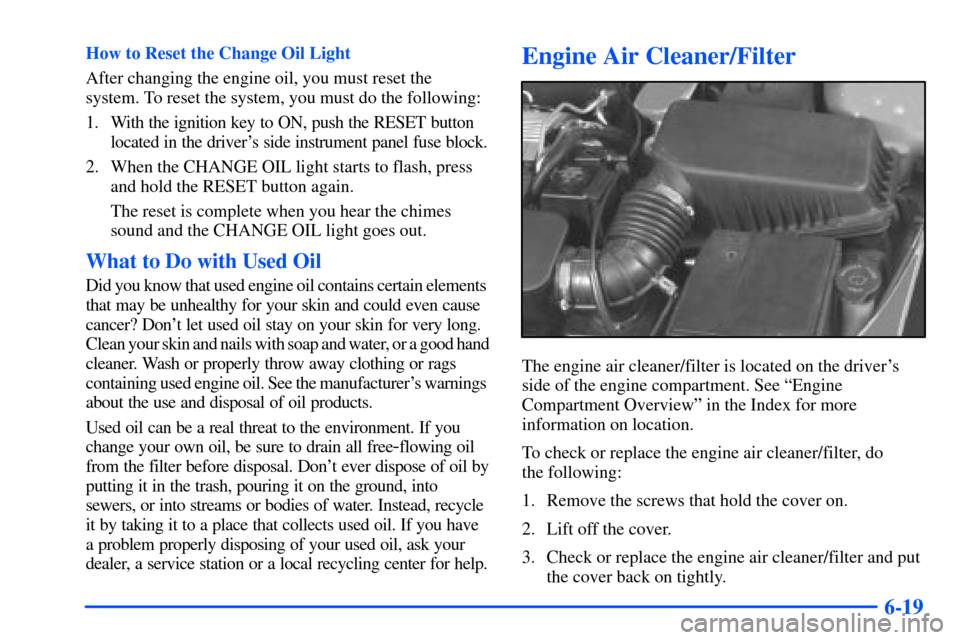
The engine air cleaner/filter is located on the driver's
side of the engine compartment. See ªEngine
Compartment Overviewº in the Index for more
information on location.
To check or replace the engine air cleaner/filter, do
the following:
1. Remove the screws that hold the cover on.
2. Lift off the cover.
3. Check or replace the engine air cleaner/filter and put
the cover back on tightly.
Page 271 of 340
6-33
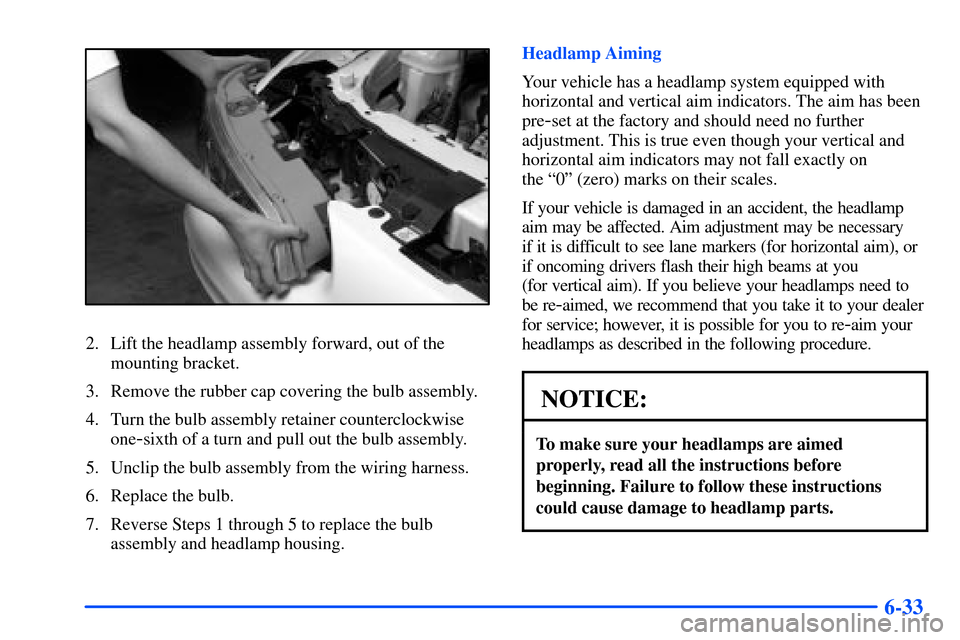
2. Lift the headlamp assembly forward, out of the
mounting bracket.
3. Remove the rubber cap covering the bulb assembly.
4. Turn the bulb assembly retainer counterclockwise
one
-sixth of a turn and pull out the bulb assembly.
5. Unclip the bulb assembly from the wiring harness.
6. Replace the bulb.
7. Reverse Steps 1 through 5 to replace the bulb
assembly and headlamp housing.Headlamp Aiming
Your vehicle has a headlamp system equipped with
horizontal and vertical aim indicators. The aim has been
pre
-set at the factory and should need no further
adjustment. This is true even though your vertical and
horizontal aim indicators may not fall exactly on
the ª0º (zero) marks on their scales.
If your vehicle is damaged in an accident, the headlamp
aim may be affected. Aim adjustment may be necessary
if it is difficult to see lane markers (for horizontal aim), or
if oncoming drivers flash their high beams at you
(for vertical aim). If you believe your headlamps need to
be re
-aimed, we recommend that you take it to your dealer
for service; however, it is possible for you to re
-aim your
headlamps as described in the following procedure.
NOTICE:
To make sure your headlamps are aimed
properly, read all the instructions before
beginning. Failure to follow these instructions
could cause damage to headlamp parts.
Page 274 of 340
6-36 Rear Turn Signal and Stop/Taillamp
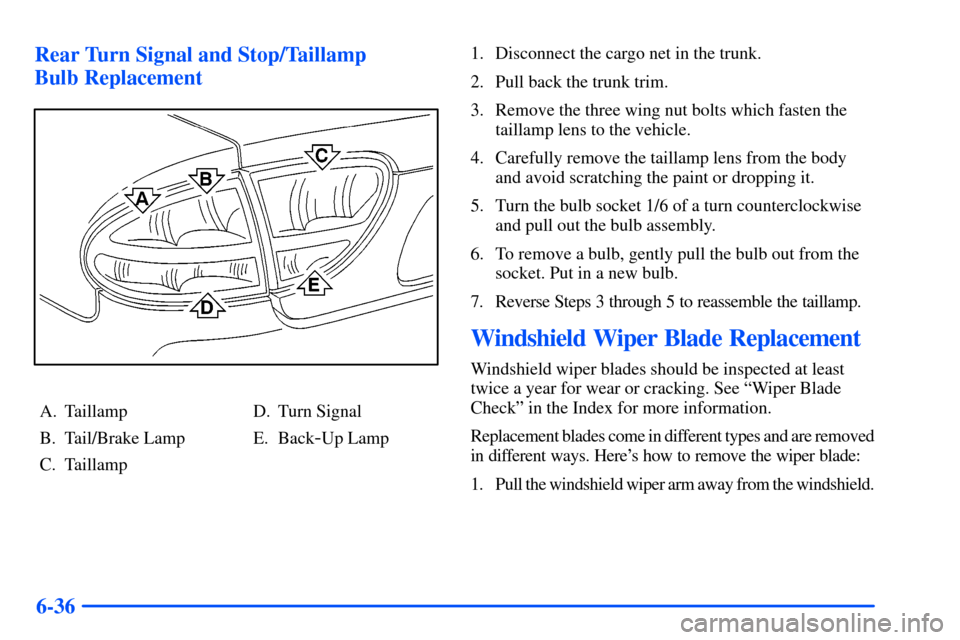
Bulb Replacement
A. Taillamp
B. Tail/Brake Lamp
C. TaillampD. Turn Signal
E. Back
-Up Lamp1. Disconnect the cargo net in the trunk.
2. Pull back the trunk trim.
3. Remove the three wing nut bolts which fasten the
taillamp lens to the vehicle.
4. Carefully remove the taillamp lens from the body
and avoid scratching the paint or dropping it.
5. Turn the bulb socket 1/6 of a turn counterclockwise
and pull out the bulb assembly.
6. To remove a bulb, gently pull the bulb out from the
socket. Put in a new bulb.
7. Reverse Steps 3 through 5 to reassemble the taillamp.
Windshield Wiper Blade Replacement
Windshield wiper blades should be inspected at least
twice a year for wear or cracking. See ªWiper Blade
Checkº in the Index for more information.
Replacement blades come in different types and are removed
in different ways. Here's how to remove the wiper blade:
1. Pull the windshield wiper arm away from the windshield.
Page 277 of 340
6-39 Tire Pressure Monitor System (If Equipped)
The tire pressure monitor system can alert you to a large
change in the pressure of one tire. The system ªlearnsº the
pressure at each tire throughout the operating speed range
of your vehicle. The system normally takes between
45 and 90 minutes of driving to learn the tire pressures.
This time may be longer depending on your individual
driving habits. Learning need not be accumulated during
a single trip. Once learned, the system will remember the
tire pressures until the system is reset.
After the system has learned tire pressures with properly
inflated tires, the LOW TIRE PRESSURE light will come
on if the pressure in one tire becomes 12 psi (83 kPa) lower
than the other three tires. The tire pressure monitor system
won't alert you if the pressure in more than one tire is low,
if the system is not properly calibrated, or if the vehicle is
moving at less than 15 mph (25 km/h), faster than 75 mph
(120 km/h), on rough roads or during turns. The light may
also come on if you are driving on partially cleared
pavement or on gravel roads.
The tire pressure monitor system detects differences in tire
rotation speeds that are caused by changes in tire pressure.
The system can alert you about a low tire
-- but it doesn't
replace normal tire maintenance. See ªTiresº in the Index.If the anti
-lock brake system warning light comes on,
the tire pressure monitor system may not be working.
See your dealer for service. Also, see ªAnti
-Lock Brake
System Warning Lightº in the Index.
When the LOW TIRE PRESSURE light comes on, you
should stop as soon as you can and check all your tires for
damage. If a tire is flat, see ªIf a Tire Goes Flatº in the
Index. Also check the tire pressure in all four tires as soon
as you can. See ªInflation
- Tire Pressureº in the Index.
The light will come on and stay on, when the ignition is
ON, until the tire pressure condition is corrected and
you RESET the system. The light may come on and then
go out when driving on partially cleared pavement or on
gravel roads. Under these conditions, you do not need to
reset the tire pressure monitor.
Don't reset the tire pressure monitor system without first
correcting the cause of the problem and checking and
adjusting the pressure in all four tires. If you reset the
system when the tire pressures are incorrect, the system
will not work properly and may not alert you when a
tire is low.
Page 278 of 340
6-40
Any time you adjust a tire's pressure, rotate your tires,
have one or more tires repaired or replaced, or when any
work is done on your vehicle where tires are removed
you'll need to reset (calibrate) the tire pressure monitor
system. You'll also need to reset the system whenever
you buy new tires and whenever the vehicle's battery
has been disconnected.
To reset (calibrate) the system:
1. Turn the ignition switch to ON (engine not running).
2. Press and release the RESET button located inside
of the driver's side instrument panel fuse block.
The CHANGE OIL light will begin to flash.
3. Press and release the RESET button again.
The CHANGE OIL light will go off, and the
LOW TIRE PRESSURE light will start flashing.
4. When the LOW TIRE PRESSURE light is flashing,
press and hold the RESET button until the
chime sounds.
If the LOW TIRE PRESSURE light doesn't go off,
repeat the procedure. If the LOW TIRE PRESSURE
light still remains on, see your dealer for service.
The system completes the calibration process
during driving.The system normally takes 15 to 20 minutes of driving in
each of three speed ranges to ªlearnº tire pressures. The
speed ranges are 15 to 40 mph (25 to 65 km/h), 40 to
65 mph (65 to 105 km/h) and above 65 mph (105 km/h).
When learning is complete, the system will alert you after
2
-8 minutes if a tire is 12 psi (83 kPa) different from the
other three tires. Detection thresholds may be higher and
detection times may be longer on rough roads, curves and
at high speeds. The system is not capable of detection at
speeds greater than 75 mph (120 km/h).
Tire Inspection and Rotation
Tires should be rotated every 6,000 to 8,000 miles
(10 000 to 13 000 km). Any time you notice unusual
wear, rotate your tires as soon as possible and check
wheel alignment. Also check for damaged tires or
wheels. See ªWhen It's Time for New Tiresº and
ªWheel Replacementº later in this section for
more information.
The purpose of regular rotation is to achieve more
uniform wear for all tires on the vehicle. The first
rotation is the most important. See ªScheduled
Maintenance Servicesº in the Index for scheduled
rotation intervals.
Page 294 of 340
6-56
Electrical System
Add-On Electrical Equipment
NOTICE:
Don't add anything electrical to your vehicle
unless you check with your dealer first. Some
electrical equipment can damage your vehicle
and the damage wouldn't be covered by your
warranty. Some add
-on electrical equipment
can keep other components from working as
they should.
Your vehicle has an air bag system. Before attempting to
add anything electrical to your vehicle, see ªServicing
Your Air Bag
-Equipped Vehicleº in the Index.
Windshield Wipers
The windshield wiper motor is protected by a circuit
breaker and a fuse. If the motor overheats due to heavy
snow, etc., the wiper will stop until the motor cools. If
the overload is caused by some electrical problem, have
it fixed.
Power Windows
A circuit breaker in the fuse panel protects the power
windows. When the current load is too heavy, the circuit
breaker opens and closes, protecting the circuit until the
problem is fixed.
Fuses and Circuit Breakers
The wiring circuits in your vehicle are protected from
short circuits by a combination of fuses, circuit breakers
and fusible links. This greatly reduces the chance of
damage caused by electrical problems.
Look at the silver
-colored band inside the fuse. If the
band is broken or melted, replace the fuse. Be sure to
replace a bad fuse with a new one of the identical size
and rating.
There are three fuse blocks in your vehicle: two
instrument panel fuse blocks and the engine
compartment fuse block.
There are four spare fuses located in the left instrument
panel end cap for your use.
Instrument Panel Fuse Blocks
There are two fuse panels for your vehicle. One is
located on the driver's side of the instrument panel and
the other is located on the passenger's side.
Page 295 of 340
6-57
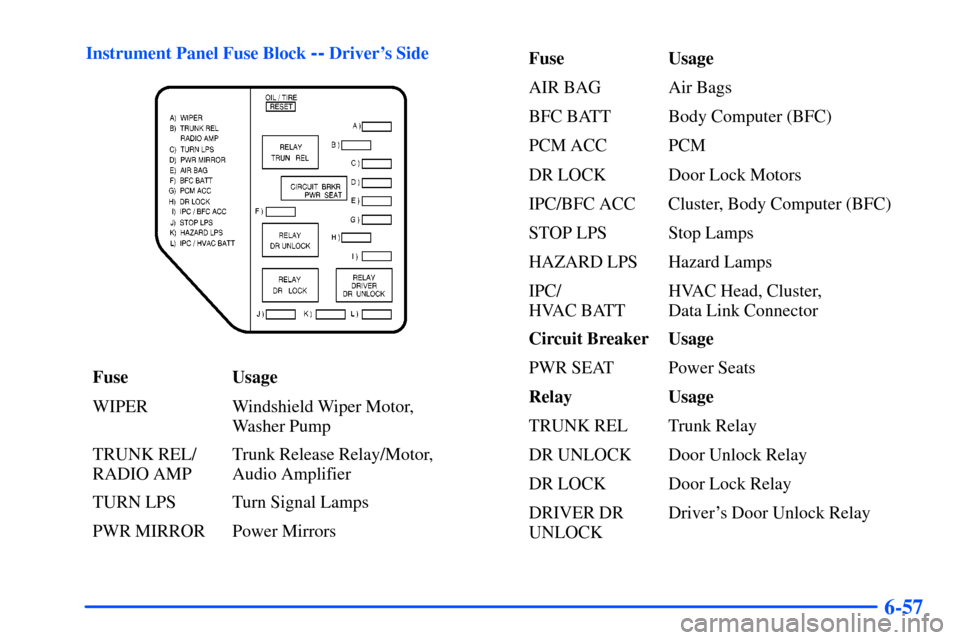
Instrument Panel Fuse Block -- Driver's Side
Fuse Usage
WIPER Windshield Wiper Motor,
Washer Pump
TRUNK REL/
RADIO AMPTrunk Release Relay/Motor,
Audio Amplifier
TURN LPS Turn Signal Lamps
PWR MIRROR Power MirrorsFuse Usage
AIR BAG Air Bags
BFC BATT Body Computer (BFC)
PCM ACC PCM
DR LOCK Door Lock Motors
IPC/BFC ACC Cluster, Body Computer (BFC)
STOP LPS Stop Lamps
HAZARD LPS Hazard Lamps
IPC/
HVAC BATTHVAC Head, Cluster,
Data Link Connector
Circuit Breaker Usage
PWR SEAT Power Seats
Relay Usage
TRUNK REL Trunk Relay
DR UNLOCK Door Unlock Relay
DR LOCK Door Lock Relay
DRIVER DR
UNLOCKDriver's Door Unlock Relay
Page 296 of 340
6-58
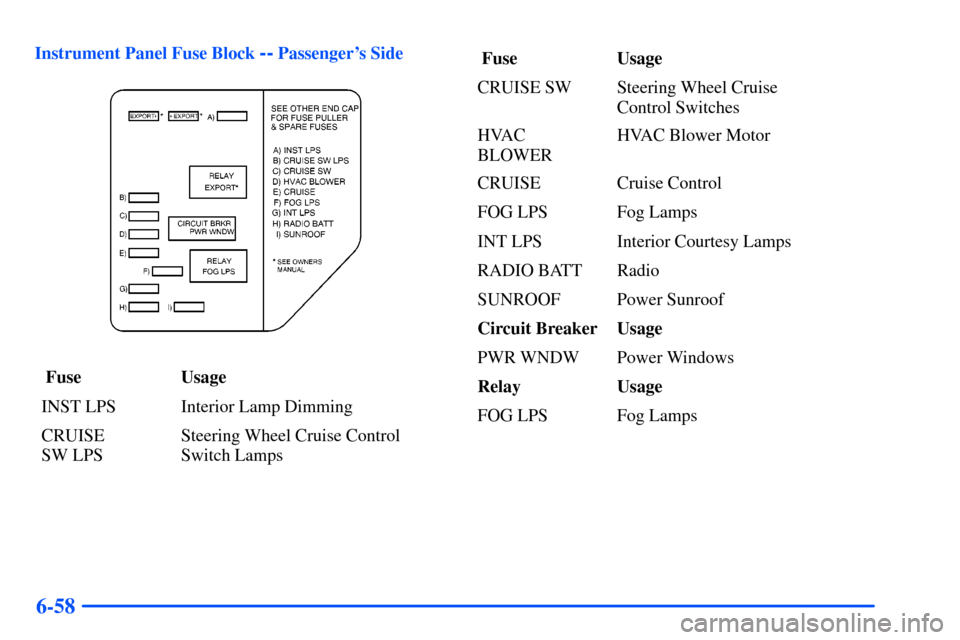
Instrument Panel Fuse Block -- Passenger's Side
Fuse Usage
INST LPS Interior Lamp Dimming
CRUISE
SW LPSSteering Wheel Cruise Control
Switch Lamps Fuse Usage
CRUISE SW Steering Wheel Cruise
Control Switches
HVAC
BLOWERHVAC Blower Motor
CRUISE Cruise Control
FOG LPS Fog Lamps
INT LPS Interior Courtesy Lamps
RADIO BATT Radio
SUNROOF Power Sunroof
Circuit Breaker Usage
PWR WNDW Power Windows
Relay Usage
FOG LPS Fog Lamps
Page 297 of 340
6-59
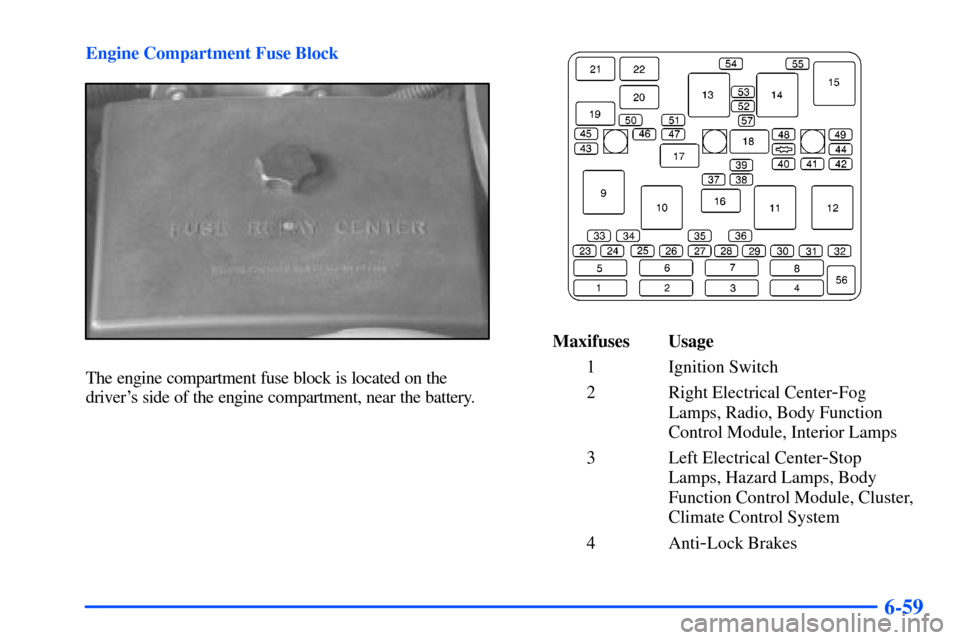
Engine Compartment Fuse Block
The engine compartment fuse block is located on the
driver's side of the engine compartment, near the battery.
Maxifuses Usage
1 Ignition Switch
2 Right Electrical Center
-Fog
Lamps, Radio, Body Function
Control Module, Interior Lamps
3 Left Electrical Center
-Stop
Lamps, Hazard Lamps, Body
Function Control Module, Cluster,
Climate Control System
4 Anti
-Lock Brakes
Page 298 of 340
6-60
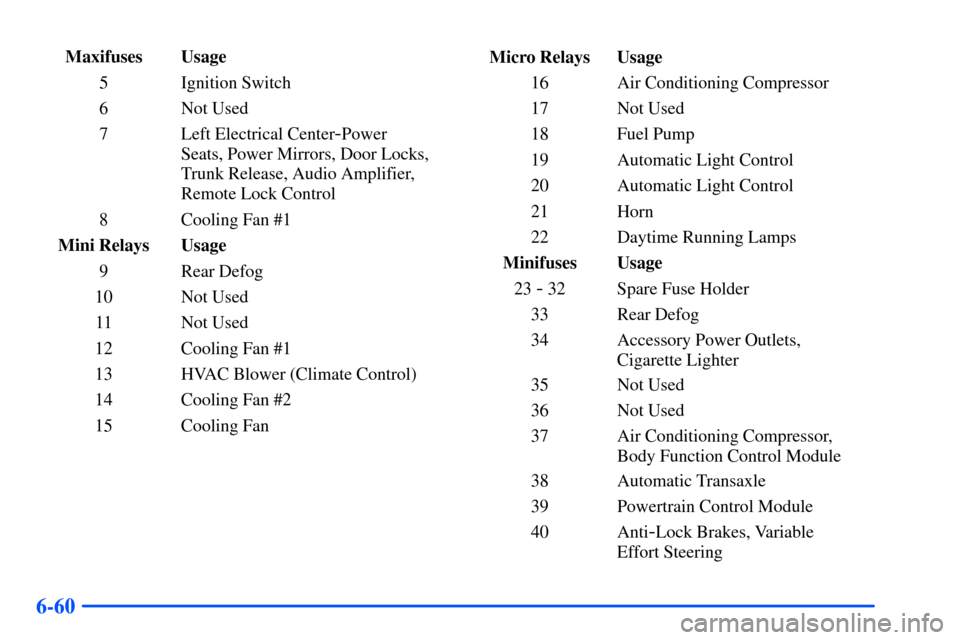
Maxifuses Usage
5 Ignition Switch
6 Not Used
7 Left Electrical Center
-Power
Seats, Power Mirrors, Door Locks,
Trunk Release, Audio Amplifier,
Remote Lock Control
8 Cooling Fan #1
Mini Relays Usage
9 Rear Defog
10 Not Used
11 Not Used
12 Cooling Fan #1
13 HVAC Blower (Climate Control)
14 Cooling Fan #2
15 Cooling FanMicro Relays Usage
16 Air Conditioning Compressor
17 Not Used
18 Fuel Pump
19 Automatic Light Control
20 Automatic Light Control
21 Horn
22 Daytime Running Lamps
Minifuses Usage
23
- 32 Spare Fuse Holder
33 Rear Defog
34 Accessory Power Outlets,
Cigarette Lighter
35 Not Used
36 Not Used
37 Air Conditioning Compressor,
Body Function Control Module
38 Automatic Transaxle
39 Powertrain Control Module
40 Anti
-Lock Brakes, Variable
Effort Steering