ecu Oldsmobile Alero 2004 s Owner's Guide
[x] Cancel search | Manufacturer: OLDSMOBILE, Model Year: 2004, Model line: Alero, Model: Oldsmobile Alero 2004Pages: 360, PDF Size: 2.49 MB
Page 77 of 360
Programmable Automatic Door
Locks
Programmable automatic power door locks are intended
to provide enhanced security and convenience by
automatically locking and unlocking doors. This features
lets you program your power door locks to one of
four different modes.
Customizing the Automatic Door Locks
for Automatic Transaxle Vehicles
Mode 1:All doors automatically lock when the transaxle
is shifted out of PARK (P). The doors will remain
locked unless manually unlocked or the lock button is
pressed. All doors will unlock when the transaxle is
shifted into PARK (P) and the key is turned to OFF.
Mode 2:This mode is only available on vehicles
equipped with a remote keyless entry transmitter. All
doors automatically lock when the transaxle is shifted
out of PARK (P). Automatic driver’s door only unlock
when the transaxle is shifted into PARK (P) and the key
is turned to OFF.
Mode 3:All doors automatically lock when the transaxle
is shifted out of PARK (P). No automatic door unlock.
Mode 4:No automatic door lock or unlock.
Customizing the Automatic Door Locks
for Manual Transaxle Vehicles
Mode 1:All doors automatically lock when the vehicle
speed is greater than 5 mph (8 km/h). The doors
will remain locked unless manually unlocked or the lock
button is pressed. All doors will unlock when the
transaxle is shifted into REVERSE (R) and the key is
turned to OFF.
Mode 2:This mode is only available with the remote
keyless entry transmitter. All doors automatically
lock when the vehicle speed is greater than 5 mph
(8 km/h). Automatic driver’s door only unlock when the
transaxle is shifted into REVERSE (R) and the key
is turned to OFF.
Mode 3:All doors automatically lock when the vehicle
speed is greater than 5 mph (8 km/h). No automatic
door unlock.
Mode 4:No automatic door lock or unlock.
2-9
Page 78 of 360
Before your vehicle was shipped from the factory it was
programmed in Mode 1. To determine the current
mode or to change to a different mode, do the following:
1. Put an automatic transaxle in PARK (P) or a
manual transaxle in REVERSE (R) with the parking
brake engaged and turn the ignition to ON.
2. Press and hold the lower part of the power door
lock switch for 10 seconds. Release the switch
when you hear the chime.
3. Count the number of chimes you hear. The number
of chimes tells you which mode your vehicle is in.
You can change the mode by pressing and
holding the lower part of the power door lock switch
(two chimes for Mode 2, three chimes for Mode 3
and four chimes for Mode 4).
4. Repeat Step 2 until you hear the number of chimes
that matches the mode you want.
The mode you selected is now set.Rear Door Security Locks
If your vehicle is a four-door model, it has rear door
security locks that help prevent passengers from
opening the rear doors from the inside.
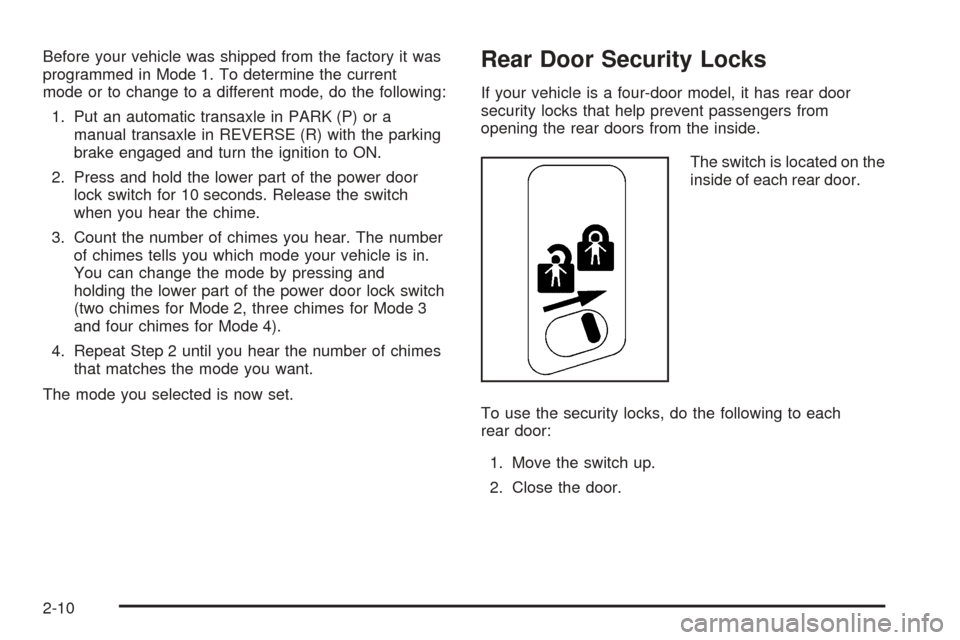
The switch is located on the
inside of each rear door.
To use the security locks, do the following to each
rear door:
1. Move the switch up.
2. Close the door.
2-10
Page 79 of 360
The rear doors on your vehicle cannot be opened from
the inside when this feature is in use. If you want to
open a rear door when the security lock is on, do
the following:
1. Unlock the door from the inside.
2. Then open the door from the outside.
If you don’t cancel the security lock feature, adults or
older children who ride in the rear won’t be able to open
the rear door from the inside. You should let adults
and older children know how these security locks work,
and how to cancel the locks.
To cancel a rear door lock, do the following:
1. Unlock the door from the inside and open it from
the outside.
2. Move the switch down.
3. Do the same to the other rear door.
The rear doors will now work normally.Lockout Protection
Lockout protection is intended to provide enhanced
security and convenience. This feature prevents a driver
who has left the key in the ignition from locking the
doors, using the power door locks while any door
is open.
To override this feature, when the key is in the ignition
and any door is open, press and hold down the
power door lock switch for three seconds.
This feature cannot guarantee that you will never be
locked out of your vehicle. If you don’t leave the key in
the ignition, or if you use the manual door lock or
the remote keyless entry transmitter, you could still lock
your keys inside your vehicle. Always remember to
take your keys with you.
2-11
Page 81 of 360
Remote Trunk Release
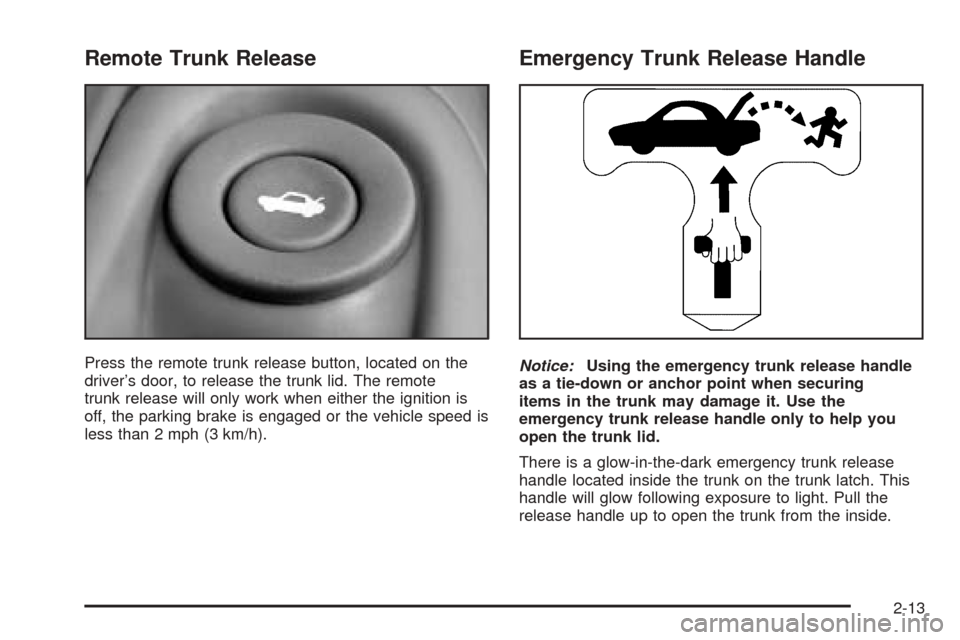
Press the remote trunk release button, located on the
driver’s door, to release the trunk lid. The remote
trunk release will only work when either the ignition is
off, the parking brake is engaged or the vehicle speed is
less than 2 mph (3 km/h).
Emergency Trunk Release Handle
Notice:Using the emergency trunk release handle
as a tie-down or anchor point when securing
items in the trunk may damage it. Use the
emergency trunk release handle only to help you
open the trunk lid.
There is a glow-in-the-dark emergency trunk release
handle located inside the trunk on the trunk latch. This
handle will glow following exposure to light. Pull the
release handle up to open the trunk from the inside.
2-13
Page 84 of 360
Theft-Deterrent Systems
Vehicle theft is big business, especially in some cities.
Although your vehicle has a number of theft-deterrent
features, we know that nothing we put on it can make it
impossible to steal.
Passlock®
Your vehicle has the Passlock®theft-deterrent system.
Passlock
®is a passive theft-deterrent system.
Passlock®enables fuel if the ignition lock cylinder has
not been tampered with.
During normal operation, the SECURITY light will go off
about five seconds after the ignition key is turned to
ON and the engine is started.
After attempting to start the engine, if the SECURITY
light flashes or stays on, wait ten minutes with the key in
ON until the light goes off. Then turn the ignition to
OFF before attempting to start the engine again.
SeeRoadside Assistance Program on page 7-6for
more information.
Starting and Operating Your
Vehicle
New Vehicle Break-In
Notice:Your vehicle does not need an elaborate
“break-in.” But it will perform better in the long run
if you follow these guidelines:
Do not drive at any one speed — fast or
slow — for the rst 500 miles (805 km). Do not
make full-throttle starts.
Avoid making hard stops for the rst 200 miles
(322 km) or so. During this time your new
brake linings are not yet broken in. Hard stops
with new linings can mean premature wear
and earlier replacement. Follow this breaking-in
guideline every time you get new brake
linings.
Do not tow a trailer during break-in. SeeTowing
a Trailer on page 4-39for more information.
2-16
Page 105 of 360
Instrument Panel Overview...............................3-2
Hazard Warning Flashers................................3-4
Other Warning Devices...................................3-5
Horn.............................................................3-5
Tilt Wheel.....................................................3-5
Turn Signal/Multifunction Lever.........................3-6
Windshield Wiper Lever...................................3-9
Cruise Control..............................................3-10
Exterior Lamps.............................................3-14
Interior Lamps..............................................3-16
Accessory Power Outlets...............................3-18
Ashtrays and Cigarette Lighter........................3-19
Climate Controls............................................3-19
Climate Control System.................................3-19
Outlet Adjustment.........................................3-22
Warning Lights, Gages and Indicators.............3-23
Instrument Panel Cluster................................3-24
Speedometer and Odometer...........................3-25
Tachometer.................................................3-25
Safety Belt Reminder Light.............................3-26
Air Bag Readiness Light................................3-26
Charging System Light..................................3-27
Up-Shift Light...............................................3-28
Brake System Warning Light..........................3-28
Anti-Lock Brake System Warning Light.............3-29
Enhanced Traction System Warning Light.........3-30
Enhanced Traction System Active Light............3-31
Engine Coolant Temperature Gage..................3-31
Low Coolant Warning Light............................3-32Malfunction Indicator Lamp.............................3-32
Oil Pressure Light.........................................3-35
Change Engine Oil Light................................3-36
Security Light...............................................3-37
Cruise Control Light......................................3-37
Low Washer Fluid Warning Light.....................3-37
Service Vehicle Soon Light............................3-38
Fuel Gage...................................................3-38
Audio System(s).............................................3-39
Setting the Time for Radios without Radio
Data Systems (RDS)..................................3-39
Setting the Time for Radios with Radio Data
Systems (RDS).........................................3-40
Radio with CD (Base Level)...........................3-40
Radio with CD (Up Level)..............................3-45
Radio with Cassette and CD..........................3-55
Theft-Deterrent Feature
(RDS Radios)...........................................3-67
Understanding Radio Reception......................3-67
Care of Your Cassette Tape Player.................3-67
Care of Your CDs.........................................3-68
Care of Your CD Player................................3-68
Backglass Antenna.......................................3-69
XM™ Satellite Radio Antenna System
(48 Contiguous US States).........................3-69
Chime Level Adjustment................................3-69
Section 3 Instrument Panel
3-1
Page 141 of 360
Security Light
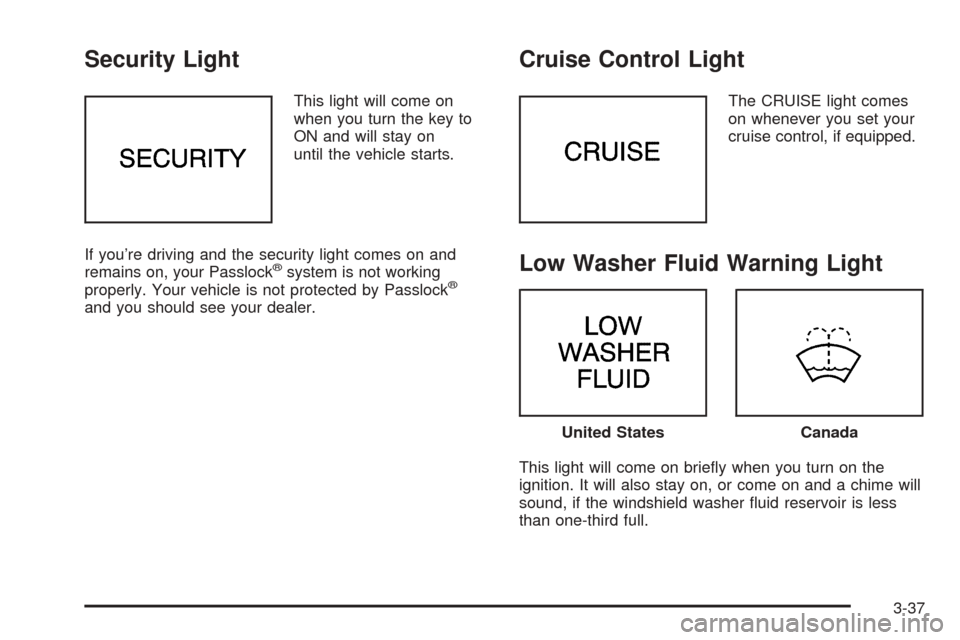
This light will come on
when you turn the key to
ON and will stay on
until the vehicle starts.
If you’re driving and the security light comes on and
remains on, your Passlock
®system is not working
properly. Your vehicle is not protected by Passlock®
and you should see your dealer.
Cruise Control Light
The CRUISE light comes
on whenever you set your
cruise control, if equipped.
Low Washer Fluid Warning Light
This light will come on briefly when you turn on the
ignition. It will also stay on, or come on and a chime will
sound, if the windshield washer fluid reservoir is less
than one-third full.
United StatesCanada
3-37
Page 156 of 360
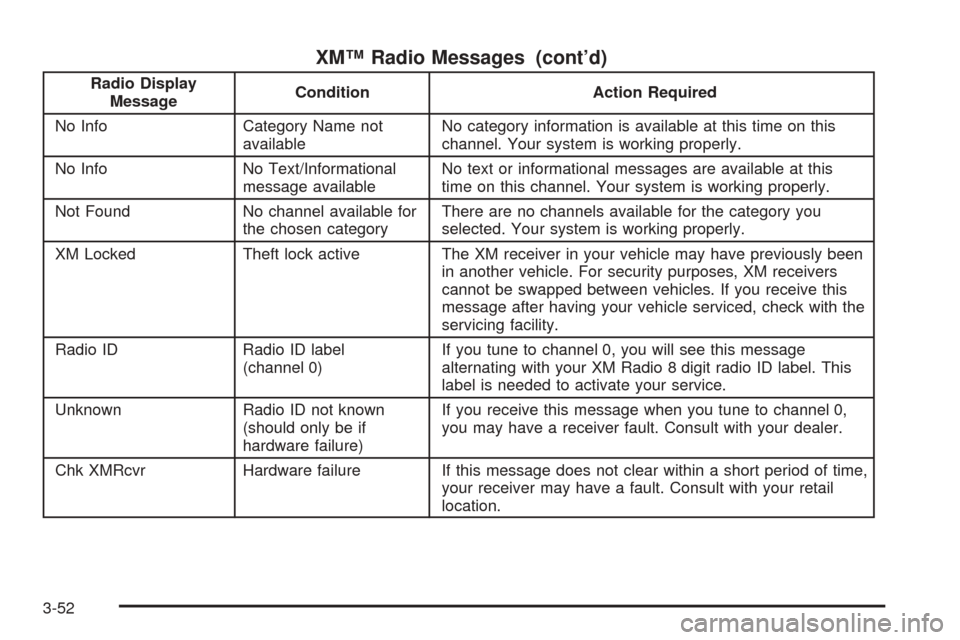
XM™ Radio Messages (cont’d)
Radio Display
MessageCondition Action Required
No Info Category Name not
availableNo category information is available at this time on this
channel. Your system is working properly.
No Info No Text/Informational
message availableNo text or informational messages are available at this
time on this channel. Your system is working properly.
Not Found No channel available for
the chosen categoryThere are no channels available for the category you
selected. Your system is working properly.
XM Locked Theft lock active The XM receiver in your vehicle may have previously been
in another vehicle. For security purposes, XM receivers
cannot be swapped between vehicles. If you receive this
message after having your vehicle serviced, check with the
servicing facility.
Radio ID Radio ID label
(channel 0)If you tune to channel 0, you will see this message
alternating with your XM Radio 8 digit radio ID label. This
label is needed to activate your service.
Unknown Radio ID not known
(should only be if
hardware failure)If you receive this message when you tune to channel 0,
you may have a receiver fault. Consult with your dealer.
Chk XMRcvr Hardware failure If this message does not clear within a short period of time,
your receiver may have a fault. Consult with your retail
location.
3-52
Page 166 of 360
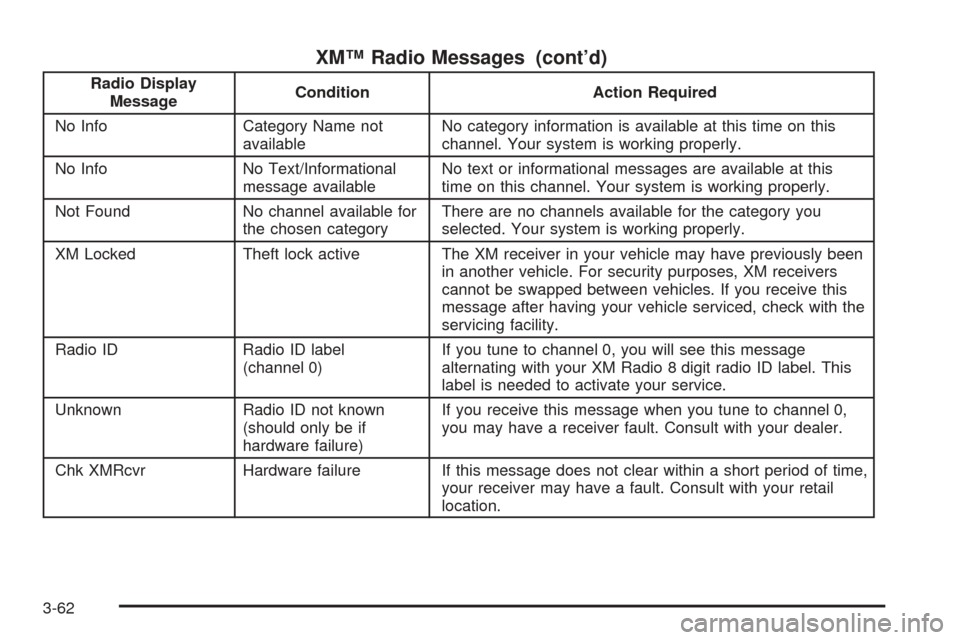
XM™ Radio Messages (cont’d)
Radio Display
MessageCondition Action Required
No Info Category Name not
availableNo category information is available at this time on this
channel. Your system is working properly.
No Info No Text/Informational
message availableNo text or informational messages are available at this
time on this channel. Your system is working properly.
Not Found No channel available for
the chosen categoryThere are no channels available for the category you
selected. Your system is working properly.
XM Locked Theft lock active The XM receiver in your vehicle may have previously been
in another vehicle. For security purposes, XM receivers
cannot be swapped between vehicles. If you receive this
message after having your vehicle serviced, check with the
servicing facility.
Radio ID Radio ID label
(channel 0)If you tune to channel 0, you will see this message
alternating with your XM Radio 8 digit radio ID label. This
label is needed to activate your service.
Unknown Radio ID not known
(should only be if
hardware failure)If you receive this message when you tune to channel 0,
you may have a receiver fault. Consult with your dealer.
Chk XMRcvr Hardware failure If this message does not clear within a short period of time,
your receiver may have a fault. Consult with your retail
location.
3-62
Page 200 of 360

Winter Driving
Here are some tips for winter driving:
•Have your vehicle in good shape for winter.
•You may want to put winter emergency supplies in
your trunk.Include an ice scraper, a small brush or broom, a
supply of windshield washer fluid, a rag, some winter
outer clothing, a small shovel, a flashlight, a red
cloth and a couple of reflective warning triangles. And, if
you will be driving under severe conditions, include a
small bag of sand, a piece of old carpet or a couple of
burlap bags to help provide traction. Be sure you
properly secure these items in your vehicle.
4-26