door lock OLDSMOBILE AURORA 1995 User Guide
[x] Cancel search | Manufacturer: OLDSMOBILE, Model Year: 1995, Model line: AURORA, Model: OLDSMOBILE AURORA 1995Pages: 372, PDF Size: 19.14 MB
Page 62 of 372

Trunk Lock
To unlock the trunk from the outside, insert the door key
and turn it.
2-10
ProCarManuals.com
Page 63 of 372

Remote Trunk Release
Press the TRUNK release
button located to the right of
the steering column to
release the trunk lid. The
trunk release override
switch must be
in the ON
position.
The trunk release button
will work in any transaxle
position. The system also works with the Remote Lock
Control.
Trunk Security Override
Inside the glove box is an
override switch that is
useful if you want to leave
valuables
in the trunk when
using a commercial parking
lot.
Move the switch to
OFF to disable the remote trunk
release button. Then lock your glove box
with the door
key.
If you have your door key with you, this will help
keep someone from getting into your trunk. Move the
switch to
ON to again make the remote trunk release
button usable.
The Remote Lock Control transmitter
will open the
trunk even if the override switch is in the OFF position.
2-11
ProCarManuals.com
Page 64 of 372

Glove Box Parking at Night
Park in a lighted spot, close all windows and lock your
vehicle. Remember to keep your valuables out
of sight.
Put them
in a storage area, or take them with you.
Use the door
key to
lock and unlock the glove box. To
open, pull the latch release on the left side of the glove
box door.
Theft
Vehicle theft is big business, especially in some cities.
Although your Aurora has a number
of theft deterrent
features, we
know that nothing we put on it can make it
impossible to steal. However, there are ways you can
help.
Key in the Ignition
If you walk away from your vehicle with the keys
inside, it’s an easy target for joy riders or professional
thieves
-- so don’t do it.
When you park your Aurora and open the driver’s door,
you’ll hear a chime reminding
you to remove your key
from the ignition and take it with you. Always do this.
Your steering wheel will be locked, and
so will your
ignition and transaxle. And remember to lock the doors.
Parking Lots
If you park in a lot where someone will be watching
your vehicle, it’s best to lock
it up and take your keys.
But what if you have to leave your ignition key? What if
you have to leave something valuable
in your vehicle?
0 Put your valuables in a storage areai, like your trunk
or glove box.
0 Move the trunk security override switch to OFF.
0 Lock the glove box.
0 Lock all the doors except the driver‘s.
0 Take the door key with you.
Take the Remote Lock Control key chain with you.
2-12
ProCarManuals.com
Page 67 of 372

Ignition Switch
RUN
ACCESSORY
W
I NOTICE:
If your key seems stuck in LOCK and you can’t
turn it, be sure it
is all the way in. If it is, then
turn the steering wheel left and right while you
turn the key hard. But turn the key only with
your hand. Using a tool to force
it could break
the key or the ignition switch.
If none of this
works, then your vehicle needs service. With
the ignition key
in the ignition switch, you can turn
the switch to five positions:
ACC (Accessory): An ON position in which you can
operate your electrical power accessories. Press
in the
ignition switch as you turn the top of
it toward you.
LOCK: The only position in which you can remove the
key. This locks your steering wheel, ignition and
transaxle.
OFF: Unlocks the steering wheel, ignition, and
transaxle, but does not send electrical power to any
accessories. Use this position
if your vehicle must be
pushed or towed, but never
try to push-start your
vehicle.
A warning chime will sound if you open the
driver’s door when
the ignition is off and the key is in
the ignition.
RUN: An ON position to which the switch returns after
you start your engine and release the switch. The switch
stays
in the RUN position when the engine is running.
But even when the engine is not running, you can use
RUN to operate your electrical power accessories, and
to display some instrument panel warning lights.
START: Starts the engine. When the engine starts,
release the key. The ignition switch will return to
RUN
for norlnal driving.
ProCarManuals.com
Page 79 of 372

Shifting Out of PARK (P)
Your Aurora has a brake-transaxle shift interlock. You
have to fully
apply your regular brake before you can
shift from PARK (P) when the ignition is in the
ON
position. See “Shifting the Automatic Transaxle” in the
Index.
If you cannot shift out of PARK (P), ease pressure
on
the shift lever--push the shift lever all the way into
PARK (P) as you maintain brake application. Then
move the shift lever into the gear you wish. Press the
shift lever button before moving the shift lever.
If you ever hold the brake pedal down but still can’t
shift out of PARK (P), try this:
1. Turn the key to OFF. Open and close the driver’s
door to turn off the Retained Accessory Power
feature.
2. Apply and hold the brake until the end of step 4.
3. Shift to NEUTRAL (N).
4. Start the vehicle and then shift to the drive gear you
want.
5. Have the vehicle fixed as soon as you can.
Parking Over Things That Burn
2-27
ProCarManuals.com
Page 157 of 372

If the error occurred while trying to play a CD in the
radio or
in the CD changer, the following conditions
may have caused the error:
0
0
0
0
0
The road is too rough. The disc should play when the
road is smoother.
The disc
is dirty, scratched, wet or upside down.
The air is very humid. If
so, wait about an hour and
try again.
“E34” is displayed when the CD changer door is left
open. Completely close the changer door to restore
normal operation.
“E35” is displayed when an empty cartridge is
inserted into the CD changer. Try the cartridge again
with a disc loaded.
If any error occurs repeatedly or if an error cannot be
corrected, please contact your retailer. If your radio
displays an error number, write it down and provide it to
your retailer
when reporting the problem.
Theftlock@ Anti-Theft Feature
Your radio may have the Theftlock@ feature.
Theftlock@is designed to discourage theft
of your radio.
It works by using a secret code to disable the radio
functions whenever battery power is removed.
The Theftlock@ feature for the radio may be used or
ignored.
If ignored, the system plays normally and the
radio is not protected by the feature.
If Theftlock IS @ ..
activated, your radio will not operate if stolen.
When Theftlock@ is activated, the radio
will display
“LOC” to indicate a locked condition anytime battery
power
is removed. If your battery loses power for any
reason, you must unlock the radio with the secret code
before
it will operate.
3-25
ProCarManuals.com
Page 235 of 372

Remote Fuel Door Manual Release
The fuel door can be
opened lnanually
in
case of an electrical
power failure.
To do
so, first open the trunk.
The release nlechanisln
is on the driver’s side
of the vehicle, at the
top of the
trunk
compartment. Pull the
tab toward you to
release the
fuel door.
NOTICE:
Prying on a locked fuel filler door could damage
it. Use the remote fuel door manual release
located in the trunk.
Filling Your Tank
The cap is behind a hinged door on the left side of your
vehicle.
6-5
ProCarManuals.com
Page 236 of 372

To take off the cap, turn it slowly to the left
(counterclockwise).
While refueling, hang the cap inside the fuel door. Twist
it clockwise to secure it,
if necessary. Be
careful not to spill gasoline. Clean gasoline from
painted surfaces as soon
as possible. See “Cleaning the
Outside
of Your Aurora” in the Index.
When you put the cap back on, turn it to the right until
you hear at least three clicks.
I I
I NOTICE: I
If you need a new cap, be sure to get the right
type. Your retailer can get one for you. If you get
the wrong type, it may not fit or have proper
venting, and your fuel tank and emissions system
might be damaged.
6-6
ProCarManuals.com
Page 286 of 372
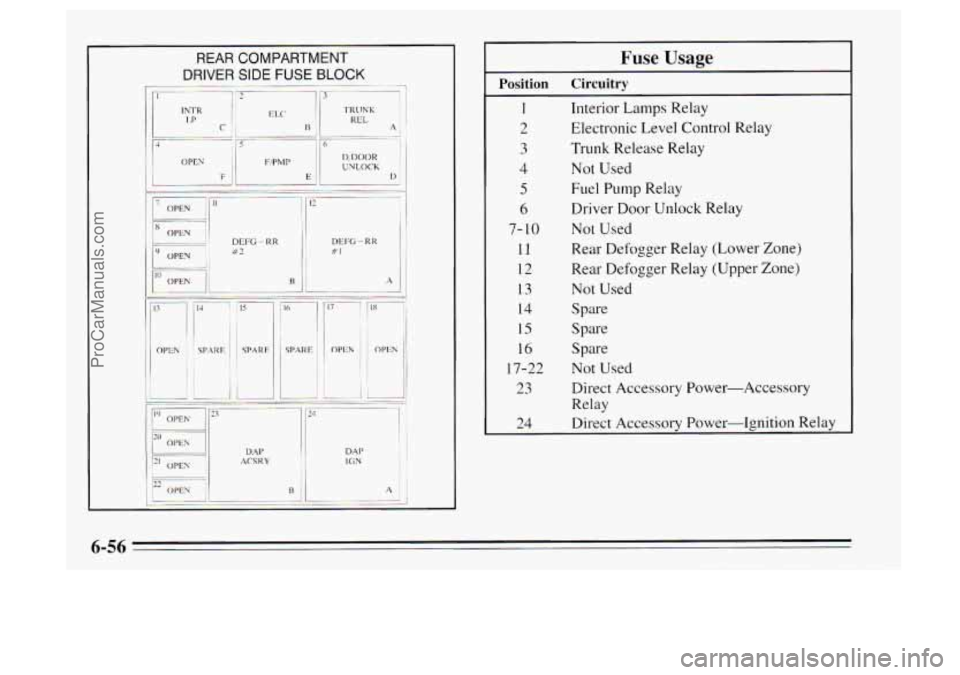
REAR COMPARTMENT
DP’
ER SIDE FUSE BLOCK
-. -~ 113 J
DEI% - RR B2
ACS K Y DM’ DM IC.; N ‘I j
Fuse Usage
1 Interior Lamps Relay
2 Electronic Level Control Relay
3 Trunk Release Relay
5 Fuel Pump Relay
Position Circuitry
4 Not Used
6 Driver Door Unlock Relay
7- 10 Not Used
11 Rear Defogger Relay (Lower Zone)
12 Rear Defogger Relay (Upper Zone)
13 Not Used
14 Spare
15 Spare
16 Spare
17-22 Not Used
23 Direct Accessory Power-Accessory
Relay
24 Direct Accessory Power-Ignition Relay
6-56
ProCarManuals.com
Page 287 of 372
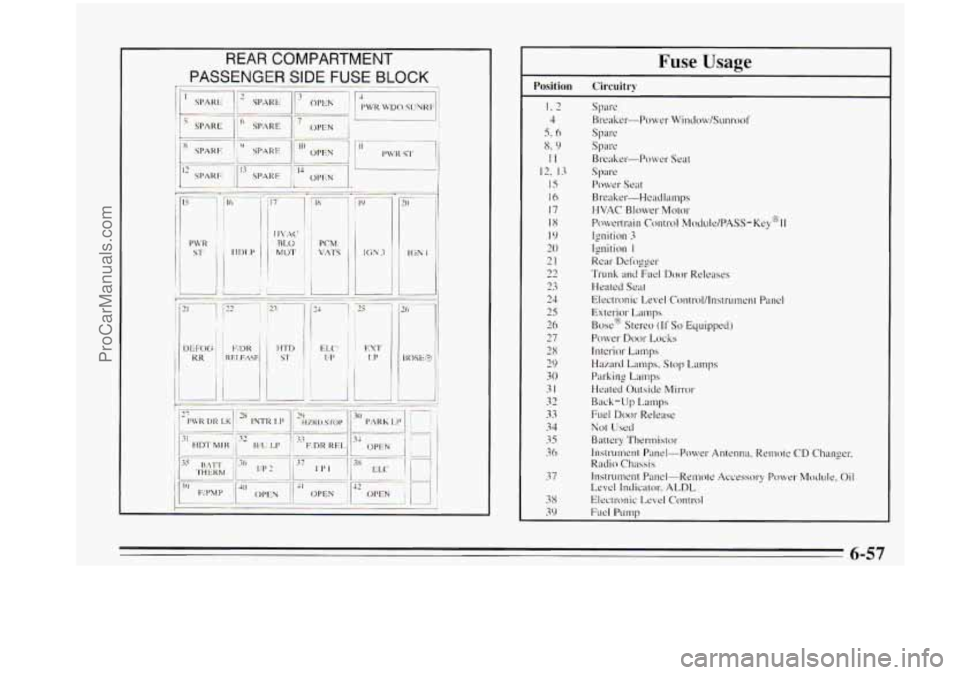
r.
Fuse Usage
Position Circuitry
I. 2
4
5. 6
x. 9
II
12, 13
15
16
17
18
I9
20
21
22
23
24
25
26
27
28
29
30
31
32
33
34
35
36
37
38
39
Spare
Breaker-Power Window/Sunrool'
Spare
Spre
Breaker-Power Seat
spa re
Power Seat
Breaker.-Headlamps
HVAC Blower Mo~or
Ignition 3
Ignition I
Rear Defogger
Trunk and FLKI Door Releases
Heated Seat
Electronic Level Control/lnstrument Panel
Exterior Lamps
Box@ Stereo
(If So Equipped)
Power Door Locks
Interior Lamp
Hazard Lamps. Stop Lamps
Parking
Lamps
Heated Outside h4irror
Back-Up Lamps
Fuel
Door Release
Not Used
Battery Thertmislor
Instrument Panel-Power Antenna, Remote CD Changer.
Rndio
Chassis
Instrument Panel-Remote Accessory Power Module. Oil
Level Indicator, ALDL
Electronic Level Control
Fuel Pump
Powertrain
control MOCIUI~/PASS-K~~@II
6-57
ProCarManuals.com