brakes OLDSMOBILE BRAVADA 1994 Owners Manual
[x] Cancel search | Manufacturer: OLDSMOBILE, Model Year: 1994, Model line: BRAVADA, Model: OLDSMOBILE BRAVADA 1994Pages: 248, PDF Size: 14.54 MB
Page 16 of 248

How to Use this Manual
These symbols are on some of your
controls: These symbols
are used on warning
and indicator lights: Here
are some other symbols you
may see:
Windshield Wipers
Engine Coolant
Temperature Fuse
w Windshield
Washer
Battery Charging
System Tailgate Window
Windshield Defroster Lighter
Fuel
Rear Window Defogger Horn
Speaker
Engine
Oil Pressure
Rear Window Wiper
Brake
Hood Release
Rear Window
WiperlWasher Anti-Lock Brakes
Ventilating Fan
Power Window
10
ProCarManuals.com
Page 56 of 248

Features & Controls
50
Forward Gears
ID1 (Automatic Overdrive): This
position is for normal driving.
If you
need more power for passing, and
you’re:
Going less than 35 mph (56 km/h),
push your accelerator pedal about
halfway down.
Going about 35 mph (56 ltm/h) or
more, push the accelerator pedal all
the way down.
You’ll shift down to the next gear and
have more power.
D (Third Gear): This position is like
(Dl, but you never go into Overdrive.
Here are some times you might choose
D instead of [D):
When driving on hilly, winding roads.
When towing a trailer, so there is less
When going down a steep hill.
2 (Second Gear): This position gives
you more power but lower fuel
economy.
You can use 2 on hills. It can
help control your speed as you go down
steep mountain roads, but then you
would also want to use your brakes off
and on.
1 (First Gear): This position gives you
even more power (but lower fuel
economy) than
2. You can use it on
very steep hills, or in deep snow or
mud.
If the shift lever is put in 1, the
transmission won’t shift into first gear
until the vehicle
is going slowly enough.
shifting between gears.
NOTICE:
If
your rear wheels can’t rotate,
don’t try to drive. This might
happen if you were
stuck in very
deep sand or mud or were up
against a solid object.
You could
damage your transmission or
transfer case or both. Also, if you
stop when going uphill, don’t hold
your vehicle there with only the
accelerator pedal. This could
overheat and damage the
transmission.
Use your brakes or
shift into P (Park) to hold your
vehicle in position on
a hill.
Locking Rear Axle
Your rear axle can give you additional
traction on snow, mud, ice, sand or
gravel. It works like a standard axle
most
of the time, but when one of the
rear wheels has no traction and the
other does, the locking feature will
allow the wheel with traction to move
the vehicle.
ProCarManuals.com
Page 57 of 248

[-:......,*>+ . .,, :z :. ; .. * ; e.. .: . ...
,.. ,,:... ',',::.::-: ,..:..'*,..::;;;.L L. ... , .#. .eL r
Parking Brake
ro Set the Parking Brake:
Hold the regular brake pedal down with
your right foot. Push down the parking
xalte pedal with your left foot.
If the
ignition is on, the brake system warning
ight will come on.
:.::.:,.'r:..:::::.:::
To Release the Parking Brake:
Hold the regular brake pedal down. Pull
the BRAKE RELEASE lever.
NOTICE:
Driving with the parking brake on
can cause your rear brakes to
overheat.
You may have to replace
them, and
you could also damage
other parts of your vehicle.
If You Are Towing a Trailer and Are
Parking on
a Hill:
See the Index under Towing a Trailer.
That section shows what to do first to
keep the trailer from moving.
Shiftins Into P (Park)
1. Hold the brake pedal down with your
right foot and set the parking brake.
51
ProCarManuals.com
Page 95 of 248

Anti-Lock Brake System Warning Light
With anti-lock, this light will go on
when you start your engine and may
stay on for several seconds. That’s
normal. If the light doesn’t come on,
have it fixed
so it will be ready to warn
you if there is
a problem.
If the light stays
on, or comes on when
you’re
driving, your Oldsmobile needs
service.
If the regular brake system
warning light isn’t
on, you still have
brakes, but you don’t have anti-lock
brakes. If the regular brake system
warning light is
also on, you don’t have
anti-lock brakes and there’s a problem
with your regular brakes. See
Brake
System Warning Light earlier in this part
Malfunction Indicator Lamp
(Service Engine Soon Light)
A computer monitors operation of your
fuel, ignition and emission control
systems. This light should come on
when the ignition
is on, but the engine
is not running, as a check to show you
it is working. If it does not come on at
all, have it fixed right away. If it stays
on, or it comes on while you are driving,
the computer is indicating that you
have a problem. You should take your
vehicle in for service soon.
NOTICE:
If you keep driving your vehicle
with this light on, after a while the
emission controls won’t work as
well, your fuel economy won’t be
as good and your engine may not
run as smoothly. This could lead
to costly repairs not covered by
your warranty.
L 1
89
ProCarManuals.com
Page 111 of 248
Here you’ll find information about
driving on different kinds
of roads
and in varying weather conditions
.
We’ve also included many other
useful tips
on driving .
Part 4
Your Driving and the Road
Defensive Driving .. ............................................... ................................................... 106 . ..
Drunken Driving ........................................................................\
............................. 106
Control of a Vehicle
What
Is All-Wheel Drive? ........................................................................\
........... 108
Braking ........................................................................\
......................................... 109
Anti-Lock Brakes (ABS)
........................................................................\
............. 110
Braking in Emergencies
........................................................................\
............... 111
Steering ........................................................................\
........................................ 111
Steering in Emergencies ........................................................................\
.............. 112
Passing ........................................................................\
......................................... 113
Driving Guidelines ........................................................................\
.......................... 115
Operating Your Bravada
Off Paved Roads ............................................................ 115
Driving at Night
........................................................................\
.............................. 124
Driving
in the Rain ........................................................................\
.......................... 125
City Driving
........................................................................\
..................................... 126
Freeway Driving ........................................................................\
.............................. 127
Hill and Mountain Roads ........................................................................\
................ 129
Winter Driving
........................................................................\
................................. 130
Towing a Trailer ........................................................................\
.............................. 132
..
105
ProCarManuals.com
Page 114 of 248

Your Driving and the Road
108
“I’ll be careful” isn’t the right answer.
What
if there’s an emergency, a need to
take sudden action, as when a child
darts into the street? A person with a
higher BAC might not be able to react
quickly enough to avoid the collision.
There’s something else about drinking
and driving that many people don’t
know. Medical research shows that
alcohol in a person’s system can make
crash injuries worse. That’s especially
true for brain, spinal cord and heart
injuries. That means that
if anyone who
has been drinking
- driver or
passenger
- is in a crash, the chance of
being killed or permanently disabled is
higher than
if that person had not been
drinking. And we’ve already seen that
the chance
of a crash itself is higher for
drinking drivers. You
have three systems that
make your
vehicle go where you want it
to go.
They are the brakes, the steering and
the accelerator. All three systems have
to do their work at the places where the
tires meet the road.
Sometimes, as when you’re driving on
snow or ice, it’s easy to ask more
of
those control systems than the tires and
road can provide. That means you can
lose control of your vehicle,
Wt Is All-Wheel Drive?
All the Wheels, All the Time
Bravada has a unique system called all-
wheel drive
(AWD) . Simply stated,
AWD supplies power from the engine to
all four wheels, all the time. It works in
ProCarManuals.com
Page 115 of 248

all conditions-both on and off paved
surfaces, no matter
if the weather is fair
or foul.
The heart of the AWD system is the
transfer case. Here, engine power is
divided by an interaxle differential.
Under normal conditions,
it sends 65
percent of the torque to the rear axle and
the other 35 percent to the front axle.
But on a slippery surface, a viscous
clutch in the transfer case adjusts the
65/35 proportion according to need,
sending more power to the axle with
traction.
Another feature of the AWD system
that helps Bravada keep its grip is the
limited-slip rear axle. In conditions
where one rear wheel
loses traction but
the other still has some-as when one
wheel hits an icy patch or slips onto a
muddy road shoulder-this design
provides power to the wheel with
traction. And AWD is simple. It’s
always there-working.
Braking
Braking action involves perception
time
and reaction time.
First, you have to decide to push on the
brake pedal. That’s
perception time.
Then you have to bring up your foot
and do it. That’s
reaction time.
Average reaction time is about 3/4 of a
second. But that’s only an average. It
might be less with one driver and as
long as two or three seconds or more
with another. Age, physical condition,
alertness, coordination, and eyesight all
play a part.
So do alcohol, drugs and
frustration. But even in
3/4 of a second,
a vehicle moving at 60 mph
(100 km/h)
travels 66 feet
(20 m). That could be a
lot
of distance in an emergency, so
keeping enough space between your
vehicle and others is important.
And, of course, actual stopping
distances vary greatly with the surface
of the road (whether it’s pavement or
gravel); the condition of the road (wet,
dry, icy); tire tread; and the condition of
your brakes. Avoid needless heavy braking. Some
people drive in spurts
- heavy
acceleration followed by heavy braking
- rather than keeping pace with traffic.
This is a mistake. Your brakes may not
have time to cool between hard stops.
Your brakes will wear out much faster if
you
do a lot of heavy braking. If you
keep pace with the traffic and allow
realistic following distances, you will
eliminate a lot of unnecessary braking.
That means better braking and longer
brake life.
If your engine ever stops while you’re
driving, brake normally but don’t pump
your brakes. If you do, the pedal may
get harder to push down. If your engine
stops, you will still have some power
brake assist. But you will use it when
you brake. Once the power assist is
used up, it may take longer to stop and
the brake pedal will be harder to push.
109
ProCarManuals.com
Page 116 of 248

Your Driving and the Road
110
SERVICE
ENGINE
SOON ANT’- LOCK I
Anti-Lock Brakes (ABS)
Your vehicle has an advanced electronic
braking system that can help you keep
it under control. When you start your
vehicle and begin to drive away, you
may hear a momentary motor or
clicking noise. This is the ABS system
testing itself. Here’s how anti-lock works.
Let’s say
the road is wet. You’re driving safely.
Suddenly an animal jumps out in front
You slam on the brakes. Here’s what
happens with
ABS.
A computer senses that the wheels are
slowing down. If one of the wheels is
about to stop rolling, the computer will
separately work the brakes at each front
wheel and at the rear wheels. The anti-
lock system can change the brake
pressure faster than any driver could.
The computer is programmed to make
the most of available tire and road
conditions. You can steer around the
obstacle while braking hard.
of
you.
As you brake, your computer keeps
receiving updates on wheel speed and
controls braking pressure accordingly.
Remember: Anti-lock doesn’t change
the time you need to get your foot up to
the brake pedal.
If you get too close to
the vehicle
in front of you, you won’t
have time to apply your brakes if that
vehicle suddenly slows or stops. Always
leave enough room up ahead to stop,
even though you have anti-lock brakes.
To Use Four-wheel Anti-Lock
Don’t pump the brakes. Just hold the
brake pedal down and let anti-lock
work for you. You may feel the brakes
vibrate, or you may notice some noise,
but this is normal.
ProCarManuals.com
Page 118 of 248
Your Driving and the Road
112
Steering in Emergencies
There are times when steering can be
more effective than braking. For
example, you come over a hill and find
a truck stopped in your lane,
or a car
suddenly pulls out from nowhere, or a
child darts out from between parked
cars and stops right in front of you.
You
can avoid these problems by braking -
if you can stop in time. But sometimes
you can’t; there isn’t room. That’s the
time for evasive action
- steering
around the problem.
Your Oldsmobile can perform very well
in emergemies like these. First apply
your brakes. It is better to remove as
much speed as
you can from a possible collision. Then
xeer around the
problem, to the left or right depending
on the space available.
An emergency like this requires close
attention and
a quick decision. If you
are holding the steering wheel at the
recommended
9 and 3 o’clock positions,
you can turn it a
full 180 degrees very
quickly without removing either hand.
But you have to act fast, steer quickly,
and just as quickly straighten the wheel
once
you have avoided the object.
The fact that such emergency situations
are always possible is
a good reason to
practice defensive driving at all times
and wear safety belts properly.
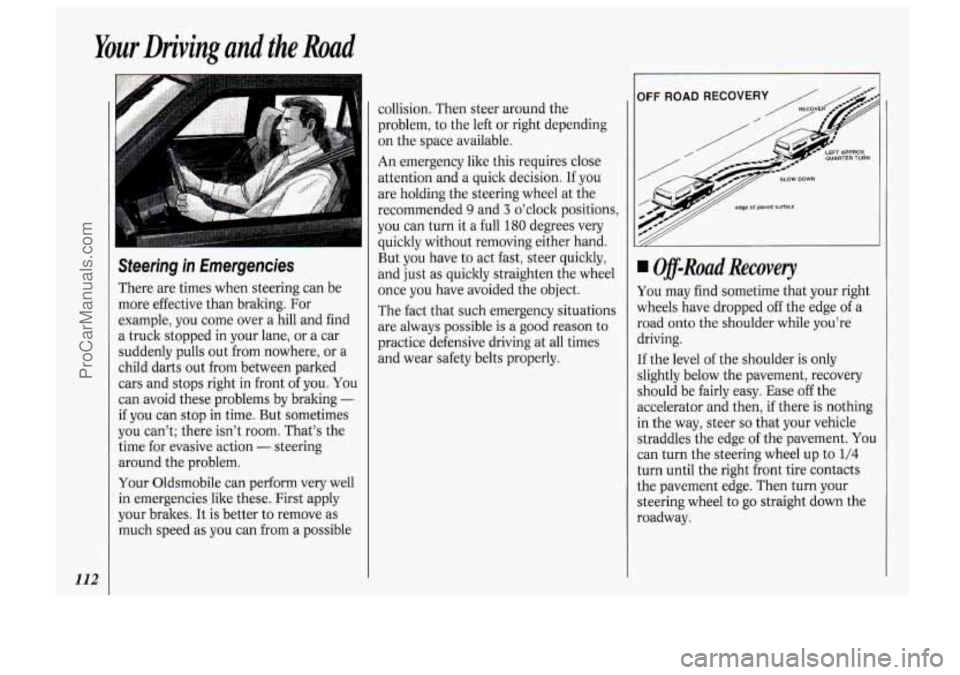
, IOFF ROAD RECOVERY /
Off-Road Recovery
You may find sometime that your right
wheels have dropped off the edge of a
road onto the shoulder while you’re
driving.
If the level of the shoulder is only
slightly below the pavement, recovery
should be fairly easy. Ease
off the
accelerator and then, if there is nothing
in the way, steer
so that your vehicle
straddles the edge of the pavement.
You
can turn the steering wheel up to 1/4
turn until the right front tire contacts
the pavement edge. Then turn your
steering wheel to
go straight down the
roadway.
ProCarManuals.com
Page 120 of 248

hur Driving and the Road
114
Loss of Control
Let’s review what driving experts say
about what happens when the three
control systems (brakes, steering and
acceleration) don’t have enough friction
where the tires meet the road to do
what the driver has asked.
In any emergency, don’t give up. Keep
trying to steer and constantly seek an
escape route or area of less danger.
Skidding
In a skid, a driver can lose control of
the vehicle. Defensive drivers avoid
most skids by taking reasonable care
suited to existing conditions, and by not
“overdriving” those conditions. But
skids are always possible.
The three types of skids correspond to
your Oldsmobile’s three control
systems. In the braking skid your
wheels aren’t rolling. In the steering or
cornering skid, too much speed or
steering in a curve causes tires to slip
and lose cornering force. And in the
acceleration skid too much throttle
causes the driving wheels to spin. A cornering
skid and an acceleration
skid are best handled by easing your
foot
off the accelerator pedal.
If your vehicle starts to slide, ease your
foot
off the accelerator pedal and
quickly steer the way you want the
vehicle to go. If you start steering
quicldy enough, your vehicle may
straighten out. Always be ready for a
second skid if it occurs.
Of course, traction is reduced when
water, snow, ice, gravel, or other material is on the road. For safety, you’ll want to
slow down and adjust your driving to
these conditions. It is important to slow
down on slippery surfaces because stopping distance will be longer and
vehicle control more limited. While driving
on a surface with reduced
traction, try your best to avoid sudden
steering, acceleration, or braking (including engine braking by shifting to a
lower gear). Any sudden changes could
cause the tires to slide. You may not
realize the surface is slippery until your
vehicle is skidding. Learn to recognize
warning clues
- such as enough water,
ice or packed snow on the road to make
a “mirrored surface”
- and slow down
when you have any doubt.
Remember: Any anti-lock braking
system (ABS) helps avoid only the
braking skid.
ProCarManuals.com