radio Oldsmobile Bravada 2000 s Owner's Guide
[x] Cancel search | Manufacturer: OLDSMOBILE, Model Year: 2000, Model line: Bravada, Model: Oldsmobile Bravada 2000Pages: 364, PDF Size: 2.6 MB
Page 154 of 364

3-22 Care of Your Cassette Tape Player
A tape player that is not cleaned regularly can cause
reduced sound quality, ruined cassettes or a damaged
mechanism. Cassette tapes should be stored in their
cases away from contaminants, direct sunlight and
extreme heat. If they aren't, they may not operate
properly or may cause failure of the tape player.
Your tape player should be cleaned regularly after every
50 hours of use. Your radio may display CLN to indicate
that you have used your tape player for 50 hours without
resetting the tape clean timer. If this message appears on
the display, your cassette tape player needs to be
cleaned. It will still play tapes, but you should clean it as
soon as possible to prevent damage to your tapes and
player. If you notice a reduction in sound quality, try a
known good cassette to see if it is the tape or the tape
player at fault. If this other cassette has no improvement
in sound quality, clean the tape player.
The recommended cleaning method for your cassette
tape player is the use of a scrubbing action,
non
-abrasive cleaning cassette with pads which scrub
the tape head as the hubs of the cleaner cassette turn.
The recommended cleaning cassette is available through
your dealership (GM Part No. 12344789).When using a scrubbing action, non
-abrasive cleaning
cassette, it is normal for the cassette to eject because
your unit is equipped with a cut tape detection feature
and a cleaning cassette may appear as a broken tape.
If the cleaning cassette ejects, insert the cassette at least
three times to ensure thorough cleaning.
You may also choose a non
-scrubbing action, wet-type
cleaner which uses a cassette with a fabric belt to clean
the tape head. This type of cleaning cassette will not
eject on its own. A non
-scrubbing action cleaner may
not clean as thoroughly as the scrubbing type cleaner.
The use of a non
-scrubbing action, dry-type cleaning
cassette is not recommended.
After you clean the player, press and hold EJECT for
five seconds to reset the CLN indicator. The radio will
display
--- to show the indicator was reset.
Cassettes are subject to wear and the sound quality
may degrade over time. Always make sure the cassette
tape is in good condition before you have your tape
player serviced.
Page 211 of 364
5-4
2. Get the vehicles close enough so the jumper cables
can reach, but be sure the vehicles aren't touching
each other. If they are, it could cause a ground
connection you don't want. You wouldn't be able to
start your vehicle, and the bad grounding could
damage the electrical systems.
To avoid the possibility of the vehicles rolling, set
the parking brake firmly on both vehicles involved in
the procedure. Put an automatic transmission vehicle
in PARK (P) and a manual transmission vehicle
in NEUTRAL.
3. Turn off the ignition on both vehicles. Unplug
unnecessary accessories plugged into the cigarette
lighter, or accessory power outlets, if you have this
option. Turn off all lamps that aren't needed as well
as radios. This will avoid sparks and help to save
both batteries. In addition, it could save your radio!
NOTICE:
If you leave your radio on, it could be badly
damaged. The repair wouldn't be covered by
your warranty.
4. Open both hoods and locate the batteries. Find
the positive (+) and negative (
-) terminals on
each battery.
Page 293 of 364
6-55
If you ever have a problem on the road and don't have
a spare fuse, you can borrow one that has the same
amperage. Just pick some feature of your vehicle that
you can get along without
-- like the radio or cigarette
lighter
-- and use its fuse, if it is the correct amperage.
Replace it as soon as you can.
Instrument Panel Fuse Block
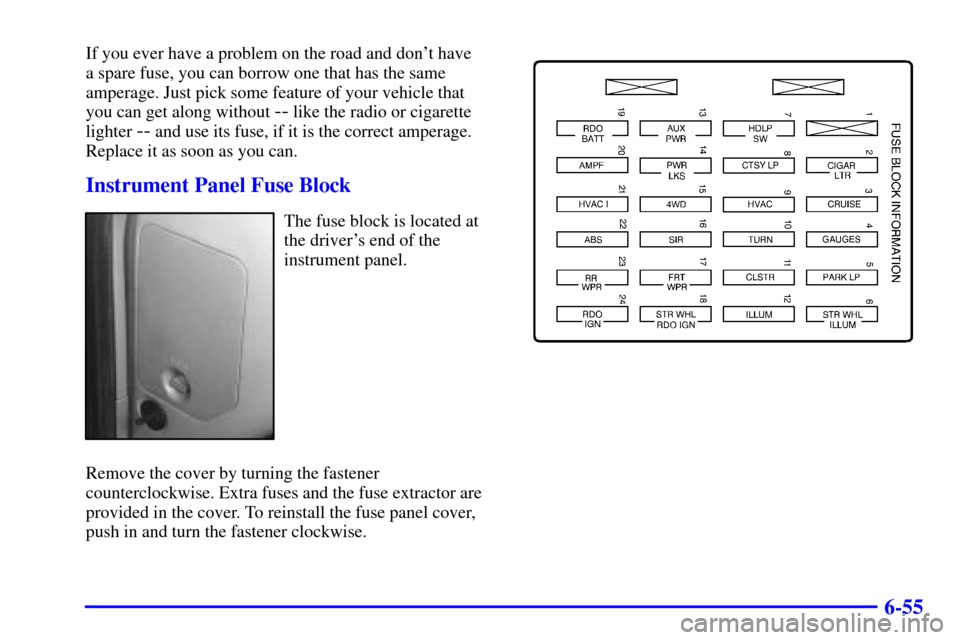
The fuse block is located at
the driver's end of the
instrument panel.
Remove the cover by turning the fastener
counterclockwise. Extra fuses and the fuse extractor are
provided in the cover. To reinstall the fuse panel cover,
push in and turn the fastener clockwise.
Page 294 of 364

6-56
Fuse/Circuit
BreakerUsage
A Not Used
B Not Used
1 Not Used
2 Cigarette Lighter, Data
Link Connector
3 Cruise Control Module and
Switch, Body Control Module,
Heated Seats
4 Gages, Body Control Module,
Instrument Panel Cluster
5 Parking Lamps, Power Window
Switch, Body Control Module,
Ashtray Lamp
6 Steering Wheel Radio Controls
7 Headlamp Switch, Body Control
Module, Headlamp Relay
8 Courtesy Lamps, Battery
Run
-Down Protection
9 Not UsedFuse/Circuit
BreakerUsage
10 Turn Signal
11 Cluster, Engine Control Module
12 Interior Lights
13 Auxiliary Power
14 Power Locks Motor
15 4WD Switch, Engine Controls
(VCM, PCM, Transmission)
16 Supplemental Inflatable Restraint
17 Front Wiper
18 Steering Wheel Radio Controls
19 Radio, Battery
20 Amplifier
21 HVAC I (Automatic), HVAC
Sensors (Automatic)
22 Anti
-Lock Brakes
23 Rear Wiper
24 Radio, Ignition