climate control Oldsmobile Cutlass Supreme 1993 Owner's Manuals
[x] Cancel search | Manufacturer: OLDSMOBILE, Model Year: 1993, Model line: Cutlass Supreme, Model: Oldsmobile Cutlass Supreme 1993Pages: 340, PDF Size: 16.21 MB
Page 91 of 340
The Instrument Panel-
Your Information System
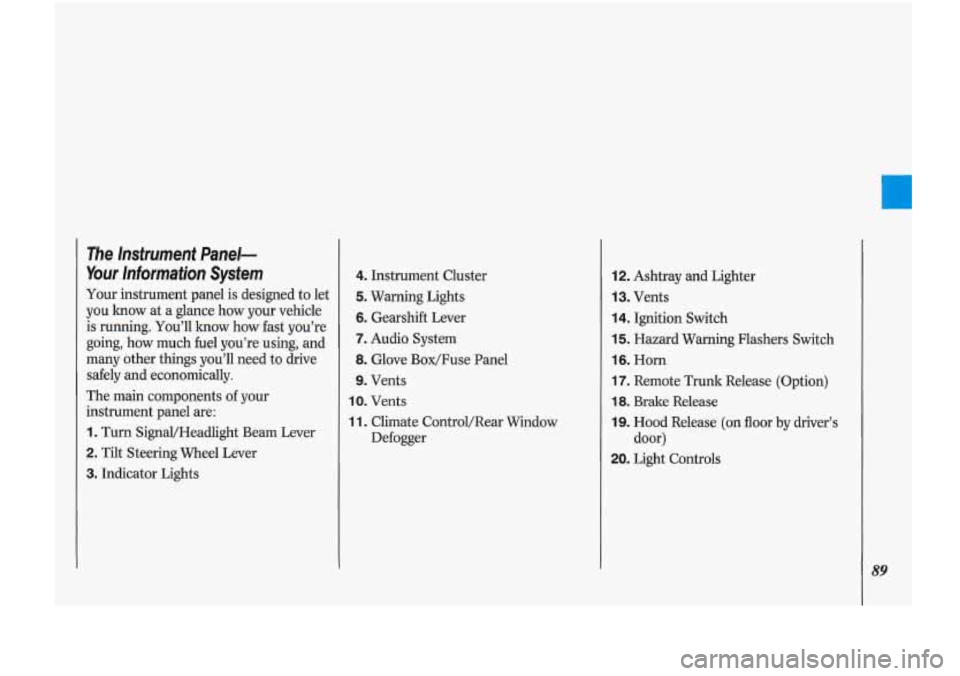
Your instrument panel is designed to let
you know
at a glance how your vehicle
is running. You’ll know how fast you’re
going, how much fuel you’re using, and
many other things you’ll need to drive
safely and economically.
The main components of your
instrument panel are:
1. Turn Signal/Headlight Beam Lever
2. Tilt Steering Wheel Lever
3. Indicator Lights
4. Instrument Cluster
5. Warning Lights
6. Gearshift Lever
7. Audio System
8. Glove Box/Fuse Panel
9. Vents
IO. Vents
11. Climate ControVRear Window
Defogger
12. Ashtray and Lighter
13. Vents
14. Ignition Switch
15. Hazard Warning Flashers Switch
16. Horn
17. Remote Trunk Release (Option)
18. Brake Release
19. Hood Release (on floor by driver’s
20. Light Controls
door)
89
Page 104 of 340
102
Although the HUD irinage apper
to be near the front
of the vehicl
do not, use it as a parking aid. T1
HUD was not designed For that
rpose.
If you try to use it that
way, such as in a parltirig lot, yo
may misjudge distance
ct run
:o somethin!
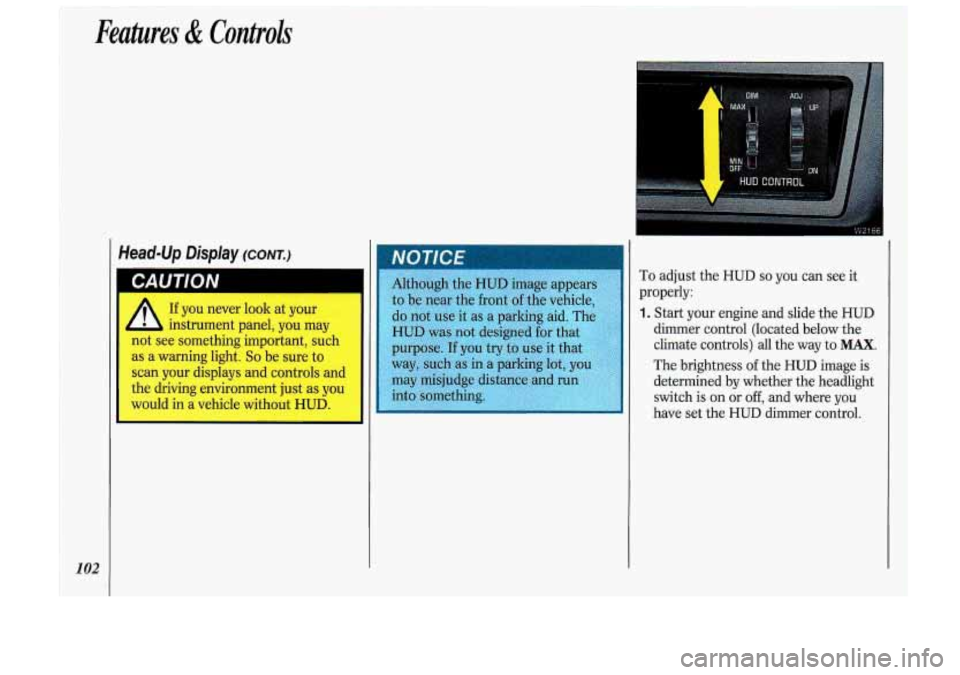
To adjust the HUD so you can see it
properly:
1. Start your engine and slide the HUD
dimmer control (located below the
climate controls) all the way to
MAX.
The brightness of the HUD image is
determined
by whether the headlight
switch is on or
off, and where you
have set the HUD dimmer control.
Page 111 of 340

In this part you’ll find out how to
operate the comfort control systems
and audio systems offered with
your
Oldsmobile . Be sure to read about the
particular system supplied with your
vehicle
.
I Part 3
I Comfort Controls & Audio Systems
Climate Control ........................................................................\
.............................. 110
Electronic Climate Control
........................................................................\
.............. 113
Steering Wheel Touch Controls for Climate Control ............................................. 116
Setting the Clock
........................................................................\
............................. 118
AM/FM Stereo Radio ........................................................................\
...................... 119
AM/FM Stereo Radio
with Cassette Player .......................................................... 121
AM/FM Stereo with Cassette Player and Graphic Equalizer
................................ 126
Compact Disc Player Anti-Theft Feature
............................................................... 131
Audio Bass Control
........................................................................\
......................... 133
Understanding Radio Reception ........................................................................\
..... 133
Care of Your Compact Discs ........................................................................\
........... 135
Fixed Mast Antenna
........................................................................\
....................... 135
Power Antenna Mast Care ........................................................................\
............. 135
AM/FM Stereo with Cassette Player and Music Search ........................................ 123
AM/FM Stereo with Compact Disc Player ............................................................. 129
Steering Wheel Touch Controls for Audio System
................................................ 132
Care
of Your Cassette Tape Player ........................................................................\
134
109
Page 112 of 340
~ Comfort Controls &Audio Systems
i I
I
I
I
! I
I
I
~ 110
Climate Control
The air conditioner and heater work
best
if you keep your windows closed
while using them. Your vehicle also has
the flow-through ventilation system
described later in this section.
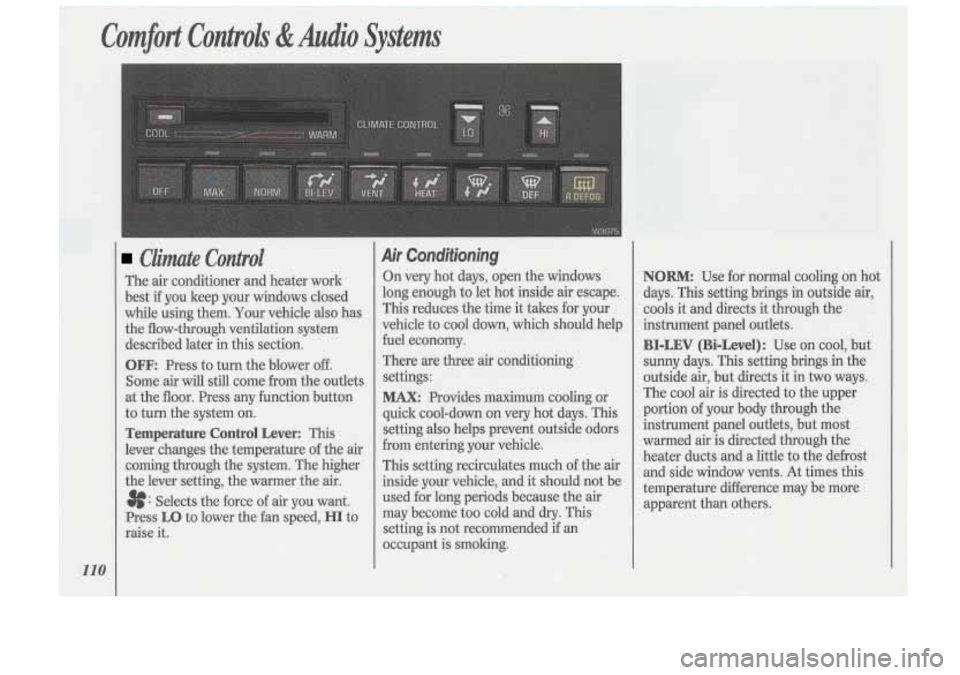
OFF: Press to turn the blower off.
Some air will still come from the outlets
at the floor. Press any function button
to turn the system
on.
Temperature Control Lever: This
lever changes the temperature of the air
coming through the system. The higher
the lever setting, the warmer the air.
3f: Selects the force of air you want.
Press
LO to lower the fan speed, HI to
raise
it.
Air Conditioning
On very hot days, open the windows
long enough to let hot inside air escape.
This reduces the time it tales for your
vehicle to cool down, which should help
fuel economy.
There are three air conditioning
settings:
MAX: Provides maximum cooling or
quick cool-down
on very hot days. This
setting also helps prevent outside odors
from entering your vehicle.
This setting recirculates much of the air
inside your vehicle, and it should not be
used for long periods because the air
may become too cold and
dry. This
setting is not recommended if an
occupant is smoking.
NORM: Use for normal cooling on hot
days. This setting brings in outside air,
cools it and directs it through the
instrument panel outlets.
BI-LEV (Bi-Level): Use on cool, but
sunny days. This setting brings in the
outside air, but directs it in two ways.
The cool air is directed to the upper
portion of your body through the
instrument panel outlets, but most
warmed air is directed through the
heater ducts and a little to the defrost
and side window vents. At times this
temperature difference may be more
apparent than others.
Page 115 of 340

Electronic Climate Control
(OPTION)
This system allows you to set the
temperature you want. It also lets you
choose automatic air flow and direction
control, or air flow and direction
settings you select. Your vehicle
also
has the flow-through ventilation system
described later in this section.
The digital screen displays the outside
temperature, the inside temperature
setting and the fan speed.
When you select the
AUTO mode, the
air conditioner compressor will operate
if the outside temperature is above
freezing.
113
Page 116 of 340

Comfort Controls &Audio Systems
Ekctronic Climate Control
114
(Cont.)
temperature caused by sunlight. To
keep you comfortable, it reduces the
interior temperature by as much as 5°F
(3°C) below the setting
on the digital
screen.
AUTO: To allow the system to
automatically control the temperature,
air distribution and fan speed:
1. Set the temperature you want with
the
COOL/WARM switch.
2. Press the AUTO switch. The AUTO
symbol will appear on the digital
screen.
The system will approach the
temperature you select as quickly as
possible. For most efficient operation,
just set the system temperature where
you would like it and drive away.
OUTS TEMP: Press to have the
outside temperature displayed on the
digital screen. Press again to return to
the inside temperature setting.
If the system is left in the outside
temperature mode, the outside
temperature will be displayed except
when changing the inside temperature
setting using the
COOL/WARM
switch. The display will return to the
outside temperature setting in about
five seconds. Use
the following controls when the
system is not set on
AUTO:
8: Press the top of the switch to raise
the fan speed, the bottom of the switch
to lower the fan speed. The fan symbol
and bar graph will be displayed on the
digital screen.
When the
AUTO switch is pressed, the
fan symbol will go out and the fan will
return to automatic operation.
If the Fahrenheit (F") or Celsius (C")
symbol begins to flash, or flashes when
you turn on the ignition,
it indicates an
electrical problem with your air conditioning system. The flashing
will
continue for about two minutes. It
means
you should have your system
serviced.
Page 118 of 340

116
Comfort Controk &Audio Systems
Steering Wheel Touch Controls
for Climate Control
(OPTION)
Some heating and cooling controls can
be adjusted at the steering wheel. These
touch controls also operate some audio
controls. See the
Index under Steering
Wheel
Touch Controls for Audio
System.
FAN: Press the upper part of the
control to increase the fan speed; press
the lower part to reduce the fan speed.
TEMP: Press the upper part of the
control to raise the inside temperature
setting; press the lower part to lower
the setting.
MODE: This control can be used to
select the direction of air flow
(BI-LEV, UPPER, or LOWER
settings), or to select DEFOG,
DEF
(Defrost) or AUTO. Press the top
of the control to move to the next mode
on the right of the climate control
panel. Press the bottom
of the control
to move to the next mode on the left.
The indicator light will glow above the
selected mode, or
AUTO will appear on
the digital display.
Rear Window Defogger (OPTION)
R DEFOG: Press to warm the
defogger grid on the rear window. The
indicator light will glow while the rear
window defogger is operating. The rear
window defogger will turn off
automatically after about
10 minutes of
use. If you turn it on again, the defogger
will operate for about five minutes only.
You can also turn the defogger off by
turning off the ignition or pressing the
R DEFOG switch again.
Do not attach a temporary vehicle
license across the defogger grid
on the
rear window.
Page 134 of 340
Comfort Controls &Audio Systems
132
CD Player Anti-Theft Feature
(CONT.)
To Disable the Anti-Theft System:
Enter your secret code by following
these steps (you will have only
15
seconds between each step).
1. Turn the ignition to Accessory or
Run and the radio off, then press the
PREV and FF buttons of the station
presets.
SEC will appear, showing the
radio is secure.
2. Press SET and 000 appears on the
display.
3. Press and hold SEEK until the first
digit of your secret code appears.
4. Press and hold SCAN until the
second and third digits of your code
appear.
the display).
5. Press AM-FM (000 will appear on
6. Press and hold SEEK until the fourth
digit of your code appears.
7. Press and hold SCAN until the fifth
and sixth digits of your code appear.
8. Press AM/FM. If the display shows
--- ” the radio is unsecured and
will play again. If the display shows
SEC, the steps were not successful
and the numbers did not match the
secret code.
If you lose or forget your code, see your
dealer.
If you lose battery power, when the
battery is reconnected, the system will
not turn on and
LOC will appear.
Follow steps
1-8 for disabling your
system (the time will appear if you are
successful). If
SEC appears, the
numbers did not match and your unit is
still locked.
((
Steering Wheel Touch Controls
for Audio System (OPTION)
Some audio system functions described
in the previous pages can also be
operated with the Steering Wheel
Touch Controls option. These touch controls
also operate some climate
controls. See the
Index under Steering
Wheel
Touch Controls for Climate
Control.
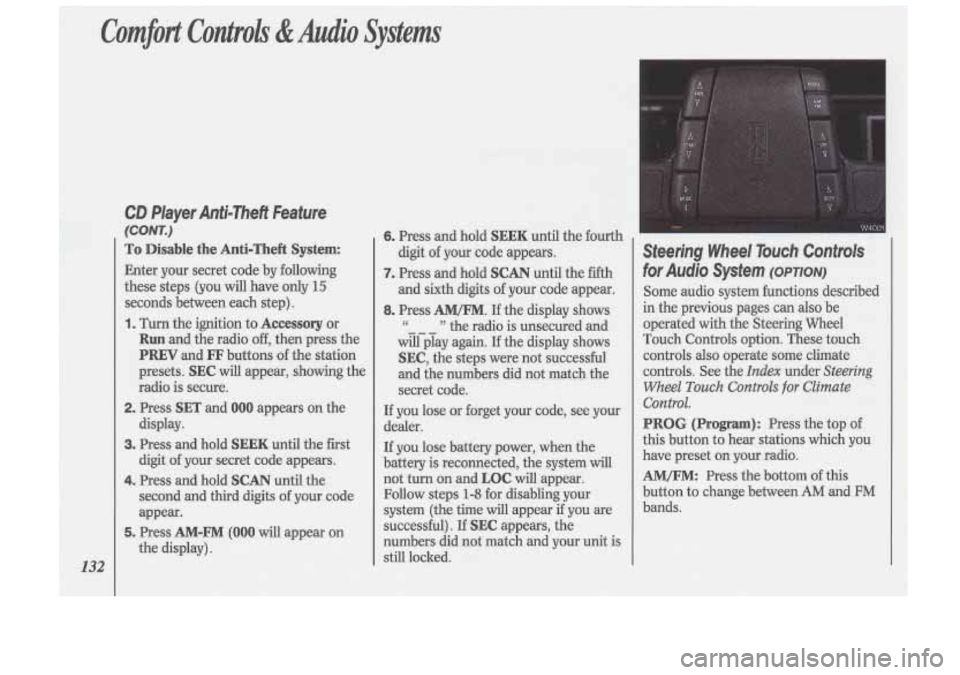
PROG (Program): Press the top of
this button to hear stations which you
have preset on your radio.
AM/FM: Press the bottom of this
button to change between
AM and FM
bands.
Page 258 of 340
Sewice & Appearance Care
256
1 Uniform Tire Quality
Grading
The following information relates to the
system developed by the United States
National Highway Traffic Safety
Administration which grades tires by
treadwear, traction and temperature
performance. (This applies only to
vehicles sold in the United States.)
Treadwear
The treadwear grade is a comparative
rating based on the wear rate of the tire
when tested under controlled
conditions on a specified government
test course. For example, a tire graded
150 would wear one and a half (1%)
times as well on the government course
as a tire graded
100. The relative
performance of tires depends upon the actual
conditions
of their use, however,
and may depart significantly from the
norm due to variations
in driving habits,
service practices and dif€erences in road
characteristics and climate.
Traction-A, B, C
The traction grades, from highest to
lowest are:
A, B, and C. They represent
the tire’s ability to stop on wet
pavement as measured under controlled
conditions on specified government test
surfaces
of asphalt and concrete. A tire
marked
C may have poor traction
performance.
Warning: The traction grade assigned
to this tire is based on braking (straight-
ahead) traction tests and does not
include cornering (turning) traction.
Temperature-A, B, C
The temperature grades are A (the
highest),
B, and C, representing the
tire’s resistance to the generation of
heat and its ability to dissipate heat
when tested under controlled
conditions on a specified indoor
laboratory test wheel. Sustained high
temperature can cause the material of
the tire to degenerate and reduce tire
life, and excessive temperature can lead
to sudden tire failure. The grade
C
corresponds to a level of performance
which all passenger car tires must meet
under the Federal Motor Vehicle Safety
Standard No.
109. Grades B and A
represent higher levels of performance
on the laboratory test wheel than the
minimum required by law.
Page 328 of 340
Index
326
Brake System Warning Light Anti-Lock Brake System
................. 99
Standard Brakes
............................... 98
Brakes. Anti-Lock
........................... 149
Warning Light
.................................. 99
Braking
in Emergencies ................... 153
Braking Technique ........................... 148
Break.Tn. New Vehicle
Normal Driving
............................... 54
When Towing a Trailer
.................. 177
Braking
............................................. 148
Buckling Up (see
Safety Belts)
Bulb Replacement
Center High-Mounted
Stoplight
.............................. 263. 280
Fog Lights
..................................... 249
Taillight
................................. 247. 280
Headlight
............................... 243. 280
Capacities and Specifications
....... 276
Carbon Monoxide
in Exhaust ............ 66
Cassette Tape Holder
........................ 83
Cassette Tape Player
(see
Audio Systems)
Center Lap Belts (see Safety Belts)
Chains. Tire ............................. 212. 258
Changing a Flat Tire
......................... 205
Checking Aim
of the Headlights .................... 241
Automatic Transaxle Fluid
............................................. 231
Brake Fluid
.................................... 238
Engine Coolant
............................. 235
Engine Oil
..................................... 226
Power Steering Fluid
.................... 237
Safety Belt Systems
.......................... 42
Things Under the Hood
................. 222
Child Restraints
.................................. 31
Children
............................................. 30
Cigarette Lighter
................................ 84
Circuit Breakers
& Fuses ................ 270
City Driving
..................................... 165
Cleaner, Air
.............................. 230, 283
Cleaning Aluminum Wheels
........................ 265
Antenna
......................................... 135
Cassette Player and Tapes
............ 134
Compact Discs
.............................. 135
Fabric .............................................. 260 Fiberglass Springs
......................... 268
Glass
............................................... 263
HUD (Head-Up Display)
............. 104
Inside
of Your Vehicle ................... 260
Leather and Vinyl
.......................... 262
Outside
of Your Vehicle ............... 265
Safety Belts
................................... 262
Special Problems
........................... 261
Underbody Maintenance
.............. 267
Warnings
........................................ 259
Weatherstrips
................................ 266
White Sidewall Tires
..................... 266
Windshield
.................................... 264
Clock, Setting the
............................. 118
Clusters. Instrument Panel ................ 90
Coin Holder ....................................... 83
Comfort Controls
Climate Control
.............................. 110
Electronic Climate Control
............ 113
Steering Wheel Touch Controls
.... 116
Ventilation ..................................... 111
Compact Disc Player
(see
Audio Systems)
Compact Spare Tire ......................... 211
Compartments, Storage
............... 83, 84