display Oldsmobile Cutlass Supreme 1994 s User Guide
[x] Cancel search | Manufacturer: OLDSMOBILE, Model Year: 1994, Model line: Cutlass Supreme, Model: Oldsmobile Cutlass Supreme 1994Pages: 276, PDF Size: 14.73 MB
Page 115 of 276
1. Tune in the desired station.
2. Press SET, and within five seconds
press any two adjacent pushbuttons
at the same time.
3. The station can be tuned in when the
same two pushbuttons are pressed at
the same time. f
VOLUME
TUNE
TREB
BASS
I/ STEREO
AUTO
REVERSE
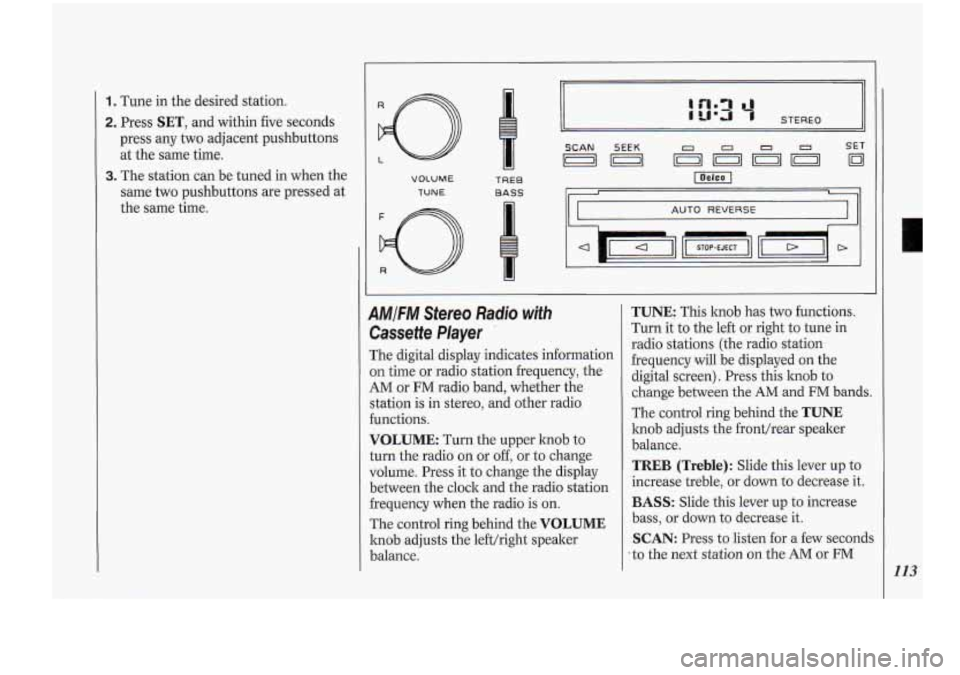
AMIFM Stereo Radio with
Cassette Player
The digital display indicates information
on time or radio station frequency, the
AM or FM radio band, whether the
station is in stereo, and other radio
functions.
VOLUME: Turn the upper knob to
turn the radio on or
off, or to change
volume. Press it to change the display
between the clock and the radio station
frequency when the radio is on.
The control ring behind the
VOLUME
knob adjusts the lefthight speaker
balance.
TUNE: This knob has two functions.
Turn it to the left or right to tune in
radio stations (the radio station
frequency .will be displayed on the
digital screen). Press this knob to
change between the AM and FM bands.
The control ring behind the
TUNE
knob adjusts the fronthear speaker
balance.
TREB (Treble): Slide this lever up to
increase treble, or down to decrease it.
BASS: Slide this lever up to increase
bass, or down to decrease it.
SCAN: Press to listen for a few seconds
:to the next station on the AM or FM
-
113
Page 116 of 276
Comfort Controls &Audio Systems
band; the scan will continue every few
seconds until you press
SCAN again to
stop on a particular station. You can
also press the upper knob
(VOLUME )
to stop the scan.
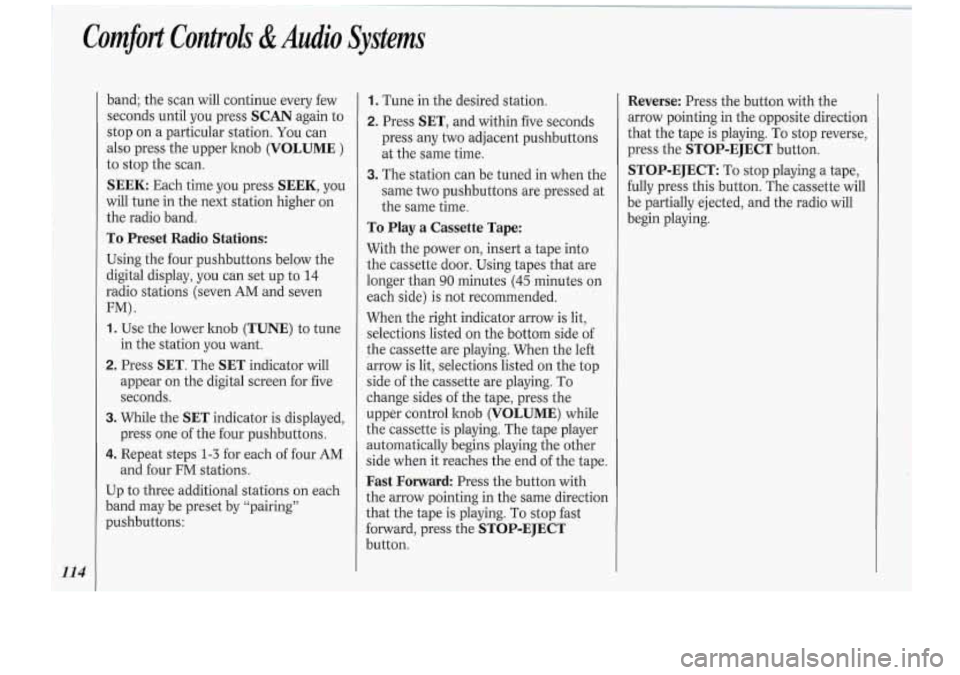
SEEK Each time you press SEEK, you
will tune in the next station higher on
the radio band.
To Preset Radio Stations:
Using the four pushbuttons below the
digital display, you can set up to
14
radio stations (seven AM and seven
FM).
1. Use the lower hob (TUNE) to tune
in the station you want.
2. Press SET. The SET indicator will
appear on the digital screen for five
seconds.
3. While the SET indicator is displayed,
press one of the four pushbuttons.
4. Repeat steps 1-3 for each of four AM
and four FM stations.
Up to three additional stations on each
band may be preset by “pairing”
pushbuttons:
1. Tune in the desired station.
2. Press SET, and within five seconds
press any two adjacent pushbuttons
at the same time.
3. The station can be tuned in when the
same two pushbuttons are pressed at
the same time.
To Play a Cassette Tape:
With the power on, insert a tape into
the cassette door. Using tapes that are
longer than
90 minutes (45 minutes on
each side) is not recommended.
When the right indicator arrow is lit,
selections listed on the bottom side of
the cassette are playing. When the left
arrow is lit, selections listed on the top
side of the cassette are playing.
To
change sides of the tape, press the
upper control hob
(VOLUME) while
the cassette is playing. The tape player
automatically begins playing the other
side when it reaches the end of the tape.
Fast Forward: Press the button with
the arrow pointing in the same direction
that the tape is playing.
To stop fast
forward, press the
STOP-EJECT
button.
Reverse: Press the button with the
arrow pointing in the opposite direction
that the tape is playing.
To stop reverse,
press the
STOP-EJECT button.
STOP-EJECT: To stop playing a tape,
fully press this button. The cassette will
be partially ejected, and the radio will
begin playing.
Page 117 of 276
ll
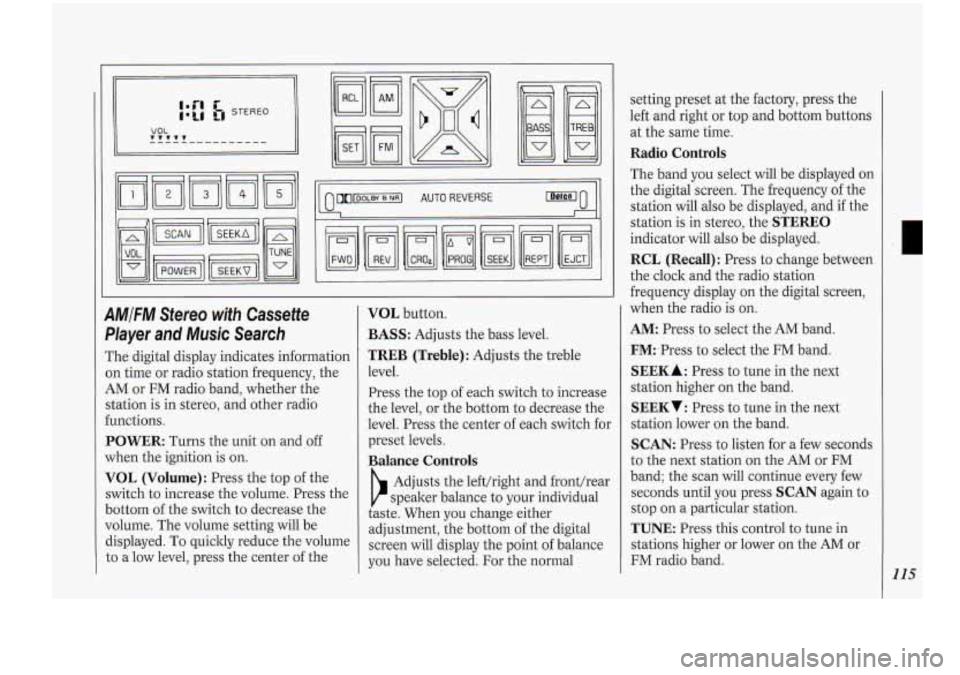
9MlFM Stereo with Cassette
Dlayer
and Music Search
The digital display indicates information
In time or radio station frequency, the
4M or FM radio band, whether the
;tation is in stereo, and other radio
:unctions.
POWER: Turns the unit on and off
when the ignition
is on.
VOL (Volume): Press the top of the
;witch to increase the volume. Press the
Jottom of the switch to decrease the
Jolume. The volume setting will be
%splayed. To quickly reduce the volume
;o a low level, press the center of the
VOL button.
BASS: Adjusts the bass level.
TREB (Treble): Adjusts the treble
level.
Press the top of each switch to increase
the level,
or the bottom to decrease the
level. Press the center of each switch for
preset levels.
Balance Controls
b
Adjusts the lefthight and fronthear
speaker balance to your individual
taste. When you change either
adjustment, the bottom of the digital
screen will display the point
of balance
you have selected.
For the normal setting preset
at the factory, press the
left and right or top and bottom buttons
at the same time.
Radio Controls
The band you select will be displayed on
the digital screen. The frequency of the
station will also be displayed, and
if the
station is in stereo, the
STEREO
indicator. will also be displayed.
RCL (Recall): Press to change between
the clock and the radio station
frequency display on the digital screen,
when the radio is on.
AM:. Press to select, the AM band.
FM:-Press to select the FM band.
SEEK A : Press to tune in the next
station higher on the band.
SEEKT: Press to tune in the next
station lower on the band.
SCAN: Press to listen for a few seconds
to the next station on the AM or FM
band; the scan will continue every few
seconds until you press
SCAN again to
stop on a particular station.
TUNE: Press this control to tune in
stations higher or lower on the AM or
FM radio band.
115
Page 119 of 276
250Hz 3.5KHz
60Hz lKHz lOKHr
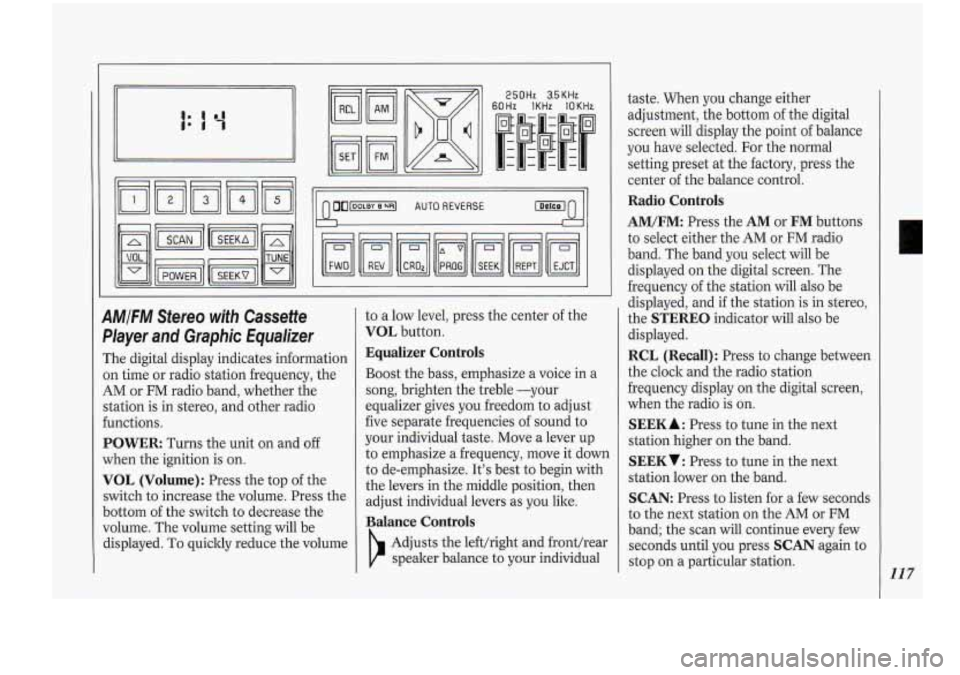
AMIFM Stereo with Cassette
Player
and Graphic Equalizer
The digital display indicates information
on time or radio station frequency, the
AM or FM radio band, whether the
station is in stereo, and other radio
€unctions.
POWER Turns the unit on and off
when the ignition is
on.
VOL (Volume): Press the top of the
switch to increase the volume. Press the
bottom
of the switch to decrease the
volume. The volume setting will be
displayed.
To quickly reduce the volume to
a low level,
press the center of the
VOL button.
Equalizer Controls
Boost the bass, emphasize a voice in a
song, brighten the treble -your
equalizer gives you freedom to adjust
five separate frequencies of sound to
your individual taste. Move a lever up
to emphasize a frequency, move
it down
to de-emphasize. It's best to begin with
the levers in the middle position, then
adjust individual levers as you like.
Balance Controls
Adjusts the lefthight and fronthear
speaker b.alance to your individual taste.
When you change either
adjustment, the bottom of the digital
screen will display the point of balance
you have selected. For the normal
setting preset at the factory, press the
center of the balance control.
Radio Controls
AM/FM: Press the AM or FM buttons
to select either the AM or
FM radio
band. The band you select will be
displayed on the digital screen. The
frequency of the station will also be
displayed, and
if the station is in stereo,
the
STEREO indicator will also be
displayed.
RCL (Recall): Press to change between
the clock and the radio station
frequency display
on the digital screen,
when the radio is on.
SEEK A : Press to tune in the next
station higher on the band.
SEEKV: Press to tune in the next
station lower on the band.
SCAN: Press to listen for a few seconds
to the next station on the
AM or FM
band; the scan will continue every few
seconds until you press
SCAN again to
stop on a particular station.
117
Page 120 of 276
Comfort.Controls &Audio Systems
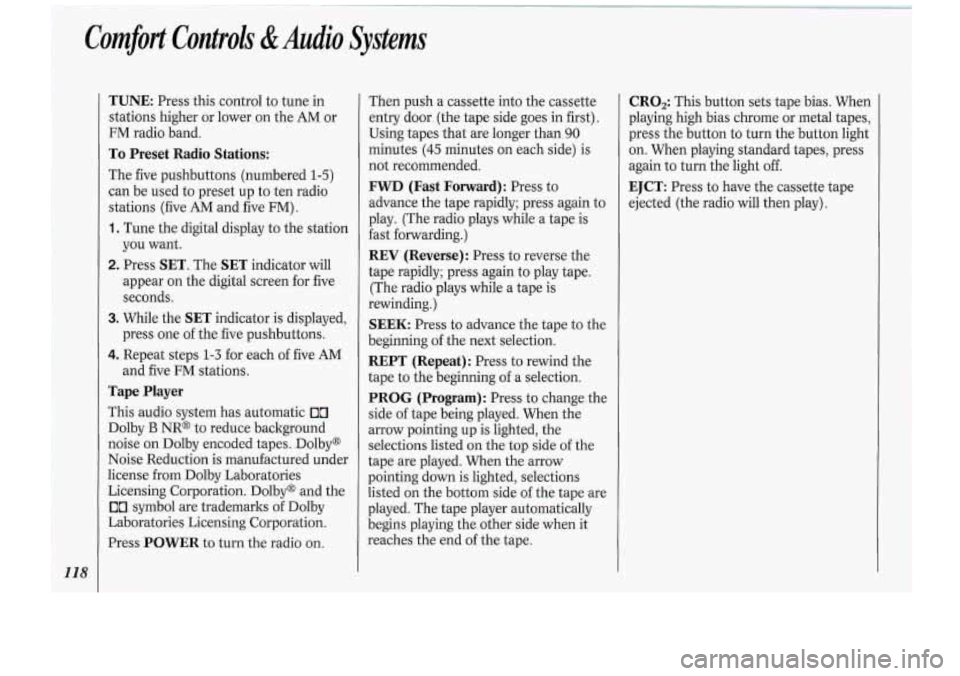
TUNE: Press this control to tune in
stations higher or lower
on the AM or
FM radio band.
To Preset Radio Stations:
The five pushbuttons (numbered 1-5)
can be used to preset up to ten radio
stations (five
AM and five FM) .
1. Tune the digital display to the station
you want.
2. Press SET. The SET indicator will
appear on the digital screen for five
seconds.
3. While the SET indicator is displayed,
press one
of the five pushbuttons.
4. Repeat steps 1-3 for each of five AM
and five FM stations.
Tape Player
This audio system has automatic Ix7
Dolby B NR@ to reduce background
noise on Dolby encoded .tapes. Dolby@
Noise Reduction is manufactured under
license from Dolby Laboratories
Licensing Corporation. Dolby@ and the
00 symbol are trademarks of Dolby
Laboratories Licensing Corporation.
Press
POWER to turn the radio on. Then push a cassette
into the cassette
entry door. (the tape side goes in first).
Using tapes that are longer than
90
minutes (45 minutes on each side) is
not recommended.
FWD (Fast Forward): Press to
advance the tape rapidly; press again to
play. (The radio plays while a tape is
fast forwarding.)
REV (Reverse): Press to reverse the
tape rapidly; press again to play tape.
(The radio plays while a tape is
rewinding.)
SEEK: Press to advance the tape to the
beginning
of the next selection.
REPT (Repeat): Press to rewind the
tape to the beginning of a selection.
PROG (Program): Press to change. the
side of tape being played. When the
arrow pointing up is lighted, the
selections listed on the top side
of the
tape are played. When the arrow
pointing down is lighted, selections
listed on the bottom side of the tape are
played. The tape player automatically
begins playing the other side when it
reaches the end of the tape.
CRO,: This button sets tape bias. When
playing high bias chrome
or metal tapes,
press the button to turn the button light
on. When playing standard tapes, press
again to turn the light
off.
EJCT: Press to have the cassette tape
ejected (the radio will then play).
Page 121 of 276
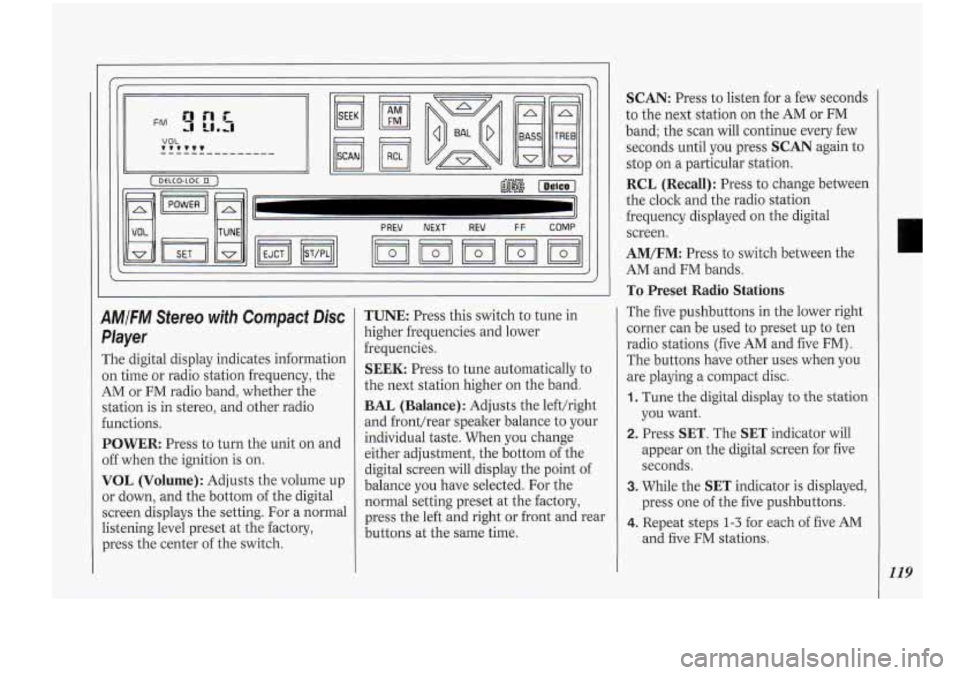
9M/FM Stereo with Compact Disc
Player
The digital display indicates information
on time or radio station frequency, the
AM or FM radio band, whether the
station is in stereo, and other radio
functions.
POWER:-Press to turn the unit on and
off when the ignition is on.
VOL (Volume): Adjusts the volume up
or down, and the bottom of the digital
screen displays the setting. For a normal
listening level preset at the factory,
press the center of the switch.
TUNE: Press this switch to tune in
higher frequencies and lower
frequencies.
SEEK: Press to tune automatically to
the next station higher on the band.
BAL (Balance): Adjusts the lefthight
and fronthear speaker balance to your
individual taste. When you change
either adjustment, the bottom of the
digital screen will display the point of
balance
you have selected. For the
normal setting preset at the factory,
press the left and right or front and rear
buttons at the same time.
SCAN: Press to listen for a few seconds
to the next station on the AM
or FM
band; the scan will continue every few
seconds until you press
SCAN again to
stop on a particular station.
RCL (Recall): Press to change between
the clock and the radio station
frequency displayed on the digital
screen.
AM/FM: Press to switch between the
AM and FM bands.
To Preset Radio Stations
The five pushbuttons in the lower right
corner can be used to preset up to ten
radio stations (five AM and five
FM) .
The buttons have other uses when you
are playing a compact disc.
1. Tune the digital display to the station
you want.
2. Press SET. The SET indicator will
appear on the digital screen for five
seconds.
3. While the SET indicator is displayed,
press one
of the five pushbuttons.
4. Repeat steps 1-3 for each of five AM
and five FM stations.
119
Page 122 of 276
Comfort Controls &Audio Systems
!20
To Play a Compact Disc:
Many of the controls far the radio also
have functions for. the compact ,disc
player, as explained here.
Don’t use mini-discs that are called
singles. They won’t eject. Use only full-
size compact discs.
1. Press POWER to turn the unit on.
2. Insert a disc part-way into the slot,
with the label side up. The player will
pull it in. In a few seconds, the disc
should play.
If the disc comes back out:
The disc may be upside down.
The disc may be dirty, scratched or
wet.
There may be too much moisture in
the air (wait about one hour and
try
again).
The player may be too hot, or the road
may be too rough for the disc
to play.
While a disc
is playing, the CD indicator
is displayed on the digital screen, as is
the clock.
RCL (Recall): Press once to see which
track is playing. Press again within five seconds
to see how long your selection
has been playing. The track number
also will be displayed when the. volume
is changed or a new track starts to play.
PREV (Previous): Press to play a track
again. If you hold the
PREV button, the
disc will keep backing up to previous
tracks.
NEXT: Press when you want to hear
the next track.
If you hold the NEXT
button, the disc will keep advancing to
other tracks.
REV (Reverse): Press and hold to
rapidly back
up to a favorite passage.
Release to resume playing.
FF (Fast Forward): Press and hold to
rapidly advance the disc. Release to
resume playing.
COMP (Compression): Depressing
this button makes soft and loud
passages more equal in volume. Press
again to resume normal play.
When Finished with the Compact
Disc Player:
If you press POWER or turn off the
ignition, the disc will stay in the player
and start again when
you turn on the ignition
or power
switch. The disc will
begin playing at the point where it had
been stopped.
ST/PL (Stop/Play): Press to stop the
disc player; the radio will play. .Press
again to play the disc (the player will
start playing the disc where
it was
stopped earlier).
EJCT (Eject): Press to eject the disc;
the radio will play.
CD Player Anti-Theft Feature
Delco LOC 11s is a security feature that
can be used or ignored. If you ignore it,
your system will play normally.
If you
use it, your system cannot be turned on
if it is stolen. These instructions will tell
you how to enter a secret code into your
system. Then,
if battery power is lost for
any reason, the secret code must be
entered again before the system can be
turned on.
To Set:
1. Write down any six-digit number and
keep it in a safe place. This is your
secret code.
Page 123 of 276
2. Turn the ignition to Accessory or
Run.
3. Press the POWER button to turn the
radio
off.
4. Press the PREV and FF buttons at
the same time and hold until
"-"
shows on the display. You now have
only 15 seconds between each of the
following steps.
display.
digit of your code appears.
second and third digits of your code
appear.
5. Press SET and 000 appears on the
6. Press and hold SEEK until the first
7. Press and hold SCAN until the
8. Press AM/FM (000 appears).
9. Press and hold SEEK until the fourth
digit of your code appears.
IO. Press and hold SCAN until the fifth
and sixth digits of your code appear.
1 1. Press AM/FM (rEP will appear for
five seconds, then
000 ) .
12. Repeat steps 6 through 10. Then
press the
AM/FM button again.
SEC will appear, indicating that
Delco-Loc 11s is set, and your radio is secure.
If "- " appears, the
steps were not successful and you
must repeat the entire procedure.
To Disable the Anti-Theft System:
Enter your secret code by following
these steps (you will have only
15
seconds between each step).
1. Turn the ignition to Accessory or
Run and the radio off, then press the
PREV and FF buttons of the station
presets.
SEC will appear, showing
the radio is secure.
2. Press SET and 000 appears on the
display.
3. Press and hold SEEK until the first
digit of your secret code appears.
4. Press and hold SCAN until the
second and-third digits of your code
appear.
5. Press AM/FM (000 will appear on
the display).
6. Press and hold SEEK until the fourth
digit of your code appears.
7. Press and hold SCAN until the fifth
and sixth ,digits of your code appear.
8. Press AM/FM. If the display shows
"-" the radio is unsecured and will play
again.
If the display shows SEC:
the steps were not successful and the
numbers did not match the secret
code.
If you lose or forget your code, see your
dealer.
If you lose battery power, when the
battery is reconnected, the system will
not 'turn.on and
LOC will appear.
Follow steps
1-8 for disabling your
system (the time will appear if you are
successful).
If SEC appears, the
numbers did not match and your unit i:
still locked.
121
Page 187 of 276
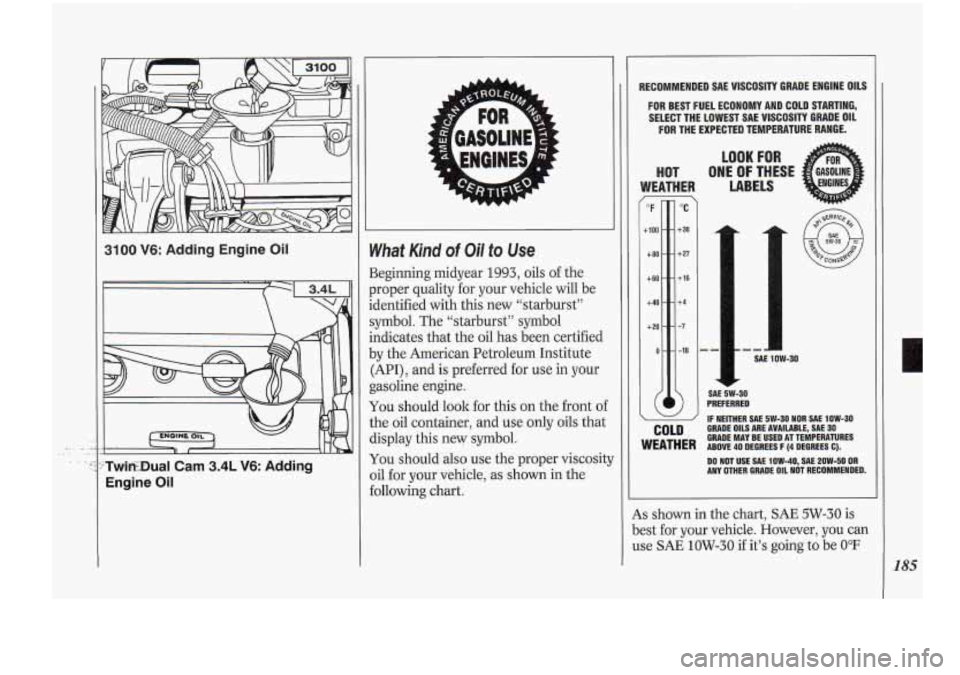
3100 V6: Adding Engine Oil
c
’TwitEDual .Cam 3.4L V6: Adding
Engine
Oil
What Kind of Oil to Use
Beginning midyear 1993, oils of the
proper quality for your vehicle will be
identified with this new “starburst”
symbol. The “starburst” symbol
indicates that the oil has been certified
.by the American Petroleum Institute
(API)
, and is preferred for use in your
gasoline engine.
You should look for this on the front of
the oil container, and use only oils that
display this new symbol.
You should also use the proper viscosit:
oil for your vehicle, as shown in the
following chart.
RECOMMENDED SAE VISCOSITY GRADE ENGlNE OILS
FOR BEST FUEL ECONOMY AND COLD STARTING,
SELECT THE LOWEST SAE VISCOSITY GRADE OIL
FOR THE EXPECTED TEMPERATURE RANGE.
COLD
LOOK FOR
WEATHER LABELS
HOT ONE OF THESE
1
SAE 5W-30
PREFERRED
IF NEITHER SAE 5W-30 NOR SAE 1OW-30
GRADE OILS ARE AVAILABLE, SAE 30 GRADE MAY. BE USED AT TEMPERATURES WEATHER ABOVE 40 DEGREES F (4 DEGREES C).
DO NOT USE
SAE 1OW-40, SAE 2OW-50 OR ANY OMER GRADE OIL NOT RECOMMENDED.
4s shown in the chart, SAE 5W-30 is
3est for your vehicle. However, you can
Ise SAE
1OW-30 if it’s going to be 0°F
L
185