ECU OLDSMOBILE SILHOUETTE 1995 User Guide
[x] Cancel search | Manufacturer: OLDSMOBILE, Model Year: 1995, Model line: SILHOUETTE, Model: OLDSMOBILE SILHOUETTE 1995Pages: 390, PDF Size: 20.27 MB
Page 63 of 390

5. Buckle the belt. Make sure the release button is
positioned so you would be able to unbuckle the
safety belt quickly
if you ever had to.
6. To tighten the belt, feed it back into the retractor
while you push down
on the child restraint.
7. Push and pull the child restraint in different
directions to be sure it is secure.
To remove the child restraint, just unbuckle the vehicle’s
safety belt and let
it go back all the way. The safety belt
will move freely again and be ready
to work for an adult
or larger child passenger.
1-53
ProCarManuals.com
Page 74 of 390

To lock the door from the inside, slide the locking lever
rearward.
lb unlock the door, slide the locking lever forward.
Power Door Locks (Option)
? . .1
From the inside, press the front of the power door lock
switch (on either front door), to unlock all doors and
the liftgate.
You can lock all doors and the liftgate from the inside,
by pressing the rear
of the power lock switch on either
front door.
If you have the optional Remote Lock Control system,
your vehicle has a special security feature. If the driver’s
door is open and your key is in the ignition in the
OFF
2-4
ProCarManuals.com
Page 78 of 390

This device complies with Part 15 of the FCC Rules.
Operation is subject to the following two conditions:
(1) This device may not cause harmful interference, and
(2) This device must accept any interference received,
including interference that may cause undesired
operation.
Should interference
to this system occur, try this:
0
0
0
0
Check to determine if battery replacement is
necessary. See the instructions
on battery
replacement.
Check the distance. You may be too far from your
vehicle. This product has a maximum range.
Check the location. Other vehicles or objects may be
blocking the signal.
See your Oldsmobile retailer or a qualified
technician for service.
Operation
The driver’s door will unlock and the interior lamps
will go on when the unlock symbol is pressed (see
“Illuminated Entry System” later in this section). If
pressed again within five seconds, all doors and the
liftgate will unlock. All doors and the liftgate will lock
when the lock symbol is pressed.
If the driver’s door is open and your key is in the
ignition in the
OFF position, you won’t be able to set the
door lock with the power door lock switch or the remote
transmitter. This security feature is designed to help
keep you from locking your keys in your vehicle.
Lock Delay
The lock delay feature can be operated using either the
remote key chain transmitter or the power door locks
switch (see “Power Door Locks” earlier in this section).
Changes or modifications to this system by other than an
authorized service facility could void authorization
to
use this equipment.
2-8
ProCarManuals.com
Page 87 of 390

Sliding Door Security Lock
Your Oldsmobile is equipped with a sliding door
security lock that helps prevent passengers from opening
the sliding door from the inside.
If you have the optional power sliding door, you can
override the security lock by pressing the
PWR DOOR
switch when the power sliding door enable switch is in
the
ON position. See “Power Sliding Door” earlier in
this section.
The security lock lever is located on the inside of the
sliding door, near the rear edge of the door.
To access
the lever, open the sliding door. Use the security lock
label on the rear edge of the door as a guide. Reach your
hand around the inside rear corner of the sliding door to
access the lever.
I ,;I m
CHILD
I SECURITY
LOCK
To use the security lock, move the security lock lever all
the way up and close the door.
If you have the optional power sliding door, slide the
power sliding door enable switch on the overhead
console to the
OFF position. The sliding door cannot be
opened from the inside when this feature is in use.
2-17
ProCarManuals.com
Page 88 of 390

.-e.- - .- ’ - - .,’. . . . . * .. . . - . . , ... .-.- : . . If you have the optional power sliding door, slide the
power sliding door enable switch to the
ON position.
Press either
PWR DOOR switch.
You should let adults and older children know how the
security lock works, and how to cancel the lock.
If you
don’t, adults or older children who ride in the rear won’t
be able to open the sliding door from the inside when
the security lock feature is in use.
To Cancel the Sliding Door Lock
1. Unlock the sliding door from the inside and open the
door from the outside.
2. Move the security lock lever all the way down.
The sliding door lock will now work normally.
If you want to open the sliding door when the security
lock
is on, unlock the sliding door from the inside and
open the door from the outside.
2-18
ProCarManuals.com
Page 109 of 390

With power windows, switches on the driver’s door
armrest control the front windows (when
the ignition is
on). The left switch controls the driver’s window. The
right switch controls the passenger’s window.
The driver’s power window switch
has two down
positions. Hold the rear
of the switch in the first position
to lower the window normally.
To activate the auto down feature, fully press the rear of
the switch, then release. The window will lower
completely.
To stop the window from lowering all the
way, press the front
of the switch.
Side Window Latches
To raise the window, press and hold the front of the
switch.
The rear
of the side windows swings open.
To open, pull the latch forward to release
it, then swing
the window outward. Press the center
of the latch to
secure the window in the open position.
To close, pull the center of the latch forward and then
close the latch.
Horn
You can sound the horn by pressing the horn symbols on
your steering wheel.
2-39
ProCarManuals.com
Page 132 of 390
NOTICE:
Loading cargo that weighs more than 125 pounds
(56 kg) on the luggage carrier may damage your
vehicle. When you carry cargo
on the luggage
carrier of
a proper size and weight, put it on the
slats,
as far forward as you can. Then slide the
crossrail up against the rear
of the load, to help
keep
it from moving. You can then tie it down.
Don’t exceed the maximum vehicle capacity when
loading your Oldsmobile. For more information on
vehicle capacity and loading, see “Loading Your
Vehicle” in the Index.
To prevent damage or loss of cargo as you’re driving,
check now and then to make sure the luggage carrier and
cargo are still securely fastened.
4 I
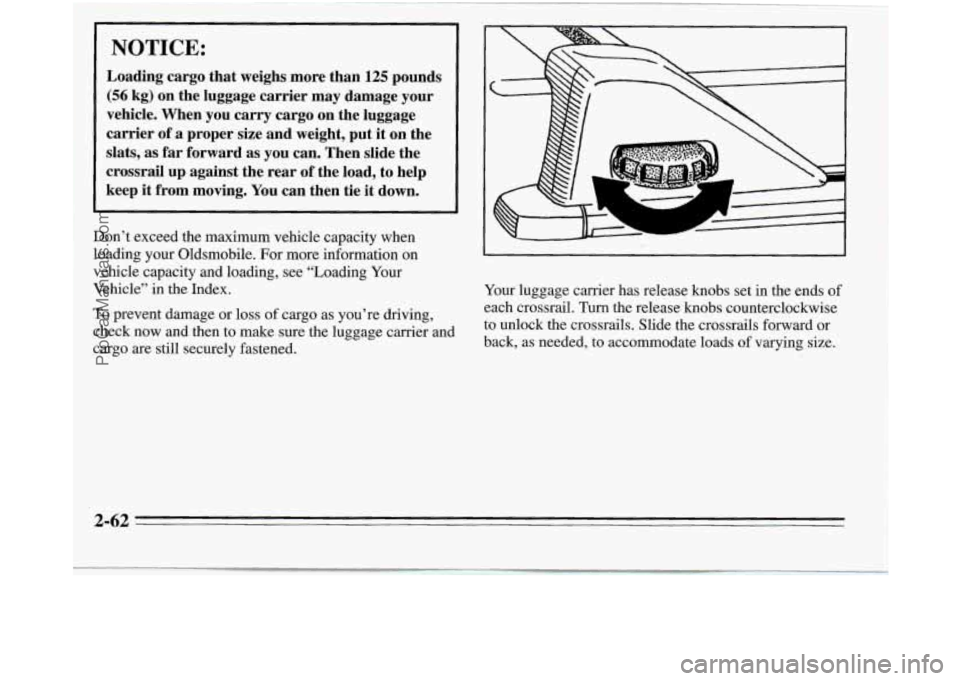
Your luggage carrier has release knobs set in the ends of
each crossrail. Turn the release
knobs counterclockwise
to unlock the crossrails. Slide the crossrails forward or
back, as needed, to accommodate loads
of varying size.
2-62
ProCarManuals.com
Page 133 of 390
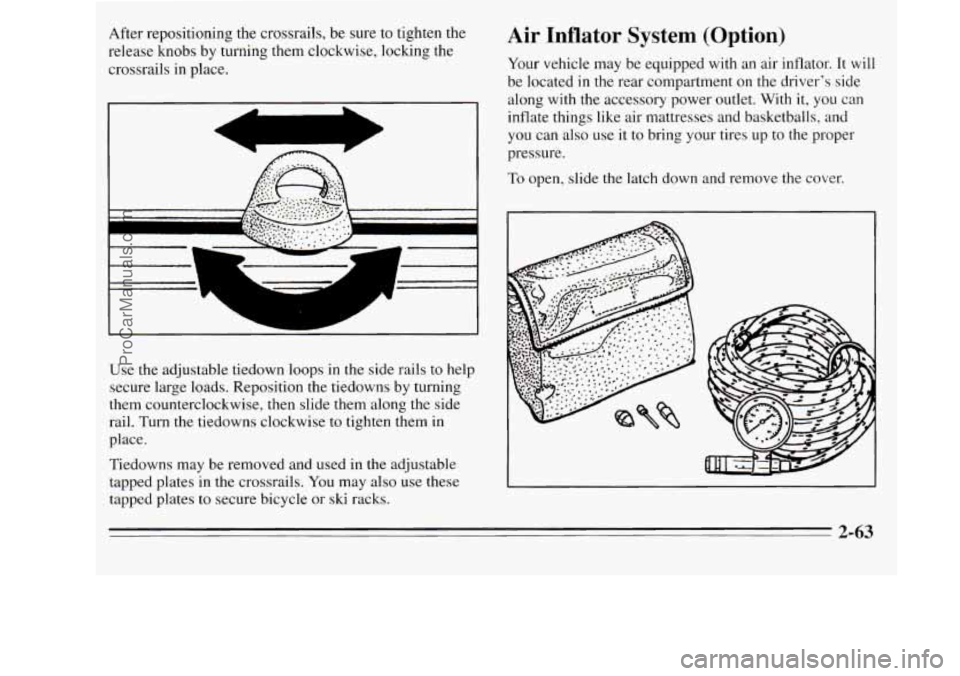
After repositioning the crossrails, be sure to tighten the
release knobs by turning them clockwise, locking the
crossrails in place.
--
L A
Use the adjustable tiedown loops in the side rails to help
secure large loads. Reposition the tiedowns by turning
them counterclockwise, then slide them along the side
rail. Turn the tiedowns clockwise
to tighten them in
place.
Tiedowns may be removed and used in the adjustable
tapped plates
in the crossrails. You may also use these
tapped plates
to secure bicycle or ski racks.
Air Inflator System (Option)
Your vehicle may be equipped with an air inflator. It will
be located in
the rear compartment on the driver's side
along with the accessory power outlet. With
it, you can
inflate things like air mattresses and basketballs, and
you can also use it to bring your tires up to the proper
pressure.
To open, slide the latch down and remove the cover.
2-63
ProCarManuals.com
Page 175 of 390
RCL: Press this button once to see which track is
playing. Press it again within five seconds to see how
long your selection has been playing. The track number
also will be displayed when the volume is changed or a
new track starts to play.
PREV: Press this button to play a track again. If you
hold or keep pressing the PREV button, the disc will
keep backing up to previous tracks.
NEXT Press this button when you want to hear the next
track before the track you are listening to has finished.
If
you hold or keep pressing the NEXT button, the disc
will keep advancing
to other tracks.
REV: Press and hold this button to rapidly back up to a
favorite passage. Release it to resume playing.
FF: Press and hold this button to rapidly advance the
disc. Release
it to resume playing.
COMP: Press this button to make soft and loud
passages more alike in volume. Press it again
to resume
normal play.
When Finished with the Compact Disc Player
If you press POWER or turn off the ignition, the disc
will stay
in the player and start again when you turn on
the ignition or power switch. The disc will begin playing
at the point where it had been stopped.
STEL: Press this button to stop the disc player (the
radio will then play). Press
it again to play the disc (the
player will start playing the disc where it was stopped
earlier).
EJCT Press this button to eject the disc (the radio will
then play).
CD Player Anti-Theft Feature
Delco LOC 11' is a security feature for the compact disc
player. It can be used or ignored. If ignored, the system
plays normally. If it is used, your player won't be usable
if it is ever stolen, because it will go to
LOC mode any
time battery power is removed. Until an unlock code is
entered, it will not turn
on.
The instructions that follow tell you how to enter a
secret code into the system. If your vehicle loses battery
power for any reason, you must unlock the system with
the secret code before the radio will turn on.
3-17
ProCarManuals.com
Page 176 of 390
To Set the Anti-Theft System
1. Write down any six-digit number and keep it in a
safe place.
2. Turn the ignition to the ACCESSORY or RUN
position.
3. Press the POWER button to turn the radio off.
4. Press the PREV and FF buttons together. Hold them
down until
“---” shows on the display (at least five
seconds). You are ready to enter your secret code.
NOTE: If you allow more than
15 seconds to elapse
between any steps, the radio automatically reverts to
time and you must start the procedure over at step
4.
5. Press SET and “000” will appear on the display.
6. Press and hold SEEK until the first digit of your
code appears.
7. Press and hold SCAN until the second and third
digits
of your code appear.
8. Press the AM FM button and “000” will appear
again. Now you are ready to enter the last three
digits of your code.
9. Repeat steps 6 and 7 for the last three digits of your
code.
10. Press the AM FM button and “rEP’ will appear.
11. Repeat steps
6- 10. This time SEC will appear,
indicating that the radio
is secure. If “---” appears,
the steps were
not successful and you must repeat
the entire procedure.
3-18
ProCarManuals.com