radio controls Oldsmobile Silhouette 2001 s User Guide
[x] Cancel search | Manufacturer: OLDSMOBILE, Model Year: 2001, Model line: Silhouette, Model: Oldsmobile Silhouette 2001Pages: 436, PDF Size: 2.95 MB
Page 243 of 436

3-32
PRESET SCAN: Press and hold either SEEK SCAN
arrow for more than four seconds, PRESET SCAN will
appear on the display. You will hear a double beep and
the ªPº will blink with the preset number. Use PRESET
SCAN to listen to each of your preset stations for a few
seconds. The radio will go to a preset station stored on
your pushbuttons, stop for a few seconds, then go on to
the next preset station. Press either SEEK SCAN arrow
again to stop scanning presets.
Setting the Tone
BASS: Press the AUDIO knob until BASS appears on
the display. Turn the knob to increase or decrease bass.
When you use this control, the radio's tone setting will
switch to custom.
To set the bass to the middle position, select BASS and
press and hold the AUDIO knob. The radio will produce
one beep and set the display level to zero. To set all tone
and speaker controls to the middle position, press and
hold the AUDIO knob when no tone or speaker
control is active. The radio will produce one beep and
CENTERED will appear on the display.MID: Press the AUDIO knob until MID appears on
the display. Turn the knob to increase or decrease mid.
When you use this control, the radio's tone setting will
switch to custom.
To set the mid to the middle position, select MID and
press and hold the AUDIO knob. The radio will produce
one beep and set the display level to zero. To set all tone
and speaker controls to the middle position, press and
hold the AUDIO knob when no tone or speaker control
is active. The radio will produce one beep and
CENTERED will appear on the display.
TREB: Press the AUDIO knob until TREB appears on
the display. Turn the knob to increase or decrease treble.
When you use this control, the radio's tone setting will
switch to custom. If a station is weak or noisy, you may
want to decrease the treble.
To set treble to the middle position, select TREB and
press and hold the AUDIO knob. The radio will produce
one beep and set the display level to zero. To set all tone
and speaker controls to the middle position, press and
hold the AUDIO knob when no tone or speaker control
is active. The radio will produce one beep and
CENTERED will appear on the display.
Page 246 of 436

3-35
ALERT!: This type of announcement warns of national
or local emergencies. You will not be able to turn off
alert announcements. ALERT! appears on the display
when an alert announcement plays. When an alert
announcement comes on the tuned radio station, you
will hear it, even if the volume is muted or a compact
disc is playing. If the compact disc player is playing,
play will stop for the announcement and resume when
the announcement is finished.
ALTERNATE FREQUENCY: This feature allows
the radio to switch to a stronger station with the same
program type. Press and hold AM FM for two seconds
to turn alternate frequency on. AF ON will appear on
the display. The radio may switch to stronger stations.
Press and hold AM FM again for two seconds to
turn alternate frequency off. AF OFF will appear on
the display. The radio will not switch to other stations.
When you turn the ignition off and then on again,
the alternate frequency feature will automatically be
turned on.Adjusting the Speakers
BAL
-FADE: The AUDIO knob adjusts balance and
fade. To adjust balance, press the AUDIO knob until
BAL appears on the display. Turn the knob to adjust the
sound to the left or right speakers. The middle position
balances the sound between the speakers. To adjust fade,
press and hold the AUDIO knob until FAD appears on
the display. Turn the knob to adjust the sound to the
front or rear speakers. The middle position balances the
sound between the speakers.
To set the balance and fade to the middle position,
select balance or fade and press and hold the AUDIO
knob. The radio will beep once and will set the display
level to the middle position. To set all tone and speaker
controls to the middle position, press and hold the
AUDIO knob when tone or speaker controls are not
active. The radio will produce one beep and
CENTERED will appear on the display.
Page 252 of 436
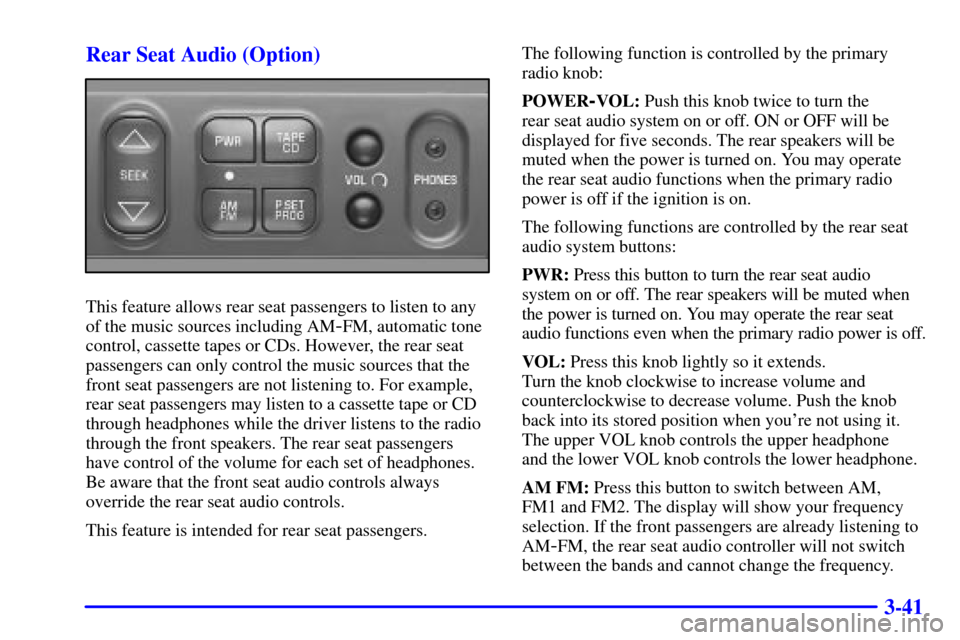
3-41 Rear Seat Audio (Option)
This feature allows rear seat passengers to listen to any
of the music sources including AM
-FM, automatic tone
control, cassette tapes or CDs. However, the rear seat
passengers can only control the music sources that the
front seat passengers are not listening to. For example,
rear seat passengers may listen to a cassette tape or CD
through headphones while the driver listens to the radio
through the front speakers. The rear seat passengers
have control of the volume for each set of headphones.
Be aware that the front seat audio controls always
override the rear seat audio controls.
This feature is intended for rear seat passengers.The following function is controlled by the primary
radio knob:
POWER
-VOL: Push this knob twice to turn the
rear seat audio system on or off. ON or OFF will be
displayed for five seconds. The rear speakers will be
muted when the power is turned on. You may operate
the rear seat audio functions when the primary radio
power is off if the ignition is on.
The following functions are controlled by the rear seat
audio system buttons:
PWR: Press this button to turn the rear seat audio
system on or off. The rear speakers will be muted when
the power is turned on. You may operate the rear seat
audio functions even when the primary radio power is off.
VOL: Press this knob lightly so it extends.
Turn the knob clockwise to increase volume and
counterclockwise to decrease volume. Push the knob
back into its stored position when you're not using it.
The upper VOL knob controls the upper headphone
and the lower VOL knob controls the lower headphone.
AM FM: Press this button to switch between AM,
FM1 and FM2. The display will show your frequency
selection. If the front passengers are already listening to
AM
-FM, the rear seat audio controller will not switch
between the bands and cannot change the frequency.
Page 254 of 436

3-43 Audio Steering Wheel Controls
(If Equipped)
If your vehicle has this feature, you can control certain
radio functions using the buttons on your steering wheel.
SEEK: Press the up arrow to tune to a higher radio
station and the down arrow to tune to a lower radio
station. The sound will mute while seeking. When
playing a cassette tape or compact disc, press SEEK
to hear the next selection.
AM/FM: Press this button to choose AM or FM.
PRESET: Press this button to play a station you
have programmed on the radio preset buttons.
VOL: Press the up or down arrow to increase or
decrease volume.
PLAY: Press this button to play a loaded cassette tape
or compact disc when the radio is playing.
MUTE: Press this button to silence the system.
Press it again to turn on the sound. This button may
be used when listening to the radio, a cassette tape or
a compact disc.