ad blue Oldsmobile Silhouette 2002 Owner's Manuals
[x] Cancel search | Manufacturer: OLDSMOBILE, Model Year: 2002, Model line: Silhouette, Model: Oldsmobile Silhouette 2002Pages: 455, PDF Size: 2.97 MB
Page 154 of 455
2-72
Turn the control counterclockwise to select the driver's
side rearview mirror, or clockwise to select the
passenger's side rearview mirror. Then use the control to
adjust each mirror so that you can see a little of the side
of your vehicle and the area beside and behind your
vehicle when you are sitting in a comfortable driving
position.
If you are not adjusting either mirror, leave the control
in the center off position. This prevents moving the
mirrors accidentally once you have them adjusted.
Both outside mirrors can be folded forward or rearward.
In the rearward position, they will fold almost flush with
the vehicle. This feature is particularly useful in
automatic car washes.
Your mirrors have a blue tint to reduce glare while
driving at night.Convex Outside Mirror
Your passenger's side mirror is convex. A convex
mirror's surface is curved so you can see more from the
driver's seat.
CAUTION:
A convex mirror can make things (like other
vehicles) look farther away than they really are.
If you cut too sharply into the right lane, you
could hit a vehicle on your right. Check your
inside mirror or glance over your shoulder
before changing lanes.
Heated Outside Mirrors
The left and right outside mirrors are heated when you
activate the rear window defogger. See ªRear Window
Defoggerº in the Index.
Page 205 of 455
3-2
Comfort Controls
This section tells you how to make your air system work
for you.
With this system, you can control the heating, cooling
and ventilation in your vehicle. Your vehicle also has
a flow
-through ventilation system described later in
this section.
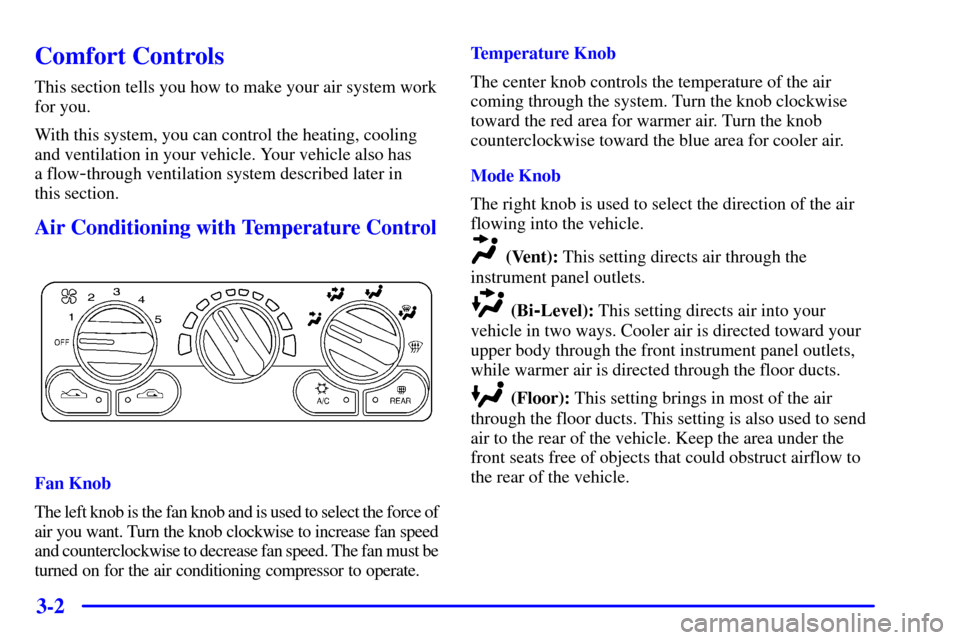
Air Conditioning with Temperature Control
Fan Knob
The left knob is the fan knob and is used to select the force of
air you want. Turn the knob clockwise to increase fan speed
and counterclockwise to decrease fan speed. The fan must be
turned on for the air conditioning compressor to operate.Temperature Knob
The center knob controls the temperature of the air
coming through the system. Turn the knob clockwise
toward the red area for warmer air. Turn the knob
counterclockwise toward the blue area for cooler air.
Mode Knob
The right knob is used to select the direction of the air
flowing into the vehicle.
(Vent): This setting directs air through the
instrument panel outlets.
(Bi-Level): This setting directs air into your
vehicle in two ways. Cooler air is directed toward your
upper body through the front instrument panel outlets,
while warmer air is directed through the floor ducts.
(Floor): This setting brings in most of the air
through the floor ducts. This setting is also used to send
air to the rear of the vehicle. Keep the area under the
front seats free of objects that could obstruct airflow to
the rear of the vehicle.
Page 208 of 455

3-5
Mode Buttons
(Outside Air): Press this button to send outside
air into your vehicle. The light in the button will glow
when outside air is in use. Using this setting while trying
to defrost or defog the windows will help clear the vents
of moisture. While floor, defog or defrost mode is
selected, the system will automatically go to outside air
mode.
(Recirculation): Press this button to limit the
amount of outside air entering your vehicle. The light in
the button will glow when recirculation is in use. You
may use this setting to limit odors entering your vehicle.
Operating the Heating/Ventilation/Air Conditioning
(HVAC) system in the recirculation mode may cause
fogging of the vehicle's windows when the weather is
cold and damp. To clear the fog, switch the HVAC
system to either the defog or defrost mode and increase
the fan speed. To avoid re
-fogging of the windows,
operate the HVAC system in the outside air mode.
A/C (Air Conditioning): Press this button to turn
the air conditioning compressor on and off. The light in
the button will glow when the air conditioning is in use.
Air Conditioning
On very hot days, your vehicle will cool down more
quickly and economically if you open the windows
long enough to let hot, inside air escape. For all
settings, adjust the temperature control knob and fan
speed as desired.
To get maximum cooling or a quick cool
-down on very
hot days, press the A/C and recirculation buttons and
move the temperature control toward the blue area.
Adjust the mode knob to direct the air to the desired
location. This setting should not be used for long
periods of time because the air may become too cold
and dry. Push the A/C button again to turn off the
air conditioning.
When the air conditioner compressor is on, you may
sometimes notice slight changes in your vehicle's engine
performance and power. This is normal. The system is
designed to help fuel economy while it maintains the
desired cooling level.
The air conditioner removes moisture from the air, so
you may sometimes notice water dripping from under
your vehicle's engine compartment when it is idling or
after it has been turned off. This is normal.
Page 211 of 455

3-8
Rear Fan Control
This option comes with the rear climate controls.
Keep the area around the base of the center instrument
panel console and the area between and under the front
seats free of objects that would obstruct airflow to the
rear of the vehicle.
The rear fan control
is located below the
climate control system,
in the switchbank.
Turn the fan control to the desired setting for the
amount of air to be directed to the rear of the vehicle.
The temperature of the air will be the same as the air
in the front of the vehicle. The rear fan control in the
instrument panel switchbank has an R setting which
allows the rear passengers to use the rear climate control
knobs to adjust the air through the rear air outlets.Rear Comfort Controls
The rear climate control knobs are located in the panel
above the driver's seat.
Turn the temperature knob counterclockwise to the
blue area for cooler air, or clockwise to the red area for
warmer air.
Turn the rear fan knob to adjust the force of air coming
through the rear outlets.
Select the desired climate control mode using the
directional controls on the instrument panel. See ªMode
Knobº earlier in this section. The mode you choose will
regulate both the front and rear climate control systems.
Page 378 of 455
6-37 Headlamps
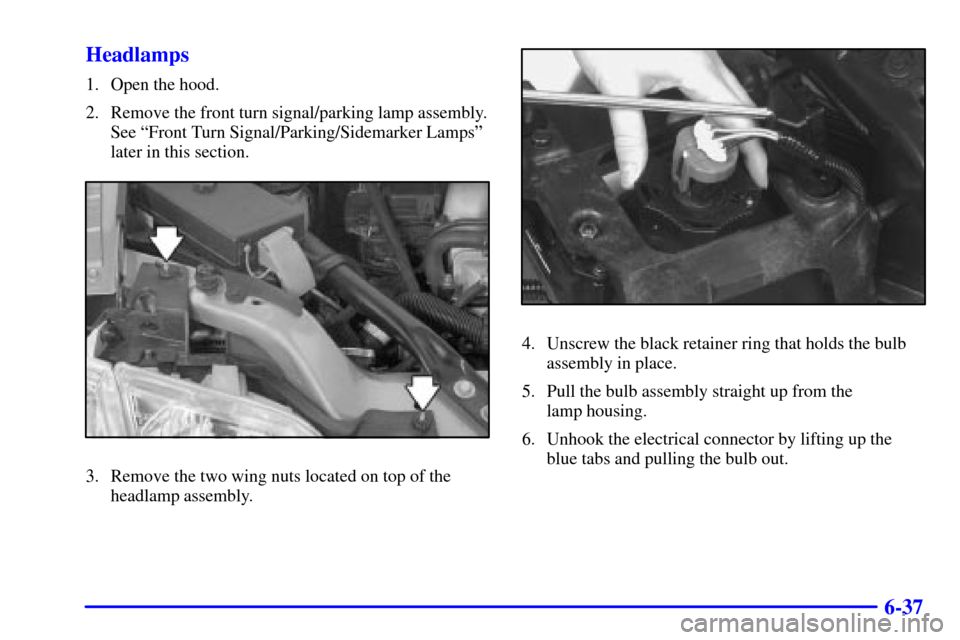
1. Open the hood.
2. Remove the front turn signal/parking lamp assembly.
See ªFront Turn Signal/Parking/Sidemarker Lampsº
later in this section.
3. Remove the two wing nuts located on top of the
headlamp assembly.
4. Unscrew the black retainer ring that holds the bulb
assembly in place.
5. Pull the bulb assembly straight up from the
lamp housing.
6. Unhook the electrical connector by lifting up the
blue tabs and pulling the bulb out.
Page 379 of 455
6-38
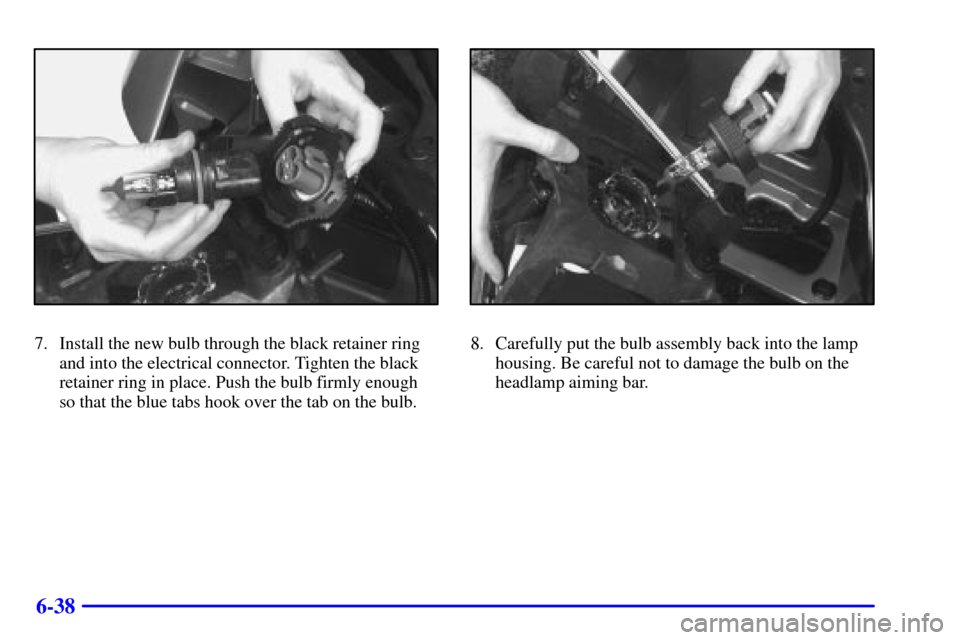
7. Install the new bulb through the black retainer ring
and into the electrical connector. Tighten the black
retainer ring in place. Push the bulb firmly enough
so that the blue tabs hook over the tab on the bulb.8. Carefully put the bulb assembly back into the lamp
housing. Be careful not to damage the bulb on the
headlamp aiming bar.