seats Oldsmobile Silhouette 2004 s Owner's Guide
[x] Cancel search | Manufacturer: OLDSMOBILE, Model Year: 2004, Model line: Silhouette, Model: Oldsmobile Silhouette 2004Pages: 462, PDF Size: 3.1 MB
Page 140 of 462
Front Seat Storage Net
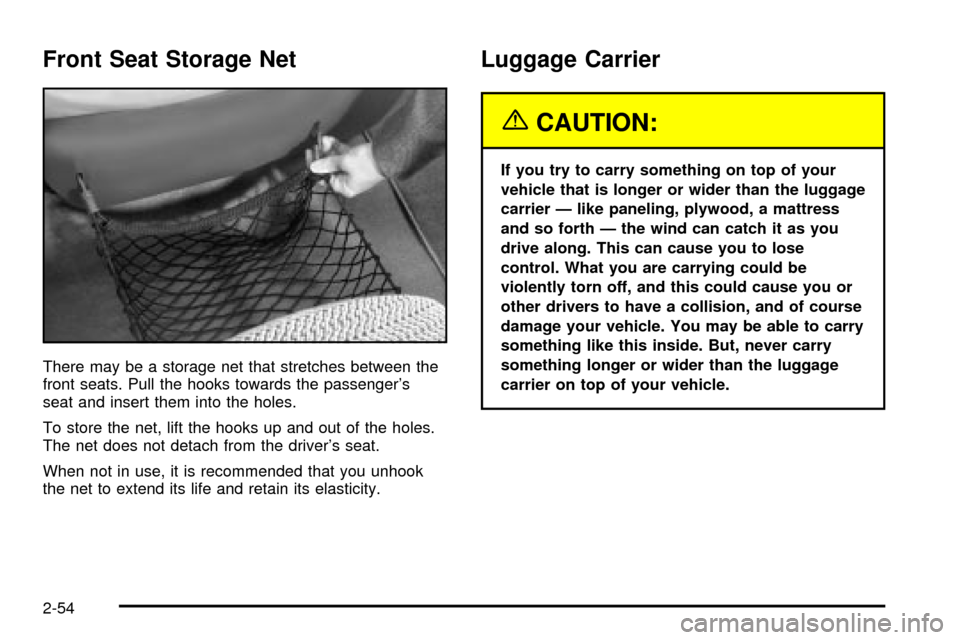
There may be a storage net that stretches between the
front seats. Pull the hooks towards the passenger's
seat and insert them into the holes.
To store the net, lift the hooks up and out of the holes.
The net does not detach from the driver's seat.
When not in use, it is recommended that you unhook
the net to extend its life and retain its elasticity.
Luggage Carrier
{CAUTION:
If you try to carry something on top of your
vehicle that is longer or wider than the luggage
carrier Ð like paneling, plywood, a mattress
and so forth Ð the wind can catch it as you
drive along. This can cause you to lose
control. What you are carrying could be
violently torn off, and this could cause you or
other drivers to have a collision, and of course
damage your vehicle. You may be able to carry
something like this inside. But, never carry
something longer or wider than the luggage
carrier on top of your vehicle.
2-54
Page 179 of 462

Switchbanks
There are two sets of switchbanks located in the front of
the vehicle. The switches will vary with the options
that are on your vehicle.
Instrument Panel Switchbank
The instrument panel switchbank is located in the
instrument panel below the comfort controls.This switchbank may contain the following:
·Rear Fan Knob. SeeRear Climate Control System
(Without Entertainment System) on page 3-34
orRear Climate Control System (With Entertainment
System) on page 3-36.
·Rear Window Wiper/Washer Switch.
See ªRear Window Wiper/Washerº under
Turn Signal/Multifunction Lever on page 3-8.
·Fog Lamps Switch. SeeExterior Lamps
on page 3-16
.
·Traction Control Switch. SeeTraction Control
System (TCS) on page 4-8
.
·Heated Seats Switches. SeeHeated Seats
on page 1-5
.
If your vehicle does not have one of these options,
there will be a blank.
If your vehicle is not equipped with the optional rear
climate control system, there will be a storage space in
this switchbank. The rubber mat can be removed for
cleaning. Snap the mat into place after cleaning.
3-23
Page 184 of 462
Climate Controls
Climate Control System
With this system you can control the heating, cooling
and ventilation for your vehicle.
Operation
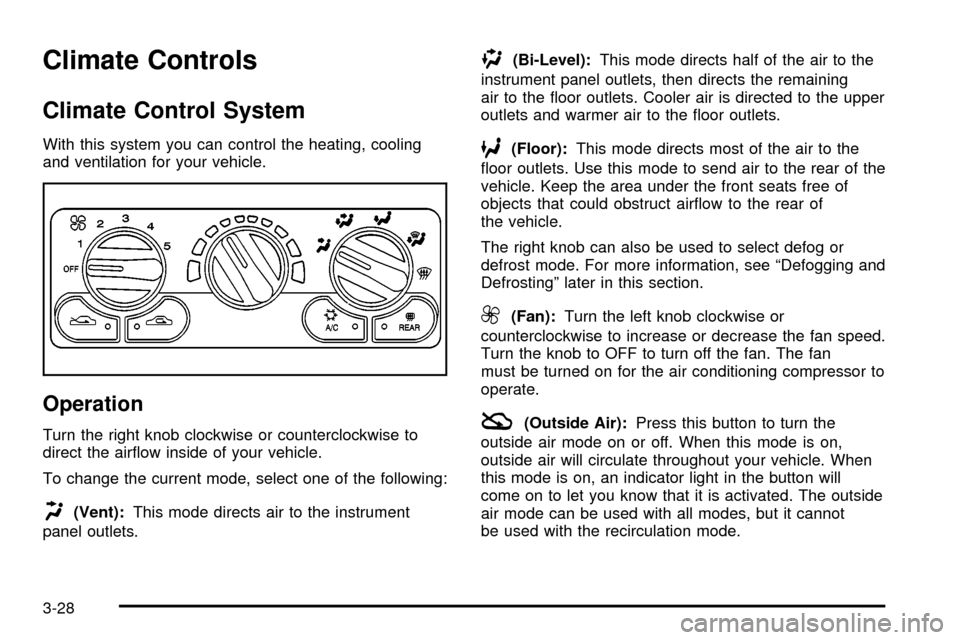
Turn the right knob clockwise or counterclockwise to
direct the air¯ow inside of your vehicle.
To change the current mode, select one of the following:
H(Vent):This mode directs air to the instrument
panel outlets.
)(Bi-Level):This mode directs half of the air to the
instrument panel outlets, then directs the remaining
air to the ¯oor outlets. Cooler air is directed to the upper
outlets and warmer air to the ¯oor outlets.
6(Floor):This mode directs most of the air to the
¯oor outlets. Use this mode to send air to the rear of the
vehicle. Keep the area under the front seats free of
objects that could obstruct air¯ow to the rear of
the vehicle.
The right knob can also be used to select defog or
defrost mode. For more information, see ªDefogging and
Defrostingº later in this section.
9(Fan):Turn the left knob clockwise or
counterclockwise to increase or decrease the fan speed.
Turn the knob to OFF to turn off the fan. The fan
must be turned on for the air conditioning compressor to
operate.
:(Outside Air):Press this button to turn the
outside air mode on or off. When this mode is on,
outside air will circulate throughout your vehicle. When
this mode is on, an indicator light in the button will
come on to let you know that it is activated. The outside
air mode can be used with all modes, but it cannot
be used with the recirculation mode.
3-28
Page 187 of 462
Dual Climate Control System
With this system you can control the heating, cooling
and ventilation for your vehicle.
Operation
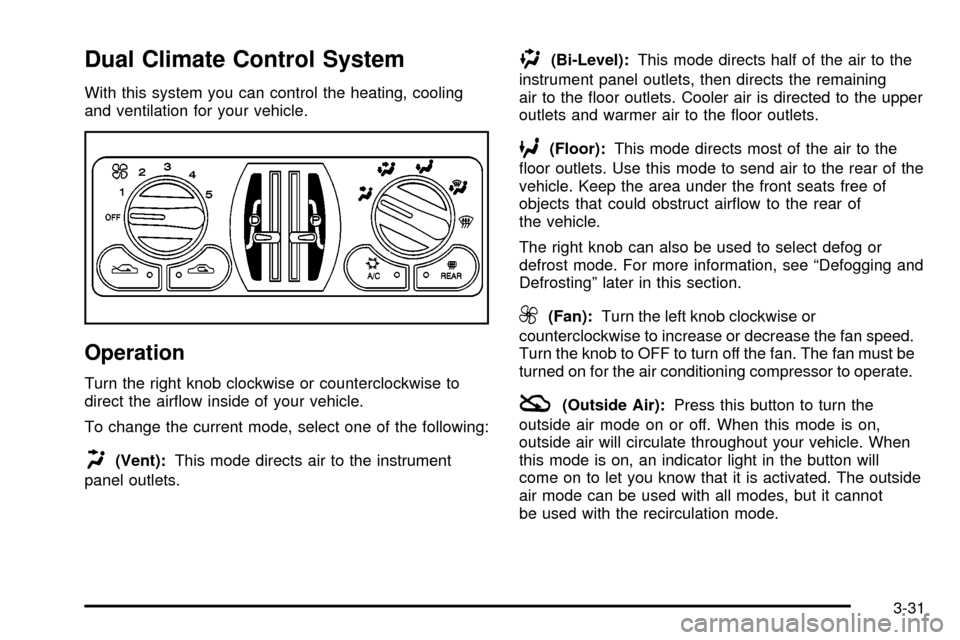
Turn the right knob clockwise or counterclockwise to
direct the air¯ow inside of your vehicle.
To change the current mode, select one of the following:
H(Vent):This mode directs air to the instrument
panel outlets.
)(Bi-Level):This mode directs half of the air to the
instrument panel outlets, then directs the remaining
air to the ¯oor outlets. Cooler air is directed to the upper
outlets and warmer air to the ¯oor outlets.
6(Floor):This mode directs most of the air to the
¯oor outlets. Use this mode to send air to the rear of the
vehicle. Keep the area under the front seats free of
objects that could obstruct air¯ow to the rear of
the vehicle.
The right knob can also be used to select defog or
defrost mode. For more information, see ªDefogging and
Defrostingº later in this section.
9(Fan):Turn the left knob clockwise or
counterclockwise to increase or decrease the fan speed.
Turn the knob to OFF to turn off the fan. The fan must be
turned on for the air conditioning compressor to operate.
:(Outside Air):Press this button to turn the
outside air mode on or off. When this mode is on,
outside air will circulate throughout your vehicle. When
this mode is on, an indicator light in the button will
come on to let you know that it is activated. The outside
air mode can be used with all modes, but it cannot
be used with the recirculation mode.
3-31
Page 190 of 462
Outlet Adjustment
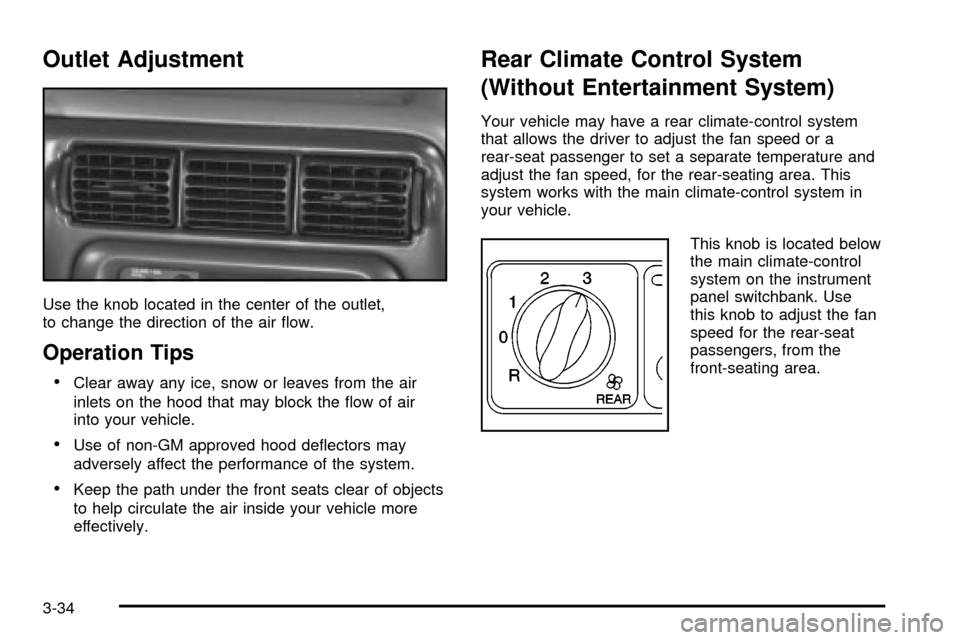
Use the knob located in the center of the outlet,
to change the direction of the air ¯ow.
Operation Tips
·Clear away any ice, snow or leaves from the air
inlets on the hood that may block the ¯ow of air
into your vehicle.
·Use of non-GM approved hood de¯ectors may
adversely affect the performance of the system.
·Keep the path under the front seats clear of objects
to help circulate the air inside your vehicle more
effectively.
Rear Climate Control System
(Without Entertainment System)
Your vehicle may have a rear climate-control system
that allows the driver to adjust the fan speed or a
rear-seat passenger to set a separate temperature and
adjust the fan speed, for the rear-seating area. This
system works with the main climate-control system in
your vehicle.
This knob is located below
the main climate-control
system on the instrument
panel switchbank. Use
this knob to adjust the fan
speed for the rear-seat
passengers, from the
front-seating area.
3-34
Page 192 of 462

Setting the Temperature
If the driver is adjusting the temperature, do the
following:
To increase or decrease the temperature for the entire
vehicle, use the temperature controls located on the
main climate-control panel.
If using the main climate-control panel, then the
air-conditioning system must be on to direct cooled air
to the rear of the vehicle. If it is not on, then the
temperature in the rear of the vehicle will remain at
cabin temperature.
If a rear-seat passenger is adjusting the temperature,
do the following:
Turn the right knob, located on the overhead rear-control
panel, behind the driver's seat, clockwise or
counterclockwise to raise or lower the temperature in
the rear-seating area only.
Rear Air Outlets
To increase air¯ow through the rear ¯oor outlets, place
the left bucket seat in the second row in the forward
position. For more information, see
Rear Seat Operation
on page 1-8.The outlet behind the left rear seat is the cold air return
outlet. Be sure to keep it free from obstructions.
Also, keep the area around the base of the center
instrument panel console, between and under the front
seats, free of objects that could also obstruct air¯ow
to the rear-seating area.
For more information on how to use the main climate
control system, see ªClimate Control Systemº listed
previously in this section. For information on ventilation,
see ªOutlet Adjustmentº under ªClimate Control
Systemº listed previously in this section.
Rear Climate Control System
(With Entertainment System)
Your vehicle may have a rear climate-control system
that allows the driver to adjust the fan speed or a
rear-seat passenger to set a separate temperature and
adjust the fan speed, for the rear-seating area. This
system works with the main climate-control system in
your vehicle.
3-36
Page 193 of 462
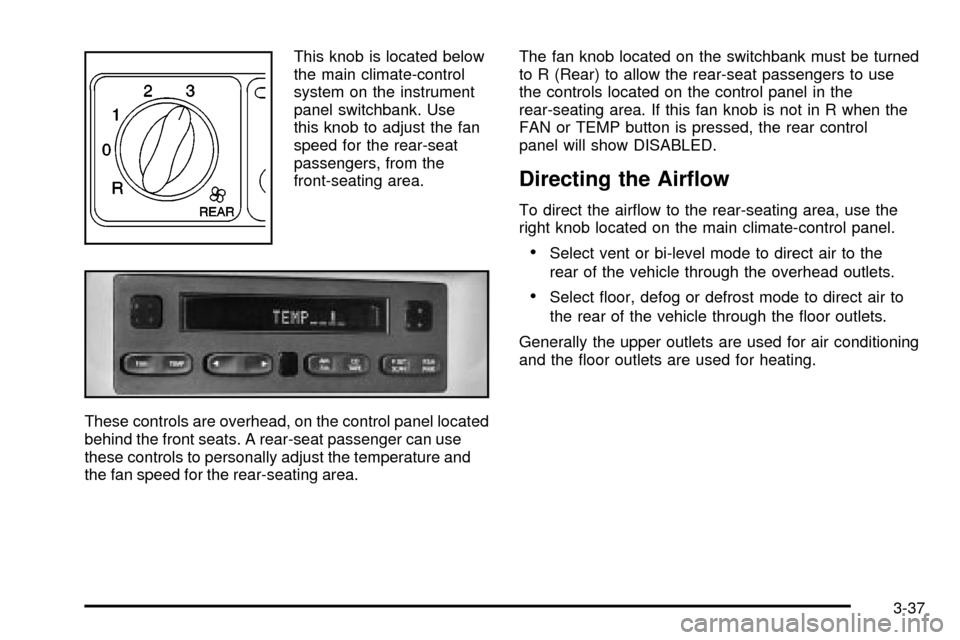
This knob is located below
the main climate-control
system on the instrument
panel switchbank. Use
this knob to adjust the fan
speed for the rear-seat
passengers, from the
front-seating area.
These controls are overhead, on the control panel located
behind the front seats. A rear-seat passenger can use
these controls to personally adjust the temperature and
the fan speed for the rear-seating area.The fan knob located on the switchbank must be turned
to R (Rear) to allow the rear-seat passengers to use
the controls located on the control panel in the
rear-seating area. If this fan knob is not in R when the
FAN or TEMP button is pressed, the rear control
panel will show DISABLED.
Directing the Air¯ow
To direct the air¯ow to the rear-seating area, use the
right knob located on the main climate-control panel.
·Select vent or bi-level mode to direct air to the
rear of the vehicle through the overhead outlets.
·Select ¯oor, defog or defrost mode to direct air to
the rear of the vehicle through the ¯oor outlets.
Generally the upper outlets are used for air conditioning
and the ¯oor outlets are used for heating.
3-37
Page 194 of 462

Selecting the Fan Speed
If the driver is adjusting the fan speed, use the following
control:
9(Fan):Turn the fan knob on the rear fan control
located below the main climate-control system on
the switchbank to numeral 1, 2, or 3 to increase or
decrease air¯ow to the rear-seating area. Turn the fan
knob on the rear fan control to 0 to turn off the fan.
If a rear-seat passenger is adjusting the fan speed, use
the following control:
FAN:Press the FAN button on the rear control panel.
The display will show the current setting. Press the
left and right arrow buttons to cycle through the available
settings: OFF, LOW, MED and HIGH.
Setting the Temperature
If the driver is adjusting the temperature, do the
following:
To increase or decrease the temperature for the entire
vehicle, use the temperature controls located on the
main climate-control panel.If using the main climate-control panel, then the
air-conditioning system must be on to direct cooled air to
the rear of the vehicle. If it is not on, then the temperature
in the rear of the vehicle will remain at cabin temperature.
If a rear-seat passenger is adjusting the temperature,
do the following:
Press the TEMP button on the rear control panel. Use the
left arrow button to make the air cooler. Use the right
arrow button to make the air warmer.
Rear Air Outlets
To increase air¯ow through the rear ¯oor outlets, place
the left bucket seat in the second row in the forward
position. For more information, see
Rear Seat Operation
on page 1-8.
The outlet behind the left rear seat is the cold air return
outlet. Be sure to keep it free from obstructions.
Also, keep the area around the base of the center
instrument panel console, between and under the front
seats, free of objects that could also obstruct air¯ow
to the rear-seating area.
3-38
Page 241 of 462

CD Messages
CHECK CD:If this message appears on the radio
display, it could be for one of the following reasons:
·It is very hot. When the temperature returns to
normal, the CD should play.
·You are driving on a very rough road. When the
road becomes smoother, the CD should play.
·The CD is dirty, scratched, wet, or upside down.
·The air is very humid. If so, wait about an hour
and try again.
·There may have been a problem while burning
the CD.
·The label may be caught in the CD player.
If the CD is not playing correctly, for any other reason,
try a known good CD.
If any error occurs repeatedly or if an error cannot be
corrected, contact your dealer. If your radio displays an
error message, write it down and provide it to your
dealer when reporting the problem.
Entertainment System
Your vehicle may have an optional Digital Versatile
Disc (DVD) entertainment system. The entertainment
system works with the vehicle's audio system and
includes a DVD player, a video display screen,
headphones and a remote control. The entertainment
system also integrates the rear climate control and rear
seat audio functions.
Before You Drive
The video entertainment system is for passengers in the
second and third row seats only. The driver cannot
safely view the video screen while driving and should
not try to do so.
In severe or extreme weather conditions your
entertainment system will shut down until the temperature
is within the operating range. This protection feature will
keep your video components from being damaged while
the temperature is below-4ÉF (-20ÉC) or above
140ÉF (60ÉC). To resume operation, shut off the
entertainment system, pull down the video screen and
then heat or cool the vehicle until the temperature is
within the operating range.
3-85
Page 293 of 462
The label shows the size of your original tires and the
in¯ation pressures needed to obtain the gross weight
capacity of your vehicle. This is called the Gross Vehicle
Weight Rating (GVWR). The GVWR includes the
weight of the vehicle, all occupants, fuel, and cargo.
The Certi®cation/Tire label also tells you the maximum
weights for the front and rear axles, called the Gross
Axle Weight Rating (GAWR). To ®nd out the actual loads
on your front and rear axles, you need to go to a
weigh station and weigh your vehicle. Your dealer can
help you with this. Be sure to spread out your load
equally on both sides of the centerline.
Never exceed the GVWR for your vehicle or the GAWR
for either the front or rear axle.
{CAUTION:
Do not load your vehicle any heavier than the
GVWR, or either the maximum front or rear
GAWR. If you do, parts on your vehicle can
break, and it can change the way your vehicle
handles. These could cause you to lose
control and crash. Also, overloading can
shorten the life of your vehicle.
Notice:Overloading your vehicle may cause
damage. Repairs would not be covered by your
warranty. Do not overload your vehicle.
If you put things inside your vehicle Ð like suitcases,
tools, packages, or anything else Ð they will go as fast
as the vehicle goes. If you have to stop or turn
quickly, or if there is a crash, they will keep going.
{CAUTION:
Things you put inside your vehicle can strike
and injure people in a sudden stop or turn, or
in a crash.
·Put things in the cargo area of your
vehicle. Try to spread the weight evenly.
·Never stack heavier things, like suitcases,
inside the vehicle so that some of them
are above the tops of the seats.
·Do not leave an unsecured child restraint
in your vehicle.
·When you carry something inside the
vehicle, secure it whenever you can.
·Do not leave a seat folded down unless
you need to.
4-37