lock Oldsmobile Silhouette 2004 s Repair Manual
[x] Cancel search | Manufacturer: OLDSMOBILE, Model Year: 2004, Model line: Silhouette, Model: Oldsmobile Silhouette 2004Pages: 462, PDF Size: 3.1 MB
Page 151 of 462

4. Press UNLOCK to change the current mode.
5. Press UNLOCK until you hear the number of chimes
corresponding to the mode selection you want.
The mode you selected is now set. You can either exit
the programming mode by following the instructions
later in this section or program the next feature available
on your vehicle.
Remote Lock and Unlock
Con®rmation
If your vehicle has this feature, it allows you to
customize the feedback received when locking or
unlocking your vehicle with the remote keyless entry
transmitter.
Programmable Modes
Mode 1:Both Features Off. Remote lock and unlock
con®rmation are disabled.
Mode 2:Exterior Lamps Flash Only
·When you use the remote keyless entry transmitter
to lock your vehicle, your parking lamps will ¯ash to
let you know the command has been received.
·When you use the remote keyless entry transmitter
to unlock your vehicle or operate your optional
power sliding door(s), your parking lamps will ¯ash
to let you know the command has been received.
Mode 3:Exterior Lamps Flash and Horn Sounds
·When you use the remote keyless entry transmitter
to lock your vehicle, the horn will sound and your
parking lamps will ¯ash to let you know the
command has been received.
·When you use the remote keyless entry transmitter
to unlock your vehicle or operate your optional
power sliding door(s), your parking lamps will ¯ash
to let you know the command has been received.
Mode 4:Exterior Lamps Flash and Horn Sounds on
second LOCK press
·When you use the remote keyless entry transmitter
to lock your vehicle, your parking lamps will ¯ash to
let you know the command has been received.
The horn will sound and your parking lamps
will ¯ash if you press the LOCK button again within
®ve seconds.
·When you use the remote keyless entry transmitter
to unlock your vehicle or operate your optional
power sliding door(s), your parking lamps will ¯ash
to let you know the command has been received.
2-65
Page 152 of 462

Your vehicle was originally programmed to Mode 4. The
mode may have been changed since then. To
determine the current mode, or to change the mode, do
the following:
1. Follow the instructions for
Entering Programming
Mode on page 2-61.
2. Press LOCK on the remote keyless entry
transmitter.
3. Count the number of chimes you hear. The number
of chimes indicates the vehicle's current
programmed mode. If you do not wish to change
the current mode, you can either exit the
programming mode by following the instructions
later in this section or program the next feature
available on your vehicle.
4. Press LOCK to change the current mode.
5. Press LOCK until you hear the number of chimes
corresponding to the mode selection you want.
The mode you selected is now set. You can either exit
the programming mode by following the instructions
later in this section or program the next feature available
on your vehicle.
Content Theft-Deterrent System
This feature allows you to turn the content theft deterrent
on and off.
Programmable Modes
Mode 1, Mode 2 and Mode 4:Feature On. If anyone
opens a door or the liftgate while your content
theft-deterrent system is armed, an alarm will sound and
your parking lamps will ¯ash for up to two minutes.
Mode 3:Feature Off. Your content theft-deterrent
system is always disarmed.
Your vehicle was originally programmed to Mode 4.
The mode may have been changed since then.
To determine the current mode, or to change the mode,
do the following:
1. Follow the instructions for
Entering Programming
Mode on page 2-61.
2. Turn the parking lamps on, then off.
2-66
Page 153 of 462

3. Count the number of chimes you hear. The number
of chimes indicates the vehicle's current
programmed mode. If you do not wish to change the
current mode, you can either exit the programming
mode by following the instructions later in this section
or program the next feature available on your vehicle.
4. Turn the parking lamps on, then off to change the
current mode.
5. Turn the parking lamps on, then off until you hear
the number of chimes corresponding to the mode
selection you want.
The mode you selected is now set. You can either exit
the programming mode by following the instructions
later in this section or program the next feature available
on your vehicle.Arming and Disarming the Content
Theft-Deterrent System
To arm or disarm the content theft-deterrent system, the
system must be turned on by using Modes 1, 2, or 4
listed previously.
This feature allows you to customize the arming and
disarming of the content-theft deterrent system.
Programmable Modes
Mode 1:Power Door Lock Switch Arming Off
·The system will arm when you lock the doors
with your key or remote keyless entry
transmitter. The key must be removed from the
ignition when you lock the doors or the
content theft-deterrent system will not arm.
·The system will disarm when you unlock the doors
with your key or remote keyless entry transmitter.
2-67
Page 154 of 462

Mode 2:Remote Keyless Entry Transmitter
Arm/Disarm Only
·The system will arm when you lock the doors with
your remote keyless entry transmitter. The key
must be removed from the ignition when you lock
the doors or the content theft-deterrent system
will not arm.
·The system will disarm when you unlock the doors
with your remote keyless entry transmitter.
While this mode provides increased security, it can be a
problem if your remote keyless entry transmitter is
damaged, lost, or if it fails to operate for any reason
while the content theft-deterrent system is armed. The
content theft-deterrent system must be disarmed for
the engine to run while in Mode 2; your key can
no longer disarm the system.
If your vehicle is equipped with the OnStar
žsystem,
OnStaržwill not be able to remotely unlock your vehicle
if it has been programmed to Mode 2.Mode 3:Standard Arming and Disarming
·The system will arm when you lock the doors using
either power door lock switch while any door or the
liftgate is open and the key is removed from the
ignition.
·The system will arm when you lock the doors with
your key or remote keyless entry transmitter and
the key is removed from the ignition.
·The system will disarm when you unlock the doors
with your key or remote keyless entry transmitter.
Your vehicle was originally programmed to Mode 1.
The mode may have been changed since then.
To determine the current mode, or to change the mode,
do the following:
1. Follow the instructions for
Entering Programming
Mode on page 2-61.
2. Insert your spare key fully into any door key
cylinder and turn it to the unlock position.
This step is necessary to prevent accidental
programming of this feature to Mode 2. Do not
program this feature to Mode 2 without ®rst reading
Mode 2 entirely. The door key cylinder must remain
in the unlock position during Steps 2 through 4.
2-68
Page 155 of 462

3. Press the button with the horn symbol on the
remote keyless entry transmitter.
4. Count the number of chimes you hear. The number
of chimes indicates the vehicle's current
programmed mode. If you do not wish to change the
current mode, you can either exit the programming
mode by following the instructions later in this section
or program the next feature available on your vehicle.
5. Press the panic button to change the current mode.
6. Press the panic button until you hear the number
of chimes corresponding to the mode selection
you want.
7. Remove your key from the door key cylinder.
The mode you selected is now set. You can either exit
the programming mode by following the instructions
next in this section or program the next feature available
on your vehicle.Exiting Programming Mode
To exit programming mode, turn the key from
ACCESSORY to OFF and put the BCM PRGRM fuse
back into the instrument panel fuse block.
After programming a feature, you can exit the
programming mode at anytime. Also, if your vehicle is
equipped with the content theft-deterrent system,
remember to arm the system before exiting.
2-69
Page 157 of 462

Instrument Panel Overview...............................3-4
Hazard Warning Flashers................................3-6
Other Warning Devices...................................3-7
Horn.............................................................3-7
Tilt Wheel.....................................................3-7
Turn Signal/Multifunction Lever.........................3-8
Exterior Lamps.............................................3-16
Interior Lamps..............................................3-18
Switchbanks.................................................3-23
Instrument Panel Switchbank..........................3-23
Overhead Console Switchbank.......................3-24
Ultrasonic Rear Parking Assist (URPA)............3-24
Accessory Power Outlets...............................3-27
Climate Controls............................................3-28
Climate Control System.................................3-28
Dual Climate Control System..........................3-31
Outlet Adjustment.........................................3-34
Rear Climate Control System
(Without Entertainment System)...................3-34
Rear Climate Control System
(With Entertainment System).......................3-36
Passenger Compartment Air Filter...................3-39
Warning Lights, Gages and Indicators.............3-41
Instrument Panel Cluster................................3-42
Speedometer and Odometer...........................3-43Safety Belt Reminder Light.............................3-44
Air Bag Readiness Light................................3-45
Brake System Warning Light..........................3-46
Anti-Lock Brake System Warning Light.............3-47
Traction Control System (TCS)
Warning Light...........................................3-47
Engine Coolant Temperature Gage..................3-48
Malfunction Indicator Lamp.............................3-49
Fuel Gage...................................................3-52
Message Center.............................................3-53
Service Traction System
Warning Message......................................3-53
Traction Active Message................................3-54
Engine Coolant Temperature
Warning Message......................................3-54
Charging System Indicator Message................3-55
Low Oil Pressure Message............................3-55
Change Engine Oil Message..........................3-56
Power Sliding Door Warning Message.............3-57
Door Ajar Warning Message...........................3-57
Rear Hatch Ajar Warning Message..................3-58
PASS-Key
žIII Security Message....................3-58
All-Wheel Drive Disable
Warning Message......................................3-59
Low Fuel Warning Message...........................3-59
Section 3 Instrument Panel
3-1
Page 161 of 462

A. Side Outlets. SeeOutlet Adjustment on page 3-34.
B. Front Outlets. See
Outlet Adjustment on page 3-34.
C. Turn Signal/Multifunction Lever. See
Turn
Signal/Multifunction Lever on page 3-8.
D. Hazard Warning Flasher Switch. See
Hazard
Warning Flashers on page 3-6.
E. Instrument Panel Cluster. See
Instrument Panel
Cluster on page 3-42.
F. Center Outlets. See
Outlet Adjustment on page 3-34.
G. Audio System. See
Audio System(s) on page 3-63.
H. Side Outlets. See
Outlet Adjustment on page 3-34.
I. Exterior Lamps Control. See
Exterior Lamps
on page 3-16.
J. Hood Release. See
Hood Release on page 5-10.
K. Audio Steering Wheel Controls. See
Audio Steering
Wheel Controls on page 3-97.
L. Horn. See
Horn on page 3-7.
M. Ignition Switch. See
Ignition Positions on page 2-31.N. Audio Steering Wheel Controls. See
Audio Steering
Wheel Controls on page 3-97.
O. Climate Controls. See
Climate Control System
on page 3-28orDual Climate Control System
on page 3-31.
P. Rear Fan Controls. See
Rear Climate Control
System (Without Entertainment System) on
page 3-34
orRear Climate Control System
(With Entertainment System) on page 3-36.
Q. Cupholder Tray. See
Cupholder(s) on page 2-52.
R. Accessory Power Outlet. See
Accessory Power
Outlets on page 3-27.
S. Instrument Panel Switchbank. See
Instrument Panel
Switchbank on page 3-23.
T. Glove Box. See
Glove Box on page 2-51.
U. Front Outlets. See
Outlet Adjustment on page 3-34.
V. Instrument Panel Fuse Block. See
Fuses and
Circuit Breakers on page 5-101.
3-5
Page 163 of 462
Other Warning Devices
If you carry re¯ective triangles, you can set one up at
the side of the road about 300 feet (100 m) behind
your vehicle.
Horn
You can sound the horn by pressing the horn symbols
on your steering wheel.
Tilt Wheel
A tilt wheel allows you to adjust the steering wheel
before you drive. You can raise it to the highest level to
give your legs more room when you exit and enter
the vehicle.
The lever that allows you to tilt the steering wheel is
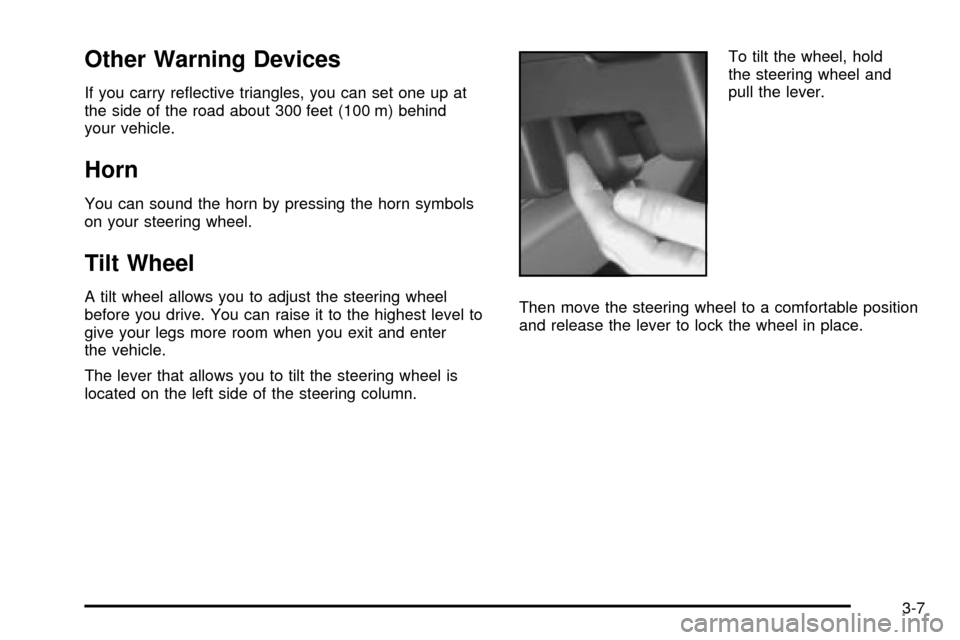
located on the left side of the steering column.To tilt the wheel, hold
the steering wheel and
pull the lever.
Then move the steering wheel to a comfortable position
and release the lever to lock the wheel in place.
3-7
Page 167 of 462

{CAUTION:
In freezing weather, do not use your washer
until the windshield is warmed. Otherwise the
washer ¯uid can form ice on the windshield,
blocking your vision.
Rear Window Washer/Wiper
If your vehicle has a rear
window wiper, the switch is
located in the instrument
panel switchbank.Press the wiper symbol on the bottom of the switch to
turn on the intermittent wiper. To turn off the wiper, press
the top of the switch.
To wash and wipe the rear window, press the washer
symbol on the top of the switch. Washer ¯uid will
run down the glass as long as the switch is held in.
When the top of the switch is released, the wiper will
continue to cycle three more times. There is only
one washer ¯uid reservoir for the front and rear
windshield wipers. See
Windshield Washer Fluid on
page 5-37.
To wash the rear window when the rear wiper is already
on, press the top of the switch with the wash symbol
on it. Press in the bottom of the switch to continue the
intermittent wiper cycle after the washing cycle is
completed.
3-11
Page 172 of 462

Exterior Lamps
The control to the left of the steering column operates
the exterior lamps.
9(Off/Auto):Turning the control to this setting will
activate the automatic headlamp control when it is
dark enough outside and turn off all of the lamps and
lights during the day, except the Daytime Running
Lamps (DRL).
;(Parking Lamps):Turning the control to this
setting turns on the parking lamps together with the
following:
·Sidemarker Lamps
·Taillamps
·Instrument Panel Lights
2(Headlamps):Turning the control to this setting
turns on the headlamps, together with the previously
listed lamps and lights.
Lamps on Reminder
If the driver's door is opened and you turn the ignition to
OFF or LOCK while leaving the lamps on, you will
hear a warning chime.
3-16