service OPEL AGILA 2009 User Guide
[x] Cancel search | Manufacturer: OPEL, Model Year: 2009, Model line: AGILA, Model: OPEL AGILA 2009Pages: 153, PDF Size: 1.82 MB
Page 63 of 153

5-13Instruments and controls
If it illuminates when the engine is
running; there may be a fault in the
engine electronics: interrupt your
journey and seek the assistance of a
workshop.
If regeneration of the diesel particle
filter is not successful or possible (3
5-13 “8 Diesel particle filter 3“), the
control indicator may illuminate and
the vehicle goes into limp home
mode: interrupt your journey and
seek the assistance of a workshop
immediately.
Further information 3 9-7.
Y Low fuel
If it illuminates during driving; fuel
level is low: fill up fuel tank as soon
as possible.
Never let the tank run dry!
Erratic fuel supply can cause catalytic
converter to overheat 3 9-8.
Diesel engines: The engine stops and
control indicator Z illuminates if the
fuel level is too low (3 5-11 “Z
Exhaust emissions”). If the tank has
been run dry, bleed the fuel system 3
10-7.Refuelling 3 9-12, fuel tank capacity
3 12-5.
8 Diesel particle filter 3
Will illuminate briefly in yellow when
the ignition is switched on.
If it illuminates during driving, the
diesel particle filter requires cleaning.
As soon as the road and traffic
situation permits it, increase speed to
more than 75 km/h (50 mph) for
approx. 30 minutes. The control
indicator extinguishes as soon as
cleaning is complete.
If regeneration of the diesel particle
filter is not successful or possible (3
5-12 “A Service vehicle soon 3“),
control indicator A may illuminate
and the vehicle goes into limp home
mode: interrupt your journey and
seek the assistance of a workshop
immediately.
Further information 3 9-7.
O Turn signal lamps
The appropriate control indicator will
flash in green when the turn signal is
on. Rapid flash; failure of a turn signal
bulb or the corresponding fuse.
Both control indicators flash when the
hazard warning lamps are active.
Turn signal lamps 3 6-2, bulb
replacement 3 10-7, fuses 3 10-11.
Warning chimes
While driving:
„when operating the turn signals.
„if driver’s seat belt is not engaged
and vehicle speed exceeds approx.
15 km/h (9 mph).
When the vehicle is parked and
driver’s door is opened:
„with exterior lamps switched on
(and ignition key removed).
„when the key is in the ignition
switch.
Seat belt warning chime 33-7.
Driving hints 3 9-1.
Page 64 of 153
5-14 Instruments and controls
Service interval display 3
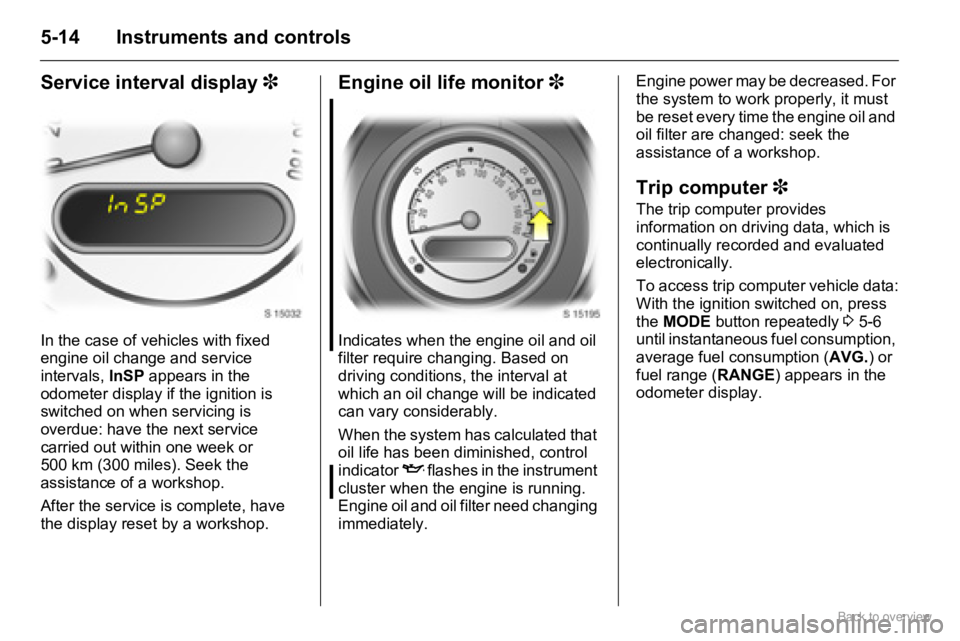
In the case of vehicles with fixed
engine oil change and service
intervals, InSP appears in the
odometer display if the ignition is
switched on when servicing is
overdue: have the next service
carried out within one week or
500 km (300 miles). Seek the
assistance of a workshop.
After the service is complete, have
the display reset by a workshop.
Engine oil life monitor 3
Indicates when the engine oil and oil
filter require changing. Based on
driving conditions, the interval at
which an oil change will be indicated
can vary considerably.
When the system has calculated that
oil life has been diminished, control
indicator
I flashes in the instrument
cluster when the engine is running.
Engine oil and oil filter need changing
immediately. Engine power may be decreased. For
the system to work properly, it must
be reset every time the engine oil and
oil filter are changed: seek the
assistance of a workshop.
Trip computer 3
The trip computer provides
information on driving data, which is
continually recorded and evaluated
electronically.
To access trip computer vehicle data:
With the ignition switched on, press
the MODE button repeatedly 3 5-6
until instantaneous fuel consumption,
average fuel consumption (AVG.) or
fuel range (RANGE) appears in the
odometer display.
Page 77 of 153

7-7Infotainment system
If less than 6 stations with strong
signals can be received, the number
of preset stations may be less than 6.
If no stations with strong signals can
be received, previously stored
stations are reset.
When automatic storing is complete,
the radio station stored under preset
station memory location 1 is
received.
To exit automatic storing while storing
is in progress, press the AST
button4 again. Previously stored
stations are not overwritten.
Recalling stored stations
To recall a station stored under one of
the preset station memory locations
1-6, tune to the desired waveband
and press the relevant preset station
button (1-6). The station
corresponding to the preset station
button is received.
If a station is not stored on the
selected preset station button (1-6),
“- - -” will appear in the display.RDS (Radio Data System)
RDS is a European service provided
by broadcasting companies, which
makes finding the required FM station
much easier and aids good reception.
RDS stations transmit information
which is automatically evaluated by
the RDS radio.
In some areas, other functions
associated with RDS are available,
e.g. TA (Traffic Announcement) and
REG (Regionalisation).
AF (Alternative Frequency)
An RDS program is transmitted on
several frequencies simultaneously.
With AF on, during the journey the
Infotainment system automatically
searches for the strongest receivable
frequency.
REG (Regionalisation)
Some RDS stations transmit different
regional programs over different
frequencies at certain times.
With REG on, when searching for the
frequency of a radio program with the
strongest reception using AF (Alternative Frequency), the
Infotainment system always remains
tuned to the selected regional
program.
With REG off, when searching for the
frequency of a radio program with the
strongest reception using AF
(Alternative Frequency), the
Infotainment system does not
consider regional programs.
Switching AF and REG on and off
Settings appears in the following
order when the AF button 7 is
pressed repeatedly:
„AF on/REG off,
„AF on/REG on,
„AF off, REG off.
With AF and/or REG active, “AF” and
“REG” appear in the display
respectively.PTY (Program Type)
Many RDS stations transmit a PTY
code that indicates the type of
program being broadcast
Page 78 of 153

7-8 Infotainment system
(e.g. News). The PTY code enables
selection of the station according to
program type.
Searching for stations by
program type
Press the PTY button 8 to select
PTY mode.
Turn the bVOLUME rotary knob f
to select the desired PTY (e.g. News,
Sports).
Press the hbutton j or
gbuttoni to begin search within
the selected PTY.
If no station within the selected PTY
code is received, “NOTHING”
appears in the display followed by
“PTY”. Select another PTY as
described above.
TA (Traffic Announcement)
Traffic stations are RDS stations
which transmit traffic information.
With TA on, the Infotainment system
searches for stations emitting TP
(Traffic Programs) and tunes into
such stations in preference to others.When TA is active and a Traffic
Program is currently being received,
CD/MP3 CD 3 playback is
interrupted for the traffic
announcement and is resumed when
the announcement ends.
Switching TA on and off
Press the TA button 9 to switch on
traffic announcements.
With TA active, “TA” appears in the
display. When a Traffic Program is
currently being received, “TP” also
appears in the display.
Press the TA button 9 again to
switch off traffic announcements.
To search for a TP station (TP SEEK)
while TA is active, press the
hbuttonj or gbutton i.
If TP data is not received within
approx. 20 seconds after TA is
switched on, TP SEEK automatically
takes place only once.
If no TP station is received,
“NOTHING” appears in the display.
PS (Program Service Name)
Display of program name instead of
station frequency.
EON (Enhanced Other
Networks)
With EON, you will hear traffic
reports, even if the set station does
not transmit its own traffic
information. When a traffic
announcement is made, the unit
switches to a traffic information
station linked to EON.
When EON is active, “EON” appears
in the display.
Page 80 of 153

7-10 Infotainment system
Selecting next or previous MP3
folder3
If the MP3 CD consists of several
folders, the required folder can be
selected as follows:
Press the DISC/FLD + button c to
skip to the next folder.
Press the - DISC/FLD button d to
skip back to the previous folder.
Displaying MP3 text
MP3 text types appear in the
following order when the TEXT
buttona is pressed repeatedly:
„Elapsed time,
„Folder name,
„File name.
Press and hold the TEXT buttona
for approx. 2 seconds to enable
scrolling text.
Removing CDs
Press the f button 1.
The CD is ejected.
Maintenance and care
„Never insert foreign objects in the
CD slot.
„If “ERROR 1” appears in the
display, the disc cannot be read. If
a normal, undamaged disc is
inserted and the message remains,
seek the assistance of a workshop.
„If “ERROR 3” appears in the
display, the player has developed
an unidentified error. The inserted
disc may not eject. Seek the
assistance of a workshop.
„Do not use commercially available
CD protection sheets or discs
equipped with stabilisers, as they
may get trapped in the internal
mechanism.
„Do not use any abrasive chemicals,
cleaning solutions or strong
cleaners. Use only a soft cloth
moistened with soapy water.
„The system must only be serviced
by trained specialists. Faulty
installation or servicing may
invalidate the unit’s warranty.Mobile telephones and
radio equipment (CB) 3
Installation and operation
The Opel installation instructions and
the operating guidelines provided by
the telephone manufacturer must be
observed when fitting and operating a
mobile telephone.
Failure to do so could invalidate the
vehicle’s operating permit
(EU Directive 95/54/EG).
Requirements to ensure trouble-free
operation:
„Professionally installed exterior
antenna, to obtain the maximum
range possible
„Maximum transmission power
10 Watts.
„Installation of the telephone in a
suitable spot (front centre console).
Obtain advice on predetermined
installation locations for the external
antenna and equipment holder and
ways of using devices with
transmission power of more than
10 Watts.
Page 87 of 153
8-6Climate controls
Maintenance
Air intake
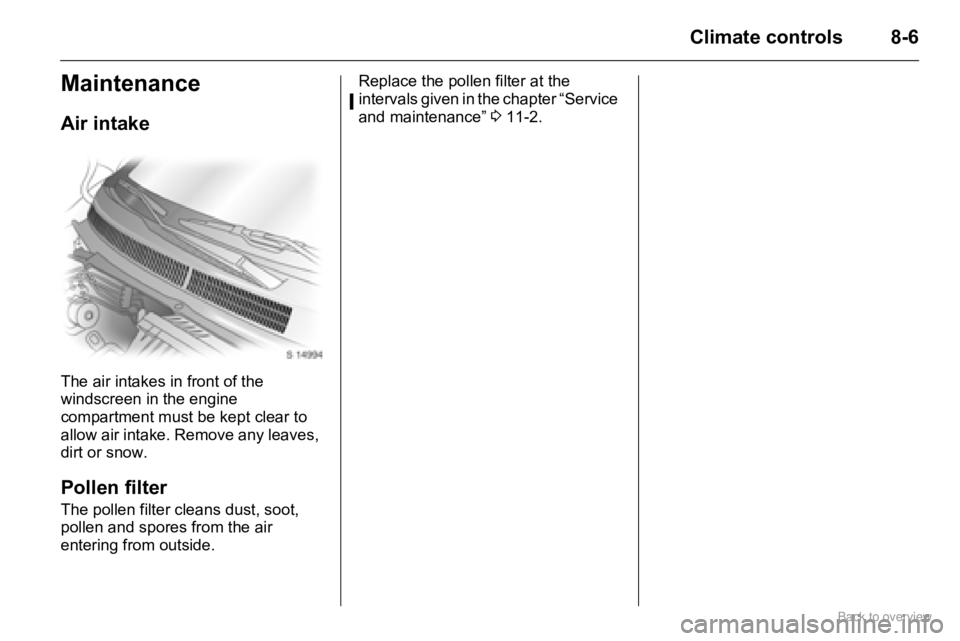
The air intakes in front of the
windscreen in the engine
compartment must be kept clear to
allow air intake. Remove any leaves,
dirt or snow.
Pollen filter
The pollen filter cleans dust, soot,
pollen and spores from the air
entering from outside. Replace the pollen filter at the
intervals given in the chapter “Service
and maintenance” 311-2.
Page 103 of 153
10-3Vehicle care
To close, lift bonnet slightly, release
the support rod from the hole and
press it back into its retaining clip.
Lower the bonnet gradually, allowing
it to drop from a height of approx.
30 cm.
Check that the bonnet is locked in
position before driving, by pulling at
its front edge. If it is not engaged,
repeat closing procedure.
Engine oil
Information on engine oil is in the
chapter “Service and maintenance”
311-6.
We recommend the engine oil level is
checked before starting a long trip.
The engine oil level must be checked
with the vehicle horizontal and with
the engine (which must be at
operating temperature) switched off.
Wait a few minutes before checking
the level to allow the normal oil
accumulation in the engine to drain
back into the oil pan.
Pull out dipstick from the tube, wipe it
clean and re-insert it as far as it will
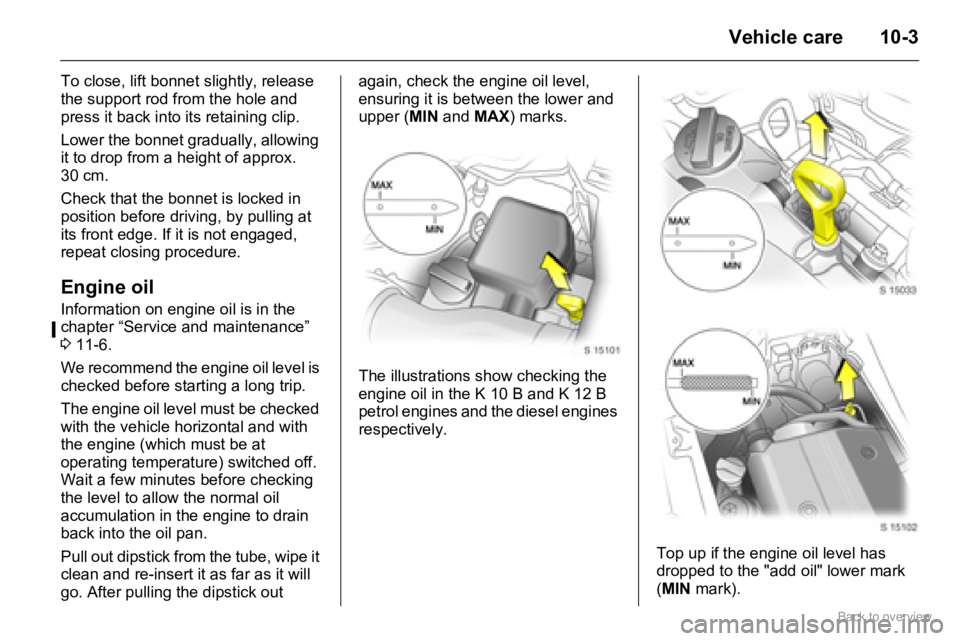
go. After pulling the dipstick out again, check the engine oil level,
ensuring it is between the lower and
upper (MIN and MAX) marks.
The illustrations show checking the
engine oil in the K 10 B and K 12 B
petrol engines and the diesel engines
respectively.
Top up if the engine oil level has
dropped to the "add oil" lower mark
(MIN mark).
Page 133 of 153

11-1Service and maintenance
Service and
maintenanceScheduled
maintenance
Service intervals
Interim Service
Due every 15,000 km (10,000 miles)
or 1 year, whichever occurs first.
Main Service
Due every 30,000 km (20,000 miles)
or 2 years, whichever occurs first.
The service intervals are based on
average operating conditions. For
severe operating conditions 311-5.
Service interval display 35-14.
Engine oil life monitor 35-14.Confirmations
Confirmation of Service is recorded in
the spaces provided in the Service
and Warranty Booklet. The date and
kilometre/mileage reading is
completed with the stamp and
signature of the Servicing Workshop.
Make sure that the Service and
Warranty Booklet is completed
correctly as continuous proof of
service is essential if any warranty or
goodwill claims are to be met, and is
also a benefit when you come to sell
the vehicle. Scheduled maintenance ....... 11-1
Service schedule .................. 11-2
Additional servicing ............... 11-5
Recommended fluids and
lubricants ............................ 11-5
Page 134 of 153

11-2 Service and maintenance
Service schedule
⊕Additional operations.o Under extreme operating conditions and if required by country-specific conditions, the intervals are reduced.
Service operations by year 1)
km ( x 1000)1)
miles ( x 1000)1)
1)Whichever occurs first.
1
15
102
30
203
45
304
60
405
75
506
90
60
Controls, lighting, signalling equipment and airbags: visual checkxxxxxx
Remote control batteries: replace every 2 years
Windscreen wipers, windscreen washer system: check, correctxxxxxx
Coolant level and antifreeze: check, correct
Hoses: check for tightness and secure seatingxxxxxx
Coolant: change every 3 years/45,000 km/30,000 miles
Brake fluid level: check, correct x x x
Battery terminals: check for secure connections and battery eyexxxxxx
Pollen filter: replace x x x
oMore often for when dust, sand or pollen is in the air agreement with customer
oAir cleaner element: inspect - petrol engines only xxxxxx
Air cleaner element: replace - petrol and diesel engines x x
⊕Spark plugs: replace every 7 years/105,000 km/70,000 miles
Page 135 of 153

11-3 Service and maintenance
Service operations by year 1)
km ( x 1000)1)
miles ( x 1000)1)
1)Whichever occurs first.⊕Additional operations.o Under extreme operating conditions and if required by country-specific conditions, the intervals are reduced.
1
15
102
30
203
45
304
60
405
75
506
90
60
Ribbed V-belt: visual check - petrol engines only x x
⊕ Replace every 6 years/90,000 km/60,000 miles
Ribbed V-belt and tensioner: visual check - diesel engines only x x x
⊕ Replace every 10 years/150,000 km/100,000 miles
⊕Valve clearances: check, adjust - petrol engines only x x x
Engine oil and oil filter: replace x x x x x x
oDiesel fuel filter: drain water x x x x x x
Diesel fuel filter: replace and bleed x x x
⊕Manual transmission: oil level check, correct x
Oil changexx
Parking brake cable: check, adjust x
Parking brake: check and adjust
Wheel mounting and suspension front and rear, brake lines, brake
pressure hoses, fuel lines, fuel tank and exhaust system: visual checkxxx
Corrosion protection: check and record in Service and Warranty Booklet annually
Front and rear wheel brakes: check visually x x x x x x