brake OPEL AMPERA E 2017.5 Manual user
[x] Cancel search | Manufacturer: OPEL, Model Year: 2017.5, Model line: AMPERA E, Model: OPEL AMPERA E 2017.5Pages: 265, PDF Size: 6.24 MB
Page 83 of 265

Instruments and controls81ABS. The brake system remains
operational but without ABS
regulation.
Antilock brake system 3 158.
Sport mode
3 illuminates when sport mode
is selected.
Sport mode 3 154.
Lane keep assist a illuminates green or yellow, or
flashes yellow.
Illuminates green
The system is switched on and ready
to operate.
Illuminates yellow
The system approaches a detected
lane marking without using the turn
signal in that direction.
Flashes yellow
The system recognises that the lane
is departed significantly.Lane keep assist 3 191.
Electronic Stability Control off
n illuminates yellow.
The system is deactivated.
Electronic Stability Control
and Traction Control system
b illuminates or flashes yellow.
Illuminates
A fault in the system is present.
Continued driving is possible. Driving
stability, however, may deteriorate
depending on road surface
conditions.
Have the cause of the fault remedied
by a workshop.
Flashes
The system is active and is working to assist the driver with directional
control of the vehicle in difficult driving
conditions.Electronic Stability Control 3 163,
Traction Control system 3 162.
Traction Control system off
k illuminates yellow.
The system is deactivated.
Tyre pressure monitoringsystem
w illuminates or flashes yellow.
Illuminates
Tyre pressure loss. Stop immediately
and check tyre pressure.
Flashes
Fault in system or tyre without
pressure sensor mounted (e.g. spare
wheel). After 60 to 90 seconds the
control indicator illuminates
continuously. Consult a workshop.
Immobiliser d illuminates yellow.
Fault in the immobiliser system. The
propulsion system cannot be started.
Page 93 of 265

Instruments and controls91Some important messages may
appear additionally in the Info display.
Some messages only pop-up for a
few seconds.
Warning chimes
When starting the propulsion
system or whilst driving
Only one warning chime will sound at a time.
The warning chime regarding not
fastened seat belts has priority over
any other warning chime.
● If seat belt is not fastened.
● If a door or the tailgate is not fully
closed when starting off.
● If a certain speed is exceeded with parking brake applied.
● If approaching a vehicle ahead too rapidly.
● If a programmed speed or speed
limit is exceeded.
● If a warning message appears in the Driver Information Centre.
● If the electronic key is not in the passenger compartment.● If the parking assist detects anobject.
● If an unintended lane change occurs.
● If safety function of the power tailgate detects obstacles in the
moving area.
When the vehicle is parked and/or the driver's door is opened
● With exterior lights on.
Battery voltage When the vehicle battery voltage is
running low, a warning message will
appear in the Driver Information
Centre.
1. Switch off any electrical consumers which are not requiredfor a safe drive, e.g. seat heating,
heated rear window or other main consumers.
2. Charge the vehicle battery by driving continuously for a while or
by using a charging device.The warning message will disappear
after the vehicle has been started
twice without a voltage drop.
If the vehicle battery cannot be
recharged, have the cause of the fault
remedied by a workshop.
Page 95 of 265

Instruments and controls93automatic switching on of the
rear window wiper when reverse
gear is engaged.
● Collision / detection systems
Pedestrian safety signal :
Activates or deactivates
pedestrian safety alert. Even if
pedestrian safety signal is
deactivated, it is automatically
activated while this menu is not
accessible such as OnStar
calling, camera projection, Apple
CarPlay and Android Auto, non-
auto dismiss pop-up, etc.
Forward Collision System : This
allows the feature’s notification to be customised. This feature will
turn on or off the Forward
Collision Alert and Active
Emergency Braking. The Off
setting disables all Forward
Collision Alert and Active
Emergency Braking functions.
With the Alert and Brake setting,
both Forward Collision Alert and
Active Emergency Braking are
available. The Alert setting
disables Active EmergencyBraking. Select Off, Alert , or Alert
and Brake .
Front pedestrian detection : This
allows the feature’s notification to
be customised. This feature may
help avoid or reduce the harm
caused by front-end crashes with
nearby pedestrians. Select Off,
Alert , or Alert and Brake .
Rear Cross Traffic Alert :
Activates or deactivates rear cross traffic alert.
Lane Change Alert : Activates or
deactivates lane change alert.
● Lighting
Vehicle locator lights : Activates
or deactivates the entry lighting.
Exit lighting : Activates or
deactivates and changes the
duration of exit lighting.
● Power door locks
Auto door lock : Activates or
deactivates the automatic door
locking function after switching
on the vehicle.
Unlocked door anti lockout :
Activates or deactivates the doorlocking function while a door is
open.
Delayed door lock : Activates or
deactivates the delayed door
locking function. This feature
delays the actual locking of the
doors until all doors are closed.
● Remote lock / unlock / start
Remote unlock light feedback :
Activates or deactivates the
hazard warning flasher feedback
whilst unlocking.
Remote lock feedback : Changes
what kind of feedback is given
when locking the vehicle.
Remote door unlock : Changes
the configuration to unlock only
the driver's door or the whole
vehicle whilst unlocking.
Relock remotely unlocked doors :
Activates or deactivates the
automatic relock function after
unlocking without opening the
vehicle.
Remote start auto heat seats :
Activates or deactivates automatically the heated seats
when using remote start.
Page 150 of 265

148Driving and operatingDriving and
operatingDriving hints ............................... 148
Driving economically ...............148
Control of the vehicle ...............149
Starting and operating ...............149
New vehicle running-in ............149
Power button ........................... 149
Retained power off ..................151
Starting and stopping the vehicle .................................... 151
Parking .................................... 152
Electric vehicle operation modes ........................................ 154
Operation ................................. 154
Drive modes ............................ 154
Electric drive unit .......................155
Operation ................................. 155
Brakes ........................................ 158
Antilock brake system .............158
Parking brake .......................... 159
Regenerative braking ..............160
Ride control systems .................162
Traction Control system ..........162
Electronic Stability Control ......163Driver assistance systems .........164
Cruise control .......................... 164
Speed limiter ........................... 165
Forward collision alert .............167
Following distance indication ...169
Active emergency braking .......169
Front pedestrian protection .....172
Parking assist .......................... 174
Side blind spot alert .................181
Lane change alert ....................183
Panoramic view system ...........184
Rear view camera ...................185
Rear cross traffic alert .............187
Traffic sign assistant ................188
Lane keep assist .....................191
Charging .................................... 193
Programmable charging ..........197
Programmed charging override .................................. 203
Charging status .......................204
Charge cord ............................. 205
Electrical requirements ............208
Towing ....................................... 209
General information .................209Driving hints
Driving economically The following advice is intended to
help maximise energy efficiency and
range.
In colder temperatures, while these
efficiency tips will help, the electric
vehicle's driving range may be lower
due to higher energy usage.
The weight of additional cargo in the
vehicle affects efficiency and range.
Avoid carrying more than is needed.
Avoid unnecessary use of electrical
accessories. Power used for
functions other than propelling the
vehicle will reduce electric vehicle
range.
Always keep the tyres properly
inflated and the vehicle properly
aligned.
Driving style
Avoid unnecessary rapid
accelerations and decelerations.
Use cruise control when appropriate.
Page 151 of 265
Driving and operating149Avoid shifting to N to coast. The
vehicle recovers energy while
coasting and braking in D or L.
Efficiency gauge in the instrument
cluster
Driving efficiency gauge 3 75.
Drive mode and gear mode selection
Use normal drive mode when
possible.
Sport mode provides more
responsive acceleration than normal
mode but can reduce energy
efficiency.
Use L in heavy stop‐and‐go traffic or
when travelling downhill. L requires
less brake pedal application and
provides a controlled, efficient way to
slow the vehicle down.
Control of the vehicleCaution
Drive carefully whenever the road
has a steep incline or when driving over a ramp or bump, etc.
Pedals
To ensure the pedal travel is
uninhibited, there must be no mats in
the area of the pedals.
Use only floor mats, which fit properly and are fixed by the retainers on the
driver side.Starting and operating
New vehicle running-in Avoid making hard stops for the first
300 km.
Hard stops with new brake linings can
lead to premature wear. Follow this
breaking-in guideline every time you
get new brake linings. Following
break-in, vehicle speed and load can be gradually increased.
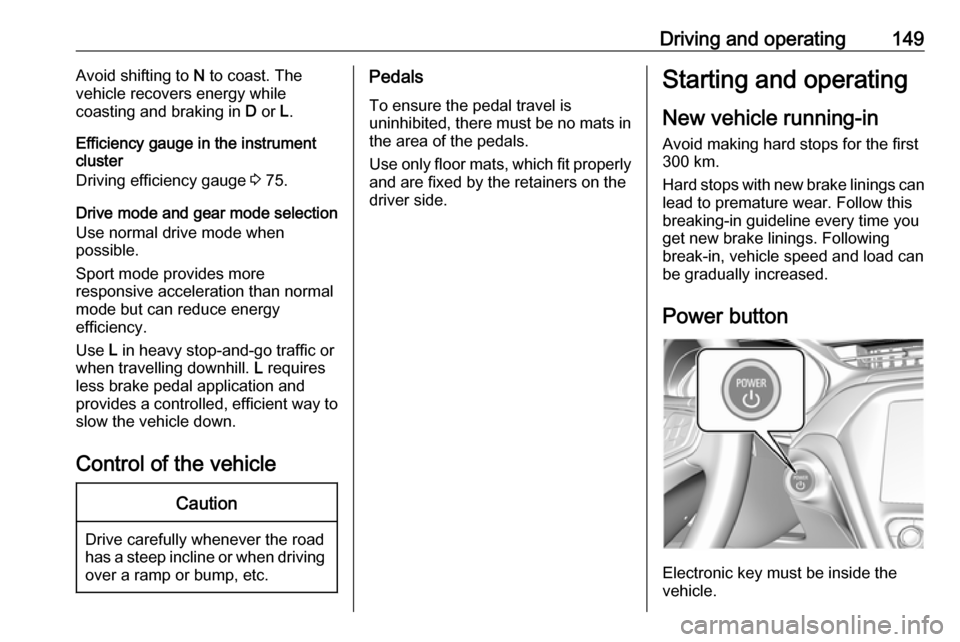
Power button
Electronic key must be inside the
vehicle.
Page 152 of 265

150Driving and operatingIf the vehicle will not start, place the
radio remote control in the transmitter
pocket, inside the centre console.
Starting and stopping the vehicle
3 151.Switching on the vehicle
With the vehicle off and the brake
pedal applied, pressing the POWER
m once will place the vehicle in
accessory power mode. When 4
illuminates in the instrument cluster, the vehicle is ready to be driven. This could take up to 15 seconds atextremely cold temperatures.
Press POWER m once more. Release
button after starting procedure
begins.Switching off the vehicle
With the vehicle in P, press
POWER m briefly in each mode or
when engine is running and vehicle is
stationary. Some functions remain
active until driver's door is opened.
If the vehicle is not in P when
switching off the vehicle, P will be
automatically engaged before the
vehicle is switched off.A chime will sound if the driver's door is opened while the vehicle is
switched on. Always press
POWER m to switch off the vehicle
before exiting the vehicle.Emergency shut off during driving
If the vehicle needs to be switched off during driving in case of emergency,
press POWER m for more than
two seconds or press twice briefly
within five seconds.
Starting and stopping the vehicle
3 151.
Service mode
This power mode is available forservice and diagnostics and to verify
the proper operation of the service
vehicle soon control indicator as may
be required for emission inspection
purposes.
With the vehicle switched off and the brake pedal not applied, pressing and
holding POWER m for more than five
seconds will place the vehicle in
service mode. The instruments and
audio systems will operate as they do in accessory power mode, but the
vehicle will not be able to be driven.
The propulsion system will not start in service mode. Press POWERm again
to switch the vehicle off.Caution
Service mode will discharge the
12-volt vehicle battery. Do not use
service mode for an extended
period, or the vehicle may not
start.
Operation in case of failure
If the vehicle does not start due to a
low radio remote control battery, a
message will be displayed in the
Driver Information Centre.
To still drive the vehicle, proceed as
follows:
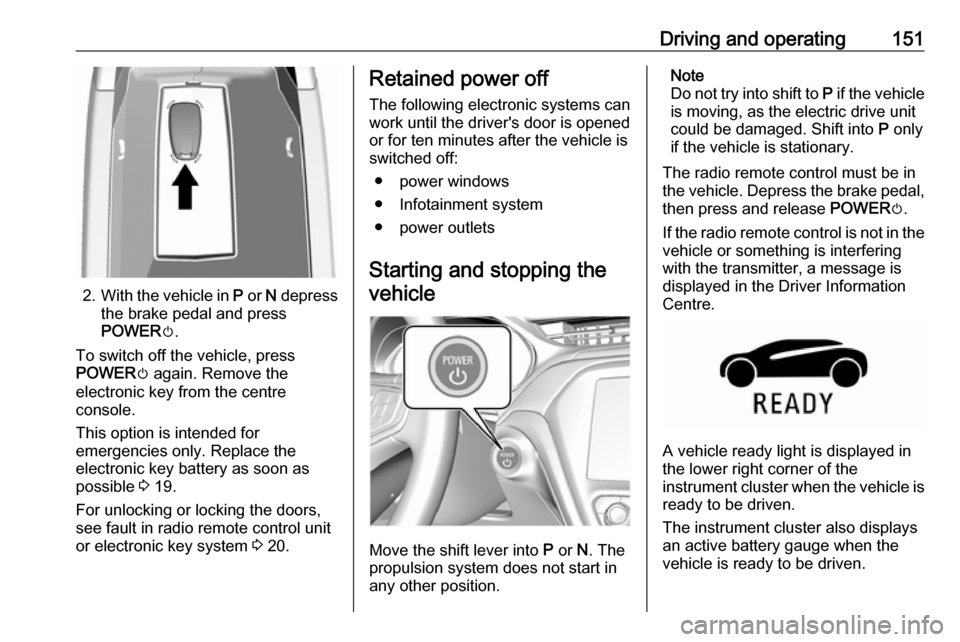
1. Open the centre console and remove the small tray from the
centre console. Place the radio
remote control in the pocket with
the buttons facing the bottom of
the vehicle.
Other objects, e.g. other keys,
transponder, tags, coins etc. must
be removed.
Page 153 of 265
Driving and operating151
2.With the vehicle in P or N depress
the brake pedal and press
POWER m.
To switch off the vehicle, press
POWER m again. Remove the
electronic key from the centre
console.
This option is intended for
emergencies only. Replace the
electronic key battery as soon as
possible 3 19.
For unlocking or locking the doors,
see fault in radio remote control unit
or electronic key system 3 20.
Retained power off
The following electronic systems can
work until the driver's door is opened
or for ten minutes after the vehicle is
switched off:
● power windows
● Infotainment system
● power outlets
Starting and stopping the
vehicle
Move the shift lever into P or N. The
propulsion system does not start in
any other position.
Note
Do not try into shift to P if the vehicle
is moving, as the electric drive unit
could be damaged. Shift into P only
if the vehicle is stationary.
The radio remote control must be in
the vehicle. Depress the brake pedal, then press and release POWERm.
If the radio remote control is not in the vehicle or something is interfering
with the transmitter, a message is
displayed in the Driver Information
Centre.
A vehicle ready light is displayed in
the lower right corner of the
instrument cluster when the vehicle is ready to be driven.
The instrument cluster also displays an active battery gauge when the
vehicle is ready to be driven.
Page 154 of 265

152Driving and operatingA chime will sound if the driver's dooris opened while the vehicle is
switched on. Always press button
POWER m to switch the vehicle off
before exiting the vehicle.
If the vehicle will not start due to a low radio remote control battery, the
vehicle can still be driven. Operation
in case of failure 3 149.
RestartingCaution
If the vehicle must be restarted
while it is still moving, move the
shift lever to N and press button
POWER m twice without
depressing the brake pedal. The
propulsion system will not restart
in any other way.
Emergency shut off during driving
1. Brake using a firm and steady pressure. Do not pump the brakes
repeatedly. This may reduce
power assist, requiring increased
brake pedal force.
2. Shift the shift lever to N. This can
be done while the vehicle is moving. After shifting to N, firmly
apply the brakes and steer the
vehicle to a safe location.
3. Come to a complete stop, shift to P, and switch the vehicle off by
pressing POWERm.
4. Apply the parking brake. If the vehicle cannot be pulled
over, and must be shut off while
driving, press and hold
POWER m for more than two
seconds, or press twice briefly
within five seconds.9 Danger
Switching off the vehicle while
moving may disable the airbags.
While driving, only shut the
propulsion system off in an
emergency.
Starting the vehicle at low
temperatures
It is recommended to switch on the vehicle while the vehicle is plugged in
when exterior temperatures are
below 0° C.
Should the exterior temperature be
lower than -32° C, the vehicle must be plugged in when the vehicle is
switched on.
Parking Note
Do not allow the vehicle to remain in
extreme temperatures for long
periods without being driven or
being plugged in.9 Warning
● Always apply parking brake.
Pull switch m for approx. one
second and check if the control
indicator m illuminates.
Page 155 of 265
Driving and operating153The electric parking brake isapplied when control indicator
m illuminates 3 80.
● Switch off the vehicle.
● If the vehicle is on a level surface or uphill slope, apply
the parking brake and set the
shift lever to P before switching
off the vehicle. On an uphill
slope, turn the front wheels
away from the kerb.
If the vehicle is on a downhill
slope, apply the parking brake
and set the shift lever to P
before switching off the vehicle.
Turn the front wheels towards
the kerb.
With the shift lever in P, press
POWER m briefly to switch off
the vehicle. Turn the steering
wheel until the steering wheel lock engages.
● Close the windows
● Lock the vehicle.
● Activate the anti-theft alarm system.
● The engine cooling fans may run
after the vehicle has been
switched off 3 213.
It is not recommended to park with the propulsion system running.
If the vehicle is left with the propulsion
system running, follow the proper
steps to be sure the vehicle will not
move.Post-crash label
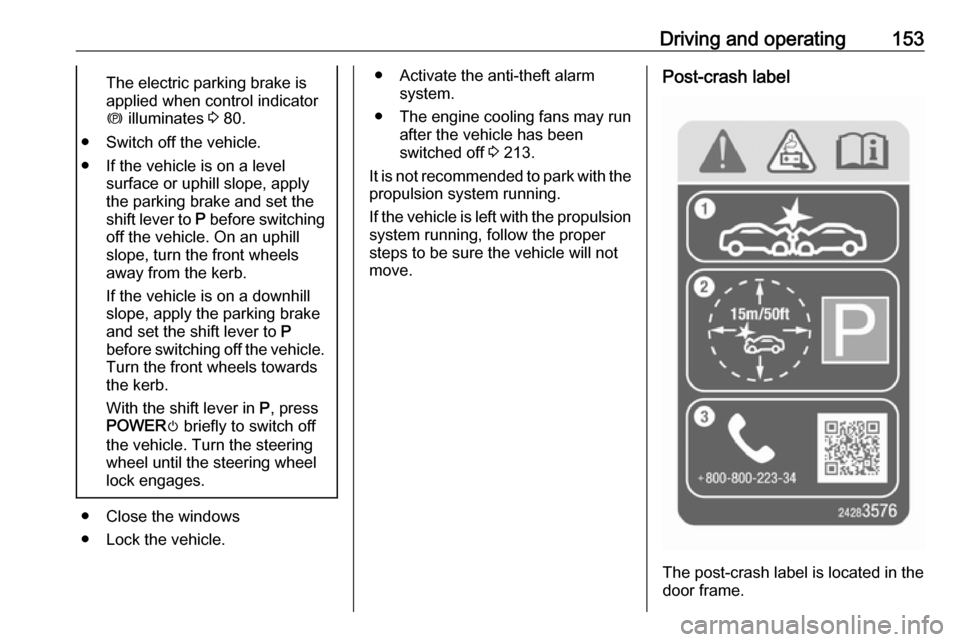
The post-crash label is located in the
door frame.
Page 157 of 265

Driving and operating155Electric drive unit
Operation
The vehicle uses an electric drive
unit. The shift lever is located on the
console between the seats.P:park position, wheels are locked, engage only when the vehicle is
stationaryR:reverse gear, engage only when
the vehicle is stationaryN:neutralD:drive mode, low recuperationL:low, high recuperation, enables
one pedal driveThe shift lever always starts from a
centre position. A yellow dot is
displayed on the shift pattern. After
releasing the shift lever, it will return
to the centre position.
P : This position locks the front
wheels. It is the recommended
position when starting the propulsion system because the vehicle cannot
move easily.9 Warning
It is dangerous to get out of the
vehicle if the shift lever is not fully
in P with the parking brake firmly
applied. The vehicle can roll.
Do not leave the vehicle when the propulsion system is running, the
vehicle may move suddenly. You
or others can be injured. To be
sure the vehicle will not move,
even if you are on even ground,
always apply the parking brake
and move the shift lever to P.The shift lock release button is
designed to prevent inadvertent
shifting out of P unless the vehicle has
been started, the brake pedal is
applied, and the shift lock release
button is pressed.
When the vehicle is stopped, press POWER m to switch off the vehicle.
The electric drive unit will shift to P
automatically.
The vehicle will not shift to P if it is
moving too fast. Stop the vehicle and
shift to P.
To shift in and out of P, press the
release button.
R : Use this gear to reverse.