steering wheel OPEL AMPERA E 2017.5 Manual user
[x] Cancel search | Manufacturer: OPEL, Model Year: 2017.5, Model line: AMPERA E, Model: OPEL AMPERA E 2017.5Pages: 265, PDF Size: 6.24 MB
Page 155 of 265
Driving and operating153The electric parking brake isapplied when control indicator
m illuminates 3 80.
● Switch off the vehicle.
● If the vehicle is on a level surface or uphill slope, apply
the parking brake and set the
shift lever to P before switching
off the vehicle. On an uphill
slope, turn the front wheels
away from the kerb.
If the vehicle is on a downhill
slope, apply the parking brake
and set the shift lever to P
before switching off the vehicle.
Turn the front wheels towards
the kerb.
With the shift lever in P, press
POWER m briefly to switch off
the vehicle. Turn the steering
wheel until the steering wheel lock engages.
● Close the windows
● Lock the vehicle.
● Activate the anti-theft alarm system.
● The engine cooling fans may run
after the vehicle has been
switched off 3 213.
It is not recommended to park with the propulsion system running.
If the vehicle is left with the propulsion
system running, follow the proper
steps to be sure the vehicle will not
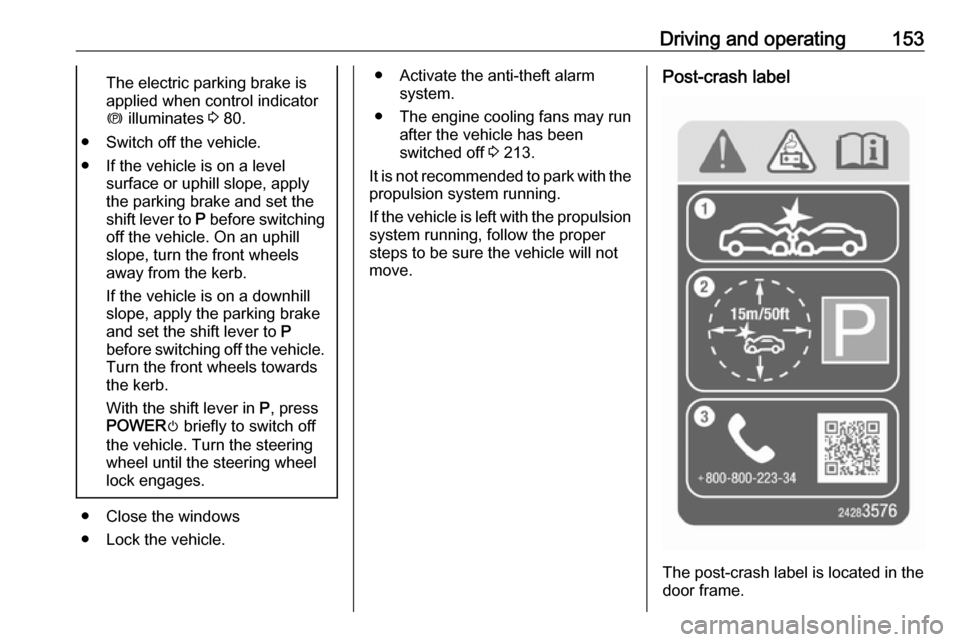
move.Post-crash label
The post-crash label is located in the
door frame.
Page 163 of 265

Driving and operating161Regeneration on demand
Regeneration on demand allows
increased deceleration by pressing
and holding the steering wheel
paddle. It works in D (Drive) and L
(Low). The accelerator pedal must be mostly released for it to work.
If regenerative braking is active, the regenerative active icon with arrowsis shown as green. Regenerative
braking 3 77.
Cruise control will switch off and the
brake lights may come on when this
feature is activated.
If the vehicle is in D (Drive) and is
brought to a complete stop while the regenerative braking paddle is held,
the vehicle will not creep forward
when the paddle is released. The
accelerator pedal must be pressed to
move the vehicle forward. Refer to
"One-pedal driving” in Electric drive
unit 3 155.
If the vehicle is on a steep gradient,
the brake pedal will be required to
hold the vehicle.
The brake controller applies the
hydraulic brakes using a pump. You
may hear the pump during some
braking manoeuvres, such as rapid
brake application or during
regenerative braking as the vehicle
comes to a stop. This is normal
operation.
Hill Top ReserveHill Top Reserve enables you to
maximise regenerative braking
efficiency when driving from a higher
elevation immediately after charging.
When switched on, this feature will
stop the charging process before thehigh voltage battery is full, allowing space for energy from regenerative
braking.
This feature also integrates with the Location-based charging feature,
allowing you to configure the system
so it is enabled when you are at home ( On – home only ) or away (On – away
only ). See "Location based charging"
in Programmable charging 3 197.
Page 171 of 265

Driving and operating169approaching a vehicle ahead too
rapidly, it may not provide you
enough time to avoid a collision.
The driver accepts full
responsibility for the appropriate
following distance based on traffic,
weather and visibility conditions.
The complete attention of the
driver is always required while
driving. The driver must always be ready to take action and apply the
brakes.
System limitations
Forward collision alert is designed to warn about vehicles only, but may
react also to other objects.
In the following cases, forward
collision alert may not detect a vehicle ahead or sensor performance is
limited:
● on winding roads
● when weather limits visibility, such as fog, rain, or snow
● when the sensor is blocked by snow, ice, slush, mud, dirt,
windscreen damage or affected
by foreign items, e.g. stickers
Following distance
indication
The following distance indication
displays the distance in seconds to a
preceding moving vehicle. The front
camera in the windscreen is used to
detect the distance of a vehicle
directly ahead in the vehicle's path. It
is active at speeds above 8 km/h.
When a preceding vehicle is detected
ahead, the distance is indicated in
seconds, displayed on a page in the
Driver Information Centre.
Select Information menu via steering
wheel buttons and press G to select
following distance indication 3 83.
The minimum indicated distance is
0.5 seconds.
If there is no vehicle ahead or the vehicle ahead is out of range, two
dashes will be displayed: -.- sec.
Active emergency braking
Active emergency braking can help toreduce the damage and injury from
crashes with vehicles, pedestrians and obstacles directly ahead, when a
collision can no longer be avoided
either by manual braking or by
steering. Before the active
emergency braking applies, the driver
is warned by the forward collision
alert 3 167 and front pedestrian
protection 3 172.
The feature uses various inputs (e.g.
camera sensor, brake pressure,
vehicle speed) to calculate the
probability of a frontal collision.9 Warning
This system is not intended to
replace the driver responsibility for driving the vehicle and looking
ahead. Its function is limited to
Page 181 of 265

Driving and operating179FunctionalityParking slot searching mode,
indication in the Info display
Select parallel or perpendicular
parking slot by touching the
respective icon on the display.
Select parking side by touching the
respective icon on the display.
When a slot is detected, a visual
feedback on the Info display and an
acoustic signal is given.
If the driver does not stop the vehicle after a parking slot is proposed, the
system starts to search for another
suitable parking slot.
Park guiding mode
The parking slot suggestion of the
system is accepted when the vehicle is stopped by the driver within
ten metres for parallel parking slots or six metres for perpendicular parking
slots after the Stop message is given.
The system calculates the optimal
path into the parking slot.
A brief vibration in the steering wheel
after engaging reverse gear indicates that the steering is controlled by the
system. Then the vehicle is steered
into the slot automatically by giving
the driver detailed instructions for
Page 182 of 265

180Driving and operatingbraking, accelerating and gear
shifting. The driver must keep hands
away from the steering wheel.
Always pay attention to the sound of
the front-rear parking assist.
Continuous sound indicates that the
distance to an obstacle is less than
approx. 30 cm.
If, for any reason, the driver must take over control of the steering, hold the
steering wheel only at the outer edge. Automatic steering is cancelled in thisevent.Display indication
The instructions on the display show:
● General hints and warning messages.
● A hint when driving faster than 30 km/h during parking slot
searching mode.
● The demand to stop the vehicle, when a parking slot is detected.
● The direction of driving during the
parking manoeuvre.
● The demand to shift into reverse or first gear.● The demand to stop or to driveslowly.
● For some of the instructions a progress bar is shown in the
Driver Information Centre.
● The successful completion of the
parking manoeuvre indicated by
a pop-up symbol and a chime.
● The cancelling of a parking manoeuvre.
Display priorities
Advanced parking assist indication in
the Info display can be inhibited by
vehicle messages with a higher
priority. After approving the message, advanced parking assist instructions
appear again and the parking
manoeuvre can be continued.
Deactivation
The system is deactivated by:
● a short press of (
● parking manoeuvre successfully ended
● driving faster than 30 km/h during
parking slot search● driving faster than 8 km/h during parking guidance
● driver interference on steering wheel detected
● exceeding number of maximum gear changes: eight cycles when
parallel parking or five cycles
when perpendicular parking
● switching off the vehicle
Deactivation by the driver or by the
system during manoeuvring will be indicated by a message on the
display. Additionally, an acoustic
signal sounds.
Fault
A message appears when:
● There is a fault in the system.● The driver did not successfully complete the parking
manoeuvre.
● The system is not operational.
● Any of the deactivation reasons described above apply.
If an object is detected during parking
instructions, Stop is indicated on the
display. Removing the object will resume the parking manoeuvre. If the
Page 192 of 265
190Driving and operating
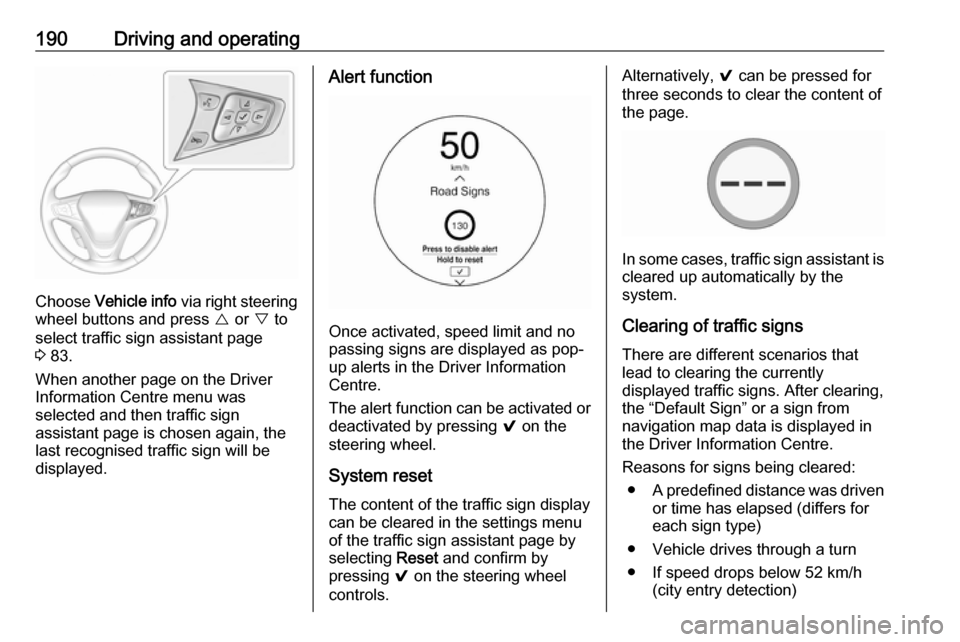
Choose Vehicle info via right steering
wheel buttons and press { or } to
select traffic sign assistant page
3 83.
When another page on the Driver Information Centre menu was
selected and then traffic sign
assistant page is chosen again, the
last recognised traffic sign will be
displayed.
Alert function
Once activated, speed limit and no
passing signs are displayed as pop-
up alerts in the Driver Information
Centre.
The alert function can be activated or
deactivated by pressing 9 on the
steering wheel.
System reset
The content of the traffic sign display
can be cleared in the settings menu
of the traffic sign assistant page by
selecting Reset and confirm by
pressing 9 on the steering wheel
controls.
Alternatively, 9 can be pressed for
three seconds to clear the content of
the page.
In some cases, traffic sign assistant is
cleared up automatically by the
system.
Clearing of traffic signs
There are different scenarios that
lead to clearing the currently
displayed traffic signs. After clearing,
the “Default Sign” or a sign from
navigation map data is displayed in
the Driver Information Centre.
Reasons for signs being cleared: ● A predefined distance was driven
or time has elapsed (differs for
each sign type)
● Vehicle drives through a turn
● If speed drops below 52 km/h (city entry detection)
Page 193 of 265

Driving and operating191Fault
Traffic sign assistant may not operate correctly if:
● The area of the windscreen, where the front camera is
located, is not clean or affected
by foreign items, e.g. stickers.
● Traffic signs are completely or partially covered or difficult to
discern.
● There are adverse environmental
conditions, e.g. heavy rain, snow,
direct sunlight or shadows.
● Traffic signs are incorrectly mounted or damaged.
● Traffic signs do not comply with the Vienna Convention on Road
Signs and Signals (Wiener
Übereinkommen über
Straßenverkehrszeichen).Caution
The system is intended to help the driver within a defined speed
range to discern certain traffic
signs. Do not ignore traffic signs
which are not displayed by the
system.
The system does not discern any other than the conventional traffic
signs that might give or end a
speed limit.
Do not let this special feature
tempt you into taking risks when
driving.
Always adapt speed to the road
conditions.
The driver assistance systems do not relieve the driver from full
responsibility for vehicle
operation.
Lane keep assist
Lane keep assist helps to avoid
crashes due to unintentional lane
departures. The front camera
observes the lane markings between
which the vehicle is driving. If the
vehicle approaches a lane marking, the steering wheel is gently turned to
position the vehicle back into the lane.
Override the system by turning the
steering wheel.
When crossing a lane marking
significantly, lane keep assist starts a
visual and acoustic warning.
Unintended lane departure is
assumed:
● without using turn signal
● using the turn signal in the opposite direction of the lane
departure
● without braking
● without acceleration
● without active steering
Note
The system is switched off during
detection of ambiguous lane
markings, e.g. in construction areas.
Note
The system may be switched off if it
detects lanes which are too narrow,
too wide or too curved.
Page 194 of 265

192Driving and operatingActivation
The lane keep assist is activated by
pressing a. The LED in the button
illuminates to indicate that the system
is switched on.
When the control indicator a in the
instrument cluster illuminates green,
the system is ready to assist.
The system is operational at vehicle
speeds above 60 km/h and if lane
markings are available.
The system gently turns the steering
wheel and the control indicator a
changes to yellow, if the vehicle
approaches a detected lane marking
without using the turn signal in that
direction.
The system alerts by flashing a
together with three chimes, from the respective direction, if the lane is
departed significantly.
The system is only operable when a
lane marking is detected.
If the system only detects lane
markings on one side of the road, it
will only assist for this side.
Lane keep assist detects hands-free
driving. In this case a message in the
Driver Information Centre pops-up
and a chime sounds as long as lane
keep assist detects hands-free
driving.Deactivation
The system is deactivated by
pressing a; the LED in the button
extinguishes.
The system is reactivated the next
time the vehicle is switched on.
Fault The system performance may be
affected by:
● windscreen not clean or affected by foreign items, e.g. stickers
● close vehicles ahead
● banked roads
● winding or hilly roads
● road edges
● roads with poor lane markings
● sudden lighting changes
● adverse environmental conditions e.g. heavy rain or
snow
● vehicle modifications, e.g. tyres
Page 195 of 265

Driving and operating193Switch off the system if the system is
disturbed by tar marks, shadows,
road cracks, temporary or
construction lane markings, or other
road imperfections.9 Warning
Always keep your attention on the
road and maintain proper vehicle
position within the lane, otherwise
vehicle damage, injury or death
could occur.
Lane keep assist does not
continuously steer the vehicle.
The system may not keep the
vehicle in the lane or give an alert,
even if a lane marking is detected.
The steering of the lane keep
assist may not be sufficient to
avoid a lane departure.
The system may not detect hands-
off driving due to external
influences (road condition and
surface, weather etc). The driver
has full responsibility to control the
vehicle and is always required to keep the hands on the steeringwheel while driving.
Using the system while driving on
slippery roads could cause loss of
control of the vehicle and a crash.
Switch the system off.Charging
This section explains the process of charging the vehicle's high voltage
battery. Do not allow the vehicle to
remain in places with extremes of
temperature for long periods without
being driven or plugged in.
It is recommended to keep the vehicle
plugged in, even if fully charged, to
keep the high voltage battery
temperature ready for the next drive.
The vehicle must be plugged in when
the temperatures are below -25° C, to operate properly and to maximise
high voltage battery life.
However, we recommend plugging in
the vehicle when temperatures drop
below 0° C or raise above 32° C.
When using the portable charge cord, it will take approximately 33 hours to
charge the vehicle with the
10 ampere setting.
When using a 230-volt charging
station, it will take approximately
10 hours to charge the vehicle with the 32 ampere setting.
Page 231 of 265

Vehicle care229The instrument panel fuse block is on
the left side of the instrument panel.
To access the fuses, open the fuse
panel door by pulling out.NumberUsage1Video processing module2Indicator light solar sensor3Side blind zone alert4Passive entry, passive start5Central gateway module6Body control module 47Body control module 38Body control module 29Body control module 110Trailer interface module 111Amplifier12Body control module 813Data link connector 114Automatic parking assist15Data link connector 2NumberUsage16Single power inverter
module 117Body control module 618Body control module 519–20–21–22–23USB24Wireless charging module25Reflected LED alert display26Heated steering wheel27–28Instrument cluster 229Trailer interface module 230Headlight levelling device31OnStar32–NumberUsage33Heating, ventilation, and air
conditioning module34–35Instrument panel cluster 136Regen on demand37–38–39–40–41–42–43Body control module 744Sensing and diagnostic
module45Front camera module46Vehicle integration control
module47Single power inverter
module 2