lane assist OPEL AMPERA E 2017.5 Manual user
[x] Cancel search | Manufacturer: OPEL, Model Year: 2017.5, Model line: AMPERA E, Model: OPEL AMPERA E 2017.5Pages: 265, PDF Size: 6.24 MB
Page 11 of 265

In brief91Power windows .....................35
2 Exterior mirrors .....................31
3 Central locking system ..........20
4 Side air vents ...................... 145
5 Turn and lane-change
signals, headlight flash,
low/high beam, high beam
assist ................................... 102
Exit lighting ......................... 104
Parking lights ...................... 103
6 Regen on Demand .............160
7 Cruise control .....................164
Speed limiter ....................... 165
Forward collision alert .........167
Heated steering wheel ..........66
8 Instruments .......................... 75
Driver Information Centre ...... 83
9 Forward collision alert
indicator ............................. 167
Front pedestrian alert ..........172
10 Buttons for Driver
Information Centre ................8311Windscreen wiper and
washer, rear wiper and
washer ................................. 67
12 Centre air vents .................. 145
13 Info display ........................... 86
14 Anti-theft alarm system
status LED ........................... 29
Light sensor ........................ 100
Charging status indicator ....204
15 Glovebox .............................. 58
16 Climate control system ........ 142
17 Hazard warning flashers ....102
Sport mode ........................ 154
Traction Control system .....162
Electronic Stability Control . 163
Parking assist/Advanced
parking assist .....................174
Lane keep assist ................191
18 Power outlet .......................... 70
19 Shift lever ........................... 155
20 USB port
21 Controls for Info display
operation .............................. 86
22 Parking brake ......................15923Power button ....................... 149
24 Steering wheel adjustment ..66
25 Horn ..................................... 67
26 Bonnet release lever ..........213
27 Fuse box ............................ 227
28 Light switch .......................... 99
Headlight range
adjustment ......................... 101
Rear fog lights ....................102
Instrument illumination .......103
Page 12 of 265
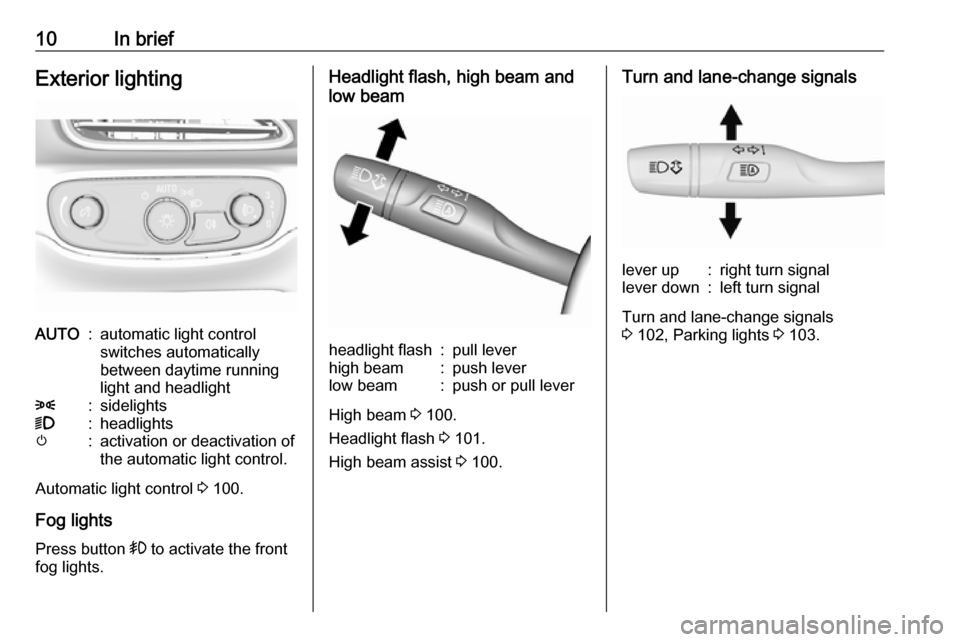
10In briefExterior lightingAUTO:automatic light control
switches automatically
between daytime running
light and headlight8:sidelights9:headlightsm:activation or deactivation of
the automatic light control.
Automatic light control 3 100.
Fog lights
Press button > to activate the front
fog lights.
Headlight flash, high beam and
low beamheadlight flash:pull leverhigh beam:push leverlow beam:push or pull lever
High beam 3 100.
Headlight flash 3 101.
High beam assist 3 100.
Turn and lane-change signalslever up:right turn signallever down:left turn signal
Turn and lane-change signals
3 102, Parking lights 3 103.
Page 36 of 265
34Keys, doors and windows9Warning
The rear camera mirror has a
limited view. Portions of the road,
vehicles, and other objects may
not be seen. Do not drive or park
the vehicle using only this camera. Objects may appear closer thanthey are. Check the outside
mirrors or glance over your
shoulder when making lane
changes or merging. Failure to
use proper care may result in
injury, death, or vehicle damage.
Rear view camera 3 185.
Troubleshooting
If the tab is in the rearward position and a blue screen and d are displayed
in the mirror and the display shuts off, see a workshop for service.
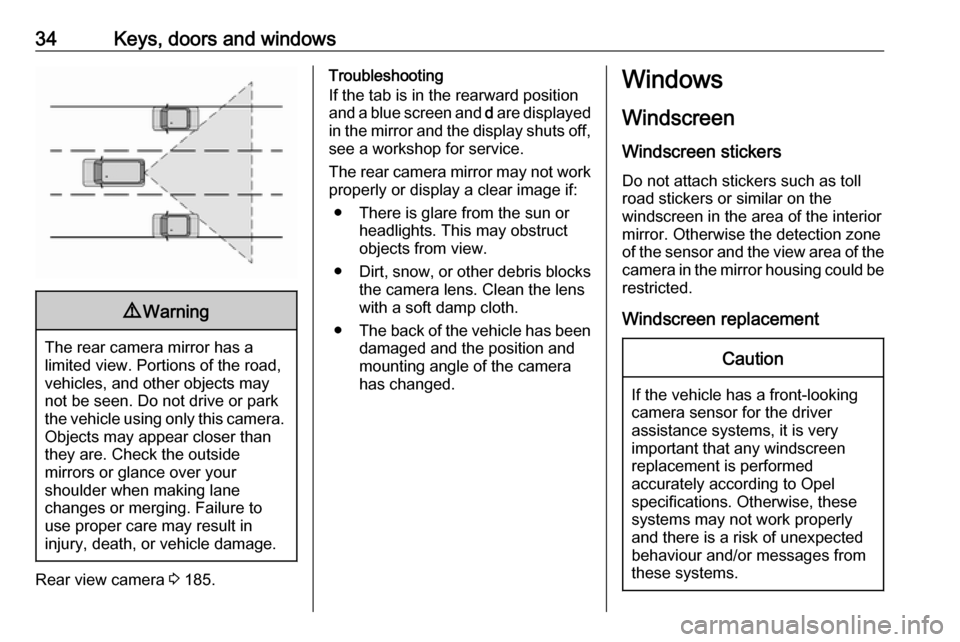
The rear camera mirror may not work properly or display a clear image if:
● There is glare from the sun or headlights. This may obstruct
objects from view.
● Dirt, snow, or other debris blocks
the camera lens. Clean the lens
with a soft damp cloth.
● The back of the vehicle has been
damaged and the position and
mounting angle of the camera
has changed.Windows
Windscreen Windscreen stickers
Do not attach stickers such as toll
road stickers or similar on the
windscreen in the area of the interior
mirror. Otherwise the detection zone
of the sensor and the view area of the camera in the mirror housing could be
restricted.
Windscreen replacementCaution
If the vehicle has a front-looking
camera sensor for the driver
assistance systems, it is very
important that any windscreen
replacement is performed
accurately according to Opel
specifications. Otherwise, these
systems may not work properly
and there is a risk of unexpected
behaviour and/or messages from
these systems.
Page 67 of 265

Instruments and controls65Instruments and
controlsControls ....................................... 66
Steering wheel adjustment ........66
Steering wheel controls .............66
Heated steering wheel ...............66
Horn ........................................... 67
Pedestrian safety alert ...............67
Windscreen wiper/washer .........67
Rear window wiper/washer .......68
Outside temperature ..................69
Clock ......................................... 69
Power outlets ............................. 70
Inductive charging .....................71
Warning lights, gauges and indi‐ cators ........................................... 73
Instrument cluster ......................73
Speedometer ............................. 75
Odometer .................................. 75
Battery gauge ............................ 75
Driving efficiency gauge ............75
Power indicator gauge ...............77
Regenerative braking ................77
Total vehicle range ....................78
Service display .......................... 78
Control indicators ......................78Turn signal................................. 78
Seat belt reminder .....................78
Airbag and belt tensioners .........79
Airbag deactivation ....................79
Charging system .......................79
Service vehicle soon .................80
Brake system ............................. 80
Electric parking brake ................80
Electric parking brake fault ........80
Antilock brake system (ABS) .....80
Sport mode ................................ 81
Lane keep assist .......................81
Electronic Stability Control off ...81
Electronic Stability Control and Traction Control system ...........81
Traction Control system off .......81
Tyre pressure monitoring system ...................................... 81
Immobiliser ................................ 81
Vehicle ready ............................. 82
Exterior light .............................. 82
High beam ................................. 82
High beam assist .......................82
Rear fog light ............................. 82
Cruise control ............................ 82
Vehicle detected ahead .............82
Pedestrian detection ..................82
Speed limiter ............................. 82
Traffic sign assistant ..................82
Door open .................................. 83Information displays.....................83
Driver Information Centre ..........83
Info display ................................ 86
Vehicle messages ........................90
Warning chimes .........................91
Battery voltage .......................... 91
Vehicle personalisation ................92
Telematics service .......................95
OnStar ....................................... 95
Page 76 of 265

74Instruments and controlsOverviewOTurn signal 3 78XSeat belt reminder 3 78vAirbag and belt tensioners
3 79VAirbag deactivation 3 79pCharging system 3 796Service vehicle soonRBrake system 3 80mElectric parking brake
3 80jElectric parking brake fault
3 80uAntilock brake system
(ABS) 3 803Sport mode 3 154aLane keep assist 3 81aElectronic Stability Control
off 3 81bElectronic Stability Control
and Traction Control
system 3 81kTraction Control system off
3 81wTyre pressure monitoring
system 3 81dImmobiliser 3 814Vehicle ready 3 828Exterior light 3 82CHigh beam 3 82fHigh beam assist 3 82øRear fog light 3 82mCruise control 3 82AVehicle detected ahead
3 827Pedestrian detected aheadLSpeed limiter 3 82LTraffic sign assistant
3 82hDoor open 3 83
Reconfigurable instrument cluster
The cluster layout can be changed.
Use the steering wheel control to
move between the different display
zones and scroll through the different displays.
There are three display
configurations to choose from:
● Basic configuration displays the
speedometer with a simplified
high voltage battery gauge and
efficiency light.
● Standard configuration displays
the speedometer with a high
voltage battery gauge and
efficiency gauge.
● Enhanced configuration displays
the speedometer with high
voltage battery gauge, efficiency
ring, and power gauge.
Driver Information Centre 3 83.
Page 83 of 265

Instruments and controls81ABS. The brake system remains
operational but without ABS
regulation.
Antilock brake system 3 158.
Sport mode
3 illuminates when sport mode
is selected.
Sport mode 3 154.
Lane keep assist a illuminates green or yellow, or
flashes yellow.
Illuminates green
The system is switched on and ready
to operate.
Illuminates yellow
The system approaches a detected
lane marking without using the turn
signal in that direction.
Flashes yellow
The system recognises that the lane
is departed significantly.Lane keep assist 3 191.
Electronic Stability Control off
n illuminates yellow.
The system is deactivated.
Electronic Stability Control
and Traction Control system
b illuminates or flashes yellow.
Illuminates
A fault in the system is present.
Continued driving is possible. Driving
stability, however, may deteriorate
depending on road surface
conditions.
Have the cause of the fault remedied
by a workshop.
Flashes
The system is active and is working to assist the driver with directional
control of the vehicle in difficult driving
conditions.Electronic Stability Control 3 163,
Traction Control system 3 162.
Traction Control system off
k illuminates yellow.
The system is deactivated.
Tyre pressure monitoringsystem
w illuminates or flashes yellow.
Illuminates
Tyre pressure loss. Stop immediately
and check tyre pressure.
Flashes
Fault in system or tyre without
pressure sensor mounted (e.g. spare
wheel). After 60 to 90 seconds the
control indicator illuminates
continuously. Consult a workshop.
Immobiliser d illuminates yellow.
Fault in the immobiliser system. The
propulsion system cannot be started.
Page 84 of 265

82Instruments and controlsSeek the assistance of a workshop.
Vehicle ready 4 illuminates green. The vehicle is
ready to be driven.
Exterior light
8 illuminates green.
The exterior lights are on 3 99.
High beam C illuminates blue.
Illuminated when high beam is on or
during headlight flash 3 100.
High beam assist f illuminates green.
The high beam assist is activated
3 100.
Rear fog light ø illuminates yellow.
The rear fog light is on 3 102.Cruise control
m illuminates white or green.
Illuminates white The system is on.
Illuminates green
Cruise control is active.
Cruise control 3 164.
Vehicle detected ahead A illuminates green or yellow.
Illuminates green
A vehicle ahead is detected in the
same lane.
Illuminates yellow
The distance to a preceding moving
vehicle gets too small or when
approaching another vehicle too
rapidly.
Forward collision alert 3 167.
Pedestrian detection
7 illuminates yellow.A pedestrian ahead is detected.
Speed limiter
L illuminates white or green.
Illuminates white The system is on.
Illuminates green Speed limiter is active. Set speed is
indicated near L symbol.
Speed limiter 3 165.
Traffic sign assistant L displays detected traffic signs as
control indicator.
Traffic sign assistant 3 188.
Page 93 of 265

Instruments and controls91Some important messages may
appear additionally in the Info display.
Some messages only pop-up for a
few seconds.
Warning chimes
When starting the propulsion
system or whilst driving
Only one warning chime will sound at a time.
The warning chime regarding not
fastened seat belts has priority over
any other warning chime.
● If seat belt is not fastened.
● If a door or the tailgate is not fully
closed when starting off.
● If a certain speed is exceeded with parking brake applied.
● If approaching a vehicle ahead too rapidly.
● If a programmed speed or speed
limit is exceeded.
● If a warning message appears in the Driver Information Centre.
● If the electronic key is not in the passenger compartment.● If the parking assist detects anobject.
● If an unintended lane change occurs.
● If safety function of the power tailgate detects obstacles in the
moving area.
When the vehicle is parked and/or the driver's door is opened
● With exterior lights on.
Battery voltage When the vehicle battery voltage is
running low, a warning message will
appear in the Driver Information
Centre.
1. Switch off any electrical consumers which are not requiredfor a safe drive, e.g. seat heating,
heated rear window or other main consumers.
2. Charge the vehicle battery by driving continuously for a while or
by using a charging device.The warning message will disappear
after the vehicle has been started
twice without a voltage drop.
If the vehicle battery cannot be
recharged, have the cause of the fault
remedied by a workshop.
Page 101 of 265
Lighting99LightingExterior lighting............................ 99
Light switch ................................ 99
Automatic light control .............100
High beam ............................... 100
High beam assist .....................100
Headlight flash ......................... 101
Headlight range adjustment ....101
Daytime running lights .............102
Hazard warning flashers ..........102
Turn and lane-change signals . 102
Rear fog light ........................... 102
Parking lights ........................... 103
Reversing lights .......................103
Misted light covers ...................103
Interior lighting ........................... 103
Instrument panel illumination control ..................................... 103
Interior lights ............................ 104
Reading lights .......................... 104
Sunvisor lights ......................... 104
Lighting features ........................104
Entry lighting ............................ 104
Exit lighting .............................. 104
Battery discharge protection ....105Exterior lighting
Light switch
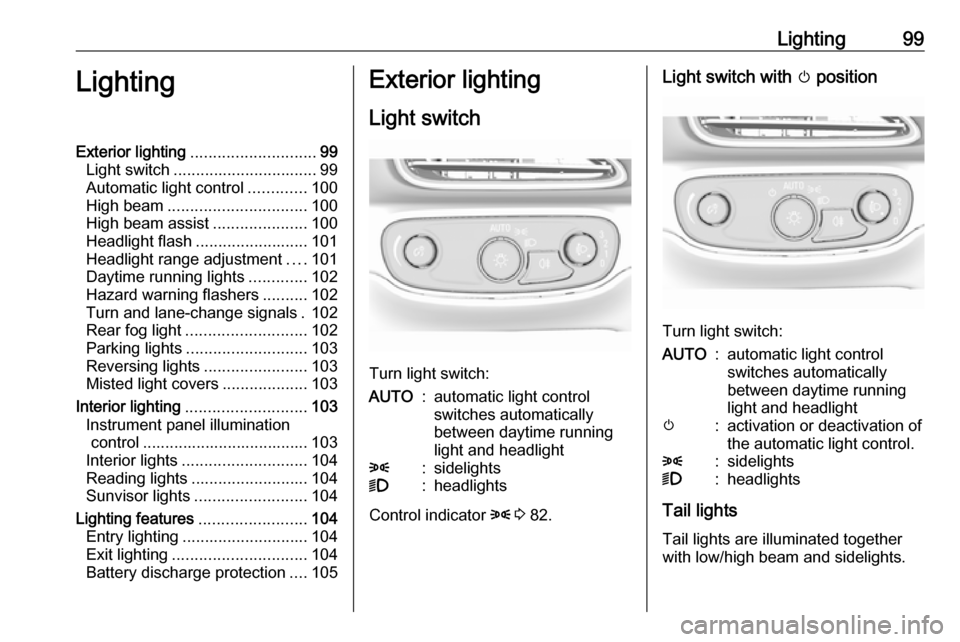
Turn light switch:
AUTO:automatic light control
switches automatically
between daytime running
light and headlight8:sidelights9:headlights
Control indicator 8 3 82.
Light switch with m position
Turn light switch:
AUTO:automatic light control
switches automatically
between daytime running
light and headlightm:activation or deactivation of
the automatic light control.8:sidelights9:headlights
Tail lights
Tail lights are illuminated together
with low/high beam and sidelights.
Page 150 of 265

148Driving and operatingDriving and
operatingDriving hints ............................... 148
Driving economically ...............148
Control of the vehicle ...............149
Starting and operating ...............149
New vehicle running-in ............149
Power button ........................... 149
Retained power off ..................151
Starting and stopping the vehicle .................................... 151
Parking .................................... 152
Electric vehicle operation modes ........................................ 154
Operation ................................. 154
Drive modes ............................ 154
Electric drive unit .......................155
Operation ................................. 155
Brakes ........................................ 158
Antilock brake system .............158
Parking brake .......................... 159
Regenerative braking ..............160
Ride control systems .................162
Traction Control system ..........162
Electronic Stability Control ......163Driver assistance systems .........164
Cruise control .......................... 164
Speed limiter ........................... 165
Forward collision alert .............167
Following distance indication ...169
Active emergency braking .......169
Front pedestrian protection .....172
Parking assist .......................... 174
Side blind spot alert .................181
Lane change alert ....................183
Panoramic view system ...........184
Rear view camera ...................185
Rear cross traffic alert .............187
Traffic sign assistant ................188
Lane keep assist .....................191
Charging .................................... 193
Programmable charging ..........197
Programmed charging override .................................. 203
Charging status .......................204
Charge cord ............................. 205
Electrical requirements ............208
Towing ....................................... 209
General information .................209Driving hints
Driving economically The following advice is intended to
help maximise energy efficiency and
range.
In colder temperatures, while these
efficiency tips will help, the electric
vehicle's driving range may be lower
due to higher energy usage.
The weight of additional cargo in the
vehicle affects efficiency and range.
Avoid carrying more than is needed.
Avoid unnecessary use of electrical
accessories. Power used for
functions other than propelling the
vehicle will reduce electric vehicle
range.
Always keep the tyres properly
inflated and the vehicle properly
aligned.
Driving style
Avoid unnecessary rapid
accelerations and decelerations.
Use cruise control when appropriate.