Fav OPEL AMPERA E 2017.5 Owner's Manual
[x] Cancel search | Manufacturer: OPEL, Model Year: 2017.5, Model line: AMPERA E, Model: OPEL AMPERA E 2017.5Pages: 265, PDF Size: 6.24 MB
Page 87 of 265

Instruments and controls85Traffic sign assistant
Displays the detected traffic signs for
the current route section 3 188.
Following distance
Displays the distance in seconds to a
preceding moving vehicle 3 169.
Blank page
Shows a blank page without any information.
Audio menu
In the main view of the Audio
application, press { or } to scroll
through radio stations or move to the
next/previous track of a USB/
Bluetooth ®
device that is connected to
the vehicle.
Press 9 to select the Audio app, then
press [ to enter the Audio menu. In
the Audio menu browse for music,
select from the favourites, or change
the audio source.
Exit the Audio menu by pressing 9
or ].Phone menu
Press 9 to select the Phone
application, then press [ to enter the
Phone menu. In the Phone menu, if
there is no active phone call, view
recent calls, scroll through contacts,
or select from the favourites. If there
is an active call, mute or unmute the
phone or switch to handset or hands
free operation.
Exit the Phone menu by pressing 9
or ].
Layout menu Press 9 while display themes is
displayed. Select Basic, Standard or
Enhanced mode by pressing 9.
Options menu
The following list contains all possible Options menu pages:
● Unit
● Speed warning
● Tyre load
Units
Press [ while units page is displayed.Select imperial or metric units by
pressing 9.
Speed warning
The speed warning function alerts the
driver when a set speed is exceeded.
To set the speed warning, press 9
while the page is displayed. Press
[ and { or } to adjust the value.
Press 9 to set the speed. Once the
speed is set, this feature can be
turned off by pressing 9 while
viewing this page. If the selected
speed limit is exceeded, a pop-up
warning is displayed with a chime.
Tyre load
The tyre pressure category according to the actual tyre inflation pressure
can be selected 3 233.
Press { or } to select a category
Light , Eco or Max .
Press 9 to confirm category.
Help
Provides information about the
gauges which are available in the
different layouts ( Basic, Standard or
Enhanced ).
Page 112 of 265
110Infotainment systemor take phone call if phoneconnected ........................... 137
Long press: activate speech recognition ..............133
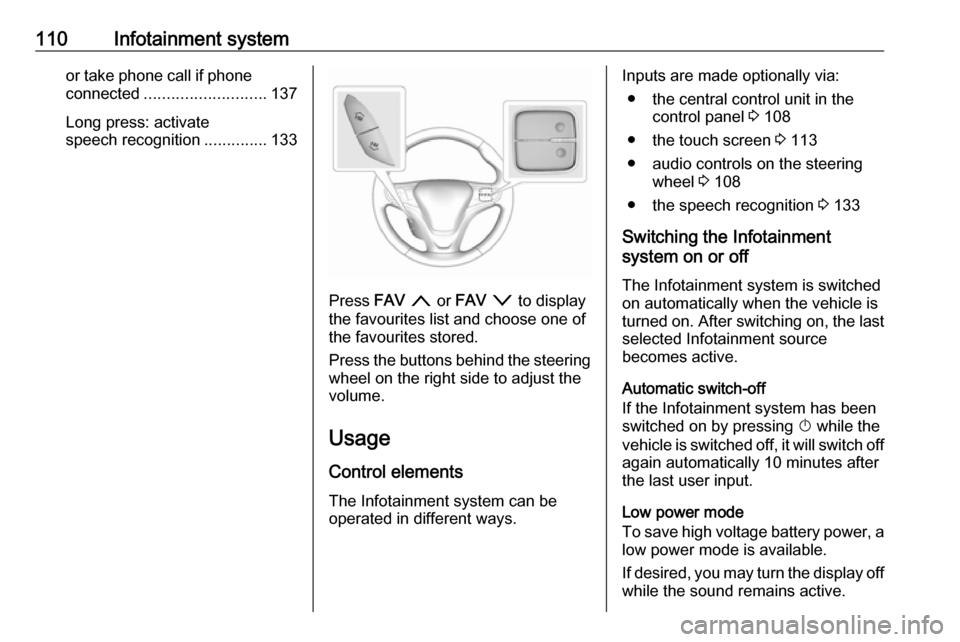
Press FAV n or FAV o to display
the favourites list and choose one of
the favourites stored.
Press the buttons behind the steering
wheel on the right side to adjust the
volume.
Usage
Control elements The Infotainment system can be
operated in different ways.
Inputs are made optionally via:
● the central control unit in the control panel 3 108
● the touch screen 3 113
● audio controls on the steering wheel 3 108
● the speech recognition 3 133
Switching the Infotainment
system on or off
The Infotainment system is switched
on automatically when the vehicle is
turned on. After switching on, the last selected Infotainment source
becomes active.
Automatic switch-off
If the Infotainment system has been switched on by pressing X while the
vehicle is switched off, it will switch off
again automatically 10 minutes after
the last user input.
Low power mode
To save high voltage battery power, a low power mode is available.
If desired, you may turn the display off
while the sound remains active.
Page 122 of 265
120Infotainment systemTo reset tone and volume settings,
delete all favourites, and erase the
ringtone selection, select Restore
radio settings .
In each case, a warning message is
displayed. Select Continue to reset
the settings.
System version
Open source information
Press p and then select 1 in the top
left corner of the screen to display the application overview screen.
Select Settings . Scroll through the list
and select Software information .
To display open source software
licensing information, select Open
source .
Software updates
Press p and then select 1 in the top
left corner of the screen to display the
application overview screen.
Select Settings . Scroll through the list
and select Software information .To start a software update, select
Software Update . For a detailed
description on software updates
3 253.
To display a menu with further
settings, select Update Preferences .
If Download New Updates in
Background is activated, software
updates are downloaded
automatically by the system without
specific notification. If Download New
Updates in Background is
deactivated, a message might be
displayed before an update is carried out. Activate or deactivate the
function as desired.
Vehicle settings See "Vehicle personalisation" 3 92.Radio
Usage
Activation of the radio function Press p and then select 1 in the top
left corner of the screen to display the application overview screen.
Select Audio. The audio main menu
last selected is displayed.
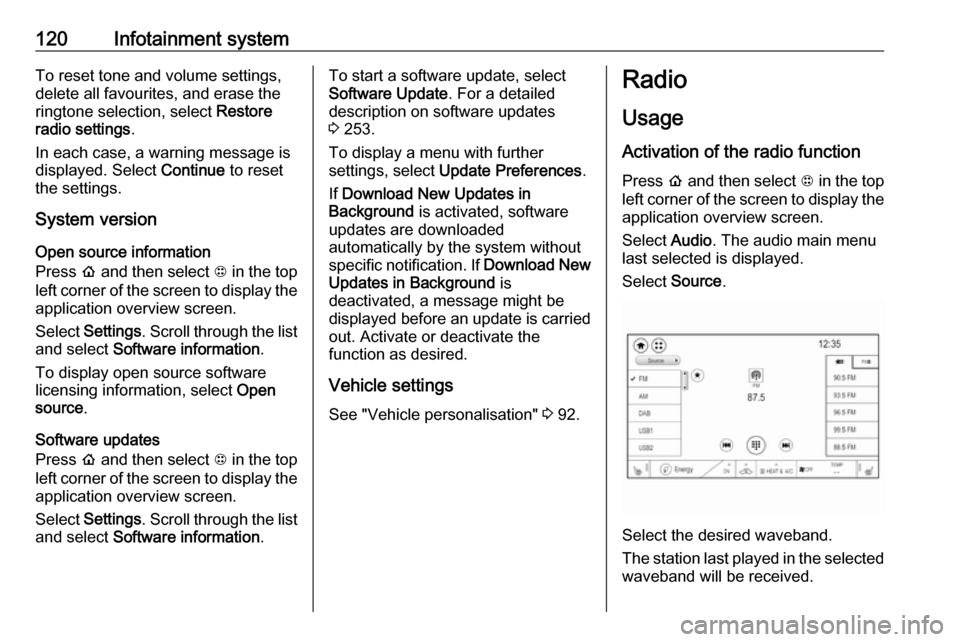
Select Source .
Select the desired waveband.
The station last played in the selected waveband will be received.
Page 124 of 265

122Infotainment system
Select the Browse audio tab and then
select the respective station list, e.g.
FM stations . All receivable stations of
the relevant waveband and in the
current reception area are displayed.
Alternatively, select the waveband
symbol tab, e.g. ~ to directly
display the stations.
Select the desired station.
Categories
Numerous radio stations broadcast a
PTY code, which specifies the type of programme transmitted (e.g. news).
Some stations also change the PTY
code depending on the content which is currently transmitted.
The Infotainment system stores these
stations, sorted by programme type in
the corresponding category list.
Note
The categories list item is only
available for the FM and the DAB
wavebands.
To search for a programme type
determined by the stations, select
Menu and then select the Browse
audio tab. Select FM categories or
DAB categories .
A list of programme types currently
available is displayed.
Select the desired programme type. A
list of stations is displayed
transmitting a programme of the
selected type.
Select the desired station.
Update station lists
If the stations stored in the waveband-
specific station list are no longer
received, the station lists must be
updated.Select Menu and then select the
Browse audio tab. Depending on the
waveband, select Update FM
stations , Update DAB stations or
Update AM stations .
Note
If a waveband-specific station list is
updated, the corresponding
category list is also updated.
A station search is started and a
corresponding message is displayed. Once the search is finished, the
respective station list is displayed.
Favourites
Favourites of all audio sources can be stored manually in the favourites list.The favourites list contains up to
15 favourites.
Page 125 of 265

Infotainment system123
Storing a station
Activate the desired waveband and
station.
Activate the < tab to display the
favourites list. Touch and hold the
desired list item for a few seconds.
The currently active frequency or
station is stored to the list item.
Alternatively, select t on the screen
or in a list. The favourite is saved and
the screen button changes to s.
To delete a station, fling the
respective list item to the right. The
favourite is wiped from the favourites
list.
Alternatively, touch s. The favourite
is deleted from the list and the screen
button changes to t.
Retrieving stations
Activate the < tab to display the
favourites list.
Select the preset screen button on
which the desired radio station is
stored.
Radio data system (RDS) RDS is a service of FM stations that
considerably facilitates the finding of
the desired station and its fault-free
reception.
Advantages of RDS ● On the display, the programme name of the station appears
instead of its frequency.
● During a station search, the Infotainment system tunes in to
RDS stations only.● The Infotainment system always
tunes into the best receivable
broadcasting frequency of the set station by means of AF
(alternative frequency).
● Depending on the station that is received, the Infotainment
system displays radio text that
can contain e.g. information on
the current programme.
RDS configuration
To use the RDS functions, RDS has
to be activated.
Activate the FM waveband. Select
Menu to open the corresponding
waveband-specific submenu and
then select the Audio settings tab.
Page 131 of 265
Infotainment system129Returning to the beginning of the
current track
Touch t after a few seconds of the
track playing.
Fast forwarding and rewinding
Touch and hold t or v. Release to
return to normal playback mode.
Playing tracks randomly
Touch n to play the tracks in random
order. The screen button changes to
o .
Touch o again to deactivate the
shuffle function and go back to the
normal playback mode.
Playing tracks repeatedly
Touch } and then select one of the
options in the drop-down menu.
Repeat all : All available files are
played repeatedly.
Repeat song : The song currently
playing is played repeatedly.
Repeat off : The repeat function is
deactivated.Browse audio function
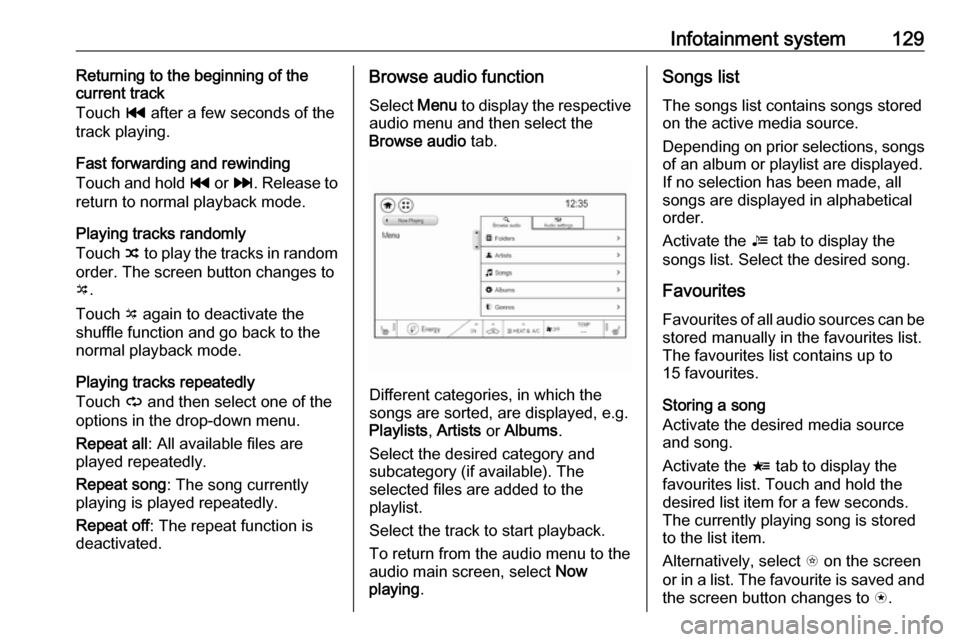
Select Menu to display the respective
audio menu and then select the
Browse audio tab.
Different categories, in which the
songs are sorted, are displayed, e.g.
Playlists , Artists or Albums .
Select the desired category and
subcategory (if available). The
selected files are added to the
playlist.
Select the track to start playback.
To return from the audio menu to the audio main screen, select Now
playing .
Songs list
The songs list contains songs stored
on the active media source.
Depending on prior selections, songs of an album or playlist are displayed.If no selection has been made, all
songs are displayed in alphabetical
order.
Activate the = tab to display the
songs list. Select the desired song.
Favourites
Favourites of all audio sources can be stored manually in the favourites list.
The favourites list contains up to
15 favourites.
Storing a song
Activate the desired media source
and song.
Activate the < tab to display the
favourites list. Touch and hold the
desired list item for a few seconds.
The currently playing song is stored
to the list item.
Alternatively, select t on the screen
or in a list. The favourite is saved and
the screen button changes to s.
Page 132 of 265
130Infotainment systemTo delete a song, fling the respective
list item to the right. The favourite is
wiped from the favourites list.
Alternatively, touch s. The favourite
is deleted from the list and the screen
button changes to t.
Retrieving songs
Activate the < tab to display the
favourites list.
Select the preset screen button on
which the desired song is stored.
Audio settings
Activate the desired audio source and then select Menu.
Select the Audio settings tab. Adjust
the settings as desired.
To return from the audio menu to the
audio main screen, select Now
playing .
Displaying pictures
You can view pictures from a USB
device connected to the USB port.Note
For your safety, some features are
disabled while driving.
Activating the picture function
If the device is not yet connected to
the Infotainment system, connect the
device 3 126.
Press p and then select 1 in the top
left corner of the screen to display the application overview screen.
Select Gallery to open the media
main menu.
Select y to open the picture main
menu displaying a list of items stored on the USB device. Select the desired
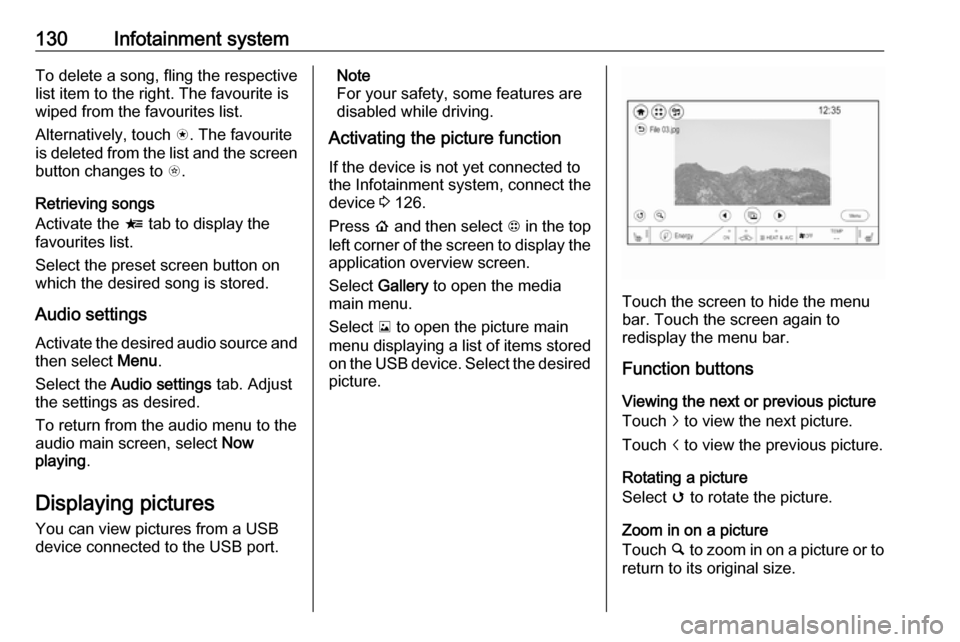
picture.
Touch the screen to hide the menu
bar. Touch the screen again to
redisplay the menu bar.
Function buttons
Viewing the next or previous picture
Touch j to view the next picture.
Touch i to view the previous picture.
Rotating a picture
Select v to rotate the picture.
Zoom in on a picture
Touch ½ to zoom in on a picture or to
return to its original size.
Page 141 of 265

Infotainment system139Favourites
Contact favourites can be stored in
the phone favourites list.Storing favourites
Press p and then select 1 in the top
left corner of the screen to display the application overview screen.
Select Phone. Select the ^ tab in the
phone main menu.
Select t next to the contact you want
to store as favourite. The icon
changes to s and the contact
appears in the favourites list.
Select s again to delete the contact
from the favourites list. The icon
changes to t.
Note
The favourites list is not
synchronised with the phone
favourites. The favourites have to be added to the favourites list on the
Infotainment system.Retrieving favourites
Press p and then select 1 in the top
left corner of the screen to display the application overview screen.Select Phone. Select the < tab in the
phone main menu.
Select the desired favourite to initiate a phone call.
Redialling a number
The last dialled phone number can be
redialled.
Press p and then select 1 in the top
left corner of the screen to display the application overview screen.
Select Phone and then ? on the
screen.
Using speed dial numbers
Speed dial numbers that are stored
on the mobile phone can also be
dialled using the keypad of the phone
main menu.
Press p and then select 1 in the top
left corner of the screen to display the application overview screen.
Select Phone.
Touch and hold the respective digit on the keypad to initiate the call. For two-
digit speed dial numbers, select the
first digit and then touch and hold the second digit.Incoming phone call
Taking a call
If an audio mode, e.g. the radio or
USB mode, is active at the moment a call comes in the audio source is
muted and stays muted until the call
ends.
To answer the call, select v in the
message on top of the screen or
press w on the steering wheel.
The Z tab is activated displaying
information on the call.
Rejecting a call
To reject the call, select @ in the
message on top of the screen or
press n on the steering wheel.
Privacy settings
When a call comes in, a message is displayed on the Infotainment display
indicating the name and number of
the person calling (if available). If
Privacy is activated, information on
the caller is only shown in the cluster
display.
Page 261 of 265

259Movie files................................... 126
Mute............................................ 110
N
New vehicle running-in ..............149
Number plate light .....................221
O Object detection systems ...........174
Odometer ..................................... 75
One-pedal driving .......................155
OnStar .......................................... 95
Operation .................... 137, 154, 155
External devices ......................126
Menu ....................................... 113
Phone ...................................... 137
Radio ....................................... 120
Outside temperature ....................69
P Pairing ........................................ 134
Panoramic view system ..............184
Parking ................................ 15, 152
Parking assist ............................ 174
Parking brake ............................ 159
Parking lights ............................. 103
Pedestrian detection .....................82
Pedestrian safety alert ............11, 67
Performance .............................. 248
Performing work ........................213Phone
Bluetooth ................................. 134
Bluetooth connection ..............134
Call history .............................. 137
Emergency calls ......................136
Entering a number ..................137
Functions during a call ............137
General information ................134
Incoming call ........................... 137
Phone book ............................. 137
Phone main menu ...................137
Selecting the ring tone ............137
Speed dial number ..................137
Phone book ................................ 137
Phone projection ........................132
Picture files ................................. 126
Playing audio .............................. 128
Playing movies ........................... 131
Pollen filter ................................. 146
Post-crash label .......................... 152
Power button .............................. 149
Power indicator gauge ..................77
Power outlets ............................... 70
Power windows ............................ 35
Programmable charging .............197
Programmed charging override ..203
Propulsion system data ..............248R
Radio Activating................................. 120Configuring DAB .....................124
Configuring RDS .....................123
DAB announcements ..............124
Digital audio broadcasting
(DAB) ...................................... 124
Favourite lists .......................... 121
Intellitext .................................. 124
Radio data system (RDS) .......123
Regional .................................. 123
Regionalisation ....................... 123
Selecting the waveband ..........120
Station search ......................... 121
Station tuning .......................... 121
Usage ...................................... 120
Radio data system (RDS) ..........123
Radio Frequency Identification (RFID) ..................................... 255
Radio remote control ...................17
RDS ............................................ 123
Reading lights ............................ 104
Rear cross traffic alert ................187
Rear floor storage cover ..............61
Rear fog light ....................... 82, 102
Rear seats .................................... 43
Rear view camera ...................... 185
Rear window wiper/washer .......... 68