key battery OPEL AMPERA E 2017.5 Owner's Manual
[x] Cancel search | Manufacturer: OPEL, Model Year: 2017.5, Model line: AMPERA E, Model: OPEL AMPERA E 2017.5Pages: 265, PDF Size: 6.24 MB
Page 20 of 265
18Keys, doors and windowsCancelling remote start
To cancel Remote start , do any of the
following:
● Aim the radio remote control at the vehicle and press and hold
O until the sidelights turn off.
● Turn on the hazard warning flashers.
● Press the POWERm button on
the instrument panel with the
brake pedal depressed, then
press the POWERm button again
to switch off the vehicle.
Conditions in which remote start will
not work
● An open bonnet.
● Vehicle propulsion system fault conditions.
● High voltage battery fault conditions.
● The shift lever is not in P (Park).Conditions in which Remote start may
be cancelled include:
● Vehicle propulsion system or high voltage battery fault
conditions.
● Electric drive unit coolant temperature is too high.
Replacing battery in radio remote
control
Replace the battery as soon as the
range reduces.
Batteries do not belong in household
waste. They must be disposed of at
an appropriate recycling collection
point.
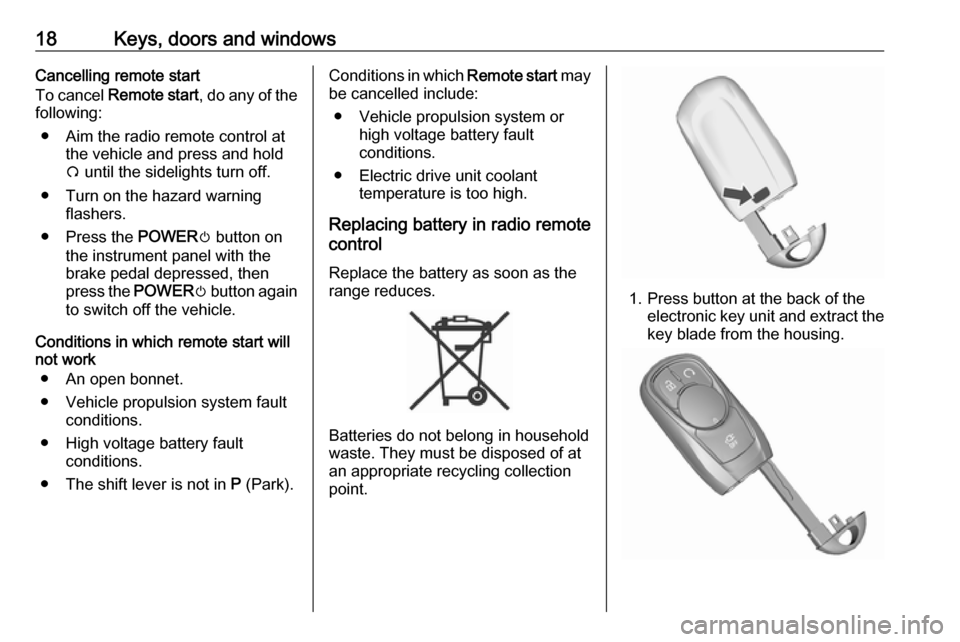
1. Press button at the back of the electronic key unit and extract thekey blade from the housing.
Page 21 of 265
Keys, doors and windows192. Insert the key blade for approx.6 mm and turn the key to open thehousing. Further insertion of the
key blade can damage the
housing.
3. Remove and replace battery. Use
CR 2032 or equivalent battery.
Pay attention to the installation
position.
4. Close the housing and insert key blade.
Radio remote control
synchronisation
After replacing the battery, unlock the
door with the key in the driver's door
lock. The radio remote control will be
synchronised when you switch on the
vehicle.
Fault
If the central locking system cannot
be operated with the radio remote
control, the cause may be one of the
following:
● Fault in radio remote control.
● The range is exceeded.
● The battery voltage is too low.● Frequent, repeated operation of the radio remote control while notin range, which will require re-
synchronisation.
● Overload of the central locking system by operating at frequent
intervals, the power supply is
interrupted for a short time.
● Interference from higher-power radio waves from other sources.
Manual unlocking 3 20.
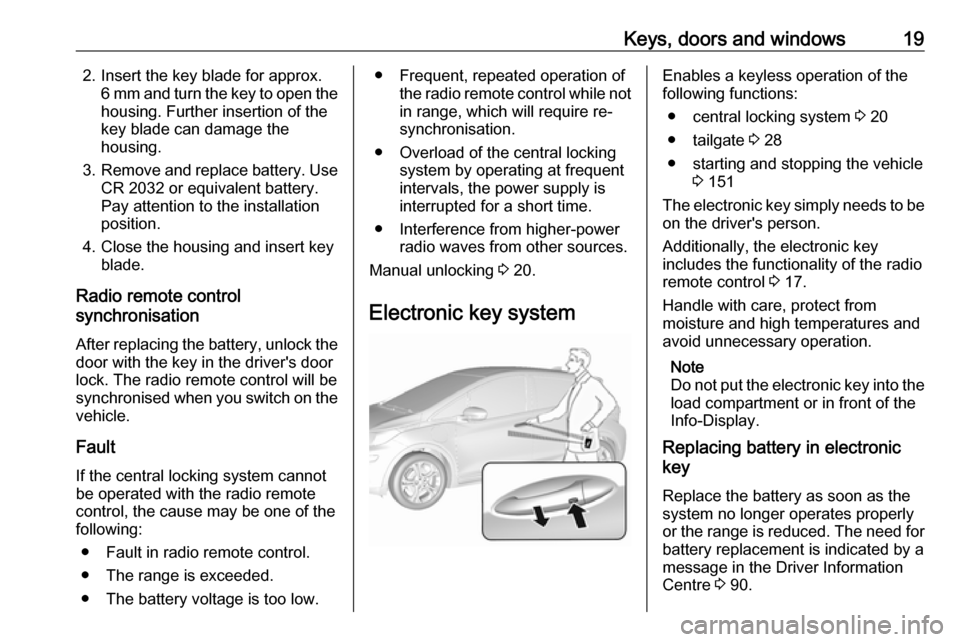
Electronic key systemEnables a keyless operation of the
following functions:
● central locking system 3 20
● tailgate 3 28
● starting and stopping the vehicle 3 151
The electronic key simply needs to be on the driver's person.
Additionally, the electronic key
includes the functionality of the radio
remote control 3 17.
Handle with care, protect from
moisture and high temperatures and
avoid unnecessary operation.
Note
Do not put the electronic key into the
load compartment or in front of the
Info-Display.
Replacing battery in electronic
key
Replace the battery as soon as the
system no longer operates properly
or the range is reduced. The need for battery replacement is indicated by a
message in the Driver Information
Centre 3 90.
Page 22 of 265

20Keys, doors and windowsBattery replacement, in Radio remotecontrol 3 17.
Electronic key synchronisation
The electronic key synchronises itself automatically during every starting
procedure.
Fault
If the central locking cannot be
operated or the propulsion system
cannot be started, the cause may be
one of the following:
● Fault in electronic key.
● Electronic key is out of reception range.
● The battery voltage is too low.
● Overload of the central locking system by operating at frequent
intervals, the power supply is
interrupted for a short time.
● Interference from higher-power radio waves from other sources.
To rectify the cause of the fault,
change the position of the electronic
key.
Manual unlocking 3 20.Memorised settings
Whenever the vehicle is switched off, the following settings are
automatically memorised by the
electronic key:
● automatic climate control
● lighting
● Infotainment system
● central locking system
● comfort settings
The saved settings are automatically
used the next time the vehicle is
switched on with the memorised
electronic key 3 19.
A precondition is that Personalisation
by driver is activated in the personal
settings of the Info display. This must
be set for each electronic key which is
used. The status change is available
only after locking and unlocking the
vehicle.
Vehicle personalisation 3 92.
Central locking system
Unlocks and locks doors, load
compartment and charge port door.A pull on an interior door handle
unlocks the respective door. Pulling the handle once more opens the door.
Note
In the event of an accident in which
airbags or belt pretensioners are
deployed, the vehicle is
automatically unlocked.
Note
A short time after unlocking with the
remote control the doors are locked
automatically if no door has been
opened. A precondition is that the
setting is activated in the vehicle
personalisation 3 92.
Page 25 of 265
Keys, doors and windows23Operation with buttons on the
electronic key
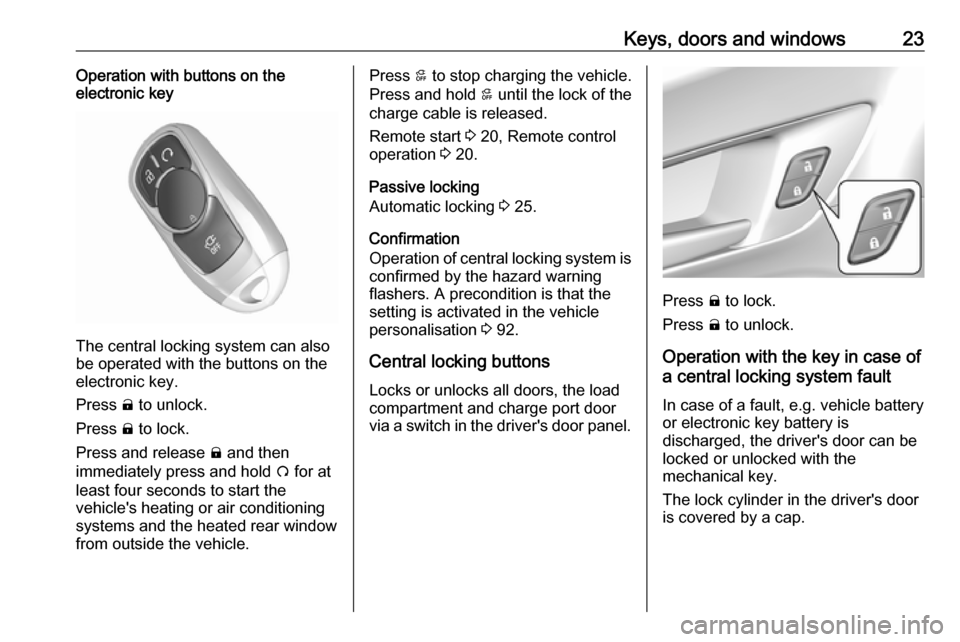
The central locking system can also
be operated with the buttons on the
electronic key.
Press ( to unlock.
Press ) to lock.
Press and release ) and then
immediately press and hold O for at
least four seconds to start the
vehicle's heating or air conditioning systems and the heated rear window
from outside the vehicle.
Press 5 to stop charging the vehicle.
Press and hold 5 until the lock of the
charge cable is released.
Remote start 3 20, Remote control
operation 3 20.
Passive locking
Automatic locking 3 25.
Confirmation
Operation of central locking system is
confirmed by the hazard warning
flashers. A precondition is that the
setting is activated in the vehicle
personalisation 3 92.
Central locking buttons Locks or unlocks all doors, the load
compartment and charge port door
via a switch in the driver's door panel.
Press ) to lock.
Press ( to unlock.
Operation with the key in case of
a central locking system fault
In case of a fault, e.g. vehicle battery
or electronic key battery is
discharged, the driver's door can be
locked or unlocked with the
mechanical key.
The lock cylinder in the driver's door
is covered by a cap.
Page 28 of 265
26Keys, doors and windowsPassive lockingOn vehicles with electronic key
system, this feature locks the vehicle
automatically after several seconds if
an electronic key has been
recognised previously inside the
vehicle, all doors have then been
closed and the electronic key does
not remain within the vehicle.
If the electronic key remains in the
vehicle or the vehicle is not off,
passive locking will not be permitted.
If there have been two or more
electronic keys in the vehicle and the
vehicle was on once, the feature locks the vehicle if just one electronic key is
taken out of the vehicle.
To prevent passive locking of the
vehicle e.g. when passengers remain in the vehicle, the system must be
disabled.
To disable the system, press the
central locking button ( for a few
seconds while one door is open. The function remains disabled until the
central locking button ) is pressed or
the vehicle is switched on.Activation or deactivation of passive
locking can be set in the menu
Settings , I Vehicle in the Info display.
Info display 3 86.
Vehicle personalisation 3 92.
The setting can be saved for the
electronic key being used 3 20.
Child locks9 Warning
Use the child locks whenever
children are occupying the rear
seats.
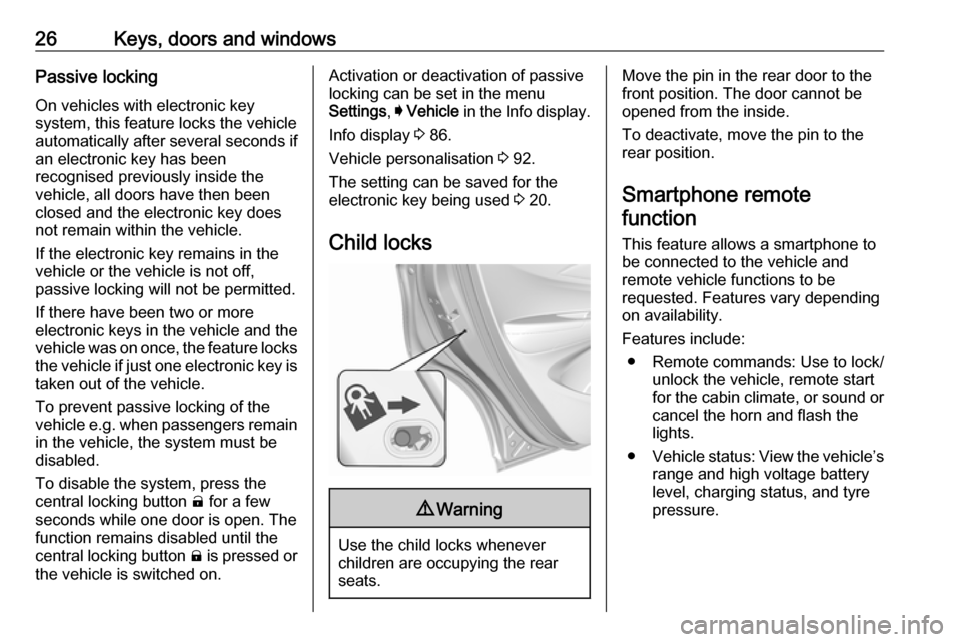
Move the pin in the rear door to the front position. The door cannot be
opened from the inside.
To deactivate, move the pin to the
rear position.
Smartphone remote
function
This feature allows a smartphone to
be connected to the vehicle and
remote vehicle functions to be
requested. Features vary depending
on availability.
Features include: ● Remote commands: Use to lock/ unlock the vehicle, remote start
for the cabin climate, or sound or cancel the horn and flash the
lights.
● Vehicle status: View the vehicle’s
range and high voltage battery
level, charging status, and tyre
pressure.
Page 29 of 265

Keys, doors and windows27● Welcome lighting: Request lightwhen approaching the vehicle.
● Location services: Save the parked location or start
navigation at the vehicle’s GPS
coordinates.Setup function ● KeyPass setup
● Managing priority setting ● Modifying priority setting
● RevocationActive remote function ● Door lock/unlock
● Remote start/stop
● Panic alarm activation/ termination
● Remote charge termination
● High voltage charge functions ● Temporary charging override
update
● Change the charging mode permanently
● Update departure time schedule●High voltage priority charging
activation and deactivation
● Select charge level/limit preference screen
● Vehicle locator
● Routing /available mileagePassive function
Approach detection/welcome lightingVisual display for vehicle information ● Low high voltage battery indication
● Tyre pressure
● Remote engine start status
● Odometer reading
● Rear closure ajar switch status
● Electric parking brake status
● Bonnet status
● High voltage battery state of charge status
● GPS signal for end of trip
● Charge mode status ● Available mileage
● Charge start and end times status● Full week of time baseddelayed charging status
● Disable rate based and delayed charging status
● High voltage charging system fault (unable to
charge)
● High voltage charger power level
● High voltage battery charge cord connected indication
● Charge complete
● Usable state of charge
● High voltage depletion mode range
● High voltage battery state of charge status
Pairing A smartphone must be paired to the
KeyPass module and then it must be
connected to the vehicle before it can
be used.
Page 38 of 265
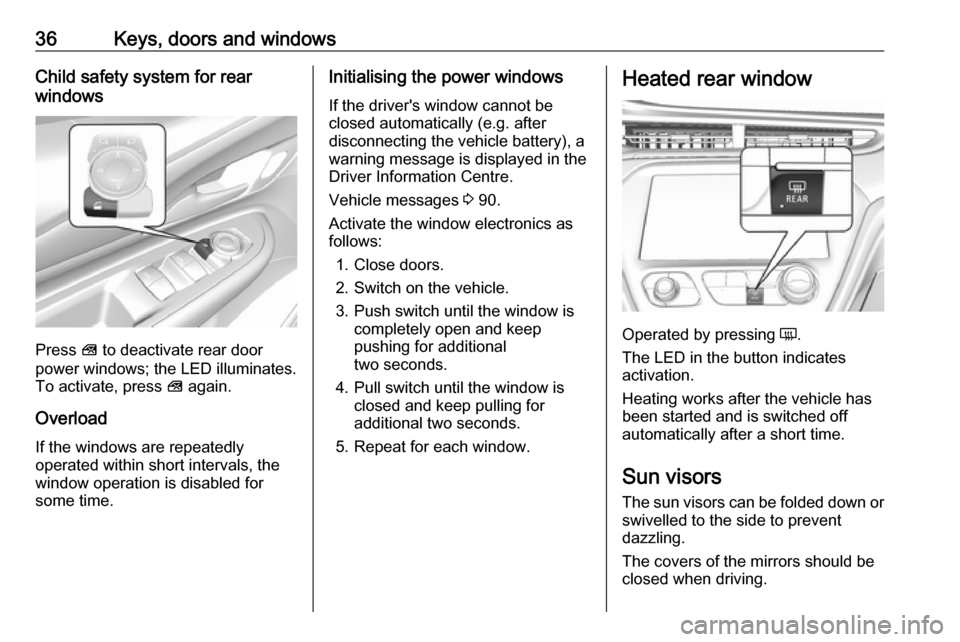
36Keys, doors and windowsChild safety system for rear
windows
Press V to deactivate rear door
power windows; the LED illuminates.
To activate, press V again.
Overload
If the windows are repeatedly
operated within short intervals, the
window operation is disabled for
some time.
Initialising the power windows
If the driver's window cannot be
closed automatically (e.g. after
disconnecting the vehicle battery), a
warning message is displayed in the
Driver Information Centre.
Vehicle messages 3 90.
Activate the window electronics as
follows:
1. Close doors.
2. Switch on the vehicle.
3. Push switch until the window is completely open and keep
pushing for additional
two seconds.
4. Pull switch until the window is closed and keep pulling for
additional two seconds.
5. Repeat for each window.Heated rear window
Operated by pressing Ü.
The LED in the button indicates
activation.
Heating works after the vehicle has
been started and is switched off
automatically after a short time.
Sun visors The sun visors can be folded down or
swivelled to the side to prevent
dazzling.
The covers of the mirrors should be
closed when driving.
Page 93 of 265

Instruments and controls91Some important messages may
appear additionally in the Info display.
Some messages only pop-up for a
few seconds.
Warning chimes
When starting the propulsion
system or whilst driving
Only one warning chime will sound at a time.
The warning chime regarding not
fastened seat belts has priority over
any other warning chime.
● If seat belt is not fastened.
● If a door or the tailgate is not fully
closed when starting off.
● If a certain speed is exceeded with parking brake applied.
● If approaching a vehicle ahead too rapidly.
● If a programmed speed or speed
limit is exceeded.
● If a warning message appears in the Driver Information Centre.
● If the electronic key is not in the passenger compartment.● If the parking assist detects anobject.
● If an unintended lane change occurs.
● If safety function of the power tailgate detects obstacles in the
moving area.
When the vehicle is parked and/or the driver's door is opened
● With exterior lights on.
Battery voltage When the vehicle battery voltage is
running low, a warning message will
appear in the Driver Information
Centre.
1. Switch off any electrical consumers which are not requiredfor a safe drive, e.g. seat heating,
heated rear window or other main consumers.
2. Charge the vehicle battery by driving continuously for a while or
by using a charging device.The warning message will disappear
after the vehicle has been started
twice without a voltage drop.
If the vehicle battery cannot be
recharged, have the cause of the fault
remedied by a workshop.
Page 99 of 265

Instruments and controls97Smartphone app
With the myOpel smartphone app,
some vehicle functions can be
operated remotely.
The following functions are available: ● Lock or unlock vehicle.
● Honk horn or flash lights.
● Operate parking heater.
● Check vehicle battery-related information.
● Check tyre pressure (only with tyre pressure monitoring
system).
● Send navigation destination to the vehicle for use with
navigation application via phone
projection.
● Locate vehicle on a map.
● Manage Wi-Fi settings.
To operate these functions, download the app from App Store ®
or
Google Play™ Store.Remote control
If desired, use any phone to call an
advisor, who can remotely operate
specific vehicle functions. Find the
respective OnStar phone number on
our country-specific website.
The following functions are available: ● Lock or unlock vehicle.
● Provide information on the vehicle location.
● Honk horn or flash lights.
Stolen vehicle assistance
If the vehicle is stolen, report the theft
to the authorities and request OnStar
stolen vehicle assistance. Use any
phone to call an advisor. Find the
respective OnStar phone number on
our country-specific website.
OnStar can provide support in
locating and recovering the vehicle.Theft alert
When the anti-theft alarm system is
triggered, a notification is sent to
OnStar. You are then informed about
this event by text message or email.Restart prevention
By sending remote signals, OnStar
can prevent the vehicle from
restarting once it has been turned off.
On-demand diagnostics
At any time e.g. if the vehicle displays a vehicle message, press Z to
contact an advisor and ask to
complete a real-time diagnostic check
to directly determine the issue.
Depending on the results, the advisor
will provide further support.
Diagnostic report
The vehicle automatically transmits
diagnostic data to OnStar which
sends a monthly email report to you
and your preferred workshop.
Note
The workshop notification function
can be disabled in your account.
The report contains the status of key
operating systems of the vehicle like
propulsion system, airbags, ABS, and
other major systems. It also provides
information on possible maintenance
items and tyre pressure (only with tyre
pressure monitoring system).
Page 152 of 265

150Driving and operatingIf the vehicle will not start, place the
radio remote control in the transmitter
pocket, inside the centre console.
Starting and stopping the vehicle
3 151.Switching on the vehicle
With the vehicle off and the brake
pedal applied, pressing the POWER
m once will place the vehicle in
accessory power mode. When 4
illuminates in the instrument cluster, the vehicle is ready to be driven. This could take up to 15 seconds atextremely cold temperatures.
Press POWER m once more. Release
button after starting procedure
begins.Switching off the vehicle
With the vehicle in P, press
POWER m briefly in each mode or
when engine is running and vehicle is
stationary. Some functions remain
active until driver's door is opened.
If the vehicle is not in P when
switching off the vehicle, P will be
automatically engaged before the
vehicle is switched off.A chime will sound if the driver's door is opened while the vehicle is
switched on. Always press
POWER m to switch off the vehicle
before exiting the vehicle.Emergency shut off during driving
If the vehicle needs to be switched off during driving in case of emergency,
press POWER m for more than
two seconds or press twice briefly
within five seconds.
Starting and stopping the vehicle
3 151.
Service mode
This power mode is available forservice and diagnostics and to verify
the proper operation of the service
vehicle soon control indicator as may
be required for emission inspection
purposes.
With the vehicle switched off and the brake pedal not applied, pressing and
holding POWER m for more than five
seconds will place the vehicle in
service mode. The instruments and
audio systems will operate as they do in accessory power mode, but the
vehicle will not be able to be driven.
The propulsion system will not start in service mode. Press POWERm again
to switch the vehicle off.Caution
Service mode will discharge the
12-volt vehicle battery. Do not use
service mode for an extended
period, or the vehicle may not
start.
Operation in case of failure
If the vehicle does not start due to a
low radio remote control battery, a
message will be displayed in the
Driver Information Centre.
To still drive the vehicle, proceed as
follows:
1. Open the centre console and remove the small tray from the
centre console. Place the radio
remote control in the pocket with
the buttons facing the bottom of
the vehicle.
Other objects, e.g. other keys,
transponder, tags, coins etc. must
be removed.