brake light OPEL AMPERA E 2018.5 Manual user
[x] Cancel search | Manufacturer: OPEL, Model Year: 2018.5, Model line: AMPERA E, Model: OPEL AMPERA E 2018.5Pages: 273, PDF Size: 6.6 MB
Page 153 of 273
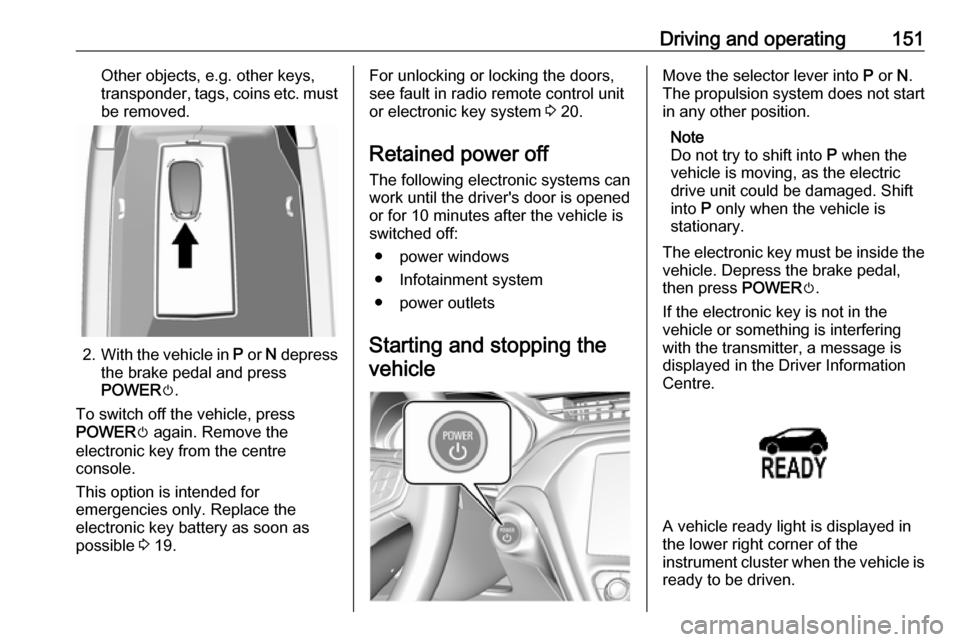
Driving and operating151Other objects, e.g. other keys,
transponder, tags, coins etc. must be removed.
2. With the vehicle in P or N depress
the brake pedal and press
POWER m.
To switch off the vehicle, press
POWER m again. Remove the
electronic key from the centre
console.
This option is intended for
emergencies only. Replace the
electronic key battery as soon as
possible 3 19.
For unlocking or locking the doors,
see fault in radio remote control unit
or electronic key system 3 20.
Retained power off
The following electronic systems can
work until the driver's door is opened
or for 10 minutes after the vehicle is
switched off:
● power windows
● Infotainment system
● power outlets
Starting and stopping the vehicleMove the selector lever into P or N.
The propulsion system does not start
in any other position.
Note
Do not try to shift into P when the
vehicle is moving, as the electric
drive unit could be damaged. Shift
into P only when the vehicle is
stationary.
The electronic key must be inside the
vehicle. Depress the brake pedal,
then press POWERm.
If the electronic key is not in the
vehicle or something is interfering
with the transmitter, a message is
displayed in the Driver Information
Centre.
A vehicle ready light is displayed in
the lower right corner of the
instrument cluster when the vehicle is ready to be driven.
Page 163 of 273
Driving and operating161the parking brake is fully released
and the control indicator m is off
before driving.
Automatic release
The electric parking brake is
automatically released when the
vehicle is running, placed into gear
and an attempt is made to drive away.
Avoid rapid acceleration when the
electric parking brake is applied, to
reduce wear of parking brake lining.
Electric parking brake control
indicator m 3 79.
Electric parking brake fault control
indicator j3 79.
Driver Information Centre 3 82.
Regenerative braking
Some braking energy from the
moving vehicle is turned back into
electrical energy. This energy is then
stored back into the high voltage
battery system, increasing energy
efficiency.
Regenerative power may be limited
when the high voltage battery is near
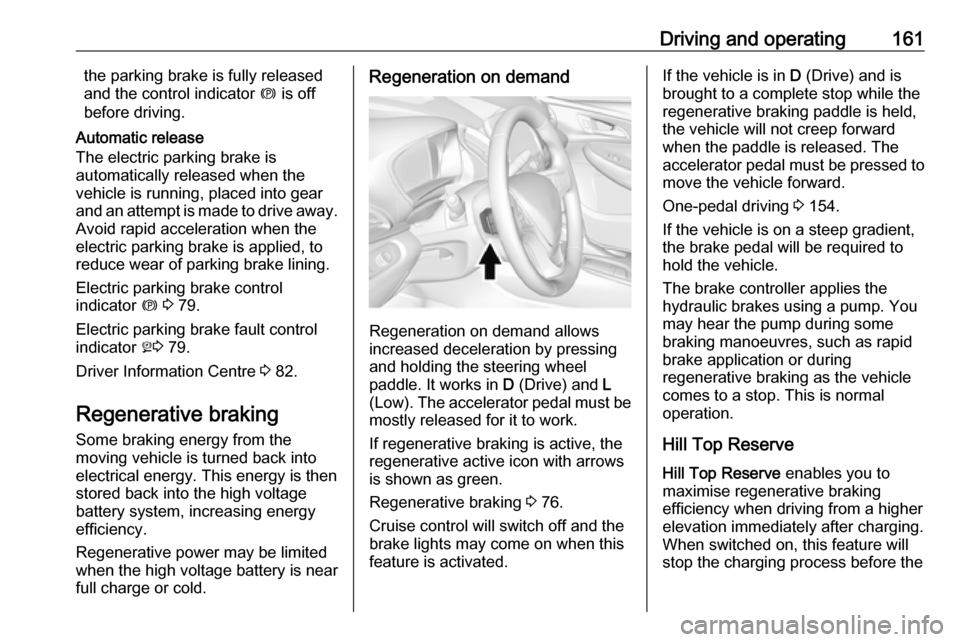
full charge or cold.Regeneration on demand
Regeneration on demand allows
increased deceleration by pressing
and holding the steering wheel
paddle. It works in D (Drive) and L
(Low). The accelerator pedal must be mostly released for it to work.
If regenerative braking is active, the regenerative active icon with arrowsis shown as green.
Regenerative braking 3 76.
Cruise control will switch off and the
brake lights may come on when this
feature is activated.
If the vehicle is in D (Drive) and is
brought to a complete stop while the regenerative braking paddle is held,
the vehicle will not creep forward
when the paddle is released. The
accelerator pedal must be pressed to
move the vehicle forward.
One-pedal driving 3 154.
If the vehicle is on a steep gradient,
the brake pedal will be required to
hold the vehicle.
The brake controller applies the
hydraulic brakes using a pump. You
may hear the pump during some
braking manoeuvres, such as rapid
brake application or during
regenerative braking as the vehicle
comes to a stop. This is normal
operation.
Hill Top ReserveHill Top Reserve enables you to
maximise regenerative braking
efficiency when driving from a higher
elevation immediately after charging.
When switched on, this feature will
stop the charging process before the
Page 170 of 273

168Driving and operatingAlerting the driver
The vehicle ahead control indicator
A illuminates green in the instrument
cluster when the system has detected
a vehicle in the driving path.
The control indicator A changes to
yellow when the distance to a
preceding moving vehicle gets too
small or when approaching another
vehicle too rapidly.Caution
The colour lighting of this control
indicator does not correspond to
local traffic laws on following
distance. The driver bears full
responsibility for maintaining safe
following distance according to
applicable traffic rules, weather
and road conditions etc. at all
times.
When the time to a potential collision
with a vehicle in front gets too small
and a collision is imminent, the driver
is notified by a flashing red LED stripe which is projected on the windscreen
in the driver's field of view.
Simultaneously a warning chime
sounds. Depress the brake pedal and
steer the vehicle, if it is required by the
situation.
Selecting the alert sensitivity
The alert sensitivity to near, medium
or far.Press V, the current setting is shown
on the Driver Information Centre.
Press V repeatedly to change the
alert sensitivity. The selected setting is also displayed in the Driver
Information Centre. The last selected setting will be stored when the vehicle
is switched off.
Page 172 of 273

170Driving and operatingActive emergency braking
Active emergency braking can help to reduce the damage and injury from
crashes with vehicles, pedestrians
and obstacles directly ahead, when a
collision can no longer be avoided
either by manual braking or by
steering. Before the active
emergency braking applies, the driver is warned by the forward collision
alert 3 167 and front pedestrian
protection 3 172.
The feature uses various inputs (e.g.
camera sensor, brake pressure,
vehicle speed) to calculate the
probability of a frontal collision.9 Warning
This system is not intended to
replace the driver responsibility for driving the vehicle and looking
ahead. Its function is limited to
supplemental use only to reduce
the vehicle speed before a
collision.
The system may not react to
animals. After a sudden lane
change, the system needs a
certain time to detect the next
preceding vehicle.
The driver must always be ready
to take action and apply the brakes and steer to avoid collisions.
Functionality
If equipped only with front camera the
active emergency braking operates in
a forward gear above walking speed
up to 80 km/h.
A precondition is that the system is
not deactivated in the vehicle
personalisation menu 3 91.
The system includes: ● brake preparation system
● emergency automatic braking
● forward looking brake assist
● front pedestrian protection system
Brake preparation system
When approaching a vehicle ahead
or a pedestrian so quickly that a
collision is likely, the brake
preparation system slightly
pressurises the brakes. This reduces
the response time, when a manual or automatic braking is requested.
The brake system is prepared so that braking can occur more rapidly.
If equipped only with front camera the
system operates up to a speed of
80 km/h.
Emergency automatic braking
After activation of brake preparation
system and just before the imminent
collision, this function automatically
applies limited braking to reduce the
impact speed of the collision or
prevent a crash.
Depending on the situation, the
vehicle may automatically brake
moderately or hard. This front
automatic braking can only occur if a
vehicle ahead is detected, indicated
by the vehicle ahead indicator A
3 167. On vehicles with front
Page 212 of 273

210Vehicle careVehicle careGeneral Information...................210
Accessories and vehicle modifications .......................... 210
Lifting the vehicle .....................211
Vehicle storage ........................211
End-of-life vehicle recovery .....212
Vehicle checks ........................... 212
Performing work ......................212
Bonnet ..................................... 213
Cooling system ........................214
Washer fluid ............................ 216
Brakes ..................................... 216
Brake fluid ............................... 216
Vehicle battery ......................... 217
Wiper blade replacement ........219
Headlight aiming ......................219
Bulb replacement .......................220
Halogen bulbs ......................... 220
Xenon headlights .....................220
Front turn lights .......................220
Tail lights ................................. 221
Side turn lights ......................... 221
Number plate light ...................222Electrical system ........................223
High voltage devices and wiring ...................................... 223
Electrical system overload .......223
Fuses ....................................... 223
Engine compartment fuse box . 225
Instrument panel fuse box .......228
Vehicle tools .............................. 231
Tools ........................................ 231
Wheels and tyres .......................231
Tyres ....................................... 231
Winter tyres ............................. 232
Tyre designations ....................232
Tyre pressure .......................... 232
Tyre pressure monitoring system .................................... 233
Tread depth ............................. 235
Changing tyre and wheel size . 236
Wheel covers ........................... 236
Tyre chains .............................. 237
Tyre repair kit .......................... 237
Jump starting ............................. 240
Towing ....................................... 242
Towing the vehicle ...................242
Towing another vehicle ...........243
Appearance care .......................244
Exterior care ............................ 244
Interior care ............................. 245General Information
Accessories and vehiclemodifications
We recommend the use of genuine
parts and accessories and factory
approved parts specific for your
vehicle type. We cannot assess or
guarantee reliability of other products - even if they have a regulatory or
otherwise granted approval.
Any modification, conversion or other
changes made to standard vehicle
specifications (including, without
limitation, software modifications,
modifications of the electronic control units) may invalidate the warranty
offered by Opel. Furthermore, such
changes may affect driver assistance
systems and energy consumption.
They may also invalidate the vehicle
operating permit.Caution
When transporting the vehicle on
a train or on a recovery vehicle, the
mud flaps might be damaged.
Page 223 of 273
Vehicle care221
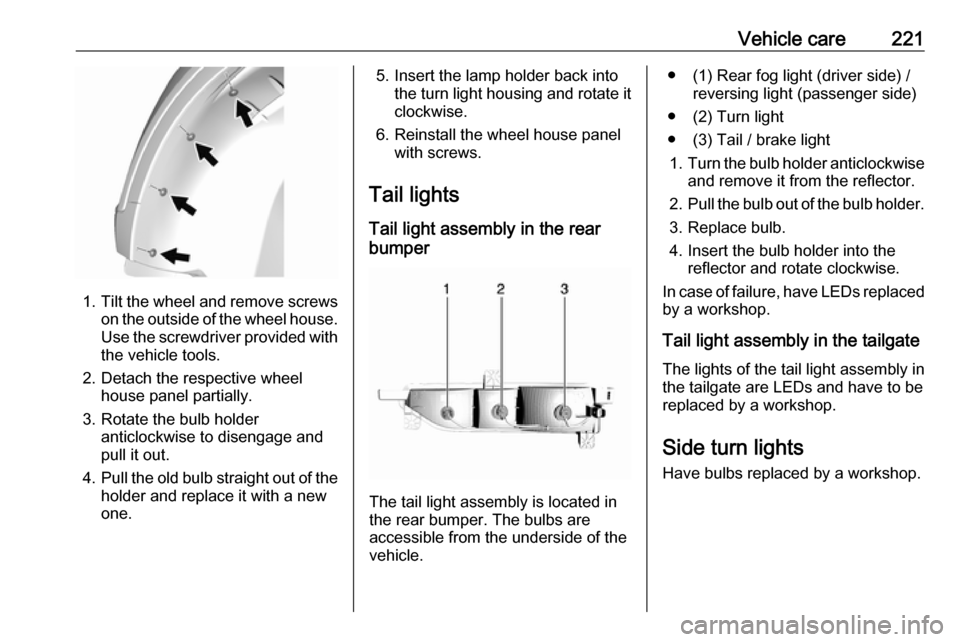
1.Tilt the wheel and remove screws
on the outside of the wheel house.
Use the screwdriver provided with the vehicle tools.
2. Detach the respective wheel house panel partially.
3. Rotate the bulb holder anticlockwise to disengage and
pull it out.
4. Pull the old bulb straight out of the
holder and replace it with a new
one.
5. Insert the lamp holder back into the turn light housing and rotate it
clockwise.
6. Reinstall the wheel house panel with screws.
Tail lights Tail light assembly in the rear
bumper
The tail light assembly is located in
the rear bumper. The bulbs are
accessible from the underside of the
vehicle.
● (1) Rear fog light (driver side) / reversing light (passenger side)
● (2) Turn light
● (3) Tail / brake light 1. Turn the bulb holder anticlockwise
and remove it from the reflector.
2. Pull the bulb out of the bulb holder.
3. Replace bulb.
4. Insert the bulb holder into the reflector and rotate clockwise.
In case of failure, have LEDs replaced by a workshop.
Tail light assembly in the tailgate The lights of the tail light assembly in
the tailgate are LEDs and have to be
replaced by a workshop.
Side turn lights Have bulbs replaced by a workshop.
Page 229 of 273

Vehicle care227NumberUsage1–2Power window rear3–4Rechargeable energy
storage system 15–6–7Left high beam headlight8Right high beam headlight9Left low beam headlight10Right low beam headlight11Horn12–13Front wiper motor driver14Tailgate15Front wiper motor co-driver16Electronic brake control
module supply electronicsNumberUsage17Rear wiper18Tailgate19Seat module front20Washer21–22Linear power module23Electronic brake control
module supply motor24Seat module rear25–26Transmission range control
module27Aero shutter28Auxiliary oil pump29E-booster motor source30Front power windows31In-panel bussed electrical
centreNumberUsage32Rear window defogger33Heated exterior rear view
mirror34Pedestrian friendly alert
function35–36–37Current sensor38Rain sensor39–40E-booster (ECU)41Power line communication
module42Automatic occupant
sensing43Window switch44Rechargeable energy
storage system
Page 245 of 273
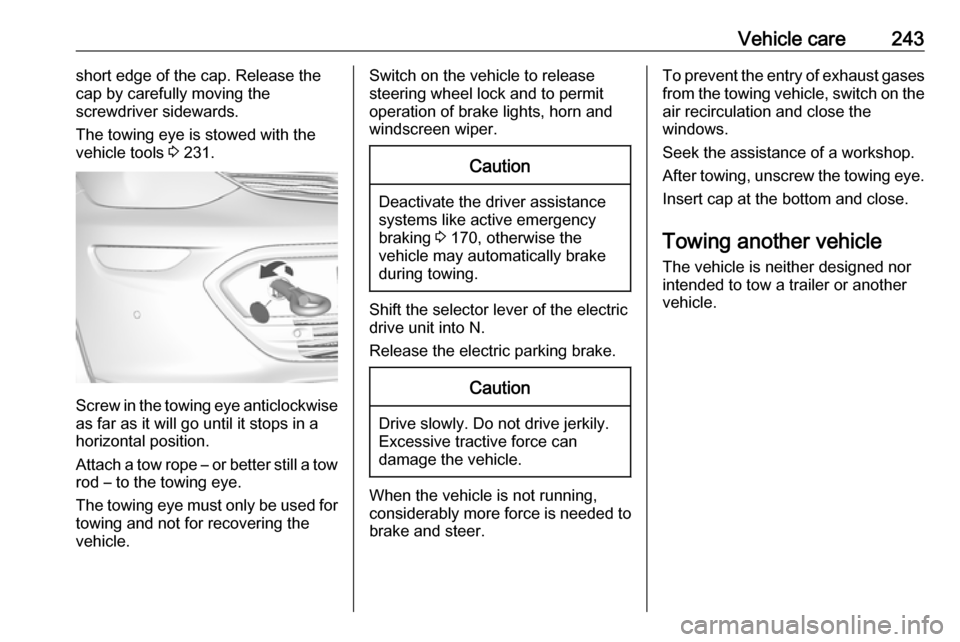
Vehicle care243short edge of the cap. Release the
cap by carefully moving the
screwdriver sidewards.
The towing eye is stowed with the vehicle tools 3 231.
Screw in the towing eye anticlockwise
as far as it will go until it stops in a
horizontal position.
Attach a tow rope – or better still a tow
rod – to the towing eye.
The towing eye must only be used for
towing and not for recovering the
vehicle.
Switch on the vehicle to release
steering wheel lock and to permit
operation of brake lights, horn and
windscreen wiper.Caution
Deactivate the driver assistance
systems like active emergency
braking 3 170, otherwise the
vehicle may automatically brake during towing.
Shift the selector lever of the electric
drive unit into N.
Release the electric parking brake.
Caution
Drive slowly. Do not drive jerkily.
Excessive tractive force can
damage the vehicle.
When the vehicle is not running, considerably more force is needed to
brake and steer.
To prevent the entry of exhaust gases from the towing vehicle, switch on the
air recirculation and close the
windows.
Seek the assistance of a workshop.
After towing, unscrew the towing eye.
Insert cap at the bottom and close.
Towing another vehicle The vehicle is neither designed nor
intended to tow a trailer or another
vehicle.
Page 262 of 273

260Customer informationThis data includes, for example:● Vehicle status information (e.g. wheel rotation rate, speed,
movement delay, lateral
acceleration, "seatbelts
fastened" display),
● Ambient conditions (e.g. temperature, rain sensor,
distance sensor).
Most of this data is volatile and is
processed only in the vehicle itself, and not beyond the operating time.
Moreover, many control units include
data storage device (amongst others the vehicle key). This is used to allow
information to be documented
temporarily or permanently on vehicle condition, component stress,
maintenance requirements and
technical events and errors.
The following information, for
example, is stored:
● System component operating states (e.g. fill level, tyre
pressure, battery status),
● State of charge of the high voltage battery, estimated range
(in the case of electric vehicles),● Faults and defects in important system components (e.g. lights,
brakes),
● System reactions in special driving situations (e.g. triggeringof an airbag, actuation of the
stability control systems),
● Information on events damaging the vehicle.
In special cases (e.g. if the vehicle
has detected a malfunction), it may be
necessary to save data that would
otherwise just be volatile.
When you use services, the operating
data saved can be read together with the vehicle identification number andused if necessary. Staff working for
the service net-work (e.g. garages, manufacturers) or third parties (e.g.
breakdown services) can read the
data from the vehicle. Services
include repair services, maintenance
processes, warranty cases and
quality assurance measures.
Data is generally read via the OBD
(On-Board Diagnostics) port
prescribed by law in the vehicle. The operating data which has been read
out documents the technical conditionof the vehicle or individual
components and assists with fault
diagnosis, compliance with warranty
obligations and quality improvement.
This data, in particular information on component stress, technical events,
operator errors and other faults, is
transmitted to the manufacturer
where appropriate, together with the vehicle identification number. The
manufacturer is also subject to
product liability. The manufacturer
potentially also needs operating data
from vehicles for product recalls.
Fault memories in the vehicle can be
reset by a service company when
carrying out servicing or repairs.
Comfort and Infotainment
functions
Comfort settings and custom settings
can be stored in the vehicle and
changed at any time.
Page 266 of 273

264IndexAAccessories and vehicle modifications .......................... 210
Activating Bluetooth music .........128
Activating phone .........................137
Activating radio ........................... 120
Activating USB audio ..................128
Activating USB movie .................131
Activating USB picture ................130
Active emergency braking ..........170
Adjustable air vents ...................146
Airbag and belt tensioners ...........78
Airbag deactivation ................49, 78
Airbag label................................... 45 Airbag system .............................. 45
Air conditioning regular operation ................................ 147
Air intake .................................... 147
Air vents...................................... 146
Antilock brake system ................ 158
Antilock brake system (ABS) .......79
Anti-theft alarm system ................29
Anti-theft locking system .............. 29
Appearance care ........................244
Armrest ................................... 40, 42
Armrest storage ........................... 58
Audio files ................................... 126
Automatic anti-dazzle ..................33
Automatic light control ...............100
Automatic locking ........................25Auto volume................................ 116
AUX Connecting device ..................126
General information ................126
B Basic operation ........................... 113
Battery discharge protection ......105
Battery gauge ............................... 74
Battery voltage ............................. 90
Belts.............................................. 42
Bluetooth Bluetooth connection ..............134
Bluetooth music menu ............128
Connecting device ..................126
General information ................126
Pairing ..................................... 134
Phone ...................................... 137
Bluetooth connection ..................134
Bonnet ....................................... 213
Brake fluid .......................... 216, 248
Brakes ............................... 158, 216
Brake system ............................... 79
Breakdown.................................. 242
BringGo ...................................... 132
Bulb replacement ....................... 220
C Call Functions during a call ............137
Incoming call ........................... 137