mirror OPEL AMPERA E 2018.5 Manual user
[x] Cancel search | Manufacturer: OPEL, Model Year: 2018.5, Model line: AMPERA E, Model: OPEL AMPERA E 2018.5Pages: 273, PDF Size: 6.6 MB
Page 70 of 273
68Instruments and controlsRear window wiper andwasher
Rear window wiper
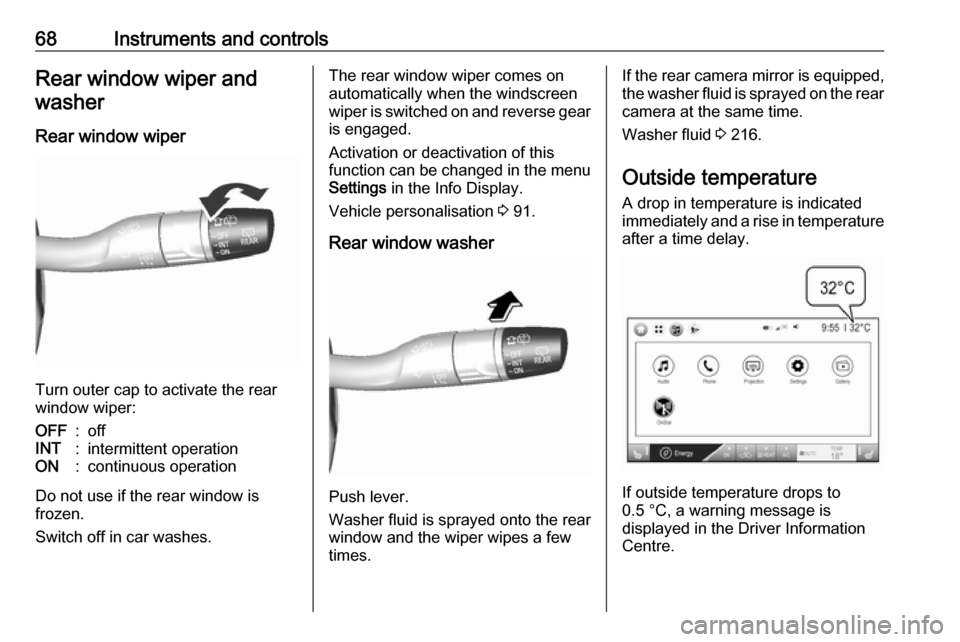
Turn outer cap to activate the rear
window wiper:
OFF:offINT:intermittent operationON:continuous operation
Do not use if the rear window is
frozen.
Switch off in car washes.
The rear window wiper comes on
automatically when the windscreen
wiper is switched on and reverse gear
is engaged.
Activation or deactivation of this
function can be changed in the menu Settings in the Info Display.
Vehicle personalisation 3 91.
Rear window washer
Push lever.
Washer fluid is sprayed onto the rear
window and the wiper wipes a few
times.
If the rear camera mirror is equipped,
the washer fluid is sprayed on the rear camera at the same time.
Washer fluid 3 216.
Outside temperature A drop in temperature is indicated
immediately and a rise in temperature
after a time delay.
If outside temperature drops to
0.5 °C, a warning message is
displayed in the Driver Information
Centre.
Page 144 of 273
142Climate controlClimate controlClimate control systems.............142
Electronic climate control system .................................... 142
Air vents ..................................... 146
Adjustable air vents .................146
Fixed air vents ......................... 146
Maintenance .............................. 147
Air intake ................................. 147
Air conditioning regular operation ................................ 147
Service .................................... 147Climate control systems
Electronic climate control system
Note
Do not cover the sensor located on top of the instrument panel,
otherwise the automatic climate
control system may not work
properly.
In automatic mode, temperature, fan
speed and air distribution are
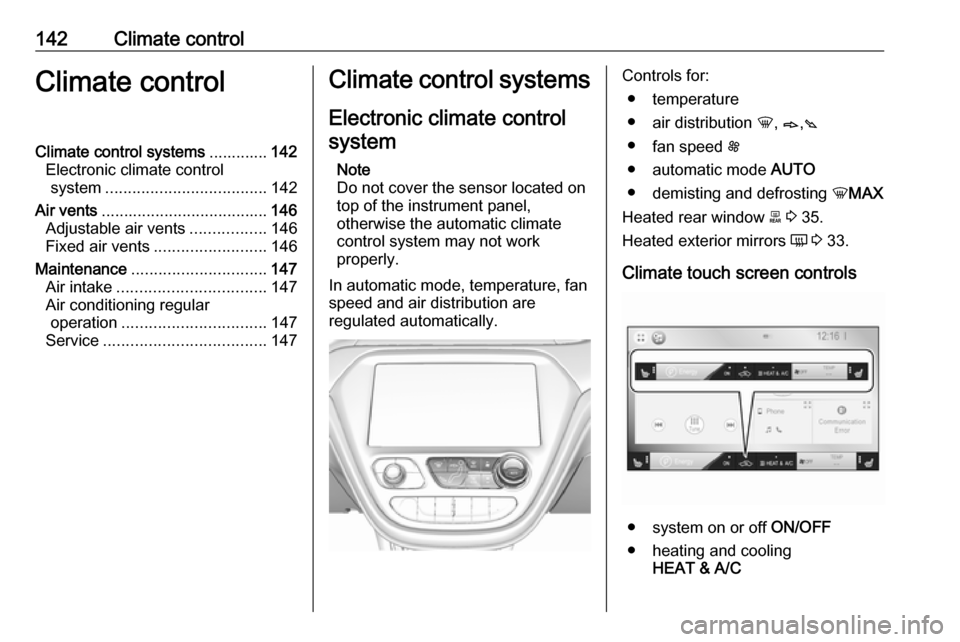
regulated automatically.Controls for:
● temperature
● air distribution h, B ,C
● fan speed E
● automatic mode AUTO
● demisting and defrosting hMAX
Heated rear window f 3 35.
Heated exterior mirrors Ü 3 33.
Climate touch screen controls
● system on or off ON/OFF
● heating and cooling HEAT & A/C
Page 184 of 273

182Driving and operatingNote
Each new vehicle requires a
calibration. For optimal parking
guidance, a driving distance of at
least 10 km, including a number of
bends, is required.
Side blind zone assistant The side blind zone assistant detects
and reports objects on either side of
the vehicle, within a specified "blind
zone". The system displays a visual
alert in each exterior mirror, when
detecting objects that may not be
visible in the interior and exterior
mirrors.
The radar distance sensors are
located in the rear bumper.9 Warning
Side blind zone assistant does not
replace driver vision.
The system does not detect:
● vehicles outside the side blind zones which may be rapidly
approaching
● pedestrians, cyclists or animals
Before changing a lane, always
check all mirrors, look over the
shoulder and use the turn lights.
When the system detects a vehicle in
the side blind zone while driving
forwards, either while passing a
vehicle or being passed, a yellow
warning symbol F will illuminate in
the relevant exterior mirror. If the
driver then activates the turn light, the warning symbol F starts flashing
yellow as a warning not to change
lanes.
When the vehicle is started, both
exterior mirror displays will briefly illuminate to indicate that the system
is operating.
The system can be activated or
deactivated in the Info Display.
Vehicle personalisation 3 91.
Side blind zone assistant will be
deactivated when Lane change alert
is deactivated. Deactivation is
indicated by a message in the Driver Information Centre.
Detection zones
The detection zones start at the rear bumper and extend approx. 3 m
rearwards and to the sides. The
height of the zone is approx. between 0.5 m and 2 m off the ground.
Side blind zone assistant is designed
to ignore stationary objects, e.g.
guardrails, posts, curbs, walls and
beams. Parked vehicles or oncoming
vehicles are not detected.
Page 185 of 273

Driving and operating183Fault
Occasional false alerts can occur
under normal circumstances and will
increase in wet conditions.
Side blind zone assistant does not
operate when the left or right corners
of the rear bumper are covered with
mud, dirt, snow, ice, slush, or in heavy rainstorms.
Cleaning instructions 3 244.
In the event of a fault in the system or if the system does not work due to
temporary conditions, a message is
displayed in the Driver Information
Centre. Seek the assistance of a
workshop.
Lane change alert Additional to the side blind zone
assistant 3 182, lane change alert
recognises rapidly approaching
vehicles from behind on parallel lanes
next to your vehicle.
If the vehicle is equipped with lane change alert, side blind zone
assistant is always included.The system alerts visually in each
exterior mirror when detecting rapidly
approaching vehicles from behind.
The radar distance sensors are
located in the rear bumper.9 Warning
Lane change alert does not
replace driver vision.
Before changing a lane, always
check all mirrors, look over the
shoulder and use the turn light.
When the system detects an
approaching vehicle from behind
which drives considerably faster, the
yellow warning symbol F will
illuminate in the relevant exterior mirror. If the driver then activates the
turn light, the warning symbol F
starts flashing yellow as a warning not to change lanes.
When the vehicle is started, both
exterior mirror displays will briefly
come on to indicate that the system is
operating.
Page 186 of 273
184Driving and operatingDetection zones
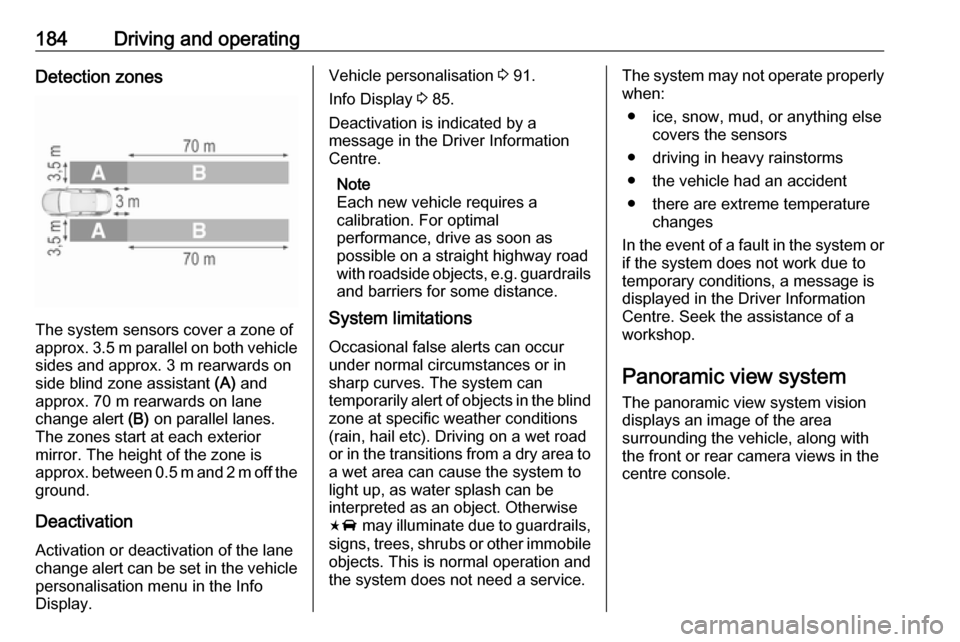
The system sensors cover a zone of
approx. 3.5 m parallel on both vehicle
sides and approx. 3 m rearwards on
side blind zone assistant (A) and
approx. 70 m rearwards on lane
change alert (B) on parallel lanes.
The zones start at each exterior
mirror. The height of the zone is
approx. between 0.5 m and 2 m off the ground.
Deactivation Activation or deactivation of the lane
change alert can be set in the vehicle
personalisation menu in the Info
Display.
Vehicle personalisation 3 91.
Info Display 3 85.
Deactivation is indicated by a
message in the Driver Information
Centre.
Note
Each new vehicle requires a
calibration. For optimal
performance, drive as soon as
possible on a straight highway road
with roadside objects, e.g. guardrails
and barriers for some distance.
System limitations
Occasional false alerts can occur
under normal circumstances or in
sharp curves. The system can
temporarily alert of objects in the blind zone at specific weather conditions
(rain, hail etc). Driving on a wet road
or in the transitions from a dry area to a wet area can cause the system to
light up, as water splash can be
interpreted as an object. Otherwise
F may illuminate due to guardrails,
signs, trees, shrubs or other immobile
objects. This is normal operation and
the system does not need a service.The system may not operate properly
when:
● ice, snow, mud, or anything else covers the sensors
● driving in heavy rainstorms
● the vehicle had an accident
● there are extreme temperature changes
In the event of a fault in the system or if the system does not work due to
temporary conditions, a message is
displayed in the Driver Information
Centre. Seek the assistance of a
workshop.
Panoramic view system The panoramic view system vision
displays an image of the area
surrounding the vehicle, along with
the front or rear camera views in the
centre console.
Page 187 of 273
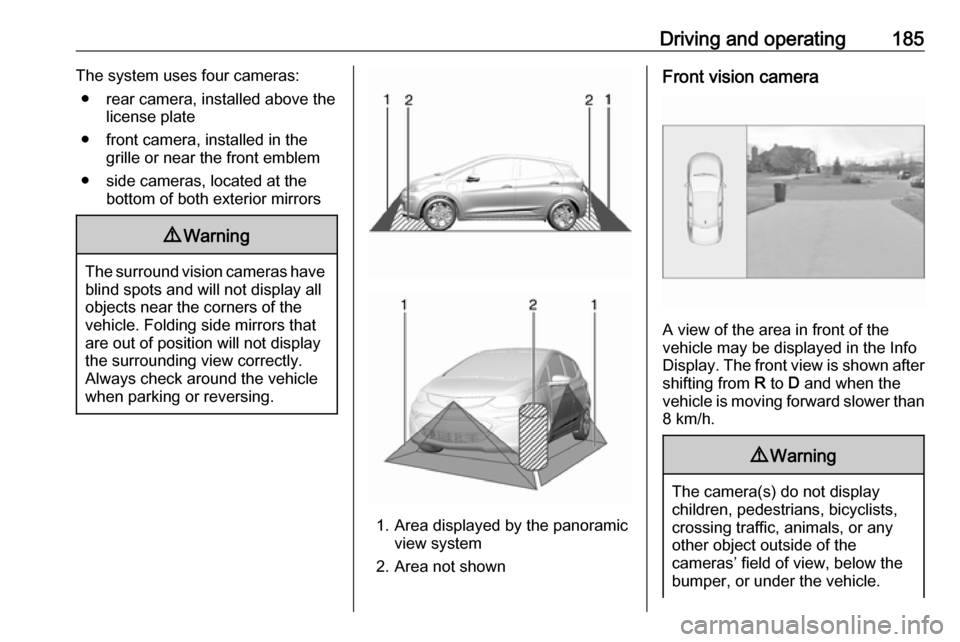
Driving and operating185The system uses four cameras:● rear camera, installed above the license plate
● front camera, installed in the grille or near the front emblem
● side cameras, located at the bottom of both exterior mirrors9Warning
The surround vision cameras have
blind spots and will not display all
objects near the corners of the
vehicle. Folding side mirrors that
are out of position will not display
the surrounding view correctly.
Always check around the vehicle
when parking or reversing.
1. Area displayed by the panoramic view system
2. Area not shown
Front vision camera
A view of the area in front of the
vehicle may be displayed in the Info
Display. The front view is shown after
shifting from R to D and when the
vehicle is moving forward slower than
8 km/h.
9 Warning
The camera(s) do not display
children, pedestrians, bicyclists,
crossing traffic, animals, or any
other object outside of the
cameras’ field of view, below the bumper, or under the vehicle.
Page 229 of 273

Vehicle care227NumberUsage1–2Power window rear3–4Rechargeable energy
storage system 15–6–7Left high beam headlight8Right high beam headlight9Left low beam headlight10Right low beam headlight11Horn12–13Front wiper motor driver14Tailgate15Front wiper motor co-driver16Electronic brake control
module supply electronicsNumberUsage17Rear wiper18Tailgate19Seat module front20Washer21–22Linear power module23Electronic brake control
module supply motor24Seat module rear25–26Transmission range control
module27Aero shutter28Auxiliary oil pump29E-booster motor source30Front power windows31In-panel bussed electrical
centreNumberUsage32Rear window defogger33Heated exterior rear view
mirror34Pedestrian friendly alert
function35–36–37Current sensor38Rain sensor39–40E-booster (ECU)41Power line communication
module42Automatic occupant
sensing43Window switch44Rechargeable energy
storage system
Page 230 of 273
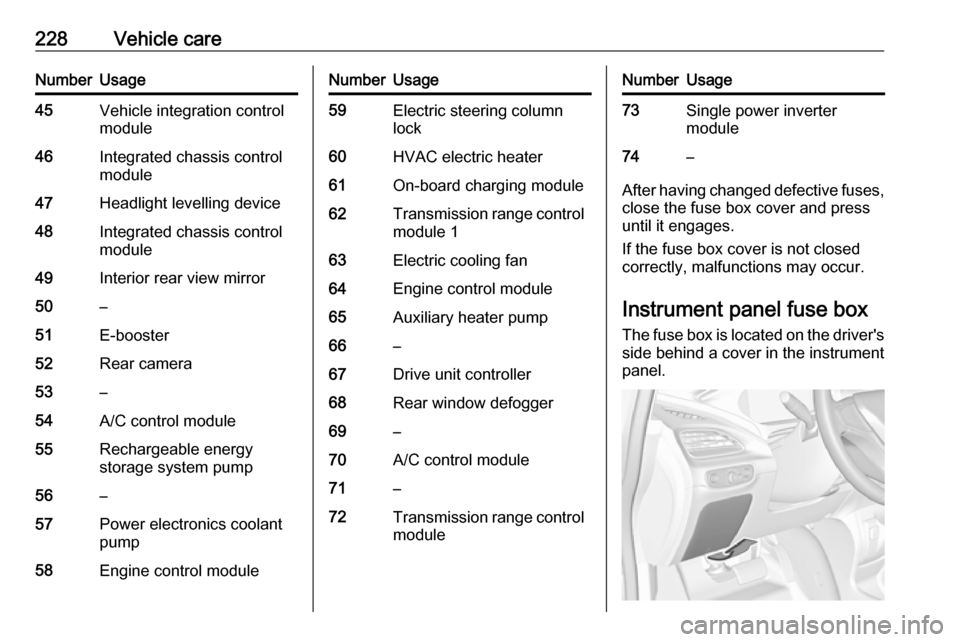
228Vehicle careNumberUsage45Vehicle integration control
module46Integrated chassis control
module47Headlight levelling device48Integrated chassis control
module49Interior rear view mirror50–51E-booster52Rear camera53–54A/C control module55Rechargeable energy
storage system pump56–57Power electronics coolant
pump58Engine control moduleNumberUsage59Electric steering column
lock60HVAC electric heater61On-board charging module62Transmission range control
module 163Electric cooling fan64Engine control module65Auxiliary heater pump66–67Drive unit controller68Rear window defogger69–70A/C control module71–72Transmission range control
moduleNumberUsage73Single power inverter
module74–
After having changed defective fuses,
close the fuse box cover and press
until it engages.
If the fuse box cover is not closed
correctly, malfunctions may occur.
Instrument panel fuse boxThe fuse box is located on the driver's
side behind a cover in the instrument
panel.
Page 255 of 273
![OPEL AMPERA E 2018.5 Manual user Technical data253Vehicle dimensionsLength [mm]4164Width without exterior mirrors [mm]1765Width with two exterior mirrors [mm]2039Height (without antenna) [mm]1594Length of load compartment floor [mm]6](/img/37/18756/w960_18756-254.png "OPEL AMPERA E 2018.5 Manual user Technical data253Vehicle dimensionsLength [mm]4164Width without exterior mirrors [mm]1765Width with two exterior mirrors [mm]2039Height (without antenna) [mm]1594Length of load compartment floor [mm]6")
Technical data253Vehicle dimensionsLength [mm]4164Width without exterior mirrors [mm]1765Width with two exterior mirrors [mm]2039Height (without antenna) [mm]1594Length of load compartment floor [mm]681Length of load compartment with folded rear seats [mm]1459Load compartment width [mm]1154Load compartment height [mm]921Wheelbase [mm]2600Turning circle diameter [m]10.8
Page 267 of 273

265Initiating a phone call..............137
Ring tone ................................. 137
Call history .................................. 137
Car wash mode .......................... 154
Central locking system ................20
Centre console storage ...............58
Changing tyre and wheel size ...236
Charge cord ................................ 205
Charge limit selection .................197
Charge mode selection ..............197
Charge rate selection .................197
Charging ..................................... 194
Charging override .......................197
Charging status .......................... 204
Charging system .......................... 78
Child locks ................................... 26
Child restraint installation locations ................................... 53
Child restraints.............................. 51
Child restraint systems ................51
Climate control ............................. 13
Clock............................................. 69
Control elements Infotainment system ................108
Steering wheel ........................ 108
Control elements overview .........108
Control indicators.......................... 77
Control of the vehicle .................149
Controls ........................................ 65
Convex shape .............................. 31Coolant ....................................... 214
Coolant and antifreeze ...............248
Cooling system ........................... 214
Cruise control ...................... 81, 164
Cupholders .................................. 57
Curtain airbag system .................. 49
D
DAB ............................................ 124
Danger, Warnings and Cautions ...2
Daytime running lights ...............102
Declaration of conformity ............255
Delayed locking ............................ 25
Digital audio broadcasting ..........124
Directional tyres .......................... 231
Displaying pictures .....................130
Display settings ..................130, 131
Door open .................................... 82
Doors ............................................ 28
Drive modes ............................... 154
Driver assistance systems ..........164
Driver Information Centre .............82
Driving economically................... 148
Driving efficiency gauge ...............74
Driving hints ........................ 148, 149
E Electric adjustment ......................32
Electrical requirements ...............209
Electrical system......................... 223
Electrical system overload .........223Electric drive unit ..................14, 154
Electric parking brake ...........79, 159
Electric parking brake fault ...........79
Electric rate schedule .................197
Electric vehicle operation modes 154
Electronic climate control system 142
Electronic key system ...................19
Electronic Stability Control.......... 163
Electronic Stability Control and Traction Control system ............80
Electronic Stability Control off....... 80
Emergency call ........................... 136
End-of-life vehicle recovery .......212
Engine compartment fuse box ...225
Engine data ............................... 252
Entry lighting .............................. 105
Event data recorders ..................259
Exit lighting ................................ 105
Exterior care .............................. 244
Exterior light ................................. 81
Exterior lighting ......................10, 99
Exterior mirrors ............................. 31
F
File formats Audio files................................ 126
Movie files ............................... 126
Picture files.............................. 126
First aid kit ................................... 61
Fixed air vents ........................... 146