phone OPEL AMPERA E 2018.5 Manual user
[x] Cancel search | Manufacturer: OPEL, Model Year: 2018.5, Model line: AMPERA E, Model: OPEL AMPERA E 2018.5Pages: 273, PDF Size: 6.6 MB
Page 108 of 273

106Infotainment systemInfotainment systemIntroduction................................ 106
General information .................106
Theft-deterrent feature ............107
Control elements overview ......108
Usage ...................................... 110
Basic operation .......................... 113
Tone settings ........................... 115
Volume settings .......................116
System settings .......................117
Radio ......................................... 120
Usage ...................................... 120
Station search ......................... 121
Radio data system ...................123
Digital audio broadcasting .......124
External devices ........................126
General information .................126
Playing audio ........................... 128
Displaying pictures ..................130
Playing movies ........................ 131
Using smartphone applications ............................ 132
Speech recognition ....................133
General information .................133
Usage ...................................... 133Phone........................................ 134
General information .................134
Bluetooth connection ...............134
Emergency call ........................136
Operation ................................. 137
Mobile phones and CB radio equipment ............................... 140Introduction
General information
The Infotainment system provides
you with state-of-the-art in-car
Infotainment.
Using radio tuner functions, you can
listen to a great number of different
radio stations.
You can connect external data
storage devices to the Infotainment
system as further audio sources,
either via cable or via Bluetooth.
The Infotainment system is equipped
with a phone portal that allows for
comfortable and safe use of your
mobile phone in the vehicle.
You can also operate specific
smartphone applications via the
Infotainment system.
Optionally, the Infotainment system
can be operated using the touch
screen and buttons on the control
panel, the controls on the steering wheel, or - if provided by your mobile
phone - via speech recognition.
Page 111 of 273

Infotainment system1091Display / touch screen ........113
2 m (knob)
Turn: adjust volume ............110
3 m (button)
Short press: mute system ...110
or deactivate mute
function if mute function is
active ................................... 110
or exit low power mode if
low power mode is active ....110
Long press: turn on low
power mode ........................ 110
4 p
Press: display the
Infotainment home screen ..113
5 t / v
Short press: skip to
previous or next station
when radio active ................121
or skip to previous or next
track when external
devices active .....................128Long press: seek up or
down when radio active ......121
or fast forward or fast
rewind when external
devices active .....................128Steering wheel controls
1w
Short press: open OnStar
menu if no phone
connected ........................... 110
or open the phone menu .....137
or take phone call if phone connected ........................... 137
Long press: activate
speech recognition ..............133
Page 114 of 273
112Infotainment system
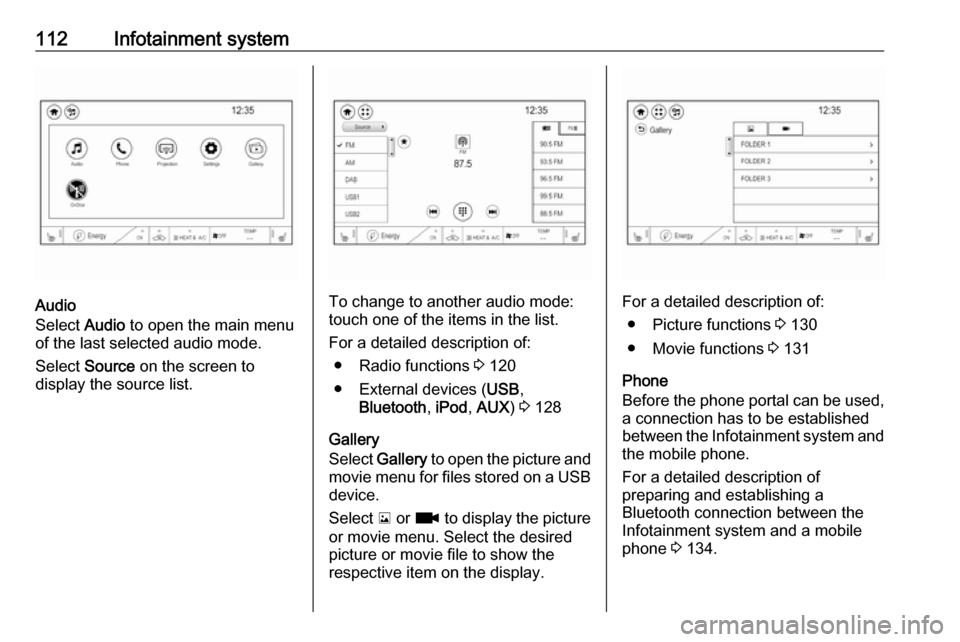
Audio
Select Audio to open the main menu
of the last selected audio mode.
Select Source on the screen to
display the source list.To change to another audio mode:
touch one of the items in the list.
For a detailed description of: ● Radio functions 3 120
● External devices ( USB,
Bluetooth , iPod , AUX ) 3 128
Gallery
Select Gallery to open the picture and
movie menu for files stored on a USB device.
Select y or z to display the picture
or movie menu. Select the desired
picture or movie file to show the
respective item on the display.For a detailed description of:
● Picture functions 3 130
● Movie functions 3 131
Phone
Before the phone portal can be used, a connection has to be established
between the Infotainment system and
the mobile phone.
For a detailed description of
preparing and establishing a
Bluetooth connection between the Infotainment system and a mobile
phone 3 134.
Page 115 of 273
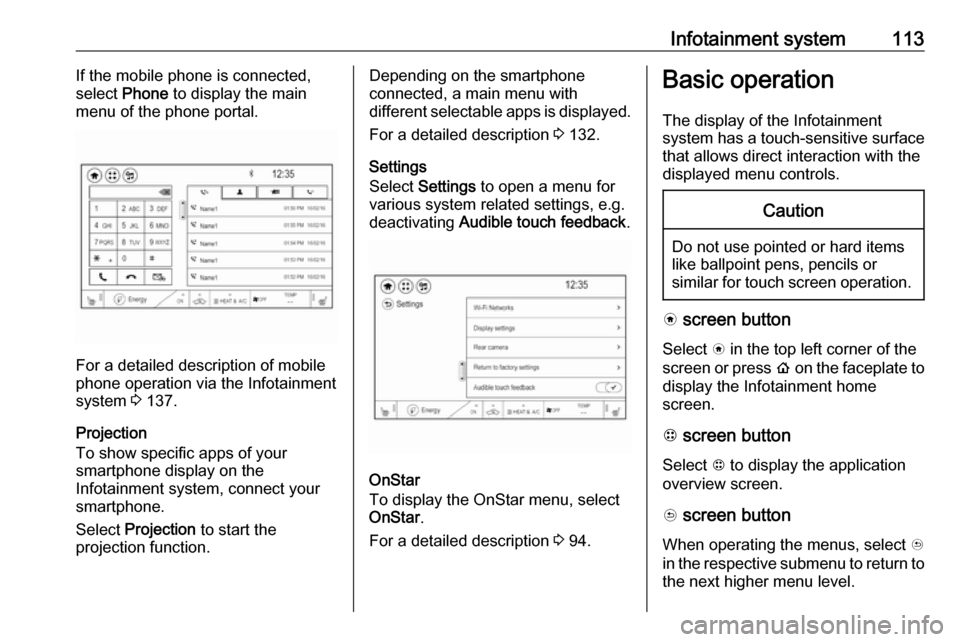
Infotainment system113If the mobile phone is connected,
select Phone to display the main
menu of the phone portal.
For a detailed description of mobile
phone operation via the Infotainment
system 3 137.
Projection
To show specific apps of your
smartphone display on the
Infotainment system, connect your smartphone.
Select Projection to start the
projection function.
Depending on the smartphone
connected, a main menu with
different selectable apps is displayed.
For a detailed description 3 132.
Settings
Select Settings to open a menu for
various system related settings, e.g.
deactivating Audible touch feedback .
OnStar
To display the OnStar menu, select
OnStar .
For a detailed description 3 94.
Basic operation
The display of the Infotainment
system has a touch-sensitive surface
that allows direct interaction with the
displayed menu controls.Caution
Do not use pointed or hard items
like ballpoint pens, pencils or
similar for touch screen operation.
v screen button
Select v in the top left corner of the
screen or press p on the faceplate to
display the Infotainment home
screen.
1 screen button
Select 1 to display the application
overview screen.
u screen button
When operating the menus, select u
in the respective submenu to return to the next higher menu level.
Page 117 of 273
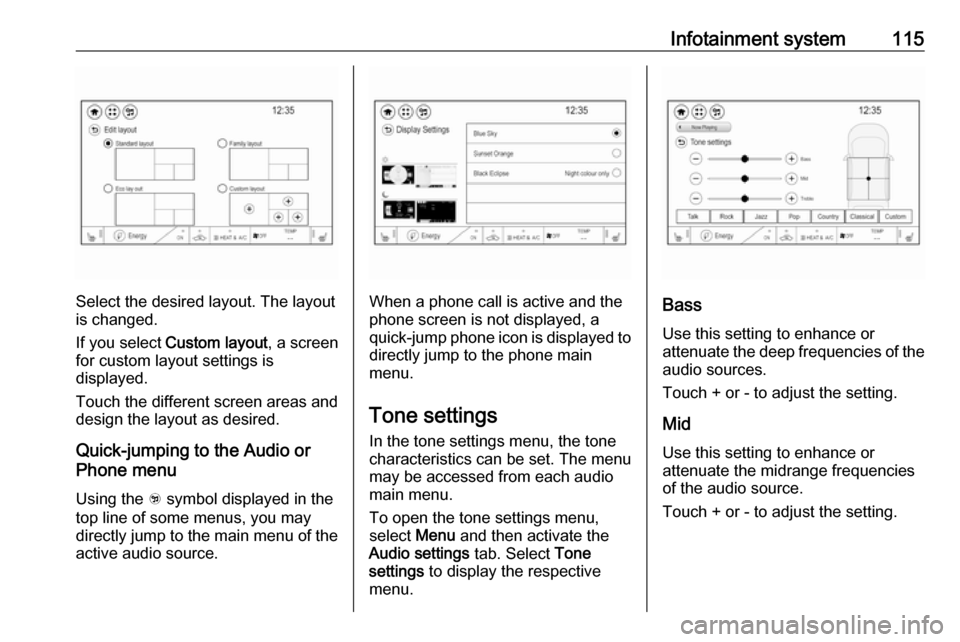
Infotainment system115
Select the desired layout. The layout
is changed.
If you select Custom layout , a screen
for custom layout settings is
displayed.
Touch the different screen areas and design the layout as desired.
Quick-jumping to the Audio or
Phone menu
Using the w symbol displayed in the
top line of some menus, you may
directly jump to the main menu of the
active audio source.When a phone call is active and the
phone screen is not displayed, a
quick-jump phone icon is displayed to directly jump to the phone main
menu.
Tone settings In the tone settings menu, the tone
characteristics can be set. The menu
may be accessed from each audio
main menu.
To open the tone settings menu,
select Menu and then activate the
Audio settings tab. Select Tone
settings to display the respective
menu.Bass
Use this setting to enhance or
attenuate the deep frequencies of the
audio sources.
Touch + or - to adjust the setting.
Mid
Use this setting to enhance or
attenuate the midrange frequencies
of the audio source.
Touch + or - to adjust the setting.
Page 128 of 273

126Infotainment systemExternal devicesGeneral information
An AUX and USB port for the
connection of external devices is
located in the centre console.
Note
The port must always be kept clean
and dry.
AUX input
It is possible to connect e.g. an iPod
or another auxiliary device with a
3.5 mm jack plug to the AUX input.
When connected to the AUX input,
the audio signal of the auxiliary device is transmitted via the speakers of the
Infotainment system.
The volume and the tone settings can
be adjusted via the Infotainment
system. All other control functions
must be operated via the auxiliary
device.
Connecting a device
Connect the AUX device to the AUX
port.
Disconnecting a device
Disconnect the AUX device from the
AUX port.
USB port An MP3 player, USB drive, SD card
(via USB connector / adapter), iPod ®
or smartphone can be connected to
the USB port.
Up to two USB devices can be
connected to the Infotainment system at a time.The Infotainment system can play
audio files, show picture files or play
movie files contained in USB storage
devices.
When connected to the USB port,
various functions of the devices can
be operated via the controls and
menus of the Infotainment system.
Note
Not all auxiliary devices are
supported by the Infotainment
system. Check the compatibility list
on our website.
Connecting a device
Connect one of the devices
mentioned above to the USB port. If
required, use the appropriate
connection cable. The music function starts automatically.
Note
If a non-readable USB device is
connected, a corresponding error
message appears and the
Infotainment system automatically
switches to the previous function.
Page 134 of 273
132Infotainment systemInterrupting and resuming playback
Touch = to interrupt playback. The
screen button changes to l.
Touch l to resume playback.
Playing the next or previous track
Touch v to play the next movie file.
Touch t within the first seconds of
the movie playing to return to the
previous movie file.
Returning to the beginning of the
current movie
Touch t after a few seconds of the
movie playing.
Fast forwarding and rewinding
Touch and hold t or v. Release to
return to normal playback mode.
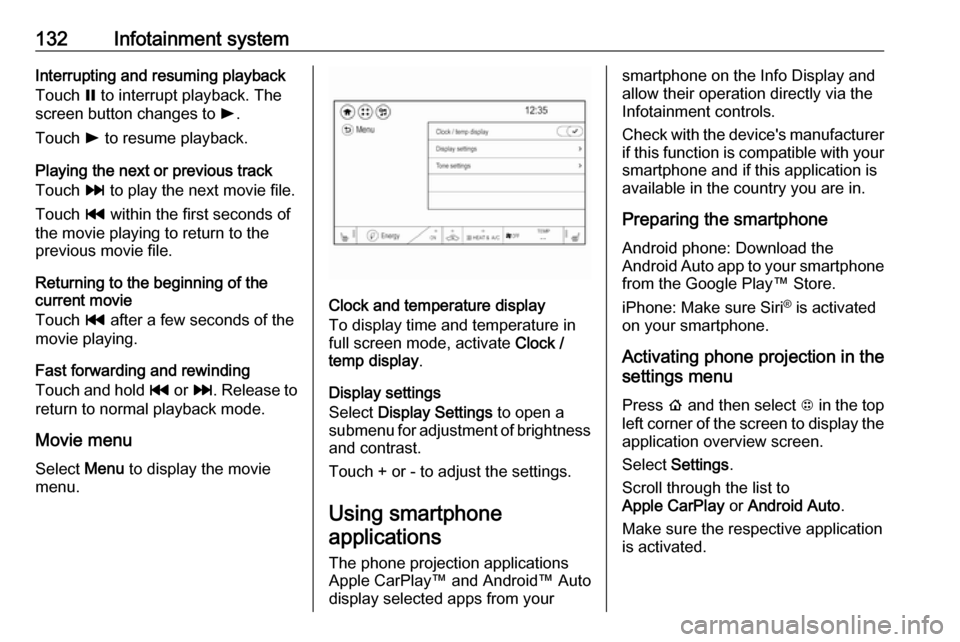
Movie menu
Select Menu to display the movie
menu.
Clock and temperature display
To display time and temperature in
full screen mode, activate Clock /
temp display .
Display settings
Select Display Settings to open a
submenu for adjustment of brightness and contrast.
Touch + or - to adjust the settings.
Using smartphone
applications
The phone projection applications
Apple CarPlay™ and Android™ Auto
display selected apps from your
smartphone on the Info Display and
allow their operation directly via the
Infotainment controls.
Check with the device's manufacturer
if this function is compatible with your
smartphone and if this application is
available in the country you are in.
Preparing the smartphone
Android phone: Download the
Android Auto app to your smartphone from the Google Play™ Store.
iPhone: Make sure Siri ®
is activated
on your smartphone.
Activating phone projection in the
settings menu
Press p and then select 1 in the top
left corner of the screen to display the application overview screen.
Select Settings .
Scroll through the list to
Apple CarPlay or Android Auto .
Make sure the respective application
is activated.
Page 135 of 273

Infotainment system133Connecting the mobile phoneConnect the smartphone to the USB
port 3 126.
When first connecting a device, a
privacy consent message may be
displayed. Confirm the message to
continue the connection procedure.
Starting phone projection Press p and then select 1 in the top
left corner of the screen to display the
application overview screen.
To start the phone projection function, select Projection .
Note
If the application is recognised by
the Infotainment system, the
application icon may change to
Apple CarPlay or Android Auto .
Alternatively, press and hold p.
The phone projection screen
displayed depends on your
smartphone and software version.
Returning to the home screen
Press p.Speech recognition
General information
The voice pass-thru application of the Infotainment system allows access to
the speech recognition commands on your smartphone. See your
smartphone manufacturer's
operating instructions to find out
whether your smartphone supports this feature.
In order to use the voice pass-thru
application, the smartphone must be
connected to the Infotainment system
via USB cable 3 126 or via Bluetooth
3 134.
Usage
Activating speech recognition Press and hold w on the steering
wheel to start a speech recognition
session. A voice command message
is displayed on the screen.As soon as a beep is heard, you can
say a command. For information on
the commands supported, see the
operating instructions for your
smartphone.
Adjusting the volume of voice
prompts
Turn m on the control panel or press
the volume buttons behind the
steering wheel to increase or
decrease the volume of voice
prompts.
Deactivating speech recognition
Press n on the steering wheel. The
voice command message disappears
and the speech recognition session is ended.
Page 136 of 273
134Infotainment systemPhoneGeneral information
The phone portal provides you with
the possibility of having mobile phone
conversations via a vehicle
microphone and the vehicle
loudspeakers as well as operating the most important mobile phone
functions via the Infotainment system
in the vehicle. To be able to use the
phone portal, the mobile phone must
be connected to the Infotainment
system via Bluetooth.
Not all phone functions are supported by every mobile phone. The usable
phone functions depend on the
relevant mobile phone and network
provider. You can find further
information on this in the operating
instructions for your mobile phone, or
you can enquire about them with your network provider.Important information for
operation and traffic safety9 Warning
Mobile phones have effects on
your environment. For this reason safety regulations and directions
have been prepared. You should
be familiar with the related
directions before you use the
telephone function.
9 Warning
Use of the hands-free facility while
driving can be dangerous because
your concentration is reduced
when telephoning. Park your
vehicle before you use the hands- free facility. Follow the stipulations
of the country in which you find
yourself at present.
Do not forget to follow the special
regulations that apply in specific
areas and always switch off the
mobile phone if the use of mobile
phones is prohibited, if
interference is caused by the
mobile phone or if dangerous
situations can occur.
Bluetooth
The phone portal is certified by the
Bluetooth Special Interest Group
(SIG).
You can find further information about the specification on the internet at
http://www.bluetooth.com
Bluetooth connection
Bluetooth is a radio standard for the wireless connection of e.g. mobile
phones, smartphones or other
devices.
The pairing and connecting of the
Bluetooth devices to the Infotainment
system are carried out via the
Devices menu. Pairing is the PIN
code exchange between the
Bluetooth device and the
Infotainment system.
Page 137 of 273
Infotainment system135Pairing a deviceImportant information ● Up to ten devices can be paired to the system.
● Only one paired device can be connected to the Infotainment
system at a time.
● Pairing only needs to be carried out once, unless the device is
deleted from the list of paired
devices. If the device has been connected previously, the
Infotainment system establishes the connection automatically.
● Bluetooth operation considerably
drains the device's battery.
Therefore, connect the device to
the USB port for charging.
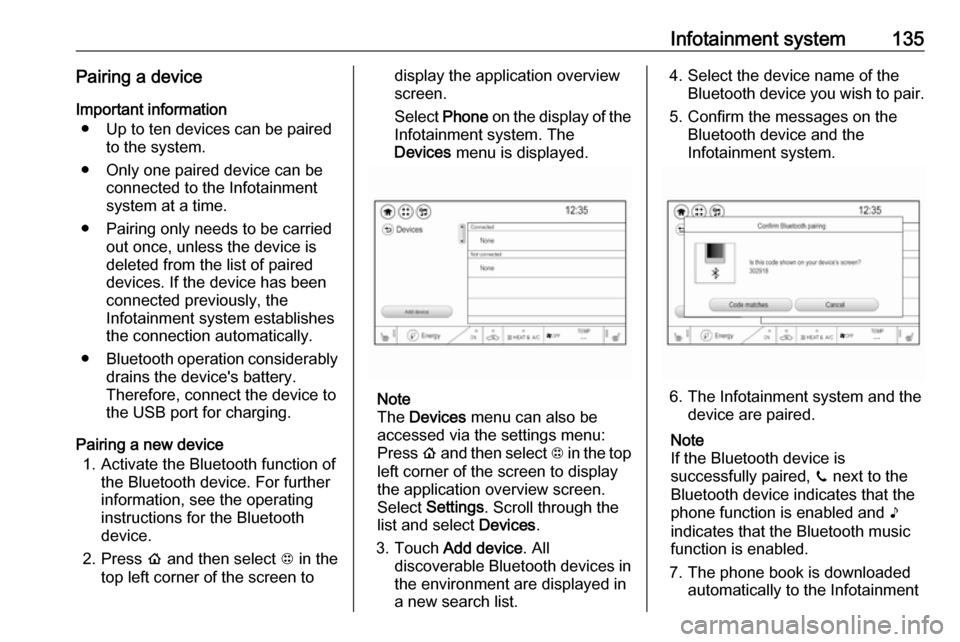
Pairing a new device 1. Activate the Bluetooth function of the Bluetooth device. For further
information, see the operating
instructions for the Bluetooth
device.
2. Press p and then select 1 in the
top left corner of the screen todisplay the application overview
screen.
Select Phone on the display of the
Infotainment system. The Devices menu is displayed.
Note
The Devices menu can also be
accessed via the settings menu: Press p and then select 1 in the top
left corner of the screen to display
the application overview screen.
Select Settings . Scroll through the
list and select Devices.
3. Touch Add device . All
discoverable Bluetooth devices in
the environment are displayed in
a new search list.
4. Select the device name of the Bluetooth device you wish to pair.
5. Confirm the messages on the Bluetooth device and the
Infotainment system.
6. The Infotainment system and the device are paired.
Note
If the Bluetooth device is
successfully paired, ? next to the
Bluetooth device indicates that the phone function is enabled and >
indicates that the Bluetooth music
function is enabled.
7. The phone book is downloaded automatically to the Infotainment