warning light OPEL AMPERA E 2018.5 Manual user
[x] Cancel search | Manufacturer: OPEL, Model Year: 2018.5, Model line: AMPERA E, Model: OPEL AMPERA E 2018.5Pages: 273, PDF Size: 6.6 MB
Page 188 of 273
186Driving and operatingShown distances may be differentfrom actual distances. Do not driveor park the vehicle using only
these camera(s). Always check
behind and around the vehicle
before driving. Failure to use
proper care may result in injury, death, or vehicle damage.
The system also works when the
surrounding is dark, but performance
may be restricted.
Rear view camera
The rear view camera assists the
driver when reversing by displaying a view of the area behind the vehicle.
The view of the camera is displayed
in the Info Display.
9 Warning
The rear view camera does not
replace driver vision. Note that
objects that are outside the
camera's field of view and the
parking assist sensors, e.g. below
the bumper or underneath the
vehicle, are not displayed.
Do not reverse or park the vehicle
using only the rear view camera.
Always check the surrounding of
the vehicle before driving.
Activation
Rear view camera is automatically
activated when reverse gear is
engaged.
Functionality
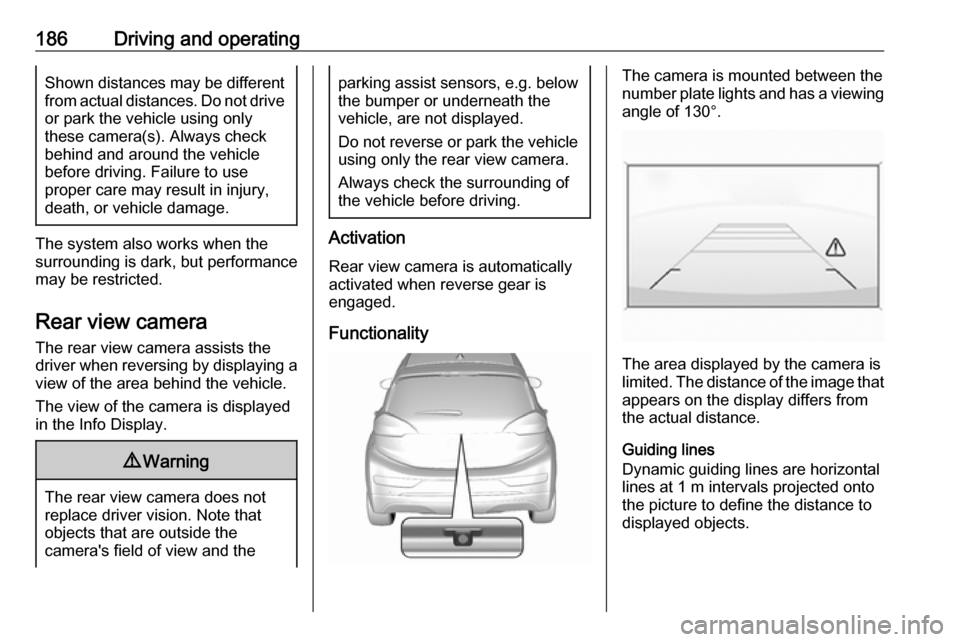
The camera is mounted between the
number plate lights and has a viewing angle of 130°.
The area displayed by the camera is
limited. The distance of the image that
appears on the display differs from
the actual distance.
Guiding lines
Dynamic guiding lines are horizontal
lines at 1 m intervals projected onto
the picture to define the distance to
displayed objects.
Page 189 of 273
Driving and operating187
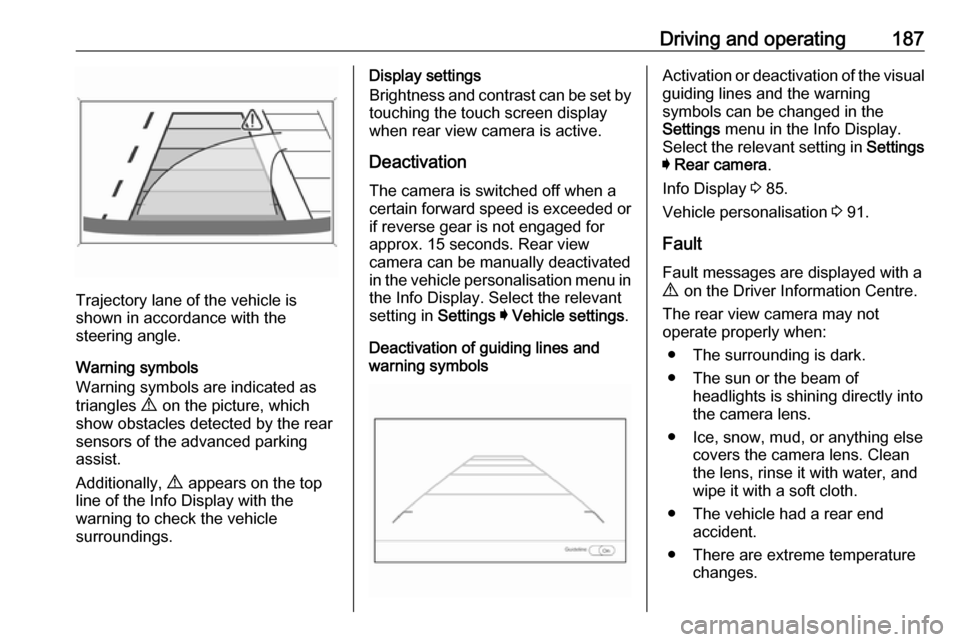
Trajectory lane of the vehicle is
shown in accordance with the
steering angle.
Warning symbols
Warning symbols are indicated as
triangles 9 on the picture, which
show obstacles detected by the rear
sensors of the advanced parking
assist.
Additionally, 9 appears on the top
line of the Info Display with the
warning to check the vehicle
surroundings.
Display settings
Brightness and contrast can be set by
touching the touch screen display
when rear view camera is active.
Deactivation The camera is switched off when a
certain forward speed is exceeded or
if reverse gear is not engaged for
approx. 15 seconds. Rear view
camera can be manually deactivated
in the vehicle personalisation menu in the Info Display. Select the relevantsetting in Settings I Vehicle settings .
Deactivation of guiding lines and
warning symbolsActivation or deactivation of the visual
guiding lines and the warning
symbols can be changed in the
Settings menu in the Info Display.
Select the relevant setting in Settings
I Rear camera .
Info Display 3 85.
Vehicle personalisation 3 91.
Fault
Fault messages are displayed with a 9 on the Driver Information Centre.
The rear view camera may not
operate properly when:
● The surrounding is dark.
● The sun or the beam of headlights is shining directly into
the camera lens.
● Ice, snow, mud, or anything else covers the camera lens. Clean
the lens, rinse it with water, and
wipe it with a soft cloth.
● The vehicle had a rear end accident.
● There are extreme temperature changes.
Page 193 of 273
Driving and operating191Alternatively, 9 can be pressed for
3 seconds to clear the content of the
page.
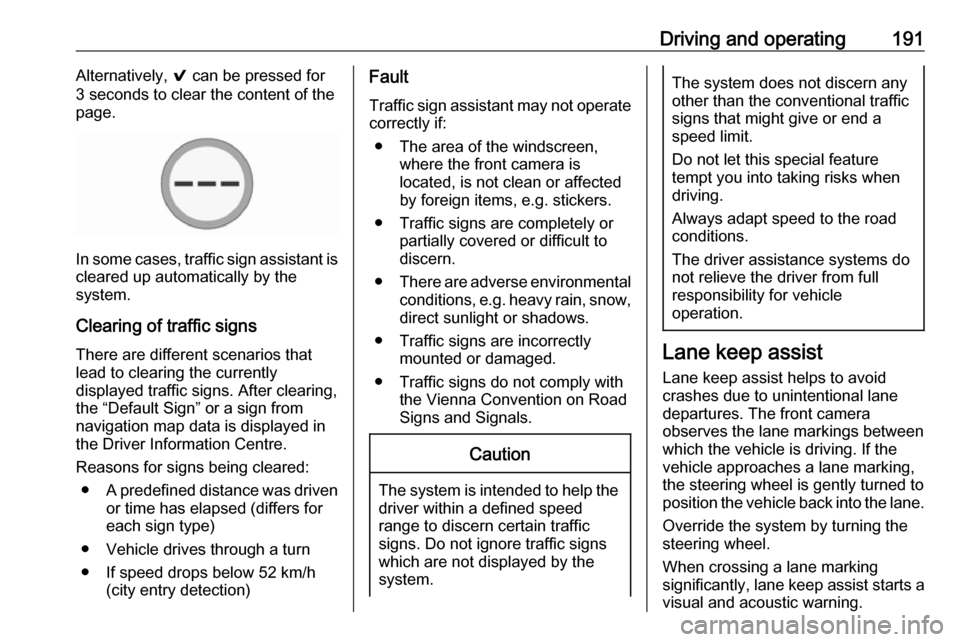
In some cases, traffic sign assistant is
cleared up automatically by the
system.
Clearing of traffic signs
There are different scenarios that
lead to clearing the currently
displayed traffic signs. After clearing,
the “Default Sign” or a sign from
navigation map data is displayed in
the Driver Information Centre.
Reasons for signs being cleared: ● A predefined distance was driven
or time has elapsed (differs for
each sign type)
● Vehicle drives through a turn
● If speed drops below 52 km/h (city entry detection)
Fault
Traffic sign assistant may not operate
correctly if:
● The area of the windscreen, where the front camera is
located, is not clean or affected
by foreign items, e.g. stickers.
● Traffic signs are completely or partially covered or difficult to
discern.
● There are adverse environmental
conditions, e.g. heavy rain, snow,
direct sunlight or shadows.
● Traffic signs are incorrectly mounted or damaged.
● Traffic signs do not comply with the Vienna Convention on Road
Signs and Signals.Caution
The system is intended to help the driver within a defined speed
range to discern certain traffic
signs. Do not ignore traffic signs
which are not displayed by the
system.
The system does not discern any other than the conventional traffic
signs that might give or end a
speed limit.
Do not let this special feature
tempt you into taking risks when
driving.
Always adapt speed to the road
conditions.
The driver assistance systems do not relieve the driver from full
responsibility for vehicle
operation.
Lane keep assist
Lane keep assist helps to avoid
crashes due to unintentional lane
departures. The front camera
observes the lane markings between
which the vehicle is driving. If the
vehicle approaches a lane marking, the steering wheel is gently turned to
position the vehicle back into the lane.
Override the system by turning the
steering wheel.
When crossing a lane marking
significantly, lane keep assist starts a
visual and acoustic warning.
Page 195 of 273
Driving and operating193timing of alert and the occurrence of
alert. Move the steering wheel to stop
the alert.
Deactivation The system is deactivated by
pressing a. The LED in the button
extinguishes.
The system is reactivated the next time the vehicle is switched on.
Fault
The system performance may be affected by:
● windscreen not clean or affected by foreign items, e.g. stickers
● close vehicles ahead
● banked roads
● winding or hilly roads
● road edges
● roads with poor lane markings
● sudden lighting changes
● adverse environmental conditions e.g. heavy rain or
snow
● vehicle modifications, e.g. tyresSwitch off the system if the system is
disturbed by tar marks, shadows,
road cracks, temporary or
construction lane markings, or other
road imperfections.9 Warning
Always keep your attention on the
road and maintain proper vehicle
position within the lane, otherwise
vehicle damage, injury or death
could occur.
The system does not detect
pedestrians, cyclists or animals on
the road. Steer the vehicle
manually to avoid injuries and
deaths.
Lane keep assist does not
continuously steer the vehicle.
The system may not keep the
vehicle in the lane or give an alert, even if a lane marking is detected.
The steering of the lane keep
assist may not be sufficient to
avoid a lane departure.
The system may not detect hands-
off driving due to external
influences (road condition and
surface, weather etc). The driver
has full responsibility to control the vehicle and is always required tokeep the hands on the steeringwheel while driving.
Using the system while driving on
slippery roads could cause loss of control of the vehicle and a crash.
Switch off the system.
Page 222 of 273
220Vehicle careIf the vehicle is damaged in a crash,
the headlight aim may be affected. If
adjustment to the low beam is
necessary, seek the assistance of a
workshop.Bulb replacement
Switch off the vehicle and the relevant
light.
Only hold a new bulb at the base. Do not touch the bulb glass with bare
hands.
Use only the same bulb type for
replacement.
Replace headlight bulbs from within
the engine compartment.
Bulb check
After a bulb replacement, switch on
the vehicle, operate and check the
lights.
Halogen bulbs9 Warning
Halogen bulbs have pressurised
gas inside and can burst if you
drop or scratch the bulb. You or others could be injured. Be sure to read and follow the instructions onthe bulb package.
Xenon headlights9 Danger
Xenon headlights work under
extremely high electrical voltage.
Do not touch. Have bulbs replaced by a workshop.
Bulbs for front turn lights and
corner lighting can be changed.
Sidelight / Daytime running lights are
designed as Light Emitting Diodes
(LEDs) and cannot be replaced.
Front turn lights Each turn light is accessible from
behind via the respective wheel
house:
Page 225 of 273

Vehicle care223Electrical system
High voltage devices and wiring9 Warning
Exposure to high voltage may
cause shock, burns, and even
death. The high voltage
components in the vehicle should
only be serviced by specially
trained technicians.
High voltage components are
identified by labels. Do not
remove, open, take apart, or
modify these components. High
voltage cable or wiring has orange covering. Do not probe, tamper
with, cut, or modify high voltage
cable or wiring.
Electrical system overload
The vehicle has fuses and circuit
breakers to protect against an
electrical system overload.
If the current electrical load is too
heavy, the circuit breaker will open
and close, protecting the circuit until
the current load returns to normal or the problem is fixed. This greatly
reduces the chance of circuit
overload and fire caused by electrical
problems.
Fuses and circuit breakers protect the
following parts in the vehicle:
● Headlight wiring
● Windscreen wiper motor
● Power windows and other power accessories
Headlight wiring An electrical overload may cause the
lights to go on and off or in some
cases to remain off. In this case, have
the headlight wiring checked
immediately by a workshop.
Windscreen wipers
If the wiper motor overheats due to
blockage from heavy snow or ice, the windscreen wipers will stop until themotor has cooled down and the wiper
control has been turned off. Afterremoval of the blockage, the wiper
motor will restart when moving the
wiper control to the desired operating
position.
Although the circuit is protected from
electrical overload, mechanical
overload due to heavy snow or ice
may cause wiper linkage damage.
Always clear ice and heavy snow
from the windscreen before using the windscreen wipers. If the overload is
caused by an electrical problem and
not snow or ice, it must be serviced.
Fuses
Data on the replacement fuse must match the data on the defective fuse.
There are two fuse boxes in the
vehicle:
● at the front left side of the engine
compartment
● at the left side of the instrument panel
Before replacing a fuse, turn off the
respective switch and the vehicle.
Page 237 of 273
Vehicle care235replacement or alternative tyres and
wheels allow the tyre pressure
monitoring system to continue to
function properly.
A spare wheel is not equipped with a pressure sensor. The tyre pressure
monitoring system is not operational
for these wheels. Control indicator w
illuminates. For the further three
wheels the system remains
operational.
The use of commercially-available
liquid tyre repair kits can impair the
function of the system. Factory-
approved repair kits can be used.
Operating electronic devices or being
close to facilities using similar wave
frequencies could disrupt the tyre
pressure monitoring system.
Each time the tyres are replaced, tyre pressure monitoring system sensors
must be dismounted and serviced.
For the screwed sensor, replace
valve core and sealing ring. For the
clipped sensor, replace complete
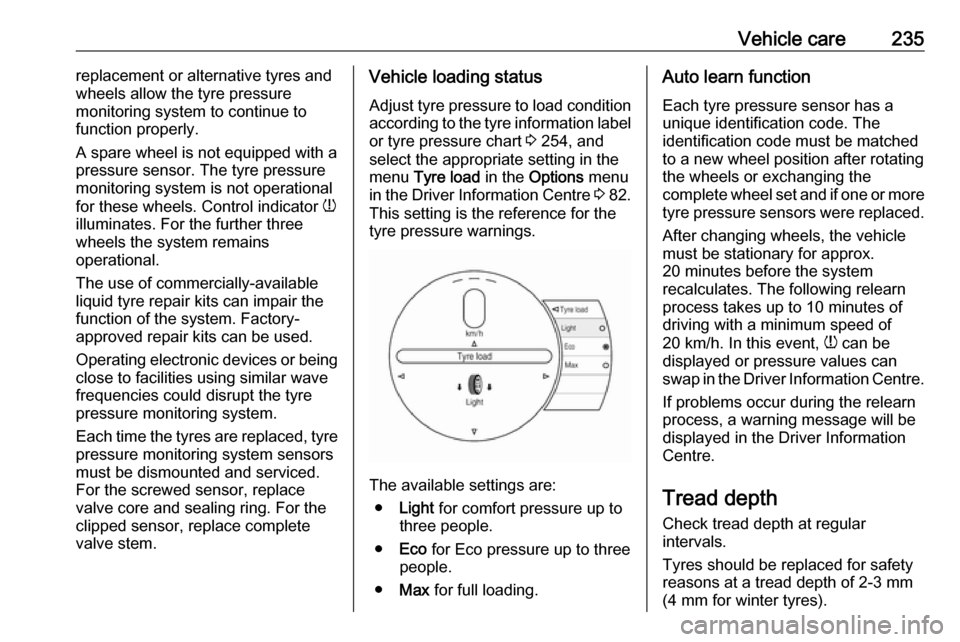
valve stem.Vehicle loading status
Adjust tyre pressure to load condition
according to the tyre information label or tyre pressure chart 3 254, and
select the appropriate setting in the
menu Tyre load in the Options menu
in the Driver Information Centre 3 82.
This setting is the reference for the
tyre pressure warnings.
The available settings are:
● Light for comfort pressure up to
three people.
● Eco for Eco pressure up to three
people.
● Max for full loading.
Auto learn function
Each tyre pressure sensor has a
unique identification code. The
identification code must be matched
to a new wheel position after rotating
the wheels or exchanging the
complete wheel set and if one or more
tyre pressure sensors were replaced.
After changing wheels, the vehicle
must be stationary for approx.
20 minutes before the system
recalculates. The following relearn
process takes up to 10 minutes of
driving with a minimum speed of
20 km/h. In this event, w can be
displayed or pressure values can
swap in the Driver Information Centre.
If problems occur during the relearn
process, a warning message will be
displayed in the Driver Information
Centre.
Tread depthCheck tread depth at regular
intervals.
Tyres should be replaced for safety
reasons at a tread depth of 2-3 mm
(4 mm for winter tyres).
Page 267 of 273

265Initiating a phone call..............137
Ring tone ................................. 137
Call history .................................. 137
Car wash mode .......................... 154
Central locking system ................20
Centre console storage ...............58
Changing tyre and wheel size ...236
Charge cord ................................ 205
Charge limit selection .................197
Charge mode selection ..............197
Charge rate selection .................197
Charging ..................................... 194
Charging override .......................197
Charging status .......................... 204
Charging system .......................... 78
Child locks ................................... 26
Child restraint installation locations ................................... 53
Child restraints.............................. 51
Child restraint systems ................51
Climate control ............................. 13
Clock............................................. 69
Control elements Infotainment system ................108
Steering wheel ........................ 108
Control elements overview .........108
Control indicators.......................... 77
Control of the vehicle .................149
Controls ........................................ 65
Convex shape .............................. 31Coolant ....................................... 214
Coolant and antifreeze ...............248
Cooling system ........................... 214
Cruise control ...................... 81, 164
Cupholders .................................. 57
Curtain airbag system .................. 49
D
DAB ............................................ 124
Danger, Warnings and Cautions ...2
Daytime running lights ...............102
Declaration of conformity ............255
Delayed locking ............................ 25
Digital audio broadcasting ..........124
Directional tyres .......................... 231
Displaying pictures .....................130
Display settings ..................130, 131
Door open .................................... 82
Doors ............................................ 28
Drive modes ............................... 154
Driver assistance systems ..........164
Driver Information Centre .............82
Driving economically................... 148
Driving efficiency gauge ...............74
Driving hints ........................ 148, 149
E Electric adjustment ......................32
Electrical requirements ...............209
Electrical system......................... 223
Electrical system overload .........223Electric drive unit ..................14, 154
Electric parking brake ...........79, 159
Electric parking brake fault ...........79
Electric rate schedule .................197
Electric vehicle operation modes 154
Electronic climate control system 142
Electronic key system ...................19
Electronic Stability Control.......... 163
Electronic Stability Control and Traction Control system ............80
Electronic Stability Control off....... 80
Emergency call ........................... 136
End-of-life vehicle recovery .......212
Engine compartment fuse box ...225
Engine data ............................... 252
Entry lighting .............................. 105
Event data recorders ..................259
Exit lighting ................................ 105
Exterior care .............................. 244
Exterior light ................................. 81
Exterior lighting ......................10, 99
Exterior mirrors ............................. 31
F
File formats Audio files................................ 126
Movie files ............................... 126
Picture files.............................. 126
First aid kit ................................... 61
Fixed air vents ........................... 146
Page 268 of 273

266Folding mirrors ............................. 32
Following distance indication ......169
Forward collision alert................. 167
Front airbag system .....................48
Front pedestrian protection ........172
Front seats.................................... 38
Front turn lights .......................... 220
Fuses ......................................... 223
G
Gauges ......................................... 74
General information ...126, 133,
134, 209
AUX ......................................... 126
Bluetooth ................................. 126
DAB ......................................... 124
Infotainment system ................106
Phone ...................................... 134
Smartphone applications ........126
USB ......................................... 126
Glovebox ..................................... 57
H Halogen bulbs ............................ 220
Hand brake ......................... 158, 159
Hazard warning flashers ............102
Headlight aiming .........................219
Headlight flash ........................... 101
Headlight range adjustment ......101
Headlights..................................... 99
Head restraint adjustment .............6Head restraints ............................ 37
Heated mirrors ............................. 33
Heated rear window ..................... 35
Heated steering wheel .................65
Heating .................................. 41, 42
High beam ........................... 81, 100
High beam assist ..................81, 100
High voltage devices and wiring 223
Home menu ................................ 113
Horn ....................................... 11, 66
I
Identification plate .....................250
Immobiliser ............................ 31, 81
Indicators ...................................... 74
Inductive charging ........................70
Info Display ................................... 85
Information displays...................... 82
Infotainment control panel ..........108
Instrument cluster ........................72
Instrument panel fuse box .........228
Instrument panel illumination control .................................... 104
Instrument panel overview ............. 8
Intellitext ..................................... 124
Interior care ............................... 245
Interior lighting ............................ 104
Interior lights .............................. 104
Introduction ............................... 0iPod............................................ 126
Connecting device ..................126
J
Jump starting ............................. 240
K Key, memorised settings ..............20
KeyPass ....................................... 26
Keys ............................................. 16
Keys, locks ................................... 16
L
Lane change alert .......................183
Lane keep assist ..................80, 191
Lashing eyes ............................... 61
Lifting the vehicle ........................211
Light switch .................................. 99
Load compartment ................28, 59
Load compartment cover .............60
Loading information .....................62
Location based charging ............197
M Manual seat adjustment ...............39
Maximum speed ......................... 232
Maximum startup volume ...........116
Memorised settings ......................20
Menu operation .......................... 113
Mirror adjustment ........................... 6 Misted light covers .....................103
Page 271 of 273

269UUltrasonic parking assist............. 174
Upholstery .................................. 245
Usage ......................... 110, 120, 133
AUX ......................................... 126
Bluetooth ................................. 126
iPod ......................................... 126
Menu ....................................... 113
Phone ...................................... 137
Radio ....................................... 120
USB ......................................... 126
USB Connecting device ..................126
General information ................126
USB audio menu .....................128
USB movie menu ....................131
USB picture menu ...................130
Using smartphone applications ..132
Using this manual ..........................2
V
Vehicle battery ........................... 217
Vehicle checks............................ 212
Vehicle data recording and privacy ..................................... 259
Vehicle detected ahead ................81
Vehicle dimensions .................... 253
Vehicle Identification Number ....250
Vehicle messages .......................89
Vehicle personalisation ...............91Vehicle ready ................................ 81
Vehicle security ............................ 29
Vehicle storage ........................... 211
Vehicle tools ............................... 231
Vehicle unlocking ........................... 4
Vehicle weight ........................... 252
Voice recognition ........................133
Volume Auto volume ............................ 116
Maximum startup volume ........116
Mute function........................... 110
Ring tone volume ....................116
Setting the volume ..................110
Speed compensated volume ..116
Touch beep volume ................116
TP volume ............................... 116
Volume limitation at high
temperatures ........................... 110
Volume settings .......................... 116
W
Warning chimes ........................... 90
Warning lights ............................... 74
Warning triangle .......................... 61
Washer and wiper systems .........12
Washer fluid ............................... 216
Waveband selection ...................120
Wheel covers ............................. 236
Wheels and tyres .......................231
Windows ....................................... 33Windscreen................................... 33
Windscreen wiper and washer ....66
Winter tyres ............................... 232
Wiper blade replacement ..........219
X Xenon headlights .......................220