wheel OPEL AMPERA E 2018.5 Manual user
[x] Cancel search | Manufacturer: OPEL, Model Year: 2018.5, Model line: AMPERA E, Model: OPEL AMPERA E 2018.5Pages: 273, PDF Size: 6.6 MB
Page 93 of 273
Instruments and controls91Vehicle personalisation
The vehicle's behaviour can be
personalised by changing the settings in the Info Display.
Depending on vehicle equipment and
country-specific regulations some of
the functions described below may
not be available.
Some functions are only displayed or
active when the vehicle is on.
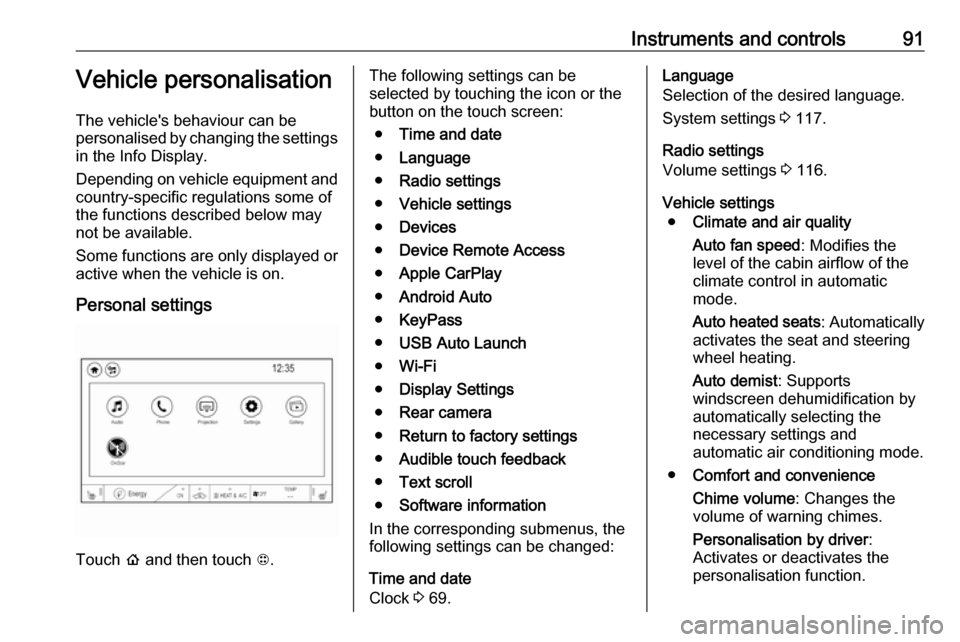
Personal settings
Touch p and then touch 1.
The following settings can be
selected by touching the icon or the
button on the touch screen:
● Time and date
● Language
● Radio settings
● Vehicle settings
● Devices
● Device Remote Access
● Apple CarPlay
● Android Auto
● KeyPass
● USB Auto Launch
● Wi-Fi
● Display Settings
● Rear camera
● Return to factory settings
● Audible touch feedback
● Text scroll
● Software information
In the corresponding submenus, the
following settings can be changed:
Time and date
Clock 3 69.Language
Selection of the desired language.
System settings 3 117.
Radio settings
Volume settings 3 116.
Vehicle settings ● Climate and air quality
Auto fan speed : Modifies the
level of the cabin airflow of the
climate control in automatic
mode.
Auto heated seats : Automatically
activates the seat and steering
wheel heating.
Auto demist : Supports
windscreen dehumidification by
automatically selecting the
necessary settings and
automatic air conditioning mode.
● Comfort and convenience
Chime volume : Changes the
volume of warning chimes.
Personalisation by driver :
Activates or deactivates the
personalisation function.
Page 103 of 273

Lighting10150 km/h. High beam is switched off at
a speed below 35 km/h, but high beam assist remains active.
The green control indicator f
illuminates continuously when the
high beam assist is activated, the blue one 7 illuminates when high beam is
on.
Control indicator f 3 81, 7 3 81.
Pushing the stalk once switches on
manual high beam without high beam assist.
High beam assist switches
automatically back to low beam
when:
● Driving in urban areas.
● Reverse parking function is active.
● Rear fog light is switched on.
If there are no restrictions detected,
the system switches back to high
beam.Deactivation
If high beam assist is active and high
beam is on, press f once or pull the
stalk once to deactivate high beam
assist.
If high beam assist is active and high
beam is off, press f once to
deactivate high beam assist.
Pushing the stalk to activate manual high beam will also deactivate highbeam assist.
Headlight flash in conjunction with high beam assist
Headlight flash by pulling the stalk
once will not deactivate high beam
assist when high beam is off.
Headlight flash by pulling the stalk
once deactivates high beam assist
when high beam is on.
Fault in headlight system
When the system detects a failure in
the headlight system, it selects a
preset position to avoid dazzling of
oncoming traffic. A warning is
displayed in the Driver Information
Centre.Headlight flash
To activate the headlight flash, pull
stalk.
Pulling stalk deactivates high beam.
Headlight range adjustment
Manual headlight range
adjustment
To adapt headlight range to the
vehicle load to prevent dazzling: turn
thumb wheel ? to required position.
Page 104 of 273

102Lighting0:front seats occupied1:all seats occupied2:all seats occupied and load
compartment laden3:driver's seat occupied and load
compartment laden
Daytime running lights
Daytime running lights increase
visibility of the vehicle during daylight.
While the daytime running light is
active, the tail lights and the sidelights are switched off.
Please remember that the low beam
should be switched on when required.
Hazard warning flashers Operated by pressing ¨.
In the event of an accident with airbag
deployment, the hazard warning
flashers are activated automatically.
Turn lightsstalk up:right turn lightstalk down:left turn light
A resistance point can be felt when
moving the stalk.
Constant flashing is activated when
the stalk is being moved beyond the
resistance point. It is deactivated
when the steering wheel is moved in
the opposite direction or stalk is
manually moved back to its neutral
position.
Page 106 of 273
104LightingInterior lightingInstrument panelillumination control
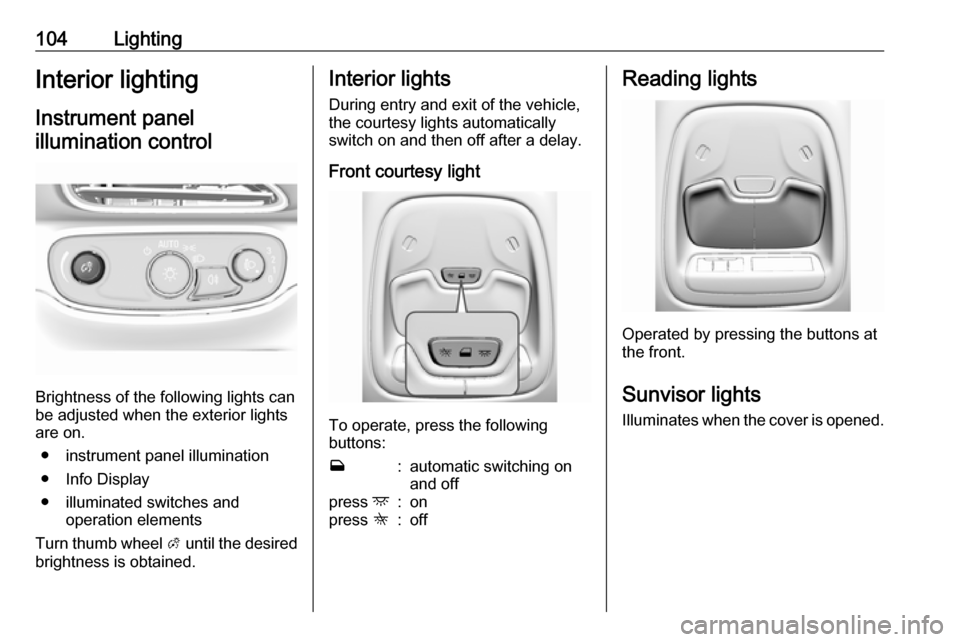
Brightness of the following lights can
be adjusted when the exterior lights
are on.
● instrument panel illumination
● Info Display
● illuminated switches and operation elements
Turn thumb wheel A until the desired
brightness is obtained.
Interior lights
During entry and exit of the vehicle,
the courtesy lights automatically
switch on and then off after a delay.
Front courtesy light
To operate, press the following
buttons:
w:automatic switching on
and offpress d:onpress K:offReading lights
Operated by pressing the buttons at
the front.
Sunvisor lights
Illuminates when the cover is opened.
Page 108 of 273

106Infotainment systemInfotainment systemIntroduction................................ 106
General information .................106
Theft-deterrent feature ............107
Control elements overview ......108
Usage ...................................... 110
Basic operation .......................... 113
Tone settings ........................... 115
Volume settings .......................116
System settings .......................117
Radio ......................................... 120
Usage ...................................... 120
Station search ......................... 121
Radio data system ...................123
Digital audio broadcasting .......124
External devices ........................126
General information .................126
Playing audio ........................... 128
Displaying pictures ..................130
Playing movies ........................ 131
Using smartphone applications ............................ 132
Speech recognition ....................133
General information .................133
Usage ...................................... 133Phone........................................ 134
General information .................134
Bluetooth connection ...............134
Emergency call ........................136
Operation ................................. 137
Mobile phones and CB radio equipment ............................... 140Introduction
General information
The Infotainment system provides
you with state-of-the-art in-car
Infotainment.
Using radio tuner functions, you can
listen to a great number of different
radio stations.
You can connect external data
storage devices to the Infotainment
system as further audio sources,
either via cable or via Bluetooth.
The Infotainment system is equipped
with a phone portal that allows for
comfortable and safe use of your
mobile phone in the vehicle.
You can also operate specific
smartphone applications via the
Infotainment system.
Optionally, the Infotainment system
can be operated using the touch
screen and buttons on the control
panel, the controls on the steering wheel, or - if provided by your mobile
phone - via speech recognition.
Page 111 of 273

Infotainment system1091Display / touch screen ........113
2 m (knob)
Turn: adjust volume ............110
3 m (button)
Short press: mute system ...110
or deactivate mute
function if mute function is
active ................................... 110
or exit low power mode if
low power mode is active ....110
Long press: turn on low
power mode ........................ 110
4 p
Press: display the
Infotainment home screen ..113
5 t / v
Short press: skip to
previous or next station
when radio active ................121
or skip to previous or next
track when external
devices active .....................128Long press: seek up or
down when radio active ......121
or fast forward or fast
rewind when external
devices active .....................128Steering wheel controls
1w
Short press: open OnStar
menu if no phone
connected ........................... 110
or open the phone menu .....137
or take phone call if phone connected ........................... 137
Long press: activate
speech recognition ..............133
Page 112 of 273

110Infotainment system2Five-way controller
Press buttons: operate
menus on the Driver
Information Centre ................82
3 n
Press: end / decline call ......137
or deactivate speech recognition .......................... 133
or activate / deactivate
mute function ...................... 110
Press FAV n or FAV o to display
the favourites list and choose one of
the favourites stored.
Press the buttons behind the steering wheel on the right side to adjust the
volume.
Usage
Control elements
The Infotainment system can be
operated in different ways.
Inputs are made optionally via:
● the central control unit in the control panel 3 108
● the touch screen 3 113
● audio controls on the steering wheel 3 108
● the speech recognition 3 133
Switching the Infotainment
system on or off
The Infotainment system is switched
on automatically when the vehicle is turned on. After switching on, the last selected Infotainment source
becomes active.
Automatic switch-off
If the Infotainment system has been
switched on by pressing X while the
vehicle is switched off, it will switch off again automatically 10 minutes after
the last user input.
Low power mode
To save high voltage battery power, a
low power mode is available.
If desired, you may turn the display off while the sound remains active.
Page 135 of 273

Infotainment system133Connecting the mobile phoneConnect the smartphone to the USB
port 3 126.
When first connecting a device, a
privacy consent message may be
displayed. Confirm the message to
continue the connection procedure.
Starting phone projection Press p and then select 1 in the top
left corner of the screen to display the
application overview screen.
To start the phone projection function, select Projection .
Note
If the application is recognised by
the Infotainment system, the
application icon may change to
Apple CarPlay or Android Auto .
Alternatively, press and hold p.
The phone projection screen
displayed depends on your
smartphone and software version.
Returning to the home screen
Press p.Speech recognition
General information
The voice pass-thru application of the Infotainment system allows access to
the speech recognition commands on your smartphone. See your
smartphone manufacturer's
operating instructions to find out
whether your smartphone supports this feature.
In order to use the voice pass-thru
application, the smartphone must be
connected to the Infotainment system
via USB cable 3 126 or via Bluetooth
3 134.
Usage
Activating speech recognition Press and hold w on the steering
wheel to start a speech recognition
session. A voice command message
is displayed on the screen.As soon as a beep is heard, you can
say a command. For information on
the commands supported, see the
operating instructions for your
smartphone.
Adjusting the volume of voice
prompts
Turn m on the control panel or press
the volume buttons behind the
steering wheel to increase or
decrease the volume of voice
prompts.
Deactivating speech recognition
Press n on the steering wheel. The
voice command message disappears
and the speech recognition session is ended.
Page 141 of 273

Infotainment system139Favourites
Contact favourites can be stored in
the phone favourites list.Storing favourites
Press p and then select 1 in the top
left corner of the screen to display the application overview screen.
Select Phone. Select the ^ tab in the
phone main menu.
Select t next to the contact you want
to store as favourite. The icon
changes to s and the contact
appears in the favourites list.
Select s again to delete the contact
from the favourites list. The icon
changes to t.
Note
The favourites list is not
synchronised with the phone
favourites. The favourites have to be added to the favourites list on the
Infotainment system.Retrieving favourites
Press p and then select 1 in the top
left corner of the screen to display the application overview screen.Select Phone. Select the < tab in the
phone main menu.
Select the desired favourite to initiate a phone call.
Redialling a number
The last dialled phone number can be
redialled.
Press p and then select 1 in the top
left corner of the screen to display the application overview screen.
Select Phone and then ? on the
screen.
Using speed dial numbers
Speed dial numbers that are stored
on the mobile phone can also be
dialled using the keypad of the phone
main menu.
Press p and then select 1 in the top
left corner of the screen to display the application overview screen.
Select Phone.
Touch and hold the respective digit on the keypad to initiate the call. For two-
digit speed dial numbers, select the
first digit and then touch and hold the second digit.Incoming phone call
Taking a call
If an audio mode, e.g. the radio or
USB mode, is active at the moment a call comes in the audio source is
muted and stays muted until the call
ends.
To answer the call, select v in the
message on top of the screen or
press w on the steering wheel.
The Z tab is activated displaying
information on the call.
Rejecting a call
To reject the call, select @ in the
message on top of the screen or
press n on the steering wheel.
Privacy settings
When a call comes in, a message is displayed on the Info Display
indicating the name and number of
the person calling (if available). If
Privacy is activated, information on
the caller is only shown in the cluster
display.
Page 155 of 273

Driving and operating1539Warning
● Always apply parking brake.
Pull switch m for approx.
1 second and check if the
control indicator m illuminates.
The electric parking brake is applied when control indicator
m illuminates 3 79.
● Switch off the vehicle.
● If the vehicle is on a level surface or uphill slope, apply
the parking brake and set the
selector lever to P before
switching off the vehicle. On an uphill slope, turn the front
wheels away from the kerb.
If the vehicle is on a downhill
slope, apply the parking brake
and set the selector lever to P
before switching off the vehicle.
Turn the front wheels towards
the kerb.
With the selector lever in P,
press POWER m briefly to
switch off the vehicle. Turn the
steering wheel until the
steering wheel lock engages.
● Close the windows.
● Lock the vehicle.
● Activate the anti-theft alarm system.
● The engine cooling fans may run
after the vehicle has been
switched off 3 212.
It is not recommended to park with the propulsion system running.
If the vehicle is left with the propulsion
system running, follow the proper
steps to be sure the vehicle will not move.
Post-crash label
The post-crash label is located in the
driver's door frame.
After an accident, park the vehicle
with a sufficient distance of
approx. 7.5 m to other objects.
Park on a non-flammable surface.
Call the hotline number given on the
label to get further instructions on how to handle the vehicle.