Charge OPEL AMPERA E 2018.5 User Guide
[x] Cancel search | Manufacturer: OPEL, Model Year: 2018.5, Model line: AMPERA E, Model: OPEL AMPERA E 2018.5Pages: 273, PDF Size: 6.6 MB
Page 92 of 273

90Instruments and controlsSome important messages may
appear additionally in the Info
Display. Some messages only pop-
up for a few seconds.
Warning chimes If several warnings appear at the
same time, only one warning chime will sound.
When starting the propulsion
system or whilst driving
The warning chime regarding not
fastened seat belts has priority over
any other warning chime.
● If seat belt is not fastened.
● If a door or the tailgate is not fully
closed when starting off.
● If a certain speed is exceeded with parking brake applied.
● If approaching a vehicle ahead too rapidly.
● If a programmed speed or speed
limit is exceeded.
● If a warning message appears in the Driver Information Centre.● If the electronic key is not in thepassenger compartment.
● If the parking assist detects an object.
● If an unintended lane change occurs.
● If safety function of the power tailgate detects obstacles in the
moving area.
When the vehicle is parked and /
or the driver's door is opened
● With exterior lights on.
Battery voltage
When the voltage of the 12 V vehicle
battery is running low, a warning
message will appear in the Driver
Information Centre.
1. Switch off any electrical consumers which are not requiredfor a safe drive, e.g. seat heating,
heated rear window or other main
consumers.
2. Charge the 12 V vehicle battery by
driving continuously for a while or
by using a charging device.The warning message will disappear
after the vehicle has been started
twice without a voltage drop.
If the 12 V vehicle battery cannot be
recharged, have the cause of the fault remedied by a workshop.
Page 101 of 273
Lighting99LightingExterior lighting............................ 99
Light switch ................................ 99
Automatic light control .............100
High beam ............................... 100
High beam assist .....................100
Headlight flash ......................... 101
Headlight range adjustment ....101
Daytime running lights .............102
Hazard warning flashers ..........102
Turn lights ................................ 102
Rear fog light ........................... 103
Parking lights ........................... 103
Reversing lights .......................103
Misted light covers ...................103
Interior lighting ........................... 104
Instrument panel illumination control ..................................... 104
Interior lights ............................ 104
Reading lights .......................... 104
Sunvisor lights ......................... 104
Lighting features ........................105
Entry lighting ............................ 105
Exit lighting .............................. 105
Battery discharge protection ....105Exterior lighting
Light switch
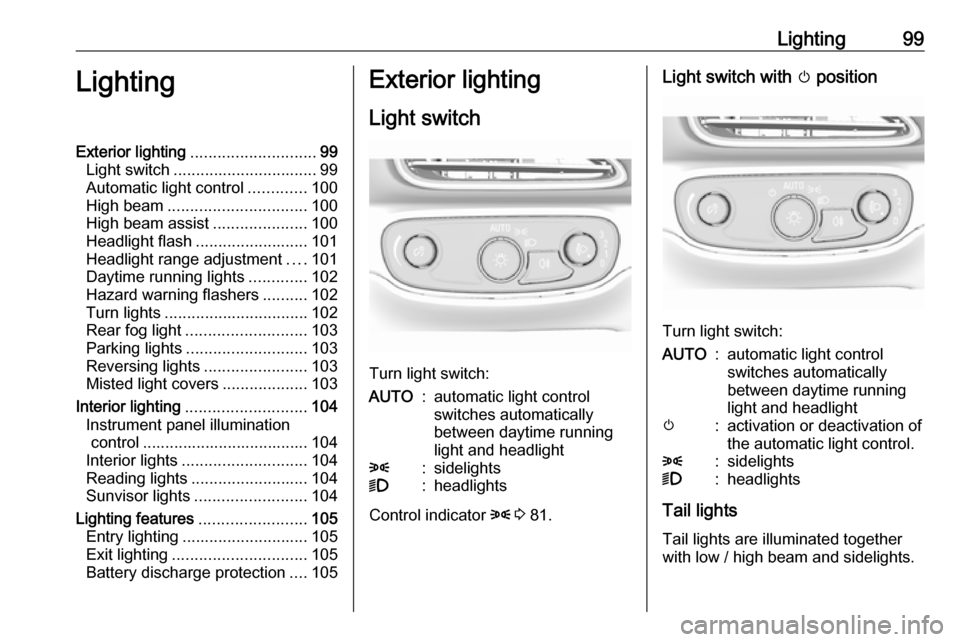
Turn light switch:
AUTO:automatic light control
switches automatically
between daytime running
light and headlight8:sidelights9:headlights
Control indicator 8 3 81.
Light switch with m position
Turn light switch:
AUTO:automatic light control
switches automatically
between daytime running
light and headlightm:activation or deactivation of
the automatic light control.8:sidelights9:headlights
Tail lights
Tail lights are illuminated together
with low / high beam and sidelights.
Page 107 of 273

Lighting105Lighting features
Entry lighting Low beam and the interior lights turn
on briefly by pressing ( on the
electronic key. The lights turn off
immediately when POWERm is
pressed or automatically after a brief period.
Exit lighting The low beam and the reversing light
come on by doing the following:
1. Switch off the vehicle.
2. Open the driver's door.
3. Pull the stalk briefly and release.
Some interior lights come on when
the vehicle is switched off. The
exterior and the interior lights remain
on after the door is closed for a brief
period and then turn off.
Activation, deactivation and duration
of this function can be changed in the
Info Display.
Vehicle personalisation 3 91.Battery discharge protection
Vehicle battery state of charge
function
The vehicle battery saver feature is
designed to protect the 12 V vehicle
battery. If any interior light is left on and the vehicle is switched off, thevehicle battery discharge protection
system automatically turns the lights
off after approx. 10 minutes.
If the exterior lights are left on, they
turn off when the vehicle is switched
off. If the sidelights are switched on
when the vehicle is switched off, the
sidelights remain on until they are
manually switched off.
Page 150 of 273

148Driving and operatingDriving and
operatingDriving hints ............................... 148
Driving economically ...............148
Control of the vehicle ...............149
Starting and operating ...............149
New vehicle running-in ............149
Power button ........................... 149
Retained power off ..................151
Starting and stopping the vehicle .................................... 151
Parking .................................... 152
Electric vehicle operation modes ........................................ 154
Operation ................................. 154
Drive modes ............................ 154
Electric drive unit .......................154
Operation ................................. 154
Brakes ........................................ 158
Antilock brake system .............158
Parking brake .......................... 159
Regenerative braking ..............161
Ride control systems .................162
Traction Control system ..........162
Electronic Stability Control ......163Driver assistance systems .........164
Cruise control .......................... 164
Speed limiter ........................... 166
Forward collision alert .............167
Following distance indication ...169
Active emergency braking .......170
Front pedestrian protection .....172
Parking assist .......................... 174
Side blind zone assistant .........182
Lane change alert ....................183
Panoramic view system ...........184
Rear view camera ...................186
Rear cross traffic alert .............188
Traffic sign assistant ................189
Lane keep assist .....................191
Charging .................................... 194
Programmable charging ..........197
Programmed charging override .................................. 204
Charging status .......................204
Charge cord ............................. 205
Electrical requirements ............209
Towing ....................................... 209
General information .................209Driving hints
Driving economically The following advice is intended to
help maximise energy efficiency and
range.
In colder temperatures, while these
efficiency tips will help, the electric
vehicle's driving range may be lower
due to higher energy usage.
The weight of additional cargo in the
vehicle affects efficiency and range.
Avoid carrying more than is needed.
Avoid unnecessary use of electrical
accessories. Power used for
functions other than propelling the
vehicle will reduce electric vehicle
range.
Always keep the tyres properly
inflated and the vehicle properly
aligned.
Driving style
Avoid unnecessary rapid
accelerations and decelerations.
Use cruise control when appropriate.
Page 152 of 273

150Driving and operatingIf the vehicle will not start, place the
electronic key in the transmitter
pocket inside the centre console.
Starting and stopping the vehicle
3 151.Switching on the vehicle
With the vehicle off and the brake
pedal applied, pressing POWERm
once will switch on the vehicle. When 4 illuminates in the instrument
cluster, the vehicle is ready to be
driven. This could take up to
15 seconds at extremely cold
temperatures.Switching off the vehicle
With the vehicle in P, press
POWER m briefly in service mode or
when engine is running and vehicle is
stationary. Some functions remain
active until driver's door is opened.
If the vehicle is not in P when
switching off the vehicle, P will be
automatically engaged before the
vehicle is switched off.A chime will sound if the driver's door is opened while the vehicle is
switched on. Always press
POWER m to switch off the vehicle
before exiting the vehicle.Emergency shut off during driving
If the vehicle needs to be switched off during driving in case of emergency,
press POWER m for more than
2 seconds or press twice briefly within
5 seconds.
Starting and stopping the vehicle
3 151.
Service mode
This power mode is available for
service and diagnostics and to verify
the proper operation of the service
vehicle soon control indicator as may
be required for emission inspection
purposes.
With the vehicle switched off and the
brake pedal not applied, pressing and holding POWER m for more than
5 seconds will place the vehicle in service mode. The instruments and
audio systems will operate as they do when the vehicle is switched on, but
the vehicle will not be able to be
driven. The propulsion system will not start in service mode. Press
POWER m again to switch off the
vehicle.Caution
Service mode will discharge the
12 V vehicle battery. Do not use
service mode for an extended
period, or the vehicle may not
start.
Operation in case of failure
If the vehicle does not start due to a
low electronic key battery, a message
will be displayed in the Driver
Information Centre.
To still drive the vehicle, proceed as
follows:
1. Open the centre console and remove the small tray from the
centre console. Place the
electronic key in the pocket with
the buttons facing the bottom of
the vehicle.
Page 156 of 273
154Driving and operatingElectric vehicle
operation modes
Operation This vehicle is a purely electricallydriven vehicle. It always uses an
electric propulsion system to drive the
vehicle. Electricity is the vehicle's only source of energy.
Drive modes Sport modeSport mode provides more
responsive acceleration than normal
mode, but can reduce energy
efficiency. Use normal mode
whenever possible.
When the 3 indicator does not
illuminate, the vehicle is in normal
mode.
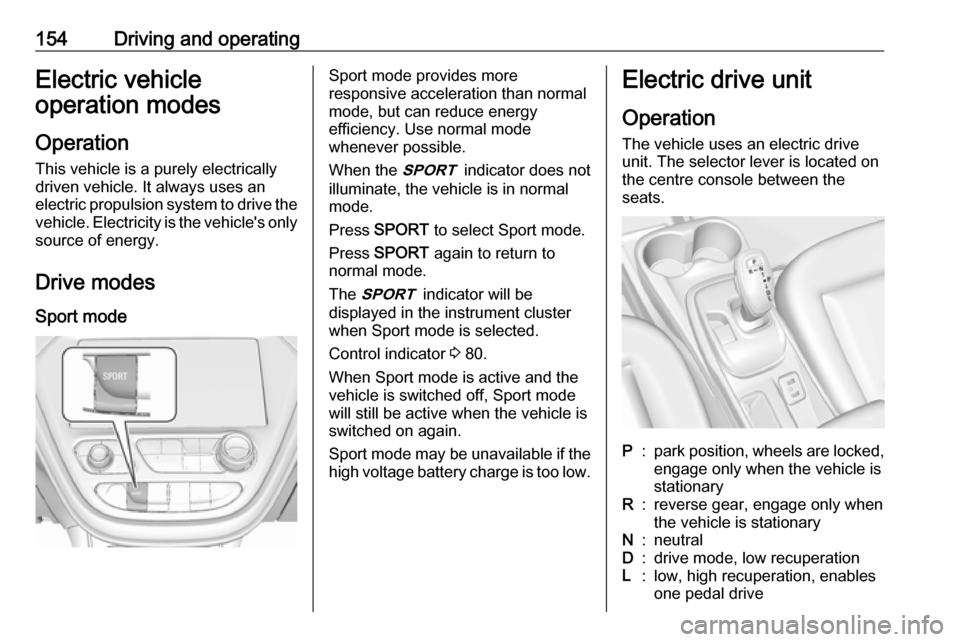
Press SPORT to select Sport mode.
Press SPORT again to return to
normal mode.
The 3 indicator will be
displayed in the instrument cluster
when Sport mode is selected.
Control indicator 3 80.
When Sport mode is active and the
vehicle is switched off, Sport mode
will still be active when the vehicle is switched on again.
Sport mode may be unavailable if the high voltage battery charge is too low.Electric drive unit
Operation The vehicle uses an electric drive
unit. The selector lever is located on
the centre console between the
seats.P:park position, wheels are locked, engage only when the vehicle is
stationaryR:reverse gear, engage only when
the vehicle is stationaryN:neutralD:drive mode, low recuperationL:low, high recuperation, enables
one pedal drive
Page 161 of 273
Driving and operating159ABS starts to regulate brake pressure
as soon as a wheel shows a tendency to lock. The vehicle remains
steerable, even during hard braking.
ABS control is made apparent
through a pulse in the brake pedal
and the noise of the regulation
process.
For optimum braking, keep the brake
pedal fully depressed throughout the
braking process, despite the fact that
the pedal is pulsating. Do not reduce
the pressure on the pedal.
After starting off, the system performs a self-test which may be audible.
Control indicator u 3 79.
Fault9 Warning
If there is a fault in the ABS, the
wheels may be liable to lock due
to braking that is heavier than
normal. The advantages of ABS
are no longer available. During
hard braking, the vehicle can nolonger be steered and may
swerve.
Have the cause of the fault remedied
by a workshop.
Parking brake
Electric parking brake
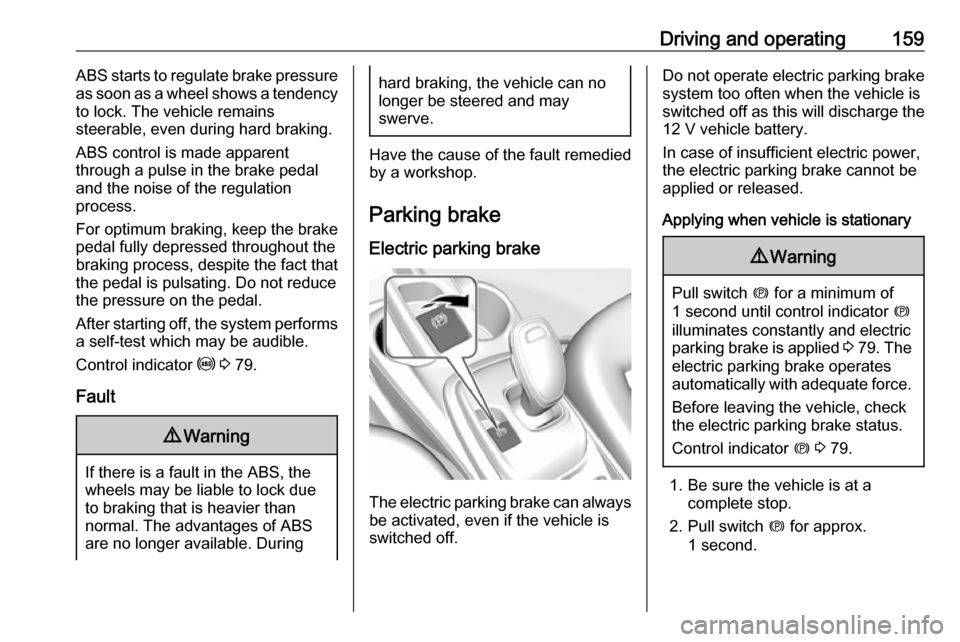
The electric parking brake can always
be activated, even if the vehicle is
switched off.
Do not operate electric parking brake
system too often when the vehicle is
switched off as this will discharge the 12 V vehicle battery.
In case of insufficient electric power,
the electric parking brake cannot be
applied or released.
Applying when vehicle is stationary9 Warning
Pull switch m for a minimum of
1 second until control indicator m
illuminates constantly and electric
parking brake is applied 3 79 . The
electric parking brake operates automatically with adequate force.
Before leaving the vehicle, check
the electric parking brake status.
Control indicator m 3 79.
1. Be sure the vehicle is at a
complete stop.
2. Pull switch m for approx.
1 second.
Page 163 of 273
Driving and operating161the parking brake is fully released
and the control indicator m is off
before driving.
Automatic release
The electric parking brake is
automatically released when the
vehicle is running, placed into gear
and an attempt is made to drive away.
Avoid rapid acceleration when the
electric parking brake is applied, to
reduce wear of parking brake lining.
Electric parking brake control
indicator m 3 79.
Electric parking brake fault control
indicator j3 79.
Driver Information Centre 3 82.
Regenerative braking
Some braking energy from the
moving vehicle is turned back into
electrical energy. This energy is then
stored back into the high voltage
battery system, increasing energy
efficiency.
Regenerative power may be limited
when the high voltage battery is near
full charge or cold.Regeneration on demand
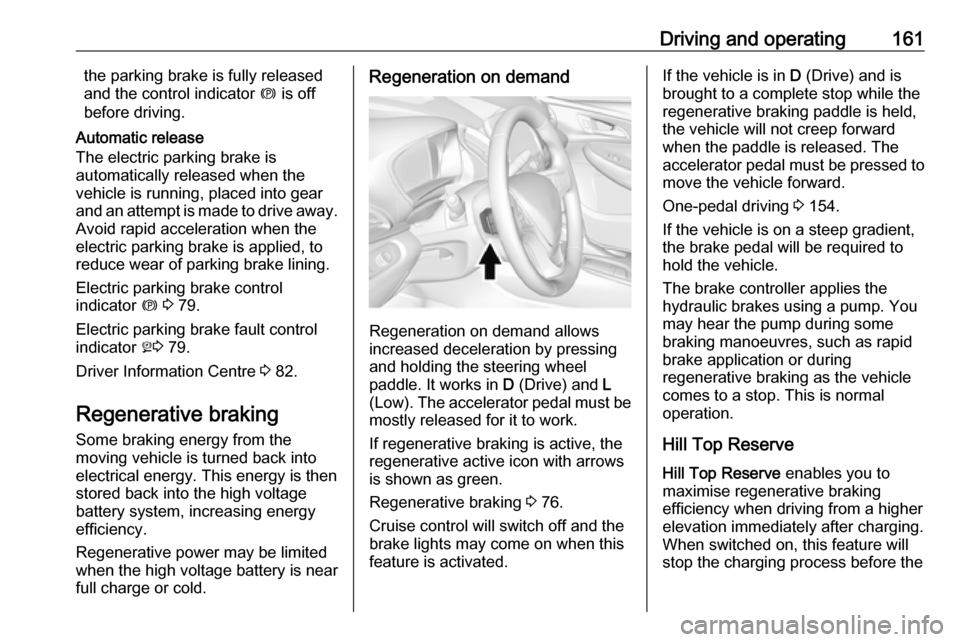
Regeneration on demand allows
increased deceleration by pressing
and holding the steering wheel
paddle. It works in D (Drive) and L
(Low). The accelerator pedal must be mostly released for it to work.
If regenerative braking is active, the regenerative active icon with arrowsis shown as green.
Regenerative braking 3 76.
Cruise control will switch off and the
brake lights may come on when this
feature is activated.
If the vehicle is in D (Drive) and is
brought to a complete stop while the regenerative braking paddle is held,
the vehicle will not creep forward
when the paddle is released. The
accelerator pedal must be pressed to
move the vehicle forward.
One-pedal driving 3 154.
If the vehicle is on a steep gradient,
the brake pedal will be required to
hold the vehicle.
The brake controller applies the
hydraulic brakes using a pump. You
may hear the pump during some
braking manoeuvres, such as rapid
brake application or during
regenerative braking as the vehicle
comes to a stop. This is normal
operation.
Hill Top ReserveHill Top Reserve enables you to
maximise regenerative braking
efficiency when driving from a higher
elevation immediately after charging.
When switched on, this feature will
stop the charging process before the
Page 196 of 273

194Driving and operatingCharging
This section explains the process of
charging the vehicle's high voltage
battery. Do not allow the vehicle to
remain in places with extremes of
temperature for long periods without
being driven or plugged in.
It is recommended to keep the vehicle plugged in, even if fully charged, to
keep the high voltage battery
temperature ready for the next drive.
The vehicle must be plugged in when
the temperatures are below -25 °C, to
operate properly and to maximise
high voltage battery life.
However, we recommend plugging in the vehicle when temperatures drop
below 0 °C or raise above 32 °C.
When using the portable charge cord, it will take approximately 33 hours to
charge the vehicle with the 10 A
setting.
When using a 230 V charging station,
it will take approximately 10 hours to
charge the vehicle with the 32 A
setting.Charge times will vary based on high
voltage battery condition and outside
temperature. There are three ways to programme how the vehicle is
charged.
Programmable charging 3 197.
The charging system may run fans
and pumps resulting in noises coming from the vehicle while it is turned off.
Additional clicking sounds may be
caused by the electrical devices used
while charging.
While the charge cord is plugged into
the vehicle, the vehicle cannot be
driven.
When to charge When the high voltage battery is
getting low, charging messages may
be displayed.
The Charge vehicle soon message
indicates that the driving range is low
and the vehicle needs to be charged
soon. As the charge level drops, the
Propulsion power is reduced
message is displayed and the
accelerator pedal response is
reduced. In addition, the remainingrange value will change to Low
indicating the vehicle should be charged immediately.
When the energy is fully depleted, the
Out of power. Charge vehicle now
message is displayed and the vehicle slows to a stop. Brake and steering
assist will still operate. Once the
vehicle has stopped, switch off the
vehicle.
AC (alternating current) charging
Start charging
A portable charge cord used to
charge the vehicle high voltage
battery is stored under the rear floor
storage cover in the load
compartment.
1. Shift into P (Park) and switch off
the vehicle.
Page 197 of 273

Driving and operating195
2. Push the rearward edge of thecharge port door in and release to
open the door.
In cold weather conditions, ice
may form around the charge port
door. Remove ice from the area
before attempting to open or close the charge port door.3. Open the tailgate. Lift the rear floor storage cover and remove
the charge cord.
4. Plug the charge cord into the electrical outlet.
Electrical requirements 3 209.
Verify the charge cord status.
Charge cord 3 205.
Select the appropriate charge
level.
See "Charge limit selection" in
Programmable charging 3 197.5. Plug in the vehicle plug of the
charge cord into the charge port
on the vehicle. Verify that the
charging status indicator
illuminates on top of the
instrument panel and an audible
beep occurs.
Charging status 3 204.
6. Once charging, the vehicle plug will be locked to the charge port
and cannot be disconnected while
charging is active.
Stop charging 1. To stop charging, when inside the
vehicle, use the Stop button on
the Charging screen.