air condition OPEL AMPERA E 2018.5 User Guide
[x] Cancel search | Manufacturer: OPEL, Model Year: 2018.5, Model line: AMPERA E, Model: OPEL AMPERA E 2018.5Pages: 273, PDF Size: 6.6 MB
Page 235 of 273
Vehicle care233For the tyres approved for your
vehicle, refer to the EEC Certificate of
Conformity provided with your vehicle
or other national registration
documents.
The driver is responsible for correct
adjustment of tyre pressure.9 Warning
If the pressure is too low, this can
result in considerable tyre warm-
up and internal damage, leading to tread separation and even to tyre
blow-out at high speeds.
9 Warning
For specific tyres the
recommended tyre pressure as
shown in the tyre pressure table may exceed the maximum tyre
pressure as indicated on the tyre.
Never exceed the maximum tyre
pressure as indicated on the tyre.
If the tyre pressure must be reduced
or increased on a vehicle with tyre
pressure monitoring system, switch
off the vehicle.
Temperature dependency The tyre pressure depends on the
temperature of the tyre. During
driving, tyre temperature and
pressure increase. Tyre pressure
values provided on the tyre
information label and tyre pressure
chart are valid for cold tyres, which means at 20 °C.
The pressure increases by nearly
10 kPa for a 10 °C temperature
increase. This must be considered
when warm tyres are checked.
The tyre pressure value displayed in
the Driver Information Centre shows
the real tyre pressure. A cooled down
tyre will show a decreased value,
which does not indicate an air leak.Tyre pressure monitoring
system
The tyre pressure monitoring system
checks the pressure of all four tyres
once a minute when vehicle speed
exceeds a certain limit.Caution
Tyre pressure monitoring system
warns only about low tyre pressure condition and does not replace
regular tyre maintenance by the
driver.
All wheels must be equipped with pressure sensors and the tyres must
have the prescribed pressure.
Note
In countries where the tyre pressure
monitoring system is legally
required, the use of wheels without
pressure sensors will invalidate the
vehicle operating permit.
The current tyre pressures can be
shown in the Driver Information
Centre.
Page 237 of 273
Vehicle care235replacement or alternative tyres and
wheels allow the tyre pressure
monitoring system to continue to
function properly.
A spare wheel is not equipped with a pressure sensor. The tyre pressure
monitoring system is not operational
for these wheels. Control indicator w
illuminates. For the further three
wheels the system remains
operational.
The use of commercially-available
liquid tyre repair kits can impair the
function of the system. Factory-
approved repair kits can be used.
Operating electronic devices or being
close to facilities using similar wave
frequencies could disrupt the tyre
pressure monitoring system.
Each time the tyres are replaced, tyre pressure monitoring system sensors
must be dismounted and serviced.
For the screwed sensor, replace
valve core and sealing ring. For the
clipped sensor, replace complete
valve stem.Vehicle loading status
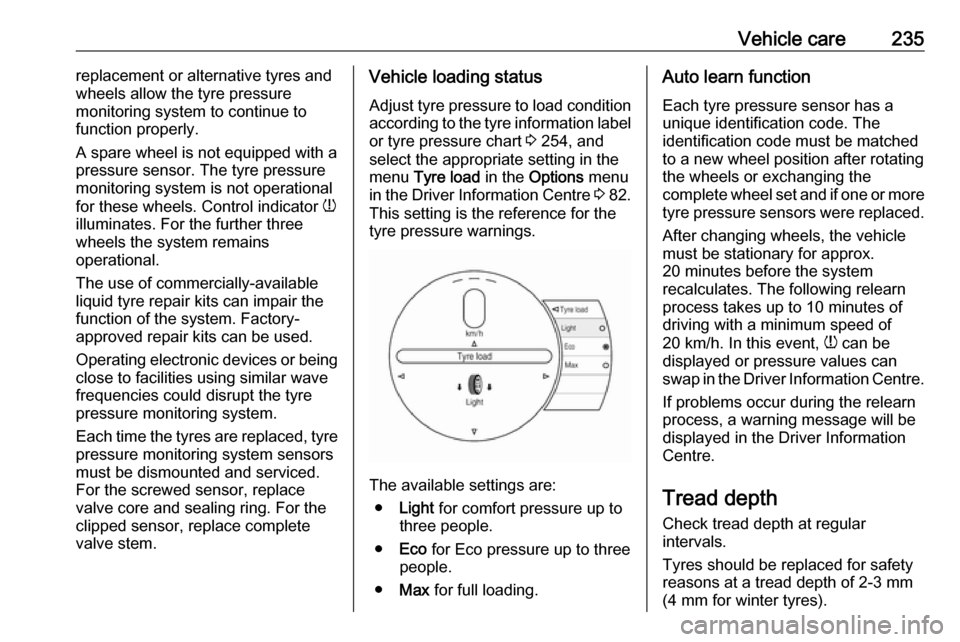
Adjust tyre pressure to load condition
according to the tyre information label or tyre pressure chart 3 254, and
select the appropriate setting in the
menu Tyre load in the Options menu
in the Driver Information Centre 3 82.
This setting is the reference for the
tyre pressure warnings.
The available settings are:
● Light for comfort pressure up to
three people.
● Eco for Eco pressure up to three
people.
● Max for full loading.
Auto learn function
Each tyre pressure sensor has a
unique identification code. The
identification code must be matched
to a new wheel position after rotating
the wheels or exchanging the
complete wheel set and if one or more
tyre pressure sensors were replaced.
After changing wheels, the vehicle
must be stationary for approx.
20 minutes before the system
recalculates. The following relearn
process takes up to 10 minutes of
driving with a minimum speed of
20 km/h. In this event, w can be
displayed or pressure values can
swap in the Driver Information Centre.
If problems occur during the relearn
process, a warning message will be
displayed in the Driver Information
Centre.
Tread depthCheck tread depth at regular
intervals.
Tyres should be replaced for safety
reasons at a tread depth of 2-3 mm
(4 mm for winter tyres).
Page 239 of 273
Vehicle care237Tyre chains
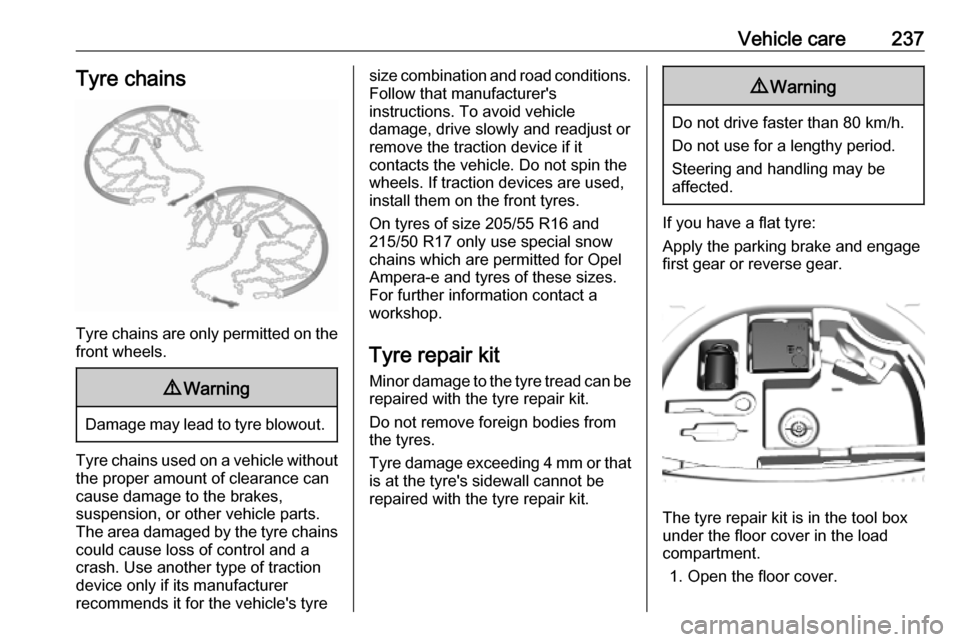
Tyre chains are only permitted on the
front wheels.
9 Warning
Damage may lead to tyre blowout.
Tyre chains used on a vehicle without
the proper amount of clearance can
cause damage to the brakes,
suspension, or other vehicle parts.
The area damaged by the tyre chains could cause loss of control and a
crash. Use another type of traction
device only if its manufacturer
recommends it for the vehicle's tyre
size combination and road conditions.
Follow that manufacturer's
instructions. To avoid vehicle
damage, drive slowly and readjust or
remove the traction device if it
contacts the vehicle. Do not spin the
wheels. If traction devices are used,
install them on the front tyres.
On tyres of size 205/55 R16 and 215/50 R17 only use special snow
chains which are permitted for Opel
Ampera-e and tyres of these sizes. For further information contact a
workshop.
Tyre repair kit Minor damage to the tyre tread can be
repaired with the tyre repair kit.
Do not remove foreign bodies from
the tyres.
Tyre damage exceeding 4 mm or that is at the tyre's sidewall cannot be
repaired with the tyre repair kit.9 Warning
Do not drive faster than 80 km/h.
Do not use for a lengthy period.
Steering and handling may be
affected.
If you have a flat tyre:
Apply the parking brake and engage
first gear or reverse gear.
The tyre repair kit is in the tool box
under the floor cover in the load
compartment.
1. Open the floor cover.
Page 249 of 273

Service and maintenance247Service and
maintenanceGeneral information ...................247
Service information ..................247
Recommended fluids, lubricants and parts .................................... 248
Recommended fluids and lubricants ................................ 248General information
Service information In order to ensure economical and
safe vehicle operation and to
maintain the value of your vehicle, it
is of vital importance that all
maintenance work is carried out at the proper intervals as specified.
The detailed, up-to-date service
schedule for your vehicle is available
at the workshop.
European service intervals Maintenance of your vehicle is
required every 30,000 km or after one year, whichever occurs first, unless
otherwise indicated in the service
display.
A shorter service interval can be valid
for severe driving behaviour, e.g. for
taxis and police vehicles.
The European service intervals are
valid for the following countries:
Andorra, Austria, Belgium, Bosnia-
Herzegovina, Bulgaria, Croatia,
Cyprus, Czech Republic, Denmark,
Estonia, Finland, France, Germany,Greece, Greenland, Hungary,
Iceland, Ireland, Italy, Latvia,
Liechtenstein, Lithuania,
Luxembourg, Macedonia, Malta,
Monaco, Montenegro, Netherlands,
Norway, Poland, Portugal, Romania, San Marino, Serbia, Slovakia,
Slovenia, Spain, Sweden,
Switzerland, United Kingdom.
International service intervals
Maintenance of your vehicle is
required every 15,000 km or after one
year, whichever occurs first, unless
otherwise indicated in the service
display.
Severe operating conditions exist if
one or more of the following
circumstances occur frequently: Cold
starting, stop and go operation,
mountain driving, driving on poor and sandy road surfaces, increased air
pollution, presence of airborne sand
and high dust content, driving at high
altitude and large variations of
temperature. Under these severe
operating conditions, certain service
work may be required more frequently than the regular service interval.
Page 260 of 273

258Customer information1. Redistributions of source codemust retain the above copyright
notice, definition, disclaimer, and
this list of conditions.
2. Redistributions in binary form (compiled executables) must
reproduce the above copyright
notice, definition, disclaimer, and
this list of conditions in
documentation and / or other
materials provided with the
distribution. The sole exception to
this condition is redistribution of a
standard UnZipSFX binary
(including SFXWiz) as part of a
self-extracting archive; that is
permitted without inclusion of this
license, as long as the normal
SFX banner has not been
removed from the binary or
disabled.
3. Altered versions--including, but not limited to, ports to new
operating systems, existing ports
with new graphical interfaces, and dynamic, shared, or static library
versions--must be plainly marked
as such and must not be
misrepresented as being the
original source. Such alteredversions also must not be
misrepresented as being Info-ZIP
releases--including, but not
limited to, labelling of the altered
versions with the names “Info-
ZIP” (or any variation thereof,
including, but not limited to,
different capitalizations), “Pocket
UnZip,” “WiZ” or “MacZip” without
the explicit permission of Info-ZIP. Such altered versions are further
prohibited from misrepresentative
use of the Zip-Bugs or Info-ZIP e- mail addresses or of the Info-ZIP
URL(s).
4. Info-ZIP retains the right to use the names “Info-ZIP,” “Zip,”
“UnZip,” “UnZipSFX,” “WiZ,”
“Pocket UnZip,” “Pocket Zip,” and
“MacZip” for its own source and
binary releases.
Software update
The Infotainment system can
download and install selected
software updates over a wireless
connection.Note
The availability of these over-the-air
vehicle software updates varies by
vehicle and country. Find more
information on our home page.
Internet connection
Downloading over-the-air vehicle
software updates requires internet
connectivity, which can be accessed
through the vehicle’s built-in OnStar
connection or another password-
protected Wi-Fi hotspot, e.g. provided
by a mobile phone.
To connect the Infotainment system
to a hotspot, select Settings on the
home screen, Wi-Fi and then Manage
Wi-Fi Networks . Select the desired
Wi-Fi network, and follow the on-
screen prompts.
Updates
The system will prompt for certain
updates to be downloaded and
installed. There is also an option to
check for updates manually.
Page 262 of 273

260Customer informationThis data includes, for example:● Vehicle status information (e.g. wheel rotation rate, speed,
movement delay, lateral
acceleration, "seatbelts
fastened" display),
● Ambient conditions (e.g. temperature, rain sensor,
distance sensor).
Most of this data is volatile and is
processed only in the vehicle itself, and not beyond the operating time.
Moreover, many control units include
data storage device (amongst others the vehicle key). This is used to allow
information to be documented
temporarily or permanently on vehicle condition, component stress,
maintenance requirements and
technical events and errors.
The following information, for
example, is stored:
● System component operating states (e.g. fill level, tyre
pressure, battery status),
● State of charge of the high voltage battery, estimated range
(in the case of electric vehicles),● Faults and defects in important system components (e.g. lights,
brakes),
● System reactions in special driving situations (e.g. triggeringof an airbag, actuation of the
stability control systems),
● Information on events damaging the vehicle.
In special cases (e.g. if the vehicle
has detected a malfunction), it may be
necessary to save data that would
otherwise just be volatile.
When you use services, the operating
data saved can be read together with the vehicle identification number andused if necessary. Staff working for
the service net-work (e.g. garages, manufacturers) or third parties (e.g.
breakdown services) can read the
data from the vehicle. Services
include repair services, maintenance
processes, warranty cases and
quality assurance measures.
Data is generally read via the OBD
(On-Board Diagnostics) port
prescribed by law in the vehicle. The operating data which has been read
out documents the technical conditionof the vehicle or individual
components and assists with fault
diagnosis, compliance with warranty
obligations and quality improvement.
This data, in particular information on component stress, technical events,
operator errors and other faults, is
transmitted to the manufacturer
where appropriate, together with the vehicle identification number. The
manufacturer is also subject to
product liability. The manufacturer
potentially also needs operating data
from vehicles for product recalls.
Fault memories in the vehicle can be
reset by a service company when
carrying out servicing or repairs.
Comfort and Infotainment
functions
Comfort settings and custom settings
can be stored in the vehicle and
changed at any time.
Page 263 of 273

Customer information261Depending on the equipment level in
question, these include
● Seat and steering wheel position settings,
● Chassis and air conditioning settings,
● Custom settings such as interior lighting.
You can input your own data in the
Infotainment functions for your
vehicle as part of the selected
features.
Depending on the equipment level in
question, these include
● Multimedia data such as music, videos or photos for playback in
an integrated multimedia system,
● Address book data for use with an integrated hands-free system
or an integrated navigation
system,
● Input destinations,
● Data on the use of online services.
This data for comfort and
Infotainment functions can be stored
locally in the vehicle or be kept on adevice that you have connected to the
vehicle ( e.g. a smartphone, USB stick
or MP3 player). Data that you have input yourself can be deleted at any
time.
This data can only be transmitted out
of the vehicle at your request,
particularly when using online
services in accordance with the
settings selected by you.
Smartphone integration, e.g.
Android Auto or Apple CarPlay
If your vehicle is equipped
accordingly, you can connect your
smartphone or another mobile device
to the vehicle so that you can control
it via the controls integrated in the
vehicle. The smartphone image and
sound can be output via the
multimedia system in this case. At the same time, specific information is
transmitted to your smartphone.
Depending on the type of integration,
this includes data such as position
data, day / night mode and other
general vehicle information. For moreinformation, please see the operating
instructions for the vehicle /
Infotainment system.
Integration allows selected
smartphone apps to be used, such as
navigation or music playback. No
further integration is possible
between smartphone and vehicle, in particular active access to vehicledata. The nature of further data
processing is determined by the
provider of the app used. Whether
you can define settings, and if so
which ones, is dependent on the app
in question and your smartphone's
operating system.
Page 266 of 273

264IndexAAccessories and vehicle modifications .......................... 210
Activating Bluetooth music .........128
Activating phone .........................137
Activating radio ........................... 120
Activating USB audio ..................128
Activating USB movie .................131
Activating USB picture ................130
Active emergency braking ..........170
Adjustable air vents ...................146
Airbag and belt tensioners ...........78
Airbag deactivation ................49, 78
Airbag label................................... 45 Airbag system .............................. 45
Air conditioning regular operation ................................ 147
Air intake .................................... 147
Air vents...................................... 146
Antilock brake system ................ 158
Antilock brake system (ABS) .......79
Anti-theft alarm system ................29
Anti-theft locking system .............. 29
Appearance care ........................244
Armrest ................................... 40, 42
Armrest storage ........................... 58
Audio files ................................... 126
Automatic anti-dazzle ..................33
Automatic light control ...............100
Automatic locking ........................25Auto volume................................ 116
AUX Connecting device ..................126
General information ................126
B Basic operation ........................... 113
Battery discharge protection ......105
Battery gauge ............................... 74
Battery voltage ............................. 90
Belts.............................................. 42
Bluetooth Bluetooth connection ..............134
Bluetooth music menu ............128
Connecting device ..................126
General information ................126
Pairing ..................................... 134
Phone ...................................... 137
Bluetooth connection ..................134
Bonnet ....................................... 213
Brake fluid .......................... 216, 248
Brakes ............................... 158, 216
Brake system ............................... 79
Breakdown.................................. 242
BringGo ...................................... 132
Bulb replacement ....................... 220
C Call Functions during a call ............137
Incoming call ........................... 137