heating OPEL AMPERA E 2018.5 User Guide
[x] Cancel search | Manufacturer: OPEL, Model Year: 2018.5, Model line: AMPERA E, Model: OPEL AMPERA E 2018.5Pages: 273, PDF Size: 6.6 MB
Page 90 of 273

88Instruments and controls●Climate settings includes how the
heating and air conditioning are
used.
● Outside temperature includes the
effect that hot or cold air has on
vehicle aerodynamics.
● Score is the sum of the individual
scores.
The individual scores provide an
understanding of how electric
economy are different from day-to-
day, even when travelling the same
route.
All values are reset after a complete
charge and may not be stable until
approximately 16 km have been
driven.Efficiency History
The Efficiency History graph shows
the average economy over the last
50 km.
The present bar provides the average economy for the current 5 km.
Touch Reset to clear the history data.
Energy settings
To view and change the Energy
settings , touch Energy and then
Energy settings . Use the arrows to
scroll through the list.
The following list of menu items may
be available:
● Location-based charging : This
feature allows the charging settings to be remembered at the
saved GPS coordinates for the
Home location.
Location based charging in
Programmable charging 3 197.
Page 92 of 273

90Instruments and controlsSome important messages may
appear additionally in the Info
Display. Some messages only pop-
up for a few seconds.
Warning chimes If several warnings appear at the
same time, only one warning chime will sound.
When starting the propulsion
system or whilst driving
The warning chime regarding not
fastened seat belts has priority over
any other warning chime.
● If seat belt is not fastened.
● If a door or the tailgate is not fully
closed when starting off.
● If a certain speed is exceeded with parking brake applied.
● If approaching a vehicle ahead too rapidly.
● If a programmed speed or speed
limit is exceeded.
● If a warning message appears in the Driver Information Centre.● If the electronic key is not in thepassenger compartment.
● If the parking assist detects an object.
● If an unintended lane change occurs.
● If safety function of the power tailgate detects obstacles in the
moving area.
When the vehicle is parked and /
or the driver's door is opened
● With exterior lights on.
Battery voltage
When the voltage of the 12 V vehicle
battery is running low, a warning
message will appear in the Driver
Information Centre.
1. Switch off any electrical consumers which are not requiredfor a safe drive, e.g. seat heating,
heated rear window or other main
consumers.
2. Charge the 12 V vehicle battery by
driving continuously for a while or
by using a charging device.The warning message will disappear
after the vehicle has been started
twice without a voltage drop.
If the 12 V vehicle battery cannot be
recharged, have the cause of the fault remedied by a workshop.
Page 93 of 273
Instruments and controls91Vehicle personalisation
The vehicle's behaviour can be
personalised by changing the settings in the Info Display.
Depending on vehicle equipment and
country-specific regulations some of
the functions described below may
not be available.
Some functions are only displayed or
active when the vehicle is on.
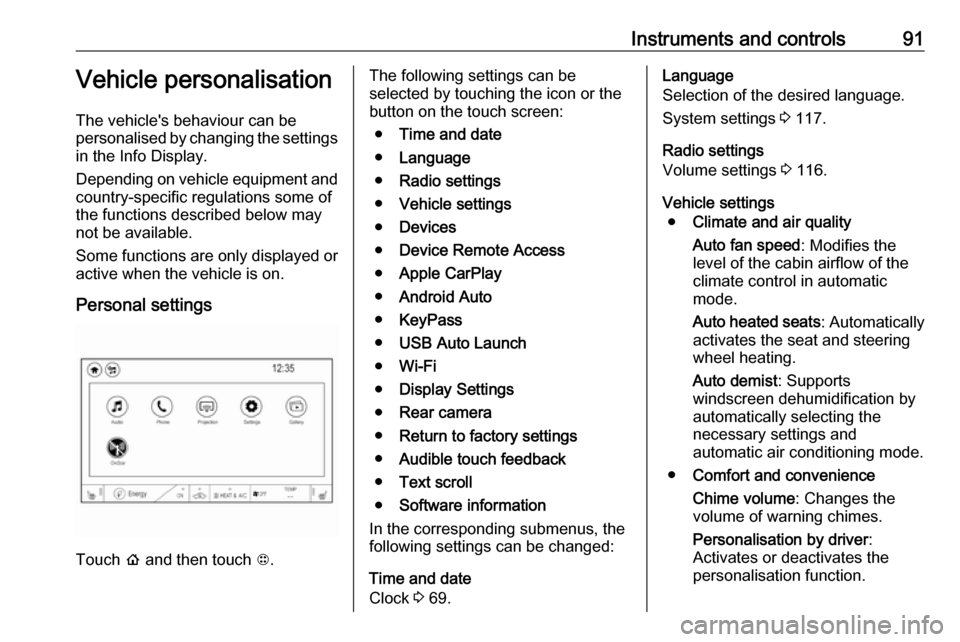
Personal settings
Touch p and then touch 1.
The following settings can be
selected by touching the icon or the
button on the touch screen:
● Time and date
● Language
● Radio settings
● Vehicle settings
● Devices
● Device Remote Access
● Apple CarPlay
● Android Auto
● KeyPass
● USB Auto Launch
● Wi-Fi
● Display Settings
● Rear camera
● Return to factory settings
● Audible touch feedback
● Text scroll
● Software information
In the corresponding submenus, the
following settings can be changed:
Time and date
Clock 3 69.Language
Selection of the desired language.
System settings 3 117.
Radio settings
Volume settings 3 116.
Vehicle settings ● Climate and air quality
Auto fan speed : Modifies the
level of the cabin airflow of the
climate control in automatic
mode.
Auto heated seats : Automatically
activates the seat and steering
wheel heating.
Auto demist : Supports
windscreen dehumidification by
automatically selecting the
necessary settings and
automatic air conditioning mode.
● Comfort and convenience
Chime volume : Changes the
volume of warning chimes.
Personalisation by driver :
Activates or deactivates the
personalisation function.
Page 144 of 273
142Climate controlClimate controlClimate control systems.............142
Electronic climate control system .................................... 142
Air vents ..................................... 146
Adjustable air vents .................146
Fixed air vents ......................... 146
Maintenance .............................. 147
Air intake ................................. 147
Air conditioning regular operation ................................ 147
Service .................................... 147Climate control systems
Electronic climate control system
Note
Do not cover the sensor located on top of the instrument panel,
otherwise the automatic climate
control system may not work
properly.
In automatic mode, temperature, fan
speed and air distribution are
regulated automatically.Controls for:
● temperature
● air distribution h, B ,C
● fan speed E
● automatic mode AUTO
● demisting and defrosting hMAX
Heated rear window f 3 35.
Heated exterior mirrors Ü 3 33.
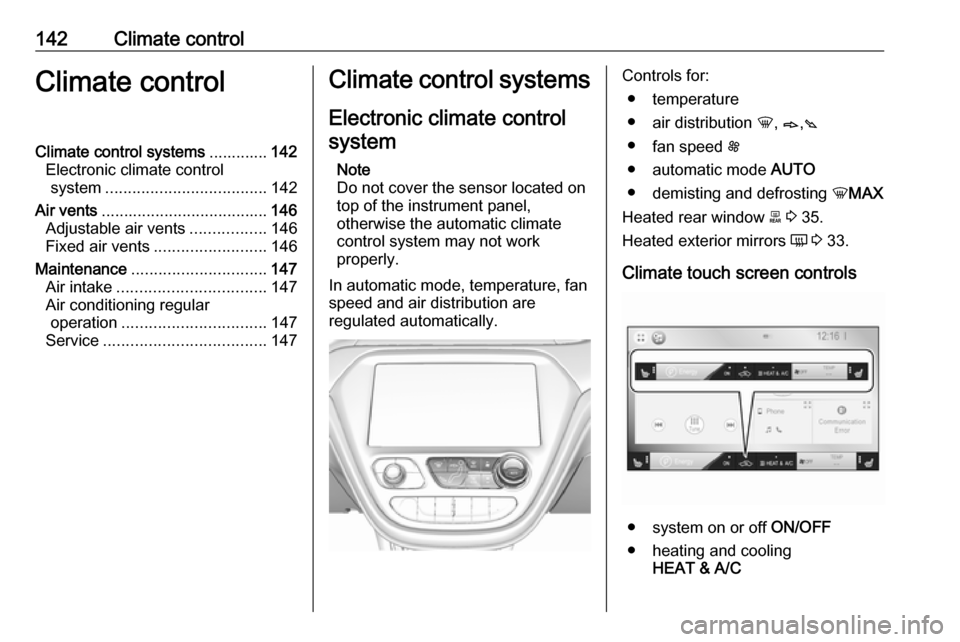
Climate touch screen controls
● system on or off ON/OFF
● heating and cooling HEAT & A/C
Page 145 of 273

Climate control143●manual air recirculation 4
● Heated seats +/q 3 41
Automatic mode AUTO
Basic setting for maximum comfort: ● Press AUTO, the air distribution
and fan speed are regulated
automatically. The LED in the
button illuminates to indicate
activation.
● Touch Heat & A/C to switch on
optimal heating, cooling and
demisting. The LED in the button illuminates to indicate activation.
● Set the preselected temperature by turning rotary knob TEMP.
Recommended temperature is
22 °C.
● Open all air vents to allow optimised air distribution in
automatic mode.
The fan speed regulation in automatic mode can be changed in the Info
Display.
Vehicle personalisation 3 91.
Temperature preselection
Set temperature to the desired value.
The selected temperature is indicated in the display.
Note
The preselected temperature is only achieved if Heat & A/C is switched
on.
If the minimum temperature Lo is set,
the climate control system runs at maximum cooling, when Heat & A/C
is switched on.
If the maximum temperature Hi is set,
the climate control system runs at maximum heating when Heat & A/C is
switched on.
Page 146 of 273

144Climate controlDemisting and defrosting the
windows hMAX
●
Press hMAX . The LED in the
button illuminates to indicate
activation. When hMAX is
selected, air is directed to the
windscreen and the fan runs at a
higher speed. Fog or frost is cleared from the windscreenmore quickly.
● Temperature and air distribution are set automatically and the fan
runs at high speed.
● Switch on heated rear window f.
● To return to previous mode: press h, to return to automatic
mode: press AUTO.
Settings of automatic rear window
heating can be changed in the
Info Display.
Vehicle personalisation 3 91.
System activation ON/OFF Cooling, fan and automatic mode can
be switched off by pressing ON/OFF.
Manual settings Climate control system settings can
be changed by activating the buttons
and rotary knobs as described below.
Changing a setting will deactivate
automatic mode.Fan speed Z,
Press lower button to decrease or
upper button to increase fan speed.
The fan speed is indicated in the
lower display area.
If the fan is switched off, the air
conditioning is also deactivated.
To return to automatic mode: Press
AUTO .
Page 147 of 273

Climate control145Air distribution V, B and C
Press the appropriate button for the
desired adjustment. The LED in the
button illuminates to indicate
activation.
B:to head area via adjustable air
ventsC:to foot well and windscreenh:to windscreen
Combinations are possible.
To return to automatic air distribution:
press AUTO .
Manual air recirculation 4
Touch 4 to activate the air
recirculation mode.
Touch 4 again to deactivate
recirculation mode.
If selected, the touch screen button
will illuminate to indicate that air is
being recirculated. This helps to
quickly cool the air inside the vehicle or prevent outside air and odours
from entering.
Touching 4 deactivates air
recirculation. Press AUTO to return to
automatic operation. Recirculation
runs automatically as needed.
9 Warning
The exchange of fresh air is
reduced in air recirculation mode.
In operation without cooling the air humidity increases, so the
windows may mist up from inside.
The quality of the passenger
compartment air deteriorates,
which may cause the vehicle
occupants to feel drowsy.
Remote heating and cooling
Operated by pressing O on the
electronic key.
The climate control system will default
to an appropriate heating or cooling
mode and the rear window heating
will turn on in the event of cold outside temperatures.
Remote start 3 17.
Page 149 of 273
Climate control147Maintenance
Air intake
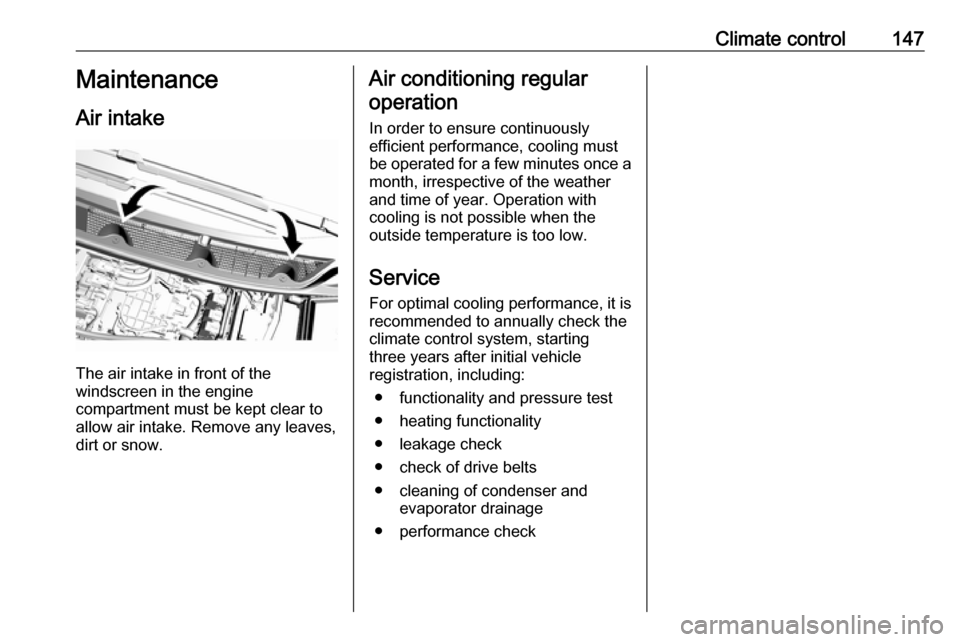
The air intake in front of the
windscreen in the engine
compartment must be kept clear to
allow air intake. Remove any leaves,
dirt or snow.
Air conditioning regular
operation
In order to ensure continuously
efficient performance, cooling must
be operated for a few minutes once a
month, irrespective of the weather
and time of year. Operation with
cooling is not possible when the
outside temperature is too low.
Service For optimal cooling performance, it is recommended to annually check the
climate control system, starting
three years after initial vehicle
registration, including:
● functionality and pressure test
● heating functionality
● leakage check
● check of drive belts
● cleaning of condenser and evaporator drainage
● performance check
Page 207 of 273

Driving and operating205● Solid green – No horn chirps:Charging is complete.
● Solid yellow – No horn chirp: Vehicle is plugged in. It is normalfor the charging status indicator
to turn yellow for a few seconds
after plugging in a compatible
charge cord. The solid yellow
may remain illuminated
depending on the vehicle.
This may also indicate that the
charging system has detected a
fault and will not charge the high
voltage battery.
● No light signal (upon plug‐in) – No horn chirps: Charge cord
connection should be checked.
● No light signal (after indication of
green or yellow charging status
indicator) – No horn chirps:
Charge cord connection should
be checked. If connection is
correct, this may be due to a
power failure and charging will
begin later. This may also occur
if the vehicle has detected a high voltage charging system fault.● No light signal – Three horn chirps: Charge port door is open.
● No light signal – Horn chirps repeatedly: The power supply
was interrupted before the
charging process could be
completed. Repeated chirps will stop if power is restored within
90 seconds.
Vehicle personalisation 3 91.
The system may be thermally
conditioning the high voltage battery
during any of the states mentioned
above, requiring electric energy to be
transferred to the vehicle.
If the vehicle is plugged in and vehicle power is on, the charging status
indicator will flash or illuminate solid green, depending on the charge level.
This also happens during Engine
Assisted Heating if the vehicle is
plugged in.
If the vehicle is plugged in and the
charging status indicator is off, a
charging fault has been detected.Charge cord9 Danger
There is a risk of electric shock
that may cause personal injury or
death.
Do not use the charge cord if any part of the charge cord is
damaged.
Do not open or remove the charge cord cover.
Service by qualified personnel
only. Connect the charge cord to a
properly grounded outlet with
cords that are not damaged.
A portable charge cord used to
charge the vehicle high voltage
battery is stored under the rear floor
storage cover in the load
compartment 3 194.
Page 232 of 273

230Vehicle careNumberUsage32–33Heating, ventilation, and airconditioning module34–35Instrument panel cluster 136Radio37–38–39–40–41–42–43Body control module 744Sensing and diagnostic
module45Front camera module46Vehicle integration control
moduleNumberUsage47Single power inverter
module 248Electric steering column
lock49Auxiliary jack50Steering wheel controls51Steering wheel controls
backlighting52Smartphone remote func‐
tion module53Auxiliary power outlet54–55Logistic56–57–58–59–60–To reinstall the door, insert the bottom tab first, then push the door back into its original location.