door lock OPEL AMPERA E 2018.5 Owner's Guide
[x] Cancel search | Manufacturer: OPEL, Model Year: 2018.5, Model line: AMPERA E, Model: OPEL AMPERA E 2018.5Pages: 273, PDF Size: 6.6 MB
Page 95 of 273

Instruments and controls93Remote start auto heat seats:
Activates or deactivates
automatically the heated seats
when using remote start.
Passive door unlock : Changes
the configuration to unlock only
the driver's door or the whole
vehicle whilst unlocking.
Relock remotely unlocked doors :
Activates or deactivates the
passive locking function. This
feature locks the vehicle
automatically after several
seconds if all doors have been
closed and an electronic key has been removed from the vehicle.
Remote start auto heat seats :
Activates or deactivates automatically the heated seats
when using remote start.
Passive door unlock : Changes
the configuration to unlock only
the driver's door or the whole
vehicle whilst unlocking.
Passive door lock : Activates or
deactivates the passive locking
function. This feature locks the
vehicle automatically after
several seconds if all doors havebeen closed and an electronic
key has been removed from the
vehicle.
Remote left in vehicle alert :
Activates or deactivates the
warning chime when the
electronic key remains in the
vehicle.
Devices
External devices 3 126.
Device remote access
Smartphone remote function 3 26.
Apple CarPlay
Using smartphone applications
3 132.
Android Auto
Using smartphone applications
3 132.
KeyPass
Smartphone remote function 3 26.
USB Auto Launch
External devices 3 126.Wi-Fi
System settings 3 117.
Display Settings
System settings 3 117.
Rear camera
Symbols : Activates or deactivates the
symbols.
Guidelines : Activates or deactivates
the guiding lines.
Return to factory settings
Reset vehicle settings : Resets all
settings to the default settings.
Clear all private data : Deletes all
private information from the vehicle.
Restore radio settings : Resets all
radio settings to the default settings.
System settings 3 117.
Audible touch feedback
Usage 3 110.
Text scroll
System settings 3 117.
Software information
System settings 3 117.
Page 153 of 273
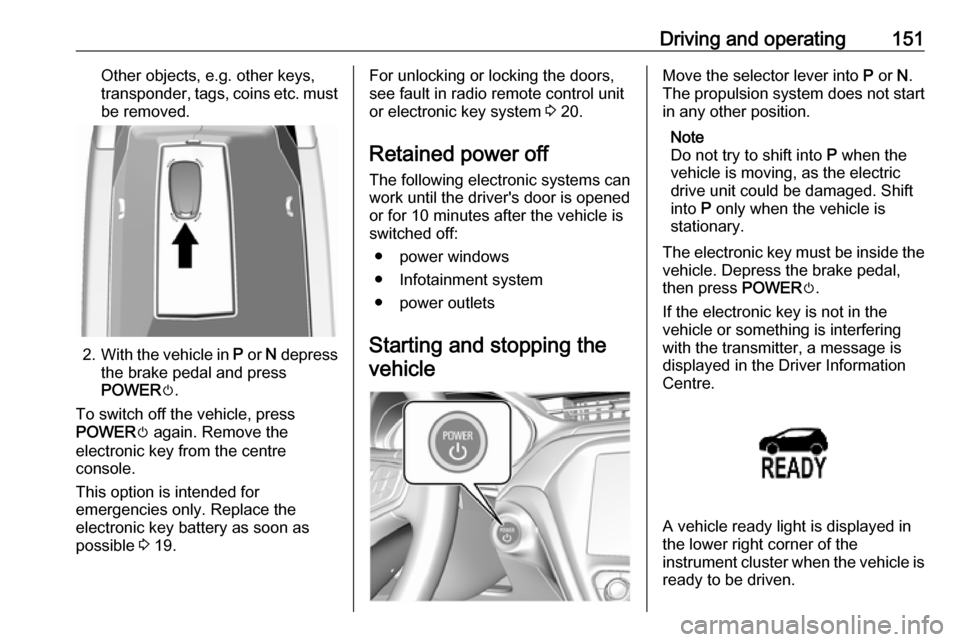
Driving and operating151Other objects, e.g. other keys,
transponder, tags, coins etc. must be removed.
2. With the vehicle in P or N depress
the brake pedal and press
POWER m.
To switch off the vehicle, press
POWER m again. Remove the
electronic key from the centre
console.
This option is intended for
emergencies only. Replace the
electronic key battery as soon as
possible 3 19.
For unlocking or locking the doors,
see fault in radio remote control unit
or electronic key system 3 20.
Retained power off
The following electronic systems can
work until the driver's door is opened
or for 10 minutes after the vehicle is
switched off:
● power windows
● Infotainment system
● power outlets
Starting and stopping the vehicleMove the selector lever into P or N.
The propulsion system does not start
in any other position.
Note
Do not try to shift into P when the
vehicle is moving, as the electric
drive unit could be damaged. Shift
into P only when the vehicle is
stationary.
The electronic key must be inside the
vehicle. Depress the brake pedal,
then press POWERm.
If the electronic key is not in the
vehicle or something is interfering
with the transmitter, a message is
displayed in the Driver Information
Centre.
A vehicle ready light is displayed in
the lower right corner of the
instrument cluster when the vehicle is ready to be driven.
Page 155 of 273

Driving and operating1539Warning
● Always apply parking brake.
Pull switch m for approx.
1 second and check if the
control indicator m illuminates.
The electric parking brake is applied when control indicator
m illuminates 3 79.
● Switch off the vehicle.
● If the vehicle is on a level surface or uphill slope, apply
the parking brake and set the
selector lever to P before
switching off the vehicle. On an uphill slope, turn the front
wheels away from the kerb.
If the vehicle is on a downhill
slope, apply the parking brake
and set the selector lever to P
before switching off the vehicle.
Turn the front wheels towards
the kerb.
With the selector lever in P,
press POWER m briefly to
switch off the vehicle. Turn the
steering wheel until the
steering wheel lock engages.
● Close the windows.
● Lock the vehicle.
● Activate the anti-theft alarm system.
● The engine cooling fans may run
after the vehicle has been
switched off 3 212.
It is not recommended to park with the propulsion system running.
If the vehicle is left with the propulsion
system running, follow the proper
steps to be sure the vehicle will not move.
Post-crash label
The post-crash label is located in the
driver's door frame.
After an accident, park the vehicle
with a sufficient distance of
approx. 7.5 m to other objects.
Park on a non-flammable surface.
Call the hotline number given on the
label to get further instructions on how to handle the vehicle.
Page 160 of 273

158Driving and operatingCar wash mode (vehicle off) - driver
out of vehicle
To place the vehicle in N with the
vehicle off and unoccupied:
1. Apply the brake pedal.2. Open the door.
3. Shift to N.
4. Turn off the vehicle and release the brake pedal.
5. The indicator should continue to show N. If it does not, repeat steps
1-4.
6. Exit the vehicle and close the door.
The vehicle is now ready for the
car wash.
Car wash mode (vehicle on) - driver
in vehicle
To place the vehicle in N with the
vehicle on and occupied:
1. Apply the brake pedal.
2. Shift to N.
3. Release the brake pedal.
The vehicle is now ready for the
car wash.Car wash mode (vehicle on) - driver
out of vehicle
To place the vehicle in N with the
vehicle on and unoccupied:
1. Apply the brake pedal.2. Open the door.
3. Shift to N.
4. Release the brake pedal.
5. The indicator should continue to show N. If it does not, repeat steps
1-4.
6. Exit the vehicle and close the door.
The vehicle is now ready for the
car wash.
The vehicle may have
automatically shifted to P upon re-
entry.Brakes
The brake system comprises two
independent brake circuits.
If a brake circuit fails, the vehicle can
still be braked using the other brake
circuit. However, braking effect is
achieved only when the brake pedal
is depressed firmly. Considerably
more force is needed for this. The
braking distance is extended. Seek the assistance of a workshop before
continuing the journey.
When the vehicle is switched off, the
support of the brake servo unit
disappears once the brake pedal has been depressed once or twice.
Braking effect is not reduced, but
braking requires significantly greater
force. It is especially important to bear this in mind when being towed.
Control indicator R 3 79.
Antilock brake system
Antilock brake system (ABS)
prevents the wheels from locking.
Page 197 of 273

Driving and operating195
2. Push the rearward edge of thecharge port door in and release to
open the door.
In cold weather conditions, ice
may form around the charge port
door. Remove ice from the area
before attempting to open or close the charge port door.3. Open the tailgate. Lift the rear floor storage cover and remove
the charge cord.
4. Plug the charge cord into the electrical outlet.
Electrical requirements 3 209.
Verify the charge cord status.
Charge cord 3 205.
Select the appropriate charge
level.
See "Charge limit selection" in
Programmable charging 3 197.5. Plug in the vehicle plug of the
charge cord into the charge port
on the vehicle. Verify that the
charging status indicator
illuminates on top of the
instrument panel and an audible
beep occurs.
Charging status 3 204.
6. Once charging, the vehicle plug will be locked to the charge port
and cannot be disconnected while
charging is active.
Stop charging 1. To stop charging, when inside the
vehicle, use the Stop button on
the Charging screen.
Page 198 of 273
196Driving and operatingSee "Temporary charge mode
override and cancel" in
Programmable charging 3 197.
Additionally, the stop charge
button on the electronic key may
also be used. Press and hold 5 on
the electronic key. This will also
unlock the vehicle plug.
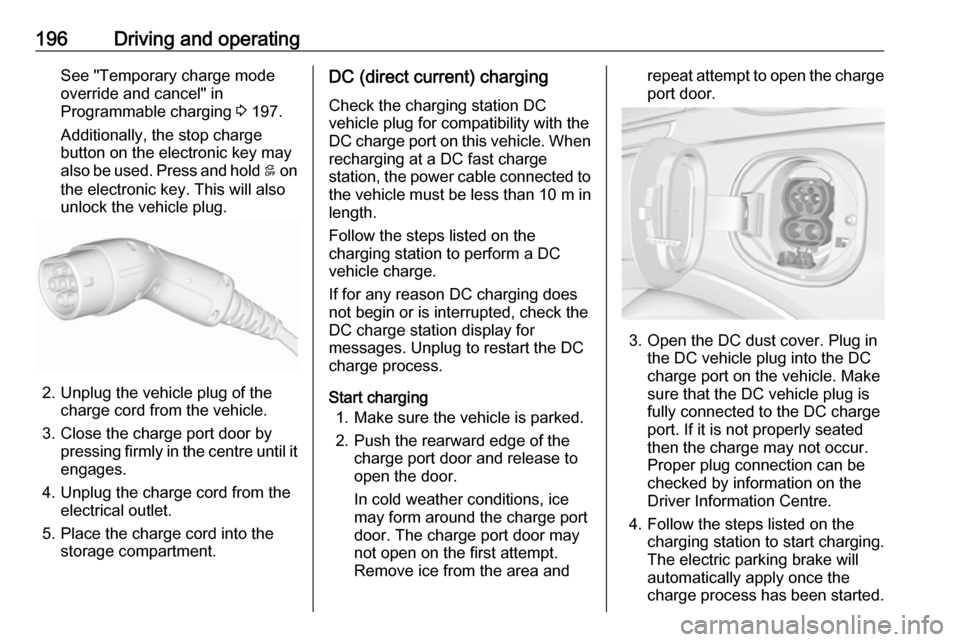
2. Unplug the vehicle plug of the charge cord from the vehicle.
3. Close the charge port door by pressing firmly in the centre until it
engages.
4. Unplug the charge cord from the electrical outlet.
5. Place the charge cord into the storage compartment.
DC (direct current) charging
Check the charging station DC
vehicle plug for compatibility with the
DC charge port on this vehicle. When
recharging at a DC fast charge
station, the power cable connected to the vehicle must be less than 10 m in
length.
Follow the steps listed on the
charging station to perform a DC
vehicle charge.
If for any reason DC charging does
not begin or is interrupted, check the
DC charge station display for
messages. Unplug to restart the DC
charge process.
Start charging 1. Make sure the vehicle is parked.
2. Push the rearward edge of the charge port door and release to
open the door.
In cold weather conditions, ice
may form around the charge port
door. The charge port door may
not open on the first attempt.
Remove ice from the area andrepeat attempt to open the charge
port door.
3. Open the DC dust cover. Plug in the DC vehicle plug into the DC
charge port on the vehicle. Make
sure that the DC vehicle plug is
fully connected to the DC charge
port. If it is not properly seated
then the charge may not occur.
Proper plug connection can be
checked by information on the
Driver Information Centre.
4. Follow the steps listed on the charging station to start charging.
The electric parking brake will
automatically apply once the
charge process has been started.
Page 199 of 273

Driving and operating1975. Once charging, the DC vehicleplug will be locked to the DC
charge port and cannot be
disconnected while charging is
active.
6. Verify that the charging status indicator illuminates on top of the
instrument panel and a horn chirp occurs.
Charging status 3 204.Caution
Do not attempt to disconnect the
DC vehicle plug while charging is
active. This action may damage vehicle or charging station
hardware.
Stop charging
Controls on the charging station can
be used to stop the charge process at any time. Or press and hold 5 on the
electronic key. This will also unlock
the vehicle plug.
To stop charging when inside the
vehicle, you may use the Stop button
on the Charging screen.
Programmable charging 3 197.
There is also an available mobile app
with several charging functions.
Smartphone remote function 3 26.Automatic power supply cut-off
When the vehicle no longer needs to
use power from the charging station,
the charging process will be stopped.
Use the electronic key to unlock the
DC vehicle plug.
Energy can still be consumed from
the charging station when the
vehicle’s displays and indicators
show that the high voltage battery is
fully charged. This is to ensure the
high voltage battery is in optimal
temperature operating range to
maximise vehicle range.
Programmable charging 3 197.
End charging
1. Wait until the charging process has been fully stopped, the
vehicle plug is unlocked and the
charging status indicator is solid
green or off.
2. Unplug the DC vehicle plug from the DC charge port on the vehicle
and close the dust cover.
3. Close the charge port door by pressing firmly in the centre to
latch properly.
4. Manually disengage the electric parking brake before driving the
vehicle.
5. To start another DC charge, remove the DC vehicle plug and
reconnect.
Programmable charging
Programmable charge modes To view the current charge mode
status on the Info Display, touch Energy and then Charging.
The charge start and charge
complete time estimations are also
displayed on the screen. These
estimations are most accurate when
the vehicle is plugged in and in
moderate temperature conditions.
Also, to get an accurate time
estimate, the vehicle uses an internal
clock for programmable charging, not the clock in the instrument panel.
Page 213 of 273
Vehicle care211Lifting the vehicle9Warning
Lifting the vehicle improperly can
cause serious injuries and
damage to the vehicle.
The vehicle should be lifted only by well-trained staff at an
authorised workshop.
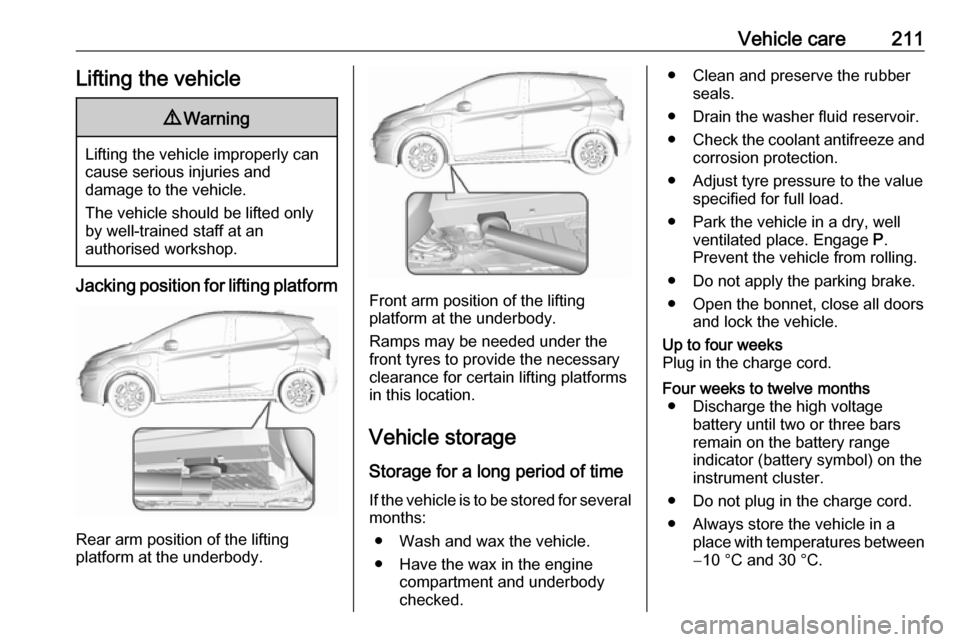
Jacking position for lifting platform
Rear arm position of the lifting
platform at the underbody.
Front arm position of the lifting
platform at the underbody.
Ramps may be needed under the
front tyres to provide the necessary
clearance for certain lifting platforms
in this location.
Vehicle storage Storage for a long period of timeIf the vehicle is to be stored for several months:
● Wash and wax the vehicle.
● Have the wax in the engine compartment and underbody
checked.
● Clean and preserve the rubber seals.
● Drain the washer fluid reservoir.
● Check the coolant antifreeze and
corrosion protection.
● Adjust tyre pressure to the value specified for full load.
● Park the vehicle in a dry, well ventilated place. Engage P.
Prevent the vehicle from rolling.
● Do not apply the parking brake.
● Open the bonnet, close all doors and lock the vehicle.Up to four weeks
Plug in the charge cord.Four weeks to twelve months ● Discharge the high voltage battery until two or three bars
remain on the battery range
indicator (battery symbol) on the
instrument cluster.
● Do not plug in the charge cord.
● Always store the vehicle in a place with temperatures between−10 °C and 30 °C.
Page 231 of 273
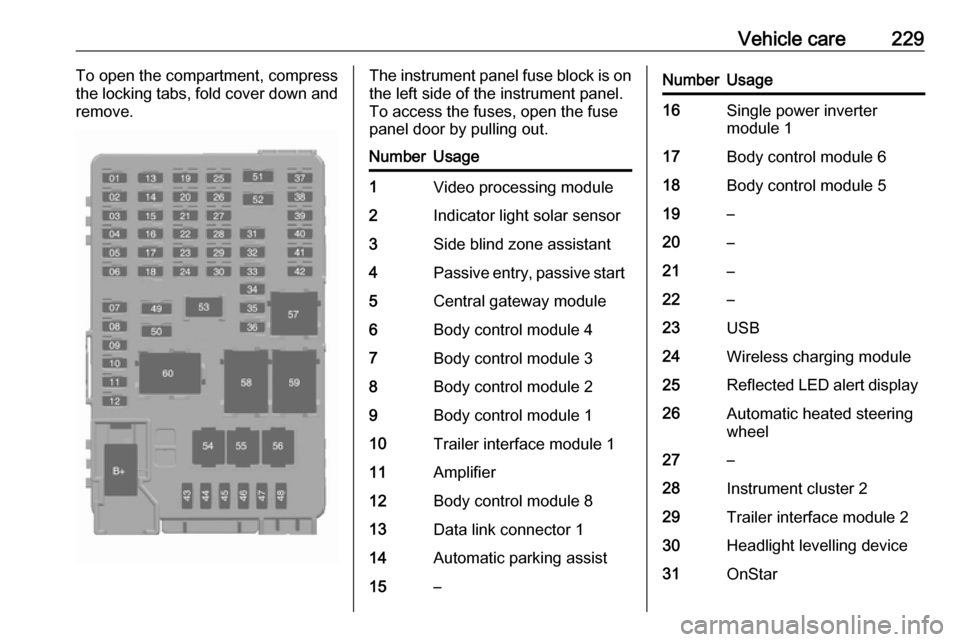
Vehicle care229To open the compartment, compress
the locking tabs, fold cover down and
remove.The instrument panel fuse block is on the left side of the instrument panel.
To access the fuses, open the fuse
panel door by pulling out.NumberUsage1Video processing module2Indicator light solar sensor3Side blind zone assistant4Passive entry, passive start5Central gateway module6Body control module 47Body control module 38Body control module 29Body control module 110Trailer interface module 111Amplifier12Body control module 813Data link connector 114Automatic parking assist15–NumberUsage16Single power inverter
module 117Body control module 618Body control module 519–20–21–22–23USB24Wireless charging module25Reflected LED alert display26Automatic heated steering
wheel27–28Instrument cluster 229Trailer interface module 230Headlight levelling device31OnStar
Page 232 of 273

230Vehicle careNumberUsage32–33Heating, ventilation, and airconditioning module34–35Instrument panel cluster 136Radio37–38–39–40–41–42–43Body control module 744Sensing and diagnostic
module45Front camera module46Vehicle integration control
moduleNumberUsage47Single power inverter
module 248Electric steering column
lock49Auxiliary jack50Steering wheel controls51Steering wheel controls
backlighting52Smartphone remote func‐
tion module53Auxiliary power outlet54–55Logistic56–57–58–59–60–To reinstall the door, insert the bottom tab first, then push the door back into its original location.