remote OPEL AMPERA E 2018.5 Owner's Guide
[x] Cancel search | Manufacturer: OPEL, Model Year: 2018.5, Model line: AMPERA E, Model: OPEL AMPERA E 2018.5Pages: 273, PDF Size: 6.6 MB
Page 153 of 273
Driving and operating151Other objects, e.g. other keys,
transponder, tags, coins etc. must be removed.
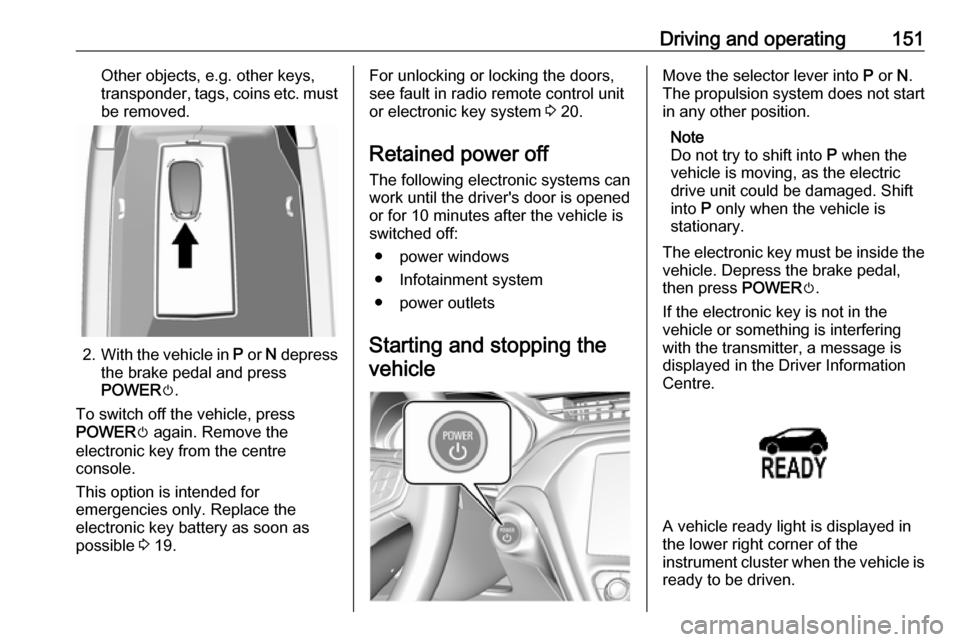
2. With the vehicle in P or N depress
the brake pedal and press
POWER m.
To switch off the vehicle, press
POWER m again. Remove the
electronic key from the centre
console.
This option is intended for
emergencies only. Replace the
electronic key battery as soon as
possible 3 19.
For unlocking or locking the doors,
see fault in radio remote control unit
or electronic key system 3 20.
Retained power off
The following electronic systems can
work until the driver's door is opened
or for 10 minutes after the vehicle is
switched off:
● power windows
● Infotainment system
● power outlets
Starting and stopping the vehicleMove the selector lever into P or N.
The propulsion system does not start
in any other position.
Note
Do not try to shift into P when the
vehicle is moving, as the electric
drive unit could be damaged. Shift
into P only when the vehicle is
stationary.
The electronic key must be inside the
vehicle. Depress the brake pedal,
then press POWERm.
If the electronic key is not in the
vehicle or something is interfering
with the transmitter, a message is
displayed in the Driver Information
Centre.
A vehicle ready light is displayed in
the lower right corner of the
instrument cluster when the vehicle is ready to be driven.
Page 199 of 273

Driving and operating1975. Once charging, the DC vehicleplug will be locked to the DC
charge port and cannot be
disconnected while charging is
active.
6. Verify that the charging status indicator illuminates on top of the
instrument panel and a horn chirp occurs.
Charging status 3 204.Caution
Do not attempt to disconnect the
DC vehicle plug while charging is
active. This action may damage vehicle or charging station
hardware.
Stop charging
Controls on the charging station can
be used to stop the charge process at any time. Or press and hold 5 on the
electronic key. This will also unlock
the vehicle plug.
To stop charging when inside the
vehicle, you may use the Stop button
on the Charging screen.
Programmable charging 3 197.
There is also an available mobile app
with several charging functions.
Smartphone remote function 3 26.Automatic power supply cut-off
When the vehicle no longer needs to
use power from the charging station,
the charging process will be stopped.
Use the electronic key to unlock the
DC vehicle plug.
Energy can still be consumed from
the charging station when the
vehicle’s displays and indicators
show that the high voltage battery is
fully charged. This is to ensure the
high voltage battery is in optimal
temperature operating range to
maximise vehicle range.
Programmable charging 3 197.
End charging
1. Wait until the charging process has been fully stopped, the
vehicle plug is unlocked and the
charging status indicator is solid
green or off.
2. Unplug the DC vehicle plug from the DC charge port on the vehicle
and close the dust cover.
3. Close the charge port door by pressing firmly in the centre to
latch properly.
4. Manually disengage the electric parking brake before driving the
vehicle.
5. To start another DC charge, remove the DC vehicle plug and
reconnect.
Programmable charging
Programmable charge modes To view the current charge mode
status on the Info Display, touch Energy and then Charging.
The charge start and charge
complete time estimations are also
displayed on the screen. These
estimations are most accurate when
the vehicle is plugged in and in
moderate temperature conditions.
Also, to get an accurate time
estimate, the vehicle uses an internal
clock for programmable charging, not the clock in the instrument panel.
Page 232 of 273

230Vehicle careNumberUsage32–33Heating, ventilation, and airconditioning module34–35Instrument panel cluster 136Radio37–38–39–40–41–42–43Body control module 744Sensing and diagnostic
module45Front camera module46Vehicle integration control
moduleNumberUsage47Single power inverter
module 248Electric steering column
lock49Auxiliary jack50Steering wheel controls51Steering wheel controls
backlighting52Smartphone remote func‐
tion module53Auxiliary power outlet54–55Logistic56–57–58–59–60–To reinstall the door, insert the bottom tab first, then push the door back into its original location.
Page 258 of 273

256Customer informationInfotainment system IntelliLink-e
LG Electronics
European Shared Service Center
B.V., Krijgsman 1, 1186 DM
Amstelveen, The NetherlandsOperation
frequency (MHz)Maximum output
(dBm)2400.0 - 2483.54.02400.0 - 2483.513.05725.0 - 5850.013.0
OnStar module
LG Electronics
European Shared Service Center
B.V., Krijgsman 1, 1186 DM
Amstelveen, The Netherlands
Operation
frequency (MHz)Maximum output
(dBm)2402 - 248042412 - 246218880 - 915331710 - 1785241850 - 1910241920 - 1980242500 - 257023
Radar unit
Hella KGaA Hueck & Co.
Rixbecker Strasse 75, 59552
Lippstadt, Germany
Operation frequency:
24.05 - 24.25 GHz
Maximum output: 20 EIRP dBm
Radio remote control receiver
Robert Bosch GmbH
Robert Bosch Platz 1, 70839
Gerlingen, Germany
Operation frequency: N/A
Maximum output: N/A
Radio remote control transmitter
Robert Bosch GmbH
Robert Bosch Platz 1, 70839
Gerlingen, Germany
Operation frequency: 433.92 MHz
Maximum output: -4 dBm
Smartphone remote module
Denso Corporation
Waldeckerstrasse 11, 64546
Moerfelden-Walldorf, Germany
Operation frequency:
2400 - 2482 MHz
Maximum output: 3 dBm
Tyre pressure sensors
Schrader Electronics Ltd.
11 Technology Park, Belfast Road,
Antrim BT41 1QS, Northern Ireland,
United Kingdom
Operation frequency: 433.92 MHz
Maximum output: 10 dBm
REACH Registration, Evaluation,
Authorisation and Restriction of
Chemicals (REACH) is a European
Union regulation adopted to improve
the protection of human health and
the environment from the risks that
can be posed by chemicals. Visit
www.opel.com/reach for further
information and for access to the
Article 33 communication.
Page 264 of 273

262Customer informationOnline servicesIf your vehicle has a radio networkconnection, this allows data to be
exchanged between your vehicle and other systems. The radio network
connection is made possible by
means of a transmitter device in your
vehicle or a mobile device provided
by you (e.g. a smartphone). Online
functions can be used via this radio
network connection. These include
online services and applications /
apps provided to you by the
manufacturer or other providers.
Services of the manufacturer In the case of the manufacturer's
online services, the relevant functions are described by the manufacturer in
an appropriate location (e.g. Owner's
Manual, the manufacturer's website)
and the associated data protection
information is provided. Personal
data may be used to provide online
services. Data exchange for this
purpose takes place via a protected
connection, e.g. using the
manufacturer's IT systems provided
for the purpose. Collection,processing and use of personal data
for the purposes of preparation of services take place solely on the
basis of legal permission, e.g. in the case of the eCall emergency
communication system or a
contractual agreement, or by virtue of
consent.
You can activate or deactivate the
services and functions (which are
subject to charges to some extent)
and, in some cases, the vehicle's
entire radio network connection. In
particular, this does not include
statutory functions and services such
as eCall.
Third party services
If you make use of online services
from other providers (third parties),
these services are subject to the
liability and data protection and usage conditions of the provider in question.
The manufacturer frequently has no
influence over the content exchanged
in this regard.Therefore, please note the nature,
scope and purpose of the collection
and use of personal data within the
scope of third party services provided by the service provider in question.
Radio Frequency
Identification (RFID)
RFID technology is used in some
vehicles for functions such as tyre
pressure monitoring and immobiliser. It is also used in connection with
conveniences such as radio remote
controls for door locking / unlocking and starting. RFID technology in Opel
vehicles does not use or record
personal information or link with any
other Opel system containing
personal information.
Page 269 of 273

267Mobile phones and CB radioequipment .............................. 140
Movie files................................... 126
Mute............................................ 110
N New vehicle running-in ..............149
Number plate light .....................222
O
Object detection systems ...........174
Odometer ..................................... 74
One-pedal driving .......................154
OnStar .......................................... 94
Operation ............................ 137, 154
External devices ......................126
Menu ....................................... 113
Phone ...................................... 137
Radio ....................................... 120
Outside temperature ....................68
P Pairing ........................................ 134
Panoramic view system ..............184
Parking ................................ 15, 152
Parking assist ............................ 174
Parking brake ............................ 159
Parking lights ............................. 103
Pedestrian detection .....................81
Pedestrian safety alert ............11, 66
Performance .............................. 252Performing work ........................212
Phone Bluetooth ................................. 134
Bluetooth connection ..............134
Call history .............................. 137
Emergency calls ......................136
Entering a number ..................137
Functions during a call ............137
General information ................134
Incoming call ........................... 137
Phone book ............................. 137
Phone main menu ...................137
Selecting the ring tone ............137
Speed dial number ..................137
Phone book ................................ 137
Phone projection ........................132
Picture files ................................. 126
Playing audio .............................. 128
Playing movies ........................... 131
Post-crash label .......................... 152
Power button .............................. 149
Power indicator gauge ..................76
Power outlets ............................... 69
Power windows ............................ 34
Programmable charging .............197
Programmed charging override ..204
Propulsion system data ..............252R
Radio Activating................................. 120
Configuring DAB .....................124
Configuring RDS .....................123
DAB announcements ..............124
Digital audio broadcasting
(DAB) ...................................... 124
Favourite lists .......................... 121
Intellitext .................................. 124
Radio data system (RDS) .......123
Regional .................................. 123
Regionalisation ....................... 123
Selecting the waveband ..........120
Station search ......................... 121
Station tuning .......................... 121
Usage ...................................... 120
Radio data system .....................123
Radio Frequency Identification (RFID) ..................................... 262
Radio remote control ...................17
RDS ............................................ 123
REACH ....................................... 256
Reading lights ............................ 104
Rear cross traffic alert ................188
Rear floor storage cover ..............60
Rear fog light ....................... 81, 103
Rear seats .................................... 42
Rear view camera ...................... 186
Rear window wiper and washer ..68
Page 270 of 273

268Recommended fluids andlubricants ................................ 248
Regenerative braking ...........76, 161
Regional ..................................... 123
Regionalisation ........................... 123
Registered trademarks ...............259
Retained power off .....................151
Reversing lights .........................103
Ride control systems ..................162
Ring tone Changing the ring tone ............137
Ring tone volume ....................116
Roof load ...................................... 62
Roof rack ..................................... 62
S Safety belts ................................... 42
Seat adjustment ............................. 5 Seat belt ........................................ 6
Seat belt reminder .......................77
Seat belts ..................................... 42 Seat heating Seat heating, front .....................41
Seat heating, rear .....................42
Seat position ................................ 38
Self-sealing tyres ........................231
Service ............................... 147, 247
Service display ............................ 77
Service information ....................247
Service vehicle soon .................... 79Side airbag system ......................48
Side blind zone assistant ............182
Sidelights ...................................... 99
Side turn lights ........................... 221
Smartphone ................................ 126
Phone projection .....................132
Smartphone remote function ........26
Software acknowledgement .......257
Software update ......................... 258
Speech recognition .....................133
Speed dial numbers ...................137
Speed limiter......................... 81, 166
Speedometer ............................... 74
Sport mode .................................. 80
Starting and operating ................149
Starting and stopping the vehicle 151
Starting off ................................... 14
Station search............................. 121
Steering wheel adjustment ......7, 65
Steering wheel audio controls ....108
Steering wheel controls ...............65
Storage ......................................... 57
Storage compartments .................57
Sunvisor lights ........................... 104
Sun visors .................................... 36
Switching the Infotainment system on ................................ 110
Symbols ......................................... 3
System settings .......................... 117T
Tail lights ................................... 221
Temporary charge mode cancel. 197
Temporary charge mode override ................................... 197
Theft-deterrent feature ..............107
Three-point seat belt .................... 43
Tone settings .............................. 115
Tools .......................................... 231
Total vehicle range .......................77
Touch beep volume ....................116
Towing ................................ 209, 242
Towing another vehicle .............243
Towing the vehicle .....................242
TP volume .................................. 116
Traction Control system ............. 162 Traction Control system off........... 80
Traffic sign assistant .............82, 189
Tread depth ............................... 235
Turn lights ............................ 77, 102
Tyre chains ................................ 237
Tyre designations ......................232
Tyre pressure ............................ 232
Tyre pressure monitoring system ............................... 80, 233
Tyre pressures ........................... 254
Tyre repair kit ............................. 237
Tyres .......................................... 231