Charging system OPEL AMPERA E 2018 Manual user
[x] Cancel search | Manufacturer: OPEL, Model Year: 2018, Model line: AMPERA E, Model: OPEL AMPERA E 2018Pages: 267, PDF Size: 6.45 MB
Page 136 of 267

134Infotainment systeminterference is caused by the
mobile phone or if dangerous
situations can occur.
Bluetooth
The phone portal is certified by the
Bluetooth Special Interest Group
(SIG).
You can find further information about the specification on the internet at
http://www.bluetooth.com
Bluetooth connection Bluetooth is a radio standard for the
wireless connection of e.g. mobile
phones, smartphones or other
devices.
The pairing (PIN code exchange
between Bluetooth device and
Infotainment system) and connecting
of the Bluetooth devices to the
Infotainment system are carried out
via the Devices menu.
Pairing a device
Important information ● Up to ten devices can be paired to the system.
● Only one paired device can be connected to the Infotainment
system at a time.
● Pairing only needs to be carried out once, unless the device is
deleted from the list of paired
devices. If the device has been connected previously, the
Infotainment system establishes
the connection automatically.
● Bluetooth operation considerably
drains the device's battery.
Therefore, connect the device to
the USB port for charging.
Pairing a new device 1. Activate the Bluetooth function of the Bluetooth device. For further
information, see the operating
instructions for the Bluetooth
device.
2. Press p and then select 1 in the
top left corner of the screen todisplay the application overview
screen.
Select Phone on the display of the
Infotainment system. The
Devices menu is displayed.
Note
The Devices menu can also be
accessed via the settings menu: Press p and then select 1 in the top
left corner of the screen to display
the application overview screen.
Select Settings . Scroll through the
list and select Devices.
3. Touch Add device . All
discoverable Bluetooth devices in
the environment are displayed in
a new search list.
Page 149 of 267

Driving and operating147Driving and
operatingDriving hints ............................... 147
Driving economically ...............147
Control of the vehicle ...............148
Starting and operating ...............148
New vehicle running-in ............148
Power button ........................... 148
Retained power off ..................150
Starting and stopping the vehicle .................................... 150
Parking .................................... 151
Electric vehicle operation modes ........................................ 153
Operation ................................. 153
Drive modes ............................ 153
Electric drive unit .......................153
Operation ................................. 153
Brakes ........................................ 157
Antilock brake system .............157
Parking brake .......................... 158
Regenerative braking ..............159
Ride control systems .................161
Traction Control system ..........161
Electronic Stability Control ......162Driver assistance systems .........163
Cruise control .......................... 163
Speed limiter ........................... 164
Forward collision alert .............166
Following distance indication ...168
Active emergency braking .......168
Front pedestrian protection .....171
Parking assist .......................... 173
Side blind spot alert .................181
Lane change alert ....................182
Panoramic view system ...........183
Rear view camera ...................185
Rear cross traffic alert .............187
Traffic sign assistant ................188
Lane keep assist .....................190
Charging .................................... 193
Programmable charging ..........196
Programmed charging override .................................. 203
Charging status .......................203
Charge cord ............................. 204
Electrical requirements ............208
Towing ....................................... 208
General information .................208Driving hints
Driving economically The following advice is intended to
help maximise energy efficiency and
range.
In colder temperatures, while these
efficiency tips will help, the electric
vehicle's driving range may be lower
due to higher energy usage.
The weight of additional cargo in the
vehicle affects efficiency and range.
Avoid carrying more than is needed.
Avoid unnecessary use of electrical
accessories. Power used for
functions other than propelling the
vehicle will reduce electric vehicle
range.
Always keep the tyres properly
inflated and the vehicle properly
aligned.
Driving style
Avoid unnecessary rapid
accelerations and decelerations.
Use cruise control when appropriate.
Page 162 of 267

160Driving and operatingRegeneration on demand
Regeneration on demand allows
increased deceleration by pressing
and holding the steering wheel
paddle. It works in D (Drive) and L
(Low). The accelerator pedal must be mostly released for it to work.
If regenerative braking is active, the regenerative active icon with arrowsis shown as green.
Regenerative braking 3 76.
Cruise control will switch off and the
brake lights may come on when this
feature is activated.
If the vehicle is in D (Drive) and is
brought to a complete stop while the regenerative braking paddle is held,
the vehicle will not creep forward
when the paddle is released. The
accelerator pedal must be pressed to
move the vehicle forward.
One-pedal driving 3 153.
If the vehicle is on a steep gradient,
the brake pedal will be required to
hold the vehicle.
The brake controller applies the
hydraulic brakes using a pump. You
may hear the pump during some
braking manoeuvres, such as rapid
brake application or during
regenerative braking as the vehicle
comes to a stop. This is normal
operation.
Hill Top ReserveHill Top Reserve enables you to
maximise regenerative braking
efficiency when driving from a higher
elevation immediately after charging.
When switched on, this feature will
stop the charging process before thehigh voltage battery is full, allowing space for energy from regenerative
braking.
This feature also integrates with the Location-based charging feature,
allowing you to configure the system
so it is enabled when you are at home ( On – home only ) or away (On – away
only ).
Location based charging 3 196.
Page 195 of 267

Driving and operating193Charging
This section explains the process of
charging the vehicle's high voltage
battery. Do not allow the vehicle to
remain in places with extremes of
temperature for long periods without
being driven or plugged in.
It is recommended to keep the vehicle
plugged in, even if fully charged, to
keep the high voltage battery
temperature ready for the next drive.
The vehicle must be plugged in when
the temperatures are below -25 °C, to
operate properly and to maximise
high voltage battery life.
However, we recommend plugging in the vehicle when temperatures drop
below 0 °C or raise above 32 °C.
When using the portable charge cord, it will take approximately 33 hours to
charge the vehicle with the 10 A
setting.
When using a 230 V charging station, it will take approximately ten hours to
charge the vehicle with the 32 A
setting.Charge times will vary based on high
voltage battery condition and outside
temperature. There are three ways to programme how the vehicle is
charged.
Programmable charging 3 196.
The charging system may run fans
and pumps resulting in noises coming
from the vehicle while it is turned off.
Additional clicking sounds may be
caused by the electrical devices used
while charging.
While the charge cord is plugged into
the vehicle, the vehicle cannot be
driven.
When to charge When the high voltage battery is
getting low, charging messages may be displayed.
The Charge vehicle soon message
indicates that the driving range is low
and the vehicle needs to be charged
soon. As the charge level drops, the
Propulsion power is reduced
message is displayed and the
accelerator pedal response is
reduced. In addition, the remainingrange value will change to Low
indicating the vehicle should be
charged immediately.
When the energy is fully depleted, the Out of power. Charge vehicle now
message is displayed and the vehicle
slows to a stop. Brake and steering
assist will still operate. Once the
vehicle has stopped, switch off the
vehicle.
AC (alternating current) charging
Start charging
A portable charge cord used to
charge the vehicle high voltage
battery is stored under the rear floor
storage cover in the load
compartment.
1. Shift into P (Park) and switch off
the vehicle.
Page 205 of 267
Driving and operating203Programmable charging disabled
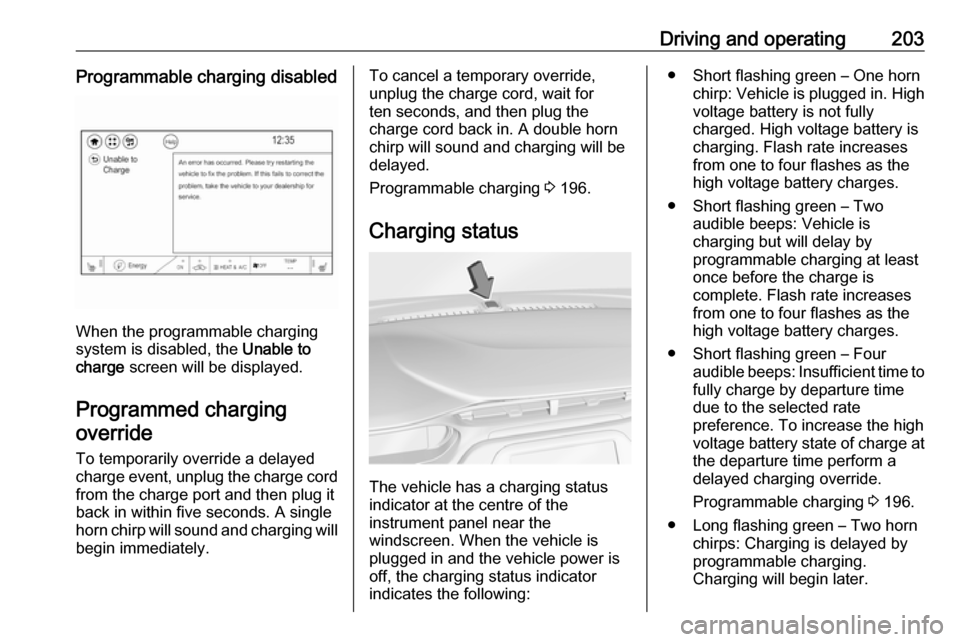
When the programmable charging
system is disabled, the Unable to
charge screen will be displayed.
Programmed charging override
To temporarily override a delayed charge event, unplug the charge cord from the charge port and then plug it
back in within five seconds. A single
horn chirp will sound and charging will begin immediately.
To cancel a temporary override,
unplug the charge cord, wait for
ten seconds, and then plug the
charge cord back in. A double horn
chirp will sound and charging will be delayed.
Programmable charging 3 196.
Charging status
The vehicle has a charging status
indicator at the centre of the
instrument panel near the
windscreen. When the vehicle is
plugged in and the vehicle power is
off, the charging status indicator
indicates the following:
● Short flashing green – One horn chirp: Vehicle is plugged in. High
voltage battery is not fully
charged. High voltage battery is
charging. Flash rate increases
from one to four flashes as the
high voltage battery charges.
● Short flashing green – Two audible beeps: Vehicle is
charging but will delay by
programmable charging at least
once before the charge is
complete. Flash rate increases
from one to four flashes as the high voltage battery charges.
● Short flashing green – Four audible beeps: Insufficient time to
fully charge by departure time due to the selected rate
preference. To increase the high
voltage battery state of charge at
the departure time perform a
delayed charging override.
Programmable charging 3 196.
● Long flashing green – Two horn chirps: Charging is delayed by
programmable charging.
Charging will begin later.
Page 206 of 267

204Driving and operating● Solid green – No horn chirps:Charging is complete.
● Solid yellow – No horn chirp: Vehicle is plugged in. It is normal
for the charging status indicator
to turn yellow for a few seconds
after plugging in a compatible
charge cord. The solid yellow
may remain illuminated
depending on the vehicle.
This may also indicate that the
charging system has detected a
fault and will not charge the high
voltage battery.
● No light signal (upon plug‐in) – No horn chirps: Charge cord
connection should be checked.
● No light signal (after indication of
green or yellow charging status
indicator) – No horn chirps:
Charge cord connection should
be checked. If connection is
correct, this may be due to a
power failure and charging will
begin later. This may also occur
if the vehicle has detected a high
voltage charging system fault.● No light signal – Three horn chirps: Charge port door is open.
● No light signal – Horn chirps repeatedly: The power supply
was interrupted before the
charging process could be
completed. Repeated chirps will stop if power is restored within
90 seconds.
Vehicle personalisation 3 91.
The system may be thermally
conditioning the high voltage battery
during any of the states mentioned
above, requiring electric energy to be
transferred to the vehicle.
If the vehicle is plugged in and vehicle
power is on, the charging status
indicator will flash or illuminate solid
green, depending on the charge level. This also happens during Engine
Assisted Heating if the vehicle is
plugged in.
If the vehicle is plugged in and the
charging status indicator is off, a
charging fault has been detected.Charge cord9 Danger
There is a risk of electric shock
that may cause personal injury or
death.
Do not use the charge cord if any part of the charge cord is
damaged.
Do not open or remove the charge cord cover.
Service by qualified personnel
only. Connect the charge cord to a
properly grounded outlet with
cords that are not damaged.
A portable charge cord used to
charge the vehicle high voltage
battery is stored under the rear floor
storage cover in the load
compartment 3 193.
Page 207 of 267

Driving and operating205Important information about
portable electric vehicle charging
● Charging an electric vehicle can stress a building's electrical
system more than a typical
household appliance.
● Before you plug in to any electrical outlet, have a qualified
electrician inspect and verify the
electrical system (electrical
outlet, wiring, junctions and
protection devices) for heavy-
duty service at a 10 A continuous load.
● Electrical outlets may wear out with normal usage or be
damaged over time, making them
unsuitable for electric vehicle
charging.
● Check the electrical outlet / plug while charging and discontinue
use if the electrical outlet / plug is hot, then have the electrical
outlet serviced by a qualified
electrician.● When outdoors, plug into an electrical outlet that is weather-
proof while in use.
● Mount the charging cord to reduce strain on the electrical
outlet / plug.9 Warning
Improper use of portable electric
vehicle charge cords may cause a fire, electrical shock, or burns, and
may result in damage to property,
serious injury, or death.
● Do not use extension cords, multi-outlet power strips,
splitters, grounding adaptors,
surge protectors, or similar
devices.
● Do not use an electrical socket that is worn or damaged, or onethat will not hold the plug firmly
in place.
● Do not use an electrical socket that is not properly grounded.
● Do not use an electrical socket that is on a circuit with other
electrical loads.
9 Warning
Read all the safety warnings and
instructions before using this
product. Failure to follow the
warnings and the instructions may result in electric shock, fire, and /
or serious injury.
Never leave children unattended
near the vehicle while the vehicle is charging and never allow
children to play with the charge
cord.
If the plug provided does not fit the electrical outlet, do not modify the
plug. Arrange for a qualified
electrician to inspect the electrical
outlet.
Do not put fingers into the electric
vehicle connector.
9 Warning
To reduce the risk of fire,
installations shall comply with the
requirements of National Electric
Code IEC 60364 – Electrical
Page 210 of 267
208Driving and operatingElectrical requirementsCaution
Do not use portable or stationary
backup generating equipment to charge the vehicle. This may
cause damage to the vehicle's
charging system. Only charge the
vehicle from utility supplied power.
Charge limit selection 3 196.
Reduced limit mode allows a non-
dedicated circuit to be used but
increases the charging time.
This vehicle is capable of being
charged with standard vehicle
charging equipment complying with
one or more of the following
standards:
● SAE J1772
● SAE J2847–2
● IEC 61851-1
● IEC 61851-22
● IEC 61851-23
● IEC 61851-24
● IEC 62196-1
● IEC 62196-2
● IEC 62196-3
● ISO 15118
Ensure that all local electrical code / standards are being met for a 10 A
continuous load. Always follow the
charging equipment installation
instructions. Contact a workshop for
more information.9 Warning
If the capacity of the electrical
circuit or AC socket is not known,
only use the lowest charge level
until the circuit capacity has been
inspected by a qualified
electrician. Using a charge level
that exceeds either the electrical
circuit or the AC outlet capacity
may start a fire or damage the
electrical circuit.
Towing
General information
The vehicle is neither designed nor
intended to tow a trailer or another vehicle.
Page 229 of 267

Vehicle care227NumberUsage46Integrated chassis control
module47Headlight levelling device48Integrated chassis control
module49Interior rear view mirror50–51E-booster52Rear camera53Run / Crank54A/C control module55Rechargeable energy
storage system pump56–57Power electronics coolant
pump58Engine control module59Electric steering column
lockNumberUsage60HVAC electric heater61On-board charging module62Transmission range control
module 163Electric cooling fan64Engine control module65Auxiliary heater pump66Powertrain relay67Drive unit controller68Rear window defogger69Second run / Crank relay70A/C control module71–72Transmission range control
module73Single power inverter
module74–After having changed defective fuses,
close the fuse box cover and press
until it engages.
If the fuse box cover is not closed
correctly, malfunctions may occur.
Instrument panel fuse boxThe fuse box is located on the driver's
side behind a cover in the instrument
panel.
To open the compartment, compress
the locking tabs, fold cover down and remove.
Page 261 of 267

259Initiating a phone call..............136
Ring tone ................................. 136
Call history .................................. 136
Car wash mode .......................... 153
Central locking system ................20
Centre console storage ...............58
Changing tyre and wheel size ...235
Charge cord ................................ 204
Charge limit selection .................196
Charge mode selection ..............196
Charge rate selection .................196
Charging ..................................... 193
Charging override .......................196
Charging status .......................... 203
Charging system .......................... 78
Child locks ................................... 26
Child restraint installation locations ................................... 53
Child restraints.............................. 51
Child restraint systems ................51
Climate control ............................. 13
Clock............................................. 68
Collision damage repair ..............254
Control elements Infotainment system ................107
Steering wheel ........................ 107
Control elements overview .........107
Control indicators.......................... 77
Control of the vehicle .................148
Controls ........................................ 65Convex shape .............................. 31
Coolant ....................................... 213
Coolant and antifreeze ...............245
Cooling system ........................... 213
Cruise control ...................... 81, 163
Cupholders .................................. 57
Curtain airbag system .................. 49
D DAB ............................................ 123
Danger, Warnings and Cautions ...2
Daytime running lights ...............101
Declaration of conformity ............252
Delayed locking ............................ 25
Digital audio broadcasting ..........123
Directional tyres .......................... 230
Displaying pictures .....................129
Display settings ..................129, 130
Door open .................................... 82
Doors ............................................ 28
Drive modes ............................... 153
Driver assistance systems ..........163
Driver Information Centre .............82
Driving economically................... 147
Driving efficiency gauge ...............74
Driving hints ........................ 147, 148
E Electric adjustment ......................32
Electrical requirements ...............208
Electrical system......................... 222Electrical system overload .........222
Electric drive unit ..................14, 153
Electric parking brake ...........79, 158
Electric parking brake fault ...........79
Electric rate schedule .................196
Electric vehicle operation modes 153
Electronic climate control system 141
Electronic key system ...................19
Electronic Stability Control.......... 162
Electronic Stability Control and Traction Control system ............80
Electronic Stability Control off....... 80
Emergency call ........................... 136
Engine compartment fuse box ...224
Engine data ............................... 249
Entry lighting .............................. 103
Event data recorders ..................257
Exit lighting ................................ 103
Exterior care .............................. 240
Exterior light ................................. 81
Exterior lighting ......................10, 98
Exterior mirrors ............................. 31
F File formats Audio files................................ 125
Movie files ............................... 125
Picture files.............................. 125
First aid kit ................................... 61
Fixed air vents ........................... 145