park assist OPEL AMPERA E 2018 Manual user
[x] Cancel search | Manufacturer: OPEL, Model Year: 2018, Model line: AMPERA E, Model: OPEL AMPERA E 2018Pages: 267, PDF Size: 6.45 MB
Page 178 of 267

176Driving and operatingIndication
The system warns the driver with
acoustic signals against potentially
hazardous obstacles in front of the
vehicle in a distance range up to
80 cm and against potentially
hazardous obstacles behind the
vehicle in a distance range up to
50 cm while a forward gear is
engaged, or up to 1.5 m while reverse gear is engaged.
Depending on which side of the
vehicle is closer to an obstacle, you
will hear acoustic warning signals in the vehicle on the respective side.
The interval between the sounds
becomes shorter as the vehicle gets
closer to that obstacle. When the
distance is less than approx. 30 cm,
the sound is continuous.
Additionally, the distance to rear and
front obstacles is displayed by
changing distance lines in the Driver
Information Centre 3 82 or,
depending on the version, on the Info
display 3 85.
The distance indication can be
inhibited by vehicle messages with a higher priority. After dismissing themessage distance indication appears again.
Deactivation
The system is deactivated
automatically when vehicle speed
exceeds 11 km/h.
Manual deactivation is also possible
by pressing the parking assist button
r .
When the system is deactivated
manually, the LED in the button
extinguishes and Park Assist off
pops-up in the Driver Information Centre.
After a manual deactivation, the front- rear parking assist is activated again
if r is pressed or if reverse gear is
engaged.
Fault
In the event of a fault or if the system does not work temporarily, e.g.
because of high external noise level
or other interference factors, a
message pops-up in the Driver
Information Centre.
Vehicle messages 3 89.
Page 179 of 267

Driving and operating177Advanced parking assist9Warning
The driver bears full responsibility
for accepting the parking slot
suggested by the system and the
parking manoeuvre.
Always check the surrounding
area in all directions when using
the advanced parking assist.
The advanced parking assist
measures a suitable parking slot
while passing, calculates the
trajectory and automatically steers
the vehicle into a parallel or
perpendicular parking slot.
Instructions are given in the Driver
Information Centre 3 82 or,
depending on the version, on the Info display 3 85, supported by acoustic
signals.
The driver must control acceleration, braking and gear shifting, while
steering is done automatically.Advanced parking assist is always
combined with front-rear parking assist. Both systems use the same
sensors in the front and rear bumper.
The system has six ultrasonic parking
sensors in the front bumper and five
ultrasonic parking sensors in the rear
bumper.
Activation of advanced parking assist Advanced parking assist can only be
activated when driving forwards.When searching for a parking slot, the system is ready to operate with a
short press of (.
The system recognises and
memorises 10 m for parallel parking
slots or 6 m for perpendicular parking
slots in the parking assist mode.
The system can only be activated at
a speed up to 30 km/h and the system
searches for a parking slot at a speed up to 30 km/h.
The maximum allowed parallel
distance between the vehicle and a
row of parked cars is 1.8 m for parallel
parking and 2.5 m for perpendicular
parking.
Page 181 of 267

Driving and operating179braking, accelerating and gear
shifting. The driver must keep hands
away from the steering wheel.
Always pay attention to the sound of the front-rear parking assist.
Continuous sound indicates that the
distance to an obstacle is less than
approx. 30 cm.
If, for any reason, the driver must take
over control of the steering, hold the
steering wheel only at the outer edge. Automatic steering is cancelled in thisevent.Display indication
The instructions in the Info display
show:
● General hints and warning messages.
● A hint when driving faster than 30 km/h during parking slot
searching mode.
● The demand to stop the vehicle, when a parking slot is detected.
● The direction of driving during the
parking manoeuvre.
● The demand to shift into reverse gear or drive mode.● The demand to stop or to driveslowly.
● For some of the instructions a progress bar is shown in the
Driver Information Centre.
● The successful completion of the
parking manoeuvre indicated by
a pop-up symbol and a chime.
● The cancelling of a parking manoeuvre.
Display priorities
Advanced parking assist indication in
the Info display can be inhibited by
vehicle messages with a higher
priority. After approving the message, advanced parking assist instructions
appear again and the parking
manoeuvre can be continued.
Deactivation
The system is deactivated by:
● a short press of (
● parking manoeuvre successfully ended●driving faster than 30 km/h during
parking slot search without
braking despite message in the
Info display
● driving faster than 8 km/h during parking guidance
● driver interference on steering wheel detected
● exceeding number of maximum gear changes: eight cycles when
parallel parking or five cycles
when perpendicular parking
● switching off the vehicle
Deactivation by the driver or by the
system during manoeuvring will be indicated by a message on the
display. Additionally, an acoustic
signal sounds.
Fault
A message appears when:
● There is a fault in the system.● The driver did not successfully complete the parking
manoeuvre.
● The system is not operational.
● Any of the deactivation reasons described above apply.
Page 182 of 267

180Driving and operatingIf an object is detected during parkinginstructions, Stop is indicated on the
display. Removing the object will
resume the parking manoeuvre. If the
object is not removed, the system will
be deactivated. A long press of ( will
activate the system and search for a
new parking slot.
Basic notes on parking assist
systems9 Warning
Under certain circumstances,
various reflective surfaces on
objects or clothing as well as
external noise sources may cause the system to fail to detect
obstacles.
Special attention must be paid to
low obstacles which can damage
the lower part of the bumper.
Caution
Performance of the system can be reduced when sensors are
covered, e.g. by ice or snow.
Performance of the parking assist
system can be reduced due to
heavy loading.
Special conditions apply if there
are taller vehicles in the vicinity
(e.g. off-road vehicles, mini vans,
vans). Object identification and correct distance indication in the
upper part of these vehicles
cannot be guaranteed.
Objects with a very small reflection
cross-section, e.g. objects of
narrow size or soft materials, may
not be detected by the system.
Parking assist systems do not
detect objects outside the
detection range.
Note
It is possible that the sensor detects a non-existing object caused by
echo disturbance from external
acoustic noise or mechanical
misalignments (sporadic false
warnings may occur).
Make sure that the front number
plate is properly mounted (not bent
and no gaps to the bumper on the left
or right side) and the sensors are
firmly in place.
Advanced parking assist system
may not respond to changes in the
available parking space after
initiating a parking manoeuvre. The
system may recognize an entry, a
gateway, a courtyard or even a crossing as a parking slot. After
selecting reverse gear the system
will start a parking manoeuvre. Take care regarding the availability of the
suggested parking slot.
Surface irregularities, e.g. on construction zones, are not detected
by the system. The driver accepts
responsibility.
Note
Each new vehicle requires a
calibration. For optimal parking
guidance, a driving distance of at
least 10 km, including a number of
bends, is required.
Page 187 of 267

Driving and operating185Shown distances may be different
from actual distances. Do not drive or park the vehicle using only
these camera(s). Always check
behind and around the vehicle
before driving. Failure to use
proper care may result in injury, death, or vehicle damage.
The system also works when the
surrounding is dark, but performance
may be restricted.
Rear view camera
The rear view camera assists the
driver when reversing by displaying a view of the area behind the vehicle.
The view of the camera is displayed
in the Info display.
9 Warning
The rear view camera does not
replace driver vision. Note that
objects that are outside the
camera's field of view and the
advanced parking assist sensors,
e.g. below the bumper or
underneath the vehicle, are not
displayed.
Do not reverse the vehicle by only looking at the Info-Display and
check the surrounding area
behind and around the vehicle
before reversing.
Activation
Rear view camera is automatically
activated when reverse gear is
engaged.
Functionality
The camera is mounted between the
number plate lights and has a viewing angle of 130°.
The area displayed by the camera is
limited. The distance of the image that
appears on the display differs from
the actual distance.
Guiding lines
Dynamic guiding lines are horizontal
lines at 1 m intervals projected onto
the picture to define the distance to
displayed objects.
Page 188 of 267

186Driving and operating
Trajectory lane of the vehicle is
shown in accordance with the
steering angle.
Warning symbols
Warning symbols are indicated as
triangles 9 on the picture, which
show obstacles detected by the rear
sensors of the advanced parking
assist.
Additionally, 9 appears on the top
line of the Info display with the
warning to check the vehicle
surroundings.
Display settings
Brightness and contrast can be set by
touching the touch screen display
when rear view camera is active.
Deactivation The camera is switched off when a
certain forward speed is exceeded or
if reverse gear is not engaged for
approx. 15 seconds. Rear view
camera can be manually deactivated
in the vehicle personalisation menu in the Info display. Select the relevantsetting in Settings I Vehicle settings .
Deactivation of guiding lines and
warning symbolsActivation or deactivation of the visual
guiding lines and the warning
symbols can be changed in the
Settings menu in the Info display.
Select the relevant setting in Settings
I Rear camera .
Info display 3 85.
Vehicle personalisation 3 91.
Fault
Fault messages are displayed with a
9 on the Driver Information Centre.
The rear view camera may not
operate properly when:
● The surrounding is dark.
● The sun or the beam of headlights is shining directly into
the camera lens.
● Ice, snow, mud, or anything else covers the camera lens. Clean
the lens, rinse it with water, and
wipe it with a soft cloth.
● The vehicle had a rear end accident.
● There are extreme temperature changes.
Page 195 of 267

Driving and operating193Charging
This section explains the process of
charging the vehicle's high voltage
battery. Do not allow the vehicle to
remain in places with extremes of
temperature for long periods without
being driven or plugged in.
It is recommended to keep the vehicle
plugged in, even if fully charged, to
keep the high voltage battery
temperature ready for the next drive.
The vehicle must be plugged in when
the temperatures are below -25 °C, to
operate properly and to maximise
high voltage battery life.
However, we recommend plugging in the vehicle when temperatures drop
below 0 °C or raise above 32 °C.
When using the portable charge cord, it will take approximately 33 hours to
charge the vehicle with the 10 A
setting.
When using a 230 V charging station, it will take approximately ten hours to
charge the vehicle with the 32 A
setting.Charge times will vary based on high
voltage battery condition and outside
temperature. There are three ways to programme how the vehicle is
charged.
Programmable charging 3 196.
The charging system may run fans
and pumps resulting in noises coming
from the vehicle while it is turned off.
Additional clicking sounds may be
caused by the electrical devices used
while charging.
While the charge cord is plugged into
the vehicle, the vehicle cannot be
driven.
When to charge When the high voltage battery is
getting low, charging messages may be displayed.
The Charge vehicle soon message
indicates that the driving range is low
and the vehicle needs to be charged
soon. As the charge level drops, the
Propulsion power is reduced
message is displayed and the
accelerator pedal response is
reduced. In addition, the remainingrange value will change to Low
indicating the vehicle should be
charged immediately.
When the energy is fully depleted, the Out of power. Charge vehicle now
message is displayed and the vehicle
slows to a stop. Brake and steering
assist will still operate. Once the
vehicle has stopped, switch off the
vehicle.
AC (alternating current) charging
Start charging
A portable charge cord used to
charge the vehicle high voltage
battery is stored under the rear floor
storage cover in the load
compartment.
1. Shift into P (Park) and switch off
the vehicle.
Page 231 of 267

Vehicle care229The instrument panel fuse block is on
the left side of the instrument panel.
To access the fuses, open the fuse
panel door by pulling out.NumberUsage1Video processing module2Indicator light solar sensor3Side blind zone alert4Passive entry, passive start5Central gateway module6Body control module 47Body control module 38Body control module 29Body control module 110Trailer interface module 111Amplifier12Body control module 813Data link connector 114Automatic parking assist15Data link connector 2NumberUsage16Single power inverter
module 117Body control module 618Body control module 519–20–21–22–23USB24Wireless charging module25Reflected LED alert display26Heated steering wheel27–28Instrument cluster 229Trailer interface module 230Headlight levelling device31OnStar32–NumberUsage33Heating, ventilation, and air
conditioning module34–35Instrument panel cluster 136Regen on demand37–38–39–40–41–42–43Body control module 744Sensing and diagnostic
module45Front camera module46Vehicle integration control
module47Single power inverter
module 2
Page 232 of 267
230Vehicle careNumberUsage48Electric steering column
lock49Auxiliary jack50Steering wheel controls51Steering wheel controls
backlighting52Smartphone remote func‐
tion module53Auxiliary power outlet54–55Logistic56–57–58Logistics relay59–60Accessory / Retained
accessory power relay
To reinstall the door, insert the bottom tab first, then push the door back into its original location.
Vehicle tools
Tools
Open the floor cover of the load
compartment 3 60.
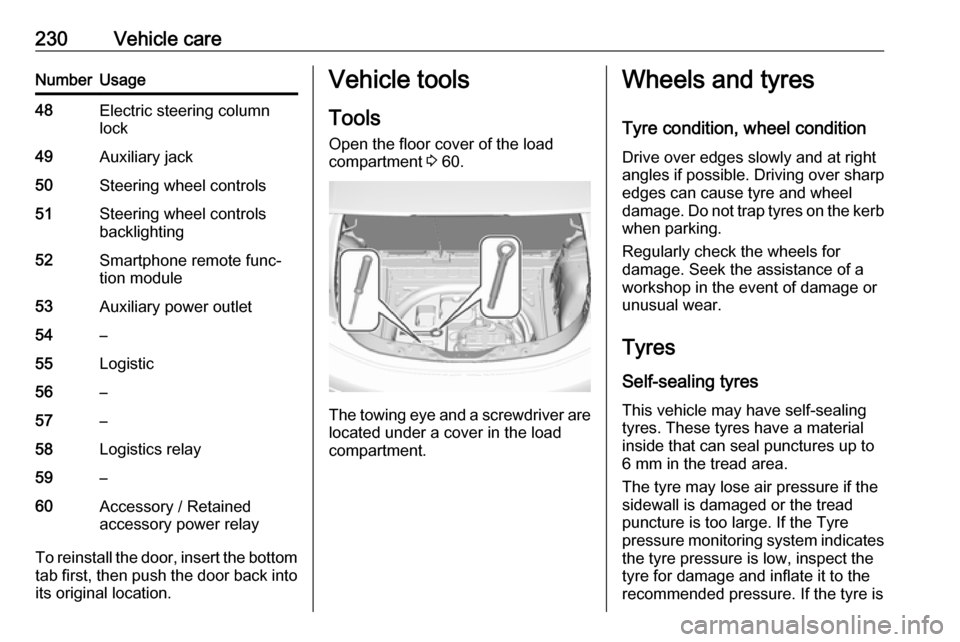
The towing eye and a screwdriver are
located under a cover in the load
compartment.
Wheels and tyres
Tyre condition, wheel condition Drive over edges slowly and at right
angles if possible. Driving over sharp
edges can cause tyre and wheel
damage. Do not trap tyres on the kerb when parking.
Regularly check the wheels for
damage. Seek the assistance of a
workshop in the event of damage or
unusual wear.
Tyres
Self-sealing tyres This vehicle may have self-sealing
tyres. These tyres have a material
inside that can seal punctures up to
6 mm in the tread area.
The tyre may lose air pressure if the
sidewall is damaged or the tread
puncture is too large. If the Tyre
pressure monitoring system indicates the tyre pressure is low, inspect thetyre for damage and inflate it to the
recommended pressure. If the tyre is
Page 242 of 267

240Vehicle careSwitch on the vehicle to release
steering wheel lock and to permit
operation of brake lights, horn and
windscreen wiper.
Shift the selector lever of the electric
drive unit into N.
Release the electric parking brake.Caution
Drive slowly. Do not drive jerkily.
Excessive tractive force can
damage the vehicle.
When the vehicle is not running, considerably more force is needed to
brake and steer.
To prevent the entry of exhaust gases from the towing vehicle, switch on the
air recirculation and close the
windows.
Seek the assistance of a workshop.
After towing, unscrew the towing eye.
Insert cap at the bottom and close.
Towing another vehicle
The vehicle is neither designed nor
intended to tow a trailer or another
vehicle.Appearance care
Exterior care
Locks The locks are lubricated at the factoryusing a high quality lock cylinder
grease. Use de-icing agent only when
absolutely necessary, as this has a
degreasing effect and impairs lock function. After using a de-icing agent, have the locks regreased by a
workshop.
Washing The paintwork of your vehicle is
exposed to environmental influences.
Wash and wax your vehicle regularly. When using automatic vehicle
washes, select a programme that
includes waxing.
Do not apply waxes or polishes to uncoated plastic, vinyl, rubber,
decals, simulated wood, or flat paint
as damage can occur.