parking brake OPEL AMPERA E 2018 Manual user
[x] Cancel search | Manufacturer: OPEL, Model Year: 2018, Model line: AMPERA E, Model: OPEL AMPERA E 2018Pages: 267, PDF Size: 6.45 MB
Page 198 of 267

196Driving and operating5. Once charging, the DC vehicleplug will be locked to the DC
charge port and cannot be
disconnected while charging is
active.
6. Verify that the charging status indicator illuminates on top of the
instrument panel and a horn chirp occurs.
Charging status 3 203.Caution
Do not attempt to disconnect the
DC vehicle plug while charging is
active. This action may damage vehicle or charging station
hardware.
Stop charging
Controls on the charging station can
be used to stop the charge process at any time. Or press and hold 5 on the
electronic key. This will also unlock
the vehicle plug.
To stop charging when inside the
vehicle, you may use the Stop button
on the Charging screen.
Programmable charging 3 196.
There is also an available mobile app
with several charging functions.
Smartphone remote function 3 26.Automatic power supply cut-off
When the vehicle no longer needs to
use power from the charging station,
the charging process will be stopped.
Use the electronic key to unlock the
DC vehicle plug.
Energy can still be consumed from
the charging station when the
vehicle’s displays and indicators
show that the high voltage battery is
fully charged. This is to ensure the
high voltage battery is in optimal
temperature operating range to
maximise vehicle range.
Programmable charging 3 196.
End charging
1. Wait until the charging process has been fully stopped, the
vehicle plug is unlocked and the
charging status indicator is solid
green or off.
2. Unplug the DC vehicle plug from the DC charge port on the vehicle
and close the dust cover.
3. Close the charge port door by pressing firmly in the centre to
latch properly.
4. Manually disengage the electric parking brake before driving the
vehicle.
5. To start another DC charge, remove the DC vehicle plug and
reconnect.
Programmable charging
Programmable charge modes To view the current charge mode
status in the Infotainment display,
touch Energy and then Charging.
The charge start and charge
complete time estimations are also
displayed on the screen. These
estimations are most accurate when
the vehicle is plugged in and in
moderate temperature conditions.
Also, to get an accurate time
estimate, the vehicle uses an internal
clock for programmable charging, not the clock in the instrument panel.
Page 212 of 267
210Vehicle careLifting the vehicle9Warning
Lifting the vehicle improperly can
cause serious injuries and
damage to the vehicle.
The vehicle should be lifted only by well-trained staff at an
authorised workshop.
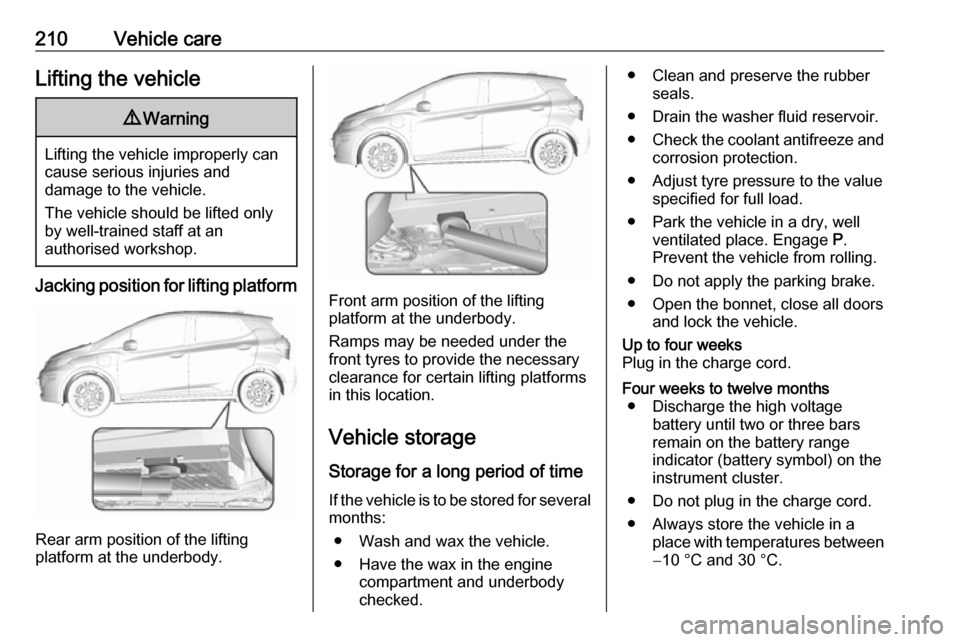
Jacking position for lifting platform
Rear arm position of the lifting
platform at the underbody.
Front arm position of the lifting
platform at the underbody.
Ramps may be needed under the
front tyres to provide the necessary
clearance for certain lifting platforms
in this location.
Vehicle storage Storage for a long period of timeIf the vehicle is to be stored for several months:
● Wash and wax the vehicle.
● Have the wax in the engine compartment and underbody
checked.
● Clean and preserve the rubber seals.
● Drain the washer fluid reservoir.
● Check the coolant antifreeze and
corrosion protection.
● Adjust tyre pressure to the value specified for full load.
● Park the vehicle in a dry, well ventilated place. Engage P.
Prevent the vehicle from rolling.
● Do not apply the parking brake.
● Open the bonnet, close all doors and lock the vehicle.Up to four weeks
Plug in the charge cord.Four weeks to twelve months ● Discharge the high voltage battery until two or three bars
remain on the battery range
indicator (battery symbol) on the
instrument cluster.
● Do not plug in the charge cord.
● Always store the vehicle in a place with temperatures between−10 °C and 30 °C.
Page 240 of 267
238Vehicle care● Use a booster vehicle batterywith the same voltage (12 V). Itscapacity (Ah) must not be muchless than that of the discharged
12 V vehicle battery.
● Use jump leads with insulated terminals and a cross section of
at least 16 mm 2
.
● Do not disconnect the discharged
12 V vehicle battery from the
vehicle.
● Switch off all unnecessary electrical consumers.
● Do not lean over the 12 V vehicle
battery during jump starting.
● Do not allow the terminals of one
lead to touch those of the other
lead.
● The vehicles must not come into contact with each other during
the jump starting process.
● Apply the parking brake, shift selector lever into P.
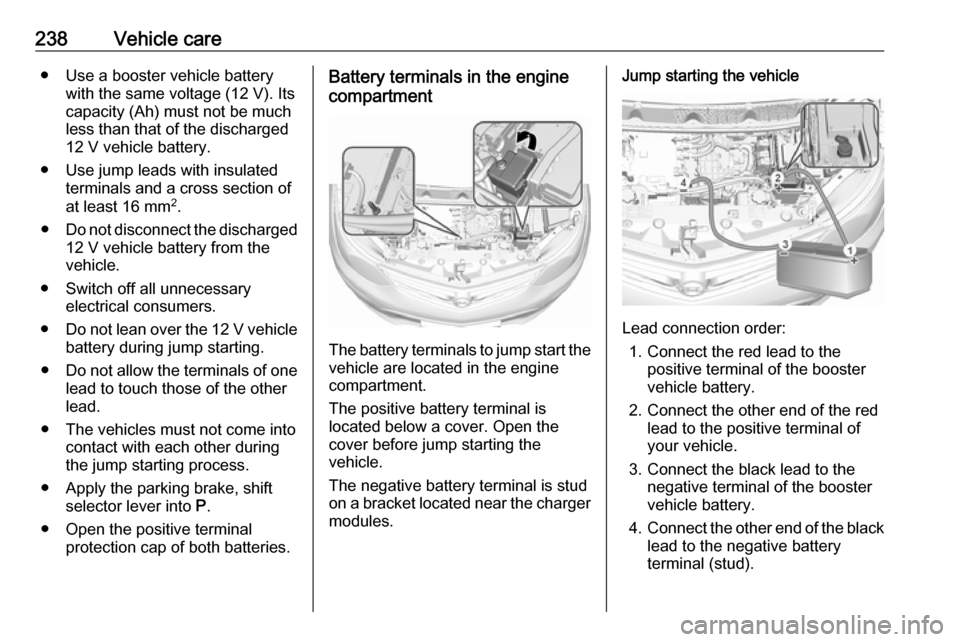
● Open the positive terminal protection cap of both batteries.Battery terminals in the engine
compartment
The battery terminals to jump start the
vehicle are located in the engine
compartment.
The positive battery terminal is
located below a cover. Open the
cover before jump starting the
vehicle.
The negative battery terminal is stud
on a bracket located near the charger
modules.
Jump starting the vehicle
Lead connection order:
1. Connect the red lead to the positive terminal of the booster
vehicle battery.
2. Connect the other end of the red lead to the positive terminal of
your vehicle.
3. Connect the black lead to the negative terminal of the booster
vehicle battery.
4. Connect the other end of the black
lead to the negative battery
terminal (stud).
Page 242 of 267

240Vehicle careSwitch on the vehicle to release
steering wheel lock and to permit
operation of brake lights, horn and
windscreen wiper.
Shift the selector lever of the electric
drive unit into N.
Release the electric parking brake.Caution
Drive slowly. Do not drive jerkily.
Excessive tractive force can
damage the vehicle.
When the vehicle is not running, considerably more force is needed to
brake and steer.
To prevent the entry of exhaust gases from the towing vehicle, switch on the
air recirculation and close the
windows.
Seek the assistance of a workshop.
After towing, unscrew the towing eye.
Insert cap at the bottom and close.
Towing another vehicle
The vehicle is neither designed nor
intended to tow a trailer or another
vehicle.Appearance care
Exterior care
Locks The locks are lubricated at the factoryusing a high quality lock cylinder
grease. Use de-icing agent only when
absolutely necessary, as this has a
degreasing effect and impairs lock function. After using a de-icing agent, have the locks regreased by a
workshop.
Washing The paintwork of your vehicle is
exposed to environmental influences.
Wash and wax your vehicle regularly. When using automatic vehicle
washes, select a programme that
includes waxing.
Do not apply waxes or polishes to uncoated plastic, vinyl, rubber,
decals, simulated wood, or flat paint
as damage can occur.
Page 261 of 267

259Initiating a phone call..............136
Ring tone ................................. 136
Call history .................................. 136
Car wash mode .......................... 153
Central locking system ................20
Centre console storage ...............58
Changing tyre and wheel size ...235
Charge cord ................................ 204
Charge limit selection .................196
Charge mode selection ..............196
Charge rate selection .................196
Charging ..................................... 193
Charging override .......................196
Charging status .......................... 203
Charging system .......................... 78
Child locks ................................... 26
Child restraint installation locations ................................... 53
Child restraints.............................. 51
Child restraint systems ................51
Climate control ............................. 13
Clock............................................. 68
Collision damage repair ..............254
Control elements Infotainment system ................107
Steering wheel ........................ 107
Control elements overview .........107
Control indicators.......................... 77
Control of the vehicle .................148
Controls ........................................ 65Convex shape .............................. 31
Coolant ....................................... 213
Coolant and antifreeze ...............245
Cooling system ........................... 213
Cruise control ...................... 81, 163
Cupholders .................................. 57
Curtain airbag system .................. 49
D DAB ............................................ 123
Danger, Warnings and Cautions ...2
Daytime running lights ...............101
Declaration of conformity ............252
Delayed locking ............................ 25
Digital audio broadcasting ..........123
Directional tyres .......................... 230
Displaying pictures .....................129
Display settings ..................129, 130
Door open .................................... 82
Doors ............................................ 28
Drive modes ............................... 153
Driver assistance systems ..........163
Driver Information Centre .............82
Driving economically................... 147
Driving efficiency gauge ...............74
Driving hints ........................ 147, 148
E Electric adjustment ......................32
Electrical requirements ...............208
Electrical system......................... 222Electrical system overload .........222
Electric drive unit ..................14, 153
Electric parking brake ...........79, 158
Electric parking brake fault ...........79
Electric rate schedule .................196
Electric vehicle operation modes 153
Electronic climate control system 141
Electronic key system ...................19
Electronic Stability Control.......... 162
Electronic Stability Control and Traction Control system ............80
Electronic Stability Control off....... 80
Emergency call ........................... 136
Engine compartment fuse box ...224
Engine data ............................... 249
Entry lighting .............................. 103
Event data recorders ..................257
Exit lighting ................................ 103
Exterior care .............................. 240
Exterior light ................................. 81
Exterior lighting ......................10, 98
Exterior mirrors ............................. 31
F File formats Audio files................................ 125
Movie files ............................... 125
Picture files.............................. 125
First aid kit ................................... 61
Fixed air vents ........................... 145
Page 263 of 267

261Mobile phones and CB radioequipment .............................. 140
Movie files................................... 125
Mute............................................ 109
N New vehicle running-in ..............148
Number plate light .....................221
O
Object detection systems ...........173
Odometer ..................................... 74
One-pedal driving .......................153
OnStar .......................................... 94
Operation ............................ 136, 153
External devices ......................125
Menu ....................................... 112
Phone ...................................... 136
Radio ....................................... 119
Outside temperature ....................68
P Pairing ........................................ 134
Panoramic view system ..............183
Parking ................................ 15, 151
Parking assist ............................ 173
Parking brake ............................ 158
Parking lights ............................. 102
Pedestrian detection .....................81
Pedestrian safety alert ............11, 66
Performance .............................. 249Performing work ........................211
Phone Bluetooth ................................. 133
Bluetooth connection ..............134
Call history .............................. 136
Emergency calls ......................136
Entering a number ..................136
Functions during a call ............136
General information ................133
Incoming call ........................... 136
Phone book ............................. 136
Phone main menu ...................136
Selecting the ring tone ............136
Speed dial number ..................136
Phone book ................................ 136
Phone projection ........................131
Picture files ................................. 125
Playing audio .............................. 127
Playing movies ........................... 130
Pollen filter ................................. 146
Post-crash label .......................... 151
Power button .............................. 148
Power indicator gauge ..................76
Power outlets ............................... 69
Power windows ............................ 34
Programmable charging .............196
Programmed charging override ..203
Propulsion system data ..............249R
Radio Activating................................. 119Configuring DAB .....................123
Configuring RDS .....................122
DAB announcements ..............123
Digital audio broadcasting
(DAB) ...................................... 123
Favourite lists .......................... 120
Intellitext .................................. 123
Radio data system (RDS) .......122
Regional .................................. 122
Regionalisation ....................... 122
Selecting the waveband ..........119
Station search ......................... 120
Station tuning .......................... 120
Usage ...................................... 119
Radio data system (RDS) ..........122
Radio Frequency Identification (RFID) ..................................... 257
Radio remote control ...................17
RDS ............................................ 122
REACH ....................................... 253
Reading lights ............................ 103
Rear cross traffic alert ................187
Rear floor storage cover ..............60
Rear fog light ....................... 81, 101
Rear seats .................................... 42
Rear view camera ...................... 185
Rear window wiper/washer .......... 67