remote OPEL AMPERA E 2018 User Guide
[x] Cancel search | Manufacturer: OPEL, Model Year: 2018, Model line: AMPERA E, Model: OPEL AMPERA E 2018Pages: 267, PDF Size: 6.45 MB
Page 32 of 267
30Keys, doors and windowsActivationAll doors must be closed and the
electronic key of the electronic key
system must not remain in the
vehicle. Otherwise the system cannot
be activated.
● Radio remote control: self- activated 30 seconds after
locking the vehicle by
pressing ) once.
● Electronic key system: self- activated 30 seconds after
locking the vehicle by pressing the button on any exterior door
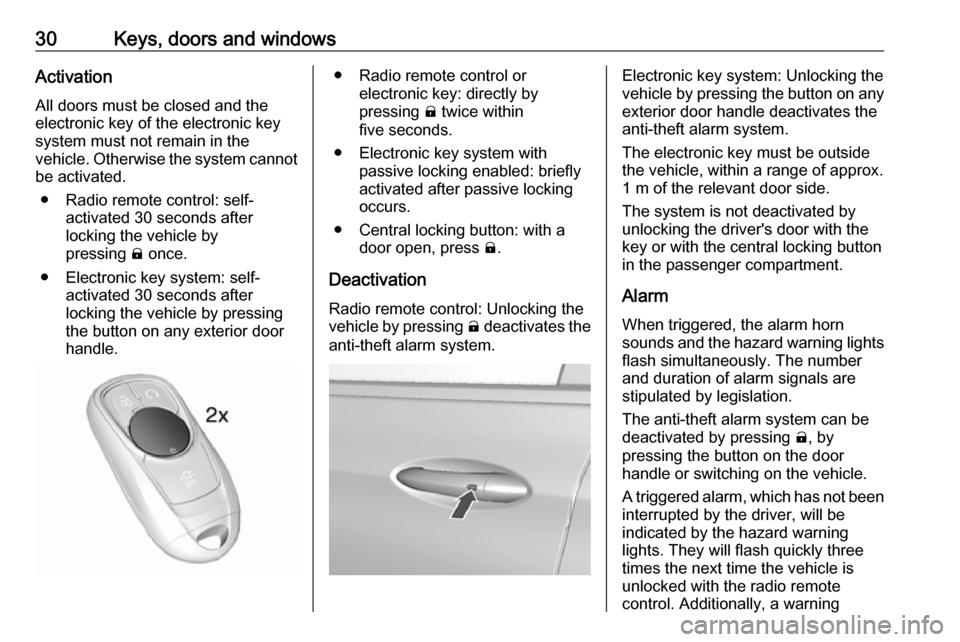
handle.● Radio remote control or electronic key: directly by
pressing ) twice within
five seconds.
● Electronic key system with passive locking enabled: briefly
activated after passive locking
occurs.
● Central locking button: with a door open, press ).
Deactivation Radio remote control: Unlocking the
vehicle by pressing ( deactivates the
anti-theft alarm system.Electronic key system: Unlocking the
vehicle by pressing the button on any exterior door handle deactivates the
anti-theft alarm system.
The electronic key must be outside
the vehicle, within a range of approx. 1 m of the relevant door side.
The system is not deactivated by
unlocking the driver's door with the
key or with the central locking button
in the passenger compartment.
Alarm When triggered, the alarm horn
sounds and the hazard warning lights flash simultaneously. The number
and duration of alarm signals are
stipulated by legislation.
The anti-theft alarm system can be
deactivated by pressing (, by
pressing the button on the door
handle or switching on the vehicle.
A triggered alarm, which has not been
interrupted by the driver, will be
indicated by the hazard warning
lights. They will flash quickly three
times the next time the vehicle is
unlocked with the radio remote
control. Additionally, a warning
Page 43 of 267
Seats, restraints41Heating
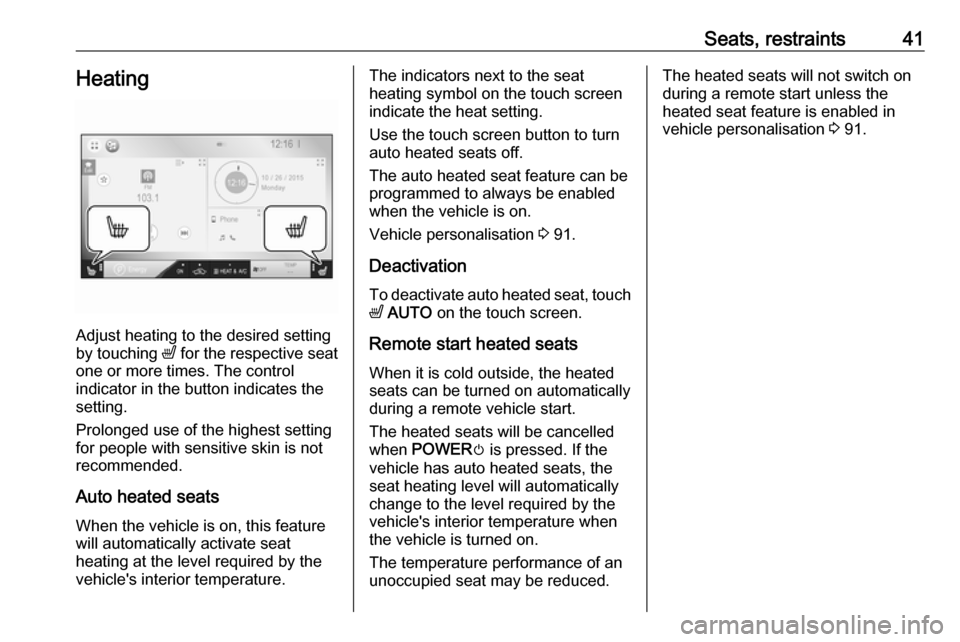
Adjust heating to the desired setting
by touching ß for the respective seat
one or more times. The control
indicator in the button indicates the
setting.
Prolonged use of the highest setting
for people with sensitive skin is not
recommended.
Auto heated seats
When the vehicle is on, this feature
will automatically activate seat
heating at the level required by the
vehicle's interior temperature.
The indicators next to the seat
heating symbol on the touch screen
indicate the heat setting.
Use the touch screen button to turn
auto heated seats off.
The auto heated seat feature can be programmed to always be enabled
when the vehicle is on.
Vehicle personalisation 3 91.
Deactivation To deactivate auto heated seat, touchß AUTO on the touch screen.
Remote start heated seats When it is cold outside, the heatedseats can be turned on automaticallyduring a remote vehicle start.
The heated seats will be cancelled
when POWER m is pressed. If the
vehicle has auto heated seats, the
seat heating level will automatically
change to the level required by the
vehicle's interior temperature when
the vehicle is turned on.
The temperature performance of an
unoccupied seat may be reduced.The heated seats will not switch on
during a remote start unless the
heated seat feature is enabled in
vehicle personalisation 3 91.
Page 93 of 267
Instruments and controls91Vehicle personalisation
The vehicle's behaviour can be
personalised by changing the settings in the Info display.
Depending on vehicle equipment and
country-specific regulations some of
the functions described below may
not be available.
Some functions are only displayed or
active when the vehicle is on.
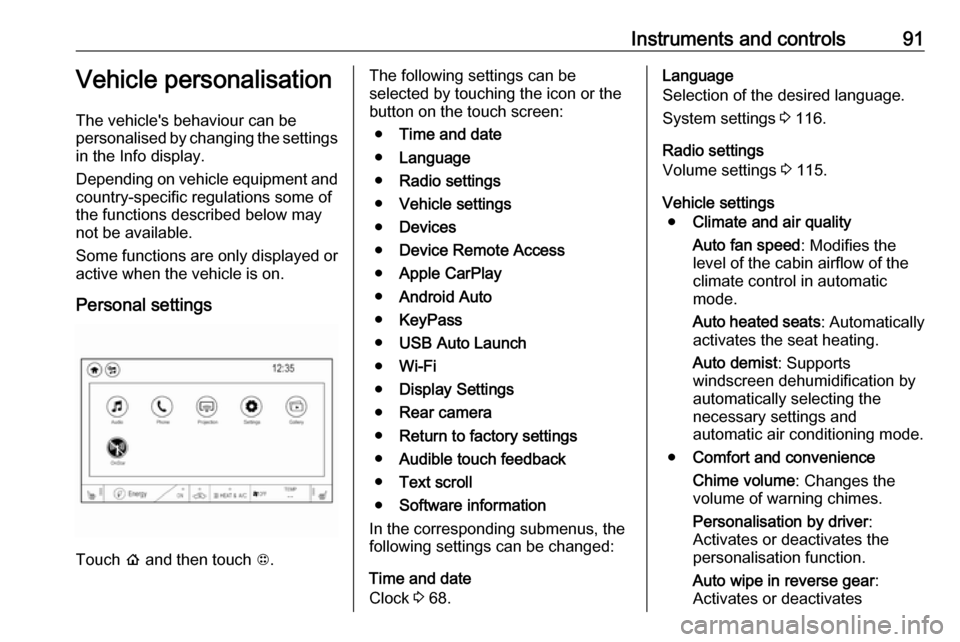
Personal settings
Touch p and then touch 1.
The following settings can be
selected by touching the icon or the
button on the touch screen:
● Time and date
● Language
● Radio settings
● Vehicle settings
● Devices
● Device Remote Access
● Apple CarPlay
● Android Auto
● KeyPass
● USB Auto Launch
● Wi-Fi
● Display Settings
● Rear camera
● Return to factory settings
● Audible touch feedback
● Text scroll
● Software information
In the corresponding submenus, the
following settings can be changed:
Time and date
Clock 3 68.Language
Selection of the desired language.
System settings 3 116.
Radio settings
Volume settings 3 115.
Vehicle settings ● Climate and air quality
Auto fan speed : Modifies the
level of the cabin airflow of the
climate control in automatic
mode.
Auto heated seats : Automatically
activates the seat heating.
Auto demist : Supports
windscreen dehumidification by
automatically selecting the
necessary settings and
automatic air conditioning mode.
● Comfort and convenience
Chime volume : Changes the
volume of warning chimes.
Personalisation by driver :
Activates or deactivates the
personalisation function.
Auto wipe in reverse gear :
Activates or deactivates
Page 94 of 267

92Instruments and controlsautomatic switching on of the
rear window wiper when reverse
gear is engaged.
● Collision / detection systems
Pedestrian safety signal :
Activates or deactivates
pedestrian safety alert. Even if
pedestrian safety signal is
deactivated, it is automatically
activated while this menu is not
accessible such as OnStar
calling, camera projection, Apple
CarPlay and Android Auto, non-
auto dismiss pop-up, etc.
Forward Collision System : This
allows the feature’s notification to
be customised. This feature will
turn on or off the Forward
Collision Alert and Active
Emergency Braking. The Off
setting disables all Forward
Collision Alert and Active
Emergency Braking functions.
With the Alert and Brake setting,
both Forward Collision Alert and
Active Emergency Braking are
available. The Alert setting
disables Active EmergencyBraking. Select Off, Alert , or Alert
and Brake .
Front pedestrian detection : This
allows the feature’s notification to be customised. This feature may
help avoid or reduce the harm
caused by front-end crashes with
nearby pedestrians. Select Off,
Alert , or Alert and Brake .
Rear Cross Traffic Alert :
Activates or deactivates rear
cross traffic alert.
Lane Change Alert : Activates or
deactivates lane change alert.
● Lighting
Vehicle locator lights : Activates
or deactivates the entry lighting.
Exit lighting : Activates or
deactivates and changes the duration of exit lighting.
● Power door locks
Auto door lock : Activates or
deactivates the automatic door
locking function after switching on the vehicle.
Unlocked door anti lockout :
Activates or deactivates the doorlocking function while a door is
open.
Delayed door lock : Activates or
deactivates the delayed door locking function. This feature
delays the actual locking of the
doors until all doors are closed. It just can be toggled when Auto
door lock is deactivated.
● Remote lock / unlock / start
Remote unlock light feedback :
Activates or deactivates the
hazard warning flasher feedback
whilst unlocking.
Remote lock feedback : Changes
what kind of feedback is given
when locking the vehicle.
Remote door unlock : Changes
the configuration to unlock only
the driver's door or the whole
vehicle whilst unlocking.
Relock remotely unlocked doors :
Activates or deactivates the
automatic relock function after
unlocking without opening the vehicle.
Remote start auto heat seats :
Activates or deactivates
Page 95 of 267

Instruments and controls93automatically the heated seats
when using remote start.
Passive door unlock : Changes
the configuration to unlock only
the driver's door or the whole
vehicle whilst unlocking.
Relock remotely unlocked doors :
Activates or deactivates the
passive locking function. This
feature locks the vehicle
automatically after several
seconds if all doors have been
closed and an electronic key has been removed from the vehicle.
Remote start auto heat seats :
Activates or deactivates automatically the heated seats
when using remote start.
Passive door unlock : Changes
the configuration to unlock only
the driver's door or the whole
vehicle whilst unlocking.
Passive door lock : Activates or
deactivates the passive locking
function. This feature locks the
vehicle automatically after
several seconds if all doors have
been closed and an electronickey has been removed from the
vehicle.
Remote left in vehicle alert :
Activates or deactivates the
warning chime when the
electronic key remains in the
vehicle.
Devices
External devices 3 125.
Device remote access
Smartphone remote function 3 26.
Apple CarPlay
Using smartphone applications
3 131.
Android Auto
Using smartphone applications
3 131.
KeyPass
Smartphone remote function 3 26.
USB Auto Launch
External devices 3 125.
Wi-Fi
System settings 3 116.Display Settings
System settings 3 116.
Rear camera
Symbols : Activates or deactivates the
symbols.
Guidelines : Activates or deactivates
the guiding lines.
Return to factory settings
Reset vehicle settings : Resets all
settings to the default settings.
Clear all private data : Deletes all
private information from the vehicle.
Restore radio settings : Resets all
radio settings to the default settings.
System settings 3 116.
Audible touch feedback
Usage 3 109.
Text scroll
System settings 3 116.
Software information
System settings 3 116.
Page 96 of 267
94Instruments and controlsTelematics service
OnStar OnStar is a personal connectivity and
service assistant with integrated
Wi-Fi hotspot. The OnStar service is
available 24 hours a day, seven days
a week.
Note
OnStar is not available for all
markets. For further information,
contact your workshop.
Note
In order to be available and
operational, OnStar needs a valid
OnStar subscription, functioning
vehicle electrics, mobile service and GPS satellite link.
To activate the OnStar services and
set up an account, press Z and speak
with an advisor.Depending on the equipment of the vehicle, the following services are available:
● Emergency services and support
in the case of a vehicle
breakdown
● Wi-Fi hotspot
● Smartphone application
● Remote control, e.g. location of the vehicle, activation of horn and
lights, control of central locking
system
● Stolen vehicle assistance
● Vehicle diagnostics
● Destination download
Note
The OnStar module of the vehicle is
deactivated after ten days without
switching on the vehicle. Functions
requiring a data connection will be
available again after switching on
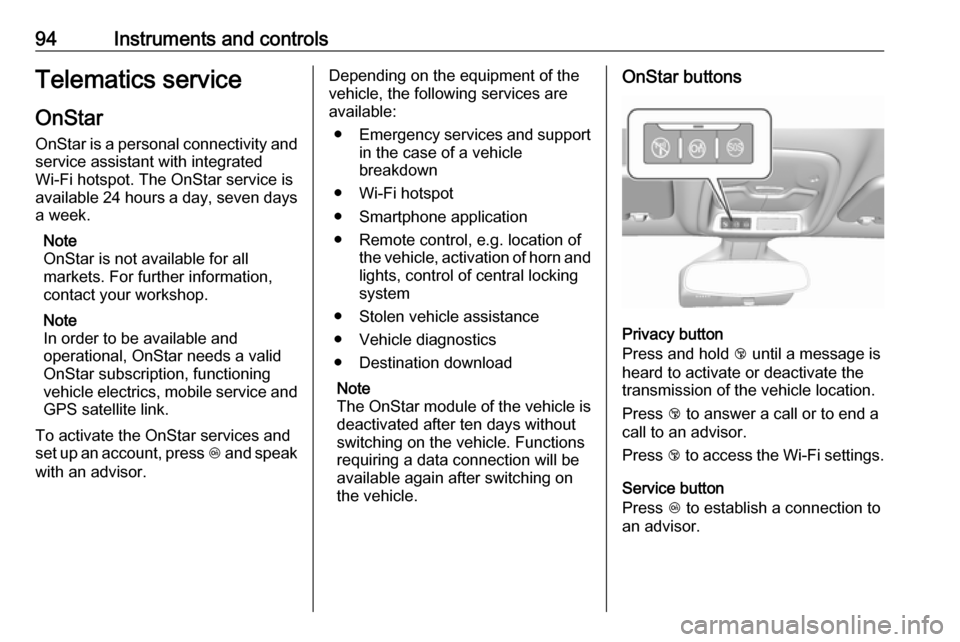
the vehicle.OnStar buttons
Privacy button
Press and hold j until a message is
heard to activate or deactivate the
transmission of the vehicle location.
Press j to answer a call or to end a
call to an advisor.
Press j to access the Wi-Fi settings.
Service button
Press Z to establish a connection to
an advisor.
Page 98 of 267

96Instruments and controlsSmartphone app
With the myOpel smartphone app,
some vehicle functions can be
operated remotely.
The following functions are available: ● Lock or unlock vehicle.
● Honk horn or flash lights.
● Operate parking heater.
● Check vehicle battery-related information.
● Check tyre pressure (only with tyre pressure monitoring
system).
● Send navigation destination to the vehicle for use with
navigation application via phone
projection.
● Locate vehicle on a map.
● Manage Wi-Fi settings.
To operate these functions, download the app from App Store ®
or
Google Play™ Store.Remote control
If desired, use any phone to call an
advisor, who can remotely operate
specific vehicle functions. Find the
respective OnStar phone number on
our country-specific website.
The following functions are available: ● Lock or unlock vehicle.
● Provide information on the vehicle location.
● Honk horn or flash lights.
Stolen vehicle assistance
If the vehicle is stolen, report the theft
to the authorities and request OnStar
stolen vehicle assistance. Use any
phone to call an advisor. Find the
respective OnStar phone number on
our country-specific website.
OnStar can provide support in
locating and recovering the vehicle.Theft alert
When the anti-theft alarm system is
triggered, a notification is sent to
OnStar. You are then informed about
this event by text message or email.Restart prevention
By sending remote signals, OnStar
can prevent the vehicle from
restarting once it has been turned off.
On-demand diagnostics
At any time e.g. if the vehicle displays a vehicle message, press Z to
contact an advisor and ask to
complete a real-time diagnostic check
to directly determine the issue.
Depending on the results, the advisor
will provide further support.
Diagnostic report
The vehicle automatically transmits
diagnostic data to OnStar which
sends a monthly email report to you
and your preferred workshop.
Note
The workshop notification function
can be disabled in your account.
The report contains the status of key
operating systems of the vehicle like
propulsion system, airbags, ABS, and
other major systems. It also provides
information on possible maintenance
items and tyre pressure (only with tyre
pressure monitoring system).
Page 99 of 267

Instruments and controls97To look at the information in greater
detail, select the link within the email and log in to your account.
Destination download
A desired destination can be directly
downloaded to the navigation system.
Press Z to call an advisor and
describe the destination or point of
interest.
The advisor can look up any address
or point of interest and directly send
the destination to the built-in
navigation system.
OnStar settings
OnStar PIN
To have full access to all OnStar
services, a four-digit PIN is required. The PIN has to be personalised when first talking to an advisor.
To change the PIN, press Z to call an
advisor.Account data
An OnStar subscriber has an account
where all the data is stored. To
request a change of the account
information, press Z and talk to an
advisor or log in to your account.
If the OnStar service is used on
another vehicle, press Z and request
that the account be transferred to the
new vehicle.
Note
In any case, if the vehicle is disposed of, sold or otherwise transferred,
immediately inform OnStar about
the changes and terminate the
OnStar service on this vehicle.
Vehicle location
The vehicle location is transmitted to OnStar when service is requested or
triggered. A message on the Info
display informs about this
transmission.
To activate or deactivate the
transmission of the vehicle location,
press and hold j until an audio
message is heard.The deactivation is indicated by the
status light flashing red and green for
a short period of time and each time
the vehicle is started.
Note
If the transmission of the vehicle
location is deactivated, some
services are no longer available.
Note
The vehicle location always remains accessible to OnStar in the case of
an emergency.
Find the privacy policy in your
account.
Software updates
OnStar may remotely carry out
software updates without further
notice or consent. These updates are
to enhance or maintain safety and
security or the operation of the
vehicle.
These updates may concern privacy
issues. Find the privacy policy in your account.
Page 146 of 267

144Climate controlAir distribution V, B and C
Press the appropriate button for the
desired adjustment. The LED in the
button illuminates to indicate
activation.
B:to head area via adjustable air
ventsC:to foot well and windscreenh:to windscreen
Combinations are possible.
To return to automatic air distribution:
press AUTO .
Manual air recirculation 4
Touch 4 to activate the air
recirculation mode.
Touch 4 again to deactivate
recirculation mode.
If selected, the touch screen button
will illuminate to indicate that air is
being recirculated. This helps to
quickly cool the air inside the vehicle or prevent outside air and odours
from entering.
Touching 4 deactivates air
recirculation. Press AUTO to return to
automatic operation; recirculation
runs automatically as needed.
9 Warning
The exchange of fresh air is
reduced in air recirculation mode.
In operation without cooling the air humidity increases, so the
windows may mist up from inside.
The quality of the passenger
compartment air deteriorates,
which may cause the vehicle
occupants to feel drowsy.
Remote heating and cooling
Operated by pressing O on the
electronic key.
The climate control system will default
to an appropriate heating or cooling
mode and the rear window heating
will turn on in the event of cold outside temperatures.
Remote start 3 17.
Page 152 of 267
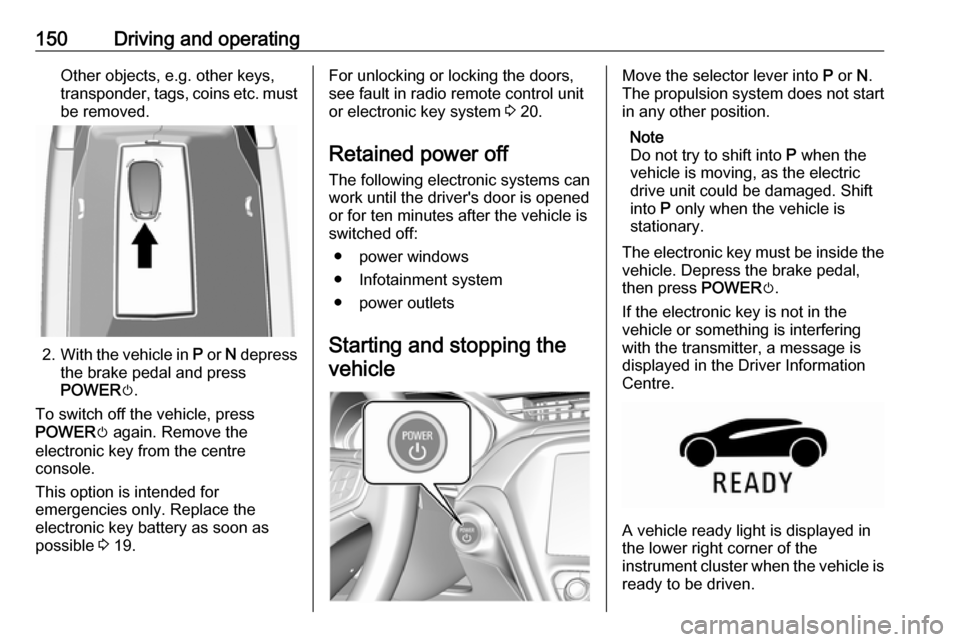
150Driving and operatingOther objects, e.g. other keys,
transponder, tags, coins etc. must
be removed.
2. With the vehicle in P or N depress
the brake pedal and press
POWER m.
To switch off the vehicle, press
POWER m again. Remove the
electronic key from the centre
console.
This option is intended for
emergencies only. Replace the
electronic key battery as soon as
possible 3 19.
For unlocking or locking the doors,
see fault in radio remote control unit
or electronic key system 3 20.
Retained power off
The following electronic systems can
work until the driver's door is opened
or for ten minutes after the vehicle is
switched off:
● power windows
● Infotainment system
● power outlets
Starting and stopping the
vehicleMove the selector lever into P or N.
The propulsion system does not start
in any other position.
Note
Do not try to shift into P when the
vehicle is moving, as the electric
drive unit could be damaged. Shift
into P only when the vehicle is
stationary.
The electronic key must be inside the
vehicle. Depress the brake pedal,
then press POWERm.
If the electronic key is not in the
vehicle or something is interfering
with the transmitter, a message is
displayed in the Driver Information
Centre.
A vehicle ready light is displayed in
the lower right corner of the
instrument cluster when the vehicle is ready to be driven.