Heat OPEL AMPERA E 2018 Owner's Guide
[x] Cancel search | Manufacturer: OPEL, Model Year: 2018, Model line: AMPERA E, Model: OPEL AMPERA E 2018Pages: 267, PDF Size: 6.45 MB
Page 143 of 267
Climate control141Climate controlClimate control systems.............141
Electronic climate control system .................................... 141
Air vents ..................................... 145
Adjustable air vents .................145
Fixed air vents ......................... 145
Maintenance .............................. 146
Air intake ................................. 146
Pollen filter ............................... 146
Air conditioning regular operation ................................ 146
Service .................................... 146Climate control systems
Electronic climate control system
Note
Do not cover the sensor located on top of the instrument panel,
otherwise the automatic climate
control system may not work
properly.
In automatic mode, temperature, fan
speed and air distribution are
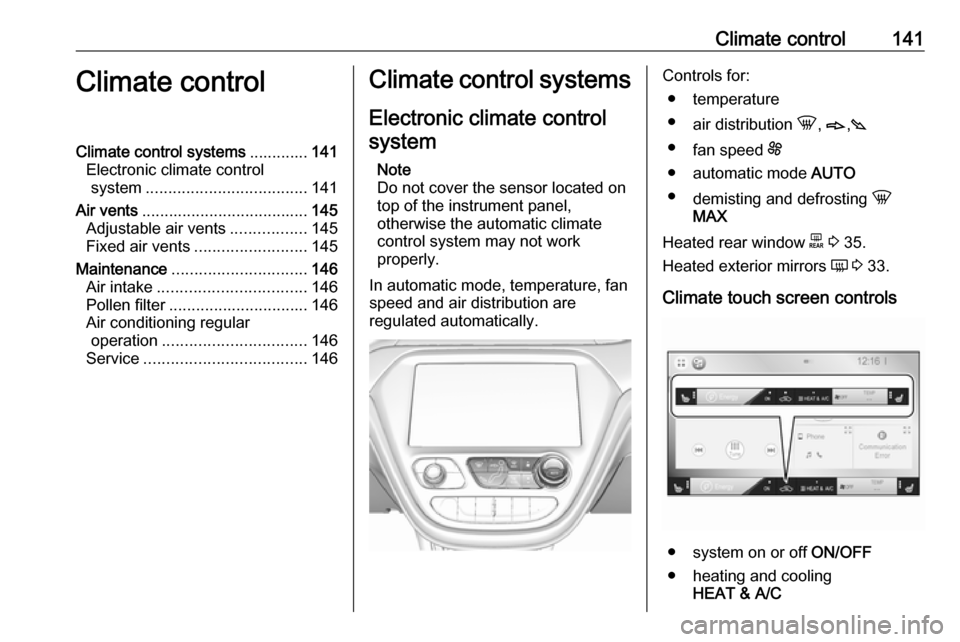
regulated automatically.Controls for:
● temperature
● air distribution h, B ,C
● fan speed E
● automatic mode AUTO
● demisting and defrosting h
MAX
Heated rear window f 3 35.
Heated exterior mirrors Ü 3 33.
Climate touch screen controls
● system on or off ON/OFF
● heating and cooling HEAT & A/C
Page 144 of 267

142Climate control●manual air recirculation 4
● Heated seats +/q 3 41
Automatic mode AUTO
Basic setting for maximum comfort: ● Press AUTO, the air distribution
and fan speed are regulated
automatically. The LED in the
button illuminates to indicate
activation.
● Touch Heat & A/C to switch on
optimal heating, cooling and
demisting. The LED in the button illuminates to indicate activation.
● Set the preselected temperature by turning rotary knob TEMP.
Recommended temperature is
22 °C.
● Open all air vents to allow optimised air distribution in
automatic mode.
The fan speed regulation in automatic mode can be changed in the Info
display.
Vehicle personalisation 3 91.
Temperature preselection
Set temperature to the desired value.
The selected temperature is indicated in the display.
Note
The preselected temperature is only achieved if Heat & A/C is switched
on.
If the minimum temperature Lo is set,
the climate control system runs at maximum cooling, when Heat & A/C
is switched on.
If the maximum temperature Hi is set,
the climate control system runs at maximum heating when Heat & A/C is
switched on.
Page 145 of 267

Climate control143Demisting and defrosting the
windows hMAX
●
Press hMAX . The LED in the
button illuminates to indicate
activation. When hMAX is
selected, air is directed to the
windscreen and the fan runs at a
higher speed. Fog or frost is cleared from the windscreenmore quickly.
● Temperature and air distribution are set automatically and the fan
runs at high speed.
● Switch on heated rear window f.
● To return to previous mode: press h, to return to automatic
mode: press AUTO.
Settings of automatic rear window
heating can be changed in the
Info display.
Vehicle personalisation 3 91.
System activation ON/OFF Cooling, fan and automatic mode can
be switched off by pressing ON/OFF.
Manual settings Climate control system settings can
be changed by activating the buttons
and rotary knobs as described below.
Changing a setting will deactivate
automatic mode.Fan speed Z,
Press lower button to decrease or
upper button to increase fan speed.
The fan speed is indicated in the
lower display area.
If the fan is switched off, the air
conditioning is also deactivated.
To return to automatic mode: Press
AUTO .
Page 146 of 267

144Climate controlAir distribution V, B and C
Press the appropriate button for the
desired adjustment. The LED in the
button illuminates to indicate
activation.
B:to head area via adjustable air
ventsC:to foot well and windscreenh:to windscreen
Combinations are possible.
To return to automatic air distribution:
press AUTO .
Manual air recirculation 4
Touch 4 to activate the air
recirculation mode.
Touch 4 again to deactivate
recirculation mode.
If selected, the touch screen button
will illuminate to indicate that air is
being recirculated. This helps to
quickly cool the air inside the vehicle or prevent outside air and odours
from entering.
Touching 4 deactivates air
recirculation. Press AUTO to return to
automatic operation; recirculation
runs automatically as needed.
9 Warning
The exchange of fresh air is
reduced in air recirculation mode.
In operation without cooling the air humidity increases, so the
windows may mist up from inside.
The quality of the passenger
compartment air deteriorates,
which may cause the vehicle
occupants to feel drowsy.
Remote heating and cooling
Operated by pressing O on the
electronic key.
The climate control system will default
to an appropriate heating or cooling
mode and the rear window heating
will turn on in the event of cold outside temperatures.
Remote start 3 17.
Page 148 of 267
146Climate controlMaintenanceAir intake
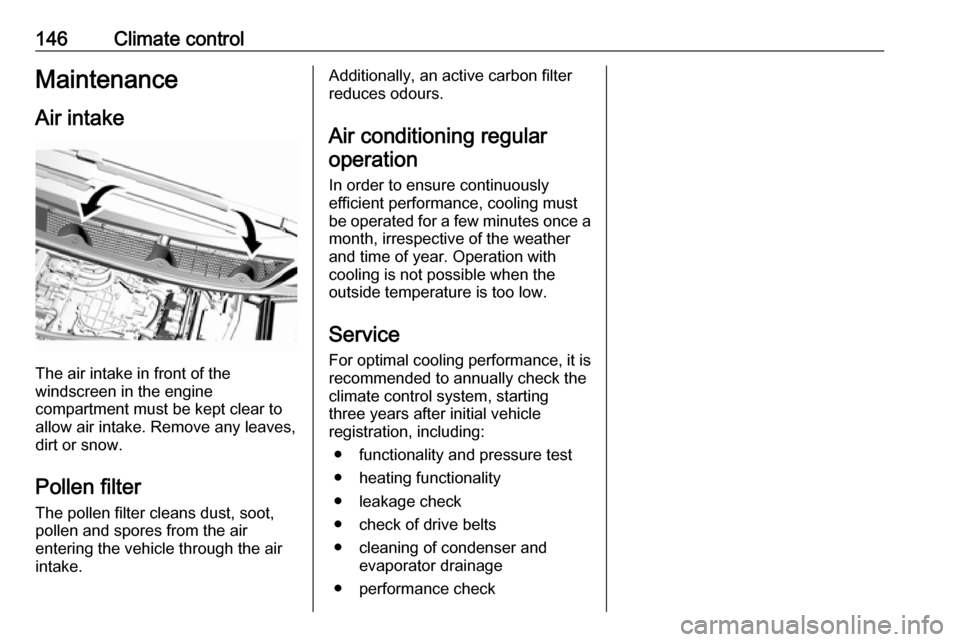
The air intake in front of the
windscreen in the engine
compartment must be kept clear to
allow air intake. Remove any leaves,
dirt or snow.
Pollen filter The pollen filter cleans dust, soot,
pollen and spores from the air
entering the vehicle through the air
intake.
Additionally, an active carbon filter
reduces odours.
Air conditioning regular
operation
In order to ensure continuously
efficient performance, cooling must
be operated for a few minutes once a
month, irrespective of the weather
and time of year. Operation with
cooling is not possible when the
outside temperature is too low.
Service For optimal cooling performance, it is recommended to annually check the
climate control system, starting
three years after initial vehicle
registration, including:
● functionality and pressure test
● heating functionality
● leakage check
● check of drive belts
● cleaning of condenser and evaporator drainage
● performance check
Page 161 of 267

Driving and operating159pulled until the vehicle stops moving,
the electric parking brake will remain
applied.
When the electric parking brake fault
indicator j illuminates, the electric
parking brake has detected a system
problem and is operating with
reduced functionality. To apply the
electric parking brake when j
illuminates, pull the switch m and
hold it until the control indicator m
remains on. If the control indicator j
illuminates, seek the assistance of a
workshop.
The vehicle may automatically apply
the electric parking brake in some
situations when the vehicle is not
moving. This is normal, and is done to
periodically check the correct
operation of the electric parking brake
system.
If the electric parking brake fails to
apply, the rear wheels should be
blocked to prevent vehicle
movement.Releasing
1. Switch on the vehicle.
2. Keep brake pedal depressed. 3. Push switch m.
If attempting to release the electric
parking brake without the brake pedal
being applied, a chime will sound and
a message will be displayed in the Driver Information Centre. The
electric parking brake is released
when m is off.
If control indicator j is illuminated, the
electric parking brake has detected a
system problem, and is operating with reduced functionality. To release the
electric parking brake when j is on,
push down the switch m and hold it
down until the control indicator j
goes off. If the control indicator
remains illuminated, seek the
assistance of a workshop.
Note
Driving with the parking brake on
can overheat the brake system and
cause premature wear or damage to brake system parts. Make sure thatthe parking brake is fully released
and the control indicator m is off
before driving.
Automatic release
The electric parking brake is
automatically released when the
vehicle is running, placed into gear
and an attempt is made to drive away.
Avoid rapid acceleration when the
electric parking brake is applied, to
reduce wear of parking brake lining.
Electric parking brake control
indicator m 3 79.
Electric parking brake fault control
indicator j3 79.
Driver Information Centre 3 82.
Regenerative braking
Some braking energy from the
moving vehicle is turned back into
electrical energy. This energy is then
stored back into the high voltage
battery system, increasing energy
efficiency.
Regenerative power may be limited
when the high voltage battery is near
full charge or cold.
Page 206 of 267

204Driving and operating● Solid green – No horn chirps:Charging is complete.
● Solid yellow – No horn chirp: Vehicle is plugged in. It is normal
for the charging status indicator
to turn yellow for a few seconds
after plugging in a compatible
charge cord. The solid yellow
may remain illuminated
depending on the vehicle.
This may also indicate that the
charging system has detected a
fault and will not charge the high
voltage battery.
● No light signal (upon plug‐in) – No horn chirps: Charge cord
connection should be checked.
● No light signal (after indication of
green or yellow charging status
indicator) – No horn chirps:
Charge cord connection should
be checked. If connection is
correct, this may be due to a
power failure and charging will
begin later. This may also occur
if the vehicle has detected a high
voltage charging system fault.● No light signal – Three horn chirps: Charge port door is open.
● No light signal – Horn chirps repeatedly: The power supply
was interrupted before the
charging process could be
completed. Repeated chirps will stop if power is restored within
90 seconds.
Vehicle personalisation 3 91.
The system may be thermally
conditioning the high voltage battery
during any of the states mentioned
above, requiring electric energy to be
transferred to the vehicle.
If the vehicle is plugged in and vehicle
power is on, the charging status
indicator will flash or illuminate solid
green, depending on the charge level. This also happens during Engine
Assisted Heating if the vehicle is
plugged in.
If the vehicle is plugged in and the
charging status indicator is off, a
charging fault has been detected.Charge cord9 Danger
There is a risk of electric shock
that may cause personal injury or
death.
Do not use the charge cord if any part of the charge cord is
damaged.
Do not open or remove the charge cord cover.
Service by qualified personnel
only. Connect the charge cord to a
properly grounded outlet with
cords that are not damaged.
A portable charge cord used to
charge the vehicle high voltage
battery is stored under the rear floor
storage cover in the load
compartment 3 193.
Page 208 of 267
206Driving and operatinginstallations in buildings,
depending on the region in which
the unit is being installed. The
installer shall comply with any
additional local requirements
mandated by the country and / or
municipality.
Do not use this product if the
flexible power cord or the electric
vehicle cable is frayed, has broken insulation, or shows any other
signs of damage.
Do not use this product if the
enclosure or the vehicle plug is
broken, cracked, open, or shows
any other indication of damage.
The plug must be plugged into an
appropriate electrical outlet that is
properly installed in accordance
with all local codes and
ordinances. Do not modify the
plug provided with the product. If
the plug does not fit the electrical
outlet, have a proper electrical
outlet installed by a qualified
electrician. If ground is missing,the charge cord indicators will
indicate an electrical system fault
and the vehicle may not charge.
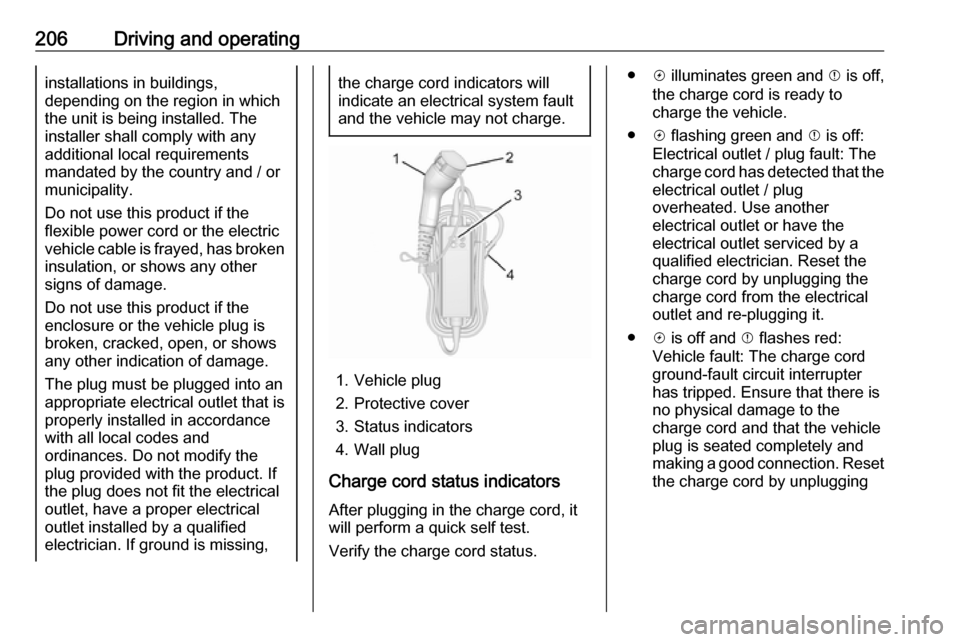
1. Vehicle plug
2. Protective cover
3. Status indicators
4. Wall plug
Charge cord status indicators After plugging in the charge cord, it
will perform a quick self test.
Verify the charge cord status.
● c illuminates green and d is off,
the charge cord is ready to
charge the vehicle.
● c flashing green and d is off:
Electrical outlet / plug fault: The
charge cord has detected that the electrical outlet / plug
overheated. Use another
electrical outlet or have the
electrical outlet serviced by a
qualified electrician. Reset the
charge cord by unplugging the
charge cord from the electrical
outlet and re-plugging it.
● c is off and d flashes red:
Vehicle fault: The charge cord
ground-fault circuit interrupter
has tripped. Ensure that there is no physical damage to the
charge cord and that the vehicle
plug is seated completely and making a good connection. Reset the charge cord by unplugging
Page 215 of 267
Vehicle care2133. Release the bonnet support fromits retainer above the radiator
support and place it securely into
the slotted retainer in the bonnet.
Closing Before closing the bonnet, press the
support into the holder.
Lower the bonnet and let it fall into the
latch from a low height (20-25 cm).
Check that the bonnet is engaged.Caution
Do not press the bonnet into the
latch to avoid dents.
Cooling system
The vehicle has three different
cooling systems.
Regularly check the coolant level of
the respective cooling systems and
have the cause of a possible coolant
loss remedied by a workshop.
Caution
Make sure that you never run the
vehicle with insufficient coolant.
A low coolant level can cause
damage to the vehicle.
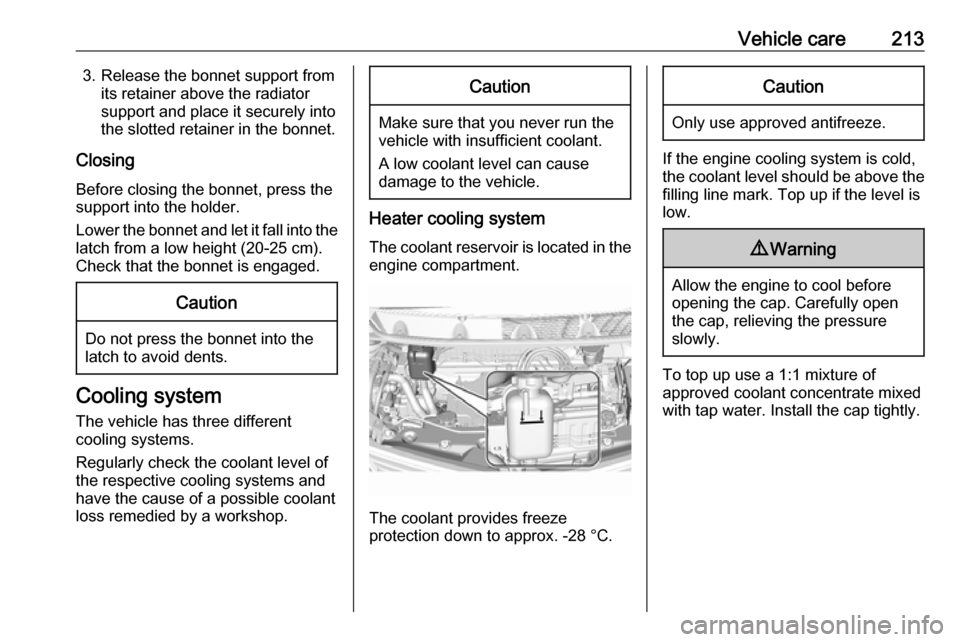
Heater cooling system
The coolant reservoir is located in the engine compartment.
The coolant provides freeze
protection down to approx. -28 °C.
Caution
Only use approved antifreeze.
If the engine cooling system is cold,
the coolant level should be above the
filling line mark. Top up if the level is
low.
9 Warning
Allow the engine to cool before
opening the cap. Carefully open
the cap, relieving the pressure
slowly.
To top up use a 1:1 mixture of
approved coolant concentrate mixed
with tap water. Install the cap tightly.
Page 224 of 267

222Vehicle careElectrical systemHigh voltage devices andwiring9 Warning
Exposure to high voltage may
cause shock, burns, and even
death. The high voltage
components in the vehicle should
only be serviced by specially
trained technicians.
High voltage components are
identified by labels. Do not
remove, open, take apart, or
modify these components. High
voltage cable or wiring has orange covering. Do not probe, tamper
with, cut, or modify high voltage
cable or wiring.
Electrical system overload
The vehicle has fuses and circuit
breakers to protect against an
electrical system overload.
If the current electrical load is too
heavy, the circuit breaker will open
and close, protecting the circuit until
the current load returns to normal or the problem is fixed. This greatly
reduces the chance of circuit
overload and fire caused by electrical
problems.
Fuses and circuit breakers protect the
following parts in the vehicle:
● Headlight wiring
● Windscreen wiper motor
● Power windows and other power accessories
Headlight wiring An electrical overload may cause the
lights to go on and off or in some
cases to remain off. In this case, have
the headlight wiring checked
immediately by a workshop.
Windscreen wipers
If the wiper motor overheats due to
blockage from heavy snow or ice, the windscreen wipers will stop until themotor has cooled down and the wiper
control has been turned off. Afterremoval of the blockage, the wiper
motor will restart when moving the
wiper control to the desired operating
position.
Although the circuit is protected from
electrical overload, mechanical
overload due to heavy snow or ice
may cause wiper linkage damage.
Always clear ice and heavy snow
from the windscreen before using the windscreen wipers. If the overload is
caused by an electrical problem and
not snow or ice, it must be serviced.
Fuses
Data on the replacement fuse must match the data on the defective fuse.
There are two fuse boxes in the
vehicle:
● at the front left side of the engine
compartment
● at the left side of the instrument panel
Before replacing a fuse, turn off the
respective switch and the vehicle.