seats OPEL AMPERA E 2018 Owner's Guide
[x] Cancel search | Manufacturer: OPEL, Model Year: 2018, Model line: AMPERA E, Model: OPEL AMPERA E 2018Pages: 267, PDF Size: 6.45 MB
Page 95 of 267

Instruments and controls93automatically the heated seats
when using remote start.
Passive door unlock : Changes
the configuration to unlock only
the driver's door or the whole
vehicle whilst unlocking.
Relock remotely unlocked doors :
Activates or deactivates the
passive locking function. This
feature locks the vehicle
automatically after several
seconds if all doors have been
closed and an electronic key has been removed from the vehicle.
Remote start auto heat seats :
Activates or deactivates automatically the heated seats
when using remote start.
Passive door unlock : Changes
the configuration to unlock only
the driver's door or the whole
vehicle whilst unlocking.
Passive door lock : Activates or
deactivates the passive locking
function. This feature locks the
vehicle automatically after
several seconds if all doors have
been closed and an electronickey has been removed from the
vehicle.
Remote left in vehicle alert :
Activates or deactivates the
warning chime when the
electronic key remains in the
vehicle.
Devices
External devices 3 125.
Device remote access
Smartphone remote function 3 26.
Apple CarPlay
Using smartphone applications
3 131.
Android Auto
Using smartphone applications
3 131.
KeyPass
Smartphone remote function 3 26.
USB Auto Launch
External devices 3 125.
Wi-Fi
System settings 3 116.Display Settings
System settings 3 116.
Rear camera
Symbols : Activates or deactivates the
symbols.
Guidelines : Activates or deactivates
the guiding lines.
Return to factory settings
Reset vehicle settings : Resets all
settings to the default settings.
Clear all private data : Deletes all
private information from the vehicle.
Restore radio settings : Resets all
radio settings to the default settings.
System settings 3 116.
Audible touch feedback
Usage 3 109.
Text scroll
System settings 3 116.
Software information
System settings 3 116.
Page 102 of 267
100Lighting50 km/h. High beam is switched off ata speed below 35 km/h, but high
beam assist remains active.
The green control indicator f
illuminates continuously when the
high beam assist is activated, the blue
one 7 illuminates when high beam is
on.
Control indicator f 3 81, 7 3 81.
Pushing indicator lever once switches
on manual high beam without high beam assist.
High beam assist switches
automatically to low beam when:
● Driving in urban areas.
● Reverse parking function is active.
● Rear fog light is switched on.
If there are no restrictions detected, the system switches back to high
beam.
Deactivation
If high beam assist is active and high
beam is on, press f once or pull
indicator lever once to deactivate high beam assist.If high beam assist is active and high
beam is off, press f once to
deactivate high beam assist.
Pushing the indicator lever to activate
manual high beam will also
deactivate high beam assist.
Headlight flash in conjunction with high beam assist
Headlight flash by pulling indicator
lever once will not deactivate high beam assist when high beam is off.
Headlight flash by pulling indicator
lever once deactivates high beam
assist when high beam is on.
Fault in headlight system
When the system detects a failure in
the headlight system, it selects a
preset position to avoid dazzling of
oncoming traffic. A warning is
displayed in the Driver Information
Centre.
Headlight flash
To activate the headlight flash, pull
lever.
Pulling lever deactivates high beam.Headlight range adjustment
Manual headlight range
adjustment
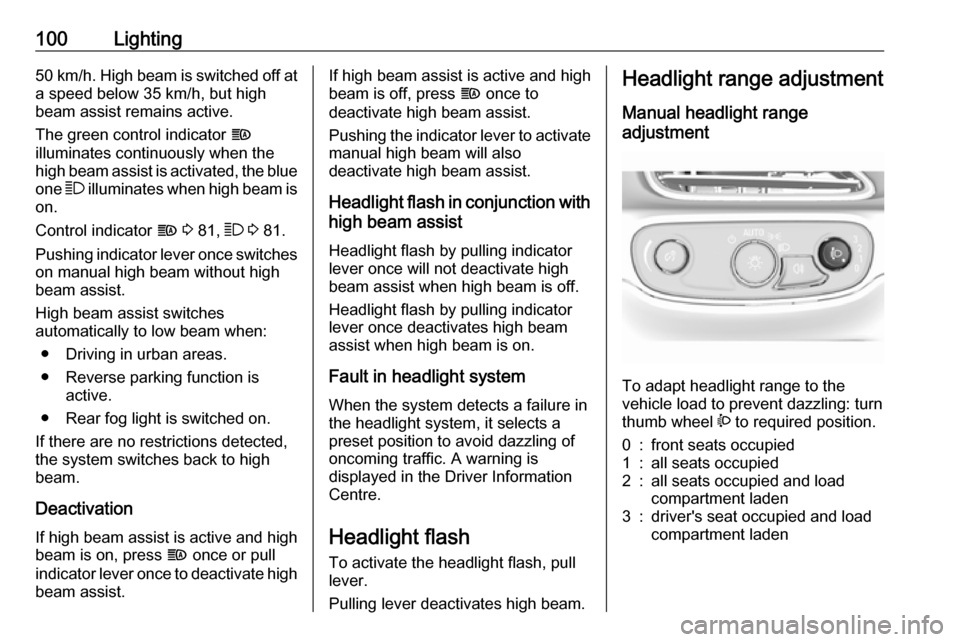
To adapt headlight range to the
vehicle load to prevent dazzling: turn
thumb wheel ? to required position.
0:front seats occupied1:all seats occupied2:all seats occupied and load
compartment laden3:driver's seat occupied and load
compartment laden
Page 144 of 267

142Climate control●manual air recirculation 4
● Heated seats +/q 3 41
Automatic mode AUTO
Basic setting for maximum comfort: ● Press AUTO, the air distribution
and fan speed are regulated
automatically. The LED in the
button illuminates to indicate
activation.
● Touch Heat & A/C to switch on
optimal heating, cooling and
demisting. The LED in the button illuminates to indicate activation.
● Set the preselected temperature by turning rotary knob TEMP.
Recommended temperature is
22 °C.
● Open all air vents to allow optimised air distribution in
automatic mode.
The fan speed regulation in automatic mode can be changed in the Info
display.
Vehicle personalisation 3 91.
Temperature preselection
Set temperature to the desired value.
The selected temperature is indicated in the display.
Note
The preselected temperature is only achieved if Heat & A/C is switched
on.
If the minimum temperature Lo is set,
the climate control system runs at maximum cooling, when Heat & A/C
is switched on.
If the maximum temperature Hi is set,
the climate control system runs at maximum heating when Heat & A/C is
switched on.
Page 155 of 267
Driving and operating153Electric vehicle
operation modes
Operation This vehicle is a purely electrically
driven vehicle. It always uses an
electric propulsion system to drive the
vehicle. Electricity is the vehicle's only source of energy.
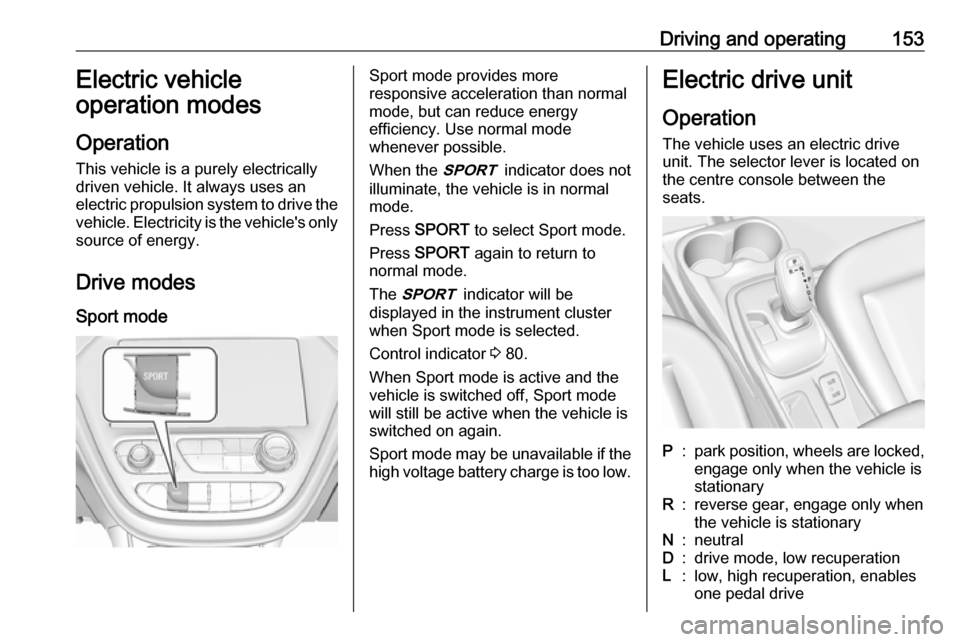
Drive modes Sport modeSport mode provides more
responsive acceleration than normal
mode, but can reduce energy
efficiency. Use normal mode
whenever possible.
When the 3 indicator does not
illuminate, the vehicle is in normal
mode.
Press SPORT to select Sport mode.
Press SPORT again to return to
normal mode.
The 3 indicator will be
displayed in the instrument cluster
when Sport mode is selected.
Control indicator 3 80.
When Sport mode is active and the
vehicle is switched off, Sport mode
will still be active when the vehicle is switched on again.
Sport mode may be unavailable if the high voltage battery charge is too low.Electric drive unit
Operation The vehicle uses an electric drive
unit. The selector lever is located on
the centre console between the
seats.P:park position, wheels are locked, engage only when the vehicle is
stationaryR:reverse gear, engage only when
the vehicle is stationaryN:neutralD:drive mode, low recuperationL:low, high recuperation, enables
one pedal drive
Page 252 of 267
![OPEL AMPERA E 2018 Owners Guide 250Technical dataVehicle dimensionsLength [mm]4164Width without exterior mirrors [mm]1765Width with two exterior mirrors [mm]2039Height (without antenna) [mm]1594Length of load compartment floor [mm]6](/img/37/18755/w960_18755-251.png "OPEL AMPERA E 2018 Owners Guide 250Technical dataVehicle dimensionsLength [mm]4164Width without exterior mirrors [mm]1765Width with two exterior mirrors [mm]2039Height (without antenna) [mm]1594Length of load compartment floor [mm]6")
250Technical dataVehicle dimensionsLength [mm]4164Width without exterior mirrors [mm]1765Width with two exterior mirrors [mm]2039Height (without antenna) [mm]1594Length of load compartment floor [mm]681Length of load compartment with folded rear seats [mm]1459Load compartment width [mm]1154Load compartment height [mm]921Wheelbase [mm]2600Turning circle diameter [m]10.8
Page 262 of 267

260Folding mirrors ............................. 32
Following distance indication ......168
Forward collision alert................. 166
Front airbag system .....................48
Front pedestrian protection ........171
Front seats.................................... 38
Front turn signal lights ...............219
Fuses ......................................... 222
G
Gauges ......................................... 74
General information ...125, 132,
133, 208
AUX ......................................... 125
Bluetooth ................................. 125
DAB ......................................... 123
Infotainment system ................105
Phone ...................................... 133
Smartphone applications ........125
USB ......................................... 125
Glovebox ..................................... 57
H Halogen bulbs ............................ 219
Hand brake ......................... 157, 158
Hazard warning flashers ............101
Headlight aiming .........................218
Headlight flash ........................... 100
Headlight range adjustment ......100
Headlights..................................... 98
Head restraint adjustment .............6Head restraints ............................ 37
Heated mirrors ............................. 33
Heated rear window ..................... 35
Heated steering wheel .................65
Heating .................................. 41, 42
High beam ............................. 81, 99
High beam assist ....................81, 99
High voltage devices and wiring 222
Home menu ................................ 112
Horn ....................................... 11, 66
I
Identification plate .....................247
Immobiliser ............................ 31, 80
Indicators ...................................... 74
Inductive charging ........................70
Info display ................................... 85
Information displays...................... 82
Infotainment control panel ..........107
Instrument cluster ........................72
Instrument panel fuse box .........227
Instrument panel illumination control .................................... 102
Instrument panel overview ............. 8
Intellitext ..................................... 123
Interior care ............................... 242
Interior lighting ............................ 102
Interior lights .............................. 103
Introduction ............................... 0iPod............................................ 125
Connecting device ..................125
J Jump starting ............................. 237
K Key, memorised settings ..............20
KeyPass ....................................... 26
Keys ............................................. 16
Keys, locks ................................... 16
L Lane change alert .......................182
Lane keep assist ..................80, 190
Lashing eyes ............................... 61
Lifting the vehicle ........................210
Light switch .................................. 98
Load compartment ................28, 59
Load compartment cover .............60
Loading information .....................62
Location based charging ............196
M Manual seat adjustment ...............39
Maximum speed ......................... 231
Maximum startup volume ...........115
Memorised settings ......................20
Menu operation .......................... 112
Mirror adjustment ........................... 6
Misted light covers .....................102
Page 263 of 267

261Mobile phones and CB radioequipment .............................. 140
Movie files................................... 125
Mute............................................ 109
N New vehicle running-in ..............148
Number plate light .....................221
O
Object detection systems ...........173
Odometer ..................................... 74
One-pedal driving .......................153
OnStar .......................................... 94
Operation ............................ 136, 153
External devices ......................125
Menu ....................................... 112
Phone ...................................... 136
Radio ....................................... 119
Outside temperature ....................68
P Pairing ........................................ 134
Panoramic view system ..............183
Parking ................................ 15, 151
Parking assist ............................ 173
Parking brake ............................ 158
Parking lights ............................. 102
Pedestrian detection .....................81
Pedestrian safety alert ............11, 66
Performance .............................. 249Performing work ........................211
Phone Bluetooth ................................. 133
Bluetooth connection ..............134
Call history .............................. 136
Emergency calls ......................136
Entering a number ..................136
Functions during a call ............136
General information ................133
Incoming call ........................... 136
Phone book ............................. 136
Phone main menu ...................136
Selecting the ring tone ............136
Speed dial number ..................136
Phone book ................................ 136
Phone projection ........................131
Picture files ................................. 125
Playing audio .............................. 127
Playing movies ........................... 130
Pollen filter ................................. 146
Post-crash label .......................... 151
Power button .............................. 148
Power indicator gauge ..................76
Power outlets ............................... 69
Power windows ............................ 34
Programmable charging .............196
Programmed charging override ..203
Propulsion system data ..............249R
Radio Activating................................. 119Configuring DAB .....................123
Configuring RDS .....................122
DAB announcements ..............123
Digital audio broadcasting
(DAB) ...................................... 123
Favourite lists .......................... 120
Intellitext .................................. 123
Radio data system (RDS) .......122
Regional .................................. 122
Regionalisation ....................... 122
Selecting the waveband ..........119
Station search ......................... 120
Station tuning .......................... 120
Usage ...................................... 119
Radio data system (RDS) ..........122
Radio Frequency Identification (RFID) ..................................... 257
Radio remote control ...................17
RDS ............................................ 122
REACH ....................................... 253
Reading lights ............................ 103
Rear cross traffic alert ................187
Rear floor storage cover ..............60
Rear fog light ....................... 81, 101
Rear seats .................................... 42
Rear view camera ...................... 185
Rear window wiper/washer .......... 67