Seat OPEL AMPERA E 2018 Service Manual
[x] Cancel search | Manufacturer: OPEL, Model Year: 2018, Model line: AMPERA E, Model: OPEL AMPERA E 2018Pages: 267, PDF Size: 6.45 MB
Page 155 of 267
Driving and operating153Electric vehicle
operation modes
Operation This vehicle is a purely electrically
driven vehicle. It always uses an
electric propulsion system to drive the
vehicle. Electricity is the vehicle's only source of energy.
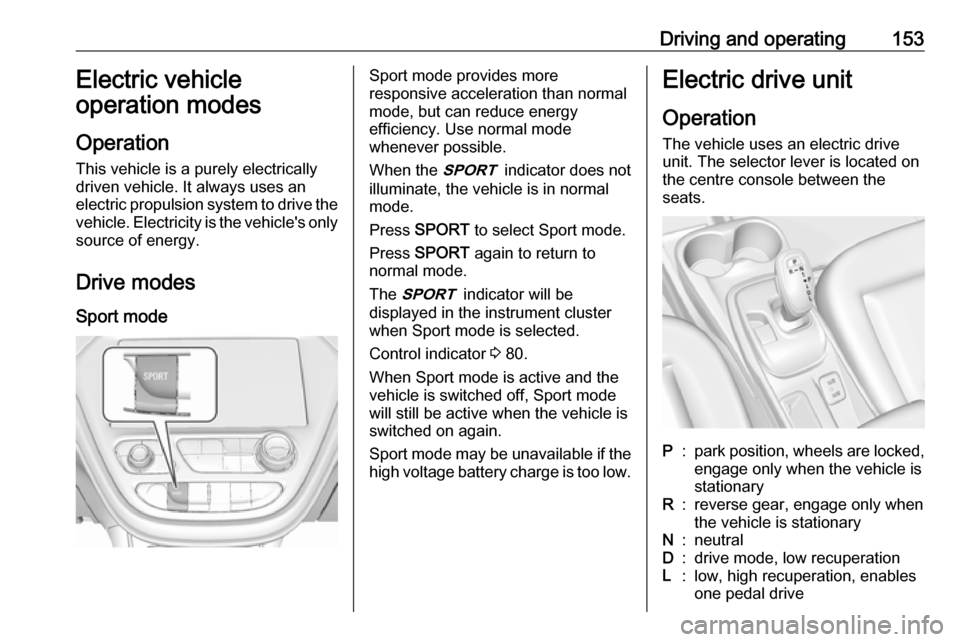
Drive modes Sport modeSport mode provides more
responsive acceleration than normal
mode, but can reduce energy
efficiency. Use normal mode
whenever possible.
When the 3 indicator does not
illuminate, the vehicle is in normal
mode.
Press SPORT to select Sport mode.
Press SPORT again to return to
normal mode.
The 3 indicator will be
displayed in the instrument cluster
when Sport mode is selected.
Control indicator 3 80.
When Sport mode is active and the
vehicle is switched off, Sport mode
will still be active when the vehicle is switched on again.
Sport mode may be unavailable if the high voltage battery charge is too low.Electric drive unit
Operation The vehicle uses an electric drive
unit. The selector lever is located on
the centre console between the
seats.P:park position, wheels are locked, engage only when the vehicle is
stationaryR:reverse gear, engage only when
the vehicle is stationaryN:neutralD:drive mode, low recuperationL:low, high recuperation, enables
one pedal drive
Page 158 of 267

156Driving and operatingOne-pedal drivingCaution
When the vehicle is operated in L
and the driver unfastens his seat
belt, the electric parking brake is
automatically applied and one
pedal driving is not possible.
With one-pedal driving, the
accelerator pedal can be used to
control the deceleration of the vehicle
down to a complete stop.
Quick releasing of the accelerator
pedal will result in aggressive
deceleration. Slow releasing of the
accelerator pedal will allow the
deceleration of the vehicle to be
adjusted as desired.
To use one-pedal driving, shift into L.
L is only selectable when the vehicle
is in D. Press the accelerator pedal to
achieve the desired speed. The
deceleration provided by one-pedal
driving provides full regenerative
braking and helps increase energy efficiency.
While driving on slopes, one-pedal
driving may not be able to bring the
vehicle to a complete stop or hold the
vehicle at a stop.
If the vehicle cannot stop on a slope
while using one-pedal driving, the
electric parking brake may be applied to hold the vehicle stationary.
To drive again, depress the
accelerator pedal, and the electric
parking brake will automatically
disengage.
One-pedal driving may become
disabled and the vehicle may
continue to creep forward, or if
stopped, may apply the electric
parking brake or shift to P.
This can be caused by the following: ● The driver's door is open.
● The driver's seat belt is unbuckled.
● The vehicle has remained stationary for five minutes.
● There is a problem with the propulsion system.Additional deceleration can be
achieved by using the regenerative braking paddle.
Regenerative braking 3 159.
Car wash mode (vehicle off) To place the vehicle in N with the
vehicle off:
1. Switch off the vehicle.
2. Place the vehicle in Service mode
3 148.
3. Open the door while depressing the brake, and then shift to N.
4. The indicator should now show N.
If it does not, repeat the
procedure.
5. When N is no longer needed, shift
into P and switch off the vehicle.
Page 197 of 267
Driving and operating195See "Temporary charge mode
override and cancel" in
Programmable charging 3 196.
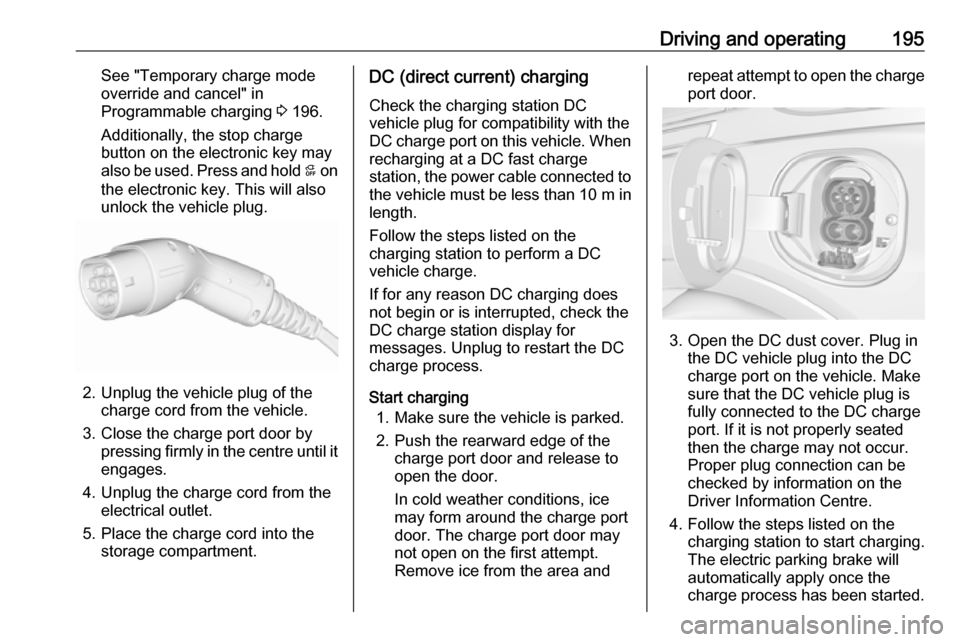
Additionally, the stop charge
button on the electronic key may
also be used. Press and hold 5 on
the electronic key. This will also
unlock the vehicle plug.
2. Unplug the vehicle plug of the charge cord from the vehicle.
3. Close the charge port door by pressing firmly in the centre until it
engages.
4. Unplug the charge cord from the electrical outlet.
5. Place the charge cord into the storage compartment.
DC (direct current) charging
Check the charging station DC
vehicle plug for compatibility with the
DC charge port on this vehicle. When
recharging at a DC fast charge
station, the power cable connected to the vehicle must be less than 10 m in
length.
Follow the steps listed on the
charging station to perform a DC
vehicle charge.
If for any reason DC charging does
not begin or is interrupted, check the
DC charge station display for
messages. Unplug to restart the DC
charge process.
Start charging 1. Make sure the vehicle is parked.
2. Push the rearward edge of the charge port door and release to
open the door.
In cold weather conditions, ice
may form around the charge port
door. The charge port door may
not open on the first attempt.
Remove ice from the area andrepeat attempt to open the charge
port door.
3. Open the DC dust cover. Plug in the DC vehicle plug into the DC
charge port on the vehicle. Make
sure that the DC vehicle plug is
fully connected to the DC charge
port. If it is not properly seated
then the charge may not occur.
Proper plug connection can be
checked by information on the
Driver Information Centre.
4. Follow the steps listed on the charging station to start charging.
The electric parking brake will
automatically apply once the
charge process has been started.
Page 208 of 267
206Driving and operatinginstallations in buildings,
depending on the region in which
the unit is being installed. The
installer shall comply with any
additional local requirements
mandated by the country and / or
municipality.
Do not use this product if the
flexible power cord or the electric
vehicle cable is frayed, has broken insulation, or shows any other
signs of damage.
Do not use this product if the
enclosure or the vehicle plug is
broken, cracked, open, or shows
any other indication of damage.
The plug must be plugged into an
appropriate electrical outlet that is
properly installed in accordance
with all local codes and
ordinances. Do not modify the
plug provided with the product. If
the plug does not fit the electrical
outlet, have a proper electrical
outlet installed by a qualified
electrician. If ground is missing,the charge cord indicators will
indicate an electrical system fault
and the vehicle may not charge.
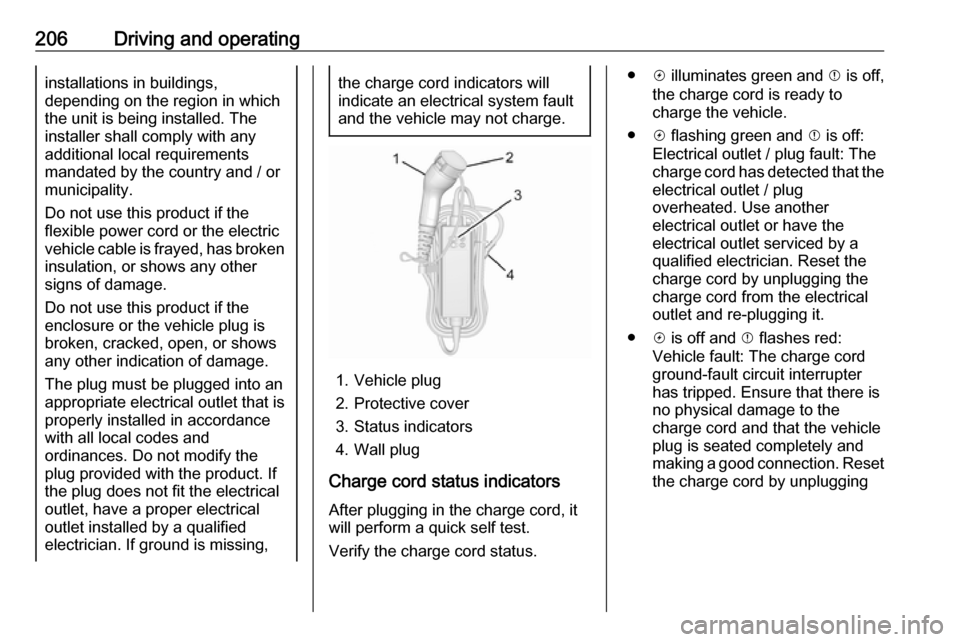
1. Vehicle plug
2. Protective cover
3. Status indicators
4. Wall plug
Charge cord status indicators After plugging in the charge cord, it
will perform a quick self test.
Verify the charge cord status.
● c illuminates green and d is off,
the charge cord is ready to
charge the vehicle.
● c flashing green and d is off:
Electrical outlet / plug fault: The
charge cord has detected that the electrical outlet / plug
overheated. Use another
electrical outlet or have the
electrical outlet serviced by a
qualified electrician. Reset the
charge cord by unplugging the
charge cord from the electrical
outlet and re-plugging it.
● c is off and d flashes red:
Vehicle fault: The charge cord
ground-fault circuit interrupter
has tripped. Ensure that there is no physical damage to the
charge cord and that the vehicle
plug is seated completely and making a good connection. Reset the charge cord by unplugging
Page 228 of 267

226Vehicle careNumberUsage1–2Power window rear3–4Rechargeable energy
storage system 15–6–7Left high beam headlight8Right high beam headlight9Left low beam headlight10Right low beam headlight11Horn12–13Front wiper motor driver14Tailgate15Front wiper motor co-driver16Electronic brake control
module supply electronicsNumberUsage17Rear wiper18Tailgate19Seat module front20Washer21HID light22Linear power module23Electronic brake control
module supply motor24Seat module rear25Powertrain26Transmission range control
module27Aero shutter28Auxiliary oil pump29E-booster motor source30Front power windows31In-panel bussed electrical
centreNumberUsage32Rear window defogger33Heated exterior rear view
mirror34Pedestrian friendly alert
function35–36–37Current sensor38Rain sensor39–40E-booster (ECU)41Power line communication
module42Infant occupant sensing43Window switch44Rechargeable energy
storage system45Vehicle integration control
module
Page 244 of 267

242Vehicle careRemove dirt residues from smearingwiper blades by using a soft cloth and window cleaner. Also make sure to
remove any residues such as wax,
insect residues and similar from the
window.
Ice residues, pollution and continuous wiping on dry windows will damage or
even destroy the wiper blades.
Wheels and tyres Do not use high-pressure jet
cleaners.
Clean rims with a pH-neutral wheel
cleaner.
Rims are painted and can be treated
with the same agents as the body.
Paintwork damage Rectify minor paintwork damage witha touch-up pen before rust forms.
Have more extensive damage or rust areas repaired by a workshop.Underbody
Some areas of the vehicle underbody
have a PVC undercoating while other critical areas have a durable
protective wax coating.
After the underbody is washed, check
the underbody and have it waxed if
necessary.
Bitumen / rubber materials could damage the PVC coating. Have
underbody work carried out by a
workshop.
Before and after winter, wash the
underbody and have the protective
wax coating checked.
Interior care
Interior and upholstery
Only clean the vehicle interior,
including the instrument panel fascia
and panelling, with a dry cloth or
interior cleaner.
Clean the leather upholstery with
clear water and a soft cloth. In case of heavy soiling, use leather care.The instrument cluster and the
displays should only be cleaned using
a soft damp cloth. If necessary use a
weak soap solution.
Do not spray cleaners directly on any switches or controls.
Clean fabric upholstery with a
vacuum cleaner and brush. Remove
stains with an upholstery cleaner.
Clothing fabrics may not be
colourfast. This could cause visible
discolourations, especially on light-
coloured upholstery. Removable
stains and discolourations should be
cleaned as soon as possible.
Clean seat belts with lukewarm water or interior cleaner.Caution
Close Velcro fasteners as open
Velcro fasteners on clothing could damage seat upholstery.
The same applies to clothing with
sharp-edged objects, like zips or
belts or studded jeans.
Page 252 of 267
![OPEL AMPERA E 2018 Service Manual 250Technical dataVehicle dimensionsLength [mm]4164Width without exterior mirrors [mm]1765Width with two exterior mirrors [mm]2039Height (without antenna) [mm]1594Length of load compartment floor [mm]6](/img/37/18755/w960_18755-251.png "OPEL AMPERA E 2018 Service Manual 250Technical dataVehicle dimensionsLength [mm]4164Width without exterior mirrors [mm]1765Width with two exterior mirrors [mm]2039Height (without antenna) [mm]1594Length of load compartment floor [mm]6")
250Technical dataVehicle dimensionsLength [mm]4164Width without exterior mirrors [mm]1765Width with two exterior mirrors [mm]2039Height (without antenna) [mm]1594Length of load compartment floor [mm]681Length of load compartment with folded rear seats [mm]1459Load compartment width [mm]1154Load compartment height [mm]921Wheelbase [mm]2600Turning circle diameter [m]10.8
Page 262 of 267

260Folding mirrors ............................. 32
Following distance indication ......168
Forward collision alert................. 166
Front airbag system .....................48
Front pedestrian protection ........171
Front seats.................................... 38
Front turn signal lights ...............219
Fuses ......................................... 222
G
Gauges ......................................... 74
General information ...125, 132,
133, 208
AUX ......................................... 125
Bluetooth ................................. 125
DAB ......................................... 123
Infotainment system ................105
Phone ...................................... 133
Smartphone applications ........125
USB ......................................... 125
Glovebox ..................................... 57
H Halogen bulbs ............................ 219
Hand brake ......................... 157, 158
Hazard warning flashers ............101
Headlight aiming .........................218
Headlight flash ........................... 100
Headlight range adjustment ......100
Headlights..................................... 98
Head restraint adjustment .............6Head restraints ............................ 37
Heated mirrors ............................. 33
Heated rear window ..................... 35
Heated steering wheel .................65
Heating .................................. 41, 42
High beam ............................. 81, 99
High beam assist ....................81, 99
High voltage devices and wiring 222
Home menu ................................ 112
Horn ....................................... 11, 66
I
Identification plate .....................247
Immobiliser ............................ 31, 80
Indicators ...................................... 74
Inductive charging ........................70
Info display ................................... 85
Information displays...................... 82
Infotainment control panel ..........107
Instrument cluster ........................72
Instrument panel fuse box .........227
Instrument panel illumination control .................................... 102
Instrument panel overview ............. 8
Intellitext ..................................... 123
Interior care ............................... 242
Interior lighting ............................ 102
Interior lights .............................. 103
Introduction ............................... 0iPod............................................ 125
Connecting device ..................125
J Jump starting ............................. 237
K Key, memorised settings ..............20
KeyPass ....................................... 26
Keys ............................................. 16
Keys, locks ................................... 16
L Lane change alert .......................182
Lane keep assist ..................80, 190
Lashing eyes ............................... 61
Lifting the vehicle ........................210
Light switch .................................. 98
Load compartment ................28, 59
Load compartment cover .............60
Loading information .....................62
Location based charging ............196
M Manual seat adjustment ...............39
Maximum speed ......................... 231
Maximum startup volume ...........115
Memorised settings ......................20
Menu operation .......................... 112
Mirror adjustment ........................... 6
Misted light covers .....................102
Page 263 of 267

261Mobile phones and CB radioequipment .............................. 140
Movie files................................... 125
Mute............................................ 109
N New vehicle running-in ..............148
Number plate light .....................221
O
Object detection systems ...........173
Odometer ..................................... 74
One-pedal driving .......................153
OnStar .......................................... 94
Operation ............................ 136, 153
External devices ......................125
Menu ....................................... 112
Phone ...................................... 136
Radio ....................................... 119
Outside temperature ....................68
P Pairing ........................................ 134
Panoramic view system ..............183
Parking ................................ 15, 151
Parking assist ............................ 173
Parking brake ............................ 158
Parking lights ............................. 102
Pedestrian detection .....................81
Pedestrian safety alert ............11, 66
Performance .............................. 249Performing work ........................211
Phone Bluetooth ................................. 133
Bluetooth connection ..............134
Call history .............................. 136
Emergency calls ......................136
Entering a number ..................136
Functions during a call ............136
General information ................133
Incoming call ........................... 136
Phone book ............................. 136
Phone main menu ...................136
Selecting the ring tone ............136
Speed dial number ..................136
Phone book ................................ 136
Phone projection ........................131
Picture files ................................. 125
Playing audio .............................. 127
Playing movies ........................... 130
Pollen filter ................................. 146
Post-crash label .......................... 151
Power button .............................. 148
Power indicator gauge ..................76
Power outlets ............................... 69
Power windows ............................ 34
Programmable charging .............196
Programmed charging override ..203
Propulsion system data ..............249R
Radio Activating................................. 119Configuring DAB .....................123
Configuring RDS .....................122
DAB announcements ..............123
Digital audio broadcasting
(DAB) ...................................... 123
Favourite lists .......................... 120
Intellitext .................................. 123
Radio data system (RDS) .......122
Regional .................................. 122
Regionalisation ....................... 122
Selecting the waveband ..........119
Station search ......................... 120
Station tuning .......................... 120
Usage ...................................... 119
Radio data system (RDS) ..........122
Radio Frequency Identification (RFID) ..................................... 257
Radio remote control ...................17
RDS ............................................ 122
REACH ....................................... 253
Reading lights ............................ 103
Rear cross traffic alert ................187
Rear floor storage cover ..............60
Rear fog light ....................... 81, 101
Rear seats .................................... 42
Rear view camera ...................... 185
Rear window wiper/washer .......... 67
Page 264 of 267

262Recommended fluids andlubricants ................................ 245
Regenerative braking ...........76, 159
Regional ..................................... 122
Regionalisation ........................... 122
Registered trademarks ...............256
Retained power off .....................150
Reversing lights .........................102
Ride control systems ..................161
Ring tone Changing the ring tone ............136
Ring tone volume ....................115
Roof load ...................................... 62
Roof rack ..................................... 62
S Safety belts ................................... 42
Seat adjustment ............................. 5 Seat belt ........................................ 6
Seat belt reminder .......................77
Seat belts ..................................... 42 Seat heating Seat heating, front .....................41
Seat heating, rear .....................42
Seat position ................................ 38
Self-sealing tyres ........................230
Service ............................... 146, 244
Service display ............................ 77
Service information ....................244
Service vehicle soon .................... 79Side airbag system ......................48
Side blind spot alert ....................181
Sidelights ...................................... 98
Side turn signal lights ................220
Smartphone ................................ 125
Phone projection .....................131
Smartphone remote function ........26
Software acknowledgement .......254
Software update ......................... 255
Speech recognition .....................132
Speed dial numbers ...................136
Speed limiter......................... 81, 164
Speedometer ............................... 74
Sport mode .................................. 80
Starting and operating ................148
Starting and stopping the vehicle 150
Starting off ................................... 14
Station search............................. 120
Steering wheel adjustment ......7, 65
Steering wheel audio controls ....107
Steering wheel controls ...............65
Storage ......................................... 57
Storage compartments .................57
Sunvisor lights ........................... 103
Sun visors .................................... 35
Switching the Infotainment system on ................................ 109
Symbols ......................................... 3
System settings .......................... 116T
Tail lights ................................... 220
Temporary charge mode cancel. 196
Temporary charge mode override ................................... 196
Theft-deterrent feature ..............106
Three-point seat belt .................... 43
Tone settings .............................. 114
Tools .......................................... 230
Total vehicle range .......................77
Touch beep volume ....................115
Towing ................................ 208, 239
Towing another vehicle .............240
Towing the vehicle .....................239
TP volume .................................. 115
Traction Control system ............. 161
Traction Control system off........... 80
Traffic sign assistant .............81, 188
Tread depth ............................... 235
Turn and lane-change signals ...101
Turn signal ................................... 77
Tyre chains ................................ 236
Tyre designations ......................231
Tyre pressure ............................ 231
Tyre pressure monitoring system ............................... 80, 233
Tyre pressures ........................... 251
Tyres .......................................... 230