charging OPEL AMPERA E 2019 Manual user
[x] Cancel search | Manufacturer: OPEL, Model Year: 2019, Model line: AMPERA E, Model: OPEL AMPERA E 2019Pages: 271, PDF Size: 6.7 MB
Page 89 of 271
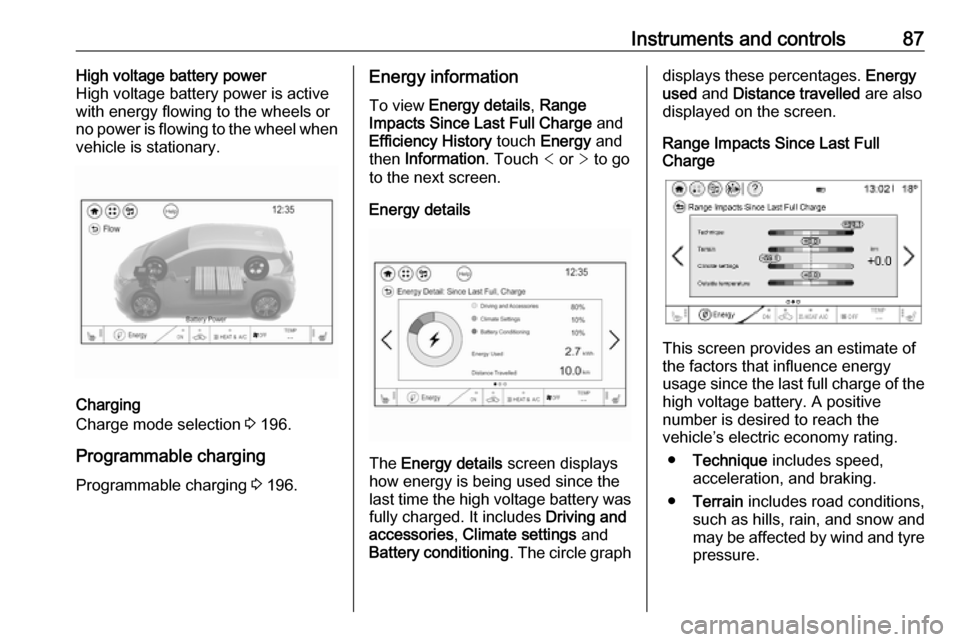
Instruments and controls87High voltage battery power
High voltage battery power is active
with energy flowing to the wheels or
no power is flowing to the wheel when
vehicle is stationary.
Charging
Charge mode selection 3 196.
Programmable charging
Programmable charging 3 196.
Energy information
To view Energy details , Range
Impacts Since Last Full Charge and
Efficiency History touch Energy and
then Information . Touch < or > to go
to the next screen.
Energy details
The Energy details screen displays
how energy is being used since the
last time the high voltage battery was
fully charged. It includes Driving and
accessories , Climate settings and
Battery conditioning . The circle graph
displays these percentages. Energy
used and Distance travelled are also
displayed on the screen.
Range Impacts Since Last Full
Charge
This screen provides an estimate of
the factors that influence energy
usage since the last full charge of the
high voltage battery. A positive
number is desired to reach the
vehicle’s electric economy rating.
● Technique includes speed,
acceleration, and braking.
● Terrain includes road conditions,
such as hills, rain, and snow and
may be affected by wind and tyre pressure.
Page 90 of 271
88Instruments and controls●Climate settings includes how the
heating and air conditioning are
used. Using fan only settings will
help reduce your climate setting
losses.
● Outside temperature includes the
effect that hot or cold air has on
vehicle aerodynamics.
The individual vehicle range impacts
provide an understanding of how electric economy are different from
day-to-day, even when travelling the
same route.
All values are reset after a complete
charge and may not be stable until
approximately 16 km have been
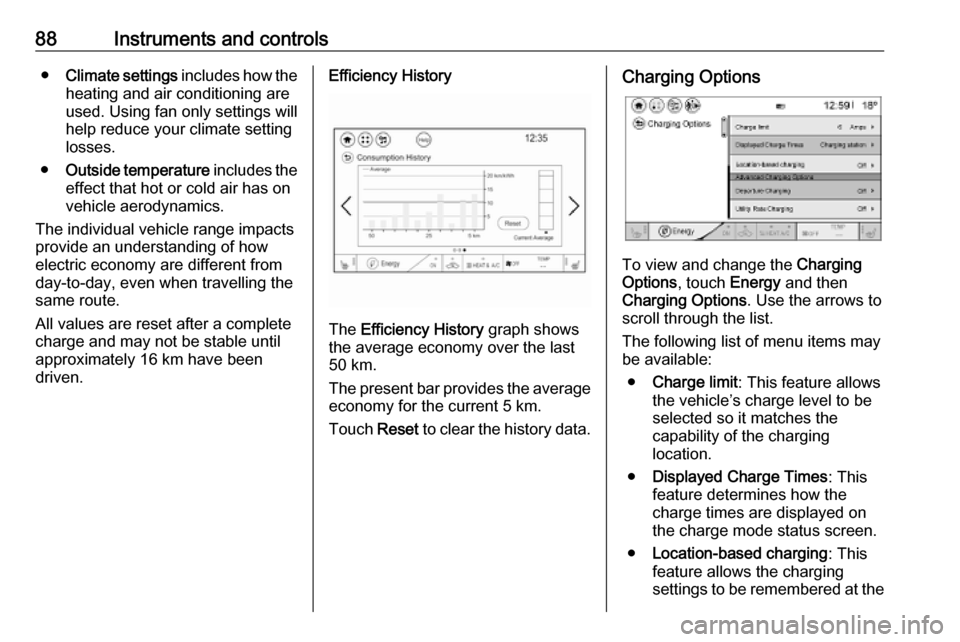
driven.Efficiency History
The Efficiency History graph shows
the average economy over the last
50 km.
The present bar provides the average economy for the current 5 km.
Touch Reset to clear the history data.
Charging Options
To view and change the Charging
Options , touch Energy and then
Charging Options . Use the arrows to
scroll through the list.
The following list of menu items may
be available:
● Charge limit : This feature allows
the vehicle’s charge level to be selected so it matches the
capability of the charging
location.
● Displayed Charge Times : This
feature determines how the
charge times are displayed on
the charge mode status screen.
● Location-based charging : This
feature allows the charging
settings to be remembered at the
Page 91 of 271

Instruments and controls89saved GPS coordinates for the
Home location.
Location based charging in
Programmable charging 3 196.
● Departure Charging : This feature
allows charging during the least
expensive rate periods to
achieve a full battery charge by
the departure time.
● Utility Rate Charging : The vehicle
estimates the charging start time
based on the utility rate schedule,
utility rate preference, and
programmed departure time for
the current day of the week.
● Energy summary pop-up : Set the
energy summary pop-up feature to On or Off.
● Charge status feedback : Set the
charge status feedback feature to Horn chirps or Off.
● Charge power loss alert : This
feature allows an alert to sound
when the vehicle is charging andloses power at the electrical
outlet. Set the charge power loss alert feature to On or Off.
● Radio power down : This allows
high voltage battery power to be
conserved. Set the value for the
reminder to be displayed. To set
high voltage battery charge level
for Radio power down , touch
Energy , then Charging Options ,
then Radio power down . Select
Off , 2% , 4% , 6% , 8% , 10% .Low power mode
This allows high voltage battery power to be conserved.
1. Press and hold m of the
Infotainment system.
2. Touch Yes on the Info Display.
The screen will turn off.
3. Press m again to turn the display
on.Vehicle messages
Messages are indicated in the Driver
Information Centre, in some cases
together with a warning chime.
Press 9 on the steering wheel to
confirm a message.
Vehicle and service messages
The vehicle messages are displayed
as text. Follow the instructions given
in the messages.
Some important messages may
appear additionally in the Info
Display. Some messages only pop-
up for a few seconds.
Page 92 of 271

90Instruments and controlsWarning chimesIf several warnings appear at the
same time, only one warning chime
will sound.
When starting the propulsion
system or whilst driving
The warning chime regarding not
fastened seat belts has priority over any other warning chime.
● If seat belt is not fastened.
● If a door or the tailgate is not fully
closed when starting off.
● If a certain speed is exceeded with parking brake applied.
● If approaching a vehicle ahead too rapidly.
● If a programmed speed or speed
limit is exceeded.
● If a warning message appears in the Driver Information Centre.
● If the electronic key is not in the passenger compartment.
● If the parking assist detects an object.● If an unintended lane changeoccurs.
● If safety function of the power tailgate detects obstacles in the
moving area.
When the vehicle is parked and / or the driver's door is opened
● With exterior lights on.
Battery voltage When the voltage of the 12 V vehicle
battery is running low, a warning
message will appear in the Driver
Information Centre.
1. Switch off any electrical consumers which are not requiredfor a safe drive, e.g. seat heating, heated rear window or other main
consumers.
2. Charge the 12 V vehicle battery by
driving continuously for a while or
by using a charging device.
If the 12 V vehicle battery cannot be
recharged, have the cause of the fault
remedied by a workshop.Vehicle personalisation
The vehicle's behaviour can be
personalised by changing the settings in the Info Display.
Depending on vehicle equipment and
country-specific regulations some of
the functions described below may
not be available.
Some functions are only displayed or
active when the vehicle is on.
Personal settings
Touch p and then touch 1.
Page 136 of 271
134Infotainment systemPairing a deviceImportant information ● Up to ten devices can be paired to the system.
● Only one paired device can be connected to the Infotainment
system at a time.
● Pairing only needs to be carried out once, unless the device is
deleted from the list of paired
devices. If the device has been
connected previously, the
Infotainment system establishes
the connection automatically.
● Bluetooth operation considerably
drains the device's battery.
Therefore, connect the device to
the USB port for charging.
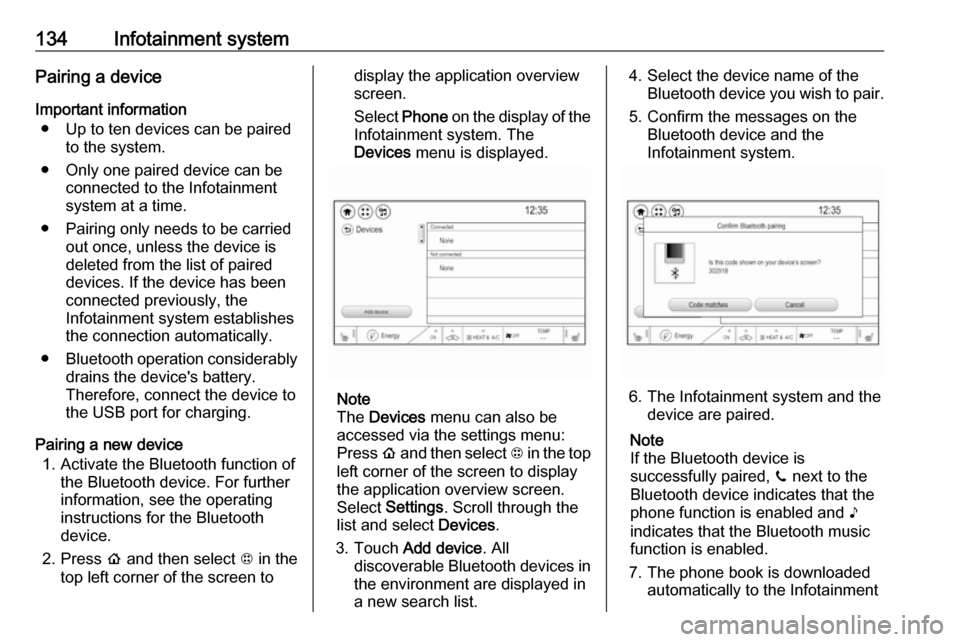
Pairing a new device 1. Activate the Bluetooth function of the Bluetooth device. For further
information, see the operating
instructions for the Bluetooth
device.
2. Press p and then select 1 in the
top left corner of the screen todisplay the application overview
screen.
Select Phone on the display of the
Infotainment system. The
Devices menu is displayed.
Note
The Devices menu can also be
accessed via the settings menu: Press p and then select 1 in the top
left corner of the screen to display
the application overview screen.
Select Settings . Scroll through the
list and select Devices.
3. Touch Add device . All
discoverable Bluetooth devices in
the environment are displayed in
a new search list.
4. Select the device name of the Bluetooth device you wish to pair.
5. Confirm the messages on the Bluetooth device and the
Infotainment system.
6. The Infotainment system and the device are paired.
Note
If the Bluetooth device is
successfully paired, ? next to the
Bluetooth device indicates that the phone function is enabled and >
indicates that the Bluetooth music
function is enabled.
7. The phone book is downloaded automatically to the Infotainment
Page 149 of 271

Driving and operating147Driving and
operatingDriving hints ............................... 147
Driving economically ...............147
Control of the vehicle ...............148
Emergencies ........................... 148
Starting and operating ...............148
New vehicle running-in ............148
Power button ........................... 148
Retained power off ..................150
Starting and stopping the vehicle .................................... 150
Parking .................................... 151
Electric vehicle operation
modes ........................................ 153
Operation ................................. 153
Drive modes ............................ 153
Electric drive unit .......................153
Operation ................................. 153
Brakes ........................................ 157
Antilock brake system .............157
Parking brake .......................... 158
Regenerative braking ..............160Ride control systems .................161
Traction Control system ..........161
Electronic Stability Control ......162
Driver assistance systems .........163
Cruise control .......................... 163
Speed limiter ........................... 164
Forward collision alert .............166
Following distance indication ...168
Active emergency braking .......168
Front pedestrian protection .....171
Parking assist .......................... 173
Side blind zone assistant .........180
Lane change alert ....................181
Panoramic view system ...........183
Rear view camera ...................184
Rear cross traffic alert .............186
Traffic sign assistant ................187
Lane keep assist .....................190
Charging .................................... 192
Programmable charging ..........196
Programmed charging override .................................. 203
Charging status .......................203
Charge cord ............................. 205
Electrical requirements ............208Driving hints
Driving economically
The following advice is intended to
help maximise energy efficiency and
range.
In colder temperatures, while these
efficiency tips will help, the electric
vehicle's driving range may be lower
due to higher energy usage.
The weight of additional cargo in the
vehicle affects efficiency and range.
Avoid carrying more than is needed.
Avoid unnecessary use of electrical
accessories. Power used for
functions other than propelling the
vehicle will reduce electric vehicle
range.
Always keep the tyres properly
inflated and the vehicle properly
aligned.
Driving style
Avoid unnecessary rapid
accelerations and decelerations.
Use cruise control when appropriate.
Page 194 of 271

192Driving and operatingSwitch off the system if the system is
disturbed by tar marks, shadows,
road cracks, temporary or
construction lane markings, or other
road imperfections.9 Warning
Always keep your attention on the
road and maintain proper vehicle
position within the lane, otherwise
vehicle damage, injury or death
could occur.
The system does not detect
pedestrians, cyclists or animals on
the road. Steer the vehicle
manually to avoid injuries and
deaths.
Lane keep assist does not
continuously steer the vehicle.
The system may not keep the
vehicle in the lane or give an alert, even if a lane marking is detected.
The steering of the lane keep
assist may not be sufficient to
avoid a lane departure.
The system may not detect hands-
off driving due to external
influences (road condition and
surface, weather etc). The driver
has full responsibility to control the vehicle and is always required tokeep the hands on the steeringwheel while driving.
Using the system while driving on
slippery roads could cause loss of control of the vehicle and a crash.
Switch off the system.Charging
This section explains the process of
charging the vehicle's high voltage
battery. Do not allow the vehicle to
remain in places with extremes of
temperature for long periods without
being driven or plugged in.
It is recommended to keep the vehicle
plugged in, even if fully charged, to
keep the high voltage battery
temperature ready for the next drive.
The vehicle must be plugged in when
the temperatures are below -25 °C, to operate properly and to maximise
high voltage battery life.
However, we recommend plugging in
the vehicle when temperatures drop
below 0 °C or raise above 32 °C.
When using the portable charge cord, it will take approximately 33 hours to
charge the vehicle with the 10 A
setting.
When using a 230 V charging station, it will take approximately 10 hours to
charge the vehicle with the 32 A
setting.
Page 195 of 271

Driving and operating193Charge times will vary based on high
voltage battery condition and outside
temperature. There are three ways to
programme how the vehicle is
charged.
Programmable charging 3 196.
The charging system may run fans
and pumps resulting in noises coming from the vehicle while it is turned off.
Additional clicking sounds may be
caused by the electrical devices used
while charging.
While the charge cord is plugged into
the vehicle, the vehicle cannot be
driven.
When to charge When the high voltage battery is
getting low, charging messages may
be displayed.
The Charge vehicle soon message
indicates that the driving range is low
and the vehicle needs to be charged
soon. As the charge level drops, the
Propulsion power is reduced
message is displayed and the
accelerator pedal response is
reduced. In addition, the remainingrange value will change to Low
indicating the vehicle should be
charged immediately.
When the energy is fully depleted, the
Out of power. Charge vehicle now
message is displayed and the vehicle slows to a stop. Brake and steering
assist will still operate. Once the
vehicle has stopped, switch off the
vehicle.
AC (alternating current) charging
Start charging
A portable charge cord used to
charge the vehicle high voltage
battery is stored under the rear floor
storage cover in the load
compartment.
1. Shift into P (Park) and switch off
the vehicle.
2. Push the rearward edge of the charge port door in and release toopen the door.
In cold weather conditions, ice
may form around the charge port
door. Remove ice from the area
before attempting to open or close
the charge port door.
Page 196 of 271
194Driving and operating
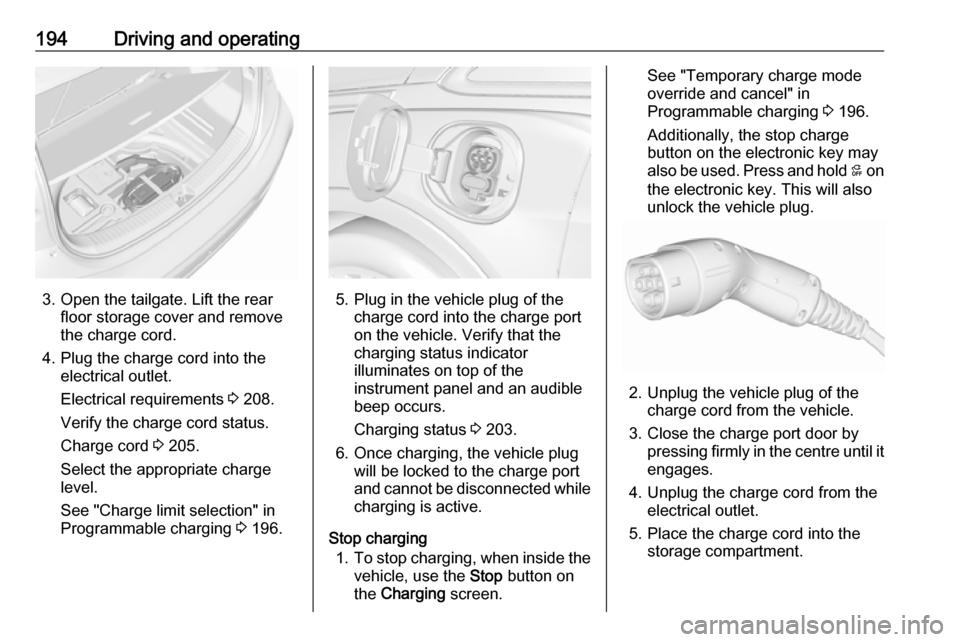
3. Open the tailgate. Lift the rearfloor storage cover and remove
the charge cord.
4. Plug the charge cord into the electrical outlet.
Electrical requirements 3 208.
Verify the charge cord status.
Charge cord 3 205.
Select the appropriate charge
level.
See "Charge limit selection" in
Programmable charging 3 196.5. Plug in the vehicle plug of the
charge cord into the charge port
on the vehicle. Verify that the
charging status indicator
illuminates on top of the
instrument panel and an audible
beep occurs.
Charging status 3 203.
6. Once charging, the vehicle plug will be locked to the charge port
and cannot be disconnected while
charging is active.
Stop charging 1. To stop charging, when inside the
vehicle, use the Stop button on
the Charging screen.
See "Temporary charge mode
override and cancel" in
Programmable charging 3 196.
Additionally, the stop charge button on the electronic key may
also be used. Press and hold 5 on
the electronic key. This will also
unlock the vehicle plug.
2. Unplug the vehicle plug of the charge cord from the vehicle.
3. Close the charge port door by pressing firmly in the centre until it
engages.
4. Unplug the charge cord from the electrical outlet.
5. Place the charge cord into the storage compartment.
Page 197 of 271
Driving and operating195DC (direct current) chargingCheck the charging station DC
vehicle plug for compatibility with the
DC charge port on this vehicle. When
recharging at a DC fast charge
station, the power cable connected to the vehicle must be less than 10 m in
length.
Follow the steps listed on the
charging station to perform a DC
vehicle charge.
If for any reason DC charging does
not begin or is interrupted, check the
DC charge station display for
messages. Unplug to restart the DC
charge process.
Start charging 1. Make sure the vehicle is parked.
2. Push the rearward edge of the charge port door and release to
open the door.
In cold weather conditions, ice
may form around the charge port
door. The charge port door may
not open on the first attempt.
Remove ice from the area andrepeat attempt to open the charge
port door.
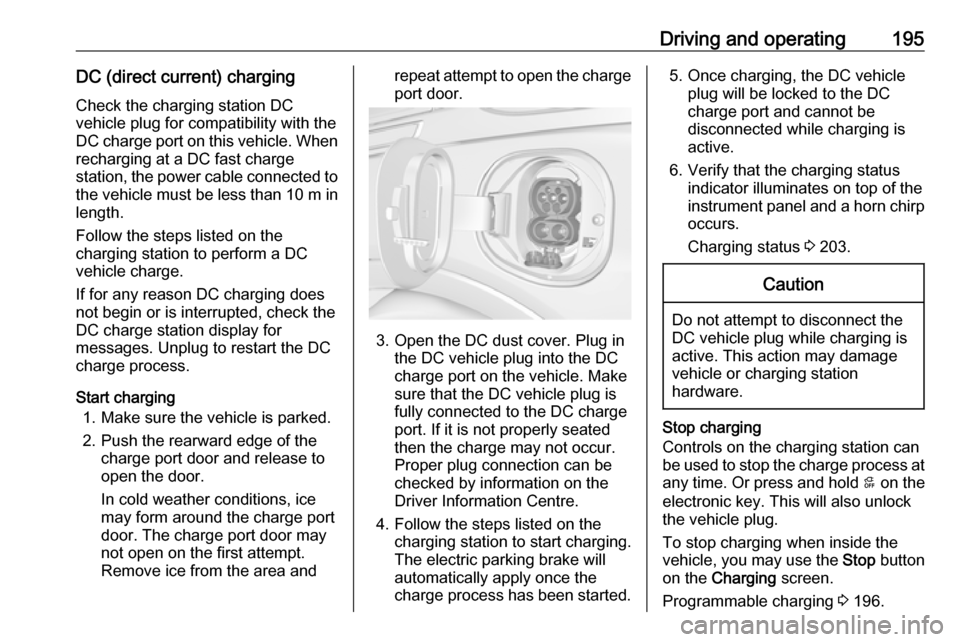
3. Open the DC dust cover. Plug in the DC vehicle plug into the DC
charge port on the vehicle. Make
sure that the DC vehicle plug is
fully connected to the DC charge
port. If it is not properly seated
then the charge may not occur.
Proper plug connection can be
checked by information on the
Driver Information Centre.
4. Follow the steps listed on the charging station to start charging.
The electric parking brake will
automatically apply once the
charge process has been started.
5. Once charging, the DC vehicle plug will be locked to the DC
charge port and cannot be
disconnected while charging is
active.
6. Verify that the charging status indicator illuminates on top of the
instrument panel and a horn chirp occurs.
Charging status 3 203.Caution
Do not attempt to disconnect the
DC vehicle plug while charging is
active. This action may damage vehicle or charging station
hardware.
Stop charging
Controls on the charging station can
be used to stop the charge process at any time. Or press and hold 5 on the
electronic key. This will also unlock
the vehicle plug.
To stop charging when inside the
vehicle, you may use the Stop button
on the Charging screen.
Programmable charging 3 196.