park assist OPEL AMPERA E 2019 Manual user
[x] Cancel search | Manufacturer: OPEL, Model Year: 2019, Model line: AMPERA E, Model: OPEL AMPERA E 2019Pages: 271, PDF Size: 6.7 MB
Page 181 of 271

Driving and operating179● The demand to stop or to driveslowly.
● For some of the instructions a progress bar is shown in the
Driver Information Centre.
● The successful completion of the
parking manoeuvre indicated by
a pop-up symbol and a chime.
● The cancelling of a parking manoeuvre.
Display priorities
Advanced parking assist indication in the Info Display can be inhibited by
vehicle messages with a higher
priority. After approving the message,
advanced parking assist instructions
appear again and the parking
manoeuvre can be continued.
Deactivation
The system is deactivated by:
● a short press of (
● parking manoeuvre successfully ended● driving faster than 30 km/h during
parking slot search without
braking despite message in the
Info Display
● driving faster than 8 km/h during parking guidance
● driver interference on steering wheel detected
● exceeding number of maximum gear changes: eight cycles when
parallel parking or five cycles
when perpendicular parking
● switching off the vehicle
Deactivation by the driver or by the system during manoeuvring will beindicated by a message on the
display. Additionally, an acoustic
signal sounds.
Fault
A message appears when:
● There is a fault in the system.
● The driver did not successfully complete the parking
manoeuvre.
● The system is not operational.
● Any of the deactivation reasons described above apply.If an object is detected during parkinginstructions, Stop is indicated on the
display. Removing the object will resume the parking manoeuvre. If the
object is not removed, the system will
be deactivated. A long press of ( will
activate the system and search for a
new parking slot.
Basic notes on parking assist
systems9 Warning
Under certain circumstances,
various reflective surfaces on
objects or clothing as well as
external noise sources may cause the system to fail to detect
obstacles.
Special attention must be paid to
low obstacles which can damage
the lower part of the bumper.
Page 182 of 271

180Driving and operatingCaution
Performance of the system can bereduced when sensors are
covered, e.g. by ice or snow.
Performance of the parking assist
system can be reduced due to
heavy loading.
Special conditions apply if there
are taller vehicles in the vicinity
(e.g. off-road vehicles, mini vans,
vans). Object identification and correct distance indication in the
upper part of these vehicles
cannot be guaranteed.
Objects with a very small reflection
cross-section, e.g. objects of
narrow size or soft materials, may
not be detected by the system.
Parking assist systems do not
detect objects outside the
detection range.
Note
It is possible that the sensor detects a non-existing object caused by
echo disturbance from external
acoustic noise or mechanical
misalignments (sporadic false
warnings may occur).
Make sure that the front number
plate is properly mounted, vertically
and horizontally centred and the
sensors are firmly in place. The
performance of the parking assist
could be reduced if the number plate is bent or a number plate holder is
used.
Advanced parking assist system
may not respond to changes in the
available parking space after
initiating a parking manoeuvre. The
system may recognize an entry, a
gateway, a courtyard or even a
crossing as a parking slot. After
selecting reverse gear the system
will start a parking manoeuvre. Take care regarding the availability of the
suggested parking slot.
Low curbs and surface irregularities,
e.g. on construction zones, are not
detected by the system. The driver
accepts responsibility.Note
Each new vehicle requires a
calibration. For optimal parking
guidance, a driving distance of at
least 10 km, including a number of
bends, is required.
Side blind zone assistant
The side blind zone assistant detects and reports objects on either side of
the vehicle, within a specified "blind
zone". The system displays a visual
alert in each exterior mirror, when
detecting objects that may not be
visible in the interior and exterior
mirrors.
The radar distance sensors are
located in the rear bumper.9 Warning
Side blind zone assistant does not
replace driver vision.
The system does not detect:
● vehicles outside the side blind zones which may be rapidly
approaching
● pedestrians, cyclists or animals
Page 183 of 271
Driving and operating181Before changing a lane, always
check all mirrors, look over the
shoulder and use the turn lights.
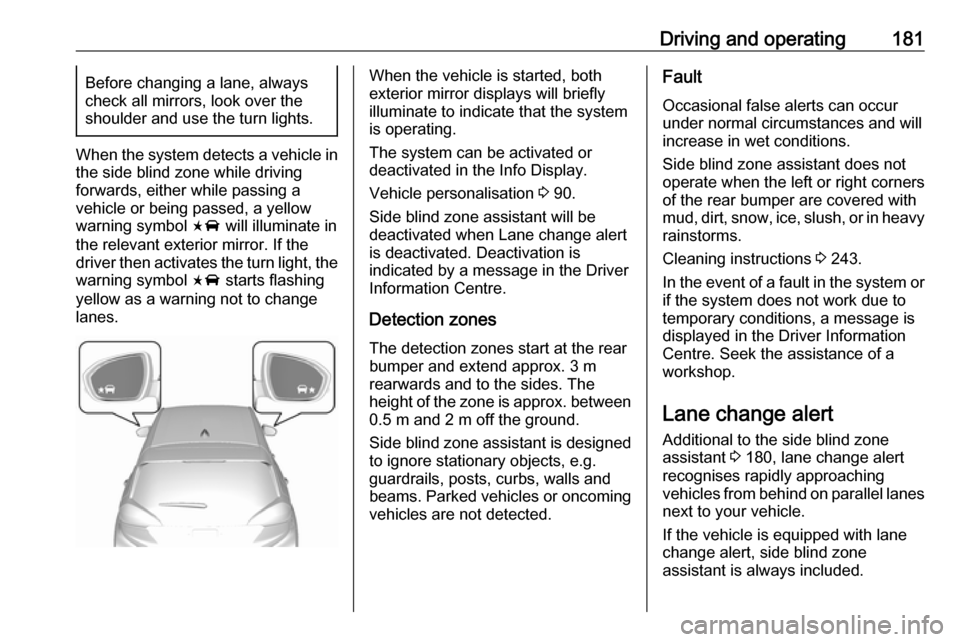
When the system detects a vehicle in
the side blind zone while driving
forwards, either while passing a
vehicle or being passed, a yellow
warning symbol F will illuminate in
the relevant exterior mirror. If the
driver then activates the turn light, the warning symbol F starts flashing
yellow as a warning not to change
lanes.
When the vehicle is started, both
exterior mirror displays will briefly illuminate to indicate that the system
is operating.
The system can be activated or
deactivated in the Info Display.
Vehicle personalisation 3 90.
Side blind zone assistant will be
deactivated when Lane change alert
is deactivated. Deactivation is
indicated by a message in the Driver Information Centre.
Detection zones
The detection zones start at the rear bumper and extend approx. 3 m
rearwards and to the sides. The
height of the zone is approx. between 0.5 m and 2 m off the ground.
Side blind zone assistant is designed
to ignore stationary objects, e.g.
guardrails, posts, curbs, walls and
beams. Parked vehicles or oncoming
vehicles are not detected.Fault
Occasional false alerts can occur
under normal circumstances and will
increase in wet conditions.
Side blind zone assistant does not
operate when the left or right corners
of the rear bumper are covered with
mud, dirt, snow, ice, slush, or in heavy rainstorms.
Cleaning instructions 3 243.
In the event of a fault in the system or
if the system does not work due to
temporary conditions, a message is
displayed in the Driver Information
Centre. Seek the assistance of a
workshop.
Lane change alert
Additional to the side blind zone
assistant 3 180, lane change alert
recognises rapidly approaching
vehicles from behind on parallel lanes
next to your vehicle.
If the vehicle is equipped with lane change alert, side blind zone
assistant is always included.
Page 185 of 271

Driving and operating183Vehicle personalisation 3 90.
Info Display 3 85.
Deactivation is indicated by a
message in the Driver Information
Centre.
Note
Each new vehicle requires a
calibration. For optimal
performance, drive as soon as
possible on a straight highway road
with roadside objects, e.g. guardrails
and barriers for some distance.
System limitations
Occasional false alerts can occurunder normal circumstances or in
sharp curves. The system can
temporarily alert of objects in the blind zone at specific weather conditions
(rain, hail etc). Driving on a wet road
or in the transitions from a dry area to
a wet area can cause the system to light up, as water splash can be
interpreted as an object. Otherwise
F may illuminate due to guardrails,
signs, trees, shrubs or other immobile
objects. This is normal operation and
the system does not need a service.The system may not operate properly
when:
● ice, snow, mud, or anything else covers the sensors
● driving in heavy rainstorms
● the vehicle had an accident
● there are extreme temperature changes
In the event of a fault in the system or if the system does not work due to
temporary conditions, a message is
displayed in the Driver Information Centre. Seek the assistance of a
workshop.
Panoramic view system The panoramic view system vision
displays an image of the area
surrounding the vehicle, along with
the front or rear camera views in the
centre console.The system uses four cameras:
● rear camera, installed above the license plate
● front camera, installed in the grille or near the front emblem
● side cameras, located at the bottom of both exterior mirrors9Warning
The surround vision cameras have
blind spots and will not display all
objects near the corners of the
vehicle. Folding side mirrors that
are out of position will not display
the surrounding view correctly.
Always check around the vehicle
when parking or reversing.
Page 186 of 271

184Driving and operating
1. Area displayed by the panoramicview system
2. Area not shown
Front vision camera
A view of the area in front of the
vehicle may be displayed in the Info
Display. The front view is shown after
shifting from R to D and when the
vehicle is moving forward slower than
8 km/h.
9 Warning
The camera(s) do not display
children, pedestrians, bicyclists,
crossing traffic, animals, or any
other object outside of the
cameras’ field of view, below the bumper, or under the vehicle.
Shown distances may be different from actual distances. Do not driveor park the vehicle using only
these camera(s). Always check
behind and around the vehicle
before driving. Failure to use
proper care may result in injury, death, or vehicle damage.
The system also works when the
surrounding is dark, but performance
may be restricted.
Rear view camera
The rear view camera assists the
driver when reversing by displaying a view of the area behind the vehicle.
The view of the camera is displayed
in the Info Display.
9 Warning
The rear view camera does not
replace driver vision. Note that
objects that are outside the
camera's field of view and the
Page 187 of 271

Driving and operating185parking assist sensors, e.g. below
the bumper or underneath the
vehicle, are not displayed.
Do not reverse or park the vehicle using only the rear view camera.
Always check the surrounding of
the vehicle before driving.
Activation
Rear view camera is automatically
activated when reverse gear is
engaged.
Functionality
The camera is mounted between the
number plate lights and has a viewing angle of 130°.
The area displayed by the camera is
limited. The distance of the image that
appears on the display differs from
the actual distance.
Guiding lines
Dynamic guiding lines are horizontal
lines at 1 m intervals projected onto
the picture to define the distance to
displayed objects.
Trajectory lane of the vehicle is
shown in accordance with the
steering angle.
Warning symbols
Warning symbols are indicated as
triangles 9 on the picture, which
show obstacles detected by the rear
sensors of the advanced parking
assist.
Additionally, 9 appears on the top
line of the Info Display with the
warning to check the vehicle
surroundings.
Page 195 of 271

Driving and operating193Charge times will vary based on high
voltage battery condition and outside
temperature. There are three ways to
programme how the vehicle is
charged.
Programmable charging 3 196.
The charging system may run fans
and pumps resulting in noises coming from the vehicle while it is turned off.
Additional clicking sounds may be
caused by the electrical devices used
while charging.
While the charge cord is plugged into
the vehicle, the vehicle cannot be
driven.
When to charge When the high voltage battery is
getting low, charging messages may
be displayed.
The Charge vehicle soon message
indicates that the driving range is low
and the vehicle needs to be charged
soon. As the charge level drops, the
Propulsion power is reduced
message is displayed and the
accelerator pedal response is
reduced. In addition, the remainingrange value will change to Low
indicating the vehicle should be
charged immediately.
When the energy is fully depleted, the
Out of power. Charge vehicle now
message is displayed and the vehicle slows to a stop. Brake and steering
assist will still operate. Once the
vehicle has stopped, switch off the
vehicle.
AC (alternating current) charging
Start charging
A portable charge cord used to
charge the vehicle high voltage
battery is stored under the rear floor
storage cover in the load
compartment.
1. Shift into P (Park) and switch off
the vehicle.
2. Push the rearward edge of the charge port door in and release toopen the door.
In cold weather conditions, ice
may form around the charge port
door. Remove ice from the area
before attempting to open or close
the charge port door.
Page 230 of 271
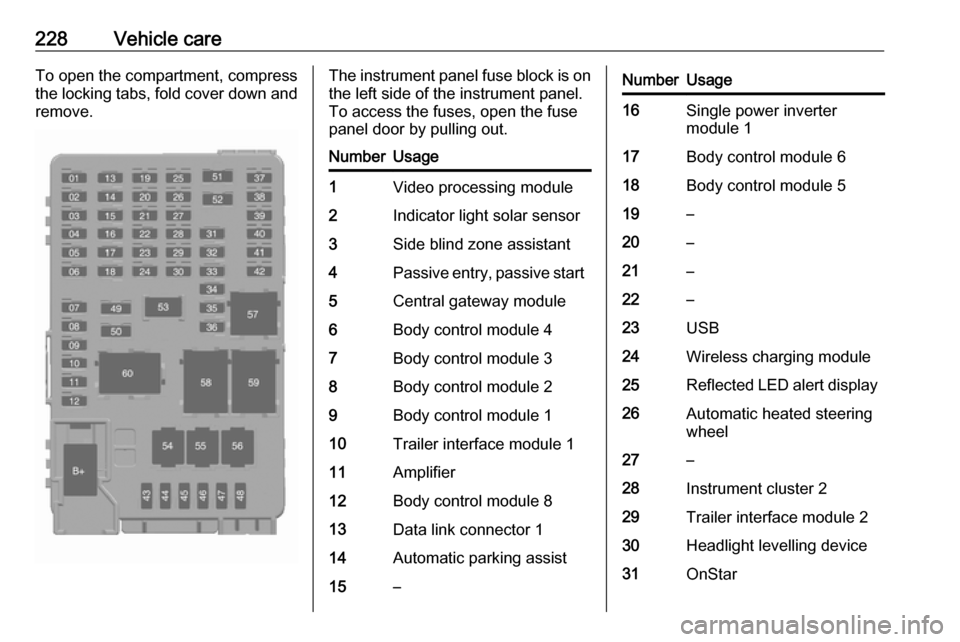
228Vehicle careTo open the compartment, compress
the locking tabs, fold cover down and remove.The instrument panel fuse block is on the left side of the instrument panel.
To access the fuses, open the fuse
panel door by pulling out.NumberUsage1Video processing module2Indicator light solar sensor3Side blind zone assistant4Passive entry, passive start5Central gateway module6Body control module 47Body control module 38Body control module 29Body control module 110Trailer interface module 111Amplifier12Body control module 813Data link connector 114Automatic parking assist15–NumberUsage16Single power inverter
module 117Body control module 618Body control module 519–20–21–22–23USB24Wireless charging module25Reflected LED alert display26Automatic heated steering
wheel27–28Instrument cluster 229Trailer interface module 230Headlight levelling device31OnStar
Page 232 of 271
230Vehicle careVehicle tools
Tools
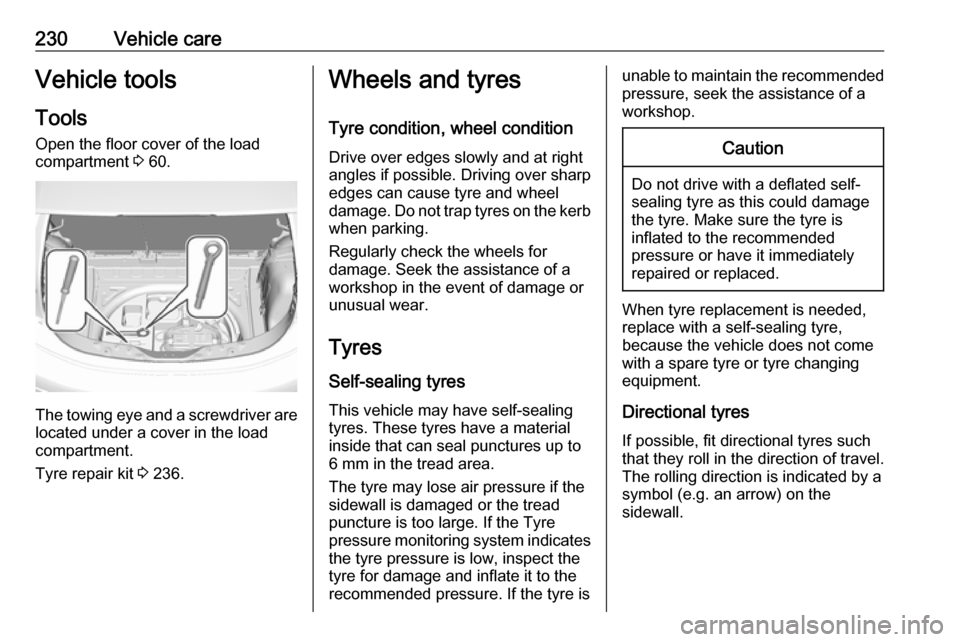
Open the floor cover of the load
compartment 3 60.
The towing eye and a screwdriver are
located under a cover in the load
compartment.
Tyre repair kit 3 236.
Wheels and tyres
Tyre condition, wheel condition Drive over edges slowly and at right
angles if possible. Driving over sharp
edges can cause tyre and wheel
damage. Do not trap tyres on the kerb when parking.
Regularly check the wheels for
damage. Seek the assistance of a
workshop in the event of damage or
unusual wear.
Tyres
Self-sealing tyres This vehicle may have self-sealing
tyres. These tyres have a material
inside that can seal punctures up to
6 mm in the tread area.
The tyre may lose air pressure if the
sidewall is damaged or the tread
puncture is too large. If the Tyre
pressure monitoring system indicates the tyre pressure is low, inspect the
tyre for damage and inflate it to the
recommended pressure. If the tyre isunable to maintain the recommended
pressure, seek the assistance of a
workshop.Caution
Do not drive with a deflated self-
sealing tyre as this could damage
the tyre. Make sure the tyre is
inflated to the recommended
pressure or have it immediately
repaired or replaced.
When tyre replacement is needed,
replace with a self-sealing tyre,
because the vehicle does not come
with a spare tyre or tyre changing
equipment.
Directional tyres
If possible, fit directional tyres such
that they roll in the direction of travel.
The rolling direction is indicated by a
symbol (e.g. an arrow) on the
sidewall.
Page 244 of 271

242Vehicle careTowingTowing the vehicleCaution
Incorrect towing of a disabled
vehicle may cause damage to the
vehicle. The disabled vehicle
should only be towed on a flatbed
car carrier.
Ensure the vehicle is only towed
by well trained technicians.
Wrap a cloth around the tip of a slot
screwdriver to prevent paint damage. Insert the screwdriver in the slot at the
short edge of the cap. Release the
cap by carefully moving the
screwdriver sidewards.
The towing eye is stowed with the vehicle tools 3 230.
Screw in the towing eye anticlockwise
as far as it will go until it stops in a
horizontal position.
Attach a tow rope – or better still a tow
rod – to the towing eye.
The towing eye must only be used for
towing and not for recovering the
vehicle.
Switch on the vehicle to release
steering wheel lock and to permit
operation of brake lights, horn and
windscreen wiper.Caution
Deactivate the driver assistance
systems like active emergency
braking 3 168, otherwise the
vehicle may automatically brake during towing.
Shift the selector lever of the electric
drive unit into N.
Release the electric parking brake.
Caution
Drive slowly. Do not drive jerkily.
Excessive tractive force can
damage the vehicle.
When the vehicle is not running, considerably more force is needed to
brake and steer.